

Lab 48 – Migrations: live, offline, with local disks, containers, bulk and between clusters
Dependencies
Section titled “Dependencies”- Previous labs:
- Lab 06: the
deso-clustercluster and the standalone nodedesopve04; - Lab 11: migration with ZFS replication;
- Lab 17: the shared storage
rbd-vm; - Lab 22: the migration network on VLAN 100 (10.100.10.0/24);
- Lab 33: the nftables firewall, which opens ports 60000-60050 on the migration network;
- Lab 40: template 9000 and the VMs
web01-web03.
- Lab 06: the
- Systems:
- nodes
desopve01-03anddesopve04; - VM 100
debian01and VM 104web01, both onrbd-vm; - CT 121 and 122 on VLAN 10 (Lab 20), CT 101 (Lab 07), CT 271 and 272 (Lab 27), CT 281 (Lab 28), VM 390 (Lab 39): they are needed for the bulk migration;
- the ZFS pool
tankondesopve04(Lab 10) and theweb-vendor.yamlsnippet oncephfs(Lab 40); - a test VM on
local-zfs, created in this lab.
- nodes
- Measurements: the log of each migration task and a
pingevery 0.2 s to the guest, from the management network or from another CT. How it works explains what each of them measures. - Credentials:
root@pam→ Appendix B.
Objectives
Section titled “Objectives”- VM 104 live-migrated with shared storage and CT 281 migrated offline, with the task duration, the downtime reported by QEMU and the longest ping gap recorded separately.
- A running VM with a local disk migrated to another node together with its disk, with the time spent copying the disk read from the log.
- A container moved in restart mode, knowing how long its service stays unreachable.
- A bulk migration started with only the intended guests selected.
- The secure and insecure modes compared on the dedicated network, knowing what the task log can and cannot tell about their speed.
- A VM moved to another cluster with
qm remote-migrateand back, with the two errors met on the way explained and solved.
How it works
Section titled “How it works”Live migration of a VM. An empty QEMU process starts on the target node. The RAM is copied while the VM keeps working; the pages that get rewritten are copied again, until so little is left that the migration can finish within a very short pause (downtime, default limit 100 ms). With shared storage the disks do not move.
Local disks. With --with-local-disks the disks are copied before the RAM, with a drive-mirror over NBD. Once they are in sync, the RAM is migrated as above. The time grows with the size of the disks.
Containers. LXC has no live migration: the CT is shut down, moved and started again (restart mode). With shared storage only the configuration moves.
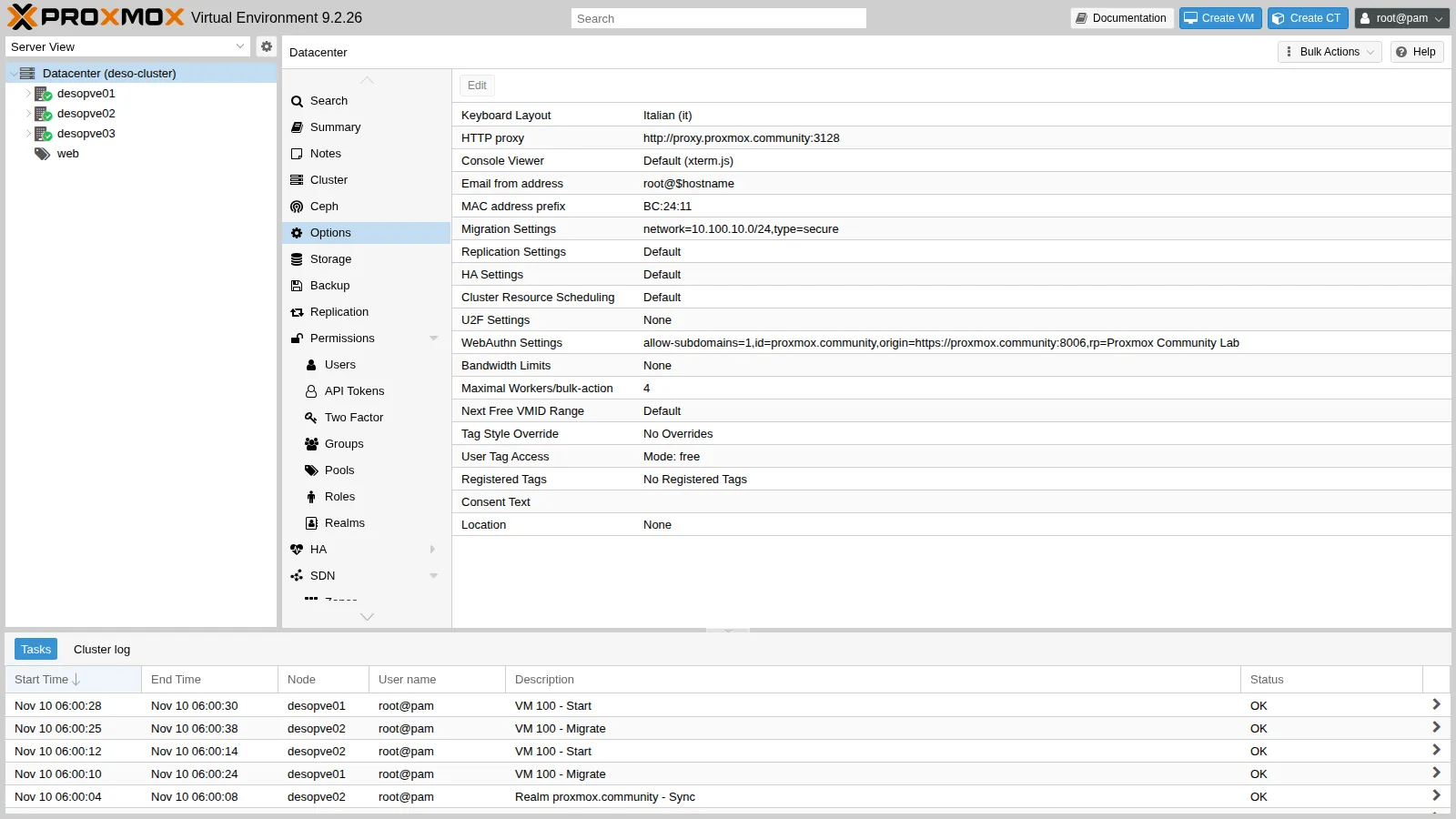
Migration network. In Datacenter → Options → Migration Settings you choose the network (here VLAN 100) and the type:
- secure: the RAM travels through an SSH tunnel;
- insecure: the RAM travels unencrypted over TCP (ports 60000-60050), which is lighter on the CPU. It only makes sense on a dedicated, trusted network.
Between clusters. qm remote-migrate uses the API of the target cluster with an API token and the certificate fingerprint. All the traffic, disks and RAM, travels through a websocket tunnel on port 8006. It is still an experimental feature, available only from the CLI (in a GUI it is offered by Proxmox Datacenter Manager, Lab 53).
What the task log and the ping measure. Three figures are easy to confuse, and this lab keeps them apart:
- task duration: the
durationin the last line of the log, in whole seconds, from the start of the task to its end, preparation and cleanup included; - downtime reported by QEMU: the
downtime N msat the end of the memory phase, the time the VM stays paused on the source for the final switchover. Proxmox VE then resumes the VM on the target only after a few more steps, such as moving the configuration and, with local disks, closing the disk mirror, so the pause seen by the guest’s clients can be longer than this figure; - longest ping gap: the longest interval between two replies of a
pingsent every 0.2 seconds. It is what a client on the network sees, with a resolution of 0.2 seconds.
The average migration speed on the same line as the downtime is not a measured throughput either: Proxmox VE computes it as the total RAM of the guest divided by the duration of the memory phase, counted in whole seconds (see the source of QemuMigrate.pm in the references).
Test environment and versions
Section titled “Test environment and versions”The outputs and times in this lab come from a run carried out on 10 November 2026 (last checked in November 2026), with this configuration:
| Component | Configuration used |
|---|---|
| Proxmox VE | 9.2.26, kernel 7.0.14-28-pve (Lab 04), on the cluster nodes and on desopve04 |
| Migrations within the cluster | VLAN 100 on vmbr1, over bond0 in active-backup with two 10 Gbit/s cards, MTU 1500 (Lab 21, Lab 22); type secure unless stated otherwise |
| Migrations between clusters | qm remote-migrate to the API of the other node (port 8006), over the management network |
| Storages | rbd-vm: Ceph 20.2.5, pool size 3 / min_size 2 (Lab 17); local-zfs: ZFS mirror on the system disks (Lab 03); on desopve04, local-lvm (LVM-thin) and tank (ZFS RAIDZ1) (Lab 09, Lab 10) |
| Guests | VMs 104 and 480, clones of template 9000: Debian 13, 2 GiB of RAM, 8 GiB disk (Lab 40); VM 100 with 2 GiB of RAM; CT 121 with a static address on VLAN 10 (Lab 21) |
What the test measures, and what it does not. Each migration was run once, the secure/insecure comparison twice, with small guests (2 GiB of RAM, 653 MiB of data on the local disk) that were idle, except VM 100 in step 6. The test does not cover guests that rewrite their memory quickly, large disks or a busy network, and one or two runs do not show how much the times vary.
Procedure
Section titled “Procedure”1. Live with shared storage
Section titled “1. Live with shared storage”web01 (VM 104) has its disk on Ceph (rbd-vm):
qm migrate 104 desopve02 --online2026-11-10 05:55:53 conntrack state migration not supported or disabled, active connections might get dropped2026-11-10 05:55:53 use dedicated network address for sending migration traffic (10.100.10.22)2026-11-10 05:55:58 migration downtime limit: 100 ms2026-11-10 05:56:00 average migration speed: 1.0 GiB/s - downtime 33 ms2026-11-10 05:56:00 migration completed, transferred 281.4 MiB VM-state2026-11-10 05:56:03 migration finished successfully (duration 00:00:10)- 10 s of task duration: only 281 MiB of RAM are transferred (
transferred 281.4 MiB VM-state), over VLAN 100. - 33 ms of downtime reported by QEMU.
- 0.84 s: the longest gap between two replies of the
ping, sent every 0.2 s from the management network.
The ping gap is much longer than the downtime: the two figures measure different things and should be kept apart. Two explanations are possible, and this test does not tell them apart: Proxmox VE resumes the VM on the target only after the memory phase and a few more steps (see How it works), and after the move the network has to learn where the VM’s MAC address is now, which is why QEMU sends announcement packets. To check:
- a much denser
ping(for example every 10 ms,ping -i 0.01), to measure the gap with a resolution comparable to the downtime; - the timestamps of the ping (
ping -D) compared with those of the last lines of the task log; - a capture on the bridge of the target node during the migration (
tcpdump -eni vmbr0 arp or rarp), to see when the VM announces its new location.
Conntrack (new in 9.x). The first line warns that the state of the connections tracked by the firewall is not migrated. With the nftables firewall (Lab 33) you can ask for it to move together with the VM:
qm migrate 104 desopve01 --online --with-conntrack-state 1 # from desopve02: this also brings the VM back to its node2026-11-10 06:11:33 average migration speed: 1.0 GiB/s - downtime 93 ms2026-11-10 06:11:33 migrated 0 conntrack state entries2026-11-10 06:11:36 flushing conntrack state for guest on source node2026-11-10 06:11:40 migration finished successfully (duration 00:00:14)0 entries were migrated. This is consistent with the configuration of web01, which does not have the firewall enabled on its network device: the option is meant for guests with the firewall enabled, because without their conntrack entries the firewall on the target node would drop the packets of the connections already open as invalid. The documentation describes the feature as best-effort. To see it at work, repeat the test with a guest that has firewall=1 on its network device and an open connection, such as an SSH session, and check that the session survives the move. In the GUI the Conntrack state option is checked by default.
2. Offline
Section titled “2. Offline”CT 281 is stopped and has its disk on Ceph:
time pct migrate 281 desopve022026-11-10 05:56:17 volume 'rbd-vm:vm-281-disk-0' is on shared storage 'rbd-vm'2026-11-10 05:56:18 migration finished successfully (duration 00:00:01)real 0m3.636sWith shared storage a stopped guest moves in a second: only the node that owns its configuration changes.
3. Live with local disks
Section titled “3. Live with local disks”A test VM (480 migra-locale) cloned from the template onto local-zfs, so its disk exists only on desopve01:
qm clone 9000 480 --name migra-locale --full 1 --storage local-zfsqm set 480 --ipconfig0 ip=172.27.199.148/24,gw=172.27.199.1 --agent enabled=1 --cicustom vendor=cephfs:snippets/web-vendor.yamlqm start 480In the GUI, the Migrate button warns that the disk has to be copied and asks for the target storage.
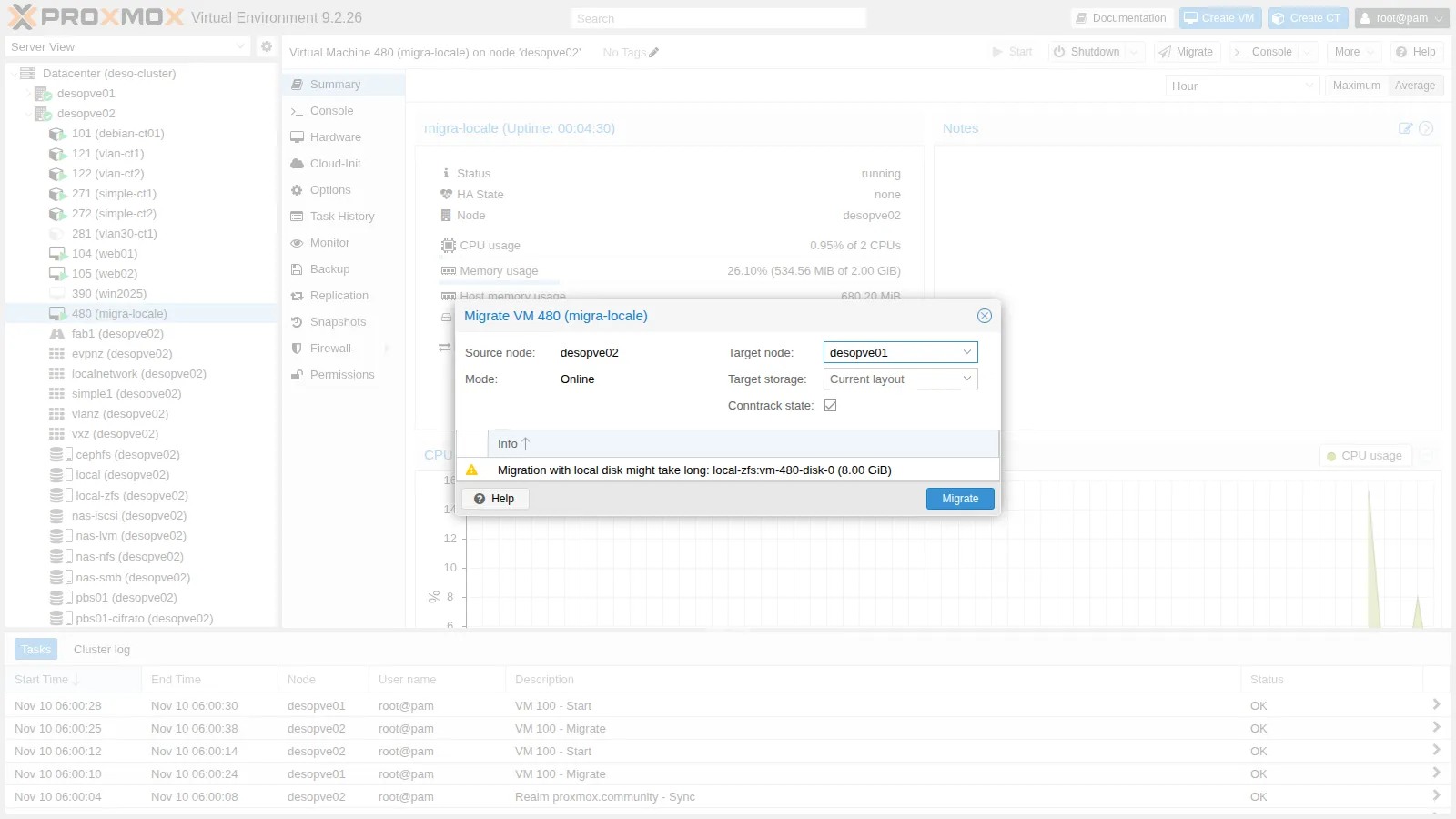
qm migrate 480 desopve02 --online --with-local-disks --targetstorage local-zfs2026-11-10 05:58:03 scsi0: start migration to nbd:unix:/run/qemu-server/480_nbd.migrate:exportname=drive-scsi0mirror-scsi0: successfully switched to actively synced mode2026-11-10 05:58:28 starting online/live migration on unix:/run/qemu-server/480.migrate2026-11-10 05:58:30 average migration speed: 1.0 GiB/s - downtime 88 ms2026-11-10 05:58:30 migration completed, transferred 611.1 MiB VM-statemirror-scsi0: Completed successfully.2026-11-10 05:58:37 migration finished successfully (duration 00:00:45)| Shared storage (VM 104) | Local disk (VM 480) | |
|---|---|---|
| Task duration | 10 s | 45 s, 25 s of which for the disk (05:58:03 → 05:58:28 in the log) |
| Downtime reported by QEMU | 33 ms | 88 ms |
| Longest ping gap (one ping every 0.2 s) | 0.84 s | 3.73 s |
The disk held only 653 MiB of data (thin provisioning), and copying it took 25 seconds. The copy time grows with the amount of data, but this lab did not measure a large disk: before planning the migration of disks with hundreds of GB, measure that time on your own system. With ZFS replication (Lab 11) only the changes since the last replication are copied: in that lab, the migration took 20 s instead of 1 min 13 s.
With the local disk the ping gap is longer as well (3.73 s against 0.84 s), while the downtime reported by QEMU stays under 100 ms. With one run per case, there is no way to tell why. One of the steps that precede the resume on the target, closing the disk mirror, exists only in this case; the checks are the same as in step 1.
4. Containers: restart mode
Section titled “4. Containers: restart mode”CT 121 (VLAN 10) is measured from CT 122, which is on the same VLAN:
pct exec 122 -- sh -c "ping -D -i 0.2 10.10.10.121 > /tmp/p121.log &" # on the node of CT 122pct migrate 121 desopve02 --restart # on the node of CT 1212026-11-10 05:59:03 starting migration of CT 121 to node 'desopve02' (10.100.10.22)2026-11-10 05:59:03 volume 'rbd-vm:vm-121-disk-0' is on shared storage 'rbd-vm'2026-11-10 05:59:04 start container on target node2026-11-10 05:59:09 migration finished successfully (duration 00:00:10)The task lasts 10 s; the ping from CT 122, one every 0.2 s, has a longest gap of 11.65 s. For a CT, “moving” always means restarting: its services must tolerate the interruption. The documentation speaks of a downtime of normally a few hundred milliseconds for a restart migration; here the gap is much longer, and this test does not break it down. It covers at least the shutdown of the CT on the source, its start on the target (the log shows the start at 05:59:04 and the end of the task at 05:59:09), and the time the CT needs before it answers on the network again. To check: compare the timestamps that ping -D wrote in /tmp/p121.log with the full task log, and look inside the CT at when its network came up (journalctl -b).
Without --restart, the migration of a running CT is refused (“not implemented”, Lab 41).
5. Bulk migration (and its trap)
Section titled “5. Bulk migration (and its trap)”Node → Bulk Actions → Bulk Migrate moves several guests in one go, with a number of jobs running in parallel (Parallel jobs) and the Allow local disk migration option.
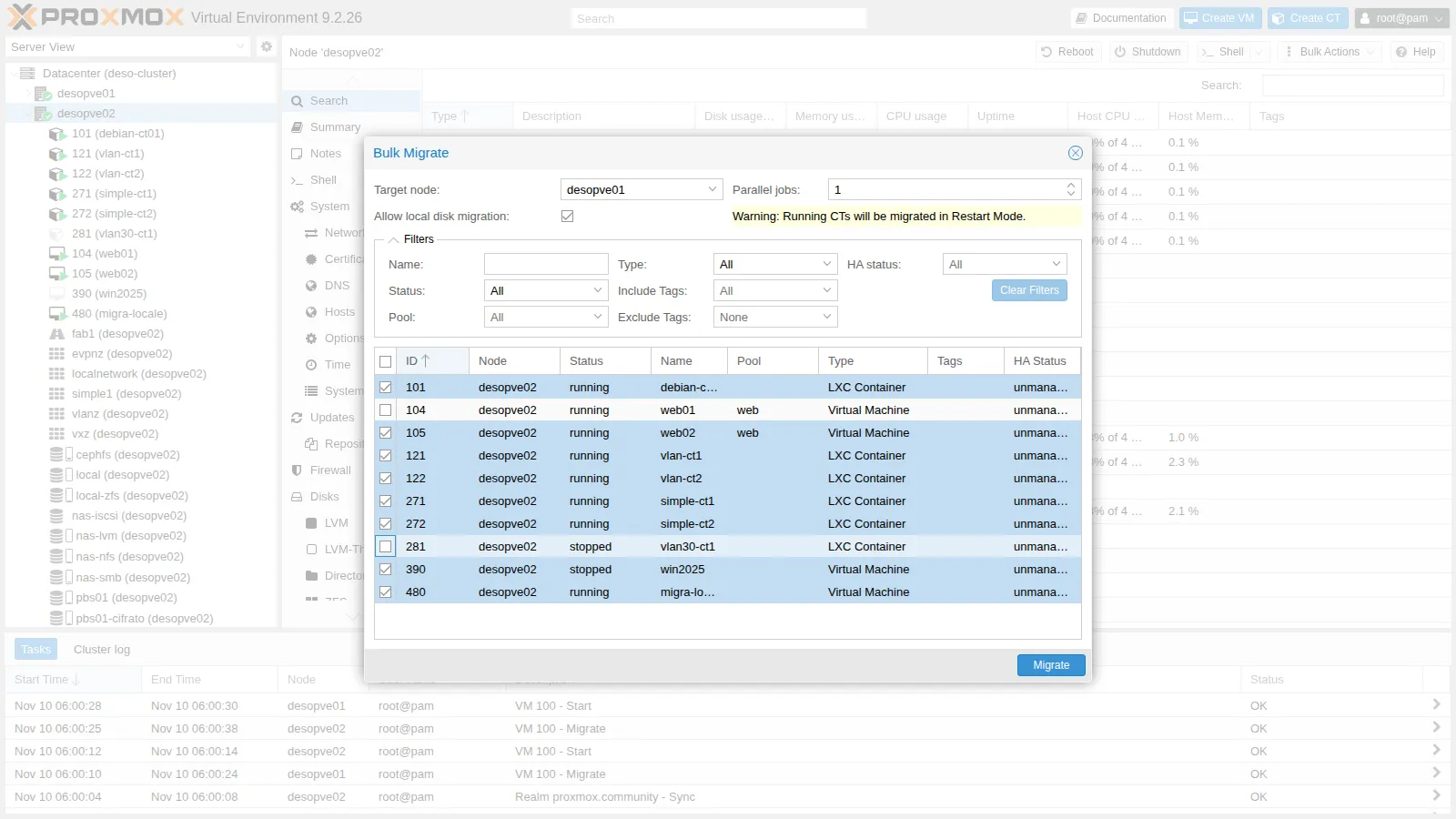
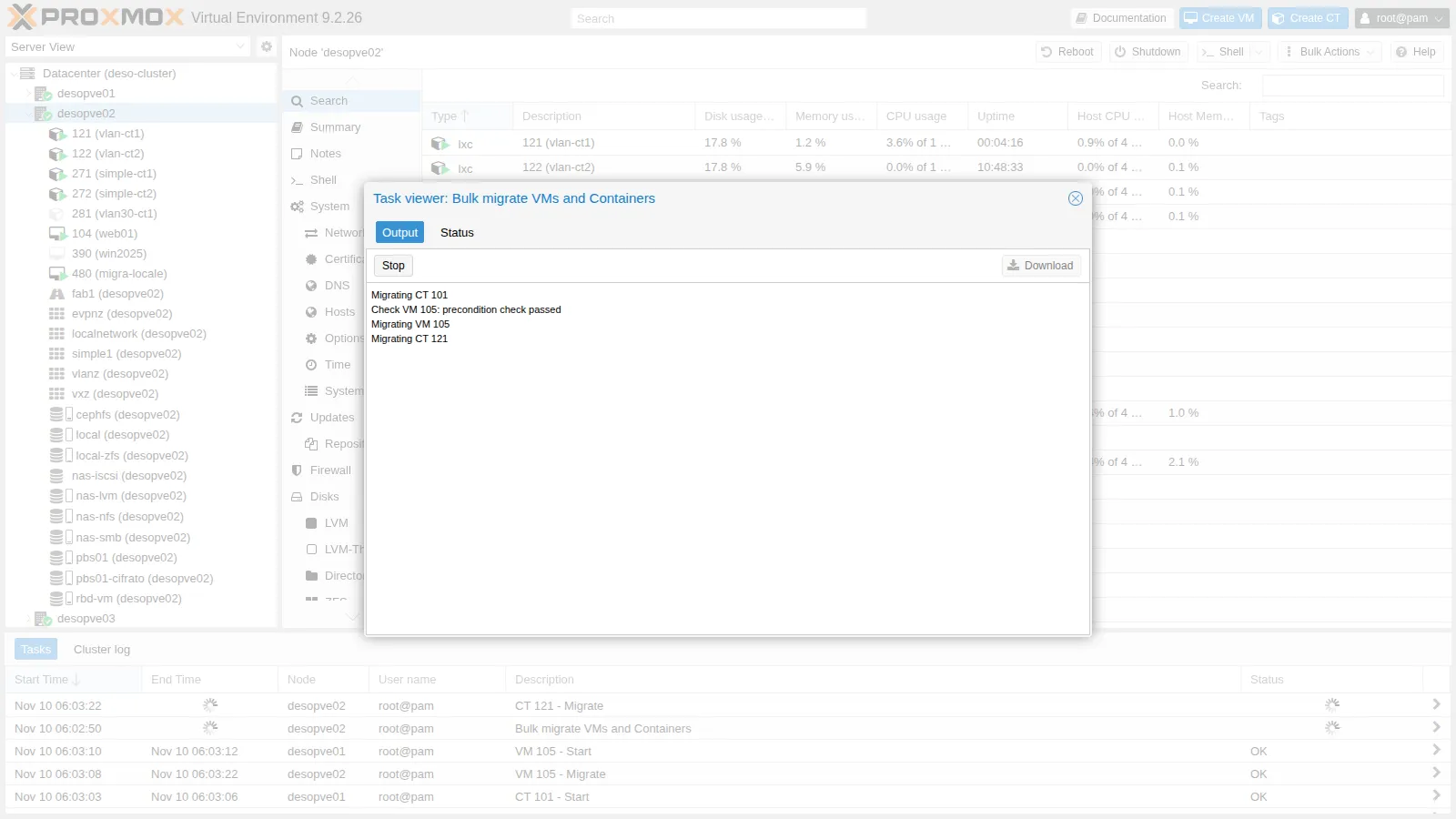
Check VM 105: precondition check passedMigrating VM 105Migrating CT 121Migrating CT 122Migrating CT 271Migrating CT 272Check VM 390: precondition check passedMigrating VM 390Check VM 480: precondition check passedMigrating VM 480All jobs finished, used 8 workers in total.TASK OK8 guests in 137 s with 1 job at a time. To put them back, use the CLI equivalent, with an explicit list and 2 parallel jobs:
pvesh create /nodes/desopve01/migrateall --target desopve02 --vms 101,105,122,271,272,390 --maxworkers 26 guests in 43 s. The two runs move different guests, eight and six, and only the first one includes VM 480, whose local disk has to be copied: they do not isolate the effect of the parallel jobs. To measure it, move the same set of guests with 1 and with 2 jobs.
Before confirming a bulk migration, check the selection column or use the filters (status, pool, tags).
6. Secure versus insecure
Section titled “6. Secure versus insecure”VM 100 has 2 GiB of RAM. To make the test meaningful, the RAM inside the guest is filled with 900 MiB of random, incompressible data:
qm guest exec 100 -- sh -c "dd if=/dev/urandom of=/dev/shm/riempi bs=1M count=900"qm migrate 100 desopve02 --online --migration_type secureqm migrate 100 desopve01 --online --migration_type insecure # from node 02== insecure 100 02->012026-11-10 05:59:59 starting online/live migration on tcp:10.100.10.21:600002026-11-10 06:00:04 average migration speed: 413.0 MiB/s - downtime 21 ms2026-11-10 06:00:04 migration completed, transferred 1.1 GiB VM-state| Test | average migration speed (log) |
Task duration |
|---|---|---|
| secure | 413 MiB/s | 14 s |
| insecure | 413 MiB/s | 14 s |
| secure (repeated) | 413 MiB/s | 14 s |
| insecure (repeated) | 688 MiB/s | 12 s |
The values come from the average migration speed line of the task logs, and three tests out of four gave exactly 413 MiB/s. As explained in How it works, that figure is the guest’s RAM divided by the duration of the memory phase in whole seconds: with about 2 GiB of RAM, 413 MiB/s means 5 seconds and 688 MiB/s means 3 seconds. Three identical values are three memory phases of the same length, rounded to the second, not three identical throughputs.
- What the test shows: with 1.1 GiB of memory to transfer, the memory phase lasts 3-5 seconds and the whole task 12-14 seconds in both modes. At this resolution there is no clear difference between secure and insecure, and the test does not tell whether the network or the encryption limits the transfer.
- What the documentation says: encryption takes a lot of computing power, and the impact shows above all on fast networks, from 10 Gbit/s up; it is lower on CPUs that implement AES in hardware. Storage migration always uses the encrypted channel, whatever the setting.
- How to check it on your system: migrate a VM with much more memory in use, so that the memory phase lasts minutes; read the actual throughput on the migration interface, for example from the byte counters of
ip -s link show vmbr1.100before and after; during a secure migration, watch the CPU usage of thesshprocess on the source node (top); measure the network alone withiperf3between two nodes on VLAN 100.
In insecure mode the target opens port 60000: the firewall must allow it on the migration network (the servizi-cluster group, Lab 33).
7. Migration between clusters: qm remote-migrate
Section titled “7. Migration between clusters: qm remote-migrate”Target: desopve04, which is a separate “datacenter” with its own local-lvm and the ZFS pool tank.
On the target node, create a token and read the certificate fingerprint:
pveum user token add root@pam migra --privsep 0 --comment "migrazione remota dal cluster"pvenode cert info | grep -B1 -A1 pve-ssl.pemThe token must be able to create VMs, allocate storage and use the bridge on the target. Here we use root@pam without privilege separation; in production a dedicated user is a better choice.
First attempt: to local-lvm.
qm remote-migrate 480 480 \ 'host=172.27.199.24,apitoken=PVEAPIToken=root@pam!migra=<segreto>,fingerprint=84:D3:F2:…' \ --target-bridge vmbr0 --target-storage local-lvm --onlineERROR: … failed to handle 'disk-import' command - no matching import/export format found for storage 'local-lvm'migration abortedError observed. The log shows that the failing disk is the cloud-init disk (ide2, on local-zfs). The main disk, attached to the running VM, is copied live through the NBD mirror; the cloud-init disk instead goes through a storage export and import. In this combination (ZFS source, LVM-thin target, PVE 9.2) the source offered it only in the zfs format, which LVM-thin cannot import. This is not a general rule: it depends on the formats the two storages have in common. Lab 53 hits the same error from the PDM GUI and shows how to check it.
Decision. Use a ZFS storage on the target as well, tank, so that the zfs format is common to the two storages.
Second attempt: to tank (ZFS).
ERROR: … failed to handle 'config' command - storage 'cephfs' does not existmigration abortedError observed. The VM configuration references a snippet on cephfs (cicustom), a storage that does not exist on the target.
Decision. The snippet was needed only at the first boot: remove the reference and try again with the same options.
qm set 480 --delete cicustomThird attempt, successful:
2026-11-10 06:08:35 start migrate command to unix:/run/qemu-server/480.migratetunnel: established new WS for forwarding '/run/qemu-server/480.migrate'2026-11-10 06:08:38 average migration speed: 682.9 MiB/s - downtime 31 ms2026-11-10 06:08:38 migration completed, transferred 624.6 MiB VM-statemirror-scsi0: Completed successfully.2026-11-10 06:08:41 migration finished successfully (duration 00:00:52)Result. The task completes in 52 seconds, with 31 ms of downtime reported by QEMU. The longest ping gap is 3.11 s, here too much longer than the downtime: step 1 lists the possible explanations and the checks. After the migration, the VM’s web page answers from the other “datacenter”.
On the cluster the VM remains, stopped and locked (lock: migrate): by default remote-migrate does not delete the original. Delete it by hand after checking the copy:
qm unlock 480 && qm destroy 480 --purgeReturn to the cluster, run on desopve04 with a token of the cluster and --delete 1, which deletes the source at the end of the migration. Prepare the token and the fingerprint on desopve01:
pveum user token add root@pam rientro --privsep 0 --comment "rientro dalla migrazione remota"pvenode cert info | grep -B1 -A1 pve-ssl.pemThen on desopve04:
qm remote-migrate 480 480 \ 'host=172.27.199.21,apitoken=PVEAPIToken=root@pam!rientro=<segreto>,fingerprint=14:32:84:…' \ --target-bridge vmbr0 --target-storage local-zfs --online --delete 12026-11-10 06:10:46 average migration speed: 682.9 MiB/s - downtime 62 ms2026-11-10 06:10:46 migration completed, transferred 626.2 MiB VM-state2026-11-10 06:10:50 migration finished successfully (duration 00:00:32)The return takes 32 seconds, with 62 ms of downtime reported by QEMU, and the VM is no longer on desopve04.
Limits of remote-migrate seen in the lab:
- CLI only, and labeled as experimental;
- it needs a token, the fingerprint and permissions on the target;
- configurations that reference storages, snippets or bridges missing on the target fail;
- disks that are not live-migrated (cloud-init, stopped VMs) require export formats that are compatible between the storages;
- the source remains by default; with
--delete 1it is removed.
8. Putting everything back
Section titled “8. Putting everything back”At the end of the lab, put the guests back where they were. VM 104 already went back to desopve01 with the conntrack test, and CT 121 with the bulk migration; what is left is CT 281, VM 480 that came back from the remote “datacenter”, and the tokens:
pct migrate 281 desopve01 # on desopve02 (the CT is stopped)qm stop 480 && qm destroy 480 --purge # on desopve01pveum user token remove root@pam rientro # on desopve01pveum user token remove root@pam migra # on desopve04Verification and tests
Section titled “Verification and tests”The lab has succeeded when every migration ends with migration finished successfully (the bulk migration with TASK OK), each guest answers on its target, and after the migration between clusters the source has been removed deliberately.
| Test | Success criterion | Result in the lab |
|---|---|---|
| Live, shared storage (VM 104) | VM running and reachable on the target | task 10 s; downtime reported by QEMU 33 ms; longest ping gap 0.84 s |
| Offline, shared storage (CT 281) | only the configuration moves | task 1 s |
| Live, local disk (VM 480, 8 GiB thin) | disk copied, VM reachable on the target | task 45 s, 25 s of which for the disk; downtime 88 ms; longest ping gap 3.73 s |
| CT in restart mode (CT 121) | CT running on the target | task 10 s; longest ping gap seen from CT 122: 11.65 s |
| Bulk migration | only the selected guests migrated | 8 guests in 137 s with 1 job at a time; 6 other guests in 43 s with 2 |
| secure versus insecure | both modes work on VLAN 100 | tasks of 12-14 s; average migration speed 413-688 MiB/s, that is memory phases of 3-5 s |
Remote-migrate to desopve04 |
VM running on the target, source stopped and locked | after 2 errors: task 52 s; downtime 31 ms; longest ping gap 3.11 s |
Remote-migrate back with --delete 1 |
VM back on the cluster, source deleted | task 32 s; downtime 62 ms |
Final lab state
Section titled “Final lab state”- Guests back in their initial location:
- VMs 100, 104 and 261 and CTs 121, 141, 143, 281, 291, 301 on
desopve01; - CTs 101, 122, 271, 272 and VMs 105 and 390 on
desopve02; - VM 106 and CTs 123, 282, 292, 302 on
desopve03.
- VMs 100, 104 and 261 and CTs 121, 141, 143, 281, 291, 301 on
- Test VM 480 deleted; nothing left behind on
desopve04. - Tokens
root@pam!migra(ondesopve04) androot@pam!rientro(on the cluster) removed. - Datacenter:
migration: secure,network=10.100.10.0/24, unchanged. - PBS and the jobs from Lab 47 unchanged.
What you learned
Section titled “What you learned”- How to estimate a migration window. With shared storage only the memory moves: here 10 seconds of task and 33 ms of downtime reported by QEMU. With local disks the disk is copied first and the time grows with its data; ZFS replication (Lab 11) shortens it. A container always restarts: plan for an interruption of its service, 11.65 seconds in this lab.
- How to read the downtime of a migration. The downtime in the task, the gap a client sees and the
average migration speedare different things: the first is measured by QEMU, the second needs a tool with enough resolution, the third is not a throughput. A gap of seconds, like the 3.73 s with the local disk, has to be checked before you attribute it to a cause. - When insecure is worth it. Only on a dedicated, trusted network, and only if a measurement on your hardware shows that encryption is the bottleneck: the test in this lab could not tell. The firewall must open ports 60000-60050.
- How to start a bulk migration safely. The window preselects all the guests: check the selection before confirming.
- What to check before a migration between clusters. Storages with an export format in common for the disks that are not copied live, the resources named in the configuration (snippets, ISOs, storages), the permissions of the token, and what happens to the source: it stays, stopped and locked, unless you use
--delete 1. - Whether to migrate the conntrack state. It is new in 9.x, works on a best-effort basis and is meant for guests with the firewall enabled.
References
Section titled “References”- Proxmox VE – Migration (qm)
- Proxmox VE – Conntrack state migration
- Proxmox VE – Container migration and restart mode
- Proxmox VE – Guest migration: type (secure/insecure) and network
- Proxmox VE – qm(1), remote-migrate
- Proxmox VE source code –
QemuMigrate.pm: how the task log computesaverage migration speed, and when the VM is resumed on the target