

Lab 25 – IPv6: dual stack, RA and SLAAC
Dependencies
Section titled “Dependencies”- Previous labs:
- Nodes:
desopve01-04for the static addresses;desopve04(standalone) for the test reboot and the dual-stack container. - Router:
rtr-core, the lab’s MikroTik RouterOS router (Lab 01, access withssh [email protected]), which also becomes the IPv6 gateway of the management network and advertises the prefix. - Template:
debian-13-standard_13.6-1_amd64.tar.zstin thelocalstorage ofdesopve04(Lab 09, orpveam download local debian-13-standard_13.6-1_amd64.tar.zst). - Credentials:
root/<lab-password>on the nodes,admin/<lab-password>onrtr-core,Administratoron the DC → Appendix B.
Objectives
Section titled “Objectives”- Understand how a host gets an IPv6 address: static addresses, Router Advertisement (RA) and SLAAC.
- Put the management network in dual stack (IPv4 and IPv6) with a private prefix (ULA).
- Give the nodes static addresses and prevent them from autoconfiguring, with link-local addresses not derived from the MAC.
- Give the guests automatic addresses (SLAAC) from the lab router.
- Add the IPv6 names to DNS and access the Proxmox GUI over IPv6.
How it works
Section titled “How it works”IPv6 addresses in brief
Section titled “IPv6 addresses in brief”| Type | Example | Use |
|---|---|---|
| Link-local | fe80::…/64 |
always present on every interface, valid only on the link (the local network); used by Neighbor Discovery and as the gateway |
| ULA (Unique Local Address) | fd27:199::/64 |
private, like the 10.x or 192.168.x networks in IPv4: not routed on the Internet |
| GUA (Global Unicast) | 2001:db8::/32 (documentation) |
public, assigned by the provider |
A host network in IPv6 is almost always a /64. In the lab the management network becomes fd27:199::/64, keeping the same last number as in IPv4 where possible: node 172.27.199.21 becomes fd27:199::21.
Neighbor Discovery, RA and SLAAC
Section titled “Neighbor Discovery, RA and SLAAC”IPv6 has no ARP: it has Neighbor Discovery (ND), made of ICMPv6 messages. Two of these messages are used for automatic configuration:
- the router periodically sends a Router Advertisement (RA), or sends one on request (Router Solicitation): “I am the gateway, the prefix of this network is
fd27:199::/64”; - a host that accepts RAs builds its own address in the prefix (SLAAC, Stateless Address Autoconfiguration) and uses the router’s link-local address as its gateway.
| Who | How it is configured | Why |
|---|---|---|
| Proxmox nodes, DC, servers | static address, RAs ignored | the address must not change: DNS, cluster, firewall and access all rely on it |
| Guests (VMs, containers) | SLAAC from the router’s RAs | no configuration in the guest, like DHCP in IPv4 |
Addresses derived from the MAC
Section titled “Addresses derived from the MAC”With the classic method (EUI-64) the host builds the second half of the address from the NIC’s MAC, with ff:fe in the middle. The MAC thus ends up in the link-local and SLAAC addresses and reveals the NIC’s manufacturer. The Linux kernel can instead generate stable privacy addresses (RFC 7217) with addr_gen_mode, not tied to the MAC. With addr_gen_mode = 3 the secret they are derived from is random and chosen at every boot: the addresses stay the same while the node is running, but change after a reboot. To keep them the same across reboots, you set a fixed secret (stable_secret) with addr_gen_mode = 2. Either way, it is good privacy practice for the nodes.
In Proxmox guests the MAC is random, with the Proxmox prefix BC:24:11: a container’s SLAAC address (fd27:199::be24:11ff:fe…) only reveals that it is a Proxmox guest.
RAs and switches
Section titled “RAs and switches”Many switches have a protection (RA Guard) that drops RAs not coming from authorized ports, to prevent an arbitrary host from advertising itself as a router. If the guests do not receive the router’s RAs, check the switch first.
IPv6 and the firewall
Section titled “IPv6 and the firewall”IPv6 does not use NAT the way IPv4 does: with reachable addresses, the firewall becomes even more important. Neighbor Discovery is ICMPv6, so a firewall that blocks all ICMPv6 breaks the network. The Proxmox firewall (labs 32-33) has rules that apply to both address families and a dedicated option, NDP, enabled by default, that lets Neighbor Discovery through.
Procedure
Section titled “Procedure”1. Before the RAs: the nodes ignore them
Section titled “1. Before the RAs: the nodes ignore them”-
Before enabling RAs on the router, tell the nodes to ignore them: otherwise every interface connected to the network builds itself a SLAAC address and a default gateway that nobody chose (and that stay even after you change your mind). The file
/etc/sysctl.d/90-ipv6-host.conf, identical on all nodes:# Static IPv6 addresses only on the node: no interface accepts RAs or autoconfigures itself (SLAAC).# The * wildcard also covers NICs that appear after boot (systemd applies the settings to every new interface).net.ipv6.conf.*.accept_ra = 0net.ipv6.conf.*.autoconf = 0# Link-local addresses not derived from the MAC (RFC 7217, "stable privacy" with a random secret)net.ipv6.conf.all.addr_gen_mode = 3net.ipv6.conf.default.addr_gen_mode = 3root@desopve01 /usr/lib/systemd/systemd-sysctl /etc/sysctl.d/90-ipv6-host.confgrep -l 1 /proc/sys/net/ipv6/conf/*/accept_ra | wc -lOutput 0If a node has already received RAs (for example because the router was already sending them), remove the addresses and routes it picked up:
root@desopve01 ip -6 addr flush scope global dynamicip -6 route flush proto ra
2. The prefix and the RAs on the router
Section titled “2. The prefix and the RAs on the router”-
On
rtr-core, assign the addressfd27:199::1/64to the management network port withadvertise=yes, so the router advertises the prefix in its RAs. In the lab the RA interval is shortened to 20-60 seconds:RouterOS — rtr-core /ipv6 address add address=fd27:199::1/64 interface=ether1 advertise=yes comment="lab 25: rete di gestione"/ipv6 nd set [find default=yes] ra-interval=20s-60s -
A fixed, easy-to-remember link-local address for the gateway,
fe80::1, instead of the one generated from the MAC. Disable automatic generation and add the address manually:RouterOS — rtr-core /ipv6 settings set disable-link-local-address=yes/ipv6 address add address=fe80::1/64 interface=ether1 advertise=no comment="link-local fisso del gateway"The generated link-local address disappears the next time the router port (or the router itself) restarts. From the router console, not from an SSH session that goes through that port, disable
ether1and re-enable it after 2 seconds; the management network is interrupted for that time:RouterOS — rtr-core /interface disable ether1; :delay 2s; /interface enable ether1RouterOS — rtr-core /ipv6 address printOutput Flags: D - DYNAMIC; G - GLOBAL, L - LINK-LOCALColumns: ADDRESS, INTERFACE, VRF, ADVERTISE, VALID, PREFERRED# ADDRESS INTERFACE VRF ADVERTISE VALID PREFERRED0 D ::1/128 lo main no;;; lab 25: rete di gestione1 G fd27:199::1/64 ether1 main yes forever forever;;; link-local fisso del gateway2 L fe80::1/64 ether1 main no forever forever -
From a node, check that the RA arrives, with
rdisc6(packagendisc6).rdisc6solicits and shows RAs even if the node is configured to ignore them:root@desopve04 apt install ndisc6rdisc6 vmbr0Output Soliciting ff02::2 (ff02::2) on vmbr0...Hop limit : undefined ( 0x00)Stateful address conf. : NoStateful other conf. : NoMobile home agent : NoRouter preference : mediumNeighbor discovery proxy : NoRouter lifetime : 1800 (0x00000708) secondsReachable time : unspecified (0x00000000)Retransmit time : unspecified (0x00000000)Source link-layer address: <MAC del router>Prefix : fd27:199::/64On-link : YesAutonomous address conf.: YesValid time : infinite (0xffffffff)Pref. time : infinite (0xffffffff)from fe80::1Autonomous address conf.: Yesmeans “build yourselves an address with SLAAC”.Stateful … Nomeans there is no DHCPv6.
3. The nodes: static addresses and link-local addresses not derived from the MAC
Section titled “3. The nodes: static addresses and link-local addresses not derived from the MAC”Before changing the network, save a copy of the file on every node:
cp /etc/network/interfaces /root/interfaces.bak-lab25-
desopve04 from the GUI. System → Network → vmbr0 → Edit: IPv6/CIDR
fd27:199::24/64, Gateway (IPv6)fd27:199::1.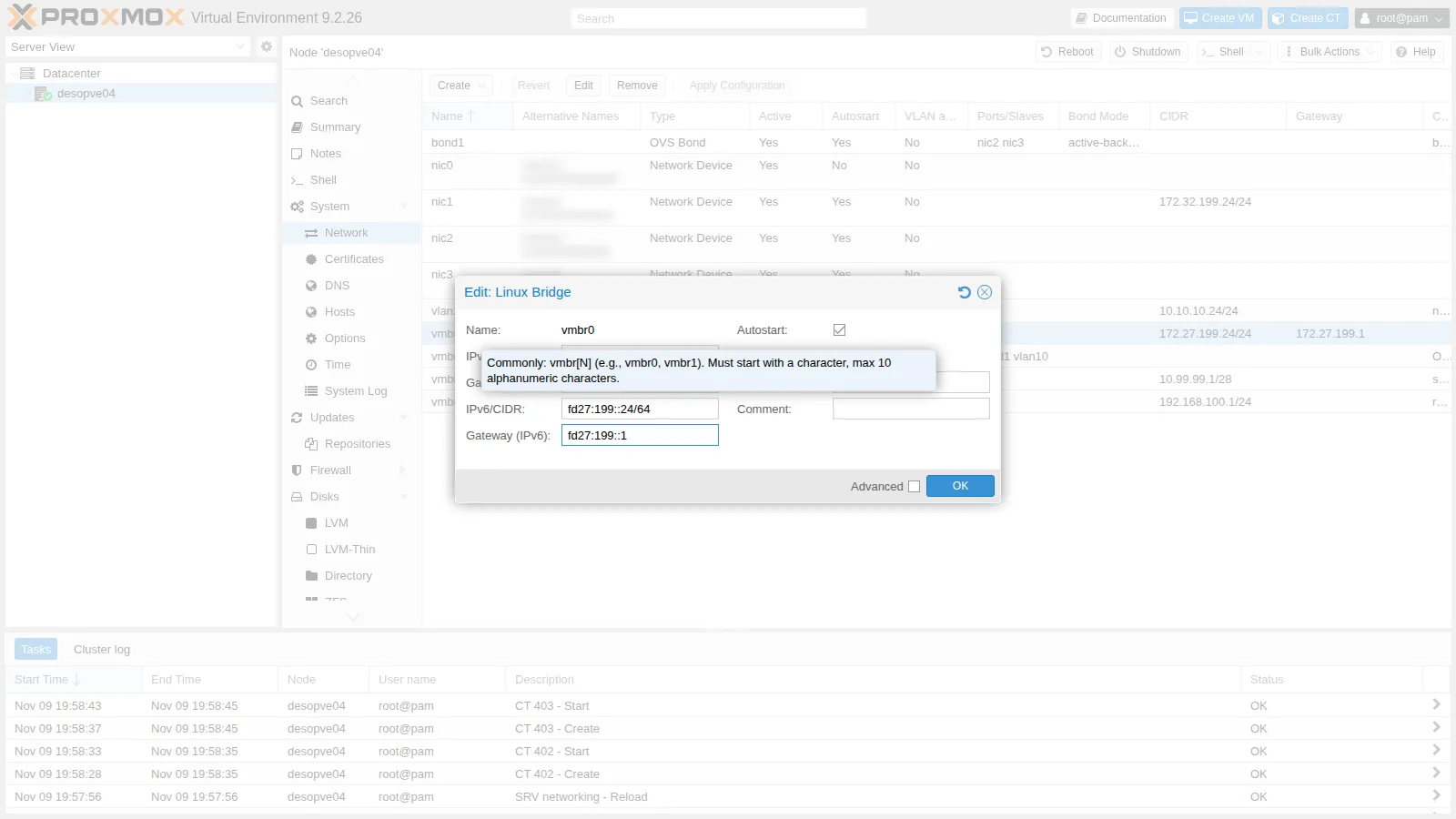
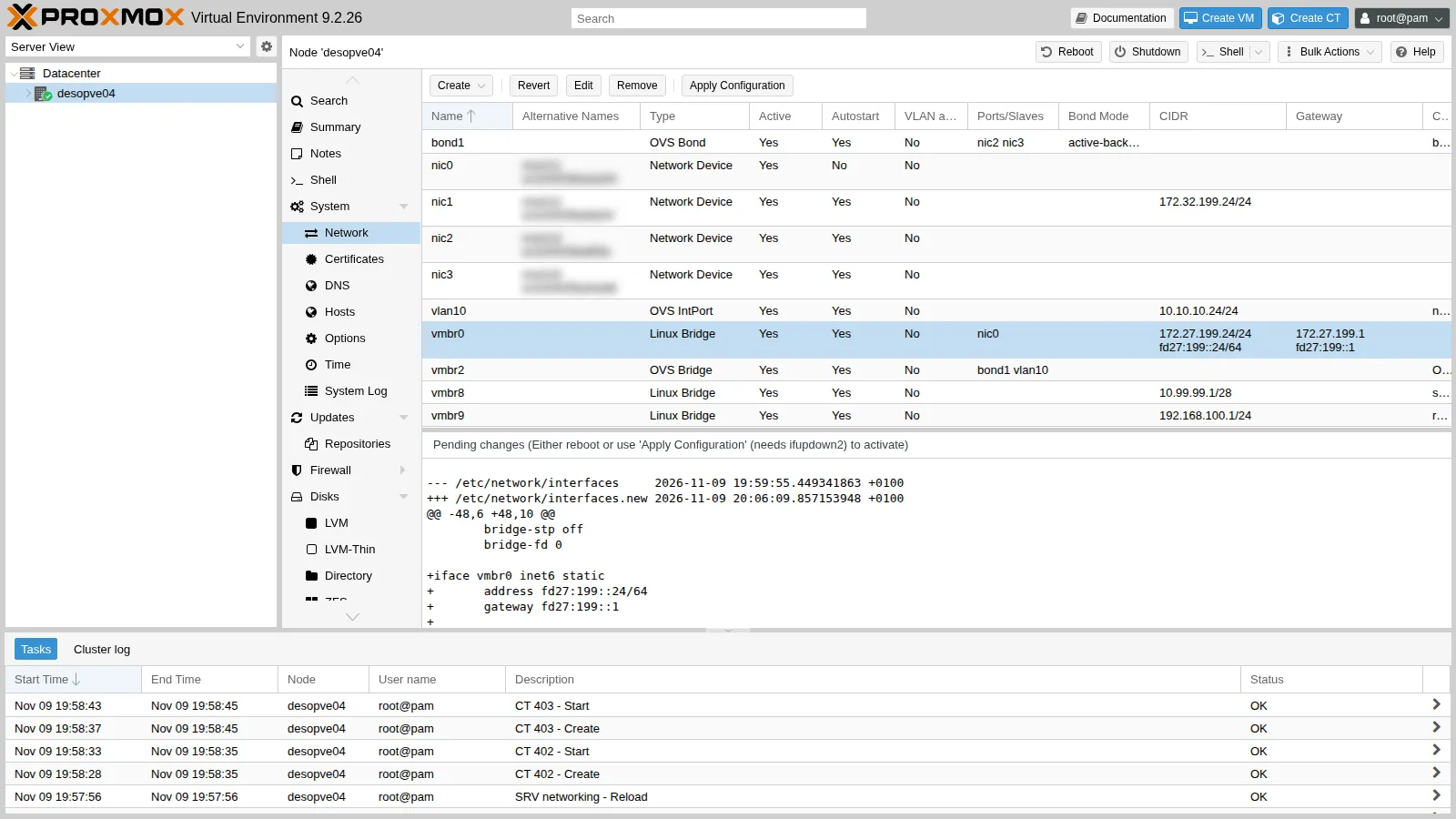
Apply Configuration:
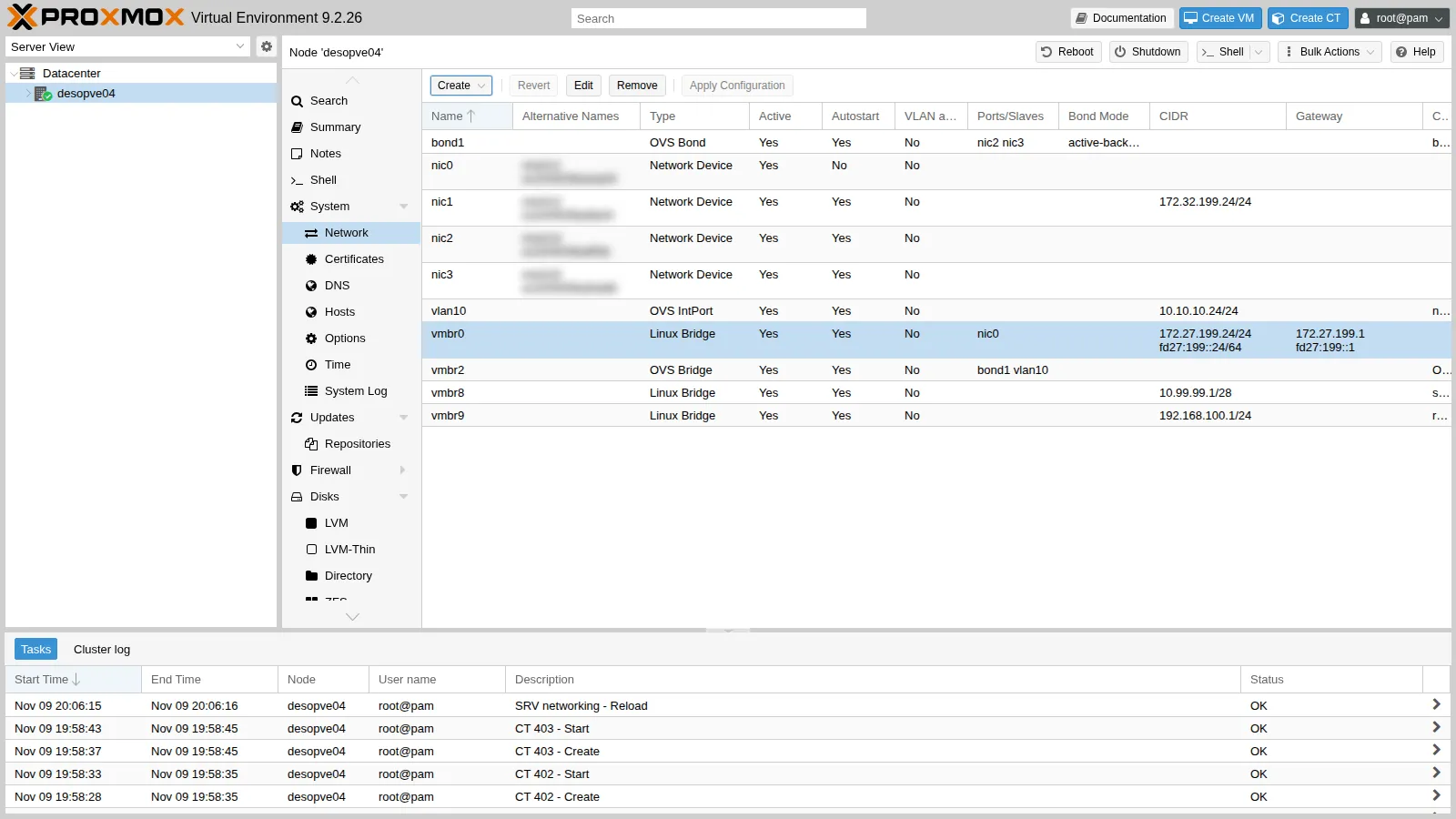
A second block for
vmbr0appears in/etc/network/interfaces, with theinet6family:iface vmbr0 inet6 staticaddress fd27:199::24/64gateway fd27:199::1 -
desopve01-03 from the command line. The same block (
fd27:199::21,::22,::23) right after theiface vmbr0 inet staticblock, thenifreload -a. Adding an address tovmbr0does not interrupt Corosync or Ceph:root@desopve01 ifreload -aip -6 addr show dev vmbr0 scope global | grep inet6Output inet6 fd27:199::21/64 scope globalroot@desopve01 ip -6 route | grep defaultOutput default via fd27:199::1 dev vmbr0 proto kernel metric 1024 onlink pref mediumroot@desopve01 ping -6 -c2 -W1 fd27:199::24 | tail -1Output rtt min/avg/max/mdev = 0.502/1.256/2.010/0.754 msroot@desopve01 pvecm status | grep ^Quorate; ceph -s | grep healthOutput Quorate: Yeshealth: HEALTH_OK -
The test reboot on
desopve04confirms three things: the settings persist, no interface accepts RAs, and the link-local addresses no longer contain the MAC.root@desopve04 ip -6 addr show dev vmbr0 scope link | grep inet6 # beforeOutput inet6 fe80::<derivato dal MAC, con ff:fe in mezzo>/64 scope link proto kernel_llroot@desopve04 systemctl rebootOutput ...root@desopve04 grep -l 1 /proc/sys/net/ipv6/conf/*/accept_ra | wc -lOutput 0root@desopve04 ip -6 route | grep defaultOutput default via fd27:199::1 dev vmbr0 proto kernel metric 1024 onlink pref mediumroot@desopve04 ip -6 addr show dev nic1 scope link | grep inet6Output inet6 fe80::3aea:589e:ff57:62eb/64 scope link stable-privacy proto kernel_llThe link-local address is now
stable-privacy, withoutff:feand without the MAC (and, withaddr_gen_mode = 3, it will change at every reboot). On the cluster nodes the file is already in effect for RAs; the new link-local addresses will apply at the next reboot, which there is no need to do now.The configurations of labs 23 and 24 (OVS, NAT and port forwarding) also come back after the reboot: they are all in the network files. The containers are not set to start at boot and must be started again with
pct start.
4. A dual-stack guest with SLAAC
Section titled “4. A dual-stack guest with SLAAC”-
CT 404 on
vmbr0, with static IPv4 and automatic IPv6 (ip6=auto, that is, SLAAC):root@desopve04 pct create 404 local:vztmpl/debian-13-standard_13.6-1_amd64.tar.zst \--hostname v6-ct1 --memory 512 --cores 1 --rootfs local-lvm:4 \--net0 name=eth0,bridge=vmbr0,ip=172.27.199.125/24,gw=172.27.199.1,ip6=auto \--nameserver 172.27.199.20 --searchdomain proxmox.community \--unprivileged 1 --features nesting=1 --password '<lab-password>' --start 1From the GUI: the container’s network interface → IPv6 → SLAAC.
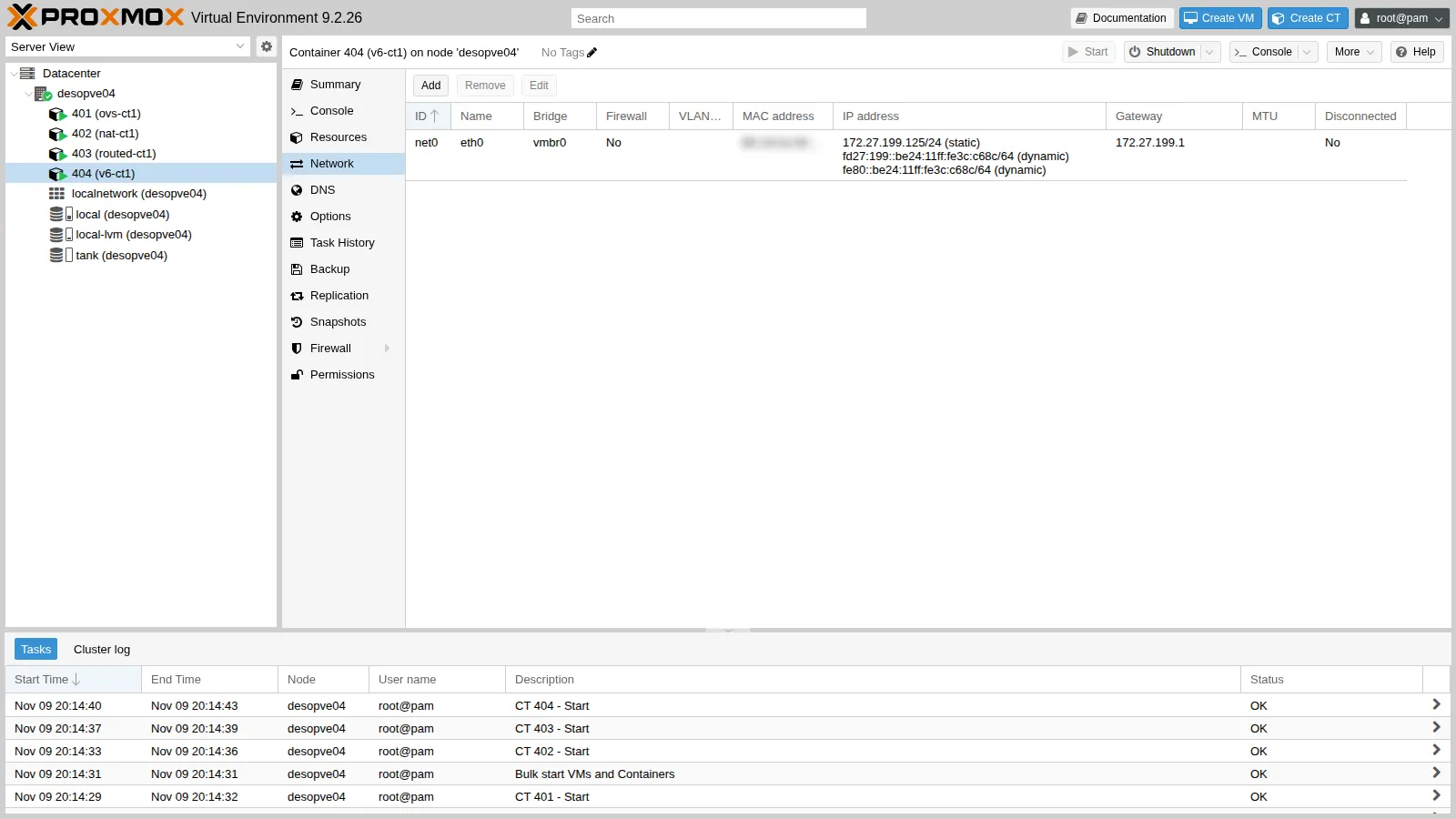
-
The container built its address from the advertised prefix and uses the router’s link-local address as its gateway:
root@desopve04 pct exec 404 -- ip -6 addr show dev eth0Output 2: eth0@if19: <BROADCAST,MULTICAST,UP,LOWER_UP> mtu 1500 qdisc noqueue state UP group default qlen 1000 link-netnsid 0inet6 fd27:199::be24:11ff:fe3c:c68c/64 scope global dynamic mngtmpaddr proto kernel_ravalid_lft forever preferred_lft foreverinet6 fe80::be24:11ff:fe3c:c68c/64 scope link proto kernel_llvalid_lft forever preferred_lft foreverroot@desopve04 pct exec 404 -- ip -6 routeOutput fd27:199::/64 dev eth0 proto kernel metric 256 pref mediumfe80::/64 dev eth0 proto kernel metric 256 pref mediumdefault via fe80::1 dev eth0 proto ra metric 1024 expires 1791sec pref mediumroot@desopve04 pct exec 404 -- ping -6 -c2 -W1 fd27:199::21 | tail -1Output rtt min/avg/max/mdev = 0.320/0.579/0.838/0.259 msroot@desopve04 pct exec 404 -- ping -c2 -W1 172.27.199.20 | tail -1Output rtt min/avg/max/mdev = 0.903/1.349/1.795/0.446 msproto kernel_raandproto raindicate an address and a gateway learned from the RA;expiresis the lifetime advertised by the router (1800 s), renewed with every RA.
5. The DC: an unexpected effect of the RAs
Section titled “5. The DC: an unexpected effect of the RAs”Windows accepts RAs by default. As soon as the router started advertising the prefix, the DC gave itself a SLAAC address on both NICs, and the DNS service registered it for the domain:
Get-NetIPAddress -AddressFamily IPv6 | Where-Object { $_.IPAddress -notlike 'fe80*' -and $_.IPAddress -ne '::1' } | Format-Table InterfaceAlias,IPAddress,PrefixOrigin,SuffixOriginInterfaceAlias IPAddress PrefixOrigin SuffixOrigin-------------- --------- ------------ ------------MGMT fd27:199::e3db:db3d:17e2:9d9a RouterAdvertisement LinkCLUSTER fd27:199::3a51:9d70:251b:f8a3 RouterAdvertisement LinkGet-DnsServerResourceRecord -ZoneName proxmox.community -RRType AAAA | Format-Table HostName,@{n='IPv6';e={$_.RecordData.IPv6Address}}HostName IPv6-------- ----@ fd27:199::e3db:db3d:17e2:9d9adesopve-dc01 fd27:199::e3db:db3d:17e2:9d9aDomainDnsZones fd27:199::e3db:db3d:17e2:9d9aForestDnsZones fd27:199::e3db:db3d:17e2:9d9aA DC with an address that depends on a router is not acceptable: let’s give it a static address, disable RAs on both NICs and clean up the old records. The PowerShell commands, on the DC:
foreach ($i in 'MGMT','CLUSTER') { Set-NetIPInterface -InterfaceAlias $i -AddressFamily IPv6 -RouterDiscovery Disabled -Dhcp Disabled }New-NetIPAddress -InterfaceAlias MGMT -IPAddress fd27:199::20 -PrefixLength 64 -DefaultGateway fd27:199::1Set-DnsClientServerAddress -InterfaceAlias MGMT -ServerAddresses 127.0.0.1,::1ipconfig /registerdnsforeach ($z in 'proxmox.community','_msdcs.proxmox.community') { Get-DnsServerResourceRecord -ZoneName $z -RRType AAAA | Where-Object { $_.RecordData.IPv6Address.IPAddressToString -notmatch '^fd27:199::(20|21|22|23|24)$' } | Remove-DnsServerResourceRecord -ZoneName $z -Force}In Lab 02 the DNS server listens only on 172.27.199.20. To make it answer over IPv6 too, add the new address to the listening list:
$s = Get-DnsServerSetting -All$s.ListeningIPAddress = @('172.27.199.20','fd27:199::20')Set-DnsServerSetting -InputObject $sRestart-Service DNS(Get-DnsServerSetting -All).ListeningIPAddress172.27.199.20fd27:199::20Then the AAAA records of the nodes, like the A records of lab 02:
foreach ($n in 21,22,23,24) { Add-DnsServerResourceRecordAAAA -ZoneName proxmox.community -Name ("desopve0" + ($n-20)) -IPv6Address ("fd27:199::" + $n)}The result:
Get-NetIPAddress -AddressFamily IPv6 | Where-Object { $_.IPAddress -notlike 'fe80*' -and $_.IPAddress -ne '::1' } | Format-Table InterfaceAlias,IPAddress,PrefixOriginInterfaceAlias IPAddress PrefixOrigin-------------- --------- ------------MGMT fd27:199::20 ManualGet-DnsServerResourceRecord -ZoneName proxmox.community -RRType AAAA | Format-Table HostName,@{n='IPv6';e={$_.RecordData.IPv6Address}}HostName IPv6-------- ----@ fd27:199::20desopve-dc01 fd27:199::20desopve01 fd27:199::21desopve02 fd27:199::22desopve03 fd27:199::23desopve04 fd27:199::24DomainDnsZones fd27:199::20ForestDnsZones fd27:199::20The DNS server now also answers when queried on its IPv6 address:
Resolve-DnsName desopve01.proxmox.community -Type AAAA -Server fd27:199::20 -DnsOnly | Format-Table Name,Type,IPAddress -AutoSizeName Type IPAddress---- ---- ---------desopve01.proxmox.community AAAA fd27:199::216. The Proxmox GUI over IPv6
Section titled “6. The Proxmox GUI over IPv6”pveproxy listens on all addresses, IPv4 and IPv6 (*):
ss -ltn '( sport = :8006 )'State Recv-Q Send-Q Local Address:Port Peer Address:PortLISTEN 0 4096 *:8006 *:*From the dual-stack container, by name (DNS now also returns the AAAA record, which takes precedence):
pct exec 404 -- getent ahosts desopve01.proxmox.community | sort -u -k1,1172.27.199.21 STREAMfd27:199::21 STREAM desopve01.proxmox.communitypct exec 404 -- wget -6 --no-check-certificate -S -O /dev/null https://desopve01.proxmox.community:8006/ 2>&1 | grep -E "Connecting|HTTP/"Connecting to desopve01.proxmox.community (desopve01.proxmox.community)|fd27:199::21|:8006... connected. HTTP/1.1 200 OKIn a browser the IPv6 address is written in square brackets: https://[fd27:199::21]:8006.
Verification and tests
Section titled “Verification and tests”| Test | Result |
|---|---|
| Router RA on the management network | received, prefix fd27:199::/64, SLAAC yes, DHCPv6 no, sender fe80::1 |
| Nodes with a static address | fd27:199::21-24, default gateway fd27:199::1, no dynamic addresses |
| Node interfaces that accept RAs | 0, even after a reboot (with the * keys) |
| Link-local after the reboot | stable-privacy, no MAC |
Container with ip6=auto |
SLAAC address and gateway fe80::1, reaches the nodes over IPv6 and the DC over IPv4 |
| DC with RAs enabled | SLAAC addresses on two NICs, registered in the domain DNS |
| DC after the fix | only the static fd27:199::20, AAAA records cleaned up |
desopve01 GUI by name from the container |
IPv6 connection, HTTP 200 |
| Cluster after the changes | quorum 3/3, Ceph HEALTH_OK, iSCSI with 2 paths |
Final lab state
Section titled “Final lab state”- Dual-stack management network:
172.27.199.0/24andfd27:199::/64. rtr-core:fd27:199::1/64onether1with RAs (20-60 s interval), fixed link-localfe80::1, automatic link-local addresses disabled.- Nodes
desopve01-04: staticfd27:199::21-24/64onvmbr0, gatewayfd27:199::1;/etc/sysctl.d/90-ipv6-host.conf(RAs ignored,addr_gen_mode3). Copies of the previous network configuration in/root/interfaces.bak-lab25. Ondesopve01-03the stable privacy link-local addresses will apply at the next reboot. - DC: static
fd27:199::20onMGMT, RAs disabled onMGMTandCLUSTER, DNS127.0.0.1and::1; DNS server listening on172.27.199.20andfd27:199::20; AAAA records fordesopve-dc01anddesopve01-04. - Containers on
desopve04, running:- CT 404
v6-ct1onvmbr0, 172.27.199.125/24 and SLAAC; - CT 401-403 unchanged from labs 23-24.
- CT 404
What you learned
Section titled “What you learned”- In IPv6 the router advertises the prefix with RAs, and the guests configure themselves with SLAAC.
- Nodes and servers need static addresses: RAs must be explicitly ignored on all interfaces, including those that exist at boot.
- With
addr_gen_modethe addresses no longer contain the NIC’s MAC. - Enabling RAs on an existing network affects everyone: Windows accepts them by default, and a DC immediately registers the new address in DNS.
- The Proxmox GUI answers over IPv6 without any special configuration; all it takes is the address on the node and, for names, the AAAA record.