

Lab 21 – Bonding: active-backup, balance-alb and LACP, link failure
Dependencies
Section titled “Dependencies”- Previous labs: Lab 20: cards
nic3andnic4with stable names ondesopve01-03, VLAN-aware bridge, test containers 121-123 withping,tcpdumpandiperf3. - Network: the two cards of each node are connected to the same network (to the same switch). LACP mode (802.3ad) would require a switch with an LACP port-channel configured on the two ports: the lab does not have one, and this lab shows what happens in that case.
- Credentials:
root/<lab-password>on the nodes → Appendix B.
Objectives
Section titled “Objectives”bond0(nic3+nic4, active-backup, preferred linknic3) under a VLAN-awarevmbr1bridge with no IP address ondesopve01-03, built from the GUI on one node and from the command line on the others, with the test containers moved onto it and reachable.- A failure and recovery of the active link while a ping is running, with the switch-over visible in the kernel log and the lost pings counted at a known probe interval.
- active-backup, balance-alb and 802.3ad compared with
iperf3and the interface counters, knowing which modes need configuration on the switch and which one suits a bond that carries a bridge with guests. - The largest packet the VM network carries end to end, measured with
ping -M dobefore any decision on jumbo frames.
How it works
Section titled “How it works”What a bond is
Section titled “What a bond is”A bond (Linux bonding) combines several physical NICs into a single logical interface, bond0. It serves two purposes:
- redundancy: if a cable, a port or a switch fails, traffic continues on the remaining cards;
- more total bandwidth, only in some modes and only with many flows: in the modes that balance per flow or per destination, a single flow uses one link. The exception is balance-rr, which spreads the packets of a single flow over all the links, at the cost of delivering them out of order.
The driver checks the state of the links every bond-miimon milliseconds (100 here) and stops using the ones that are down.
The modes
Section titled “The modes”| Mode | Name | Switch | Use of multiple links | Notes |
|---|---|---|---|---|
| 0 | balance-rr |
static port-channel | yes, round-robin, packet by packet | reorders packets: not recommended for TCP |
| 1 | active-backup |
no configuration | no: one active link, the others on standby | the simplest and most robust; with bond-primary you choose the preferred link |
| 2 | balance-xor |
static port-channel | yes, per flow (hash) | |
| 3 | broadcast |
– | every packet on all links | very special cases |
| 4 | 802.3ad (LACP) |
LACP port-channel | yes, per flow (hash) | the datacenter standard; with two switches it needs MLAG/vPC |
| 5 | balance-tlb |
none | transmit only | not suitable for a bond under a bridge with guests (see below) |
| 6 | balance-alb |
none | transmit and receive, per destination | balances incoming traffic by rewriting the node’s own ARP replies; not suitable for a bond under a bridge with guests |
In the modes that balance “per flow”, the link is chosen with a hash function (bond-xmit-hash-policy): layer2 (MAC), layer2+3 (MAC + IP) or layer3+4 (IP + ports). With layer3+4 two TCP connections between the same two hosts can use different links; a single transfer still stays on one link.
Which modes fit Proxmox VE. The Proxmox VE documentation recommends 802.3ad when the switch supports LACP and active-backup otherwise. It advises against balance-alb and balance-tlb when the bond carries a Linux bridge with guests: these modes rely on the host knowing the local addresses, and the guests’ addresses belong to the VMs and containers behind the bridge. This lab uses balance-alb in step 6 only to observe its behaviour, and then goes back to active-backup.
The design of this lab
Section titled “The design of this lab”flowchart LR
subgraph N["desopve0X"]
CT["CT 12X<br/>eth0, VLAN 10/20"] --- V1["vmbr1<br/>VLAN-aware, no IP"]
V1 --- B["bond0<br/>active-backup"]
B --- N3["nic3"]
B --- N4["nic4"]
V0["vmbr0<br/>management 172.27.199.2X"] --- N0["nic0"]
end
N3 --- SW["switch / lab network<br/>VLAN trunk"]
N4 --- SW
N0 --- SW
bond0(nic3+nic4) is the port ofvmbr1, a second VLAN-aware bridge dedicated to VM traffic. Management, Corosync, storage and Ceph stay on their own cards.vmbr1has no IP address: the node does not communicate on that network, it only offers it to the guests. This way the bond does not interfere with the node’s own traffic.
Test environment and versions
Section titled “Test environment and versions”The results in the procedure come from tests run in November 2026 (the kernel log in step 4 is from 9 November) with the configuration below. With other cards, switches or versions, the same commands can give different numbers.
| Component | Configuration used |
|---|---|
| Proxmox VE | 9.2.26, kernel 7.0.14-28-pve, which also provides the bonding driver (Lab 04) |
| Bond | nic3 + nic4 on each node, miimon 100, no up or down delay; on desopve01 both links at 10000 Mbps full duplex, as reported by /proc/net/bonding/bond0 |
| Switch | the two ports of each node on the same switch, as VLAN trunks, with no port-channel and no LACP on those ports (Lab 01) |
| Bridge | vmbr1, VLAN-aware, no IP address, MTU 1500 |
| Test containers | CT 121 on desopve01 and CT 122 on desopve02, in VLAN 10: unprivileged Debian 13 (debian-13-standard_13.6-1), 1 core and 512 MiB of RAM each, iperf3 and iputils-ping from the Debian packages (Lab 20) |
| Failure | simulated on desopve01 with ip link set nic3 down and up, not by unplugging the cable |
| Tools | ping with one probe every 0.2 s (-i 0.2), a 1-second timeout (-W 1) and timestamps (-D); iperf3 for 10 s with 1 or 4 TCP streams, server on CT 122; transmit counters in /sys/class/net/<card>/statistics/tx_bytes |
What the tests measure, and what they do not. They measure what a container on desopve01 sees when it talks to a container on desopve02 through vmbr1, the two bonds and the switch. A ping with one probe every 0.2 seconds cannot see an interruption shorter than that interval: “0% packet loss” means that no probe went unanswered, not that the interruption lasted zero seconds. Each iperf3 figure comes from a single 10-second run in one direction (CT 121 → CT 122), with no CPU measurement: it says nothing about variability or about what limited the throughput. The counters were read only on the transmit side of desopve01. The failure was simulated on the node: a cable pull, a failed switch port or the loss of the switch (the lab has only one) were not tested, and LACP was tested only without a partner on the switch.
Procedure
Section titled “Procedure”1. bond0 and vmbr1 from the GUI (desopve01)
Section titled “1. bond0 and vmbr1 from the GUI (desopve01)”-
Node desopve01 → System → Network → Create → Linux Bond.
- Name
bond0; - Slaves
nic3 nic4; - Mode
active-backup(the GUI proposesbalance-rr); - bond-primary
nic3: whenever it is available, this is the active link; - no IP address.
Hash policy stays disabled: it is used only by
balance-xorand802.3ad.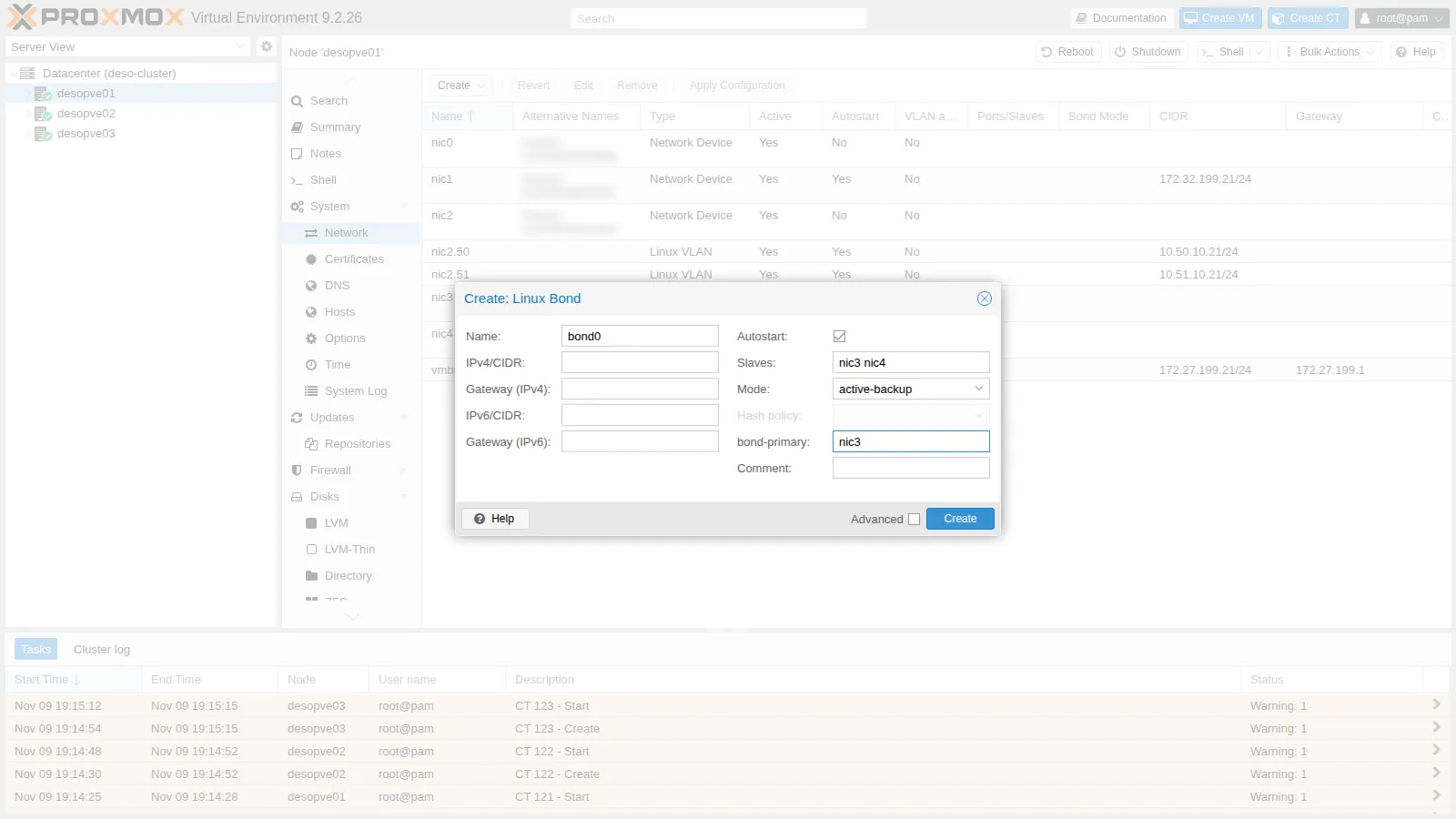
- Name
-
Create → Linux Bridge. Name
vmbr1, Bridge portsbond0, VLAN aware checked, no IP address, and a comment that reminds you what it is for.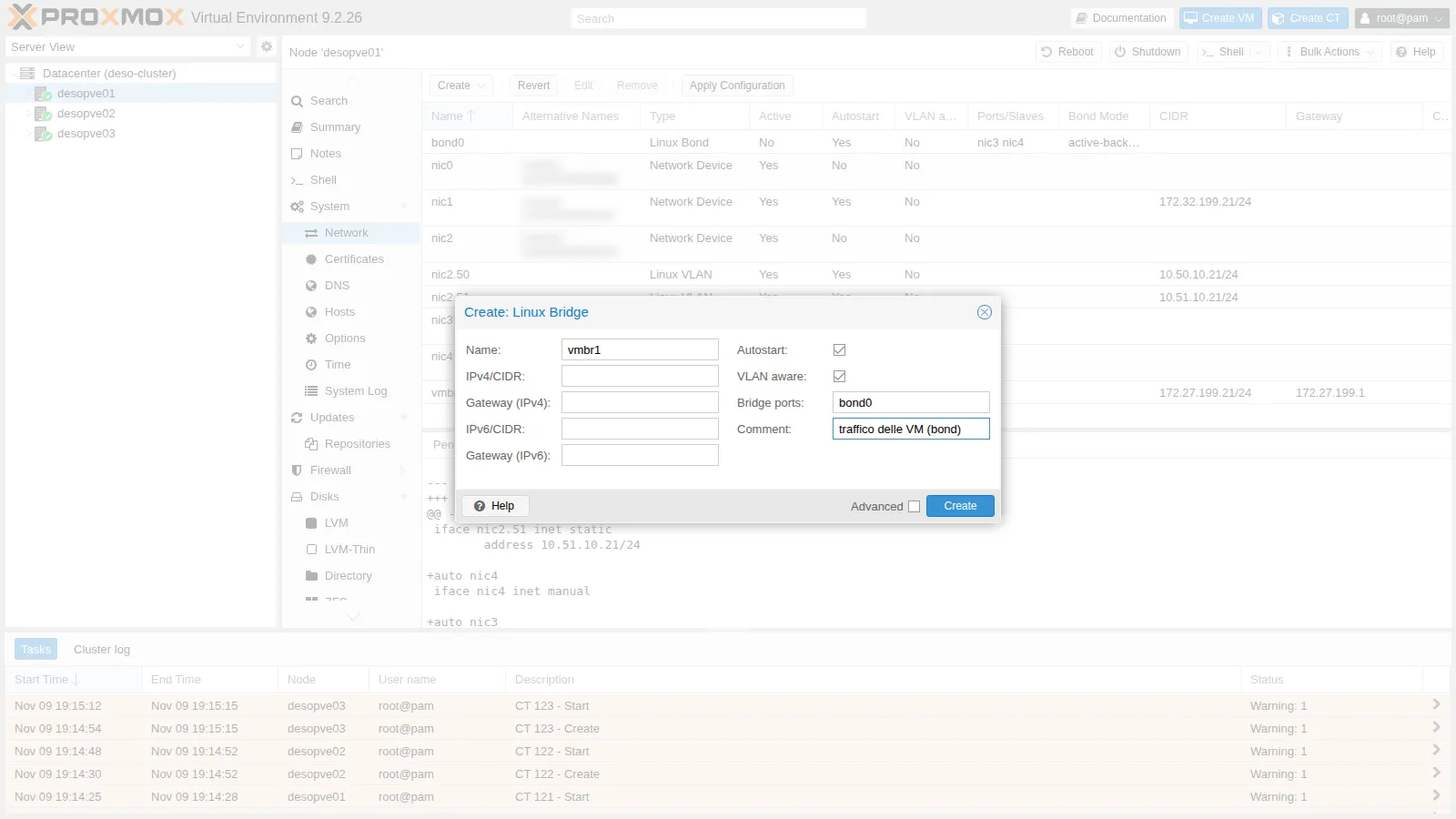
-
The pending changes show the two new blocks:
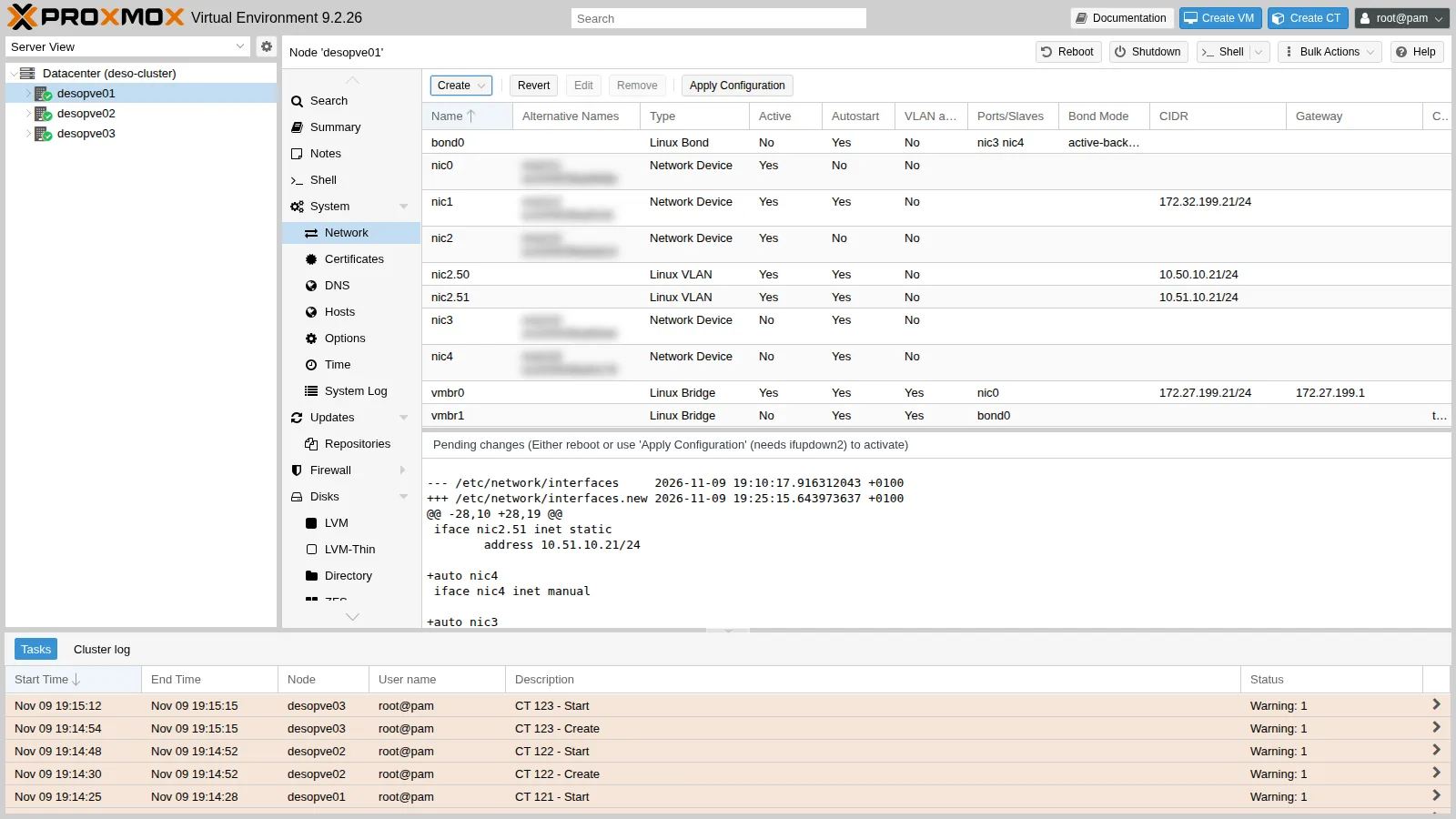
-
Apply Configuration → Yes.
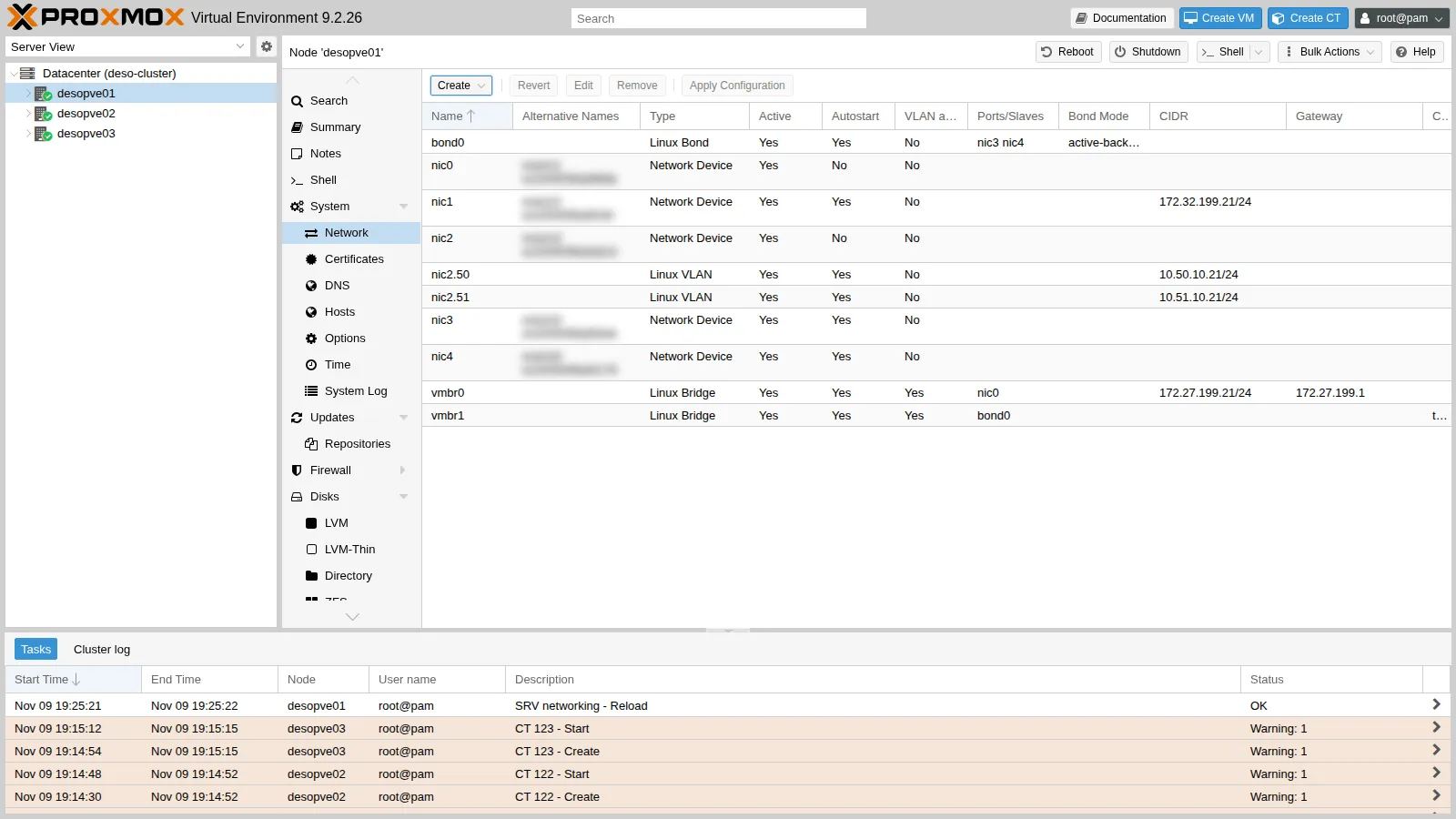
The resulting file:
auto bond0iface bond0 inet manualbond-slaves nic3 nic4bond-miimon 100bond-mode active-backupbond-primary nic3auto vmbr1iface vmbr1 inet manualbridge-ports bond0bridge-stp offbridge-fd 0bridge-vlan-aware yesbridge-vids 2-4094#traffico delle VM (bond)You can read the state of the bond in
/proc/net/bonding/bond0:root@desopve01 cat /proc/net/bonding/bond0Output Ethernet Channel Bonding Driver: v7.0.14-28-pveBonding Mode: fault-tolerance (active-backup)Primary Slave: nic3 (primary_reselect always)Currently Active Slave: nic3MII Status: upMII Polling Interval (ms): 100Up Delay (ms): 0Down Delay (ms): 0Peer Notification Delay (ms): 0Slave Interface: nic3MII Status: upSpeed: 10000 MbpsDuplex: fullLink Failure Count: 0Permanent HW addr: <MAC>Slave queue ID: 0Slave Interface: nic4MII Status: upSpeed: 10000 MbpsDuplex: fullLink Failure Count: 0Permanent HW addr: <MAC>Slave queue ID: 0
2. The same configuration on the other nodes (CLI)
Section titled “2. The same configuration on the other nodes (CLI)”On desopve02 and desopve03 add the same two blocks to /etc/network/interfaces, before the source /etc/network/interfaces.d/* line, after making a copy of the file (cp /etc/network/interfaces /root/interfaces.bak-lab21). Then apply and check:
ifreload -agrep -E "Currently Active|MII Status" /proc/net/bonding/bond0 | head -2Currently Active Slave: nic3MII Status: upcat /sys/class/net/vmbr1/bridge/vlan_filtering1Repeat on desopve03 and check that the cluster and Ceph suffered no interruptions (pvecm status, ceph -s).
3. The containers on the VM network
Section titled “3. The containers on the VM network”Move the three containers to vmbr1, with the same VLANs and the same addresses. You can do it while they are running:
pct set 121 -net0 name=eth0,bridge=vmbr1,tag=10,ip=10.10.10.121/24pct set 122 -net0 name=eth0,bridge=vmbr1,tag=10,ip=10.10.10.122/24pct set 123 -net0 name=eth0,bridge=vmbr1,tag=20,ip=10.20.20.123/24pct exec 121 -- ping -c2 -W1 10.10.10.122 | tail -22 packets transmitted, 2 received, 0% packet loss, time 1001msrtt min/avg/max/mdev = 0.927/1.380/1.834/0.453 msbridge vlan show dev veth121i0port vlan-idveth121i0 10 PVID Egress UntaggedIn the GUI it is the Bridge field of the container’s (or VM’s) network device, the same dialog you used in lab 20 to set the tag.
4. Failure of the active link (active-backup)
Section titled “4. Failure of the active link (active-backup)”CT 121 sends five pings per second to CT 122 (-i 0.2). Meanwhile, on desopve01, the active link nic3 goes down and comes back 13 seconds later. In the test shown here the failure was simulated with ip link set nic3 down. Unplugging the cable of nic3 is a more realistic test, because the switch then sees its port go down as well; with ip link, whether that happens depends on the card and its driver.
pct exec 121 -- bash -c "ping -D -i 0.2 -c 150 -W 1 10.10.10.122 > /root/ab.log" &ip link set nic3 downgrep -E "Currently Active|Link Failure" /proc/net/bonding/bond0Currently Active Slave: nic4Link Failure Count: 1Link Failure Count: 0ip link set nic3 upgrep "Currently Active" /proc/net/bonding/bond0Currently Active Slave: nic3pct exec 121 -- tail -2 /root/ab.log150 packets transmitted, 150 received, 0% packet loss, time 31030msrtt min/avg/max/mdev = 0.395/0.868/10.409/0.806 msThe kernel logs every transition:
journalctl -k | grep bond0 | tail -4Nov 09 19:26:44 desopve01 kernel: bond0: (slave nic3): link status definitely down, disabling slaveNov 09 19:26:44 desopve01 kernel: bond0: (slave nic4): making interface the new active oneNov 09 19:26:57 desopve01 kernel: bond0: (slave nic3): link status definitely up, 10000 Mbps full duplexNov 09 19:26:57 desopve01 kernel: bond0: (slave nic3): making interface the new active one- Measured: 150 probes sent and 150 answered (
0% packet loss), with a slowest round trip of 10.4 ms (rtt max). The kernel log showsnic4taking over at 19:26:44 andnic3(the primary) becoming the active link again at 19:26:57. - Interpretation: neither switch-over cost a probe. Any interruption was short enough to fall between two probes, or to delay one by no more than 10.4 ms. The test does not say how long it lasted, nor whether the 10.4 ms round trip, the slowest of the run, coincides with one of the two transitions.
- How to check: in
/root/ab.loginside CT 121, find the line with the highesttime=and compare its timestamp (-D) with the kernel log; for a finer resolution, repeat the test with a denser ping, for example-i 0.01.
What the switch has to relearn. After a switch-over, the switch has to learn which port the guests’ MAC addresses are now behind. According to the kernel documentation, in active-backup the bond sends gratuitous ARPs on the new link only for the bond itself and for the VLAN interfaces above it, and only if they have an IP address. Here bond0 has none and the guests sit behind the bridge, so nothing is announced on their behalf. In this test the continuous ping made CT 121 transmit over the new link straight away, and that is enough for the switch to learn its address. A guest that is not transmitting was not tested, and the outcome depends on the switch. If the switch sees the old port go down, it normally forgets the addresses learned on it and floods the frames for them to every port in the VLAN. If the old port stays up (a failure further along the path, or an ip link that leaves the physical link up), the switch keeps sending to the old port until the guest transmits or the entry ages out of its MAC table. To check it: stop the traffic from CT 121, take nic3 down, then ping CT 121 from CT 122 and see when the replies start; on the switch, compare the port associated with the container’s MAC address before and after the switch-over.
5. Bandwidth: one flow, one link
Section titled “5. Bandwidth: one flow, one link”With iperf3 you measure the bandwidth between CT 121 and CT 122 (server on 122 with iperf3 -s -D):
pct exec 121 -- iperf3 -c 10.10.10.122 -t 10 -f g | tail -4[ 5] 0.00-10.00 sec 6.54 GBytes 5.62 Gbits/sec 191 sender[ 5] 0.00-10.00 sec 6.54 GBytes 5.61 Gbits/sec receiver- Measured: one TCP stream for 10 seconds from CT 121 to CT 122: 5.62 Gbit/s at the sender and 5.61 Gbit/s at the receiver, with 191 retransmissions (
Retrcolumn). The links ofdesopve01run at 10 Gbit/s. - Interpretation: in active-backup only one link carries traffic, so one flow cannot go beyond 10 Gbit/s. It stopped at 5.62, so the link speed alone does not explain the result. The limit may come from the single core of each container, from the path through
veth, bridge and bond, from the switch, or from losses along the way, which the retransmissions hint at: the test does not tell these causes apart. In step 6, four streams, all onnic3, total 5.72 Gbit/s, about the same as one. That is consistent with a limit shared by all the streams rather than one per stream, but the bond mode is different and each figure comes from a single run. - How to check: during the test, watch the CPU usage in the containers and on the nodes (
top): a core pinned at 100% points to a CPU limit; read thetx_bytescounters ofnic3andnic4to confirm that only one link carries the flow; repeat the test with containers that have more cores and compare.
6. balance-alb: load balancing without configuring the switch
Section titled “6. balance-alb: load balancing without configuring the switch”-
On
desopve01anddesopve02change the mode: inbond0replacebond-mode active-backupwithbond-mode balance-alband remove thebond-primaryline, so that no card is preferred.ifreload -aapplies the change on the fly.root@desopve01 ifreload -a; grep "Bonding Mode" /proc/net/bonding/bond0Output Bonding Mode: adaptive load balancing -
Run four parallel flows to the same container, measuring the bytes transmitted by each card. Read the counters before and after the test, and compute the difference:
root@desopve01 cat /sys/class/net/nic3/statistics/tx_bytes /sys/class/net/nic4/statistics/tx_bytespct exec 121 -- iperf3 -c 10.10.10.122 -t 10 -P 4 -f g | grep "SUM.*receiver"Output [SUM] 0.00-10.00 sec 6.66 GBytes 5.72 Gbits/sec receiverroot@desopve01 cat /sys/class/net/nic3/statistics/tx_bytes /sys/class/net/nic4/statistics/tx_bytesInterface Bytes transmitted during the test nic37.17 GB nic40.00 GB - Measured: four parallel TCP streams from CT 121 to CT 122 for 10 seconds, 5.72 Gbit/s in total at the receiver (
SUMline). During the testnic3transmitted 7.17 GB andnic4nothing. - Interpretation: consistent with balance-alb choosing the transmit link per destination: the four streams go to the same IP address, so they share one card. With many guests talking to different hosts, the transmit load would be spread over both links. On the receive side, the kernel documentation describes the balancing (rlb) as a rewrite of the ARP replies sent by the local system, and the driver code skips the ARP traffic that does not come from the bond itself or from a VLAN directly above it: the guests behind the bridge are left out, and their traffic would come in through a single card. The test read only the transmit counters, so it does not show the receive side.
- How to check: repeat with streams to several different hosts and compare the counters of the two cards; for the receive side, read the
rx_bytescounters ofnic3andnic4during a test in the opposite direction (iperf3 -R).
- Measured: four parallel TCP streams from CT 121 to CT 122 for 10 seconds, 5.72 Gbit/s in total at the receiver (
-
Failure of
nic3while the ping is running:root@desopve01 pct exec 121 -- bash -c "ping -D -i 0.2 -c 100 -W 1 10.10.10.122 > /root/alb.log" &ip link set nic3 downgrep -E "Slave Interface|MII Status" /proc/net/bonding/bond0 | tail -4Output Slave Interface: nic3MII Status: downSlave Interface: nic4MII Status: uproot@desopve01 ip link set nic3 uppct exec 121 -- tail -2 /root/alb.logOutput 100 packets transmitted, 99 received, 1% packet loss, time 20559ms- Measured: 100 probes, one every 0.2 seconds, and 99 answers: one probe lost (
1% packet loss). - Interpretation: consistent with a short interruption while the bond moves the traffic from
nic3tonic4and the switch learns the new port, but the test does not prove it. It does not say when the probe was lost (when the link went down, when it came back, or at some other moment), nor how long the interruption lasted: if the loss does come from a switch-over, one lost probe with the ones before and after answered means it lasted less than about 0.4 seconds. - How to check: in
/root/alb.logfind the missingicmp_seqand compare the timestamps (-D) of the probes around it with the kernel log (journalctl -k | grep bond0); repeat with a denser ping.
- Measured: 100 probes, one every 0.2 seconds, and 99 answers: one probe lost (
7. LACP (802.3ad) without a switch that negotiates it
Section titled “7. LACP (802.3ad) without a switch that negotiates it”LACP is the standard mode in datacenters: the node’s cards and the switch ports form a single channel, and the LACP protocol continuously checks that both sides agree. It requires switch configuration. This step shows what happens when the switch does not have it.
-
Configuration tried. On
desopve01only (desopve02stays in balance-alb from step 6), set:auto bond0iface bond0 inet manualbond-slaves nic3 nic4bond-miimon 100bond-mode 802.3adbond-xmit-hash-policy layer3+4bond-lacp-rate fast -
Apply (
ifreload -a) and look at the state:root@desopve01 grep -E "Mode|Hash|LACP|Aggregator ID|Number of ports|Partner Mac|Slave Interface" /proc/net/bonding/bond0Output Bonding Mode: IEEE 802.3ad Dynamic link aggregationTransmit Hash Policy: layer3+4 (1)LACP active: onLACP rate: fastAggregator ID: 1Number of ports: 1Partner Mac Address: 00:00:00:00:00:00Slave Interface: nic3Aggregator ID: 1Slave Interface: nic4Aggregator ID: 2Behaviour observed:
Partner Mac Address: 00:00:00:00:00:00: nobody on the other side answers LACP;- each card ends up in a different aggregator (1 and 2), and the active aggregator has only one port.
Interpretation. Without a partner, each card forms an aggregator of its own and the bond uses only one of them: it works, but on one link at a time, like an active-backup in disguise that adds no bandwidth. This reading comes from the state of the aggregators; the bandwidth in this mode was not measured.
-
Traffic flows, including while
nic3is down for 3 seconds:root@desopve01 pct exec 121 -- ping -c4 -W1 10.10.10.122 | tail -2Output 4 packets transmitted, 4 received, 0% packet loss, time 3064msrtt min/avg/max/mdev = 0.475/0.594/0.718/0.091 msroot@desopve01 pct exec 121 -- bash -c "ping -D -i 0.2 -c 75 -W 1 10.10.10.122 > /root/lacp.log" &ip link set nic3 down; sleep 3; ip link set nic3 uppct exec 121 -- tail -2 /root/lacp.logOutput 75 packets transmitted, 75 received, 0% packet loss, time 15335ms- Measured: 4 pings out of 4 answered before the failure; then 75 probes at 0.2-second intervals, over about 15 seconds that include the 3 seconds with
nic3down, all answered. - Interpretation: consistent with the bond moving to the other aggregator when the only port of the active one goes down, which is what the default selection policy (
ad_select stable) does according to the kernel documentation. The output does not show the change of aggregator. - How to check: read the
Active Aggregator Infosection of/proc/net/bonding/bond0whilenic3is down; compare thetx_bytescounters of the two cards during aniperf3 -P 4: in this state only one of them should grow.
With LACP configured on the switch (not testable in this lab),
Partner Mac Addressshows the switch’s MAC address and the two cards sit in the same aggregator (Number of ports: 2). With two switches for redundancy, they must support MLAG/vPC (or stacking), because LACP sees the two switches as a single one. - Measured: 4 pings out of 4 answered before the failure; then 75 probes at 0.2-second intervals, over about 15 seconds that include the 3 seconds with
-
Decision. Go back to active-backup on
desopve01anddesopve02(same block as in step 1, withbond-primary nic3) and apply withifreload -a. If you do not control the switch configuration, it is the mode that needs nothing from the switch, and the one the Proxmox VE documentation recommends when LACP is not available. Result:bond0is back in active-backup, withnic3preferred, on both nodes: the configuration that stays for the following labs.
8. MTU and jumbo frames: verify before using them
Section titled “8. MTU and jumbo frames: verify before using them”Jumbo frames (MTU 9000) carry the same data in fewer packets, which reduces the per-packet work for storage and migration traffic. They work only if the whole path accepts them: NICs, bond, switch, guest ports and guests. A single element left at 1500 drops the larger frames, and the symptom looks like a generic network fault.
Configuration tried. A temporary test (with ip link, so it does not persist) between CT 121 on desopve01 and CT 122 on desopve02. On each node raise the MTU of the bond (which also applies it to nic3 and nic4), of the node side of the container’s interface (veth121i0, veth122i0) and of the interface inside the container. Leave the vmbr1 bridge alone: for the frames that cross it, what counts is the MTU of its ports.
ip link set bond0 mtu 9000; ip link set veth121i0 mtu 9000pct exec 121 -- ip link set eth0 mtu 9000ip link set bond0 mtu 9000; ip link set veth122i0 mtu 9000pct exec 122 -- ip link set eth0 mtu 9000pct exec 121 -- ping -M do -s 1472 -c 3 -W 1 10.10.10.122 | tail -23 packets transmitted, 3 received, 0% packet loss, time 2036msrtt min/avg/max/mdev = 0.480/0.799/1.392/0.419 mspct exec 121 -- ping -M do -s 8972 -c 3 -W 1 10.10.10.122 | tail -23 packets transmitted, 0 received, 100% packet loss, time 2081ms-M do prohibits fragmentation, and -s 8972 plus 28 bytes of headers makes a 9000-byte packet: it does not get through, while the 1500-byte one does. To find out where the limit is, try increasing sizes:
for s in 4000 8000 8910 8912; do r=$(pct exec 121 -- ping -M do -s $s -c 2 -W 1 10.10.10.122 | grep -o "[0-9]* received"); echo "$s: $r"; done4000: 2 received8000: 2 received8910: 2 received8912: 0 receivedBehaviour observed. With fragmentation forbidden, 1500-byte packets (-s 1472) get through and 9000-byte packets (-s 8972) do not: 3 sent, none answered, and the summary line reports no errors. With increasing sizes, 8910 bytes of ICMP data (an 8938-byte packet) still get through and 8912 bytes (8940) do not; 8911 was not tried.
Interpretation. Something on the path between the two nodes lets 8938-byte IP packets through and drops 8940-byte ones. Since 8938-byte packets got through, the interfaces of the two nodes had indeed been raised well above 1500: the limit is consistent with an element outside the nodes, such as the maximum frame size of the switch, but the test does not show where the larger frames are dropped. It does show why the problem is hard to spot: nothing reports an error, the larger packets simply vanish.
How to check. Capture on both nodes (tcpdump -eni bond0 'icmp and greater 8000') while CT 121 sends an 8940-byte packet (ping -M do -s 8912): if the frame leaves desopve01 and never shows up on desopve02, it is dropped in the network. Also check the MTU actually applied to each interface (ip link show), the receive errors of the cards on desopve02 (ip -s link show nic3) and the maximum frame size configured on the switch ports.
Decision. Stay at 1500 in this lab. Jumbo frames would need a common MTU that the whole path carries, here at most 8938, and a switch configured for it. Put everything back as it was:
pct exec 121 -- ip link set eth0 mtu 1500; ip link set veth121i0 mtu 1500; ip link set bond0 mtu 1500pct exec 122 -- ip link set eth0 mtu 1500; ip link set veth122i0 mtu 1500; ip link set bond0 mtu 1500Result. MTU 1500 again on every interface, as in the rest of the manual. In production you set the MTU in the network file (mtu 9000 on the NICs, on the bond and on the bridge) only after checking the switch, and you always confirm it with ping -M do at full size, in both directions.
Verification and tests
Section titled “Verification and tests”The lab has succeeded when bond0 is active in active-backup on the three nodes with the containers reachable on vmbr1, when a failure of the active link shows up in the kernel log with the lost pings counted, and when you can say, for each result below, what was measured and with which tool.
| Check | Success criterion | Observed in the lab |
|---|---|---|
bond0 + VLAN-aware vmbr1 on desopve01-03 |
Currently Active Slave: nic3 and MII Status: up; vlan_filtering set to 1; quorum and Ceph health unchanged (pvecm status, ceph -s) |
active on the three nodes, with no interruption seen by pvecm status and ceph -s |
Containers on vmbr1 |
CT 121 answers CT 122; veth121i0 has PVID 10 |
2 pings out of 2 answered; VLAN 10 untagged on the port |
| active-backup, failure and return of the active link | switch to nic4 and back to nic3 in the kernel log; lost pings counted at a known interval |
0 probes lost out of 150 (one every 0.2 s); slowest round trip 10.4 ms |
| One TCP stream (active-backup) | a reference value, with tool and parameters noted | 5.62 Gbit/s at the sender, 191 retransmissions, on 10 Gbit/s links |
| balance-alb, 4 streams to a single host | counters showing which card transmitted | 5.72 Gbit/s in total; 7.17 GB on nic3, nothing on nic4 |
| balance-alb, failure of one link | lost pings counted at a known interval | 1 probe lost out of 100 (one every 0.2 s) |
| 802.3ad without an LACP switch | the signs of a missing partner recognised | partner 00:00:00:00:00:00, separate aggregators, one port in the active one; 0 probes lost out of 75 across a 3-second failure |
| MTU along the path | ping -M do -s 8972 answered before adopting MTU 9000 |
100% loss at 9000 bytes; largest packet through: 8938 bytes. MTU stays at 1500 |
Final lab state
Section titled “Final lab state”desopve01-03:bond0(nic3+nic4, active-backup,bond-primary nic3,miimon 100) and VLAN-awarevmbr1(2-4094) without an IP address, for VM traffic. MTU 1500 everywhere.- Management network, Corosync, iSCSI and Ceph: unchanged (
vmbr0onnic0,nic1,nic2.50/nic2.51). - Test containers, now on
vmbr1: CT 121 (desopve01, VLAN 10,10.10.10.121), CT 122 (desopve02, VLAN 10,10.10.10.122,iperf3server running), CT 123 (desopve03, VLAN 20,10.20.20.123). - Copies of the previous configuration in
/root/interfaces.bak-lab21ondesopve02anddesopve03.
What you learned
Section titled “What you learned”- Choosing the bond mode from what the switch offers. If you cannot configure the switch, use active-backup, with
bond-primarywhen one link is preferred. If the switch has an LACP port-channel on those ports, use 802.3ad; with two switches, check that they support MLAG/vPC or stacking. Keep balance-alb and balance-tlb off bonds that carry a bridge with guests, as the Proxmox VE documentation advises. - Setting the right expectations for bandwidth. Apart from balance-rr, one flow never uses more than one link, and balance-alb picks the card per destination, so all the traffic to one host goes through one card. Before blaming the links for a low figure, compare it with their speed: here one stream reached 5.62 Gbit/s on 10 Gbit/s links, so the link speed alone does not explain it.
- Recognising an LACP bond without a partner:
Partner Mac Address: 00:00:00:00:00:00, one aggregator per card andNumber of ports: 1. The bond keeps working, but on one link. - Reading a failover test for what it measures. The ping interval sets the resolution: 0% loss with one probe every 0.2 seconds means that no probe was lost, not that the interruption lasted zero seconds. Match the ping timestamps with the kernel log, and remember that what happens to a silent guest depends on how the switch relearns its MAC address.
- Deciding on jumbo frames. Only after
ping -M doat full size gets through end to end, in both directions: otherwise the larger packets vanish without an error, as at 9000 bytes in this lab. - Keeping the node off a guest network. A bridge without an IP address offers the network to the guests without exposing the node on it.
References
Section titled “References”- Proxmox VE – Linux Bond: the modes, the recommended ones and balance-alb/balance-tlb with a bridge
- Linux kernel 7.0 – Bonding driver options (
mode,miimon,primary,ad_select,num_grat_arp) - Linux kernel 7.0 – Bonding: switch configuration required by each mode
- Linux 7.0 –
bond_alb.c: per-destination transmit balancing and the ARP replies left out of rlb (rlb_arp_xmit) - Debian 13 –
iperf3(1): parallel streams (-P), duration (-t), reverse direction (-R) - Debian 13 –
ping(8): interval (-i), timeout (-W), timestamps (-D), no fragmentation (-M do)