

Lab 31 – SDN 5: Fabrics (OpenFabric) and routed full mesh
Dependencies
Section titled “Dependencies”- Previous labs:
- Physical network: the node trunk carries VLANs 81, 82 and 83, one for each link between two nodes.
- Nodes:
desopve01,desopve02,desopve03. - Credentials:
root/<lab-password>→ Appendix B.
Objectives
Section titled “Objectives”- Understand what a fabric is: a routed network between the nodes, with one address per node and a routing protocol that finds the paths on its own.
- Create an OpenFabric fabric from the GUI on point-to-point links that have no addresses of their own.
- Check adjacencies, database and routes with
vtyshandip route. - Measure reconvergence when a link fails, and understand the role of the timers.
- Use the fabric as the underlay of the VXLAN zone.
How it works
Section titled “How it works”What a fabric is
Section titled “What a fabric is”A fabric connects the nodes with a routed network instead of a single layer 2 network:
- each node has a
/32address of its own, the equivalent of a router ID (here 10.80.80.1-3), on a loopback interface; - the links between the nodes are point-to-point and have no subnet of their own (unnumbered): the node uses its
/32there too; - a dynamic routing protocol exchanges the node addresses and the link state, and installs the routes; if a link fails, traffic goes through another node.
The typical case is the full mesh: three nodes connected directly to each other, two cables per node, no switch. It is the configuration the Proxmox VE guide proposes for the Ceph network in small clusters. The same fabric is used as the underlay for VXLAN and EVPN.
The fabric types in Proxmox VE 9.2
Section titled “The fabric types in Proxmox VE 9.2”The Add Fabric menu offers four protocols; this lab uses OpenFabric.
| Protocol | In brief |
|---|---|
| OpenFabric | a variant of IS-IS designed for data center fabrics: you only configure the prefix, the nodes and the interfaces |
| OSPF | the classic link-state protocol, with the concept of area |
| BGP | BGP sessions between the fabric nodes |
| WireGuard | encrypted tunnels between the nodes, also toward external nodes |
The lab: three VLANs as three cables
Section titled “The lab: three VLANs as three cables” VLAN 81 desopve01 ───────── desopve02 10.80.80.1 10.80.80.2 \ / VLAN 82 VLAN 83 \ / desopve03 10.80.80.3Each VLAN has only two members, so it behaves like a direct cable. With one important difference: bringing down the interface on one node does not unplug the cable at the other end. The other end notices the failure only when it stops receiving the neighbor’s messages, as when a transceiver or a switch in between fails.
Procedure
Section titled “Procedure”1. The point-to-point links
Section titled “1. The point-to-point links”On each node, two VLAN subinterfaces of vmbr1, without an address, before the source line of /etc/network/interfaces. Before editing the file, make a copy of it on each node: cp /etc/network/interfaces /root/interfaces.bak-lab31. For desopve01 (links to 02 and 03):
auto vmbr1.81iface vmbr1.81 inet manual#point-to-point fabric
auto vmbr1.82iface vmbr1.82 inet manual#point-to-point fabric
On desopve02 VLANs 81 and 83, on desopve03 VLANs 82 and 83. Then ifreload -a on each node.
On the nodes with the EVPN zone of lab 30, ifreload prints a harmless warning: it tries to delete a VRF route that no longer exists.
warning: vrf_evpnz: post-up cmd 'ip route del vrf vrf_evpnz unreachable default metric 4278198272' failed: returned 2 (RTNETLINK answers: No such process)2. The OpenFabric fabric
Section titled “2. The OpenFabric fabric”Datacenter → SDN → Fabrics → Add Fabric → OpenFabric: Name fab1, IPv4 Prefix 10.80.80.0/24, the range the node addresses will come from. Hello and CSNP interval stay at their default values (they are changed in step 6).
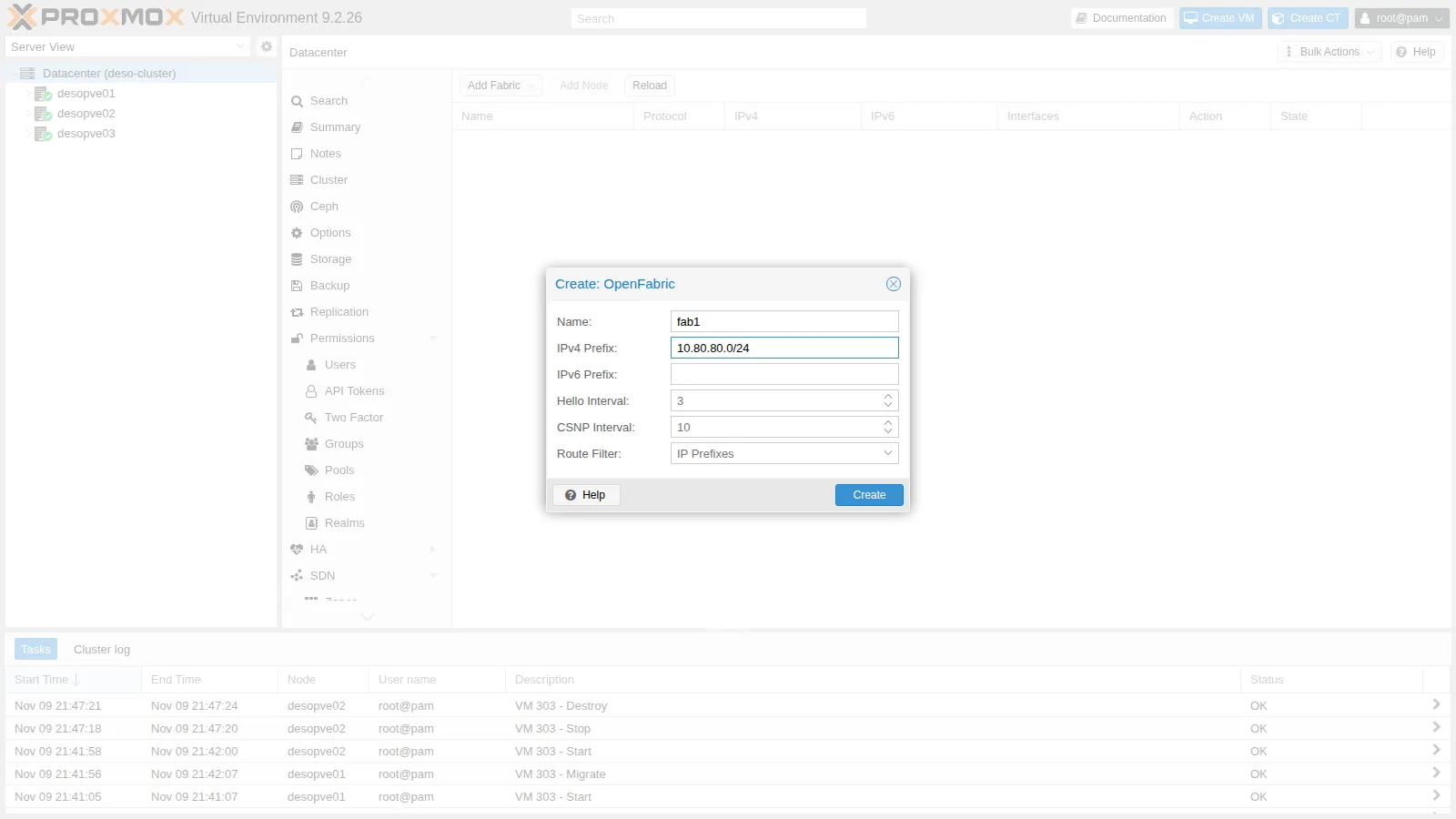
3. The fabric nodes
Section titled “3. The fabric nodes”-
With the fabric selected, Add Node: Node
desopve01, IPv410.80.80.1and, in the table, the two point-to-point interfacesvmbr1.81andvmbr1.82. Interfaces that already have an address configured are flagged with a warning: an unnumbered interface uses the node’s address.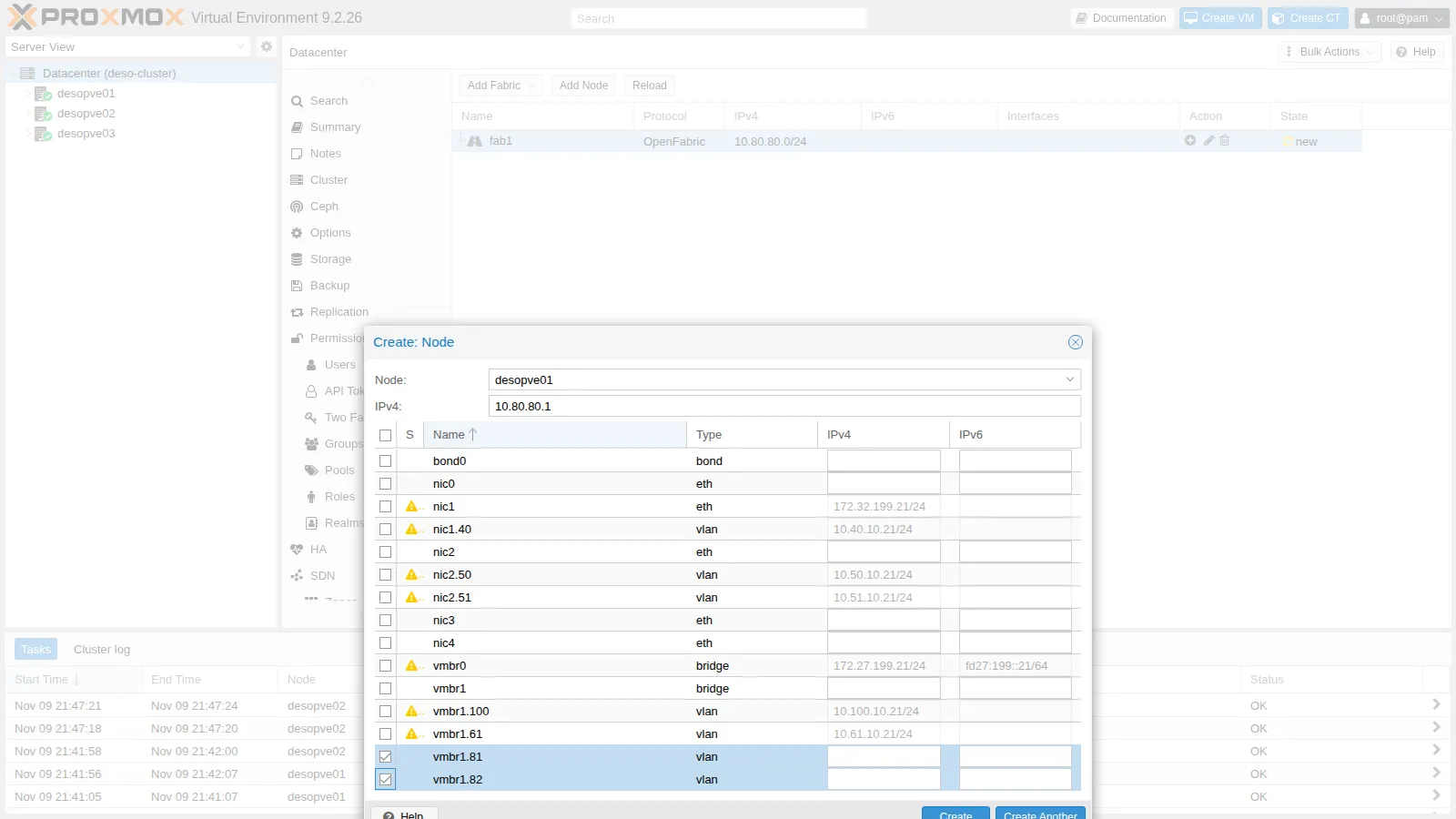
-
The other two nodes from the command line:
root@desopve01 pvesh create /cluster/sdn/fabrics/node/fab1 --node_id desopve02 --protocol openfabric \--ip 10.80.80.2 --interfaces name=vmbr1.81 --interfaces name=vmbr1.83pvesh create /cluster/sdn/fabrics/node/fab1 --node_id desopve03 --protocol openfabric \--ip 10.80.80.3 --interfaces name=vmbr1.82 --interfaces name=vmbr1.83cat /etc/pve/sdn/fabrics.cfgOutput openfabric_fabric: fab1ip_prefix 10.80.80.0/24openfabric_node: fab1_desopve01interfaces name=vmbr1.81interfaces name=vmbr1.82ip 10.80.80.1openfabric_node: fab1_desopve02interfaces name=vmbr1.81interfaces name=vmbr1.83ip 10.80.80.2openfabric_node: fab1_desopve03interfaces name=vmbr1.82interfaces name=vmbr1.83ip 10.80.80.3root@desopve01 pvesh set /cluster/sdn -
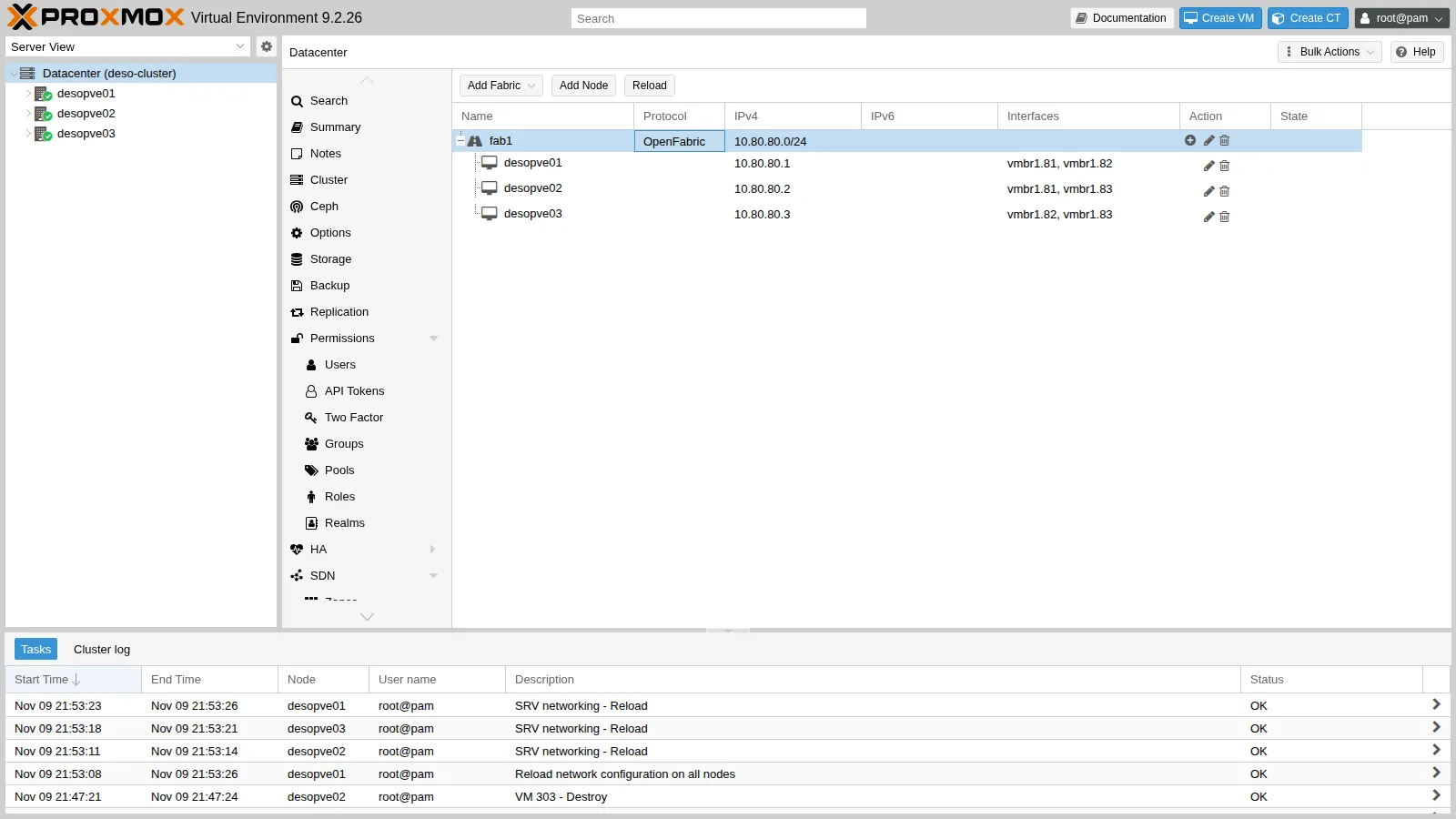
The fabric with the three nodes and their interfaces:
4. What the SDN generates
Section titled “4. What the SDN generates”-
The node address sits on a
dummy_fab1interface, the fabric loopback, and the same/32appears on the point-to-point interfaces:root@desopve01 ip -br -4 addr show dummy_fab1Output dummy_fab1 UNKNOWN 10.80.80.1/32root@desopve01 ip -br -4 addr show vmbr1.81Output vmbr1.81@vmbr1 UP 10.80.80.1/32 -
In FRR there is a
router openfabricinstance with the node identifier (NET) derived from the address. The loopback is passive: advertised, but without adjacencies. A route-map makes the node’s/32the source address for the fabric routes.# excerpt of /etc/frr/frr.conf on desopve01router openfabric fab1net 49.0001.0100.8008.0001.00exit!interface dummy_fab1ip router openfabric fab1openfabric passiveexit!interface vmbr1.81ip router openfabric fab1exit!interface vmbr1.82ip router openfabric fab1exit!access-list pve_openfabric_fab1_ips permit 10.80.80.0/24!route-map pve_openfabric permit 100match ip address pve_openfabric_fab1_ipsset src 10.80.80.1exit!ip protocol openfabric route-map pve_openfabric -
To act as a transit node, a node must forward packets. The SDN enables forwarding only on the fabric interfaces and leaves global forwarding off:
root@desopve02 sysctl -n net.ipv4.ip_forward net.ipv4.conf.vmbr1/81.forwarding net.ipv4.conf.vmbr1/83.forwardingOutput 011
5. Adjacencies, database and routes
Section titled “5. Adjacencies, database and routes”-
Each node sees its two neighbors. Holdtime is the time after which a silent neighbor is considered lost:
root@desopve01 vtysh -c "show openfabric neighbor"Output Area fab1:System Id Interface L State Holdtime SNPAdesopve02 vmbr1.81 2 Up 29 2020.2020.2020desopve03 vmbr1.82 2 Up 30 2020.2020.2020 -
The database contains the description (LSP) of each of the three nodes; from it, each node computes the best paths:
root@desopve01 vtysh -c "show openfabric database"Output Area fab1:IS-IS Level-2 link-state database:LSP ID PduLen SeqNumber Chksum Holdtime ATT/P/OLdesopve01.00-00 * 123 0x00000002 0x13b8 1183 0/0/0desopve02.00-00 123 0x00000002 0x7c48 1172 0/0/0desopve03.00-00 123 0x00000002 0xdae2 1128 0/0/03 LSPsroot@desopve01 ip route | grep 10.80.80Output 10.80.80.2 nhid 72 via 10.80.80.2 dev vmbr1.81 proto openfabric src 10.80.80.1 metric 20 onlink10.80.80.3 nhid 73 via 10.80.80.3 dev vmbr1.82 proto openfabric src 10.80.80.1 metric 20 onlink -
The node addresses are reached directly, in a single hop:
root@desopve01 ping -c3 -W1 -I 10.80.80.1 10.80.80.3Output 3 packets transmitted, 3 received, 0% packet loss, time 2065msroot@desopve01 traceroute -n -w1 -q1 -s 10.80.80.1 10.80.80.3Output 1 10.80.80.3 0.396 ms
6. Failures and reconvergence
Section titled “6. Failures and reconvergence”For each test, a ping every 100 ms from desopve01 (source 10.80.80.1) to desopve03 (10.80.80.3), in a second terminal: ping -i 0.1 -c 400 -q -I 10.80.80.1 10.80.80.3. Then bring down the VLAN 82 link between the two and bring it back up after a few tens of seconds with ip link set vmbr1.82 up, on the node (or nodes) where it was brought down.
-
One-sided failure, default timers. Bring down
vmbr1.82only ondesopve03, while ondesopve01it stays up:root@desopve03 ip link set vmbr1.82 downOutput 600 packets transmitted, 335 received, 44.1667% packet loss, time 61696ms265 pings are lost, about 26 seconds:
desopve01keeps sending towarddesopve03over VLAN 82 until the neighbor expires (holdtime of about 30 s). The same happens to the replies if you bring down the interface only ondesopve01: then it isdesopve03that does not notice. -
Tighter timers. The holdtime is a multiple of the hello interval. Setting the hello to 1 second in the fabric configuration brings the holdtime down to 10 s:
root@desopve01 pvesh set /cluster/sdn/fabrics/fabric/fab1 --protocol openfabric --hello_interval 1pvesh set /cluster/sdngrep -A3 "^interface vmbr1.81" /etc/frr/frr.confOutput interface vmbr1.81ip router openfabric fab1openfabric hello-interval 1exitroot@desopve01 vtysh -c "show openfabric neighbor" | grep UpOutput desopve02 vmbr1.81 2 Up 10 2020.2020.2020desopve03 vmbr1.82 2 Up 10 2020.2020.2020The same one-sided test:
400 packets transmitted, 338 received, +27 errors, 15.5% packet loss, time 53488msNow 62 pings are lost, about 6 seconds. The errors are the ICMP destination unreachable messages received in the meantime.
-
Link cut on both sides, as when a cable is really unplugged. Each node sees the interface go down and immediately recomputes the paths; after one second
desopve03is reached throughdesopve02:root@desopve01 ip link set vmbr1.82 downroot@desopve03 ip link set vmbr1.82 downroot@desopve01 ip route get 10.80.80.3Output 10.80.80.3 via 10.80.80.2 dev vmbr1.81 src 10.80.80.1 uid 0Output 400 packets transmitted, 384 received, 4% packet loss, time 40516ms16 pings lost: 1.6 seconds.
A first test of this kind, run right after recovering from another failure, had lost 9 seconds, with the route briefly ending up on the default gateway: the fabric had not settled yet. Repeat the measurements once the fabric is stable.
7. The fabric as the VXLAN underlay
Section titled “7. The fabric as the VXLAN underlay”-
The
vxzzone of lab 29 switches from the peer list on VLAN 61 to the fabric:root@desopve01 pvesh set /cluster/sdn/zones/vxz --fabric fab1 --delete peerspvesh set /cluster/sdn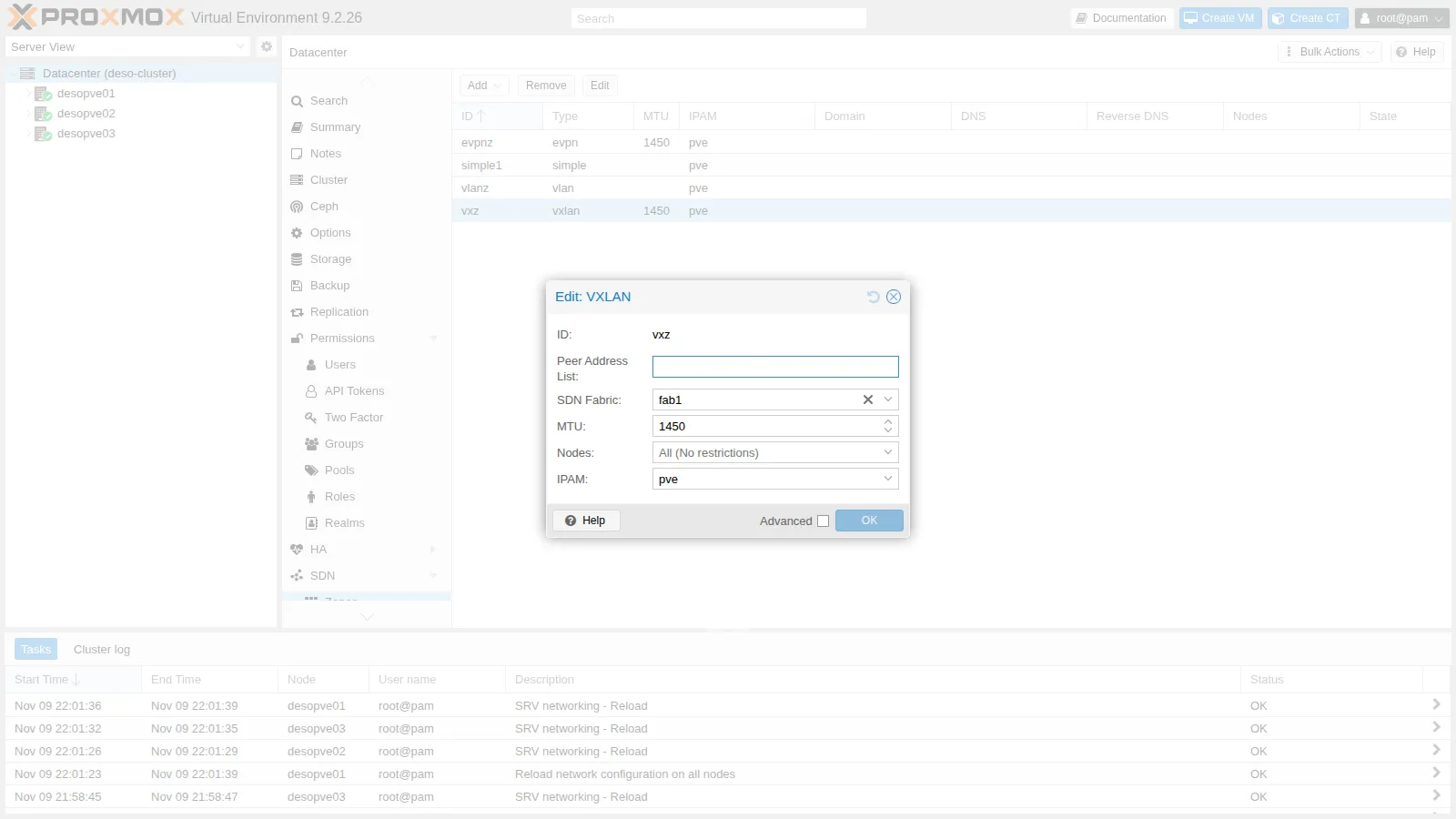
-
Now the tunnel starts from the fabric loopback and goes to those of the other nodes:
# excerpt of /etc/network/interfaces.d/sdn on desopve01auto vxlan_vnvx1iface vxlan_vnvx1vxlan-id 10062vxlan-local-tunnelip 10.80.80.1vxlan_remoteip 10.80.80.2vxlan_remoteip 10.80.80.3mtu 1450root@desopve01 pct exec 291 -- ping -c3 -W1 10.62.62.12Output 3 packets transmitted, 3 received, 0% packet loss, time 2056msroot@desopve01 tcpdump -lnni vmbr1.82 -c2 udp port 4789Output 22:02:00.587760 IP 10.80.80.1.47640 > 10.80.80.3.4789: VXLAN, flags [I] (0x08), vni 10062IP 10.62.62.11 > 10.62.62.12: ICMP echo request, id 382, seq 1, length 6422:02:00.588181 IP 10.80.80.3.48661 > 10.80.80.1.4789: VXLAN, flags [I] (0x08), vni 10062IP 10.62.62.12 > 10.62.62.11: ICMP echo reply, id 382, seq 1, length 64 -
With the 01-03 link cut on both sides, the tunnel between the two containers goes through
desopve02(visible onvmbr1.81) and the ping between the guests continues:root@desopve01 tcpdump -lnni vmbr1.81 -c2 "udp port 4789 and host 10.80.80.3"Output 22:02:17.378878 IP 10.80.80.1.47640 > 10.80.80.3.4789: VXLAN, flags [I] (0x08), vni 10062IP 10.62.62.11 > 10.62.62.12: ICMP echo request, id 383, seq 75, length 6422:02:17.380197 IP 10.80.80.3.48661 > 10.80.80.1.4789: VXLAN, flags [I] (0x08), vni 10062IP 10.62.62.12 > 10.62.62.11: ICMP echo reply, id 383, seq 75, length 64Output 250 packets transmitted, 246 received, 1.6% packet loss, time 25188ms4 pings were lost, 0.4 seconds, without touching anything in the guests or in the zone. After the test, bring the link back up on both nodes and check that all the neighbors are up again:
root@desopve01 ip link set vmbr1.82 uproot@desopve03 ip link set vmbr1.82 uproot@desopve01 vtysh -c "show openfabric neighbor" -
The EVPN controller also has the SDN Fabric field. In this lab it stays on the VLAN 61 peer list, so the
evpnzzone of lab 30 does not change.
8. What about Ceph?
Section titled “8. What about Ceph?”With a physical full mesh, the Proxmox VE guide Full Mesh Network for Ceph Server uses exactly this kind of fabric: the Ceph public and cluster networks become the fabric prefix, and each monitor and OSD uses the /32 of its node. If a cable breaks, Ceph keeps going through the third node. In this lab Ceph stays on VLANs 50 and 51 from lab 17: moving a Ceph network in use requires recreating the monitors, which is beyond the scope of this lab.
9. The rest of the network has not changed
Section titled “9. The rest of the network has not changed”ceph healthHEALTH_OKpvecm status | grep Quorate:Quorate: Yespct exec 121 -- ping -c2 -W1 10.10.10.1222 packets transmitted, 2 received, 0% packet loss, time 1001msping -c2 -W1 10.100.10.232 packets transmitted, 2 received, 0% packet loss, time 1004mspct exec 302 -- ping -c2 -W1 10.71.71.112 packets transmitted, 2 received, 0% packet loss, time 1044msVerification and tests
Section titled “Verification and tests”| Test | Hello | Lost pings (every 100 ms) |
|---|---|---|
| Link down on one side only | 3 s (default) | 265 of 600, about 26 s |
| Link down on one side only | 1 s | 62 of 400, about 6 s |
| Link cut on both sides | 1 s | 16 of 400, about 1.6 s |
| VXLAN over the fabric, link cut | 1 s | 4 of 250, about 0.4 s |
| Ceph, Corosync, guest VLANs, migration, EVPN | – | unchanged |
Final lab state
Section titled “Final lab state”- Point-to-point links on
vmbr1, without an address: VLAN 81 (01-02), 82 (01-03), 83 (02-03). - Fabric
fab1(OpenFabric, prefix 10.80.80.0/24, hello 1 s):desopve0110.80.80.1,desopve0210.80.80.2,desopve0310.80.80.3, on thedummy_fab1interfaces. - Zone
vxz: now uses thefab1fabric as the underlay, instead of the peer list. CT 291 and 292 unchanged. - Zone
evpnz: unchanged, with the controller on the VLAN 61 peers (vmbr1.61). - Backups of the node network configurations in
/root/interfaces.bak-lab31.
What you learned
Section titled “What you learned”- A fabric gives each node a
/32address and routes between the nodes over point-to-point links, finding alternative paths on its own. - Proxmox VE 9.2 creates OpenFabric, OSPF, BGP and WireGuard fabrics from the GUI and generates the interfaces, the FRR configuration and the forwarding settings.
- A failure seen by both ends recovers in about one second; one seen by only one end lasts as long as the holdtime, which you reduce by lowering the hello interval.
- VXLAN zones and EVPN controllers can use a fabric as the underlay, and the guest traffic inherits its redundancy.
- The full mesh for Ceph is a typical use of a fabric.