

Lab 14 – SMB/CIFS storage: authenticated share, permissions and comparison with NFS
Dependencies
Section titled “Dependencies”- Previous labs: Lab 12 for the NAS
desonaswith thedati/smbdataset (SMB preset) and the usersvc-pve, and Lab 13 for thenas-nfsstorage, which you will use in the comparison. - Cluster:
deso-clusterwith the three nodes (lab 06). Nodedesopve01has the Debian 13 ISO downloaded in lab 07; container 101 runs on nodedesopve02. - Network: the nodes reach
172.27.199.10on the lab LAN (TCP port 445). - Credentials:
root/<lab-password>on the nodes,truenas_admin/<lab-password>on the NAS,svc-pve/<lab-password>for SMB access → Appendix B.
Objectives
Section titled “Objectives”- An SMB share
pveon thedati/smbdataset, with the service usersvc-pvein full control, which the node can see withpvesm scan cifs. - The
nas-smbstorage mounted on every node, with the protocol version pinned to 3.11, the password in/etc/pve/priv/storage/and the mount options actually in effect read frommount. - The Debian ISO and a backup of container 101 on the share, visible from every node.
- The three typical problems reproduced and recognized by their messages: a wrong password, Unix permissions being ignored, and a stopped NAS with a
softmount. - A comparison with NFS in which every number states whether the writes were made stable with an
fsyncor not.
How it works
Section titled “How it works”SMB in Proxmox VE
Section titled “SMB in Proxmox VE”SMB (Server Message Block), also known as CIFS, is the Windows file-sharing protocol. As with NFS, Proxmox VE mounts the share on every node under /mnt/pve/<ID> and uses it as a shared file-based storage. Unlike NFS, access is authenticated: each node presents itself to the server with a user name and a password.
desonas (TrueNAS) desopve01 / 02 / 03 /mnt/dati/smb ── share "pve" ── SMB 3.1.1 ──▶ /mnt/pve/nas-smb user svc-pve ├── template/iso/ ISO images └── dump/ backups- The user’s password is stored in
/etc/pve/priv/storage/<ID>.pw. It lives in the cluster file system, so every node knows it, but theprivdirectory is readable only by root. - The server decides the permissions through its ACLs: on TrueNAS, the
svc-pveuser needs full control of the dataset. - The Linux client mounts the share with options that differ from NFS: Unix permissions do not exist (
nounix), and the mount issoft, an option Proxmox VE always sets for CIFS storages. If the server stops responding, operations fail with an error instead of waiting.
When to use SMB
Section titled “When to use SMB”| NFS | SMB/CIFS | |
|---|---|---|
| Authentication | by client IP address | user name and password (or AD domain) |
Unix permissions (owner, chmod) |
yes | no, with the options used here (nounix): the server decides them |
| Mount in Proxmox VE | hard by default |
always soft |
| With the NAS stopped, in labs 13 and 14 | processes wait, no errors | error after about 10 seconds |
| Typical use in Proxmox VE | VM disks, ISOs, backups | ISOs, templates and backups; a NAS already in use with Windows |
In this manual VM disks live on NFS, iSCSI (lab 15) or Ceph, and SMB is used for ISOs and backups. This lab does not put VM disks on SMB: what would happen can be inferred from Test 3, where writes fail after about ten seconds with the NAS stopped. For a virtual disk, that would mean I/O errors in the guest.
Alternative: authentication with Active Directory
Section titled “Alternative: authentication with Active Directory”In the lab the NAS uses a local user. In a company with Active Directory, TrueNAS can be joined to the domain (Credentials → Directory Services → Configure Active Directory: domain proxmox.community, an account with the right to join computers to the domain). This way:
- the service user becomes a domain account (for example
PROXMOX\svc-pve), managed and expired according to the domain rules; - in Proxmox VE the storage is configured with Username
svc-pveand DomainPROXMOX; - the ACLs of the share use domain users and groups.
Before joining the domain, the NAS needs correct DNS and time settings (lab 12): Kerberos rejects clock differences greater than 5 minutes.
Test environment and versions
Section titled “Test environment and versions”The tests in this lab were run in November 2026 (on 9 November, as the file names and logs show), with the configuration described below. With other versions, options or hardware, the same commands give different numbers and timings.
| Component | Configuration used |
|---|---|
| Proxmox VE | 9.2.26, kernel 7.0.14-28-pve (Lab 04); the tests run from node desopve01 |
| NAS | TrueNAS Community Edition 25.10.8 (Lab 12), datasets dati/smb (SMB preset) and dati/nfs on the same mirrored pool dati; a single network card (Lab 01) |
| SMB mount | SMB 3.1.1 (vers=3.1.1), cache=strict, soft, nounix, 4 MiB rsize and wsize (the mount output in step 3) |
| NFS mount | NFS 4.2, hard, 1 MiB rsize and wsize (Lab 13) |
| Network | management LAN 172.27.199.0/24, MTU 1500 (Lab 21) |
| Not recorded | the Samba version on the NAS and the sync property of the two datasets: read them on the NAS with smbd --version and zfs get sync dati/smb dati/nfs |
| Runs | fio from the node, a single 20-second run per case; heartbeat every 2 seconds |
What the test measures, and what it does not. fio on the node measures the kernel client (CIFS or NFS), the network and the NAS, with no VM involved. Each case was measured only once, for 20 seconds, so the result gives an order of magnitude, not a statistic. The three runs of Test 4 change several parameters at once (queue depth, I/O engine, fsync, block size), so compare NFS and SMB within a row, not across rows.
Procedure
Section titled “Procedure”1. The share on TrueNAS
Section titled “1. The share on TrueNAS”-
On the NAS: Shares → SMB → Add.
-
Purpose
Default Share, Path/mnt/dati/smb, Namepve, DescriptionStorage Proxmox VE (ISO e backup).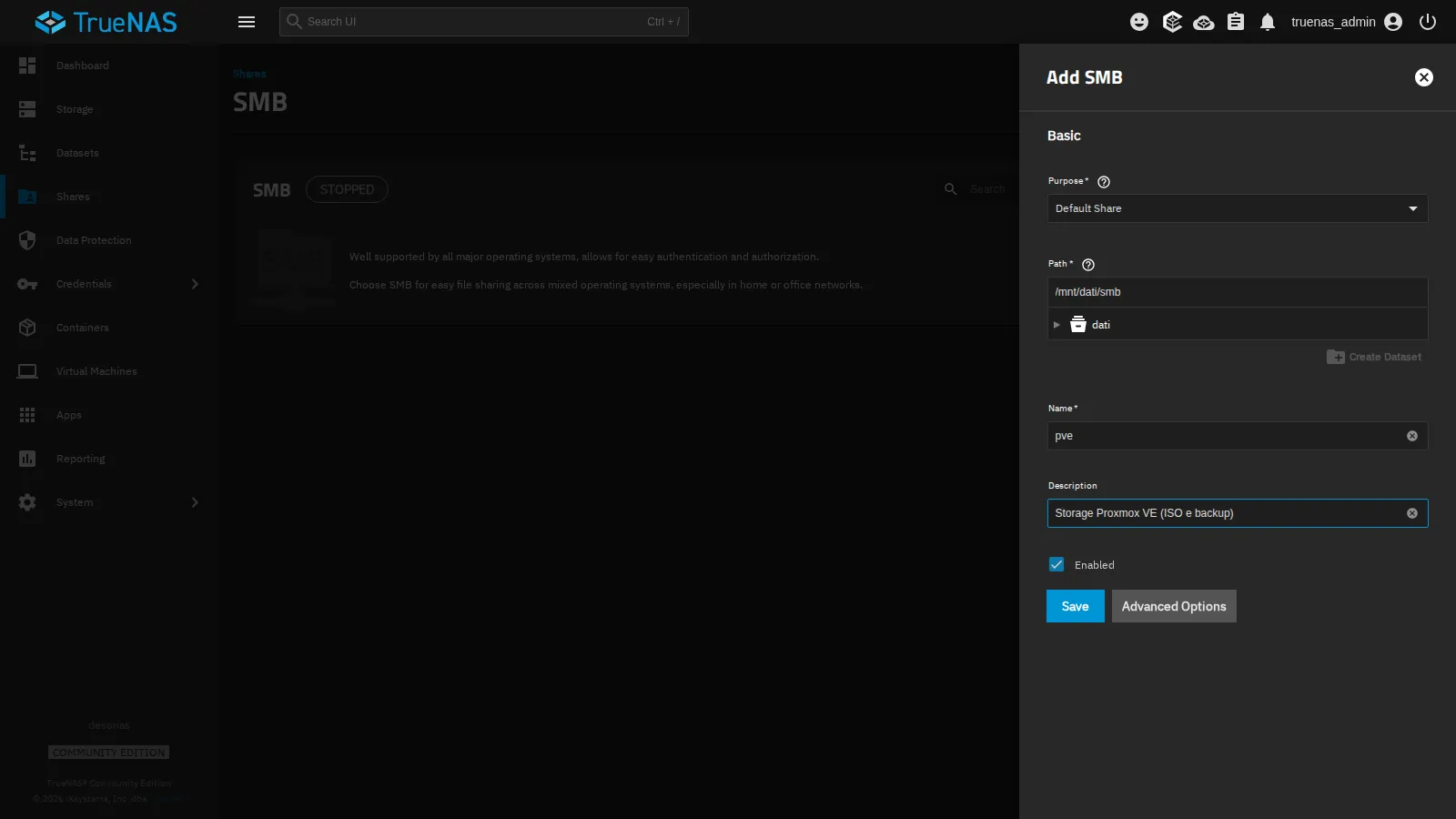
-
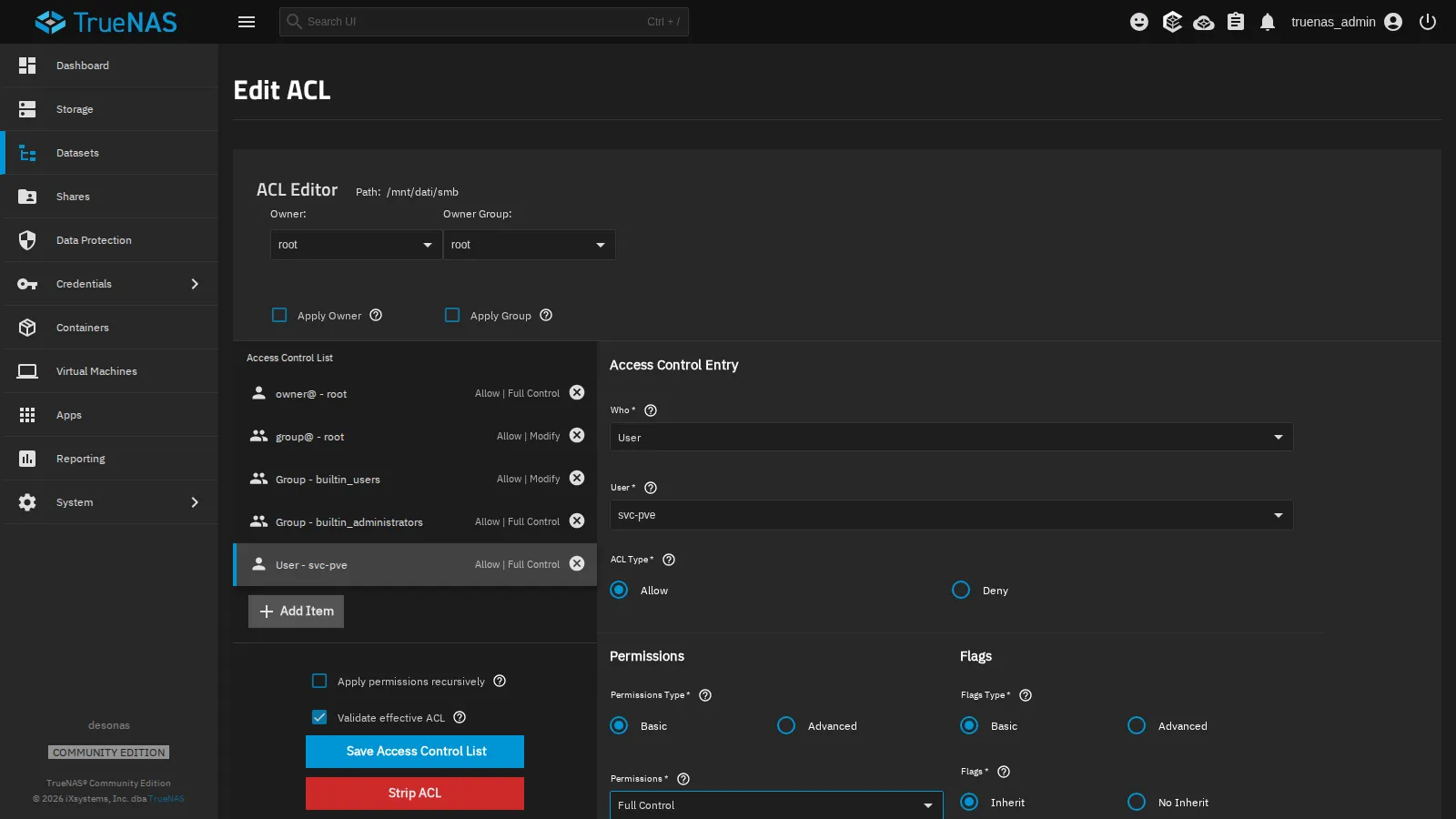
Save. TrueNAS asks Configure ACL: answer Configure to open the dataset permissions editor.
-
In the ACL editor click Add Item and create the entry:
- Who
User, Usersvc-pve; - ACL Type
Allow, PermissionsFull Control, FlagsInherit, so that it also applies to the directories and files that Proxmox VE will create.
- Who
-
Save Access Control List.
-
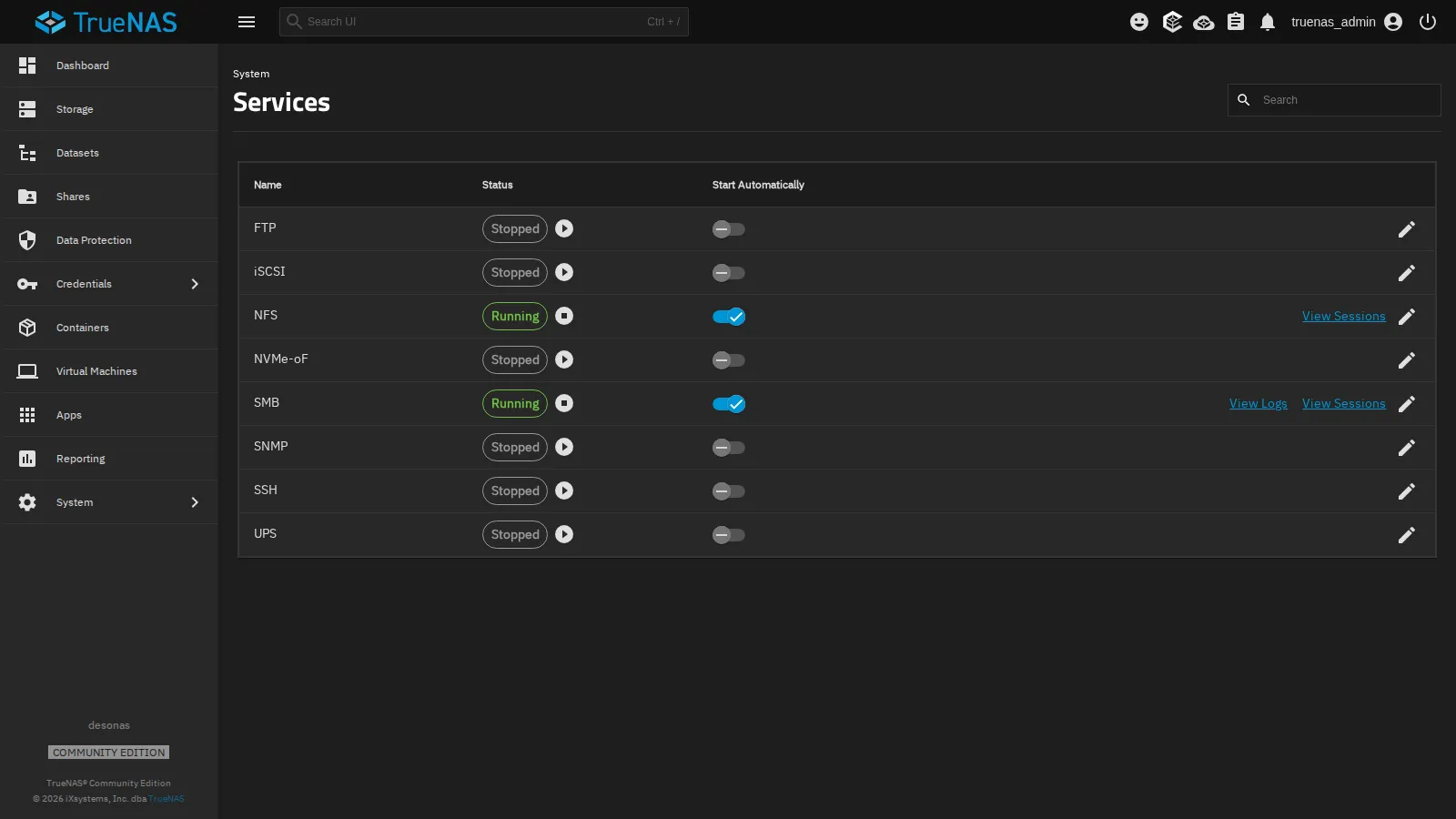
System → Services: enable Start Automatically for SMB and start the service.
From a node, check that the user can see the share:
pvesm scan cifs 172.27.199.10 --username svc-pve --password '<lab-password>'pve Storage2. Add the storage to the cluster
Section titled “2. Add the storage to the cluster”-
Datacenter → Storage → Add → SMB/CIFS.
-
Fill in:
- ID
nas-smb, Server172.27.199.10; - Username
svc-pveand Password: the Share drop-down fills with the shares the user can access; choosepve; - Content:
ISO imageandBackup(removeDisk image); - Nodes: all.
- ID
-
Check Advanced: leave Preallocation
Defaultand Allow Snapshots as Volume-Chain disabled.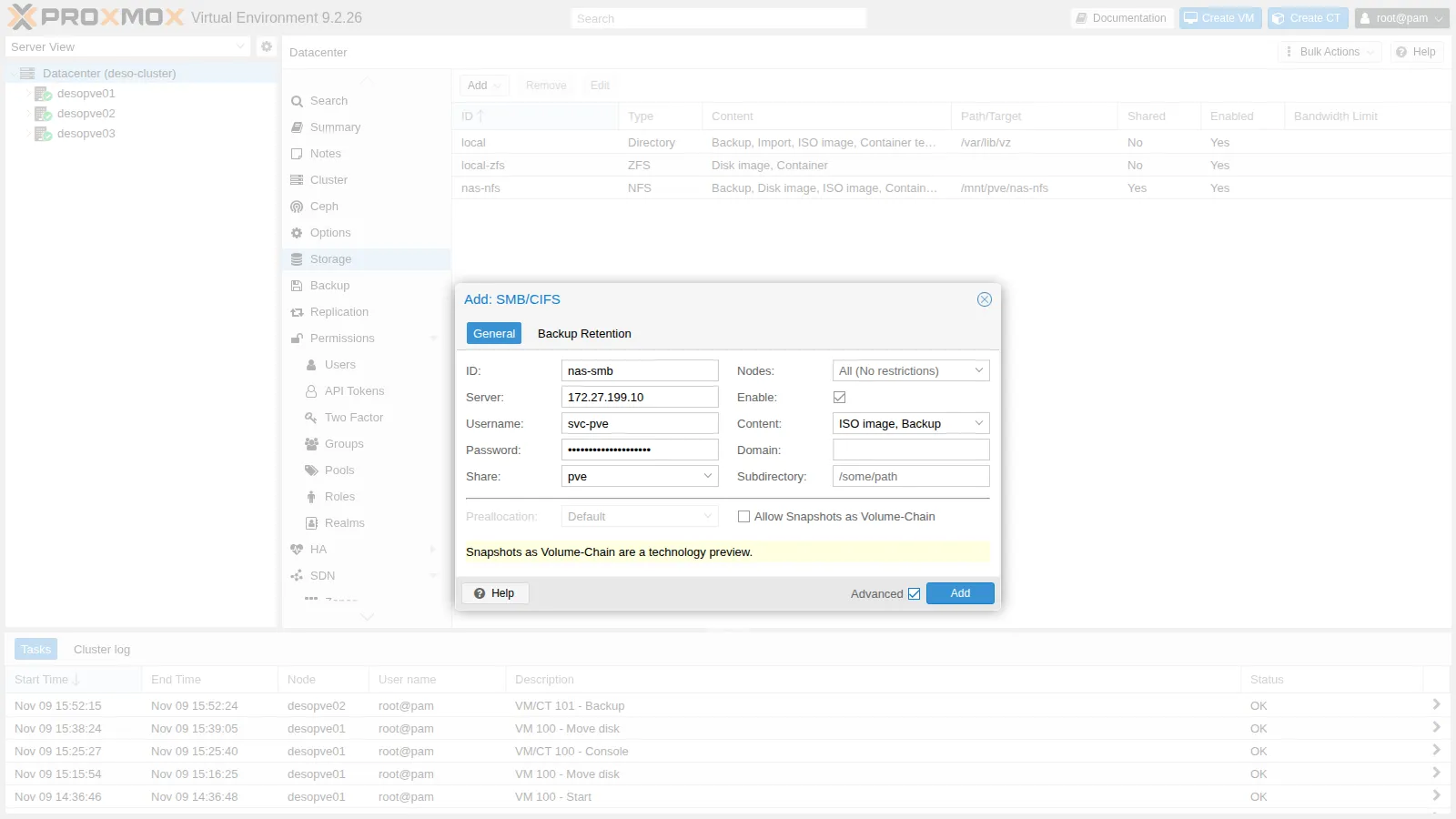
-
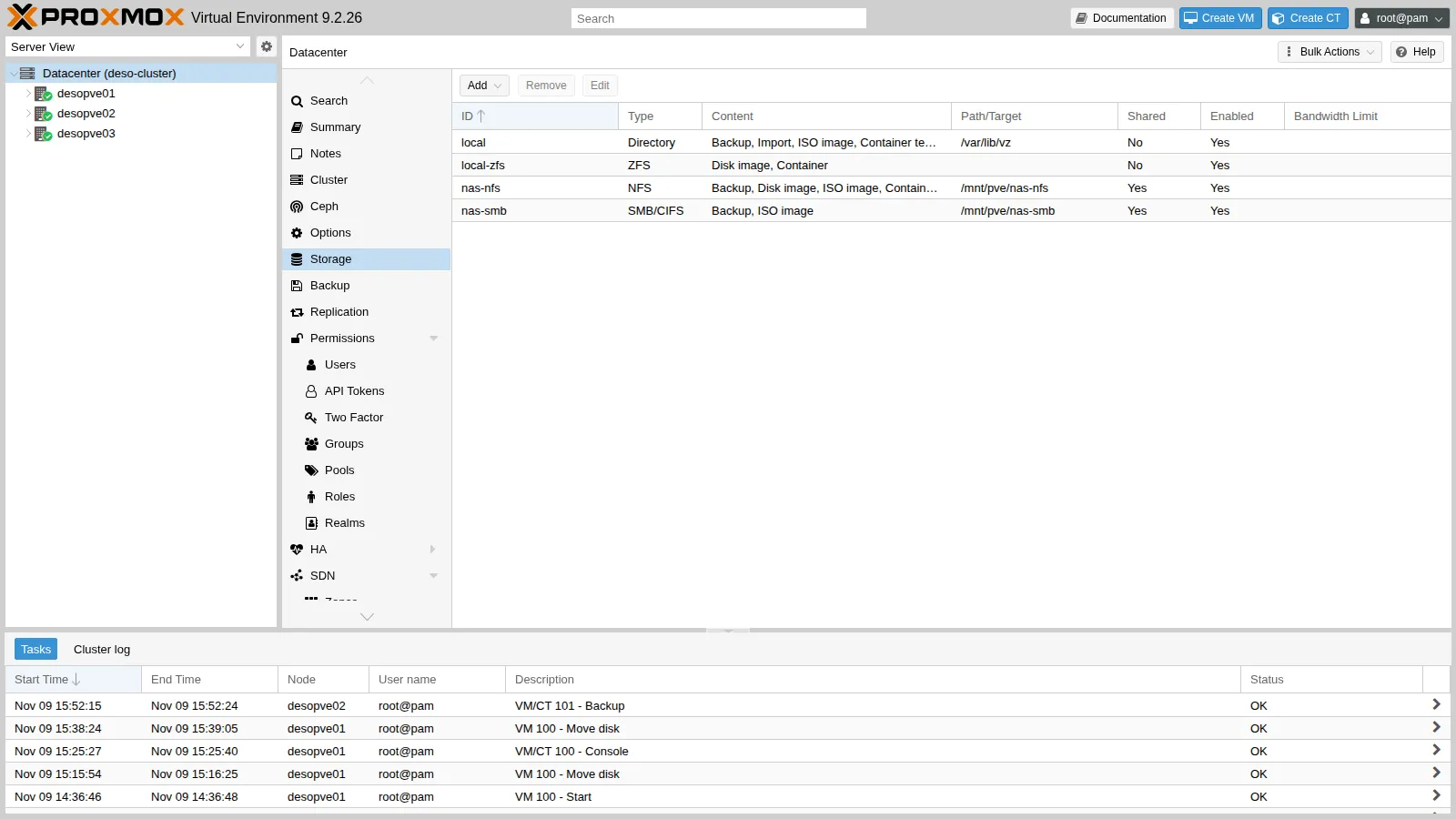
Add. The storage appears as shared and active:
3. Pin the SMB version
Section titled “3. Pin the SMB version”The dialog has no field for the protocol version. When none is set, the client negotiates the highest version from SMB2 upwards that both sides support (SMB1 is not supported). Pinning it makes the mount fail, instead of silently accepting an older version, when the server does not offer the one requested. It is set from the command line and takes effect at the next mount:
pvesm set nas-smb --smbversion 3.11umount /mnt/pve/nas-smb # on every node: pvestatd remounts it by itselfgrep -A8 "cifs: nas-smb" /etc/pve/storage.cfgcifs: nas-smb path /mnt/pve/nas-smb server 172.27.199.10 share pve content iso,backup prune-backups keep-all=1 smbversion 3.11 username svc-pvels -l /etc/pve/priv/storage/-rw------- 1 root www-data 30 Nov 9 15:49 nas-smb.pwmount | grep nas-smb//172.27.199.10/pve on /mnt/pve/nas-smb type cifs (rw,relatime,vers=3.1.1,cache=strict,upcall_target=app,username=svc-pve,uid=0,noforceuid,gid=0,noforcegid,addr=172.27.199.10,file_mode=0755,dir_mode=0755,soft,nounix,serverino,mapposix,reparse=nfs,nativesocket,symlink=native,rsize=4194304,wsize=4194304,bsize=1048576,echo_interval=60,actimeo=1,closetimeo=1)vers=3.1.1: this is SMB version 3.11, the most recent one.uid=0,gid=0,file_mode=0755: every file appears to belong to root, with fixed permissions, whoever owns it on the server.soft: operations fail if the server does not respond (you will see this in the tests).
4. Shared ISOs and backups
Section titled “4. Shared ISOs and backups”Copy the Debian ISO downloaded in lab 07 to the share and look at it from another node:
cp /var/lib/vz/template/iso/debian-13.7.0-amd64-netinst.iso /mnt/pve/nas-smb/template/iso/pvesm list nas-smbVolid Format Type Size VMIDnas-smb:iso/debian-13.7.0-amd64-netinst.iso iso iso 792723456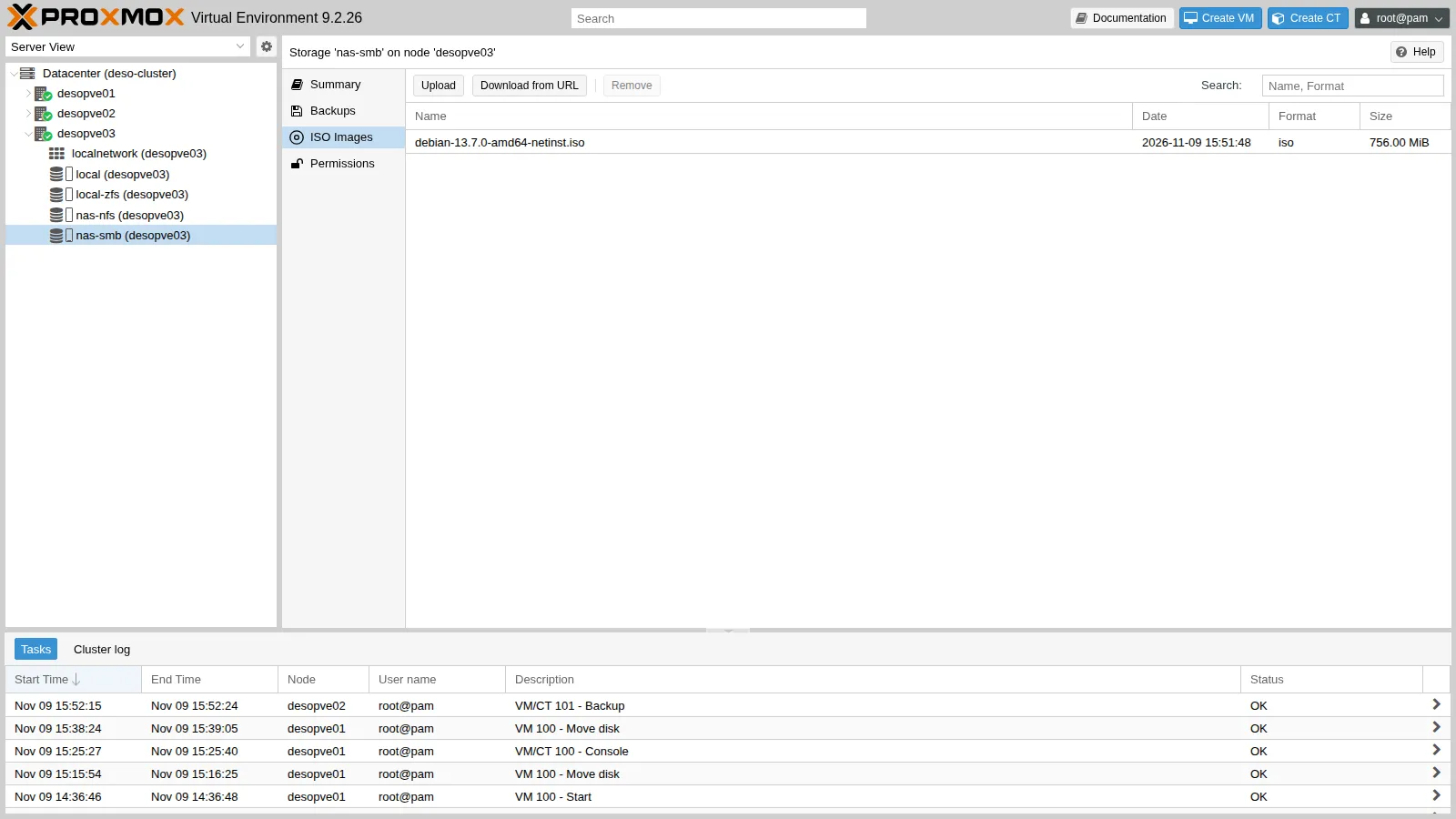
Back up container 101 to the share (backups are the topic of lab 46):
vzdump 101 --storage nas-smb --mode snapshot --compress zstdINFO: Starting Backup of VM 101 (lxc)INFO: creating vzdump archive '/mnt/pve/nas-smb/dump/vzdump-lxc-101-2026_11_09-15_52_15.tar.zst'INFO: Total bytes written: 706631680 (674MiB, 87MiB/s)INFO: archive file size: 203MBINFO: Finished Backup of VM 101 (00:00:09)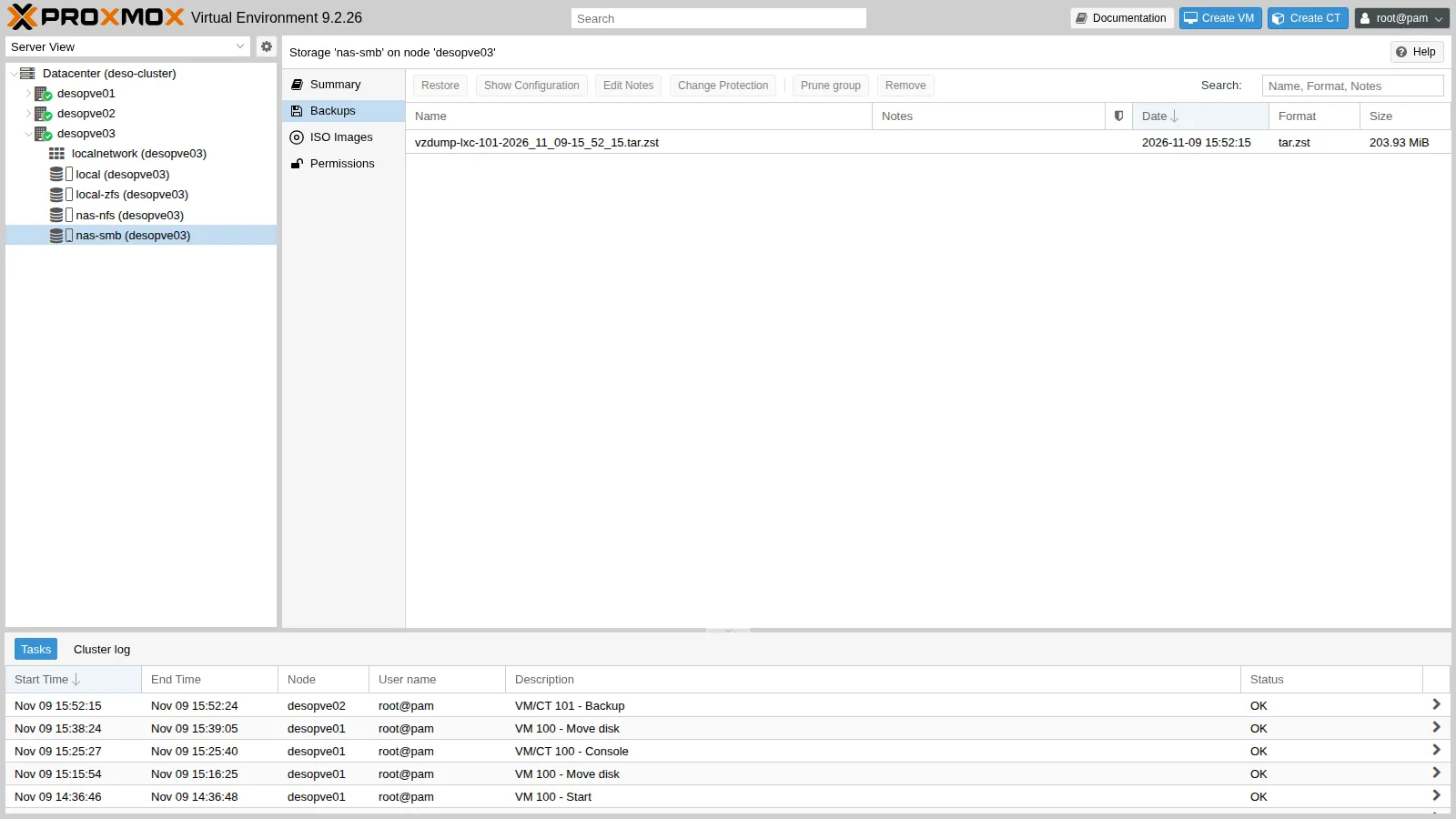
Verification and tests
Section titled “Verification and tests”Test 1 – Wrong credentials
Section titled “Test 1 – Wrong credentials”With a wrong password the server denies access. It is the same error you would see if the password of svc-pve changed on the NAS without the storage being updated:
pvesm scan cifs 172.27.199.10 --username svc-pve --password sbagliataunexpected status: NT_STATUS_ACCESS_DENIEDTo update the password: Datacenter → Storage → nas-smb → Edit, or pvesm set nas-smb --password.
Test 2 – Unix permissions do not exist
Section titled “Test 2 – Unix permissions do not exist”touch prova.txt; chmod 600 prova.txt; chown 1000:1000 prova.txt; echo $?0ls -l prova.txt-rwxr-xr-x 1 root root 0 Nov 9 15:51 prova.txtchmod and chown return no error but change nothing: with nounix the server decides the permissions through its ACLs, and the client shows the values fixed by the mount for every file (uid=0, gid=0, file_mode=0755). This is why the share should not hold files whose Unix owners and permissions matter, for example a directory mounted straight into a container.
Test 3 – The NAS stops responding
Section titled “Test 3 – The NAS stops responding”On node desopve01, start a “heartbeat” that writes the time to the share every 2 seconds and logs the outcome:
nohup sh -c 'while true; do if date +%T > /mnt/pve/nas-smb/battito.txt; then echo "$(date +%T) ok"; else echo "$(date +%T) ERRORE"; fi >> /root/smb-battito.log; sleep 2; done' >/dev/null 2>&1 &On the NAS, stop the SMB service (System → Services → SMB → Stop Service). The heartbeat logs the time at the end of each attempt:
tail -4 /root/smb-battito.log15:55:33 ok15:55:35 ok15:55:47 ERRORE15:55:59 ERROREBetween the last ok (15:55:35) and the first ERRORE (15:55:47) 12 seconds pass, 2 of which are the loop’s pause: the write hung for about 10 seconds before failing, and the next attempt did the same (15:55:59). A write by hand gets the error, and pvestatd marks the storage as inactive:
bash -c 'echo x > /mnt/pve/nas-smb/prova.txt'bash: line 1: /mnt/pve/nas-smb/prova.txt: Host is downpvesm status | grep nas-smbnas-smb cifs inactive 0 0 0 0.00%Compared with lab 13. With NFS mounted hard, processes kept waiting, without errors, until the server came back. Here, with the soft mount that Proxmox VE always uses for CIFS, the application gets an error (Host is down). The wait of about 10 seconds is what this combination showed (kernel 7.0.14-28-pve, TrueNAS 25.10.8); this test did not investigate which CIFS client timeouts produce it. For an ISO copy or a backup in progress it means a failed operation that has to be repeated; for a VM disk it would mean I/O errors in the guest operating system.
Restart the SMB service: the client reconnects by itself, with no action on the node, and the writes resume (the exact time of the restart was not recorded):
tail -3 /root/smb-battito.log15:57:38 ok15:57:40 ok15:57:42 okpvesm status | grep nas-smbnas-smb cifs active 100069248 977024 99092224 0.98%Stop the heartbeat and delete the test files:
pkill -f "^sh -c while true"; rm -f /mnt/pve/nas-smb/battito.txt /mnt/pve/nas-smb/prova.txt /root/smb-battito.logTest 4 – SMB versus NFS
Section titled “Test 4 – SMB versus NFS”From node desopve01, use fio to measure the same writes on the two NAS storages (same pool, same network). Each run lasts 20 seconds and is done once:
fio --name=t --directory=/mnt/pve/nas-smb --rw=randwrite --bs=4k --size=1G \ --iodepth=16 --ioengine=libaio --direct=1 --runtime=20 --time_based --group_reporting write: IOPS=5430, BW=21.2MiB/s (22.2MB/s)(425MiB/20017msec); 0 zone resetsfio --name=t --directory=/mnt/pve/nas-nfs --rw=randwrite --bs=4k --size=1G \ --iodepth=16 --ioengine=libaio --direct=1 --runtime=20 --time_based --group_reporting write: IOPS=962, BW=3851KiB/s (3943kB/s)(75.9MiB/20179msec); 0 zone resetsWith these options SMB delivers 5.6 times the IOPS of NFS. Repeat the test, this time asking for every write to be made stable before the next one (--fsync=1, as a database does):
fio --name=t --directory=/mnt/pve/nas-smb --rw=randwrite --bs=4k --size=1G \ --iodepth=1 --ioengine=psync --direct=1 --fsync=1 --runtime=20 --time_based write: IOPS=185, BW=741KiB/s (759kB/s)(14.9MiB/20557msec); 0 zone resetsfio --name=t --directory=/mnt/pve/nas-nfs --rw=randwrite --bs=4k --size=1G \ --iodepth=1 --ioengine=psync --direct=1 --fsync=1 --runtime=20 --time_based write: IOPS=339, BW=1358KiB/s (1391kB/s)(26.5MiB/20001msec); 0 zone resetsFinally, sequential writes in 1 MiB blocks, typical of ISOs and backups:
fio --name=t --directory=/mnt/pve/nas-smb --rw=write --bs=1M --size=1G \ --iodepth=4 --ioengine=libaio --direct=1 --runtime=20 --time_based --group_reporting write: IOPS=688, BW=688MiB/s (722MB/s)(13.6GiB/20292msec); 0 zone resetsfio --name=t --directory=/mnt/pve/nas-nfs --rw=write --bs=1M --size=1G \ --iodepth=4 --ioengine=libaio --direct=1 --runtime=20 --time_based --group_reporting write: IOPS=33, BW=33.3MiB/s (34.9MB/s)(673MiB/20201msec); 0 zone resetsDelete the test files created by fio:
rm -f /mnt/pve/nas-smb/t.0.0 /mnt/pve/nas-nfs/t.0.0Test (from the node, fio, 20 s, one run) |
NFS | SMB |
|---|---|---|
4 KiB random write, queue depth 16, libaio, no fsync |
962 IOPS | 5,430 IOPS |
1 MiB sequential write, queue depth 4, libaio, no fsync |
33 MiB/s | 688 MiB/s |
4 KiB random write, queue depth 1, psync, fsync after every write |
339 IOPS | 185 IOPS |
Each point below separates what the test measured from how we interpret it, and names the check that would confirm the interpretation.
- Writes without
fsync.- Measured: for 4 KiB random writes SMB reaches 5,430 IOPS against 962 for NFS (5.6 times); for 1 MiB sequential writes, 688 MiB/s against 33.3 (about 20 times).
- Interpretation: the gap is consistent with the two protocols acknowledging writes at different moments. Over NFS, the NAS would acknowledge direct writes only once they are stable, through the ZFS ZIL. Over SMB, the NAS could acknowledge them as soon as they are in RAM and write them to disk later, unless the client explicitly asks for a flush (
fsync). The test does not prove it, because it does not observe the NAS. - How to check: on the NAS, read the ZIL counters (
cat /proc/spl/kstat/zfs/zil) before and after each run. If the interpretation is right,zil_commit_countgrows a lot during the NFS run and little during the SMB run withoutfsync.zfs get sync dati/smb dati/nfsshows how the two datasets handle synchronous writes.
- Writes with an
fsyncafter each one.- Measured: SMB 185 IOPS, NFS 339.
- Interpretation: when every write has to become stable before the next one, SMB is no faster than NFS, and in this run it is slower. That fits point 1: without
fsync, SMB’s advantage would come from not waiting for the stable write. - How to check: the same ZIL counters, which in this run should grow in a similar way for both protocols.
- The consequence, if the interpretation is confirmed. If the NAS lost power suddenly, the last SMB writes already acknowledged but not yet stable would be lost; with NFS they would not.
For ISOs and backups the speed of SMB is an advantage, as long as you can repeat a failed operation (Test 3) and you check your backups with a test restore (lab 46). For VM disks, which rely on acknowledged writes, the soft mount and the acknowledgment before the write is stable, if the check confirms it, are two additional risks.
Summary of the checks
Section titled “Summary of the checks”| Check | Expected result | Observed in this run |
|---|---|---|
| Share and ACL | svc-pve sees the pve share |
pvesm scan cifs: pve Storage |
| Mount | SMB 3.1.1 on all nodes, password in /etc/pve/priv/storage/ |
vers=3.1.1, soft, nounix; nas-smb.pw readable only by root |
| Shared content | ISO and backup visible from every node | ISO listed from desopve03; backup of CT 101 written from desopve02 |
| Wrong password | access denied | NT_STATUS_ACCESS_DENIED |
| Unix permissions | chmod and chown have no effect and return no error |
-rwxr-xr-x 1 root root after chmod 600 and chown 1000:1000 |
| NAS stopped | errors instead of waiting; recovery on its own when the service returns | ERRORE after about 10 s, Host is down, storage inactive; ok and active again after the restart |
| Comparison with NFS | NFS and SMB compared with the same fsync behavior |
without fsync SMB at 5.6 and 20 times NFS; with fsync SMB 185 IOPS, NFS 339 |
Final lab state
Section titled “Final lab state”- NAS: SMB share
pveon/mnt/dati/smb; ACL withsvc-pveset toFull Control(inherited); SMB service running and set to start automatically. NFS unchanged. - Cluster: storage
nas-smb(CIFS,//172.27.199.10/pve, usersvc-pve,smbversion 3.11, contentiso,backup, shared, on all nodes), mounted at/mnt/pve/nas-smb. It contains:- the ISO
debian-13.7.0-amd64-netinst.iso; - the backup
vzdump-lxc-101-2026_11_09-15_52_15.tar.zstof container 101.
- the ISO
- Storage
nas-nfsunchanged and empty. VM 100 running ondesopve01(disk onlocal-zfs), CT 101 running ondesopve02.
What you learned
Section titled “What you learned”- Where to use SMB storage: for ISOs, templates and backups, especially when the NAS already serves Windows clients. Not for VM disks: Proxmox VE always mounts it
soft(Test 3), and withoutfsyncwrites may be acknowledged before they are stable (Test 4, still to be verified). - How to set it up in a controlled way: a dedicated service user with ACLs on the dataset, the protocol version pinned with
pvesm set <ID> --smbversion, and the password in/etc/pve/priv/storage/, to be updated there if it changes on the NAS. - How to recognize the typical failures by their message:
NT_STATUS_ACCESS_DENIEDfor credentials,chmodandchownwith no effect for permissions decided by the server,Host is downfor an unreachable server with asoftmount. - How to compare two storages: with the same write guarantees (with and without
fsync), stating the queue depth, I/O engine and duration of each run, and repeating the runs before drawing conclusions.