

Lab 42 – Hotplug, live resize, CPU weight and cap, pressure (PSI)
Dependencies
Section titled “Dependencies”- Previous labs:
- Node:
desopve04, the standalone node with 4 CPUs: the contention tests saturate the node, so they are not run on the cluster nodes with Ceph. - Storage:
local-lvmondesopve04. - Addresses: VM 145 on 172.27.199.145, VMs 146 and 147 on .146 and .147.
- Credentials: the VMs’
labuseruser with the SSH key of the node’sroot→ Appendix B.
Objectives
Section titled “Objectives”- Add and remove CPUs, memory, disks and network devices live, and verify what the guest sees.
- Grow a disk without shutting down the VM, all the way up to the filesystem.
- Share the CPU among competing VMs with the weight (
cpuunits) and the cap (cpulimit), measuring the result. - Read the pressure (Pressure Stall Information) of nodes and VMs in the Proxmox VE 9 GUI.
How it works
Section titled “How it works”Hotplug. The Hotplug option of a VM tells Proxmox VE which components it can plug and unplug while the VM is running. The default is disk,network,usb. CPU and memory must be added explicitly and have some requirements:
| Component | Requirements | What happens in the guest |
|---|---|---|
| Disk | SCSI or VirtIO controller | the disk appears as a new device |
| Network device | none | a new interface appears, to be configured |
| CPU | vcpus lower than sockets × cores |
the new processors arrive offline: a udev rule is needed to bring them online |
| Memory | numa: 1 |
beyond the first 1024 MiB, memory arrives in 512 MiB DIMM modules (dimm0, dimm1…); the kernel sees it in 128 MiB blocks and brings it online |
cores and vcpus. cores is the maximum number of processors the VM can have; vcpus is how many it uses at startup. The difference is the room for hotplug.
CPU weight and cap. Each VM is a cgroup v2 in /sys/fs/cgroup/qemu.slice/<VMID>.scope:
cpuunitsbecomescpu.weight(default 100): it matters only when the node’s CPU is contended, and it splits the CPU in proportion to the weights;cpulimitbecomescpu.max: a hard cap in “cores”, applied even when the node is idle.
PSI. The kernel’s Pressure Stall Information measures the percentage of time in which processes wait for a resource (CPU, I/O, memory): some = at least one process waiting, full = all of them waiting. Proxmox VE 9 collects it per node and per guest and shows it in the Summary graphs.
Procedure
Section titled “Procedure”1. The test VM
Section titled “1. The test VM”A VM from the cloud image, with a maximum of 4 cores but 2 active, NUMA enabled, and CPU and memory hotplug:
qm create 145 --name hotplug01 --ostype l26 --memory 2048 --cores 4 --vcpus 2 --numa 1 --cpu x86-64-v2-AES \ --scsihw virtio-scsi-single \ --scsi0 local-lvm:0,import-from=local:import/debian-13-genericcloud-amd64.qcow2,discard=on,iothread=1 \ --ide2 local-lvm:cloudinit --boot order=scsi0 --serial0 socket --vga serial0 \ --net0 virtio,bridge=vmbr0 --agent enabled=1 --hotplug disk,network,usb,cpu,memoryqm resize 145 scsi0 6Gqm set 145 --ciuser labuser --sshkeys /root/.ssh/id_rsa.pub \ --ipconfig0 ip=172.27.199.145/24,gw=172.27.199.1 --nameserver 172.27.199.20 --searchdomain proxmox.community --ciupgrade 0qm start 145After the first boot, from the node, configure the apt proxy in the guest and install the agent and stress-ng (the cloud image does not include them):
ssh [email protected] "echo 'Acquire::http::Proxy \"http://proxy.proxmox.community:3128\";' | sudo tee /etc/apt/apt.conf.d/80proxy \ && sudo apt-get update && sudo apt-get install -y qemu-guest-agent stress-ng && sudo systemctl start qemu-guest-agent"qm agent 145 ping && echo agent-okFrom here on, the checks in the guest are run from the node with qm guest exec 145 -- <command>.
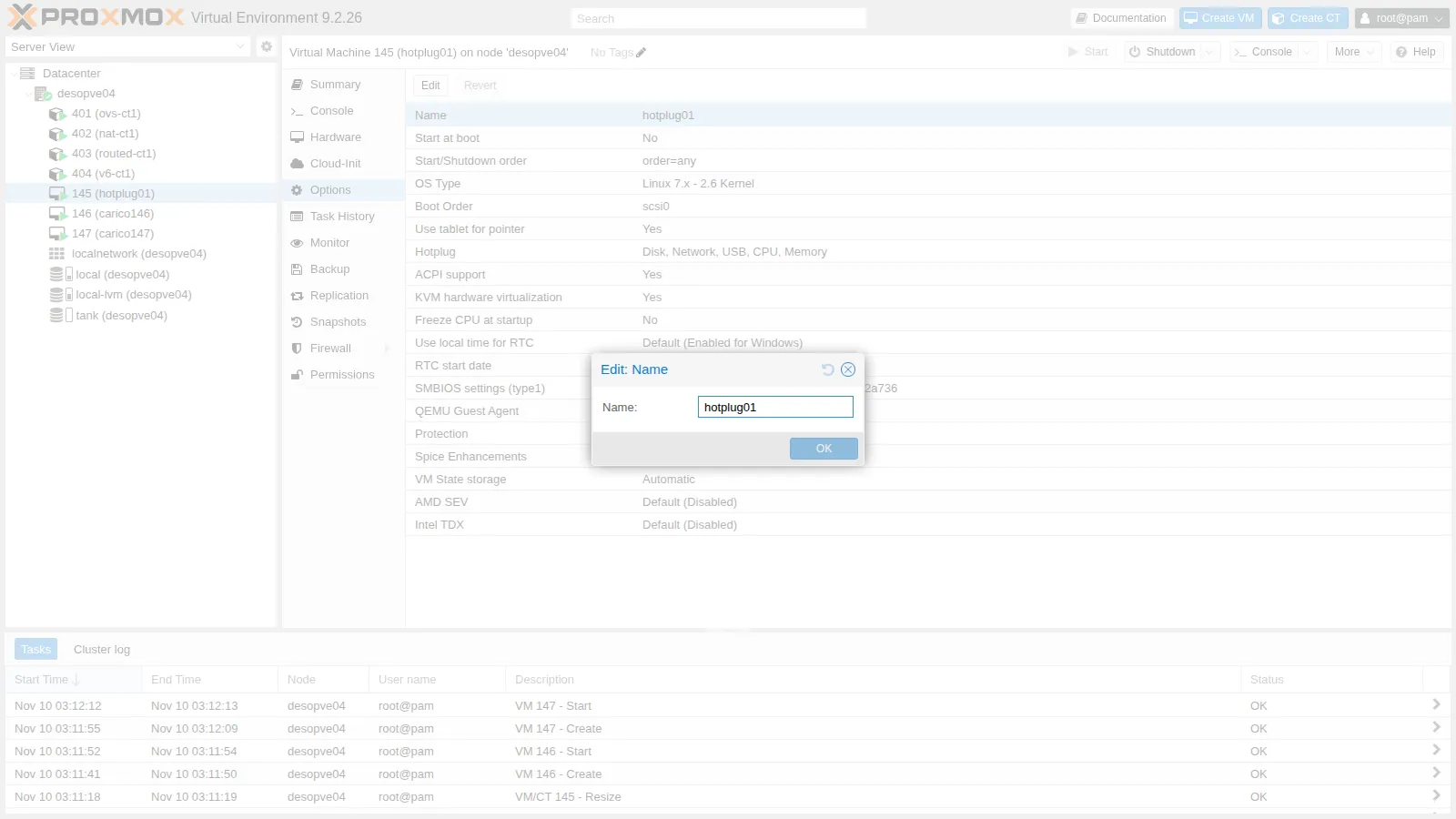
The same option from the GUI: Options → Hotplug:
The initial state in the guest:
nproc: 2/sys/devices/system/cpu/online: 0-1Mem: 1926 338 1089 0 708 1588Memory block size: 134217728Total online memory: 2147483648sda 6G disketh0 UP <BROADCAST,MULTICAST,UP,LOWER_UP>2. CPU hotplug
Section titled “2. CPU hotplug”qm set 145 --vcpus 4qm guest exec 145 -- bash -c 'nproc; cat /sys/devices/system/cpu/online; dmesg | grep hot-added'20-1[ 137.463337] ACPI: CPU2 has been hot-added[ 137.465248] ACPI: CPU3 has been hot-addedThe kernel has received the two processors, but leaves them offline: nproc stays at 2. The udev rule that brings them online as soon as they arrive, in the guest:
echo 'SUBSYSTEM=="cpu", ACTION=="add", TEST=="online", ATTR{online}=="0", ATTR{online}="1"' \ > /etc/udev/rules.d/80-hotplug-cpu.rulesudevadm control --reloadAfter removing and re-adding the processors:
qm set 145 --vcpus 2 # back to 2qm set 145 --vcpus 4nproc: 4/sys/devices/system/cpu/online: 0-3And the hot unplug:
qm set 145 --vcpus 2nproc: 2/sys/devices/system/cpu/online: 0-13. Memory hotplug
Section titled “3. Memory hotplug”qm set 145 --memory 4096qm guest exec 145 -- bash -c 'free -m | sed -n 2p; lsmem --summary=only'Mem: 3974 368 3122 0 708 3606Memory block size: 128MTotal online memory: 4GTotal offline memory: 0BThe extra 2 GiB arrive as DIMM modules and the Debian 13 kernel brings them online on its own: no rule needed. The VM monitor (qm monitor 145, command info memory-devices) shows six modules, from dimm0 to dimm5, each of 536870912 bytes: with hotplug, Proxmox VE keeps 1024 MiB static and adds 512 MiB DIMMs (1024 MiB with 1 GiB hugepages). The 128 MiB of lsmem, on the other hand, are the blocks the kernel uses to manage memory. Shrinking also works, because the added memory is free:
qm set 145 --memory 2048update VM 145: -memory 2048try to unplug memory dimm dimm5try to unplug memory dimm dimm4try to unplug memory dimm dimm3try to unplug memory dimm dimm2Mem: 1926 301 1126 0 708 1624The four added modules are removed in reverse order.
Removal works only if the guest manages to free the modules to be removed: with memory full of unmovable data, the kernel refuses the unplug.
4. Disk and network device hotplug
Section titled “4. Disk and network device hotplug”qm set 145 --scsi1 local-lvm:4,iothread=1,discard=onqm guest exec 145 -- bash -c 'lsblk -dno NAME,SIZE,TYPE; ls -l /dev/disk/by-id/ | grep drive-scsi1'WARNING: Sum of all thin volume sizes (26.00 GiB) exceeds the size of thin pool pve/data and the amount of free space in volume group (<6.13 GiB).scsi1: successfully created disk 'local-lvm:vm-145-disk-1,discard=on,iothread=1,size=4G'sda 6G disksdb 4G diskscsi-0QEMU_QEMU_HARDDISK_drive-scsi1 -> ../../sdbThe disk appears as sdb; the link in /dev/disk/by-id carries the Proxmox drive name (drive-scsi1), and it is the safe way to identify it (Lab 37). The LVM warning is a reminder of the thin pool overprovisioning seen in Lab 09.
qm set 145 --net1 virtio,bridge=vmbr0qm guest exec 145 -- ip -br linketh0 UP <BROADCAST,MULTICAST,UP,LOWER_UP>ens19 DOWN <BROADCAST,MULTICAST>The network device arrives down and without an address: it must be configured in the guest.
Hot unplug:
qm set 145 --delete net1qm set 145 --delete scsi1qm config 145 | grep unusedunused0: local-lvm:vm-145-disk-1The network device disappears; the disk is detached from the guest but not deleted: it becomes unused0, with its data intact. To really delete it:
qm disk unlink 145 --idlist unused0 --forceLogical volume "vm-145-disk-1" successfully removed.5. Growing the disk live
Section titled “5. Growing the disk live”Before:
sda 6G├─sda1 5.9G├─sda14 3M└─sda15 124M/dev/sda1 5.8G 1.2G 4.4G 21% /qm resize 145 scsi0 +4GThe guest immediately sees the larger disk, but the partition and the filesystem remain as before:
sda 10G├─sda1 5.9GIn the guest:
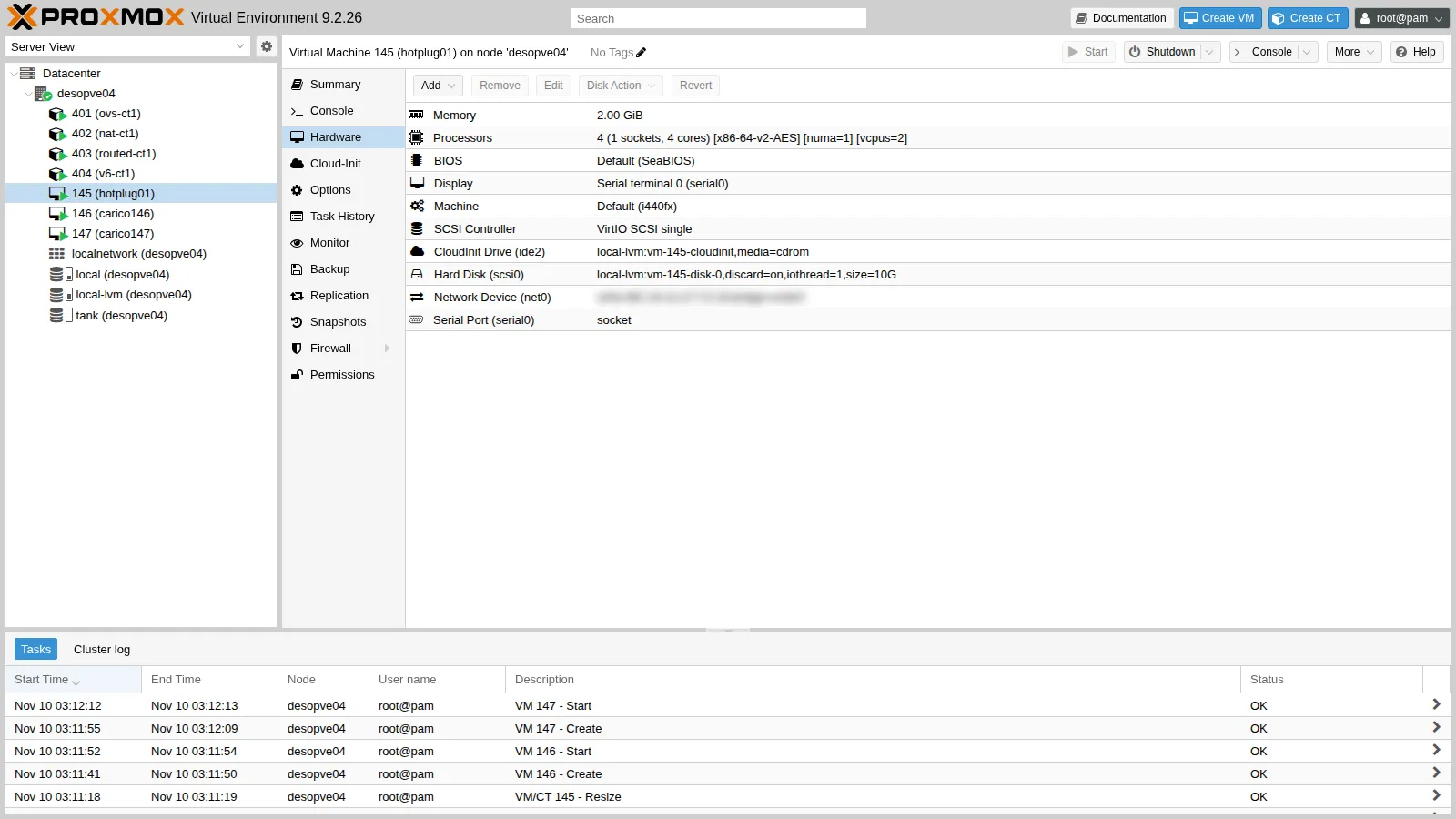
growpart /dev/sda 1resize2fs /dev/sda1df -h /CHANGED: partition=1 start=262144 old: size=12320735 end=12582878 new: size=20709343 end=20971486/dev/sda1 9.7G 1.2G 8.2G 13% /Three layers: the disk (Proxmox VE), the partition (growpart), the filesystem (resize2fs for ext4, xfs_growfs for XFS). Shrinking a disk, on the other hand, is not possible with qm resize. The same command is available in the GUI: Hardware → disk → Disk Action → Resize.
6. CPU weight and cap under contention
Section titled “6. CPU weight and cap under contention”Two identical VMs, 146 and 147, with 4 cores each on the same 4-CPU node, created like 145 but without vcpus and without hotplug:
for v in 146 147; do qm create $v --name contesa$v --ostype l26 --memory 2048 --cores 4 --cpu x86-64-v2-AES --scsihw virtio-scsi-single \ --scsi0 local-lvm:0,import-from=local:import/debian-13-genericcloud-amd64.qcow2,discard=on,iothread=1 \ --ide2 local-lvm:cloudinit --boot order=scsi0 --serial0 socket --vga serial0 --net0 virtio,bridge=vmbr0 --agent enabled=1 qm set $v --ciuser labuser --sshkeys /root/.ssh/id_rsa.pub --ipconfig0 ip=172.27.199.$v/24,gw=172.27.199.1 \ --nameserver 172.27.199.20 --searchdomain proxmox.community --ciupgrade 0 qm start $vdoneInstall the agent and stress-ng in both, as in 145. The load is stress-ng --cpu 4 in both: the demand is 8 cores out of 4 available. The script contesa.sh, on the node, measures the CPU time of each cgroup for 30 seconds (usage_usec in cpu.stat), shows weight and cap and reads the pressure (PSI). Each test:
for v in 146 147; do ssh [email protected].$v "nohup stress-ng --cpu 4 --timeout 60s >/dev/null 2>&1 &"; donesleep 15; ./contesa.sh 146 147 30A. Equal weights (default).
VM 146: 1.97 core VM 147: 1.95 core totale 3.93 core rapporto 147/146 = 0.99cpu.weight 146=100 cpu.max 146=max 100000cpu.weight 147=100 cpu.max 147=max 100000PSI cpu some avg10: VM 146 61.38 % VM 147 63.20 % nodo 95.26 %B. cpuunits 100 and 300.
qm set 146 --cpuunits 100qm set 147 --cpuunits 300VM 146: 1.01 core VM 147: 2.93 core totale 3.94 core rapporto 147/146 = 2.91cpu.weight 146=100 cpu.max 146=max 100000cpu.weight 147=300 cpu.max 147=max 100000PSI cpu some avg10: VM 146 71.53 % VM 147 27.25 % nodo 95.00 %The CPU is split 1:3, like the weights. The weight takes nothing away when the node has idle CPU: it comes into play only under contention.
C. Default weights and cpulimit 1 on 147.
qm set 146 --delete cpuunits; qm set 147 --delete cpuunitsqm set 147 --cpulimit 1VM 146: 2.92 core VM 147: 1.00 core totale 3.92 core rapporto 147/146 = 0.34cpu.weight 146=100 cpu.max 146=max 100000cpu.weight 147=100 cpu.max 147=100000 100000PSI cpu some avg10: VM 146 26.96 % VM 147 72.40 % nodo 96.78 %147 is capped at 1 core (100 ms every 100 ms) even though it asks for 4, and the rest goes to 146. The cap always applies, even when the node is idle.
7. Pressure (PSI)
Section titled “7. Pressure (PSI)”During the tests, the CPU pressure read from the cgroup of each VM (cpu.pressure, average over the last 10 seconds, last line of contesa.sh):
| Test | PSI VM 146 | PSI VM 147 | Node PSI |
|---|---|---|---|
| A, equal weights | 61 % | 63 % | 95 % |
| B, 146 weight 100 / 147 weight 300 | 72 % | 27 % | 95 % |
| C, 147 with cpulimit 1 | 27 % | 72 % | 97 % |
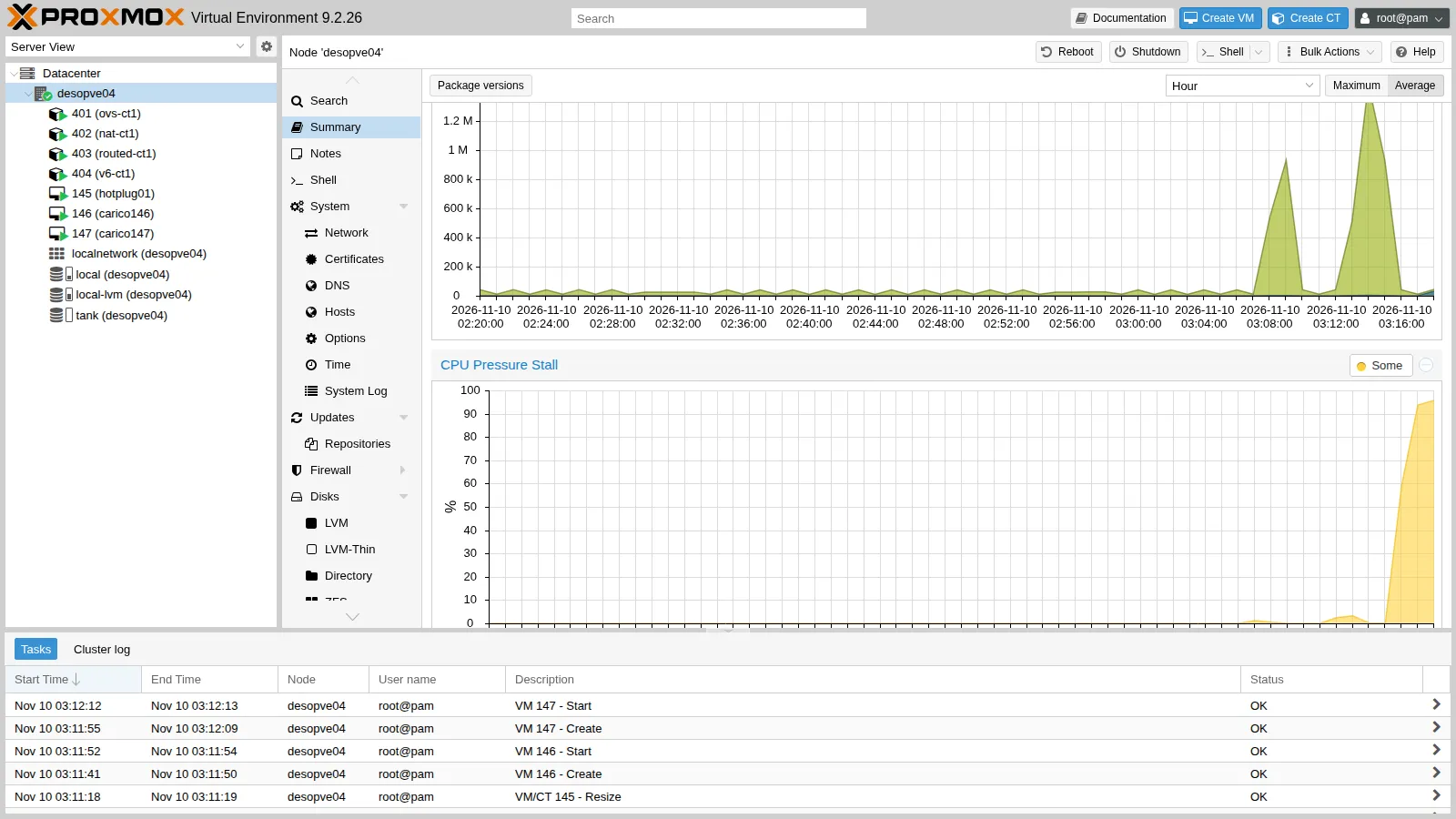
The penalized VM, whether by weight or by cap, spends more time waiting for the CPU. It is the right indicator to understand whether a VM is slow because it is waiting rather than because it is doing a lot of work. Proxmox VE 9 shows the same values in the Summary: for the node, the CPU, IO and Memory Pressure Stall graphs:
and for each guest, with the two curves some and full:
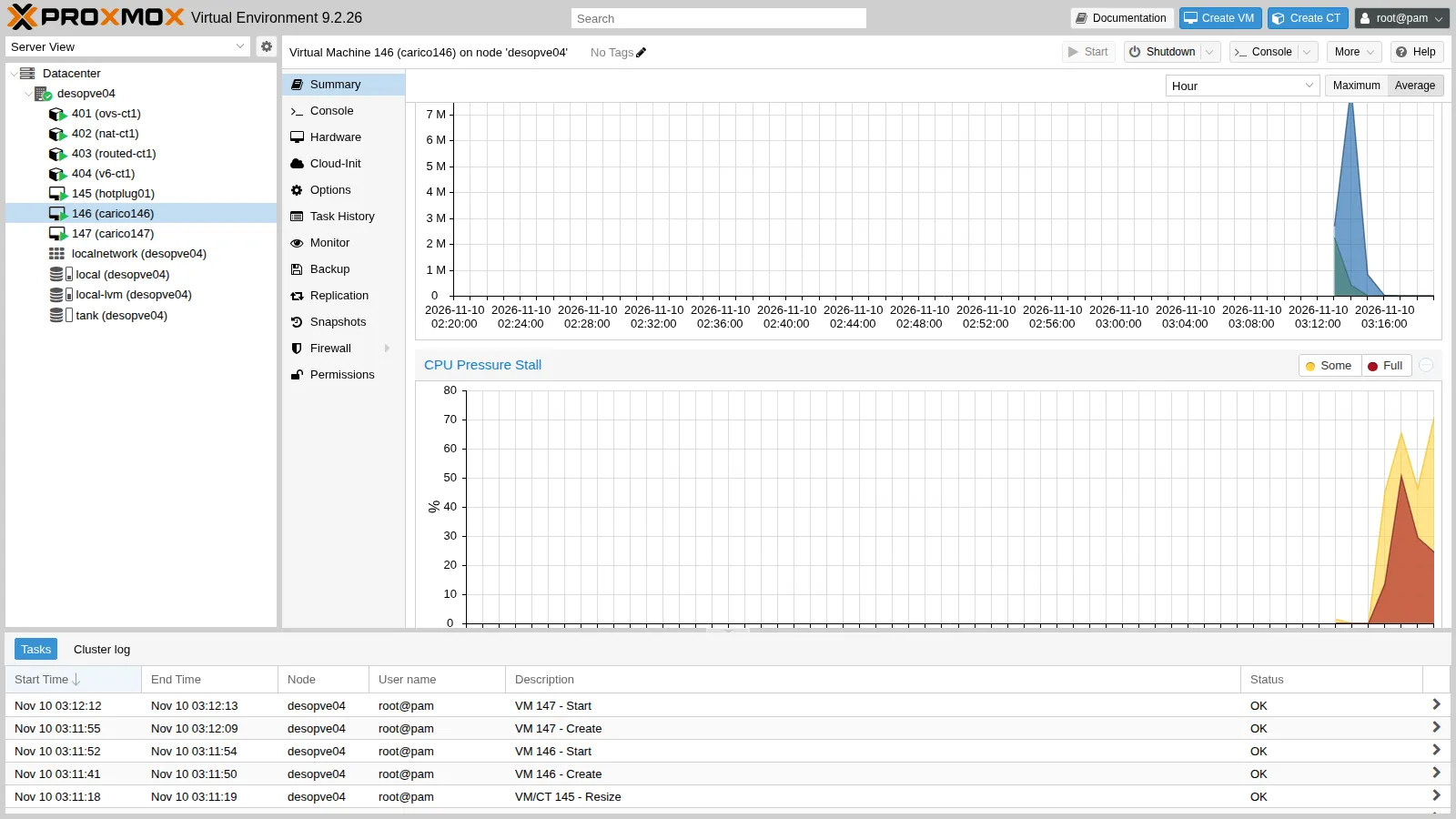
At the end, delete the test VMs:
for v in 145 146 147; do qm stop $v; qm destroy $v --purge; doneVerification and tests
Section titled “Verification and tests”- With
vcpuslower thancores, processors can be hot-added, but in the guest they stay offline until a udev rule brings them online; with the rule they appear immediately, and they can also be hot-removed. - With NUMA enabled, memory is added in 512 MiB DIMM modules, the kernel brings it online on its own, and it can be removed if it is free.
- A hot-added disk appears as a new device, identifiable in
/dev/disk/by-id/...drive-scsiN; once removed, it becomesunusedwithout losing its data. - A hot-added network device appears down and without an address.
qm resizegrows the disk live;growpartandresize2fsextend partition and filesystem without a reboot.- Under contention,
cpuunits100 and 300 split the CPU 1:2.9;cpulimit 1caps the VM at 1.00 core. - CPU pressure rises on the penalized VM and is visible in the Summary graphs.
Final lab state
Section titled “Final lab state”- Test VMs 145, 146 and 147 deleted from
desopve04, together with their disks. desopve04as before the lab: CTs 401-404 running,local-lvmandtankunchanged.- No changes to the cluster
desopve01-03.
What you learned
Section titled “What you learned”- CPU and memory hotplug must be enabled in the Hotplug option; memory hotplug requires NUMA.
- Hot-added CPUs must be brought online in the guest, with a udev rule or by hand.
- Detached disks remain as
unuseduntil you explicitly delete them. - Growing a disk live works at three levels: disk, partition, filesystem.
cpuunitsis a relative weight that matters only under contention;cpulimitis a hard cap.- PSI tells how long a VM waits for CPU, I/O or memory: since Proxmox VE 9 it is in the node and guest graphs.