

Lab 40 – Templates, cloud-init and clones: linked and full, snippets and deployment from the CLI
Dependencies
Section titled “Dependencies”- Previous labs:
- Nodes and storage: cluster
desopve01-03; template onrbd-vm; snippets oncephfs. - Network: the proxy
proxy.proxmox.community:3128for the guests’ packages. - Addresses: VM 102 on 172.27.199.102; VM 103 with DHCP on the VNet
vnsimp1; VMs 104-106 on 172.27.199.104-106. - Credentials: user
labuserwith an SSH key, no password → Appendix B.
Objectives
Section titled “Objectives”- Turn a cloud image into a template with cloud-init.
- Understand the difference between a linked clone and a full clone, with measured times and space.
- Configure user, keys, static IP and DHCP from the Cloud-Init tab.
- Read what Proxmox VE passes to the guest with
qm cloudinit dump. - Add custom configuration with snippets (
cicustom). - Create three ready-to-use VMs, on three nodes, with a command loop.
How it works
Section titled “How it works”Template. A template is a read-only VM: it cannot be started and its disks become base disks (base-9000-disk-0). It is used only as a source for clones.
Linked clone and full clone.
| Linked clone | Full clone | |
|---|---|---|
| Disk | copy-on-write on the template’s base disk | complete, independent copy |
| Time | a few seconds | proportional to the data to copy |
| Initial space | almost zero | as much as the data on the disk |
| Constraints | same storage as the template; the template cannot be deleted while clones exist | none: it can go to another storage |
The storage must support disk-level clones: Ceph RBD (clone of a snapshot), ZFS, LVM-thin, qcow2 (backing file).
Cloud-init. Cloud images have no installer: at first boot, cloud-init reads the configuration from a datasource. Proxmox VE uses the NoCloud datasource: it generates a small CD (the CloudInit drive) with three files:
user-data: user, SSH keys, hostname, packages;network-config: addresses, gateway, DNS;meta-data: theinstance-id.
When you change a Cloud-Init parameter, Proxmox VE regenerates the CD with a new instance-id, and at the next boot cloud-init applies the configuration again.
Snippets. With cicustom you can replace or extend the generated files with your own files, saved in a storage with the Snippets content type. The vendor type is added to the Proxmox VE user-data instead of replacing it: user, keys and network remain those of the Cloud-Init tab.
Procedure
Section titled “Procedure”1. The cloud image
Section titled “1. The cloud image”The image debian-13-genericcloud-amd64.qcow2 was downloaded in Lab 19 to the local storage, content type Import:
image: /var/lib/vz/import/debian-13-genericcloud-amd64.qcow2file format: qcow2virtual size: 3 GiB (3221225472 bytes)disk size: 324 MiBIt is an already installed system: 3 GiB of virtual disk, 324 MiB of actual data.
2. The base VM with the Cloud-Init drive
Section titled “2. The base VM with the Cloud-Init drive”The disk is imported directly during creation, with import-from:
qm create 9000 --name debian13-cloud --ostype l26 --memory 2048 --cores 2 --cpu x86-64-v2-AES \ --scsihw virtio-scsi-single \ --scsi0 rbd-vm:0,import-from=local:import/debian-13-genericcloud-amd64.qcow2,discard=on,ssd=1,iothread=1 \ --ide2 rbd-vm:cloudinit --boot order=scsi0 --serial0 socket --vga serial0 \ --net0 virtio,bridge=vmbr0 --agent enabled=1qm resize 9000 scsi0 8Gtransferred 3.0 GiB of 3.0 GiB (100.00%)scsi0: successfully created disk 'rbd-vm:vm-9000-disk-0,discard=on,iothread=1,size=3G,ssd=1'Resizing image: 100% complete...done.--ide2 rbd-vm:cloudinitcreates the Cloud-Init drive. It sits onrbd-vmlike the disk, so the clones work on every node.--serial0 socket --vga serial0: Debian cloud images use the serial console; the VM console becomes xterm.js (Lab 38).qm resize: the disk grows from 3 to 8 GiB. At first boot cloud-init grows the partition and the filesystem on its own.
The Cloud-Init parameters. The DC’s public key is already among those authorized on the node (Lab 05); for the template, extract just that one:
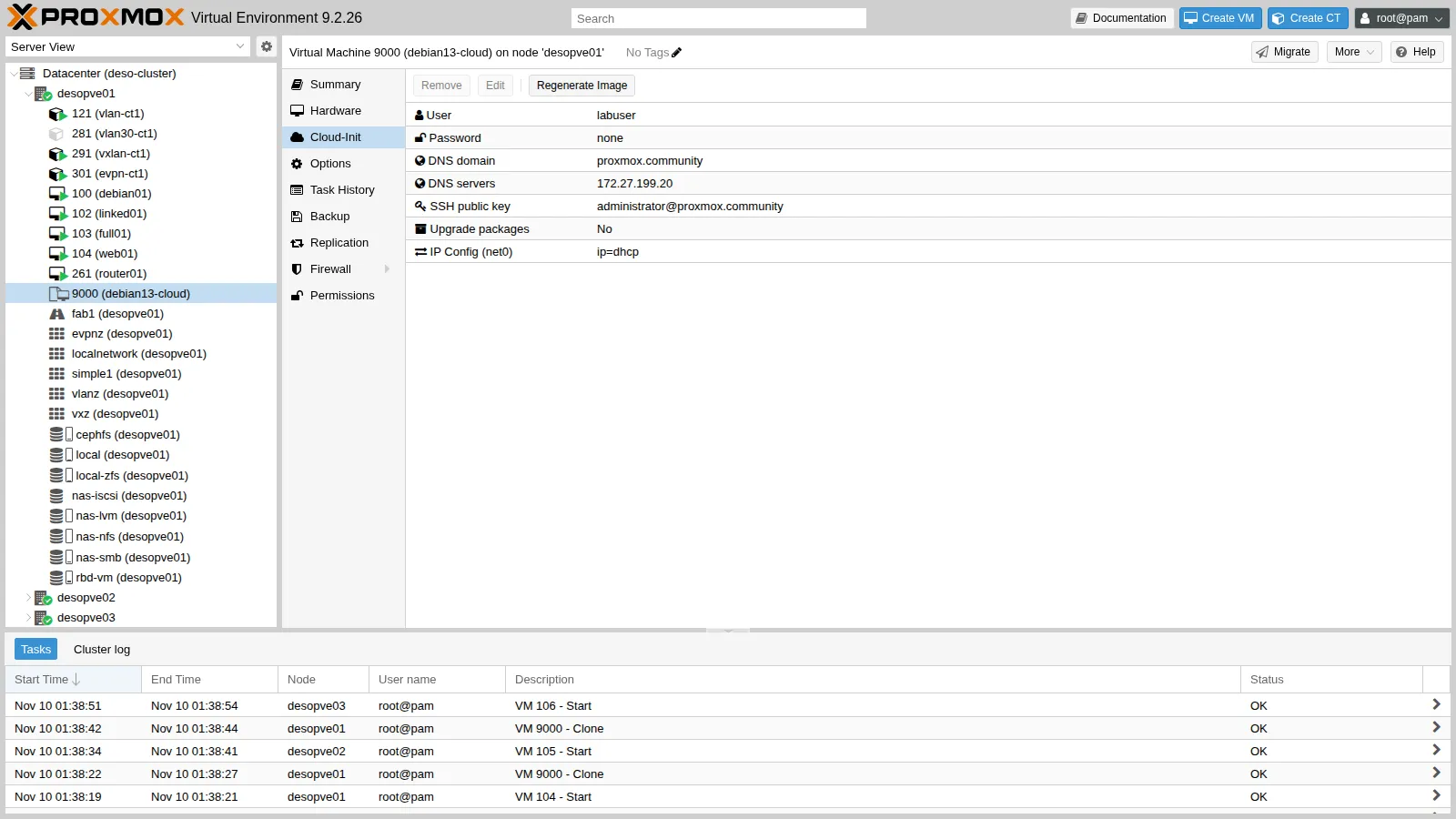
qm set 9000 --ciuser labuser --sshkeys /root/lab40-dc.pub --ipconfig0 ip=dhcp \ --nameserver 172.27.199.20 --searchdomain proxmox.community --ciupgrade 0--sshkeys: a file with the public key of the DC’sadministratoruser (Lab 05). No password: login is possible only with the key.--ipconfig0 ip=dhcp: in the template; each clone will get its own address.--ciupgrade 0: the Upgrade packages option is enabled by default and runs a package upgrade at first boot. In the lab the guest does not have the proxy configured yet, so the option is disabled in the template: the proxy is set by the snippet in section 8.
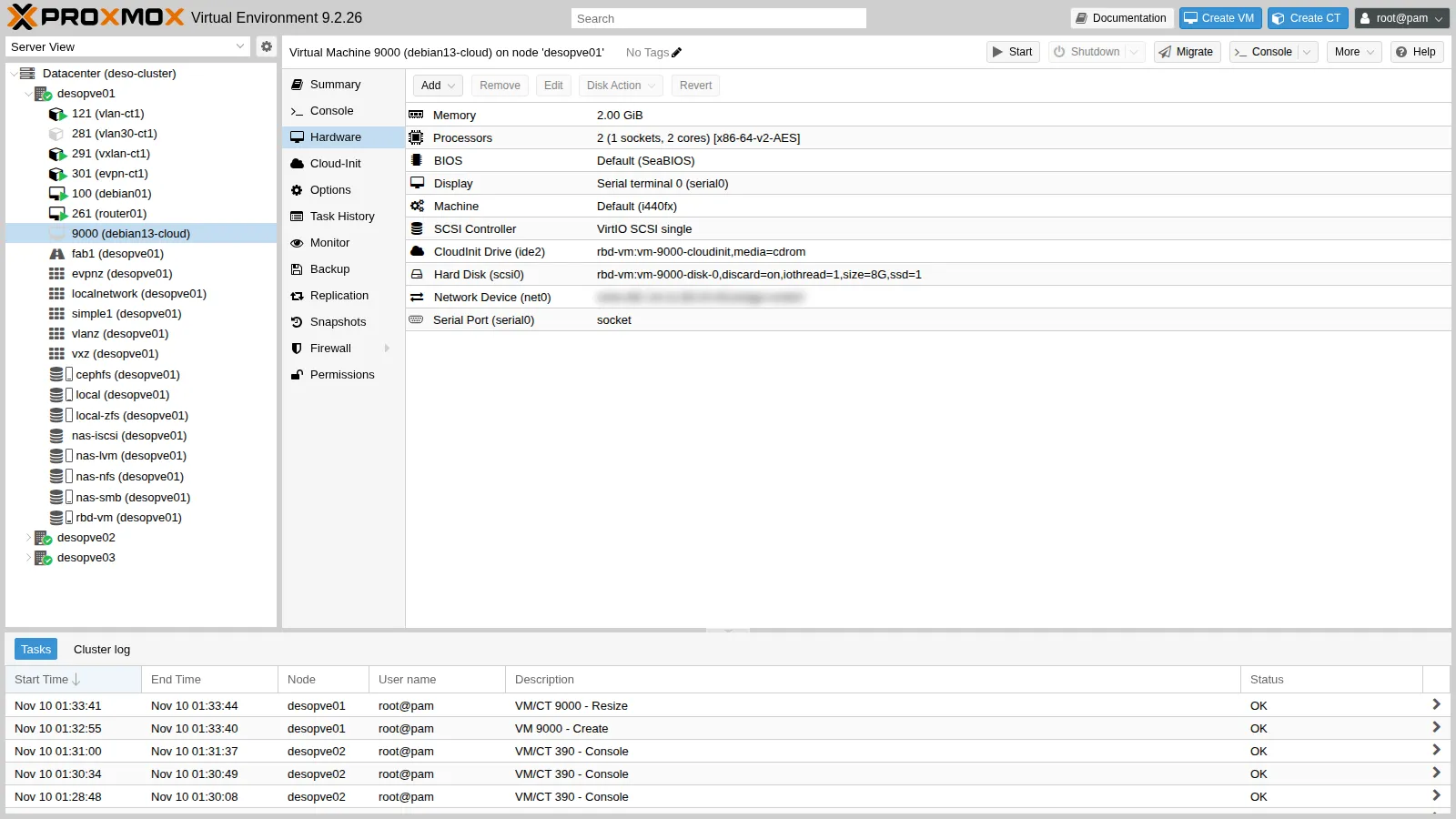
The Hardware view shows the CloudInit Drive (ide2):
and the Cloud-Init tab shows the configuration, which can also be edited from here:
3. Converting to a template
Section titled “3. Converting to a template”More → Convert to template (or qm template 9000). The disk is renamed to base-9000-disk-0 and Ceph creates its protected snapshot __base__, the source of all linked clones.
4. Linked clone
Section titled “4. Linked clone”More → Clone on the template. Mode is Linked Clone and Target Storage is locked to “Same as source”:
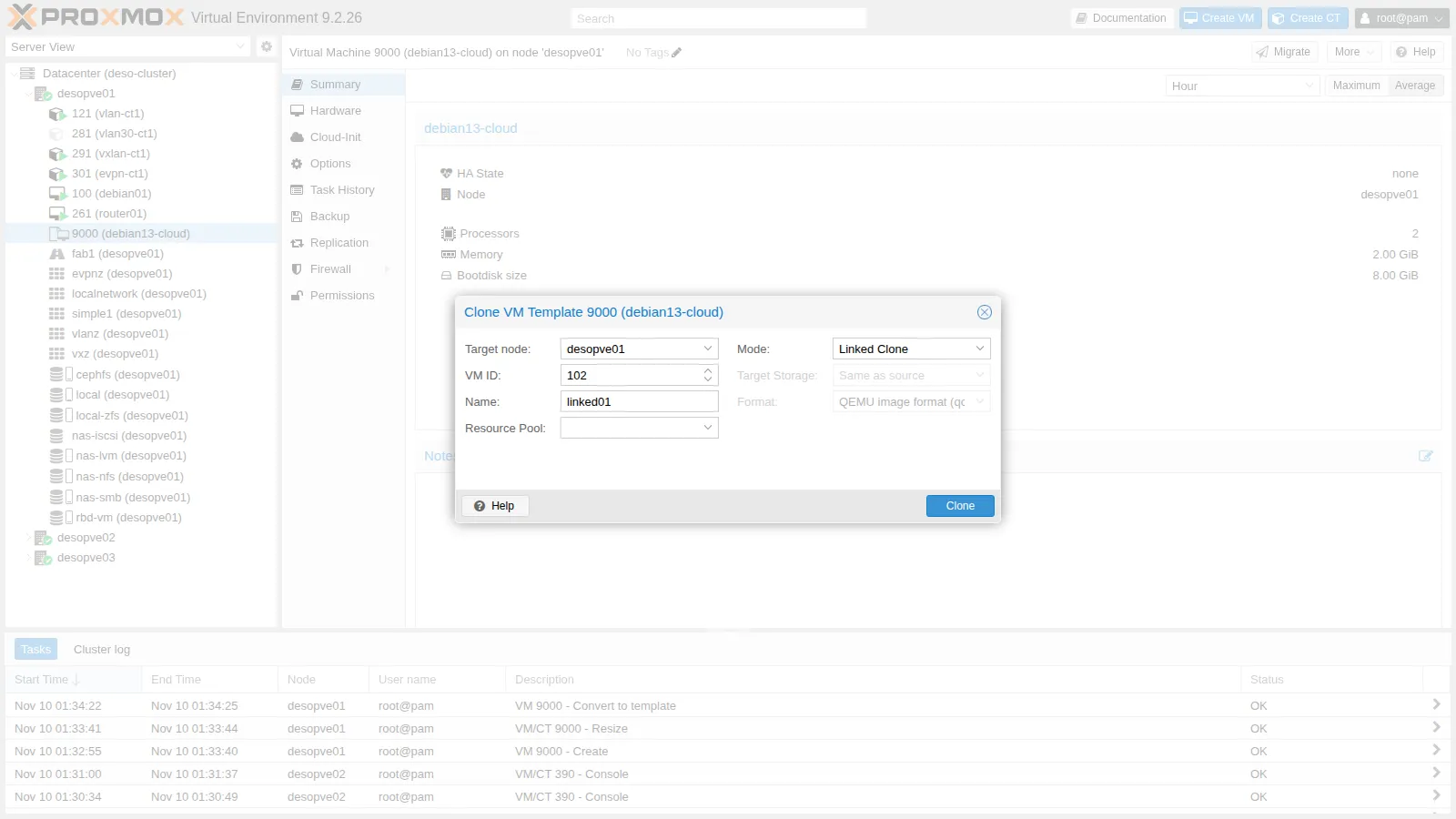
The task takes 2 seconds. The clone’s disk is an RBD clone of the template snapshot:
rbd info rbd-vm/vm-102-disk-0 | grep -E "parent|size"rbd du -p rbd-vm size 8 GiB in 2048 objects parent: rbd-vm/base-9000-disk-0@__base__NAME PROVISIONED USEDbase-9000-disk-0@__base__ 8 GiB 1.1 GiBbase-9000-disk-0 8 GiB 0 Bvm-102-cloudinit 4 MiB 4 MiBvm-102-disk-0 8 GiB 12 MiBThe clone takes up 12 MiB: it reads the common data from the base disk and writes only the differences.
A static IP, then start it:
qm set 102 --ipconfig0 ip=172.27.199.102/24,gw=172.27.199.1qm start 102After less than a minute you can log in with the DC’s key:
hostname -flinked01.proxmox.communitycloud-init status --longstatus: doneextended_status: degraded done...recoverable_errors:DEPRECATED: - 'user' of type string is deprecated in 22.2 and scheduled to be removed in 27.2. Use 'users' list instead.ip -br -4 a | grep -v "^lo"eth0 UP 172.27.199.102/24df -h / | tail -1/dev/sda1 7.7G 596M 6.8G 8% /sudo -n true && echo "sudo senza password: ok"sudo senza password: ok- The hostname is the name of the clone: Proxmox VE passes it to cloud-init.
- The filesystem has already grown to 7.7 GiB.
degraded donedoes not indicate an error: cloud-init only reports a deprecation warning about the format of the user-data generated by Proxmox VE (theuserkey). The configuration is applied.- The user created by cloud-init has passwordless
sudo, the usual practice for cloud images.
5. Full clone and its constraints
Section titled “5. Full clone and its constraints”A full clone to another node, on local storage:
qm clone 9000 103 --name full01 --full --storage local-zfs --target desopve02can't clone to non-shared storage 'local-zfs'To clone to another node, the target storage must be shared. On the same node, the full clone on local-zfs works:
time qm clone 9000 103 --name full01 --full --storage local-zfstransferred 8.0 GiB of 8.0 GiB (100.00%)
real 0m11.967sNAME USED REFERrpool/data/vm-103-disk-0 542M 542M12 seconds versus 2, and 542 MiB used right away. The disk is independent: the template could be deleted with no consequences for this VM.
6. DHCP with the SDN VNet
Section titled “6. DHCP with the SDN VNet”VM 103 goes on the VNet vnsimp1 from Lab 27, which has DHCP and IPAM, and gets its IP via DHCP:
qm set 103 --net0 virtio,bridge=vnsimp1 --ipconfig0 ip=dhcpqm cloudinit dump 103 networkversion: 1config: - type: physical name: eth0 mac_address: 'bc:24:11:06:db:69' subnets: - type: dhcp4 - type: nameserver address: - '172.27.199.20' search: - 'proxmox.community'At startup, the Proxmox VE IPAM assigns the address and the zone’s DHCP server hands it out:
{'hostname': 'full01', 'ip': '10.60.60.102', 'mac': 'BC:24:11:06:DB:69', 'subnet': '10.60.60.0/24', 'vmid': 103, 'vnet': 'vnsimp1', 'zone': 'simple1'}0 bc:24:11:06:db:69 10.60.60.102 * ff:ca:53:09:5a:00:02:00:00:ab:11:cf:d3:17:39:9a:c9:d3:ff2 packets transmitted, 2 received, 0% packet loss, time 1056msThe first line comes from the IPAM (pvesh get /cluster/sdn/ipams/pve/status), the second from the DHCP lease file on the node, the third is a ping from the node.
7. What the guest receives: qm cloudinit dump
Section titled “7. What the guest receives: qm cloudinit dump”The user-data that Proxmox VE generates for the template:
qm cloudinit dump 9000 user#cloud-confighostname: debian13-cloudmanage_etc_hosts: truefqdn: debian13-cloud.proxmox.communityuser: labuserssh_authorized_keys: - ssh-ed25519 AAAAC3NzaC1lZDI1NTE5AAAAIC7iIUcNX6/zxPH06HIwBM0Txccu3wAqjjIBFBmR1rCo [email protected]chpasswd: expire: Falseusers: - defaultHere is the user key that cloud-init reports as deprecated. When a clone does not behave as expected, qm cloudinit dump <vmid> user|network|meta is the first thing to check.
8. Snippets: additional configuration
Section titled “8. Snippets: additional configuration”The cephfs storage is shared among the nodes: enable the Snippets content type and save a vendor-data file there:
pvesm set cephfs --content iso,backup,vztmpl,snippets/mnt/pve/cephfs/snippets/web-vendor.yaml:
#cloud-config# vendor-data: added to the user-data generated by Proxmox VE (user, SSH keys, network)apt: http_proxy: http://proxy.proxmox.community:3128 https_proxy: http://proxy.proxmox.community:3128package_update: truepackages: - qemu-guest-agent - nginxruncmd: - systemctl enable --now qemu-guest-agent - echo "<h1>$(hostname) - creata dal template 9000</h1>" > /var/www/html/index.htmlVolid Format Type Size VMIDcephfs:snippets/web-vendor.yaml snippet snippets 408The snippet configures the proxy for apt, installs the guest agent and nginx, and writes a page with the VM name.
9. Three VMs from a template, on three nodes, from the CLI
Section titled “9. Three VMs from a template, on three nodes, from the CLI”qm acts only on the VMs of the node where it runs; to work on the whole cluster from a single node, use the API with pvesh:
for i in 1 2 3; do id=$((103+i)); n=desopve0$i pvesh create /nodes/desopve01/qemu/9000/clone --newid $id --name web0$i --target $n pvesh set /nodes/$n/qemu/$id/config --ipconfig0 ip=172.27.199.$id/24,gw=172.27.199.1 \ --cicustom vendor=cephfs:snippets/web-vendor.yaml pvesh create /nodes/$n/qemu/$id/status/startdoneTime of each clone, measured with date before and after the command:
clone 9000 -> 104 su desopve01: 2.5 sclone 9000 -> 105 su desopve02: 5.7 sclone 9000 -> 106 su desopve03: 2.9 sThe linked clone to another node works because rbd-vm is shared. After about a minute, the time needed to install the packages, the three VMs respond:
for id in 104 105 106; do curl -s http://172.27.199.$id/; done<h1>web01 - creata dal template 9000</h1><h1>web02 - creata dal template 9000</h1><h1>web03 - creata dal template 9000</h1>The guest agent responds on all three nodes:
for p in "desopve01 104" "desopve02 105" "desopve03 106"; do set -- $p pvesh create /nodes/$1/qemu/$2/agent/ping && echo "agent VM $2 su $1: ok"; doneagent VM 104 su desopve01: okagent VM 105 su desopve02: okagent VM 106 su desopve03: okand cloud-init has finished:
# on desopve02, which hosts VM 105qm guest exec 105 -- cloud-init statusstatus: doneVerification and tests
Section titled “Verification and tests”- Template 9000 has the base disk
base-9000-disk-0with the__base__snapshot on Ceph. - A linked clone is created in 2 seconds and takes up 12 MiB; a full clone of the same disk on ZFS takes 12 seconds and 542 MiB.
- A clone to another node on local storage is refused: shared storage is required.
- With
ip=dhcpon a VNet with IPAM, the clone receives the address assigned by the IPAM. - A vendor snippet on shared storage installs packages and services at first boot, on any node.
- Three complete VMs start from the template with a
pveshloop, and within a minute they serve a web page and respond to the guest agent.
Final lab state
Section titled “Final lab state”- Template 9000
debian13-cloudondesopve01, disk onrbd-vm: userlabuser, the DC’s key,ipconfig0 ip=dhcp,ciupgrade 0. - VMs 104-106
web01-web03, linked clones of the template, running ondesopve01,02and03, addresses 172.27.199.104-106: nginx and guest agent, snippetvendor=cephfs:snippets/web-vendor.yaml. They serve as workload for the backup, migration and HA labs. - Storage
cephfs:snippetscontent enabled, withweb-vendor.yaml. - VMs 102 and 103: deleted with
qm stop <id> && qm destroy <id> --purge, together with their disks and their address in the IPAM.
What you learned
Section titled “What you learned”- A cloud image with a Cloud-Init drive becomes a reusable template in a few commands;
import-fromimports the disk in one step. - Linked clones are instant and lightweight but tied to the template and its storage; full clones are independent and slower.
- Cloning to another node requires shared storage.
- Cloud-init applies name, user, keys and network at first boot, and grows the disk on its own.
qm cloudinit dumpshows exactly what the guest receives.- With a vendor snippet you add packages and commands without losing the configuration of the Cloud-Init tab.
- To automate across the whole cluster use
pvesh, becauseqmsees only the VMs of the local node.