

Appendix A – Upgrading from Proxmox VE 8 to 9
Proxmox VE 9 is based on Debian 13 trixie, Proxmox VE 8 on Debian 12 bookworm: the move is a major version upgrade, performed in place, one node at a time. In this appendix you actually carry it out, from start to finish, on a Proxmox VE 8.4 test node, following the official guide and resolving the warnings of the pve8to9 checklist script one by one. At the end you will find the procedure for a cluster with Ceph.
Dependencies
Section titled “Dependencies”- Previous labs: Lab 03 for the installation, Lab 04 for repositories, proxy and updates, Lab 10 for the
tankpool ondesopve04. - Test node:
pve8-test.proxmox.community(172.27.199.80), a VM ondesopve04(VMID 800, CPU typehost, so Proxmox VE can use KVM inside the VM: 2 vCPUs, 4 GiB of RAM, a 32 GiB disk on thetankstorage, UEFI firmware), installed from the officialproxmox-ve_8.4-1.isoISO. It is a disposable node: you delete it at the end of the appendix. - Lab services: proxy
proxy.proxmox.community:3128, NTP, DNS172.27.199.20, gatewayrtr-core. - Credentials:
root/<lab-password>→ Appendix B.
Objectives
Section titled “Objectives”- Prepare an 8.4 node for the upgrade and bring it to the latest 8.4.x version.
- Use
pve8to9 --fullbefore, during and after the upgrade, resolving the warnings. - Switch the repositories to trixie in the deb822 format.
- Run the upgrade, handle the changed configuration files and verify the node after the reboot.
- Know the correct order for a cluster with Ceph and high availability.
How it works
Section titled “How it works”A major version upgrade changes the Debian distribution, the kernel (from 6.8 in 8.4 to 7.0 in 9.2), QEMU, LXC, ZFS and many system services all at once. Nothing is reinstalled: apt replaces the packages and the guest configuration stays in /etc/pve.
pve8to9 is a checklist script included in the latest 8.4 packages. It changes nothing: it checks versions, cluster, Ceph, storage, guests, bootloader and services, and classifies the results as PASS, SKIP, NOTICE, WARN and FAIL. You run it several times: before the upgrade, after each fix, before the reboot and after it.
The deb822 format replaces the deb … lines of the .list files with field-based .sources files (Types, URIs, Suites, Components, Signed-By). Proxmox VE 9 uses it for its own repositories.
Trying it first on a test node is the explicit advice of the official guide: an 8.4 node installed in a VM, with a configuration similar to production, lets you see the warnings, the prompts and the timing in advance.
Procedure
Section titled “Procedure”1. The test node, installed automatically
Section titled “1. The test node, installed automatically”To avoid repeating the guided installation of Lab 03, the test node uses the automated installation: an answer.toml answer file embedded in the ISO.
-
On
desopve04, download the 8.4 ISO through the proxy (the proxy must allowenterprise.proxmox.com) and verify its checksum: the one computed bysha256summust match the line in theSHA256SUMSfile from the same folder.Terminal window cd /var/lib/vz/template/isoexport https_proxy=http://proxy.proxmox.community:3128wget https://enterprise.proxmox.com/iso/proxmox-ve_8.4-1.iso https://enterprise.proxmox.com/iso/SHA256SUMSgrep proxmox-ve_8.4-1.iso SHA256SUMS; sha256sum proxmox-ve_8.4-1.isoOutput d237d70ca48a9f6eb47f95fd4fd337722c3f69f8106393844d027d28c26523d8 proxmox-ve_8.4-1.iso -
Install the assistant and write the answer file. It contains the
rootpassword in clear text: keep it in an in-memory folder such as/dev/shmand delete it as soon as the ISO is created (rm /dev/shm/answer.toml).[global]keyboard = "it"country = "it"fqdn = "pve8-test.proxmox.community"timezone = "Europe/Rome"root-password = "<lab-password>"[network]source = "from-answer"cidr = "172.27.199.80/24"dns = "172.27.199.20"gateway = "172.27.199.1"filter.ID_NET_DRIVER = "virtio_net"[disk-setup]filesystem = "ext4"disk-list = ["sda"]root@desopve04 apt install proxmox-auto-install-assistantproxmox-auto-install-assistant validate-answer /dev/shm/answer.tomlOutput The answer file was parsed successfully, no errors found!root@desopve04 proxmox-auto-install-assistant prepare-iso proxmox-ve_8.4-1.iso --fetch-from iso \--answer-file /dev/shm/answer.toml --output /var/lib/vz/template/iso/pve84-auto.isoOutput Checking provided answer file...Copying source ISO to temporary location...Preparing ISO...Moving prepared ISO to target location...Final ISO is available at /var/lib/vz/template/iso/pve84-auto.iso. -
Create the VM with its disk on
tankand start it. The boot order puts the disk first: on the first boot the disk is empty and the ISO starts; after the installation the installed system starts, without repeating the installation.root@desopve04 qm create 800 --name pve8-test --memory 4096 --cores 2 --cpu host --machine q35 \--bios ovmf --efidisk0 tank:1,efitype=4m,pre-enrolled-keys=0 --scsihw virtio-scsi-single \--scsi0 tank:32,discard=on,iothread=1 --net0 virtio,bridge=vmbr0 \--ide2 local:iso/pve84-auto.iso,media=cdrom --boot "order=scsi0;ide2" --ostype l26qm start 800 -
A few minutes later the node answers over SSH:
root@pve8-test hostname -f; pveversionOutput pve8-test.proxmox.communitypve-manager/8.4.0/ec58e45e1bcdf2ac (running kernel: 6.8.12-9-pve)
2. Bringing the node to the latest 8.4 version
Section titled “2. Bringing the node to the latest 8.4 version”The official guide requires the latest 8.4 as the starting point. The freshly installed node has the enterprise repositories, without a subscription:
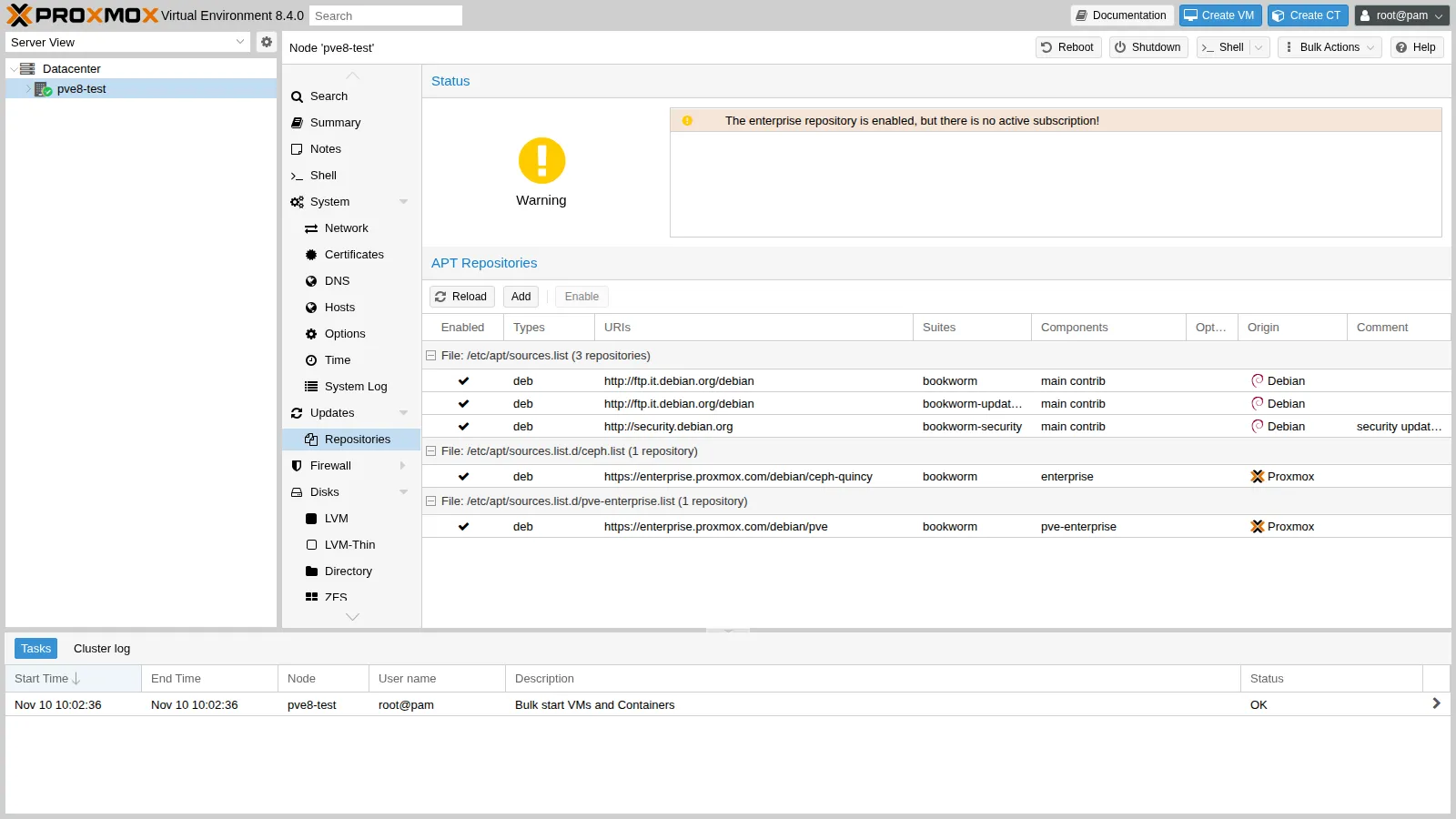
-
Set the proxy for
apt, use the Debian mirror allowed by the proxy and switch to the bookworm no-subscription repositories, as in Lab 04:Terminal window echo 'Acquire::http::Proxy "http://proxy.proxmox.community:3128";' > /etc/apt/apt.conf.d/76pveproxysed -i 's#http://ftp.it.debian.org/debian#http://deb.debian.org/debian#' /etc/apt/sources.listsed -i 's/^deb/#deb/' /etc/apt/sources.list.d/pve-enterprise.list /etc/apt/sources.list.d/ceph.listecho "deb http://download.proxmox.com/debian/pve bookworm pve-no-subscription" > /etc/apt/sources.list.d/pve-no-subscription.listecho "deb http://download.proxmox.com/debian/ceph-squid bookworm no-subscription" > /etc/apt/sources.list.d/ceph-squid.list -
Update and reboot into the new kernel:
root@pve8-test apt update && apt dist-upgradeOutput 232 upgraded, 8 newly installed, 0 to remove and 0 not upgraded.root@pve8-test rebootOutput …root@pve8-test pveversionOutput pve-manager/8.4.21/2606ac850d46da29 (running kernel: 6.8.12-43-pve) -
To have a guest to “carry” through the upgrade, create a Debian 12 container. The first
pveam updatefails:aptuses the proxy from its own configuration file, whilepveamuses the datacenter one.root@pve8-test pveam updateOutput update failed - see /var/log/pveam.log for detailsroot@pve8-test pvesh set /cluster/options --http_proxy http://proxy.proxmox.community:3128pveam updateOutput update successfulroot@pve8-test pveam download local debian-12-standard_12.12-1_amd64.tar.zstpct create 100 local:vztmpl/debian-12-standard_12.12-1_amd64.tar.zst --hostname ct-test \--unprivileged 1 --memory 512 --rootfs local-lvm:4 \--net0 name=eth0,bridge=vmbr0,ip=172.27.199.81/24,gw=172.27.199.1 --onboot 1pct start 100
3. The check with pve8to9
Section titled “3. The check with pve8to9”pve8to9 --fullExcerpt of the real output (the PASS lines are omitted):
= CHECKING VERSION INFORMATION FOR PVE PACKAGES =PASS: proxmox-ve package has version >= 8.4-0PASS: running kernel '6.8.12-43-pve' is considered suitable for upgrade.
= CHECKING CLUSTER HEALTH/SETTINGS =SKIP: standalone node.
= VIRTUAL GUEST CHECKS =WARN: 1 running guest(s) detected - consider migrating or stopping them.
= MISCELLANEOUS CHECKS =NOTICE: Less than 10 GB free space on root file system.INFO: Checking bootloader configuration...FAIL: systemd-boot meta-package installed. This will cause problems on upgrades of other boot-related packages.      Remove 'systemd-boot' See https://pve.proxmox.com/wiki/Upgrade_from_8_to_9#sd-boot-warning for more information.NOTICE: storage 'local-lvm' has guest volumes with autoactivation enabledWARN: The matching CPU microcode package 'intel-microcode' could not be found!
= SUMMARY =TOTAL:    42PASSED:   31SKIPPED:  5WARNINGS: 2FAILURES: 1
Here is how to handle each item:
-
FAIL: systemd-boot meta-package installed. First check which bootloader the node uses. Here it is UEFI with GRUB, andproxmox-boot-toolis not in use (it manages the ESP partitions of installations with root on ZFS, in both BIOS and UEFI mode;systemd-bootis only used with ZFS and UEFI without Secure Boot):root@pve8-test proxmox-boot-tool statusOutput E: /etc/kernel/proxmox-boot-uuids does not exist.root@pve8-test dpkg -l | grep -E "^ii (grub-efi-amd64 |systemd-boot)"Output ii grub-efi-amd64 2.06-13+pmx7ii systemd-boot 252.39-1~deb12u2ii systemd-boot-efi:amd64 252.39-1~deb12u2root@pve8-test apt remove systemd-bootThe meta-package can be removed safely: the node keeps booting with GRUB.
-
NOTICE … autoactivation enabled. Starting with Proxmox VE 9, guest LVM volumes are no longer activated automatically at boot: Proxmox VE activates them when they are needed. On shared LVM storages (iSCSI, FC) converting the existing volumes as well is strongly recommended; on local storages it is optional. Without options, the script asks for confirmation and, in a non-interactive context, answers no; with--assume-yesit runs:root@pve8-test /usr/share/pve-manager/migrations/pve-lvm-disable-autoactivation --assume-yesOutput Logical volume pve/vm-100-disk-0 changed.PASS: all guest volumes on storage 'local-lvm' now have autoactivation disabled -
Network interface names. The new kernel can change the interface names derived from the PCI address: if
enp6s18got another name, thevmbr0bridge would be left without a port and the node without network. Thepve-network-interface-pinningtool, already available in the latest 8.4, pins the names tonicNby binding them to the MAC address:root@pve8-test pve-network-interface-pinning generateOutput Name for link 'enp6s18' will change to 'nic0'Generating link filesSuccessfully generated .link files in '/usr/local/lib/systemd/network/'Updating /etc/network/interfaces.newSuccessfully updated Proxmox VE configuration files.Please reboot to apply the changes to your configurationA reboot happens anyway at the end of the upgrade: the new names are applied at that point.
-
WARN: 1 running guest(s). In a cluster, migrate the guests to another node; on a single node, shut them down:pct shutdown 100. -
WARN … intel-microcode. On a physical server, enable thenon-free-firmwarecomponent and installintel-microcode(oramd64-microcode). The test node is a VM: the microcode is handled by the host, so the warning can be ignored. -
NOTICE: Less than 10 GB free. The required minimum is 5 GB, with 10 GB recommended: here there are 8.7 GB free, which is enough.
Second run of the check:
NOTICE: Less than 10 GB free space on root file system.WARN: The matching CPU microcode package 'intel-microcode' could not be found!TOTAL: 42PASSED: 35SKIPPED: 5WARNINGS: 1FAILURES: 04. The trixie repositories in deb822 format
Section titled “4. The trixie repositories in deb822 format”-
Debian: replace bookworm with trixie.
Terminal window sed -i 's/bookworm/trixie/g' /etc/apt/sources.list -
Proxmox VE and Ceph: remove the old
.listfiles and create the new.sourcesfiles. The Ceph repository must be updated even if Ceph is not installed: some client packages come from there.Terminal window rm /etc/apt/sources.list.d/{pve-no-subscription,ceph-squid,pve-enterprise,ceph}.listcat > /etc/apt/sources.list.d/proxmox.sources << EOFTypes: debURIs: http://download.proxmox.com/debian/pveSuites: trixieComponents: pve-no-subscriptionSigned-By: /usr/share/keyrings/proxmox-archive-keyring.gpgEOFcat > /etc/apt/sources.list.d/ceph.sources << EOFTypes: debURIs: http://download.proxmox.com/debian/ceph-squidSuites: trixieComponents: no-subscriptionSigned-By: /usr/share/keyrings/proxmox-archive-keyring.gpgEOF -
Check that
aptsees only the trixie repositories:root@pve8-test apt update && apt policyOutput …500 http://deb.debian.org/debian trixie/contrib amd64 Packages500 http://deb.debian.org/debian trixie/main amd64 Packages500 http://deb.debian.org/debian trixie-updates/main amd64 Packages500 http://download.proxmox.com/debian/ceph-squid trixie/no-subscription amd64 Packages500 http://download.proxmox.com/debian/pve trixie/pve-no-subscription amd64 Packages500 http://security.debian.org trixie-security/contrib amd64 Packages500 http://security.debian.org trixie-security/main amd64 Packages
5. The upgrade
Section titled “5. The upgrade”apt dist-upgradeThe official guide recommends running it from the server console, or over SSH inside tmux/screen, never from the web console of the GUI, which gets interrupted during the upgrade. While it runs, apt asks what to do with the modified configuration files. The answers recommended by the guide:
| File | Recommended answer |
|---|---|
/etc/issue |
keep the installed version (Proxmox VE regenerates it at boot) |
/etc/lvm/lvm.conf |
the guide suggests the package version if you have not modified it yourself; but check the Proxmox VE global_filter (see below) |
/etc/ssh/sshd_config |
package version, if you have not modified it yourself |
/etc/default/grub |
keep the installed version, if it contains kernel options you added |
/etc/chrony/chrony.conf |
package version; customizations go into conf.d or sources.d |
In the lab the upgrade was launched non-interactively inside a systemd unit, so an SSH disconnection does not interrupt it. The installed version of every file was kept, and the differences are checked afterwards:
systemd-run --unit=pve-upgrade89 --setenv=DEBIAN_FRONTEND=noninteractive apt-get -y -o Dpkg::Options::=--force-confdef \ -o Dpkg::Options::=--force-confold dist-upgradejournalctl -fu pve-upgrade89…593 upgraded, 155 newly installed, 59 to remove and 0 not upgraded.- Duration: 12 minutes 26 seconds (from 10:14:40 to 10:27:06), on the disk of the test VM. On a server with SSDs a few minutes are enough; on spinning disks it can take more than an hour.
- Removed packages: they are libraries renamed in Debian 13 (for example
libgnutls30→libgnutls30t64): their replacement is normal.
At the end, apt left two new versions to evaluate:
find /etc -name "*.dpkg-dist"/etc/issue.dpkg-dist/etc/lvm/lvm.conf.dpkg-distdiff <(grep -vE '^\s*#|^\s*$' /etc/lvm/lvm.conf) <(grep -vE '^\s*#|^\s*$' /etc/lvm/lvm.conf.dpkg-dist)…< devices {< global_filter=["r|/dev/zd.*|","r|/dev/rbd.*|"]The installed lvm.conf contains the Proxmox VE filter, which prevents LVM from scanning the guests’ ZFS and Ceph volumes: the package version does not have it. Here the right choice is to keep the installed version. If you choose the package version, you must add the filter back. For /etc/issue the rule in the table applies. After checking, delete the .dpkg-dist files.
The check before the reboot:
WARN: a suitable kernel (proxmox-kernel-7.0) is installed, but an unsuitable (6.8.12-43-pve) is booted, missing reboot?!WARN: No (active) time synchronisation daemon (NTP) detected, but synchronized systems are important, especially for cluster and/or ceph!The first warning simply says that a reboot is needed. The second comes from chrony, which did not restart during the upgrade:
chronyd[23845]: chronyd version 4.8 starting (+CMDMON +REFCLOCK +RTC +PRIVDROP +SCFILTER +SIGND +NTS +SECHASH +IPV6 -DEBUG)chronyd[23845]: Fatal error : Could not send notification to $NOTIFY_SOCKETsystemd[1]: Failed to start chrony.service - chrony, an NTP client/server.The new chronyd talks to the bookworm systemd, which keeps running until the reboot. It is a transient error: after the reboot the service starts normally.
6. The reboot and the checks
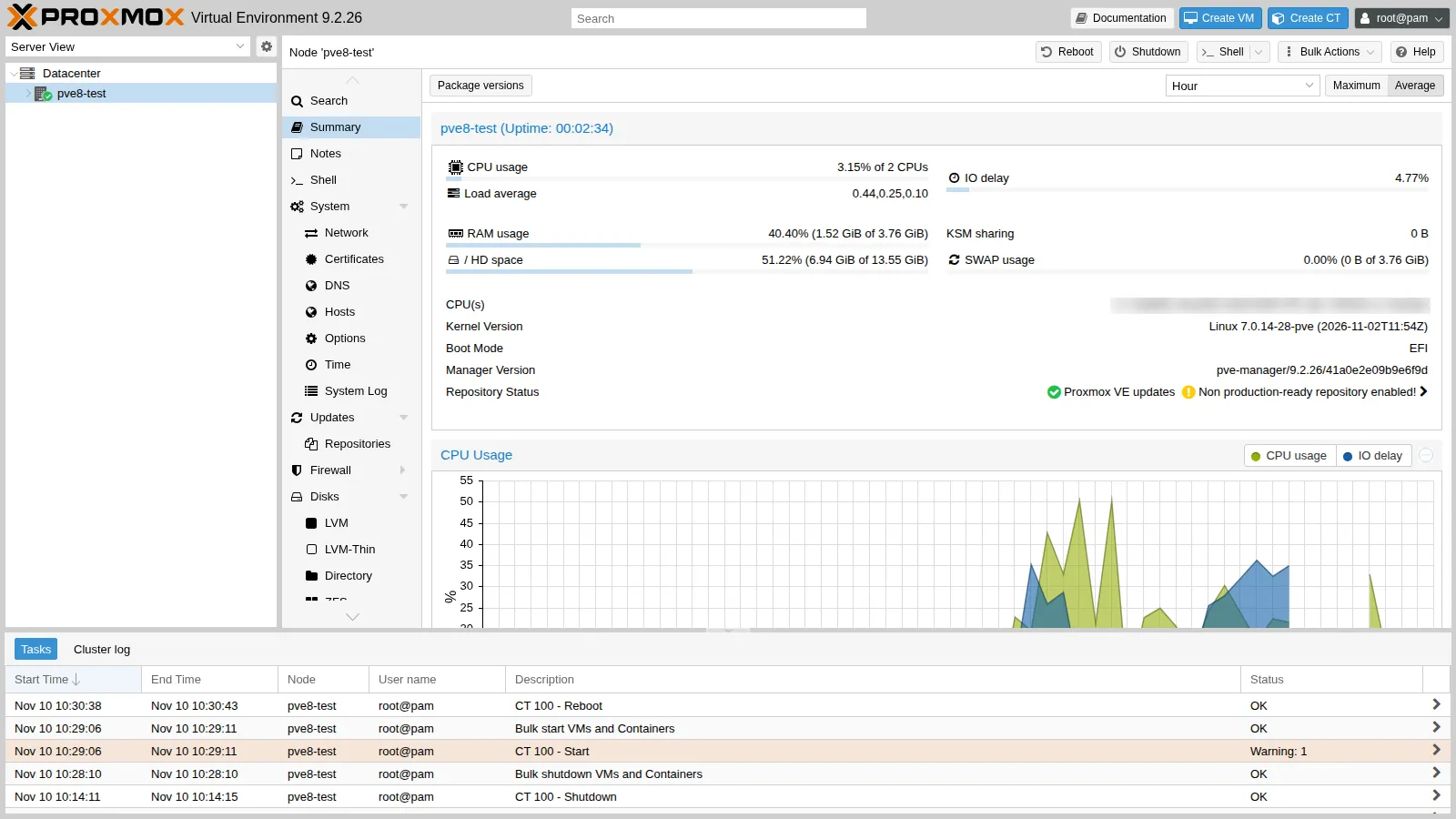
Section titled “6. The reboot and the checks”reboot…uname -r; pveversion7.0.14-28-pvepve-manager/9.2.26/41a0e2e09b9e6f9d (running kernel: 7.0.14-28-pve)pveversion -v | grep -E "^(proxmox-ve|pve-qemu-kvm|qemu-server|lxc-pve|zfsutils-linux|corosync|ifupdown2)"proxmox-ve: 9.2.0 (running kernel: 7.0.14-28-pve)corosync: 3.2.0-pve1ifupdown2: 3.3.0-1+pmx13lxc-pve: 7.0.0-2pve-qemu-kvm: 11.1.3-1qemu-server: 9.2.15zfsutils-linux: 2.4.4-pve1systemctl is-active chrony pveproxy pvedaemon pvestatd pve-cluster pve-firewallactiveactiveactiveactiveactiveactivesystemctl --failed --no-legendip -br link | grep -v lonic0 UP …vmbr0 UP …- All services are active and there are no failed units.
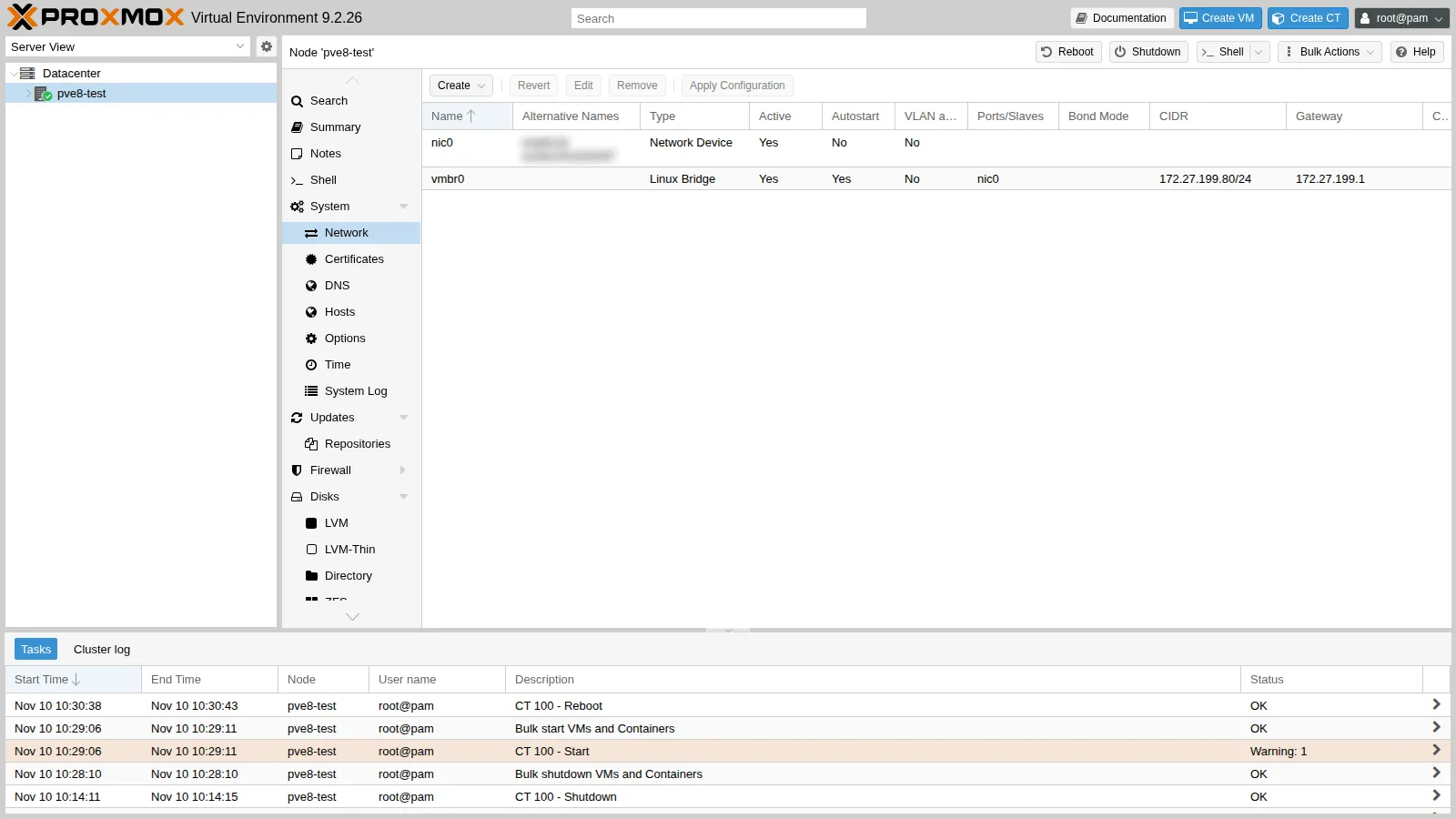
- The network card is now called
nic0andvmbr0uses it as its port: the pinning from step 3 worked.
The container restarted on its own (onboot), but the start task reports a warning:
pvenode task log <UPID dell'avvio del CT 100>WARN: Systemd 252 detected. You may need to enable nesting.TASK WARNINGS: 1pct set 100 --features nesting=1 && pct reboot 100pct exec 100 -- systemctl is-system-runningrunningThe container had been created from the command line without the nesting feature, which the GUI enables by default in unprivileged containers. With Proxmox VE 9, systemd inside the containers requires it: enable it before upgrading, or right after.
In the end pve8to9 is left with just the microcode warning, which has no effect on the test VM:
TOTAL: 42PASSED: 34SKIPPED: 5WARNINGS: 1FAILURES: 1The remaining FAIL is unable to determine installed intel-microcode version: on a physical node you solve it by installing the microcode package.
7. After the upgrade: modern repositories
Section titled “7. After the upgrade: modern repositories”-
Convert the Debian
sources.listto the deb822 format as well:root@pve8-test apt modernize-sourcesOutput Rewrite 1 sources? [Y/n] YModernizing /etc/apt/sources.list...- Writing /etc/apt/sources.list.d/debian.sourcesThe old file is kept as
sources.list.bak: after checking, you can delete it. -
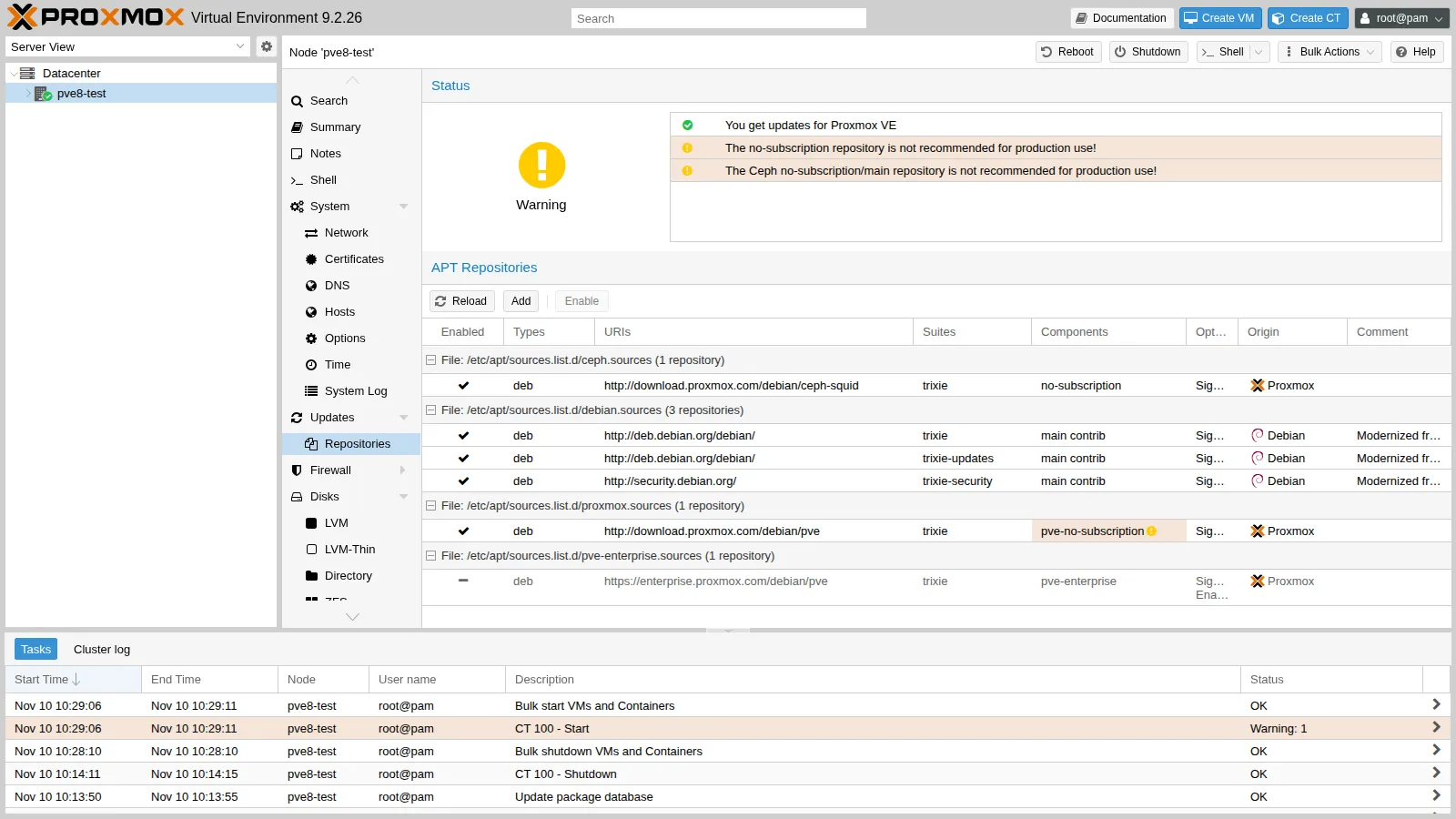
The enterprise repository comes back. The Proxmox VE 9
pve-managerpackage installs thepve-enterprise.sourcesfile, and without a subscriptionapt updatefails:Output E: The repository 'https://enterprise.proxmox.com/debian/pve trixie InRelease' is not signed.root@pve8-test dpkg -S /etc/apt/sources.list.d/pve-enterprise.sourcesOutput pve-manager: /etc/apt/sources.list.d/pve-enterprise.sourcesThe file belongs to the package, so do not delete it: disable it instead, from the GUI (Repositories → Disable) or with the
Enabled: falsefield:Terminal window echo "Enabled: false" >> /etc/apt/sources.list.d/pve-enterprise.sources
8. Cleanup
Section titled “8. Cleanup”The test node has done its job. The prepared ISO contains the root password in clear text: here it is overwritten with shred before being deleted (on SSDs and on copy-on-write file systems such as ZFS, shred does not guarantee erasure, so the test node password must not be reused elsewhere):
qm stop 800; qm destroy 800 --purge 1 --destroy-unreferenced-disks 1shred -u /var/lib/vz/template/iso/pve84-auto.isorm /var/lib/vz/template/iso/proxmox-ve_8.4-1.iso /var/lib/vz/template/iso/SHA256SUMSapt remove proxmox-auto-install-assistantUpgrading a cluster with Ceph and high availability
Section titled “Upgrading a cluster with Ceph and high availability”- Prerequisites on all nodes:
- latest 8.4 version installed;
- healthy cluster (
pvecm status) and Ceph inHEALTH_OK; - recent, verified backups of all guests;
- access to the out-of-band console (IPMI/iKVM) of every node.
- Ceph first. Proxmox VE 9 requires Ceph 19.2 Squid. If the cluster uses Quincy or Reef, upgrade Ceph before upgrading Proxmox VE, with the Ceph Quincy to Reef and Ceph Reef to Squid guides. Check with
ceph --versionon every node. - One node at a time:
- free the node: migrate the guests elsewhere, or put the node in HA maintenance mode with
ha-manager crm-command node-maintenance enable <nodo>; - run
ceph osd set noout, to avoid rebalancing during the reboot; - run steps 3–6 of this appendix on the node and check
pvecm status,ceph -sand the services; - disable maintenance mode and move on to the next node; at the end,
ceph osd unset noout.
- free the node: migrate the guests elsewhere, or put the node in HA maintenance mode with
- Migrations in a mixed cluster: moving a guest from a version 8 node to a version 9 node always works; the opposite may work but is not supported. So upgrade the nodes without moving the guests back. If a migration started from the GUI of an already upgraded node fails, repeat it from the GUI of the node still on version 8.
- HA: HA groups are automatically converted to HA rules when all nodes are on version 9 (see Lab 49). In case of problems, check
journalctl -eu pve-ha-crmon the active CRM node. - Bootloader: with ZFS as root and UEFI without Secure Boot, the node boots with
systemd-boot, managed byproxmox-boot-tool. Remove thesystemd-bootmeta-package whenpve8to9asks for it, and keepsystemd-boot-efiandsystemd-boot-toolsif the script says so. With LVM on UEFI, make sure thatgrub-efi-amd64is installed. - Networks: pin the network interface names with
pve-network-interface-pinning generateon all nodes before the upgrade. A changed name on a Corosync or Ceph network card isolates the node. - Other Debian 13 changes to know about:
/etc/sysctl.confis no longer read: move the settings to/etc/sysctl.d/<NN>-<nome>.conf;/tmpbecomes atmpfsthat uses up to 50% of the RAM, and the files in/tmpand/var/tmpare cleaned up periodically;- once all nodes are upgraded, Ceph may report service keys that are considered insecure: the guide explains how to migrate the keys.
- Ceph after Proxmox VE: the cluster stays on Squid. New 9.2 installations use Ceph 20 Tentacle, as in Lab 17. When you want to move to Tentacle, follow the Ceph Squid to Tentacle guide, again one node at a time.
Verification and tests
Section titled “Verification and tests”pveversionreportspve-manager/9.2.26with kernel7.0.14-28-pve.pve8to9 --fullreports no blocking problems; only the microcode warnings remain, as expected in a VM.apt policylists only trixie repositories; the enterprise one is disabled.- The network card is called
nic0and the network works. - The container created on 8.4 restarts after the upgrade and reaches the gateway.
Final lab state
Section titled “Final lab state”- The test VM 800
pve8-testis deleted, along with its disks ontank. - The ISOs and the answer file are destroyed, and the automated installation assistant is uninstalled from
desopve04. - The rest of the lab is unchanged.
What you learned
Section titled “What you learned”- A major version upgrade is tried first on a test node: in one hour you discover warnings and prompts that would be costly in production.
- You run
pve8to9at every step; everyFAILandWARNhas a precise cause, to fix or to understand. - Real problems came up in the lab:
- the
systemd-bootmeta-package to remove; - the LVM volumes with autoactivation;
chronynot restarting before the reboot;- the container asking for
nesting; - the enterprise repository coming back after the upgrade.
- the
- Network interface names must be pinned before the upgrade: a node left without network after the reboot can only be recovered from the console.
- In a cluster the order matters: Ceph Squid first, then one node at a time, with
nooutand HA maintenance mode.