

Lab 23 – Open vSwitch: bridges, bonds and VLANs with OVS
Dependencies
Section titled “Dependencies”- Previous labs:
- Node:
desopve04, the standalone node. The OVS tests do not touch the cluster network. - Network cards: on
desopve04, two free ports connected to the switch trunk:nic2(lab 18) and the port of a second single-port card, to install with the server powered off in step 1, which becomesnic3. - Test guest: CT 122
vlan-ct2(VLAN 10, 10.10.10.122) ondesopve02, created in lab 20 on a Linux bridge. - Template:
debian-13-standard_13.6-1_amd64.tar.zstin thelocalstorage ofdesopve04(lab 09, orpveam download local debian-13-standard_13.6-1_amd64.tar.zst). - Proxy: to download the packages,
proxy.proxmox.community:3128(lab 04). - Credentials:
root/<lab-password>→ Appendix B.
Objectives
Section titled “Objectives”- On
desopve04, an OVS bridgevmbr2built from the GUI, with the bondbond1(nic2+nic3) and the internal portvlan10(10.10.10.24/24):ovs-vsctl showlists the ports and their tags. - A container on VLAN 10 of the OVS bridge that reaches CT 122, which sits on a Linux bridge on another node.
- For each OVS bond mode tried (active-backup, balance-slb, balance-tcp with LACP), knowing what the switch has to provide and what happens when a member, or the LACP partner, is missing, as read with
ovs-appctl bond/showandlacp/show. - Knowing where an OVS setting has to live to stay in place: in
/etc/network/interfaces, not only in the OVS database.
How it works
Section titled “How it works”Two software switches for the same job
Section titled “Two software switches for the same job”Proxmox VE connects VMs to the network with a software switch inside the node. There are two kinds:
| Linux bridge | Open vSwitch (OVS) | |
|---|---|---|
| Where it lives | in the kernel, built in from the start | kernel module (datapath) plus two user-space services: ovsdb-server (the configuration) and ovs-vswitchd (the logic) |
| Installation | already present | openvswitch-switch package |
| VLANs | VLAN-aware bridge, tag on the virtual NIC | tag on the port (tag), trunk for the ports that carry several VLANs |
| Bonds | kernel bond (bond0) below the bridge |
bond inside OVS (OVSBond): active-backup, balance-slb, LACP (balance-tcp) |
| Node address on a VLAN | VLAN interface (vmbr1.100) |
internal port (OVSIntPort) with a tag |
| Extra features | — | OpenFlow flows, port mirroring, tunnels, per-port statistics |
| Tools | ip, bridge, /proc/net/bonding |
ovs-vsctl, ovs-appctl, ovs-ofctl |
For most Proxmox clusters the Linux bridge is enough, and it is the default choice. OVS is worth it when you need its extra features, or when the network is already managed with OVS. VMs, containers and Proxmox SDN work with both.
OVS objects in the Proxmox GUI
Section titled “OVS objects in the Proxmox GUI”Once the package is installed, three entries appear in System → Network → Create:
- OVS Bridge: the switch (
vmbr2). Its ports are bonds, NICs and internal ports. - OVS Bond: a bond of two or more NICs, created inside an OVS bridge.
- OVS IntPort: an internal port, that is, an interface of the node connected to the switch. With a VLAN tag it gives the node an address on that VLAN.
The NICs that join an OVS bond stay configured as inet manual, with no other options: OVS manages them.
The OVS bond
Section titled “The OVS bond”| Mode | How it works | Switch configuration needed? |
|---|---|---|
active-backup |
only one member transmits, the other takes over if the first one fails | no |
balance-slb |
assigns each source MAC and VLAN to one member and, every 10 s by default, moves some of them to balance the load | no |
balance-tcp |
distributes per flow (L3/L4) | yes: it requires LACP |
With lacp=active OVS negotiates LACP (802.3ad) with the switch. According to the OVS documentation, if no partner answers the bond is disabled, unless the lacp-fallback-ab option makes it fall back to active-backup. The lab switch has no LACP configured toward the nodes (Lab 01), so step 5 shows exactly this case.
OVS detects that a member has failed by watching the carrier of its interface (bond-detect-mode=carrier, the default). A fault that leaves the carrier up, for example beyond the switch port, is not detected by the bond.
Test environment and versions
Section titled “Test environment and versions”The outputs in this lab come from tests run in November 2026 with this configuration:
| Component | Configuration used |
|---|---|
| Proxmox VE | 9.2.26, kernel 7.0.14-28-pve, on the standalone node desopve04 (Lab 04) |
| Open vSwitch | 3.5.0 (openvswitch-switch 3.5.0-1+b1) |
| Bond | bond1 on nic2 and nic3, two single-port cards with 10 GbE ports (Lab 01); OVS defaults: failure detection by carrier, no primary member, lacp-fallback-ab off |
| Switch | node ports as 802.1Q trunks, no LACP and no port-channel (Lab 01) |
| Ping target | CT 122 on desopve02, behind the Linux bridge vmbr1 and bond0 (Lab 20, Lab 21) |
| Traffic | ping from CT 401 (Debian 13 template): 5 requests per second during the failure of a member, 2 or 3 requests in the other checks |
What the tests measure, and what they do not. The failure of a member is simulated with ip link set nic3 down, which OVS sees as a loss of carrier. The only traffic comes from one container, that is from a single source MAC: enough to see a failover, not to judge how balance-slb spreads the load. The outputs show one run of each test.
Procedure
Section titled “Procedure”1. An extra card and the OVS package
Section titled “1. An extra card and the OVS package”-
Power off
desopve04(its guests are shut down, or there are none), install the second single-port card, cable it to the switch and power the node back on. The new port shows up with its system name (ens<N>, assigned by udev). Pin the name as in lab 20:root@desopve04 cp /etc/network/interfaces /root/interfaces.bak-lab23pve-network-interface-pinning generate --interface ens<N> --target-name nic3Output Name for link 'ens<N>' (enp<B>s<S>f<F>, enx<MAC>) will change to 'nic3'Generating link filesSuccessfully generated .link files in '/usr/local/lib/systemd/network/'...root@desopve04 udevadm trigger -c add /sys/class/net/ens<N>; udevadm settleip -br link | grep -E "^nic"Output nic0 UP <MAC> <BROADCAST,MULTICAST,UP,LOWER_UP>nic1 UP <MAC> <BROADCAST,MULTICAST,UP,LOWER_UP>nic2 UP <MAC> <BROADCAST,MULTICAST,UP,LOWER_UP>nic3 DOWN <MAC> <BROADCAST,MULTICAST> -
Install Open vSwitch (downloaded through the proxy):
root@desopve04 apt install openvswitch-switchOutput ...Setting up openvswitch-switch (3.5.0-1+b1) ...root@desopve04 systemctl is-active openvswitch-switchOutput activeroot@desopve04 ovs-vsctl showOutput 6704ca2b-e02a-493d-a7bc-582606dafa2eovs_version: "3.5.0"The node’s network before the lab:
vmbr0for management,nic1for storage,nic2andnic3free.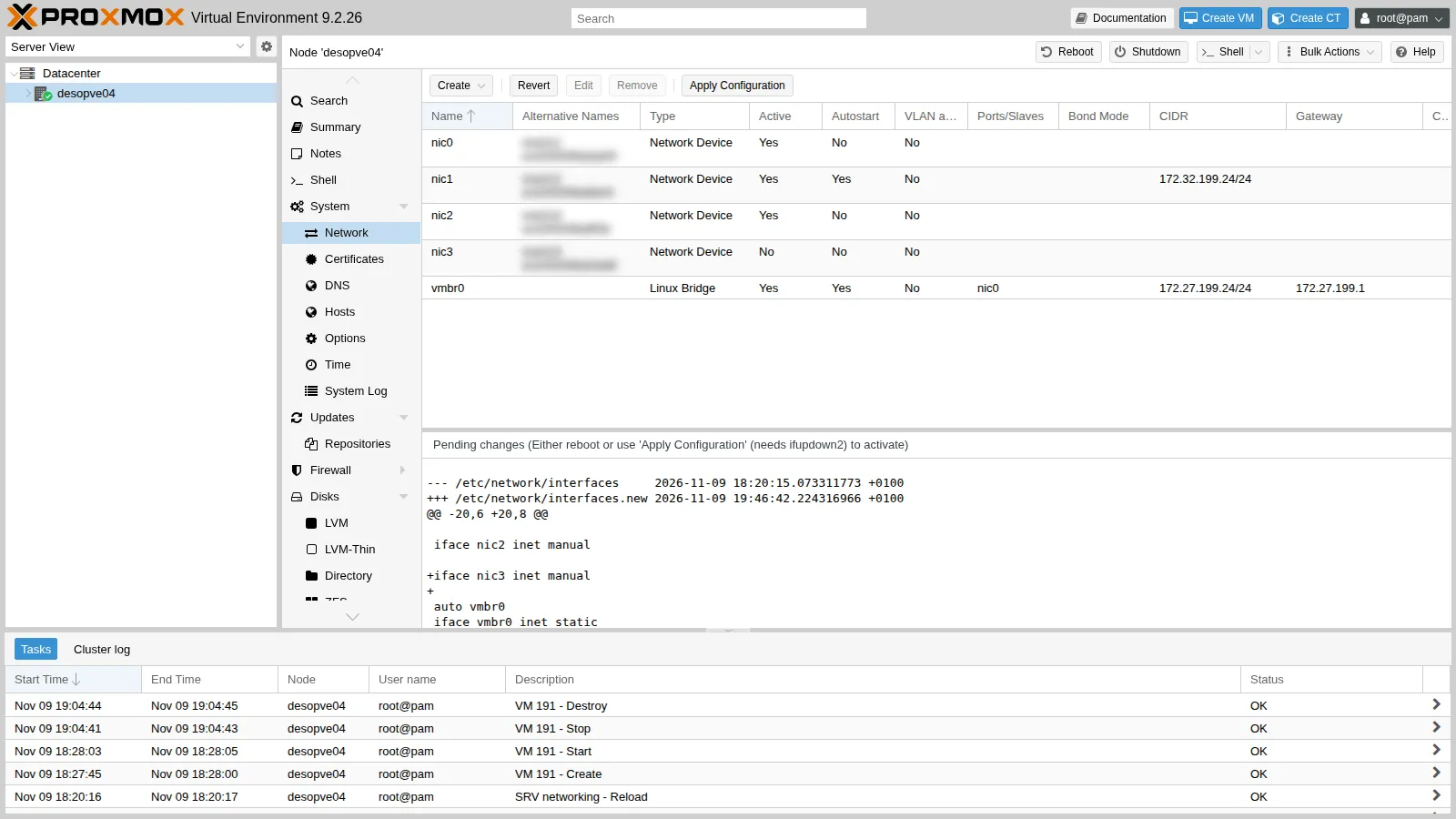
2. Bridge, bond and internal port from the GUI
Section titled “2. Bridge, bond and internal port from the GUI”-
Node desopve04 → System → Network → Create → OVS Bridge. Name
vmbr2, no ports for now (the bond is added later), commentOpen vSwitch (lab 23).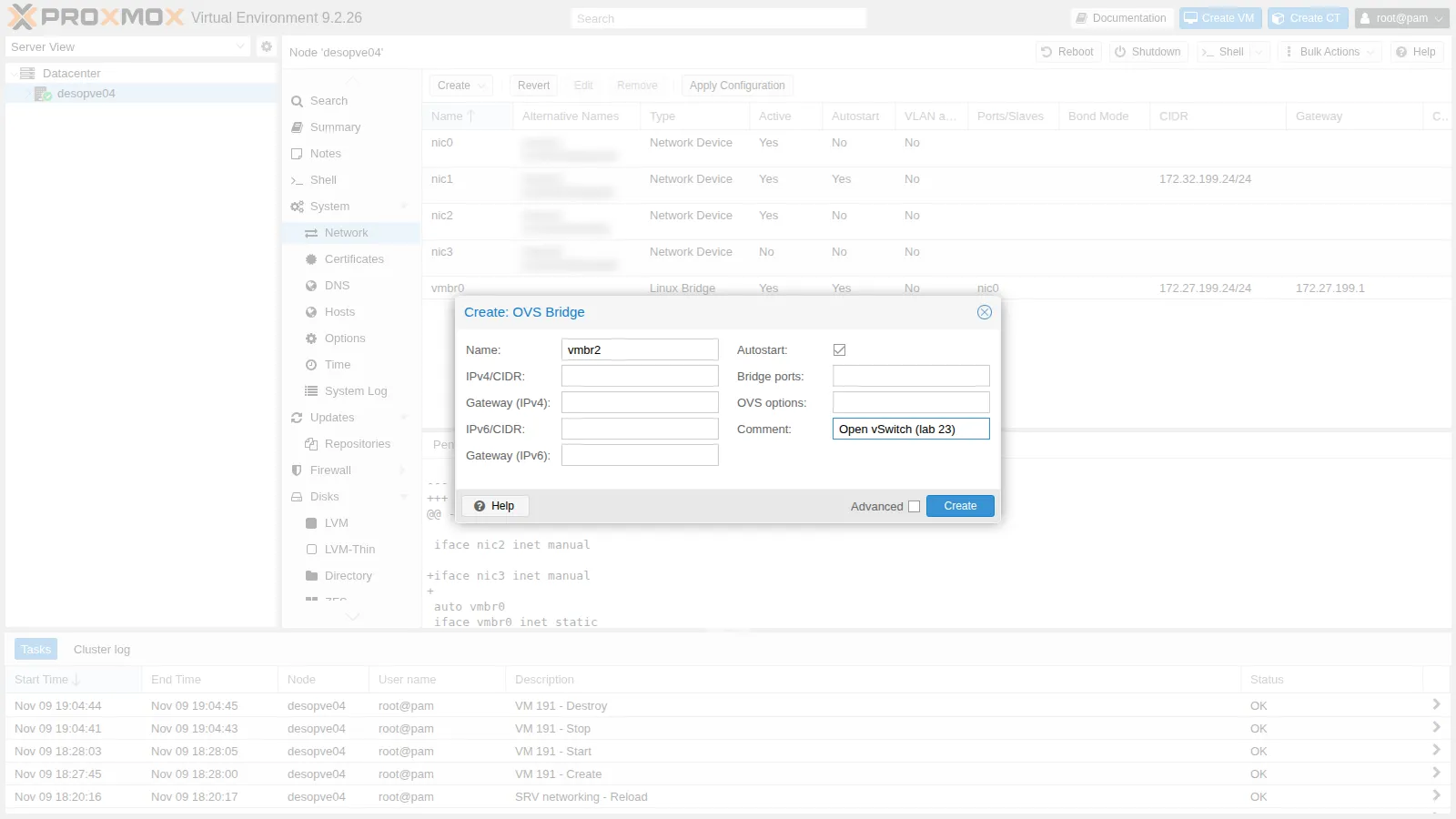
-
Create → OVS Bond. Name
bond1(thebond0on the other nodes is a Linux bond), Modeactive-backup, Slavesnic2 nic3, OVS Bridgevmbr2.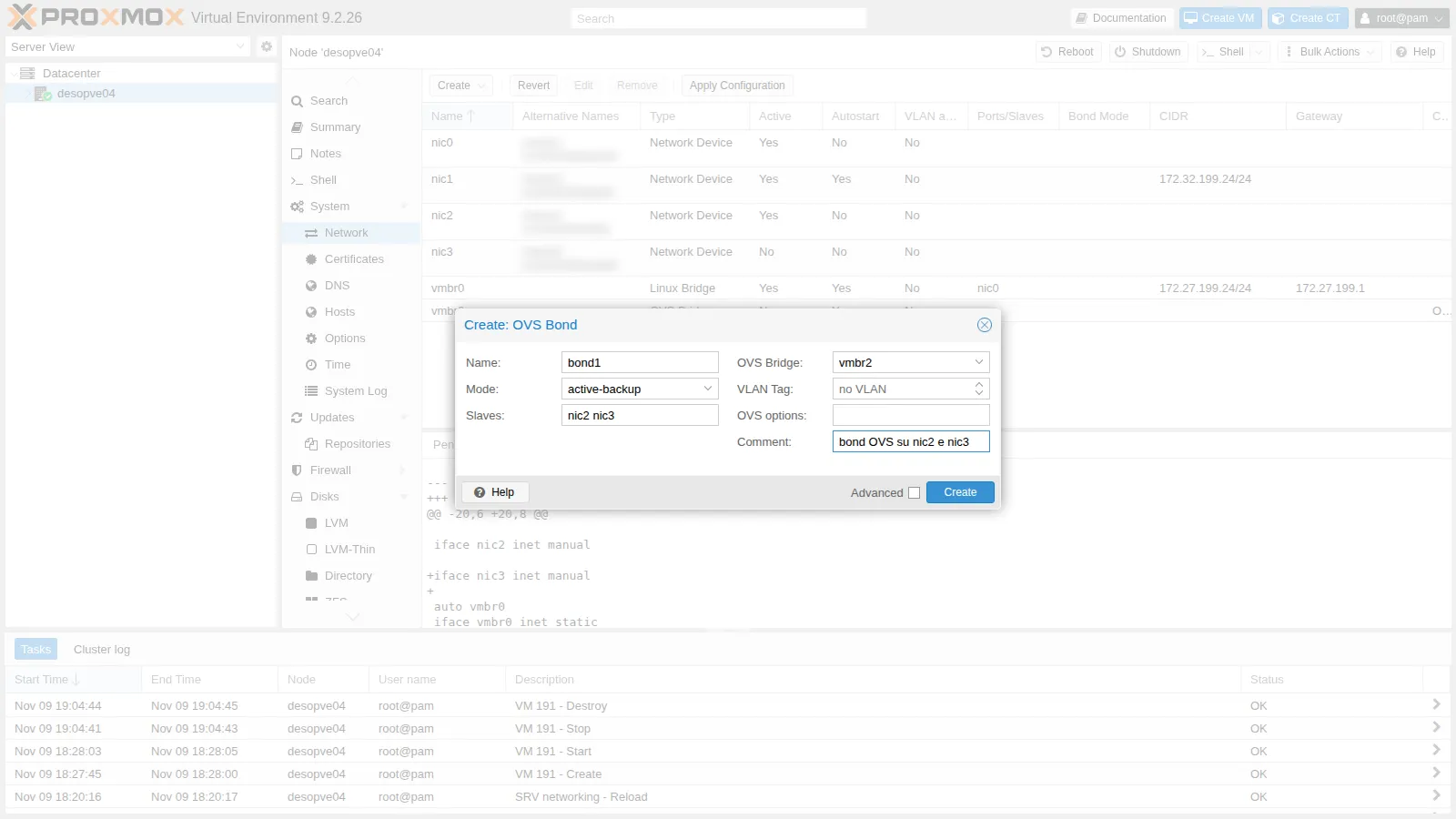
-
Create → OVS IntPort. Name
vlan10, OVS Bridgevmbr2, VLAN Tag10, IPv4/CIDR10.10.10.24/24, no gateway. The node will have an address in VLAN 10, the same VLAN as the test containers from lab 20.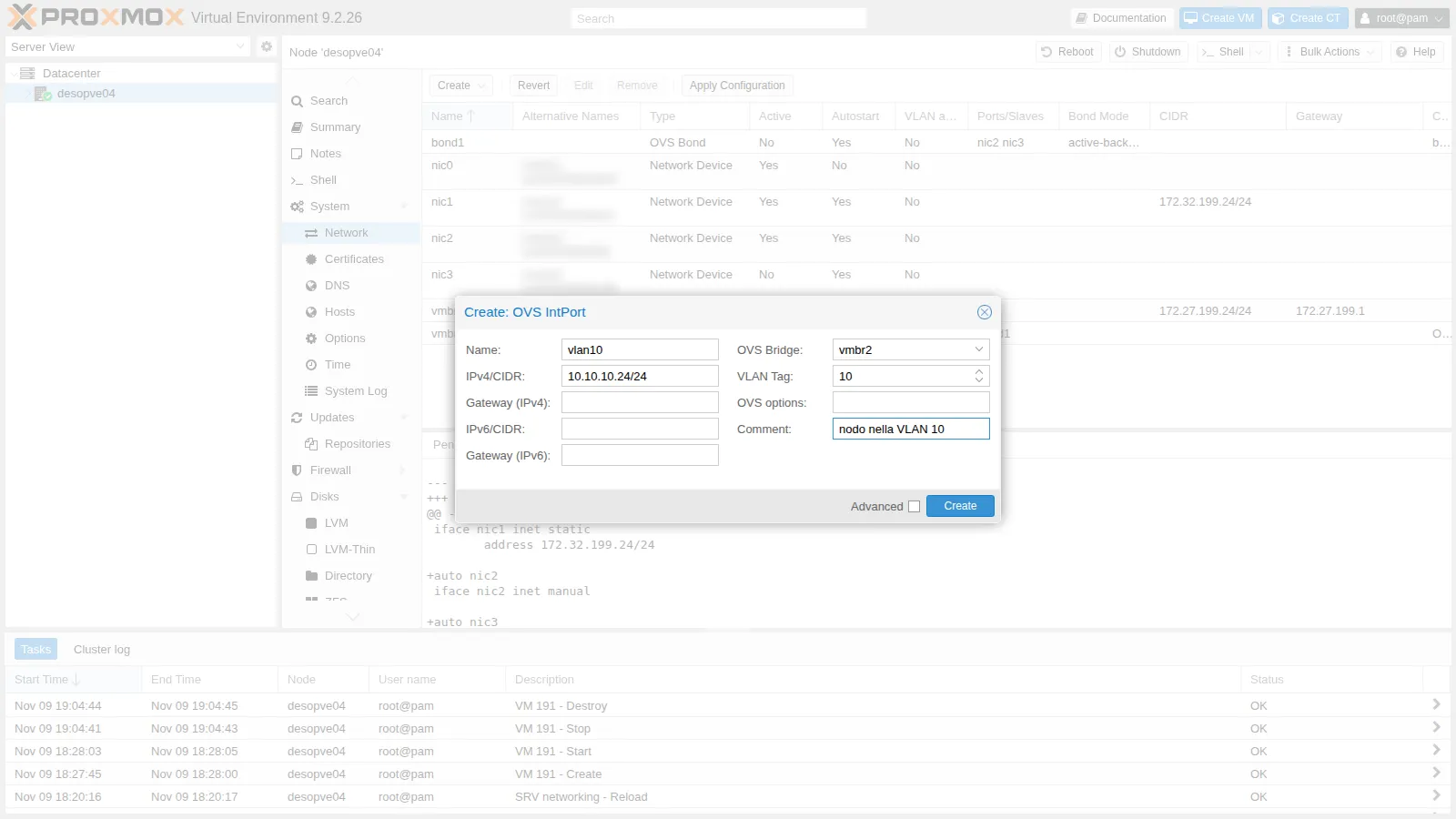
-
The changes are pending: the GUI shows the differences from the file currently in use.
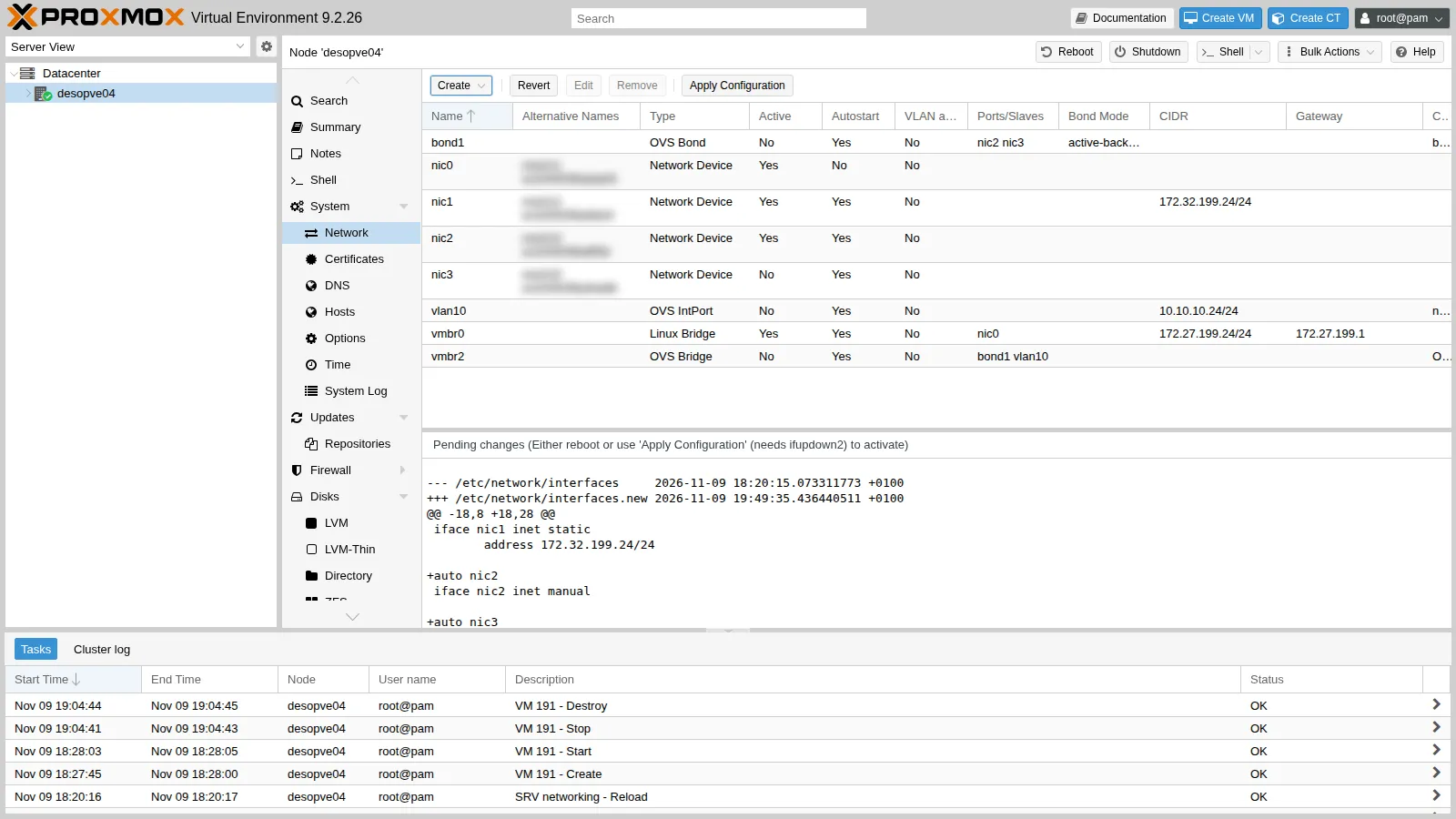
-
Apply Configuration → Yes.
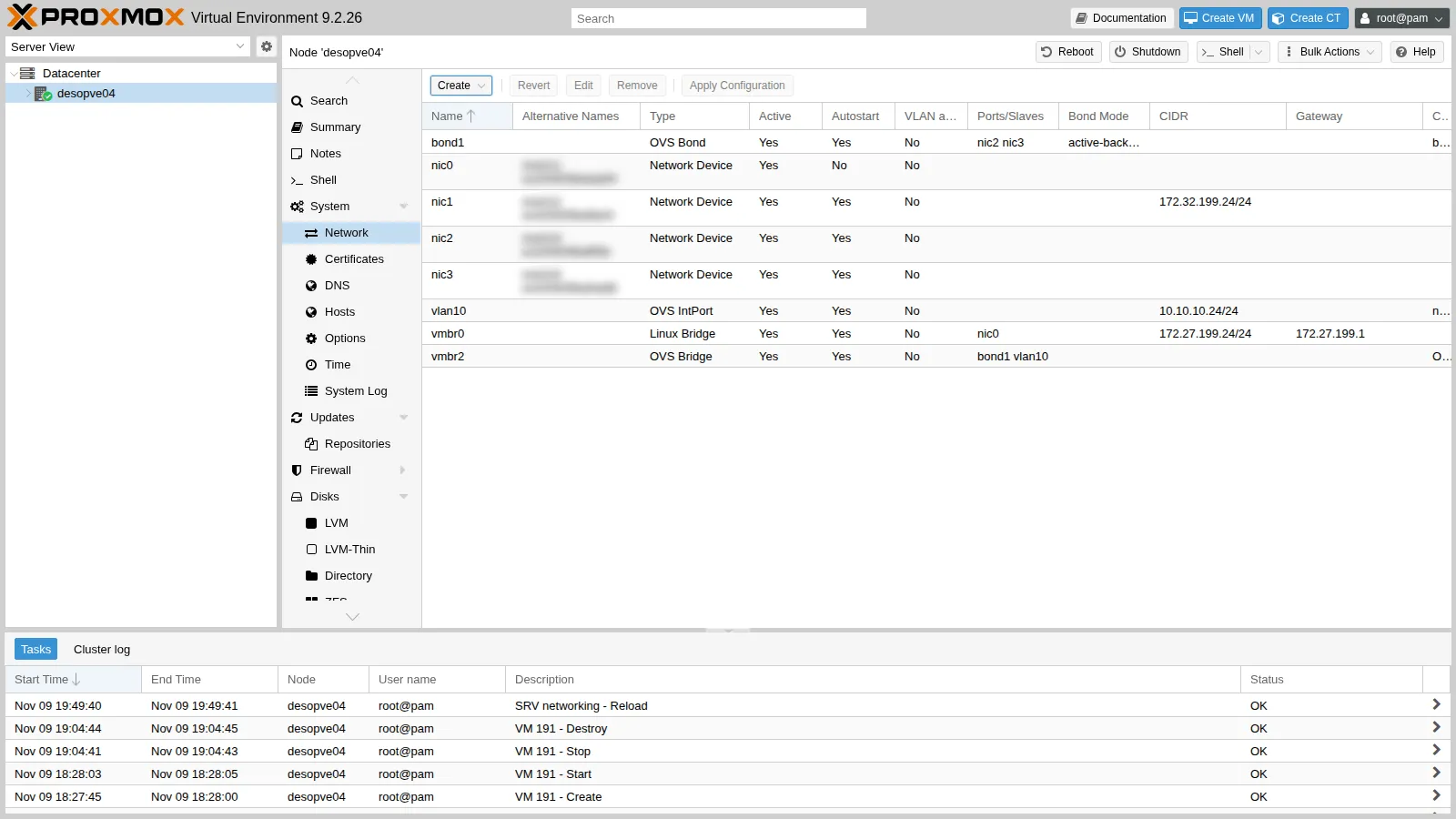
In
/etc/network/interfacesthe OVS objects have theovs_type,ovs_bridge,ovs_ports,ovs_bondsandovs_optionslines:auto nic3iface nic3 inet manualauto vlan10iface vlan10 inet staticaddress 10.10.10.24/24ovs_type OVSIntPortovs_bridge vmbr2ovs_options tag=10#nodo nella VLAN 10auto bond1iface bond1 inet manualovs_bonds nic2 nic3ovs_type OVSBondovs_bridge vmbr2ovs_options bond_mode=active-backup#bond OVS su nic2 e nic3auto vmbr2iface vmbr2 inet manualovs_type OVSBridgeovs_ports bond1 vlan10#Open vSwitch (lab 23)
3. A container on VLAN 10 of the OVS bridge
Section titled “3. A container on VLAN 10 of the OVS bridge”-
Create CT 401 with its network interface on
vmbr2and tag 10. In the GUI you choose Bridgevmbr2and VLAN Tag10, as with a Linux bridge; from the command line:root@desopve04 pct create 401 local:vztmpl/debian-13-standard_13.6-1_amd64.tar.zst \--hostname ovs-ct1 --memory 512 --cores 1 --rootfs local-lvm:4 \--net0 name=eth0,bridge=vmbr2,tag=10,ip=10.10.10.124/24 \--unprivileged 1 --features nesting=1 --password '<lab-password>' --start 1pct config 401 | grep net0Output net0: name=eth0,bridge=vmbr2,hwaddr=BC:24:11:2B:5F:96,ip=10.10.10.124/24,tag=10,type=veth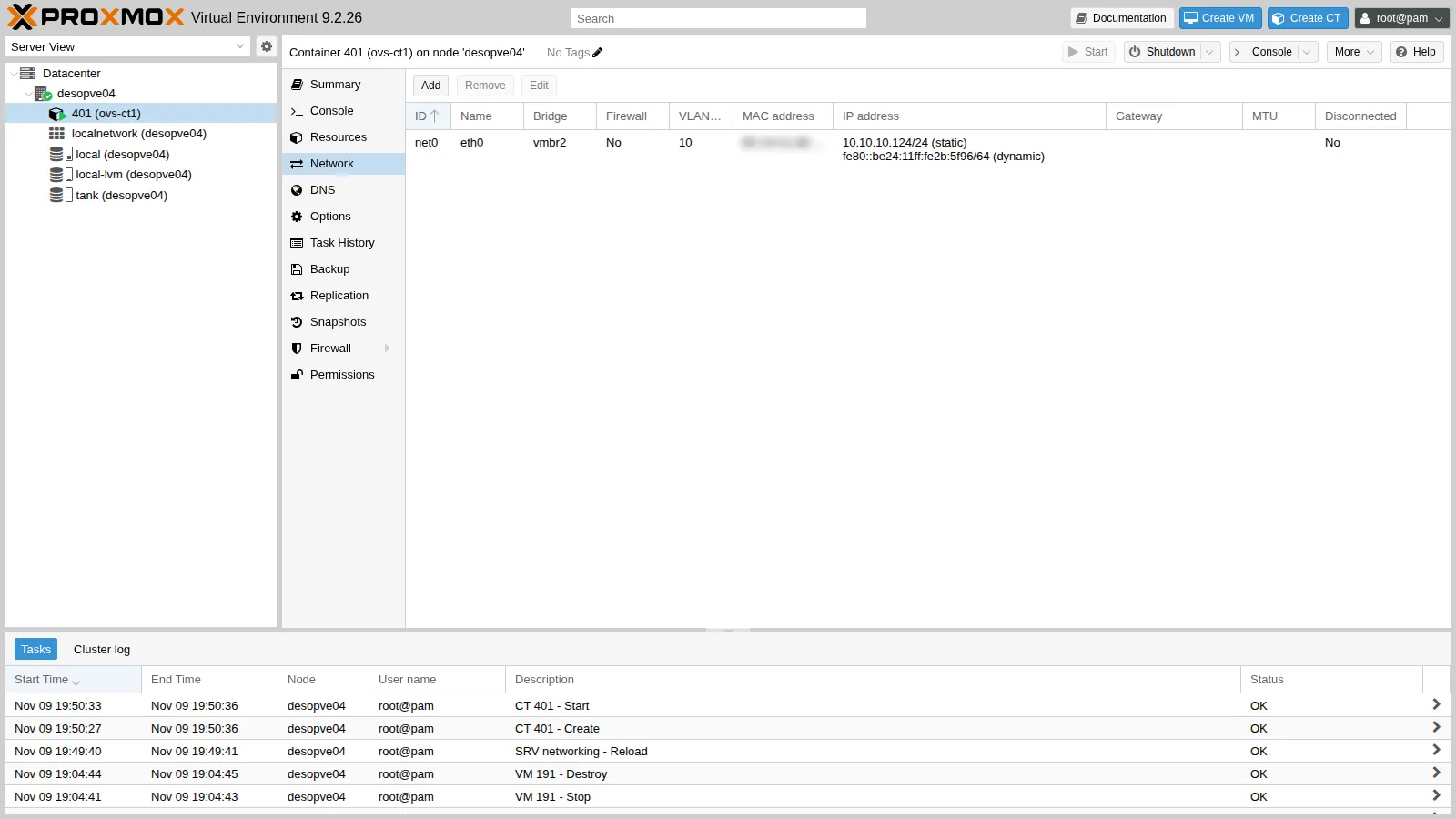
-
The container reaches CT 122, which sits on a Linux bridge on
desopve02, and the node’s internal port. The 802.1Q tag is the same standard: the network does not care which kind of software switch added it.root@desopve04 pct exec 401 -- ping -c3 -W1 10.10.10.122Output 64 bytes from 10.10.10.122: icmp_seq=1 ttl=64 time=2.21 ms64 bytes from 10.10.10.122: icmp_seq=2 ttl=64 time=0.606 ms64 bytes from 10.10.10.122: icmp_seq=3 ttl=64 time=0.572 ms3 packets transmitted, 3 received, 0% packet loss, time 2061msroot@desopve04 pct exec 401 -- ping -c3 -W1 10.10.10.24 | tail -2Output 3 packets transmitted, 3 received, 0% packet loss, time 2015msrtt min/avg/max/mdev = 0.164/0.454/1.029/0.406 msroot@desopve04 pct exec 401 -- ping -c2 -W1 10.20.20.123Output ping: connect: Network is unreachableVLAN 20 remains unreachable: between different VLANs you need a router (lab 26).
4. Reading the OVS state
Section titled “4. Reading the OVS state”-
The switch structure: ports, bond members, tags.
root@desopve04 ovs-vsctl showOutput 6704ca2b-e02a-493d-a7bc-582606dafa2eBridge vmbr2Port bond1Interface nic2Interface nic3Port veth401i0tag: 10Interface veth401i0Port vlan10tag: 10Interface vlan10type: internalPort vmbr2Interface vmbr2type: internalovs_version: "3.5.0"The container’s port (
veth401i0) hastag: 10: Proxmox added it to the switch when the CT started. Thebond1port has no tag, so it is a trunk and carries all the VLANs. -
The table of learned MAC addresses, with the VLAN of each one:
root@desopve04 ovs-appctl fdb/show vmbr2Output port VLAN MAC AgeLOCAL 0 de:b1:d7:6e:4e:4f 712 10 bc:24:11:af:bc:fc 472 0 <MAC> 422 0 <MAC> 301 10 86:93:65:12:34:7e 22 10 bc:24:11:10:9a:74 25 10 bc:24:11:2b:5f:96 1The
bc:24:11:…MAC addresses belong to the container interfaces: the remote ones (CT 121 and 122) come in from port 2, that is, from the bond. On VLAN 0 (untagged) OVS also sees the traffic of the management network, which runs on the same trunk. -
The OpenFlow flows: without a controller there is a single rule,
NORMAL, which means “behave like a MAC-learning switch”.root@desopve04 ovs-ofctl dump-flows vmbr2Output NXST_FLOW reply (xid=0x4):cookie=0x0, duration=71.116s, table=0, n_packets=16563, n_bytes=1310428, idle_age=0, priority=0 actions=NORMAL
5. Putting the OVS bond to the test
Section titled “5. Putting the OVS bond to the test”-
active-backup, failure of the active member. The active member is
nic3. While the container sends 5 pings per second to CT 122,nic3is brought down:root@desopve04 ovs-appctl bond/show bond1 | grep -E "active member|^member"Output active member mac: <MAC>(nic3)member nic2: enabledmember nic3: enabledroot@desopve04 pct exec 401 -- ping -i 0.2 -c 75 -W1 10.10.10.122 > /tmp/p1.txt &ip link set nic3 downtail -2 /tmp/p1.txtOutput 75 packets transmitted, 75 received, 0% packet loss, time 15335msrtt min/avg/max/mdev = 0.436/0.658/1.016/0.118 msroot@desopve04 ovs-appctl bond/show bond1 | sed -n "/active-backup primary/,\$p"Output active-backup primary: <none>active member mac: <MAC>(nic2)member nic2: enabledactive membermay_enable: truemember nic3: disabledmay_enable: false- Measured: 75 requests at 200 ms intervals, 75 replies, highest round-trip time 1.016 ms; after the failure,
bond/showreportsnic2as the active member andnic3disabled. - Interpretation: OVS moved the traffic to
nic2without losing any request. If there was an interruption, it was shorter than the 200 ms between two requests. - How to check more finely: a denser ping from the container, for example every 10 ms (
ping -i 0.01 -D -O), or a capture with timestamps on the surviving member (tcpdump -ttt -ni nic2 vlan 10 and icmp), to see when the first request leaves through it.
When
nic3comes back (ip link set nic3 up), the active member staysnic2(check it withovs-appctl bond/show bond1 | grep "active member"): with no primary member (active-backup primary: <none>), OVS has no reason to switch back. Withother_config:bond-primary=nic3the traffic would return tonic3as soon as it is up again, at the cost of a second move. - Measured: 75 requests at 200 ms intervals, 75 replies, highest round-trip time 1.016 ms; after the failure,
-
balance-slb. You can change the mode on the fly too:
root@desopve04 ovs-vsctl set port bond1 bond_mode=balance-slbovs-appctl bond/show bond1Output ---- bond1 ----bond_mode: balance-slb...next rebalance: 522 mslacp_status: off...member nic2: enabledactive membermay_enable: truemember nic3: enabledmay_enable: truehash 122: 1 kB loadBoth members are enabled; the output shows the MAC hash 122 assigned to
nic3with 1 kB of load, and the next rebalance due in 522 ms. SLB maps each source MAC and VLAN to a hash, assigns the hashes to the members and moves them periodically according to the load, so the load spreads only when there are several sources. With a single container generating traffic, this output does not show the load shared by the two members. To see it, generate traffic from several guests and compare the transmit counters of the members before and after (ovs-vsctl get interface nic2 statistics:tx_bytes, and the same fornic3). Likebalance-albon the Linux bond (Lab 21), SLB needs no configuration on the switch, but it splits the traffic by a different criterion: the source MAC here, the destination there. -
LACP without a partner.
balance-tcprequires LACP:root@desopve04 ovs-vsctl set port bond1 lacp=active bond_mode=balance-tcpovs-appctl bond/show bond1 | grep -E "bond_mode|lacp_status|lacp_fallback|^member|may_enable"Output bond_mode: balance-tcplacp_status: configuredlacp_fallback_ab: falsemember nic2: disabledmay_enable: falsemember nic3: disabledmay_enable: falseroot@desopve04 ovs-appctl lacp/show bond1 | grep -E "actor sys_id|partner sys_id" | head -2Output actor sys_id: <MAC>partner sys_id: 00:00:00:00:00:00root@desopve04 pct exec 401 -- ping -c3 -W1 10.10.10.122 | tail -1Output 3 packets transmitted, 0 received, 100% packet loss, time 2083msThe lab switch does not answer LACP (
partner sys_idall zeros): OVS disables both members (may_enable: false) and the container loses the network: 3 requests, no replies. This is what the OVS documentation describes forlacp-fallback-abset tofalse, the default: without a partner the bond is disabled. On the same switch, the Linux bond in802.3admode kept one member active in its own aggregator (Lab 21): the two implementations handle a missing partner differently, and with OVS the whole bond goes down. -
Falling back to active-backup. With
lacp-fallback-abthe bond works again even without a partner:root@desopve04 ovs-vsctl set port bond1 other_config:lacp-fallback-ab=trueovs-appctl bond/show bond1 | grep -E "lacp_status|lacp_fallback|active member$"Output lacp_status: configuredlacp_fallback_ab: trueactive memberroot@desopve04 pct exec 401 -- ping -c3 -W1 10.10.10.122 | tail -2Output 3 packets transmitted, 3 received, 0% packet loss, time 2065msrtt min/avg/max/mdev = 0.639/0.684/0.753/0.049 msThe fallback keeps the bond up while the switch is not configured, but it also hides the problem: the bond works, without aggregating anything, and nothing fails. If you use it, check that
lacp_statusreadsnegotiatedonce the switch has been configured; here it staysconfigured, the sign that no partner has answered. -
Back to the configuration in the file. The changes made with
ovs-vsctlare stored in the OVS database, not in/etc/network/interfaces, the file that Proxmox VE shows in the GUI and applies: the running bond and the file can disagree without the GUI showing it. Undo the changes by hand, or write them into the file withovs_options(for exampleovs_options bond_mode=balance-tcp lacp=active other_config:lacp-fallback-ab=true).root@desopve04 ovs-vsctl set port bond1 lacp=off bond_mode=active-backup -- remove port bond1 other_config lacp-fallback-abovs-vsctl get port bond1 bond_mode lacp other_configOutput active-backupoff{}
6. Linux bridge and OVS, command by command
Section titled “6. Linux bridge and OVS, command by command”| What you want to see | Linux bridge | Open vSwitch |
|---|---|---|
| Switch structure and ports | bridge link, ip -d link |
ovs-vsctl show |
| Port VLANs | bridge vlan show |
ovs-vsctl show (tag field), ovs-vsctl list port |
| Learned MAC addresses | bridge fdb show br vmbr1 |
ovs-appctl fdb/show vmbr2 |
| Bond status | cat /proc/net/bonding/bond0 |
ovs-appctl bond/show bond1 |
| LACP | /proc/net/bonding/bond0 (802.3ad section) |
ovs-appctl lacp/show bond1 |
| Forwarding rules | (none: the bridge learns and forwards) | ovs-ofctl dump-flows vmbr2 |
Verification and tests
Section titled “Verification and tests”The lab has succeeded when CT 401 reaches CT 122 over VLAN 10, every bond test in the table gives the expected result, and at the end bond1 is back in active-backup without LACP.
| Check | Expected result | Observed in the test |
|---|---|---|
| OVS bridge, bond and internal port created from the GUI | vmbr2 with bond1 and vlan10 |
bond1 on nic2 + nic3, vlan10 10.10.10.24/24 |
CT on vmbr2 with tag 10 to a CT on a Linux bridge on another node |
replies | 3 out of 3, 0% loss |
| VLAN 20 from the CT in VLAN 10 | no route without a router | Network is unreachable |
| Failure of the active member in active-backup | traffic moved to the other member | 75 replies out of 75 at 200 ms intervals; nic2 active |
Return of nic3 |
active member unchanged, with no primary member | nic2 still active |
| balance-slb | both members enabled, hashes assigned | hash 122 on nic3; how the load is shared was not measured |
| balance-tcp with LACP, no partner | bond disabled | both members disabled, partner 00:00:00:00:00:00, 100% loss |
LACP with lacp-fallback-ab |
fallback to active-backup | one active member, 0% loss |
| Back to the file configuration | active-backup, LACP off | active-backup, off, {} |
Final lab state
Section titled “Final lab state”desopve04: Open vSwitch 3.5 installed.vmbr2(OVS) withbond1(OVS, active-backup,nic2+nic3);- internal port
vlan1010.10.10.24/24 (VLAN 10); vmbr0andnic1unchanged;- copy of the previous network configuration in
/root/interfaces.bak-lab23.
- CT 401
ovs-ct1ondesopve04, running:vmbr2VLAN 10, 10.10.10.124/24, disk onlocal-lvm. - The cluster (
desopve01-03) was not touched.
What you learned
Section titled “What you learned”- Linux bridge or OVS: the Linux bridge by default; OVS when you need what it adds (OpenFlow flows, port mirroring, ports and bonds managed inside the switch) or when the network is already run with OVS. The 802.1Q tag is the same on both, so they can share a network.
- Which OVS bond mode, given the switch: with no LACP on the switch, active-backup, which the OVS documentation prefers in that case, while balance-slb helps only when many guests send traffic; with LACP configured on the switch, balance-tcp with
lacp=active. - Whether to enable
lacp-fallback-ab: it keeps the bond up while the switch is not ready, at the price of hiding a configuration error; if you enable it, monitor thatlacp_statusreadsnegotiated. - Whether to set a primary member: without one, OVS stays on the surviving member after a recovery, one move only; with
bond-primary, traffic returns to the preferred member, with a second move. - Where an OVS setting belongs: a change made with
ovs-vsctltakes effect at once but lives outside the network file; anything meant to stay goes intoovs_optionsin/etc/network/interfaces.
References
Section titled “References”- Proxmox VE wiki – Open vSwitch
- Proxmox VE – Network Configuration
- Open vSwitch – Bonding: active-backup, SLB and the LACP fallback (current documentation)
- ovs-vswitchd.conf.db(5), Open vSwitch 3.5 – bond, failure detection and LACP options
- ovs-vswitchd(8), Open vSwitch 3.5 – the
bond/showandlacp/showcommands