

Lab 24 – Routing and NAT on the host: masquerading, port forwarding and routed configuration
Dependencies
Section titled “Dependencies”- Previous labs:
- Node:
desopve04, the standalone node: the tests do not touch the cluster. - Router:
rtr-core(172.27.199.1), the lab’s MikroTik RouterOS router and the gateway of the management network: its basic configuration is in Lab 01 and you access it withssh [email protected]. In this lab it plays the part of the provider’s router. - Template:
debian-13-standard_13.6-1_amd64.tar.zstin thelocalstorage ofdesopve04(Lab 09, orpveam download local debian-13-standard_13.6-1_amd64.tar.zst). - Test clients:
desopve01and the DCdesopve-dc01(172.27.199.20). - Proxy:
proxy.proxmox.community:3128for the packages in the containers. - Credentials:
root/<lab-password>on the nodes,admin/<lab-password>onrtr-core→ Appendix B.
Objectives
Section titled “Objectives”- Give the guests a private network that reaches the rest of the network with the node’s address (masquerading).
- Publish a service of a private guest on a port of the node (port forwarding).
- Route an “additional” subnet to the node, as providers do with dedicated servers, and give the guests their own addresses without NAT.
- Write
post-uprules that do not get duplicated when the network is reloaded.
How it works
Section titled “How it works”Three ways to connect the guests
Section titled “Three ways to connect the guests”| Mode | How the guests see the others | How the others see the guests | When to use it |
|---|---|---|---|
| Bridged (lab 20) | the guests are on the same physical network as the node | with their own address | almost always: datacenters, corporate LANs |
| Masquerading (NAT) | they go out with the node’s address | they do not see them (only through port forwarding) | a single available address, labs, test networks |
| Routed | the node acts as a router between their subnet and the outside network | with their own address, if someone routes the subnet to the node | dedicated servers at a provider that does not accept unknown MAC addresses on its network |
The node as a router
Section titled “The node as a router”To forward packets between its interfaces, the node must have IP forwarding enabled (net.ipv4.ip_forward = 1). A bridge without ports (bridge-ports none) is a network that exists only inside the node: the guests attached to it can get out only through the node, which routes their traffic.
Masquerading and port forwarding
Section titled “Masquerading and port forwarding”Masquerading is a form of source NAT: the guests’ packets leave through vmbr0 with the node’s address instead of their own. The kernel’s conntrack table remembers every connection and delivers the replies to the right guest. The other hosts do not see the private network and do not need to know about it.
Port forwarding is destination NAT (DNAT): a connection that arrives at a port of the node is redirected to an address and a port on the private network.
Routed configuration
Section titled “Routed configuration”A provider assigns the server a main address and, often, an additional subnet routed to the main address. The node puts the subnet on an internal bridge and routes it: the guests have their own addresses, reachable from outside, without NAT. In the lab we add the route that would live on the provider’s router ourselves, on rtr-core.
A variant in the Proxmox documentation uses proxy ARP (proxy_arp on the external interface): the node answers the ARP requests for the guests’ addresses, so the provider’s router reaches them even without a dedicated route. This lab uses the static route, which is the clearest approach.
The rules in the network file
Section titled “The rules in the network file”The GUI does not manage NAT: you add the rules by hand in /etc/network/interfaces with post-up (run when the interface comes up) and post-down (run when it goes down). Proxmox keeps these lines even when you later change the network from the GUI.
Procedure
Section titled “Procedure”1. The two internal bridges from the GUI
Section titled “1. The two internal bridges from the GUI”-
Make a backup copy of the network configuration:
root@desopve04 cp /etc/network/interfaces /root/interfaces.bak-lab24 -
Node desopve04 → System → Network → Create → Linux Bridge. Name
vmbr9, IPv4/CIDR192.168.100.1/24, Bridge ports empty, no gateway. Commentrete privata con NAT.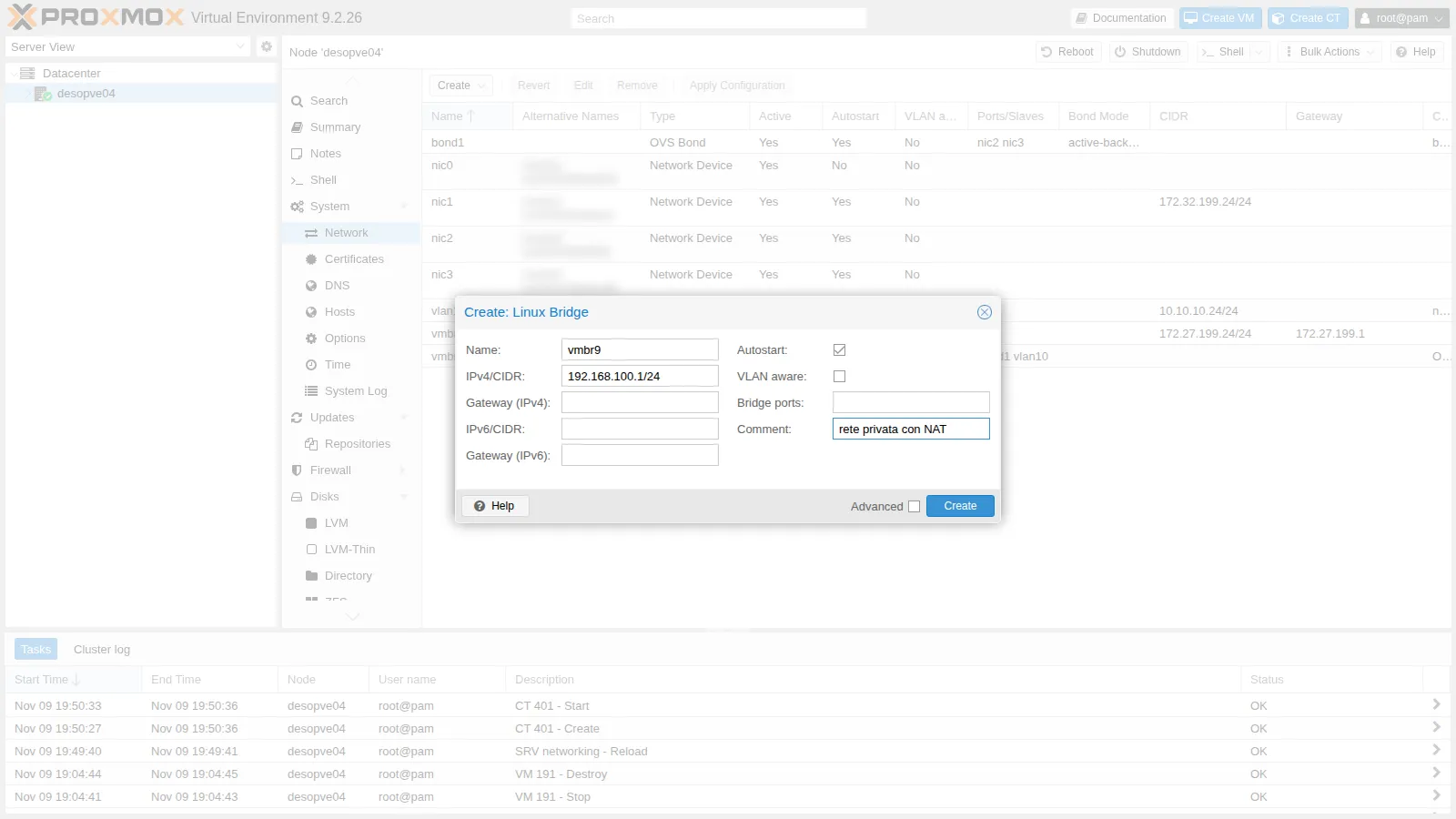
-
A second bridge for the routed configuration: Name
vmbr8, IPv4/CIDR10.99.99.1/28(the provider’s “additional subnet”), Bridge ports empty, commentsubnet instradata.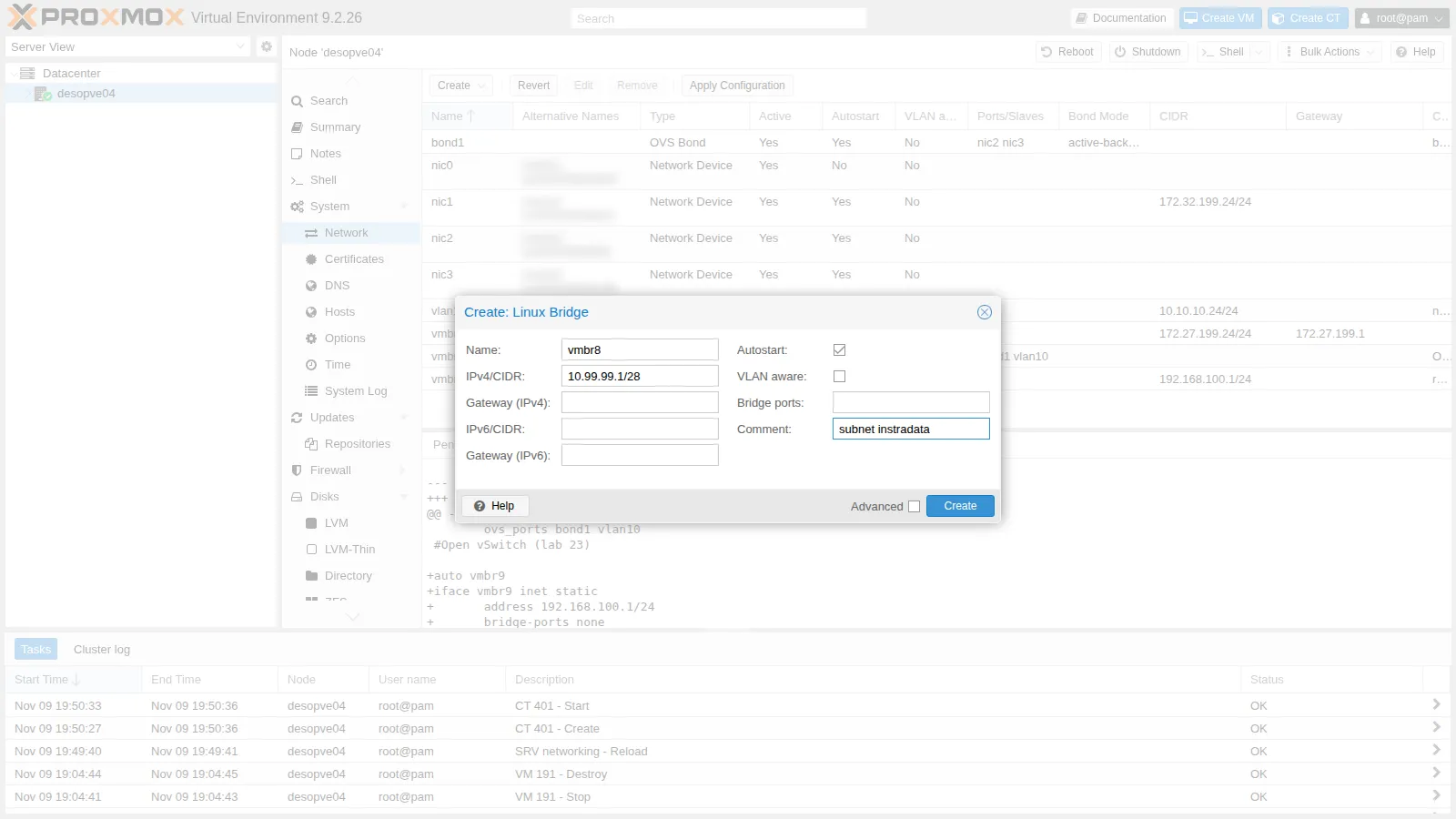
-
Apply Configuration:
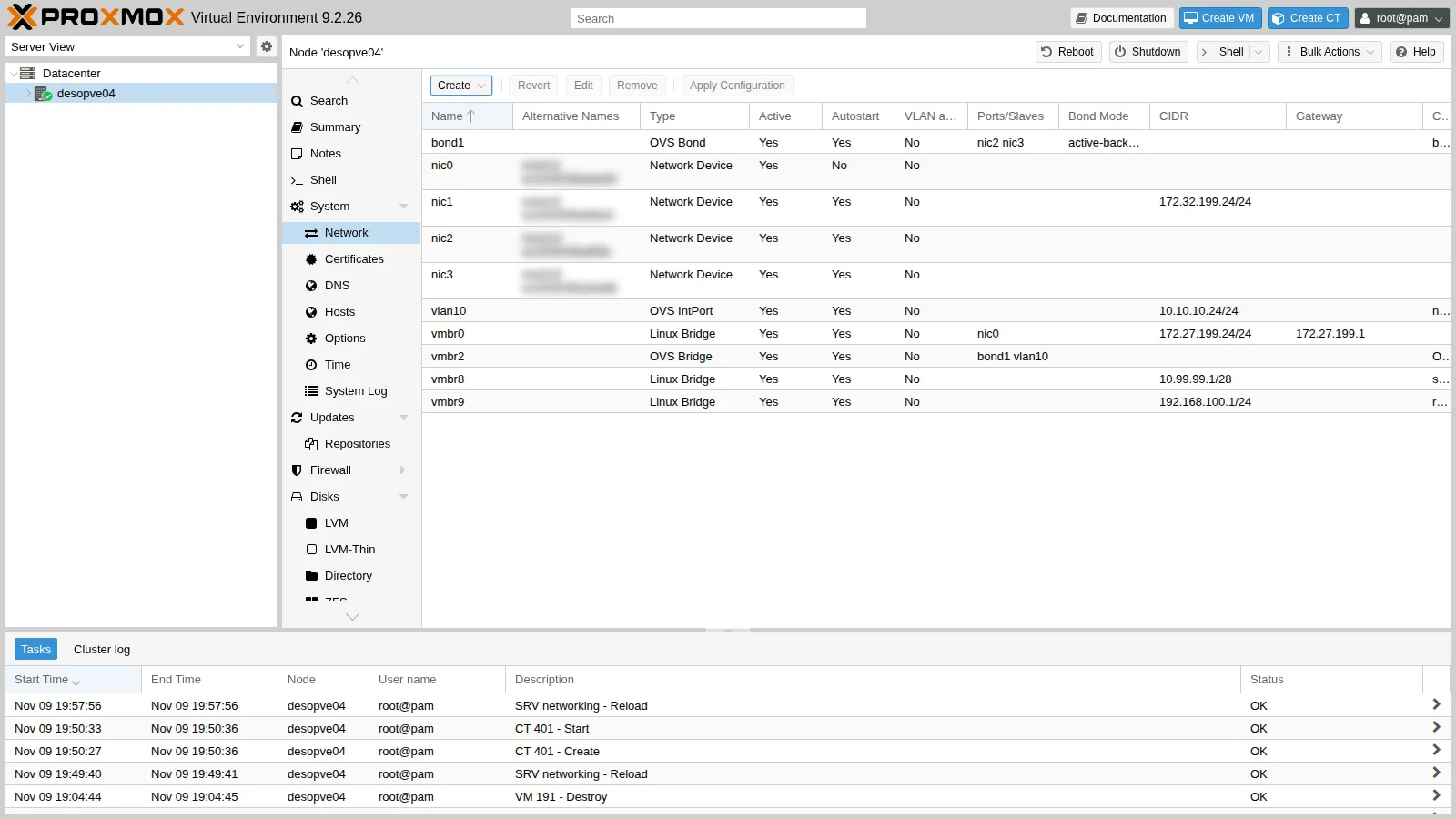
-
Enable IP forwarding permanently:
root@desopve04 echo "net.ipv4.ip_forward = 1" > /etc/sysctl.d/80-ip-forward.confsysctl -p /etc/sysctl.d/80-ip-forward.confOutput net.ipv4.ip_forward = 1
2. Masquerading
Section titled “2. Masquerading”-
Add the two NAT lines to the
vmbr9block in/etc/network/interfacesand reload the network:auto vmbr9iface vmbr9 inet staticaddress 192.168.100.1/24bridge-ports nonebridge-stp offbridge-fd 0post-up iptables -t nat -A POSTROUTING -s 192.168.100.0/24 -o vmbr0 -j MASQUERADEpost-down iptables -t nat -D POSTROUTING -s 192.168.100.0/24 -o vmbr0 -j MASQUERADE#rete privata con NATroot@desopve04 ifreload -aiptables -t nat -S POSTROUTINGOutput -P POSTROUTING ACCEPT-A POSTROUTING -s 192.168.100.0/24 -o vmbr0 -j MASQUERADE -
Create CT 402 on the private network, with the node as its gateway:
root@desopve04 pct create 402 local:vztmpl/debian-13-standard_13.6-1_amd64.tar.zst \--hostname nat-ct1 --memory 512 --cores 1 --rootfs local-lvm:4 \--net0 name=eth0,bridge=vmbr9,ip=192.168.100.10/24,gw=192.168.100.1 \--nameserver 172.27.199.20 --searchdomain proxmox.community \--unprivileged 1 --features nesting=1 --password '<lab-password>' --start 1 -
The container reaches the DC and resolves names:
root@desopve04 pct exec 402 -- ip routeOutput default via 192.168.100.1 dev eth0 proto kernel onlink192.168.100.0/24 dev eth0 proto kernel scope link src 192.168.100.10root@desopve04 pct exec 402 -- ping -c3 -W1 172.27.199.20 | tail -2Output 3 packets transmitted, 3 received, 0% packet loss, time 2074msrtt min/avg/max/mdev = 0.743/0.820/0.862/0.054 msroot@desopve04 pct exec 402 -- getent hosts desopve-dc01.proxmox.communityOutput 172.27.199.20 desopve-dc01.proxmox.community172.32.199.20 desopve-dc01.proxmox.community -
On
vmbr0the packets leave with the node’s address, and the conntrack table remembers whom to send the reply back to:root@desopve04 tcpdump -ni vmbr0 icmp and host 172.27.199.20Output 19:59:00.253879 IP 172.27.199.24 > 172.27.199.20: ICMP echo request, id 347, seq 1, length 6419:59:00.254872 IP 172.27.199.20 > 172.27.199.24: ICMP echo reply, id 347, seq 1, length 64root@desopve04 conntrack -L -p icmpOutput icmp 1 24 src=192.168.100.10 dst=172.27.199.20 type=8 code=0 id=347 src=172.27.199.20 dst=172.27.199.24 type=0 code=0 id=347 mark=0 use=1The conntrack entry has two halves: the request as the container sent it (
src=192.168.100.10) and the reply as it arrives from the DC (dst=172.27.199.24). -
Test without masquerading. Remove the rule and try again:
root@desopve04 iptables -t nat -D POSTROUTING -s 192.168.100.0/24 -o vmbr0 -j MASQUERADEpct exec 402 -- ping -c3 -W1 172.27.199.20 | tail -1Output 3 packets transmitted, 0 received, 100% packet loss, time 2055msroot@desopve04 tcpdump -ni vmbr0 icmp and host 172.27.199.20Output 19:59:08.670035 IP 192.168.100.10 > 172.27.199.20: ICMP echo request, id 348, seq 1, length 6419:59:09.700834 IP 192.168.100.10 > 172.27.199.20: ICMP echo request, id 348, seq 2, length 6419:59:10.725095 IP 192.168.100.10 > 172.27.199.20: ICMP echo request, id 348, seq 3, length 64The node forwards the requests with the private address: the DC does not know where
192.168.100.0/24is, sends the replies to its gateway, and they get lost. Put the rule back (iptables -t nat -A ...) and the ping works again. -
The container installs packages through the NAT and the lab proxy:
root@desopve04 pct exec 402 -- sh -c 'echo "Acquire::http::Proxy \"http://proxy.proxmox.community:3128\";" > /etc/apt/apt.conf.d/80proxy'pct exec 402 -- apt-get updatepct exec 402 -- apt-get install -y nginxpct exec 402 -- sh -c 'echo "nat-ct1: servizio raggiunto con il port forwarding" > /var/www/html/index.html'
3. Port forwarding
Section titled “3. Port forwarding”-
Add the DNAT lines to
vmbr9: port 8080 of the node goes to port 80 of the container.post-up iptables -t nat -A PREROUTING -i vmbr0 -p tcp --dport 8080 -j DNAT --to-destination 192.168.100.10:80post-down iptables -t nat -D PREROUTING -i vmbr0 -p tcp --dport 8080 -j DNAT --to-destination 192.168.100.10:80 -
Watch out for
ifreload. When you reload the network after the change, ifupdown2 runs thepost-upcommands ofvmbr9again: the masquerading rule that was already there gets added a second time too.root@desopve04 ifreload -aiptables -t nat -S | grep -E "DNAT|MASQ"Output -A PREROUTING -i vmbr0 -p tcp -m tcp --dport 8080 -j DNAT --to-destination 192.168.100.10:80-A POSTROUTING -s 192.168.100.0/24 -o vmbr0 -j MASQUERADE-A POSTROUTING -s 192.168.100.0/24 -o vmbr0 -j MASQUERADEThe DNAT rule, just added to the file, appears once; the masquerading rule, which was already there, appears twice.
ifreload -areruns all thepost-upcommands of the bridge at every reload, even if the file has not changed: with one more reload there would be two DNAT rules and three MASQUERADE rules. Duplicate rules do not break anything right away, but they pile up, and apost-downremoves only one of them. The solution is to add a rule only if it is missing:iptables -C(check) fails if the rule is not there, and only then does-Aadd it. The finalvmbr9block:auto vmbr9iface vmbr9 inet staticaddress 192.168.100.1/24bridge-ports nonebridge-stp offbridge-fd 0post-up iptables -t nat -C POSTROUTING -s 192.168.100.0/24 -o vmbr0 -j MASQUERADE 2>/dev/null || iptables -t nat -A POSTROUTING -s 192.168.100.0/24 -o vmbr0 -j MASQUERADEpost-down iptables -t nat -D POSTROUTING -s 192.168.100.0/24 -o vmbr0 -j MASQUERADEpost-up iptables -t nat -C PREROUTING -i vmbr0 -p tcp --dport 8080 -j DNAT --to-destination 192.168.100.10:80 2>/dev/null || iptables -t nat -A PREROUTING -i vmbr0 -p tcp --dport 8080 -j DNAT --to-destination 192.168.100.10:80post-down iptables -t nat -D PREROUTING -i vmbr0 -p tcp --dport 8080 -j DNAT --to-destination 192.168.100.10:80#rete privata con NATOnce you have removed the extra copies by hand (
iptables -t nat -D ...once per rule), two reloads in a row no longer duplicate anything:root@desopve04 ifreload -a; ifreload -aiptables -t nat -S | grep -E "DNAT|MASQ"Output -A PREROUTING -i vmbr0 -p tcp -m tcp --dport 8080 -j DNAT --to-destination 192.168.100.10:80-A POSTROUTING -s 192.168.100.0/24 -o vmbr0 -j MASQUERADE -
The container’s service is reachable from the management network on port 8080 of the node:
root@desopve01 curl -s http://172.27.199.24:8080/Output nat-ct1: servizio raggiunto con il port forwardingroot@desopve01 curl -s -i http://172.27.199.24:8080/ | head -3Output HTTP/1.1 200 OKServer: nginxDate: Mon, 09 Nov 2026 18:59:43 GMT -
From the node itself, however, it does not work:
root@desopve04 curl -s -m 5 http://172.27.199.24:8080/ || echo "nessuna risposta (codice $?)"Output nessuna risposta (codice 7)root@desopve04 iptables -t nat -L PREROUTING -n -vOutput Chain PREROUTING (policy ACCEPT 41 packets, 2952 bytes)pkts bytes target prot opt in out source destination2 120 DNAT tcp -- vmbr0 * 0.0.0.0/0 0.0.0.0/0 tcp dpt:8080 to:192.168.100.10:80Connections that originate on the node do not go through the
PREROUTINGchain (they go throughOUTPUT), and the rule matches packets coming in fromvmbr0. The counters show the 2 packets that arrived from the other hosts.
4. Routed configuration
Section titled “4. Routed configuration”-
Create CT 403 on the routed subnet, with the node as its gateway:
root@desopve04 pct create 403 local:vztmpl/debian-13-standard_13.6-1_amd64.tar.zst \--hostname routed-ct1 --memory 512 --cores 1 --rootfs local-lvm:4 \--net0 name=eth0,bridge=vmbr8,ip=10.99.99.2/28,gw=10.99.99.1 \--nameserver 172.27.199.20 --searchdomain proxmox.community \--unprivileged 1 --features nesting=1 --password '<lab-password>' --start 1 -
As long as the router does not know that the subnet is behind
desopve04, the container is unreachable:root@desopve01 ping -c2 -W1 10.99.99.2 | tail -1Output 2 packets transmitted, 0 received, +2 errors, 100% packet loss, time 1001ms -
On the router (
rtr-corehere, the provider’s router in production) route the subnet to the node’s main address:RouterOS — rtr-core /ip route add dst-address=10.99.99.0/28 gateway=172.27.199.24 comment="subnet instradata verso desopve04 (lab 24)"/ip route print where dst-address=10.99.99.0/28Output Flags: A - ACTIVE; s - STATICColumns: DST-ADDRESS, GATEWAY, ROUTING-TABLE, DISTANCE# DST-ADDRESS GATEWAY ROUTING-TABLE DISTANCE;;; subnet instradata verso desopve04 (lab 24)0 As 10.99.99.0/28 172.27.199.24 main 1 -
Now the container is reachable at its own address, and
tracerouteshows the path: router, node, container.root@desopve01 ping -c3 -W1 10.99.99.2 | tail -2Output 3 packets transmitted, 3 received, 0% packet loss, time 2052msrtt min/avg/max/mdev = 0.633/0.776/0.907/0.112 msroot@desopve01 traceroute -n -w1 -q1 10.99.99.2Output traceroute to 10.99.99.2 (10.99.99.2), 30 hops max, 60 byte packets1 172.27.199.1 0.440 ms2 172.27.199.24 0.684 ms3 10.99.99.2 0.783 ms -
Unlike with masquerading, whoever receives the traffic sees the container’s real address. Start the capture on
vmbr0and, from a second terminal, send a ping from the container (pct exec 403 -- ping -c1 172.27.199.20):root@desopve04 tcpdump -ni vmbr0 icmp and host 172.27.199.20Output 20:00:13.717794 IP 10.99.99.2 > 172.27.199.20: ICMP echo request, id 344, seq 1, length 6420:00:13.718992 IP 172.27.199.20 > 10.99.99.2: ICMP echo reply, id 344, seq 1, length 64root@desopve04 ip route | grep -E "vmbr8|vmbr9"Output 10.99.99.0/28 dev vmbr8 proto kernel scope link src 10.99.99.1192.168.100.0/24 dev vmbr9 proto kernel scope link src 192.168.100.1The node has no NAT rules for
10.99.99.0/28: it simply routes, because both networks are attached to its interfaces.
Verification and tests
Section titled “Verification and tests”| Test | Result |
|---|---|
| CT on the private network to the DC, with masquerading | 0% loss; on vmbr0 you see the node’s address |
| Same test without the MASQUERADE rule | 100% loss: the DC does not know where to reply |
apt in the private container |
works through the NAT and the proxy |
Port forwarding 8080 → CT 402:80 from desopve01 |
container page, HTTP 200 |
| Port forwarding from the node itself | does not work: local traffic does not go through PREROUTING |
ifreload with post-up iptables -A |
duplicate rules; with -C ... || -A no duplicates |
| Routed subnet without a route on the router | unreachable |
Routed subnet with the route on rtr-core |
reachable in 3 hops, without NAT |
Final lab state
Section titled “Final lab state”desopve04:vmbr9192.168.100.1/24 without ports, with masquerading towardsvmbr0and DNAT172.27.199.24:8080→192.168.100.10:80;vmbr810.99.99.1/28 without ports, routed subnet;- IP forwarding enabled (
/etc/sysctl.d/80-ip-forward.conf); - copy of the previous network configuration in
/root/interfaces.bak-lab24; - OVS (
vmbr2,bond1,vlan10) unchanged since lab 23.
- Containers on
desopve04, all running:- CT 401
ovs-ct1(lab 23); - CT 402
nat-ct1onvmbr9, 192.168.100.10, with nginx; - CT 403
routed-ct1onvmbr8, 10.99.99.2/28.
- CT 401
rtr-core: static route10.99.99.0/28via172.27.199.24.
What you learned
Section titled “What you learned”- A bridge without ports is a network internal to the node; with IP forwarding the node routes it.
- Masquerading hides the guests behind the node’s address: conntrack delivers the replies, and the other hosts do not see the private network.
- Port forwarding publishes a private service on a port of the node, but it does not apply to connections that originate on the node itself.
- With the routed configuration the guests have their own addresses without NAT: the upstream router must route the subnet to the node.
post-uprules are rerun at everyifreload: withiptables -C ... || iptables -A ...they do not get duplicated.