

Lab 28 – SDN 2: VLAN and QinQ zones
Dependencies
Section titled “Dependencies”- Previous labs:
- Physical network: the node ports facing the network are a trunk that lets any tag through. In production they are configured on the switches as trunks with the allowed VLANs.
- Nodes:
desopve01,desopve02,desopve03. - Template:
cephfs:vztmpl/debian-13-standard_13.6-1_amd64.tar.zst. - Credentials:
root/<lab-password>→ Appendix B.
Objectives
Section titled “Objectives”- Create VLAN networks as SDN VNets instead of setting the tag on the guest’s network interface.
- Use Dry-Run to see which files the SDN will change before applying.
- Understand QinQ: a service VLAN that contains the customer VLANs, with ethertype 802.1Q or 802.1ad.
- Check with
tcpdumpwhich tags actually travel between the nodes, and look at the MTU issue.
How it works
Section titled “How it works”VLAN zone
Section titled “VLAN zone”In lab 20 the tag was set on the guest’s network interface (tag=10). With a VLAN zone the VNet decides the tag: you create a VNet vnv30 with tag 30, and whoever creates the VM picks vnv30 as the bridge, without knowing anything about VLANs. On the nodes the VNet becomes a Linux bridge whose port is vmbr1.30, the VLAN subinterface of the existing bridge. With VNets you can also grant permissions per network (lab 44).
QinQ zone
Section titled “QinQ zone”QinQ stacks two tags:
- the outer tag, the service VLAN, is one per zone: it separates, for example, two customers or two environments;
- the inner tag, the customer VLAN, is the VNet’s tag.
Two QinQ zones can both use VLAN 10 without seeing each other, because they travel in different service VLANs.
| Zone | Frame on the trunk between the nodes |
|---|---|
| VLAN, VNet tag 30 | MAC · 802.1Q 30 · IPv4 |
| QinQ, service VLAN 300 (802.1q) | MAC · 802.1Q 300 · 802.1Q 10 · IPv4 |
| QinQ, service VLAN 301 (802.1ad) | MAC · 802.1ad 301 (ethertype 0x88a8) · 802.1Q 10 · IPv4 |
The service VLAN protocol is 802.1q by default; 802.1ad is the one the standard specifies for the outer tag and should be chosen if the switches require it.
MTU: each tag adds 4 bytes to the frame. With two tags a 1500-byte IP packet produces a 1526-byte frame (1522 without the FCS, as tcpdump counts them), versus 1518 bytes for an untagged frame and 1522 for a frame with a single 802.1Q tag. The Proxmox VE documentation says to reduce the MTU of QinQ VNets to 1496 if the physical network has an MTU of 1500, or else to raise the MTU of the physical network.
Procedure
Section titled “Procedure”1. VLAN zone and VNet
Section titled “1. VLAN zone and VNet”-
Datacenter → SDN → Zones → Add → VLAN. ID
vlanz, Bridgevmbr1: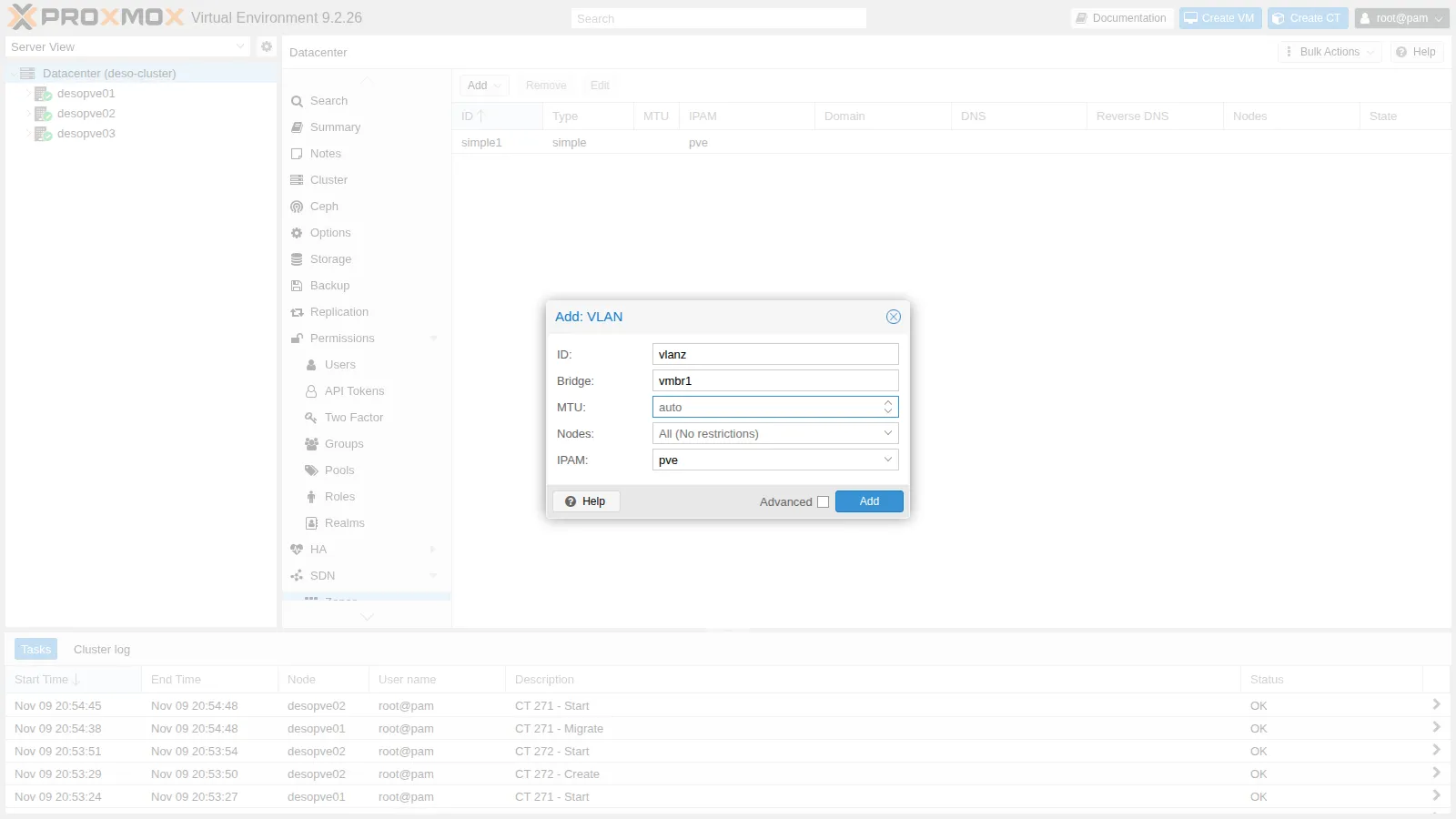
-
VNets → Create: Name
vnv30, Zonevlanz, Tag30: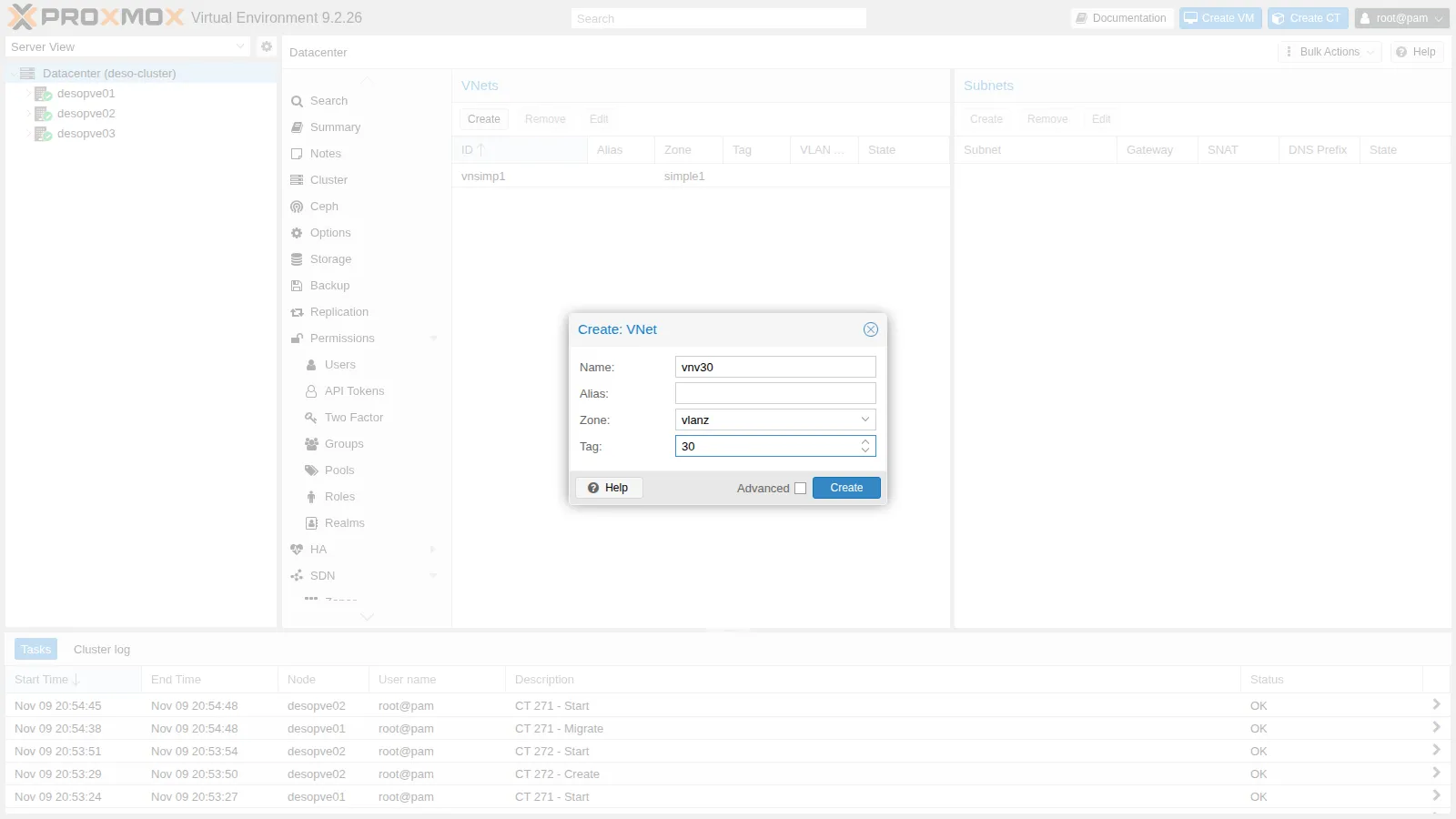
2. Dry-Run before applying
Section titled “2. Dry-Run before applying”-
On the SDN page click Dry-Run: for each node it shows the differences between the current files and those that Apply will write.
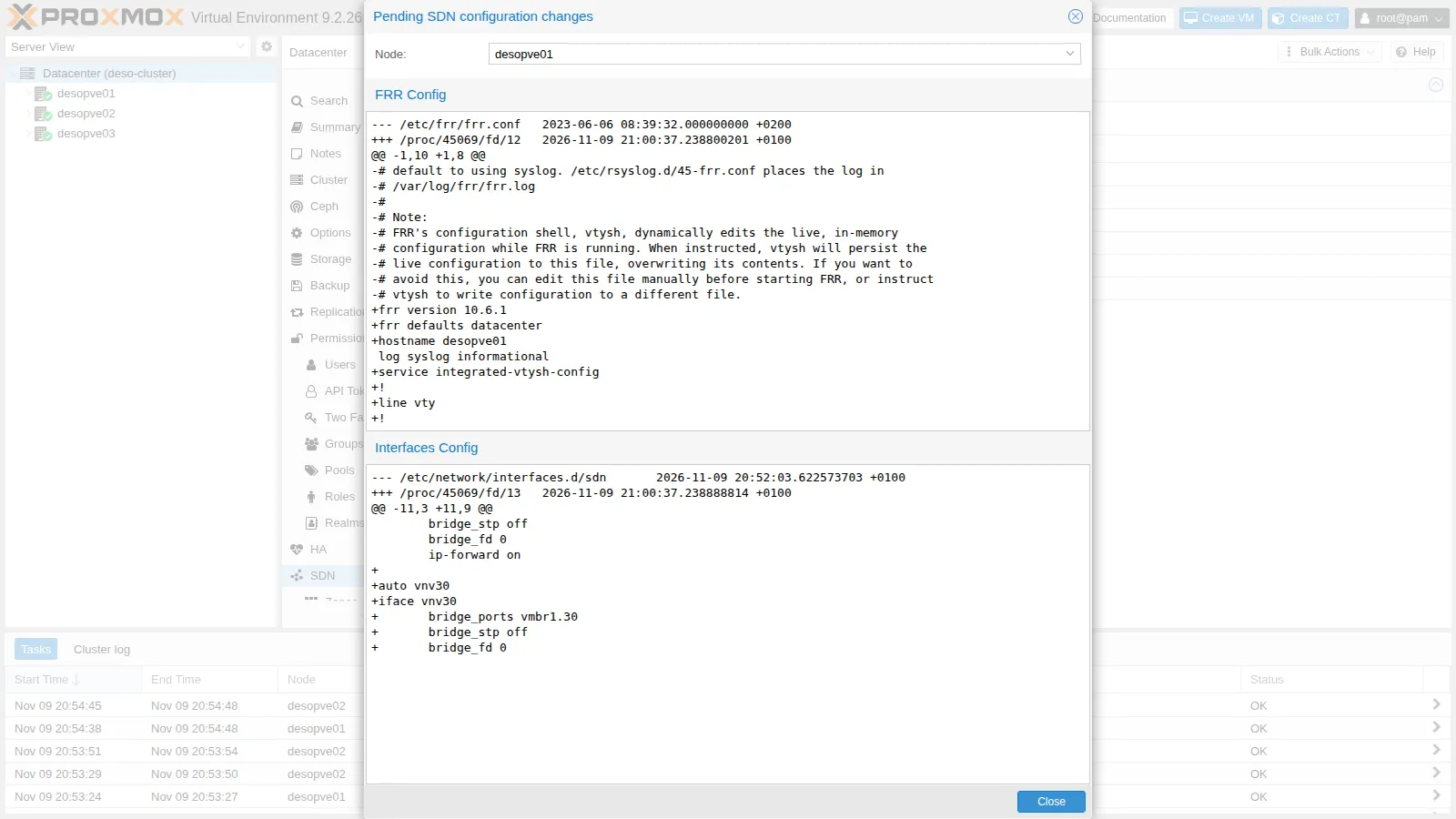
Two things to note:
- in Interfaces Config the new bridge
vnv30appears, with portvmbr1.30; - in FRR Config the Dry-Run shows the
frr.confthat the SDN generates in place of the default one. The file on the node is actually written when a controller or a fabric is needed (labs 30-31): from then on FRR is managed by the SDN, and anyone using FRR by hand for something else must do so through the SDN.
- in Interfaces Config the new bridge
-
Apply (this also works from the command line) and check the status:
root@desopve01 pvesh set /cluster/sdnOutput UPID:desopve01:00027B63:0023AE2B:6AF22680:reloadnetworkall::root@pam:root@desopve01 ip -d link show vmbr1.30 | grep -v link/etherOutput 73: vmbr1.30@vmbr1: <BROADCAST,MULTICAST,UP,LOWER_UP> mtu 1500 qdisc noqueue master vnv30 state UP mode DEFAULT group default qlen 1000vlan protocol 802.1Q id 30 <REORDER_HDR>
3. Guests on different nodes in VLAN 30
Section titled “3. Guests on different nodes in VLAN 30”-
One container on
desopve01and one ondesopve03, with a static address. The VNet has no subnet: it is a layer 2 network, and any gateway is a router on the VLAN, likerouter01from lab 26.root@desopve01 pct create 281 cephfs:vztmpl/debian-13-standard_13.6-1_amd64.tar.zst --hostname vlan30-ct1 \--unprivileged 1 --features nesting=1 --cores 1 --memory 512 --rootfs rbd-vm:4 \--net0 name=eth0,bridge=vnv30,ip=10.30.30.11/24 --passwordpct start 281root@desopve03 pct create 282 cephfs:vztmpl/debian-13-standard_13.6-1_amd64.tar.zst --hostname vlan30-ct2 \--unprivileged 1 --features nesting=1 --cores 1 --memory 512 --rootfs rbd-vm:4 \--net0 name=eth0,bridge=vnv30,ip=10.30.30.12/24 --passwordpct start 282 -
The two containers see each other, and on the bond the traffic carries tag 30. Start the capture before the ping, in a second terminal; in this and the following labs
tcpdumpis shown after the command that generates the traffic only so that the output reads in the right order:root@desopve01 tcpdump -lnei bond0 -c2 "vlan 30 and icmp" # second terminal, before the pingpct exec 281 -- ping -c3 -W1 10.30.30.12Output 3 packets transmitted, 3 received, 0% packet loss, time 2016msOutput 16:26:01.301288 bc:24:11:53:8e:d8 > bc:24:11:ed:d7:ff, ethertype 802.1Q (0x8100), length 102: vlan 30, p 0, ethertype IPv4 (0x0800), 10.30.30.11 > 10.30.30.12: ICMP echo request, id 326, seq 1, length 6416:26:01.301592 bc:24:11:ed:d7:ff > bc:24:11:53:8e:d8, ethertype 802.1Q (0x8100), length 102: vlan 30, p 0, ethertype IPv4 (0x0800), 10.30.30.12 > 10.30.30.11: ICMP echo reply, id 326, seq 1, length 64After the test the two containers are shut down: they remain ready for the migration in Lab 48.
root@desopve01 pct shutdown 281root@desopve03 pct shutdown 282
4. QinQ zone with an 802.1q service VLAN
Section titled “4. QinQ zone with an 802.1q service VLAN”-
Zones → Add → QinQ. ID
qinqz, Bridgevmbr1, Service VLAN300, Service VLAN Protocol802.1q: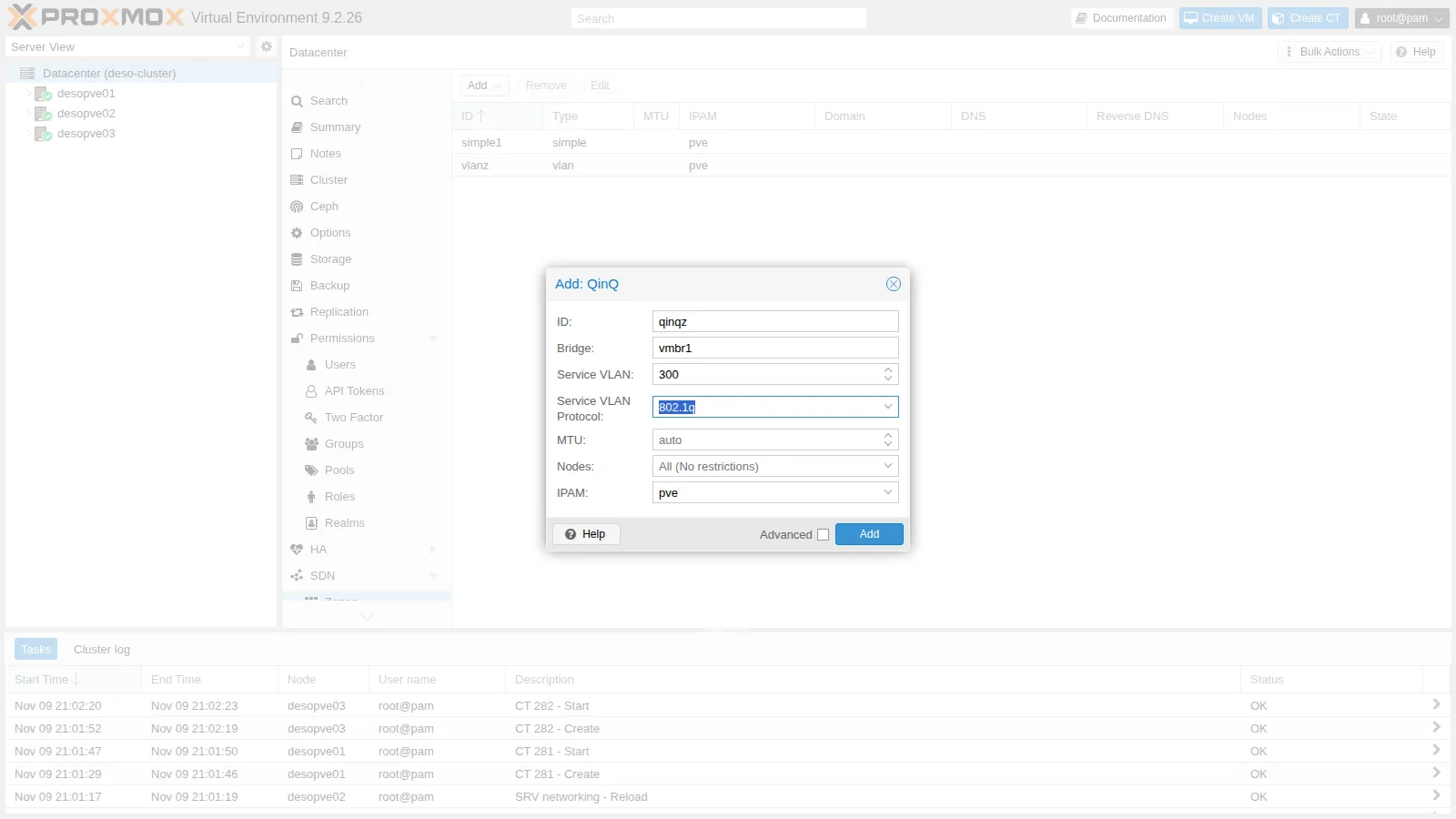
-
The VNet (customer VLAN 10) and Apply, from the command line:
root@desopve01 pvesh create /cluster/sdn/vnets --vnet vnq10 --zone qinqz --tag 10pvesh set /cluster/sdn -
What the SDN generates on every node: a VLAN-aware bridge for the zone (
z_qinqz), connected tovmbr1.300(the service VLAN), and inside it the customer VLANz_qinqz.10, which is the VNet’s port:# excerpt of /etc/network/interfaces.d/sdn on desopve01auto vmbr1.300iface vmbr1.300vlan-protocol 802.1qauto z_qinqziface z_qinqzbridge-stp offbridge-ports vmbr1.300 ln_qinqzbridge-fd 0bridge-vlan-aware yesbridge-vids 2-4094auto vnq10iface vnq10bridge_ports z_qinqz.10bridge_stp offbridge_fd 0root@desopve01 ip -d link show | grep -A2 -E "vmbr1.300|z_qinqz|qinqz" | grep -E "^[0-9]+:|vlan protocol" | head -10Output 76: vmbr1.300@vmbr1: <BROADCAST,MULTICAST,UP,LOWER_UP> mtu 1500 qdisc noqueue master z_qinqz state UP mode DEFAULT group default qlen 1000vlan protocol 802.1Q id 300 <REORDER_HDR>77: ln_qinqz@pr_qinqz: <BROADCAST,MULTICAST,UP,LOWER_UP> mtu 1500 qdisc noqueue master z_qinqz state UP mode DEFAULT group default qlen 100078: pr_qinqz@ln_qinqz: <BROADCAST,MULTICAST,UP,LOWER_UP> mtu 1500 qdisc noqueue state UP mode DEFAULT group default qlen 100079: z_qinqz: <BROADCAST,MULTICAST,UP,LOWER_UP> mtu 1500 qdisc noqueue state UP mode DEFAULT group default qlen 100080: z_qinqz.10@z_qinqz: <BROADCAST,MULTICAST,UP,LOWER_UP> mtu 1500 qdisc noqueue master vnq10 state UP mode DEFAULT group default qlen 1000vlan protocol 802.1Q id 10 <REORDER_HDR>The
vethpairln_qinqz/pr_qinqzconnects the zone bridge: it is an internal implementation detail. -
Two containers (CT 283 on
desopve01, CT 284 ondesopve03, addresses 10.31.10.11 and .12) onvnq10, created like the VLAN 30 ones:root@desopve01 pct create 283 cephfs:vztmpl/debian-13-standard_13.6-1_amd64.tar.zst --hostname qinq-ct1 \--unprivileged 1 --features nesting=1 --cores 1 --memory 512 --rootfs rbd-vm:4 \--net0 name=eth0,bridge=vnq10,ip=10.31.10.11/24 --passwordpct start 283root@desopve03 pct create 284 cephfs:vztmpl/debian-13-standard_13.6-1_amd64.tar.zst --hostname qinq-ct2 \--unprivileged 1 --features nesting=1 --cores 1 --memory 512 --rootfs rbd-vm:4 \--net0 name=eth0,bridge=vnq10,ip=10.31.10.12/24 --passwordpct start 284The ping goes through, and on the bond the frames carry two tags, 300 outside and 10 inside:
root@desopve01 pct exec 283 -- ping -c3 -W1 10.31.10.12Output 3 packets transmitted, 3 received, 0% packet loss, time 2002msroot@desopve01 tcpdump -lnei bond0 -c2 "vlan 300 and vlan 10 and icmp"Output 21:04:57.411769 bc:24:11:af:71:cf > bc:24:11:7c:50:ed, ethertype 802.1Q (0x8100), length 106: vlan 300, p 0, ethertype 802.1Q (0x8100), vlan 10, p 0, ethertype IPv4 (0x0800), 10.31.10.11 > 10.31.10.12: ICMP echo request, id 342, seq 2, length 6421:04:57.413112 bc:24:11:7c:50:ed > bc:24:11:af:71:cf, ethertype 802.1Q (0x8100), length 106: vlan 300, p 0, ethertype 802.1Q (0x8100), vlan 10, p 0, ethertype IPv4 (0x0800), 10.31.10.12 > 10.31.10.11: ICMP echo reply, id 342, seq 2, length 64 -
MTU. The container’s network interface has an MTU of 1500: the SDN did not reduce it on its own. With the don’t fragment bit, test a 1500-byte and a 1496-byte IP packet:
root@desopve01 pct exec 283 -- ip link show eth0 | grep -o "mtu [0-9]*"Output mtu 1500root@desopve01 pct exec 283 -- ping -c3 -W1 -M do -s 1472 10.31.10.12Output 3 packets transmitted, 3 received, 0% packet loss, time 2081msroot@desopve01 pct exec 283 -- ping -c3 -W1 -M do -s 1468 10.31.10.12Output 3 packets transmitted, 3 received, 0% packet loss, time 2060msIn the lab both go through: the network between the nodes accepts much larger frames (in Lab 21, packets up to 8938 bytes). On a switch that drops frames over 1518 bytes the first one would be lost without any visible error, the worst case to diagnose. Before using QinQ in production, check the MTU of the whole path (lab 34), or set the zone MTU to 1496.
5. 802.1ad service VLAN
Section titled “5. 802.1ad service VLAN”-
A second QinQ zone with service VLAN 301 and protocol
802.1ad, with its VNet. Before applying, Dry-Run shows that only the service VLAN subinterface is added onvmbr1(vmbr1.301withvlan-protocol 802.1ad): thevmbr1bridge and its 802.1Q VLANs are not touched.root@desopve01 pvesh create /cluster/sdn/zones --type qinq --zone qinqad --bridge vmbr1 --tag 301 --vlan-protocol 802.1adpvesh create /cluster/sdn/vnets --vnet vnqad10 --zone qinqad --tag 10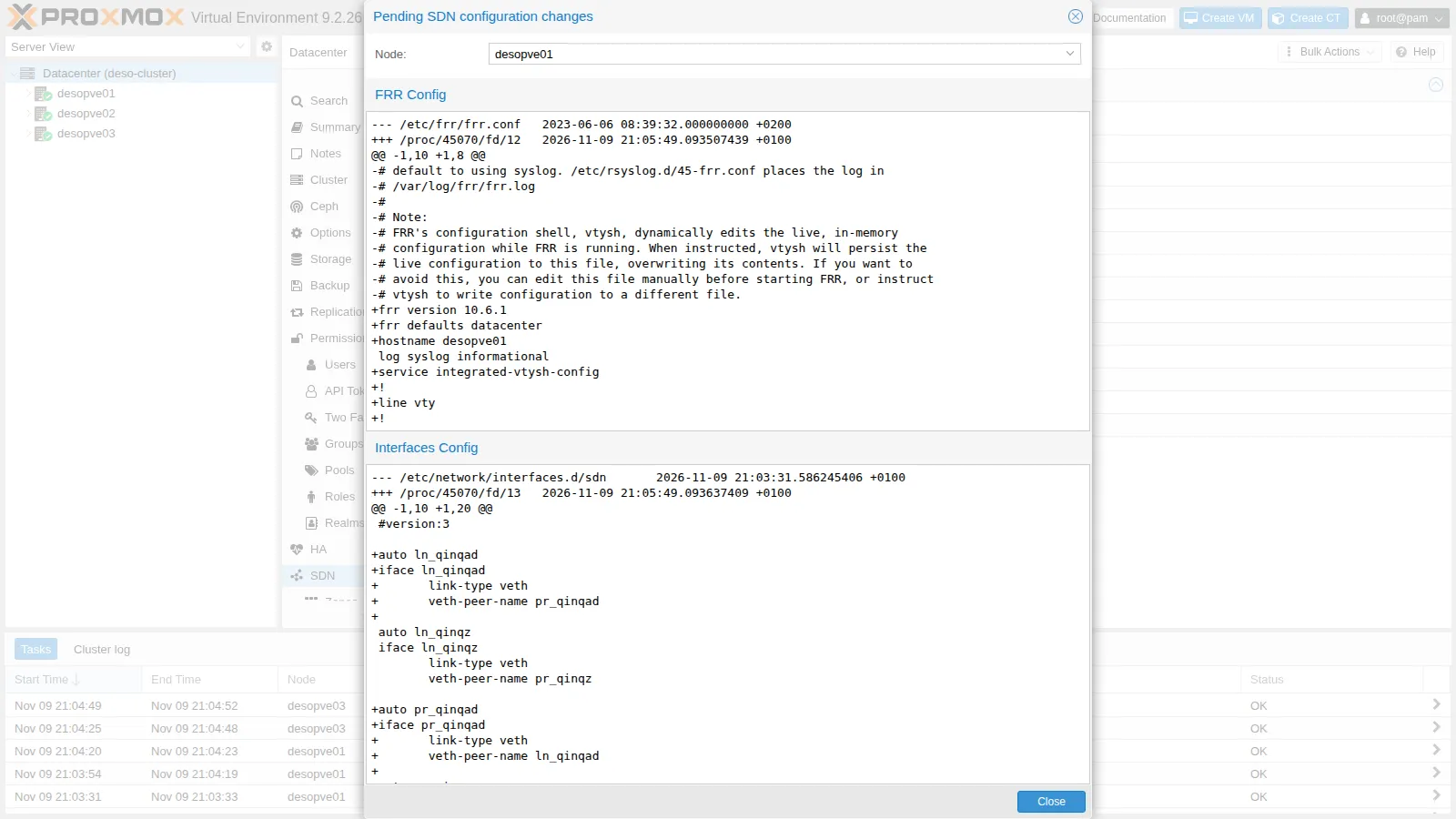
-
After Apply the bridge stays 802.1Q (
0x8100) and the service VLAN is 802.1ad:root@desopve01 pvesh set /cluster/sdncat /sys/class/net/vmbr1/bridge/vlan_protocolOutput 0x8100root@desopve01 ip -d link show vmbr1.301 | grep -o "vlan protocol [^ ]* id [0-9]*"Output vlan protocol 802.1ad id 301 -
The two containers move to the
vnqad10VNet (same MAC and address) and the outer tag now has ethertype0x88a8:root@desopve01 pct set 283 --net0 name=eth0,bridge=vnqad10,hwaddr=BC:24:11:AF:71:CF,ip=10.31.10.11/24root@desopve03 pct set 284 --net0 name=eth0,bridge=vnqad10,hwaddr=BC:24:11:7C:50:ED,ip=10.31.10.12/24root@desopve01 pct exec 283 -- ping -c3 -W1 10.31.10.12Output 3 packets transmitted, 3 received, 0% packet loss, time 2061msroot@desopve01 tcpdump -lnei bond0 -c2 "ether proto 0x88a8"Output 21:06:55.911301 bc:24:11:af:71:cf > bc:24:11:7c:50:ed, ethertype 802.1Q-QinQ (0x88a8), length 106: vlan 301, p 0, ethertype 802.1Q (0x8100), vlan 10, p 0, ethertype IPv4 (0x0800), 10.31.10.11 > 10.31.10.12: ICMP echo request, id 346, seq 1, length 6421:06:56.948753 bc:24:11:af:71:cf > bc:24:11:7c:50:ed, ethertype 802.1Q-QinQ (0x88a8), length 106: vlan 301, p 0, ethertype 802.1Q (0x8100), vlan 10, p 0, ethertype IPv4 (0x0800), 10.31.10.11 > 10.31.10.12: ICMP echo request, id 346, seq 2, length 64 -
The rest of the network was not affected by the new zone: the containers’ VLAN 10, the migration network and Ceph all work.
root@desopve01 pct exec 121 -- ping -c2 -W1 10.10.10.122Output 2 packets transmitted, 2 received, 0% packet loss, time 1002msroot@desopve01 ping -c2 -W1 10.100.10.22Output 2 packets transmitted, 2 received, 0% packet loss, time 1058msroot@desopve01 ceph healthOutput HEALTH_OK
6. The VNet overview and cleanup
Section titled “6. The VNet overview and cleanup”-
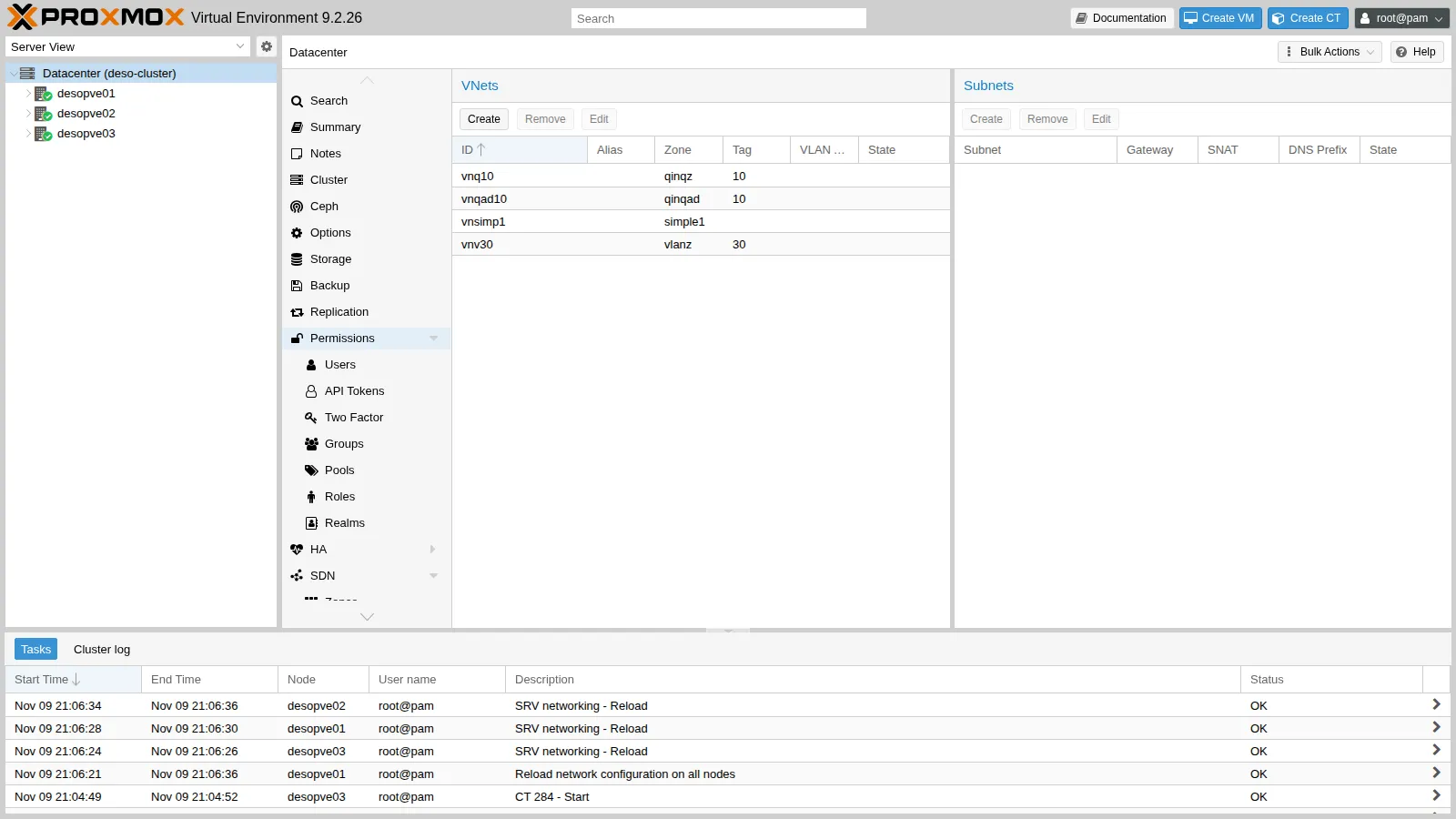
The VNets created in this lab and the previous one:
-
The QinQ zones were only a test: delete the containers, the VNets and the zones, then apply. Zones can only be deleted after their VNets.
root@desopve01 pct stop 283 && pct destroy 283 --purgeroot@desopve03 pct stop 284 && pct destroy 284 --purgeroot@desopve01 for v in vnqad10 vnq10; do pvesh delete /cluster/sdn/vnets/$v; donefor z in qinqad qinqz; do pvesh delete /cluster/sdn/zones/$z; donepvesh set /cluster/sdnip link show vmbr1.300Output Device "vmbr1.300" does not exist.
Verification and tests
Section titled “Verification and tests”| Test | Result |
|---|---|
VLAN 30 VNet between desopve01 and desopve03 |
0% loss, one 802.1Q tag 30 on the bond |
| Dry-Run | shows the new bridge and the replacement of frr.conf |
| QinQ 802.1q, service VLAN 300 | 0% loss, two 802.1Q tags (300 and 10) |
| QinQ, 1500-byte IP packet (1522-byte frame) | goes through in the lab; on a switch that does not accept the double tag it would be lost |
| QinQ 802.1ad, service VLAN 301 | 0% loss, outer tag 0x88a8 |
| Guest VLANs, migration and Ceph after the QinQ zones | unchanged |
Final lab state
Section titled “Final lab state”- SDN:
- zone
simple1with VNetvnsimp1(lab 27), unchanged; - zone
vlanz(VLAN onvmbr1) with VNetvnv30, tag 30, no subnet; - QinQ zones
qinqzandqinqaddeleted.
- zone
- Containers in VLAN 30, stopped, not set to start at boot, disk on
rbd-vm:- CT 281
vlan30-ct1ondesopve01, 10.30.30.11/24; - CT 282
vlan30-ct2ondesopve03, 10.30.30.12/24.
- CT 281
- CT 283 and 284 deleted.
vmbr1stays VLAN-aware 802.1Q;/etc/frr/frr.confis still the one shipped with the package: the SDN writes it with the EVPN controller and the fabric of labs 30-31.
What you learned
Section titled “What you learned”- With a VLAN zone the VNet decides the tag: guests pick a network by name, and the existing bridge carries the traffic.
- Dry-Run shows, for each node, the changes to the network files and to FRR before applying them.
- QinQ encapsulates the customer VLANs in one service VLAN per zone; the service VLAN can be 802.1Q or 802.1ad.
- The double tag makes the frame 8 bytes longer: with an MTU of 1500 on the physical network, QinQ VNets go to 1496, or you raise the MTU of the path.
- Zones are deleted after their VNets, and the removal, too, takes effect only with Apply.