

Lab 43 – Identity: Active Directory realm with LDAPS and synchronization
Dependencies
Section titled “Dependencies”- Previous labs:
- Lab 02: the domain controller
desopve-dc01with theproxmox.communitydomain; - Lab 05: SSH access to the nodes and the
pveumCLI; - Lab 06: the cluster
desopve01-03, with the shared realm configuration; - Lab 33: the node firewall. The traffic to the DC on port 636 originates from the nodes and is allowed by the outbound policy.
- Lab 02: the domain controller
- Systems: DC
desopve-dc01.proxmox.community(172.27.199.20), nodesdesopve01-03. - Credentials: the domain
Administrator; service accountsvc-pve-ldap; domain test users, all with<lab-password>→ Appendix B.
Objectives
Section titled “Objectives”- Install an Enterprise CA (AD CS) on the domain controller and obtain the certificate for LDAPS.
- Make the CA trusted on all nodes and verify the chain with
openssl. - Prepare a dedicated OU in AD with users, groups and a service account for the bind, not the Administrator.
- Create an Active Directory realm in Proxmox VE over LDAPS with certificate verification.
- Synchronize users and groups with filters and sync options, manually and with a scheduled job.
- Log in to the GUI as a domain user.
How it works
Section titled “How it works”Realm. A realm is an authentication source. Proxmox VE has two built-in ones, pam (Linux users of the node) and pve (its own users). A realm of type Active Directory verifies the password directly on the domain controller: Proxmox VE neither knows nor stores the users’ passwords.
Users and synchronization. To log in, a domain user must also exist in Proxmox VE as name@realm. Synchronization reads users and groups from AD and creates or updates them in Proxmox VE. Groups become groupname-realm and bring their members with them. Permissions (ACLs), the topic of Lab 44, are assigned to the synchronized groups.
Why LDAPS. With plain LDAP (port 389), the bind password and the password of every login travel in clear text. LDAPS (port 636) encrypts the connection with TLS. For TLS to be of any use, the node must verify the DC’s certificate, so it must trust the CA that issued it.
AD CS and autoenrollment. An Enterprise Root CA is integrated with Active Directory: as soon as it is installed, the domain controllers request a certificate with the Domain Controller template on their own. It is the one AD DS uses for LDAPS, with no additional configuration.
Service account. Reading users and groups requires a domain account. Every domain user can read the directory, so an ordinary account without privileges, dedicated to this purpose, is enough. The Administrator must never be used for the bind: its password would end up on the nodes.
flowchart LR
  subgraph AD["desopve-dc01 (AD DS + AD CS)"]
    CA[PROXMOX-CA] -->|issues| CERT[DC certificate<br/>LDAPS :636]
    OU[OU=PVE<br/>Utenti, Gruppi, Servizi]
  end
  N1[desopve01] & N2[desopve02] & N3[desopve03] -->|LDAPS, verified with the CA| CERT
  N1 -.->|bind svc-pve-ldap<br/>sync users and groups| OU
Procedure
Section titled “Procedure”1. Certification authority on the DC
Section titled “1. Certification authority on the DC”In PowerShell as administrator on the DC:
Install-WindowsFeature ADCS-Cert-Authority -IncludeManagementToolsInstall-AdcsCertificationAuthority -CAType EnterpriseRootCA -CACommonName "PROXMOX-CA" ` -KeyLength 4096 -HashAlgorithmName SHA256 -ValidityPeriod Years -ValidityPeriodUnits 10 -ForceGet-Service CertSvcInstall-WindowsFeature: Success=True Restart=No Features=Active Directory Certificate Services, Certification Authority, Active Directory Certificate Services Tools, Certification Authority Management ToolsInstall-AdcsCertificationAuthority: ErrorId=0
Name Status---- ------CertSvc RunningA 4096-bit root CA with SHA-256, valid for 10 years. No reboot is needed.
2. The DC certificate and LDAPS
Section titled “2. The DC certificate and LDAPS”The DC requests its certificate at the first autoenrollment cycle; certutil -pulse triggers it right away:
certutil -pulseGet-ChildItem Cert:\LocalMachine\MyCertUtil: -pulse command completed successfully.CN=desopve-dc01.proxmox.community | CN=PROXMOX-CA, DC=proxmox, DC=community | Client Authentication,Server Authentication | 2027-11-10 | DNS Name=desopve-dc01.proxmox.communityThe certificate has the Server Authentication usage and the DC name in the Subject Alternative Name: that is what LDAPS needs. In the Certification Authority console (certsrv.msc) it appears among the issued certificates, with the Domain Controller template:
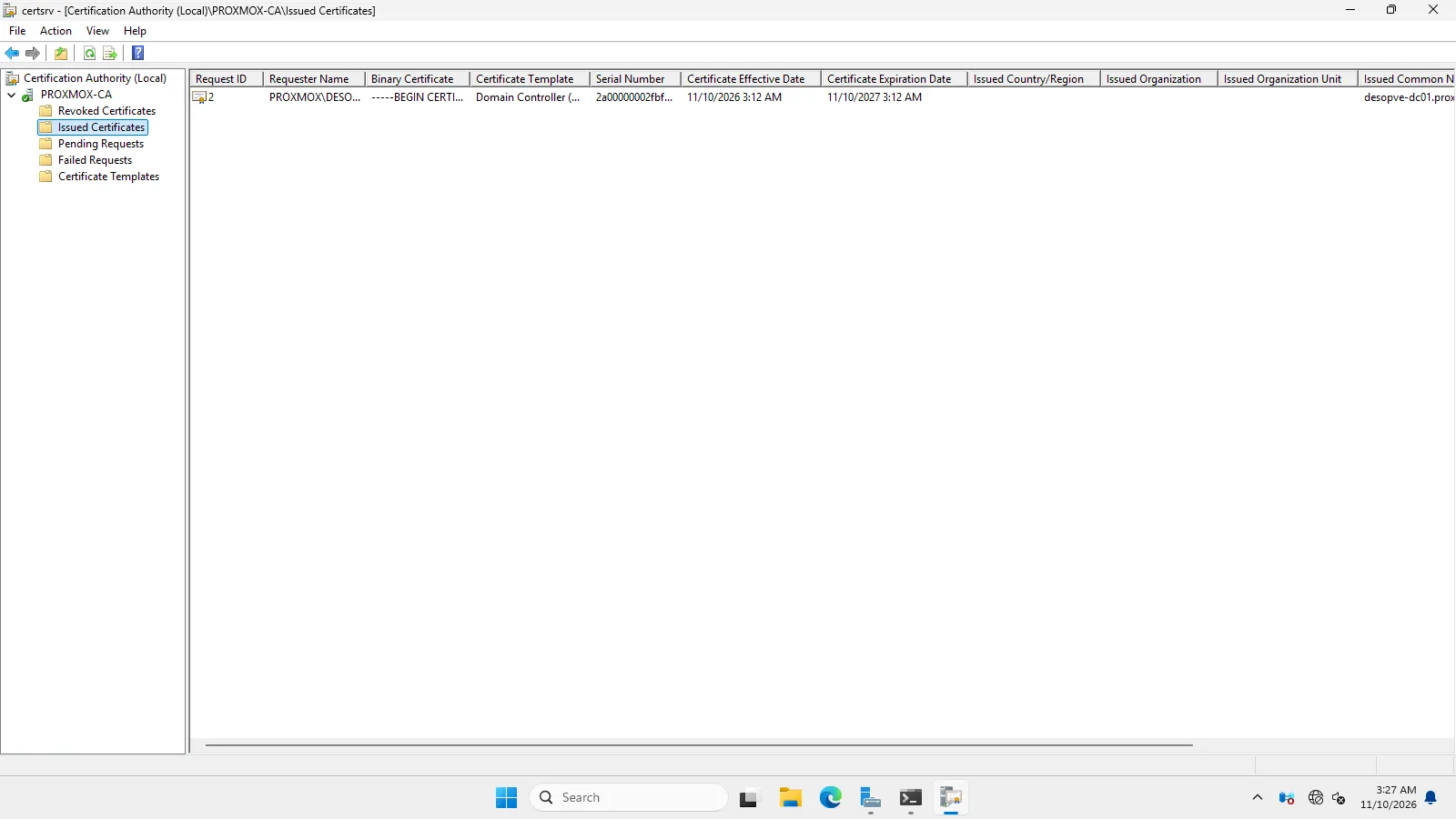
AD DS uses it immediately, without a reboot. From node desopve01:
openssl s_client -connect desopve-dc01.proxmox.community:636 </dev/null 2>&1 | grep -E "subject=|issuer=|Verify return code"subject=CN=desopve-dc01.proxmox.communityissuer=DC=community, DC=proxmox, CN=PROXMOX-CAVerify return code: 21 (unable to verify the first certificate)LDAPS responds, but the node does not know PROXMOX-CA and cannot verify the certificate.
3. The CA on the nodes
Section titled “3. The CA on the nodes”Export the CA certificate, in PEM format, from the DC:
$c = Get-ChildItem Cert:\LocalMachine\Root | Where-Object { $_.Subject -like 'CN=PROXMOX-CA*' }& { "-----BEGIN CERTIFICATE-----" [Convert]::ToBase64String($c.RawData, 'InsertLineBreaks') "-----END CERTIFICATE-----"} | Set-Content -Encoding ascii C:\proxmox-ca.pemforeach ($n in 1..3) { scp C:\proxmox-ca.pem root@desopve0$n.proxmox.community: }The file lands in the home directory of root on each node, through the OpenSSH set up in Lab 05. Before deploying it, check its fingerprint:
openssl x509 -in proxmox-ca.pem -noout -subject -dates -fingerprint -sha256subject=DC = community, DC = proxmox, CN = PROXMOX-CAnotBefore=Nov 10 02:12:38 2026 GMTnotAfter=Nov 10 02:22:38 2036 GMTsha256 Fingerprint=6E:73:BB:89:E6:54:BF:97:99:BE:19:01:E2:E9:0C:BA:BB:6D:92:66:A7:B3:33:9A:E1:43:64:A8:3B:8E:2F:56On every cluster node, the file goes into /usr/local/share/ca-certificates/ with the .crt extension; then update the system store:
cp proxmox-ca.pem /usr/local/share/ca-certificates/proxmox-ca.crtupdate-ca-certificatesopenssl s_client -connect desopve-dc01.proxmox.community:636 -verify_hostname desopve-dc01.proxmox.community </dev/null 2>&1 | grep -E "^depth|Verify return code"== desopve01depth=1 DC=community, DC=proxmox, CN=PROXMOX-CAdepth=0 CN=desopve-dc01.proxmox.communityVerify return code: 0 (ok)== desopve02Verify return code: 0 (ok)== desopve03Verify return code: 0 (ok)The chain is complete and the name matches. The realm configuration is shared across the cluster, but the certificate store belongs to each node: the CA is needed on all of them.
4. OU, service account, users and groups in AD
Section titled “4. OU, service account, users and groups in AD”A dedicated OU PVE with three sub-OUs, the service account, three groups and three users:
$base = 'DC=proxmox,DC=community'New-ADOrganizationalUnit -Name 'PVE' -Path $baseforeach ($ou in 'Utenti','Gruppi','Servizi') { New-ADOrganizationalUnit -Name $ou -Path "OU=PVE,$base" }$pw = ConvertTo-SecureString '<lab-password>' -AsPlainText -ForceNew-ADUser -Name 'svc-pve-ldap' -SamAccountName 'svc-pve-ldap' -UserPrincipalName '[email protected]' ` -Path "OU=Servizi,OU=PVE,$base" -AccountPassword $pw -Enabled $true -PasswordNeverExpires $true ` -CannotChangePassword $true -Description 'Bind LDAP dei nodi Proxmox VE (sola lettura)'foreach ($g in 'pve-admins','pve-operators','pve-auditors') { New-ADGroup -Name $g -GroupScope Global -GroupCategory Security -Path "OU=Gruppi,OU=PVE,$base" }New-ADUser -Name 'Mario Rossi' -GivenName Mario -Surname Rossi -SamAccountName mario.rossi ` -UserPrincipalName mario.rossi@proxmox.community -EmailAddress mario.rossi@proxmox.community ` -Path "OU=Utenti,OU=PVE,$base" -AccountPassword $pw -Enabled $trueAdd-ADGroupMember pve-admins -Members mario.rossiNew-ADUser -Name 'Laura Bianchi' -GivenName Laura -Surname Bianchi -SamAccountName laura.bianchi ` -UserPrincipalName laura.bianchi@proxmox.community -EmailAddress laura.bianchi@proxmox.community ` -Path "OU=Utenti,OU=PVE,$base" -AccountPassword $pw -Enabled $trueAdd-ADGroupMember pve-operators -Members laura.bianchiNew-ADUser -Name 'Paolo Verdi' -GivenName Paolo -Surname Verdi -SamAccountName paolo.verdi ` -UserPrincipalName paolo.verdi@proxmox.community -EmailAddress paolo.verdi@proxmox.community ` -Path "OU=Utenti,OU=PVE,$base" -AccountPassword $pw -Enabled $trueAdd-ADGroupMember pve-auditors -Members paolo.verdiFor the filter test, also create a user outside the OU, utente.esterno, in the standard CN=Users container:
New-ADUser -Name 'Utente Esterno' -SamAccountName utente.esterno -UserPrincipalName utente.esterno@proxmox.community ` -Path "CN=Users,$base" -AccountPassword $pw -Enabled $trueObjectClass DistinguishedName----------- -----------------user CN=Laura Bianchi,OU=Utenti,OU=PVE,DC=proxmox,DC=communityuser CN=Mario Rossi,OU=Utenti,OU=PVE,DC=proxmox,DC=communityuser CN=Paolo Verdi,OU=Utenti,OU=PVE,DC=proxmox,DC=communitygroup CN=pve-admins,OU=Gruppi,OU=PVE,DC=proxmox,DC=communitygroup CN=pve-auditors,OU=Gruppi,OU=PVE,DC=proxmox,DC=communitygroup CN=pve-operators,OU=Gruppi,OU=PVE,DC=proxmox,DC=communityuser CN=svc-pve-ldap,OU=Servizi,OU=PVE,DC=proxmox,DC=communitypve-admins: mario.rossipve-operators: laura.bianchipve-auditors: paolo.verdiThe structure in Active Directory Users and Computers (the user Anna Neri is added in step 7):
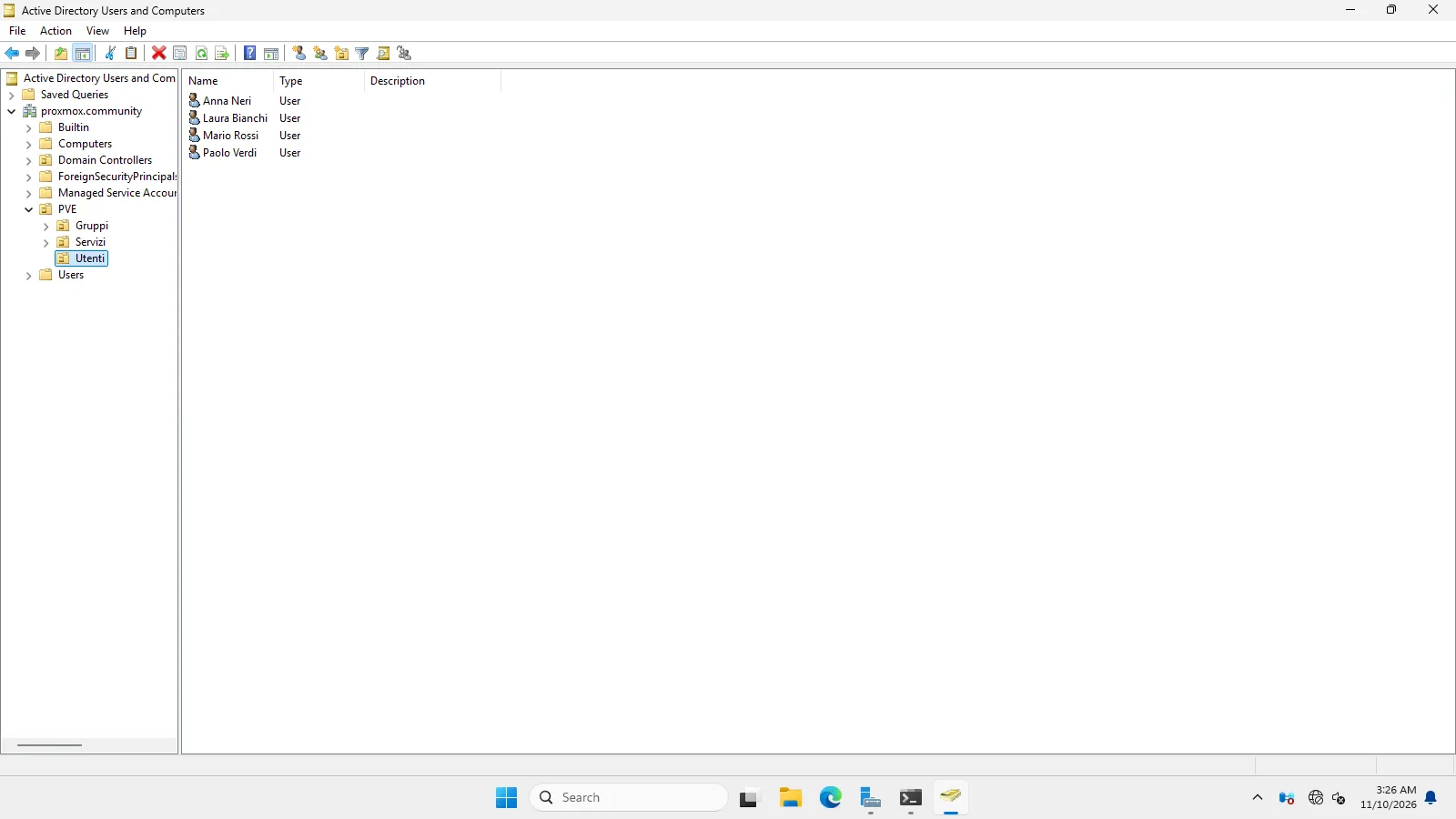
5. The Active Directory realm in Proxmox VE
Section titled “5. The Active Directory realm in Proxmox VE”From Datacenter → Permissions → Realms → Add → Active Directory Server, or from the CLI:
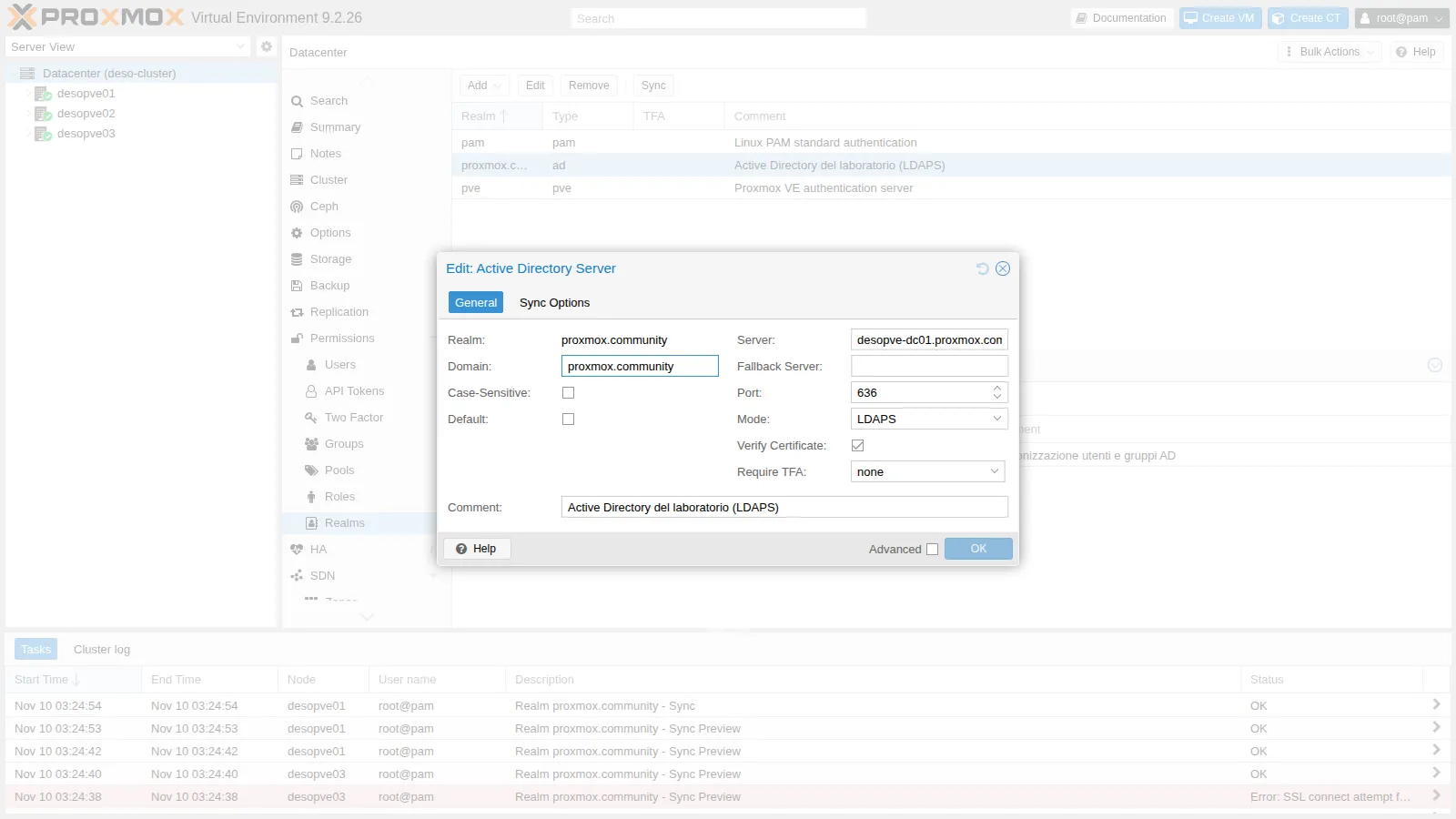
pveum realm add proxmox.community --type ad --domain proxmox.community \ --server1 desopve-dc01.proxmox.community --port 636 --mode ldaps --verify 1 \ --base_dn 'OU=PVE,DC=proxmox,DC=community' \ --sync_attributes 'email=mail,firstname=givenName,lastname=sn' \ --group_filter '(cn=pve-*)' \ --sync-defaults-options 'scope=both,enable-new=1,remove-vanished=acl;entry;properties' \ --case-sensitive 0 --check-connection 1 --comment 'Active Directory del laboratorio (LDAPS)'--mode ldaps --port 636 --verify 1: encrypted connection with certificate verification through the node’s system store (capath, default/etc/ssl/certs).--bind_dn: the service account, in theuser@domainform accepted by AD. The password is saved in/etc/pve/priv/realm/proxmox.community.pw, readable only by root.--base_dn: synchronization searches only inside thePVEOU.--sync_attributes: maps e-mail, first name and last name to the AD attributes.--group_filter '(cn=pve-*)': only the groups whose name starts withpve-.--case-sensitive 0: in AD, user names are case-insensitive, and the realm must behave the same way.--check-connection 1: tests the bind before saving.
The General tab:
and the Sync Options tab, with the default synchronization options:
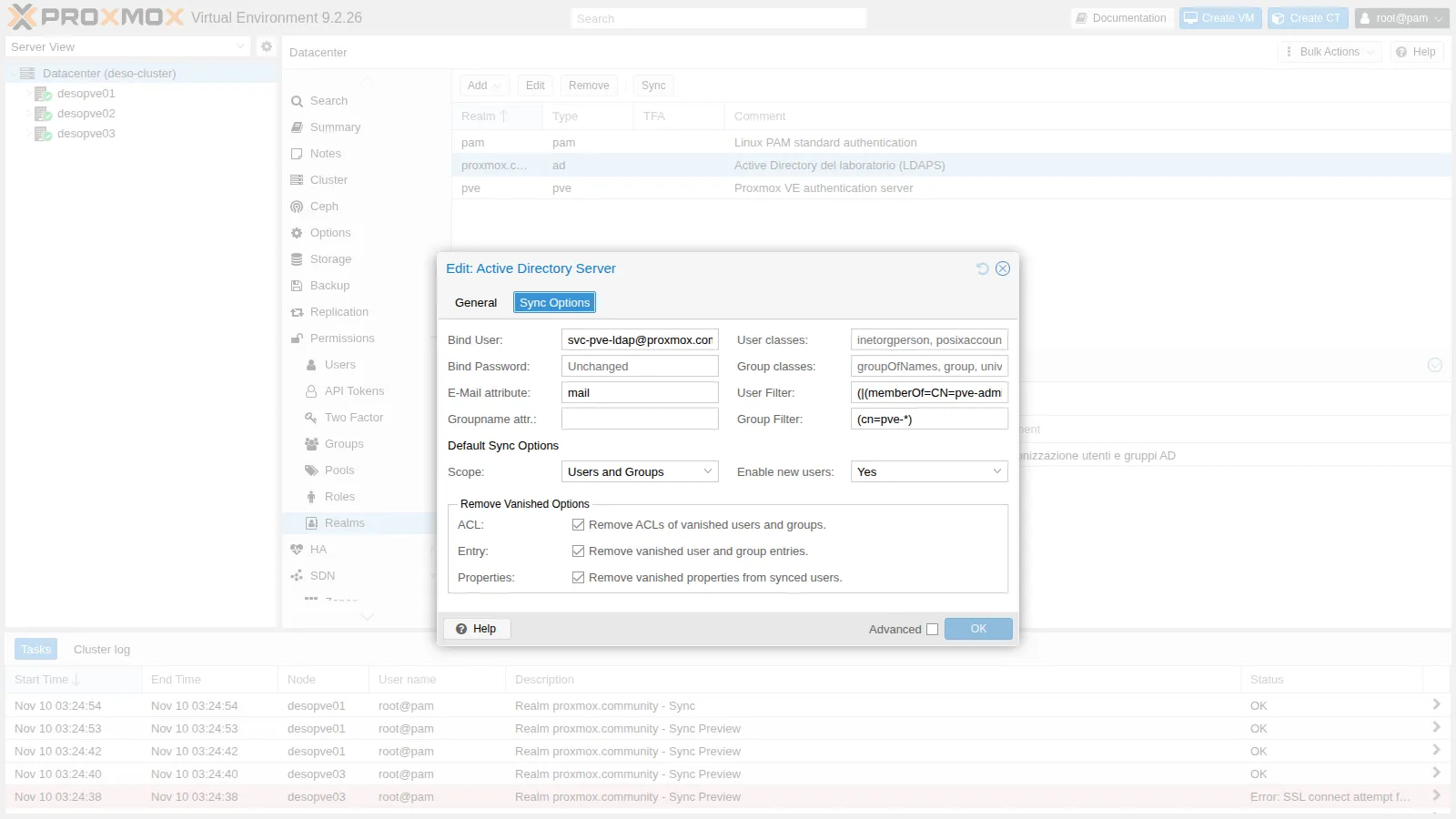
The Remove Vanished options decide what happens when a user or a group disappears from AD:
- Entry: the user or group is deleted from Proxmox VE;
- ACL: its permissions are removed;
- Properties: the fields (e-mail, name) that are no longer present in AD are cleared.
6. First synchronization
Section titled “6. First synchronization”Verification really matters. On desopve03, temporarily remove the CA from the system store and try a dry-run synchronization:
mv /usr/local/share/ca-certificates/proxmox-ca.crt /root/ && update-ca-certificates --freshpveum realm sync proxmox.community --dry-run(dry test run) starting sync for realm proxmox.communitySSL connect attempt failed error:0A000086:SSL routines::certificate verify failedWithout the CA, the node refuses the connection. Put the CA back on desopve03:
mv /root/proxmox-ca.crt /usr/local/share/ca-certificates/ && update-ca-certificatesThe same test from desopve01:
(dry test run) starting sync for realm proxmox.communitygot data from server, updating users and groupssyncing users (remove-vanished opts: acl;entry;properties)adding user '[email protected]'adding user '[email protected]'adding user '[email protected]'adding user '[email protected]'syncing groups (remove-vanished opts: acl;entry;properties)adding group 'pve-admins-proxmox.community'adding group 'pve-auditors-proxmox.community'adding group 'pve-operators-proxmox.community'
NOTE: Dry test run, changes were NOT written to the configuration.
utente.esterno does not appear because it is outside the OU, but the service account svc-pve-ldap does, and it must not be a Proxmox VE user. A user filter limits synchronization to the members of the pve-* groups:
G='OU=Gruppi,OU=PVE,DC=proxmox,DC=community'pveum realm modify proxmox.community --filter \ "(|(memberOf=CN=pve-admins,$G)(memberOf=CN=pve-operators,$G)(memberOf=CN=pve-auditors,$G))"pveum realm sync proxmox.community --dry-runadding user '[email protected]'adding user '[email protected]'adding user '[email protected]'adding group 'pve-admins-proxmox.community'adding group 'pve-auditors-proxmox.community'adding group 'pve-operators-proxmox.community'NOTE: Dry test run, changes were NOT written to the configuration.Now the real synchronization, from the Sync button in the GUI or from the CLI:
pveum realm sync proxmox.communitysuccessfully updated users and groups configuration[email protected] Laura Bianchi [email protected] enable=1[email protected] Mario Rossi [email protected] enable=1[email protected] Paolo Verdi [email protected] enable=1pve-admins-proxmox.community [email protected]pve-operators-proxmox.community [email protected]pve-auditors-proxmox.community [email protected]First name, last name and e-mail come from AD thanks to sync_attributes.
7. Scheduled synchronization
Section titled “7. Scheduled synchronization”A Realm Sync Job repeats the synchronization automatically. For the test, schedule it every 5 minutes:
pvesh create /cluster/jobs/realm-sync/sync-ad --realm proxmox.community --schedule "*/5" \ --scope both --enable-new 1 --remove-vanished "acl;entry;properties" \ --comment "Sincronizzazione utenti e gruppi AD"Then, in AD, add a user, Anna Neri, to the pve-operators group ($base and $pw as in step 4):
New-ADUser -Name 'Anna Neri' -GivenName Anna -Surname Neri -SamAccountName anna.neri ` -UserPrincipalName anna.neri@proxmox.community -EmailAddress anna.neri@proxmox.community ` -Path "OU=Utenti,OU=PVE,$base" -AccountPassword $pw -Enabled $trueAdd-ADGroupMember pve-operators -Members anna.neriWithout doing anything else, the job is run by one of the cluster nodes:
desopve02 auth-realm-sync root@pam 03:35:04 OKdesopve02 auth-realm-sync root@pam 03:30:04 OKdesopve01 auth-realm-sync root@pam 03:24:54 OKand the new user appears in Proxmox VE, already in the right group:
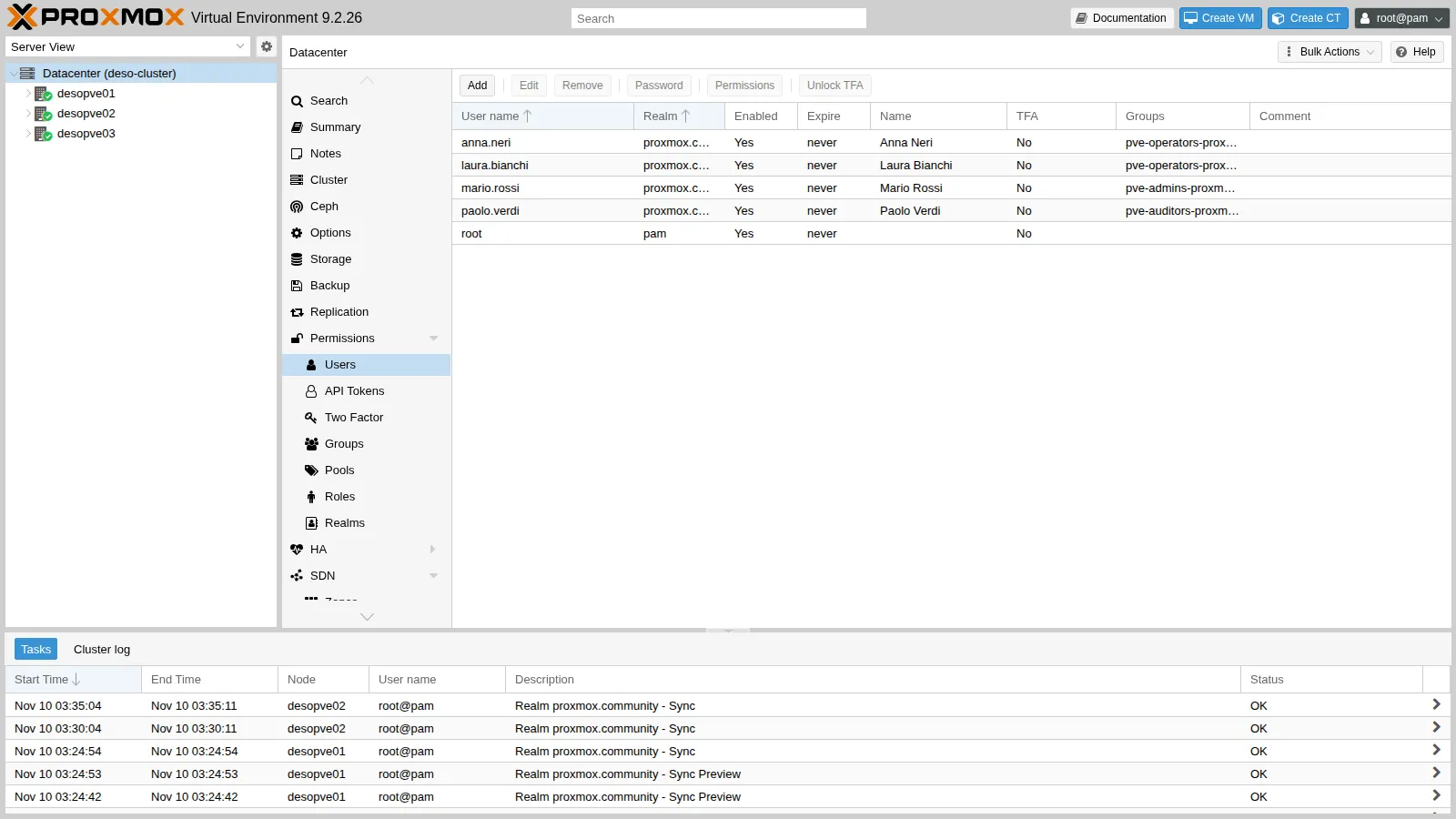
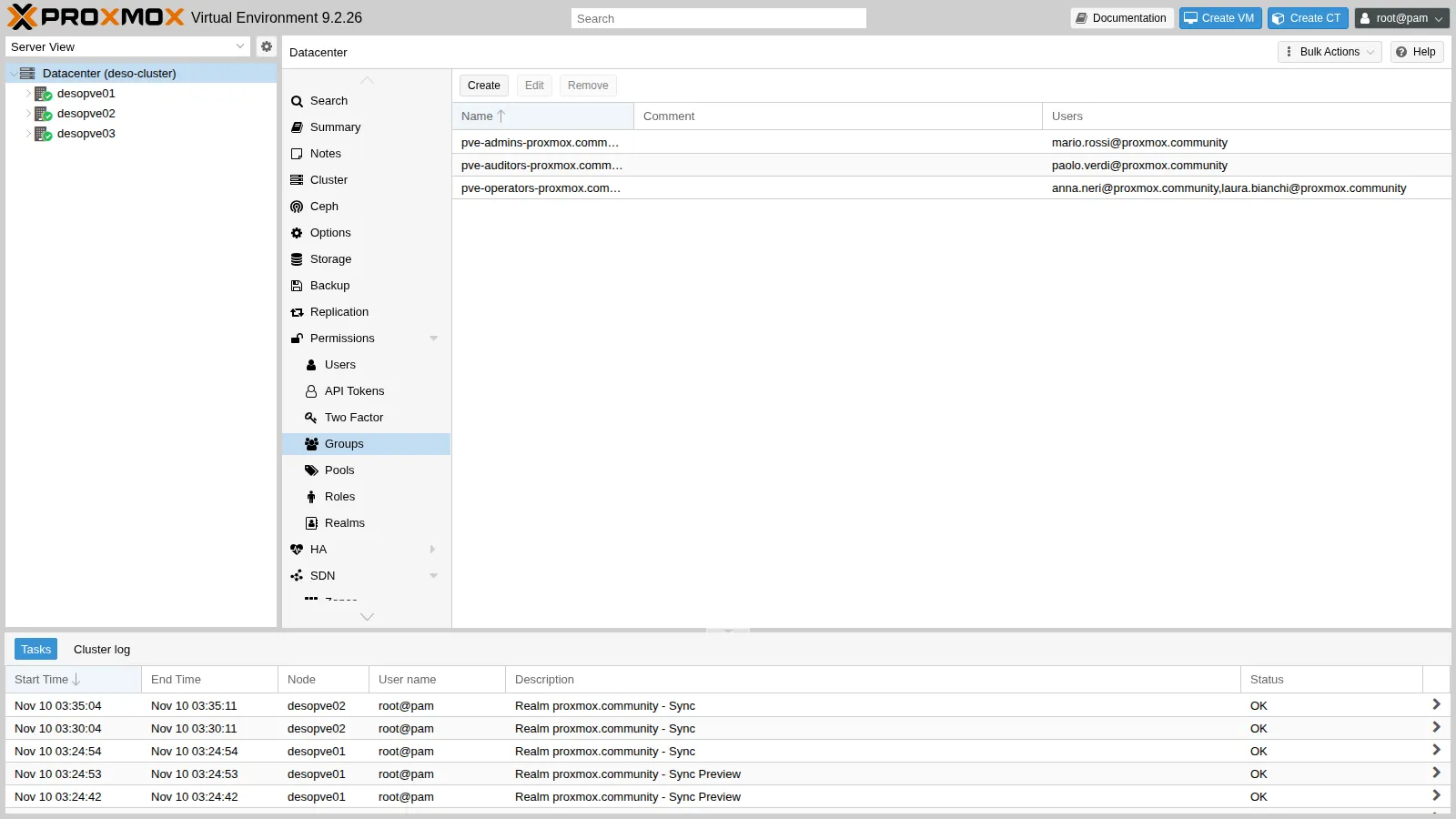
pve-operators-proxmox.community [email protected],[email protected]For normal use, set the job back to once an hour:
pvesh set /cluster/jobs/realm-sync/sync-ad --schedule hourlyThe job appears under the realms, with Run Now to start it immediately:
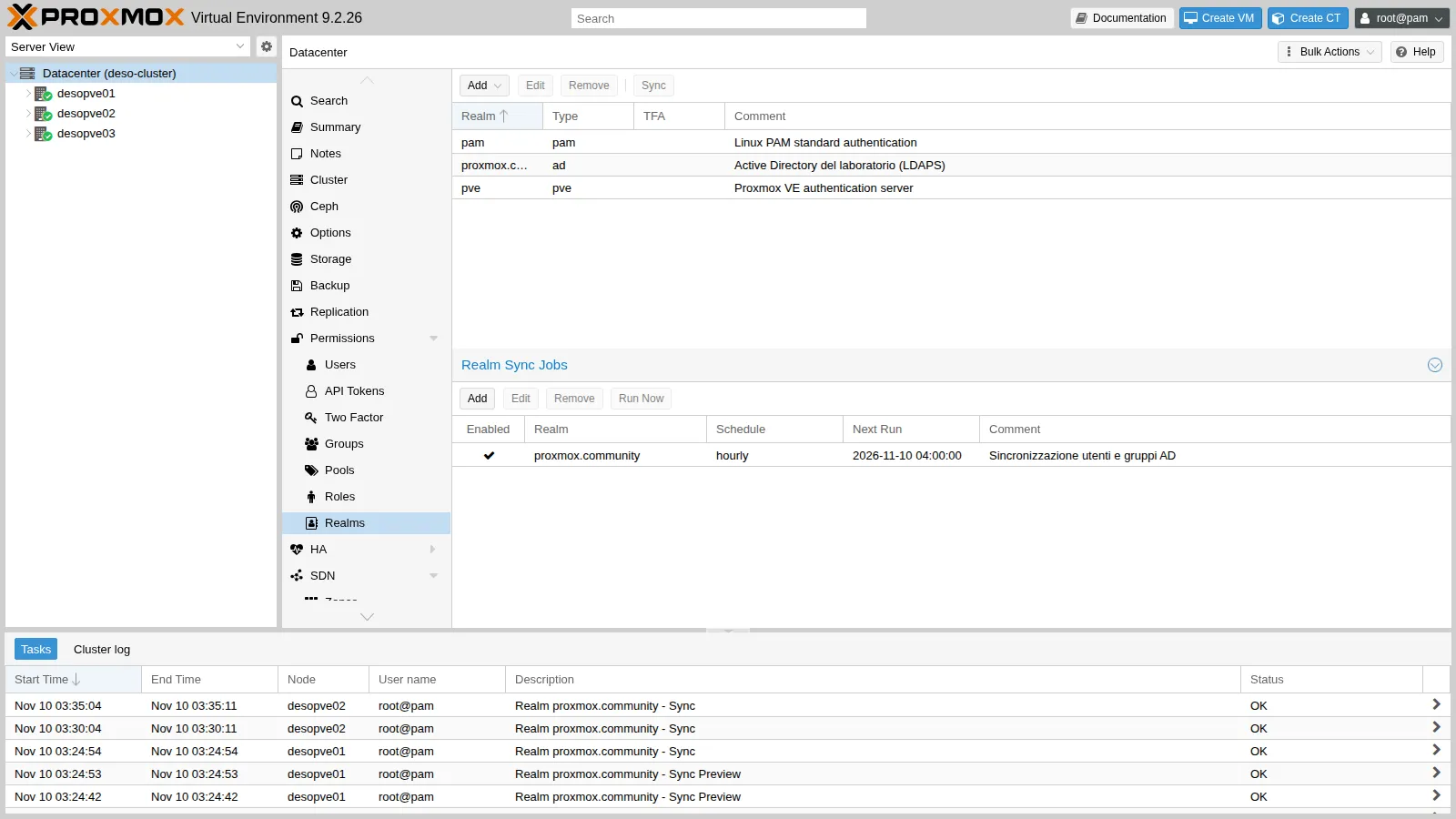
Synchronized users and groups in Permissions → Users and Groups:
8. Login of a domain user
Section titled “8. Login of a domain user”On the login page, the realm appears with its comment:
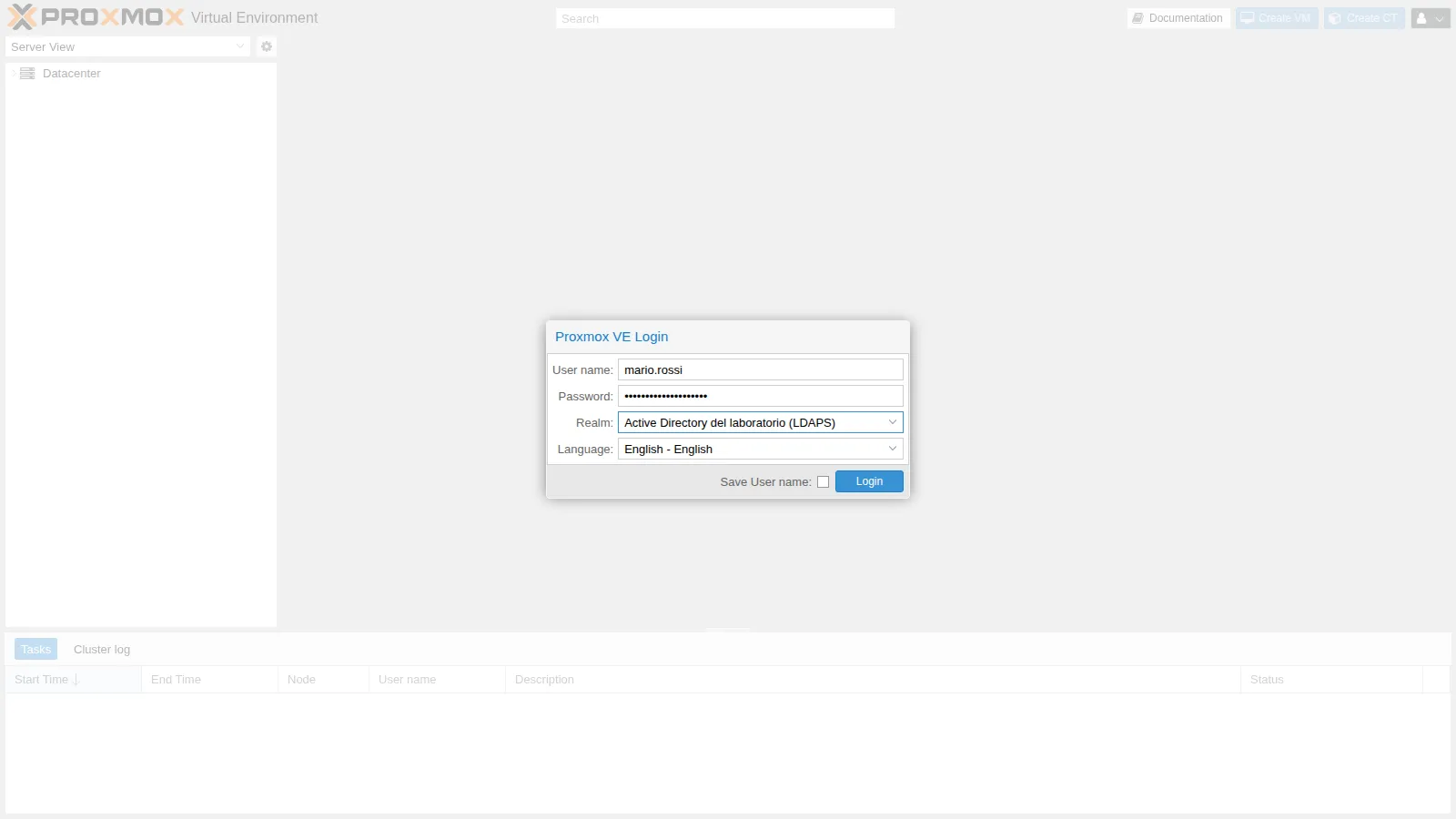
The login succeeds, but Mario has no permissions yet: he sees the nodes without data, no guests and no storage, and in the menu only his own settings.
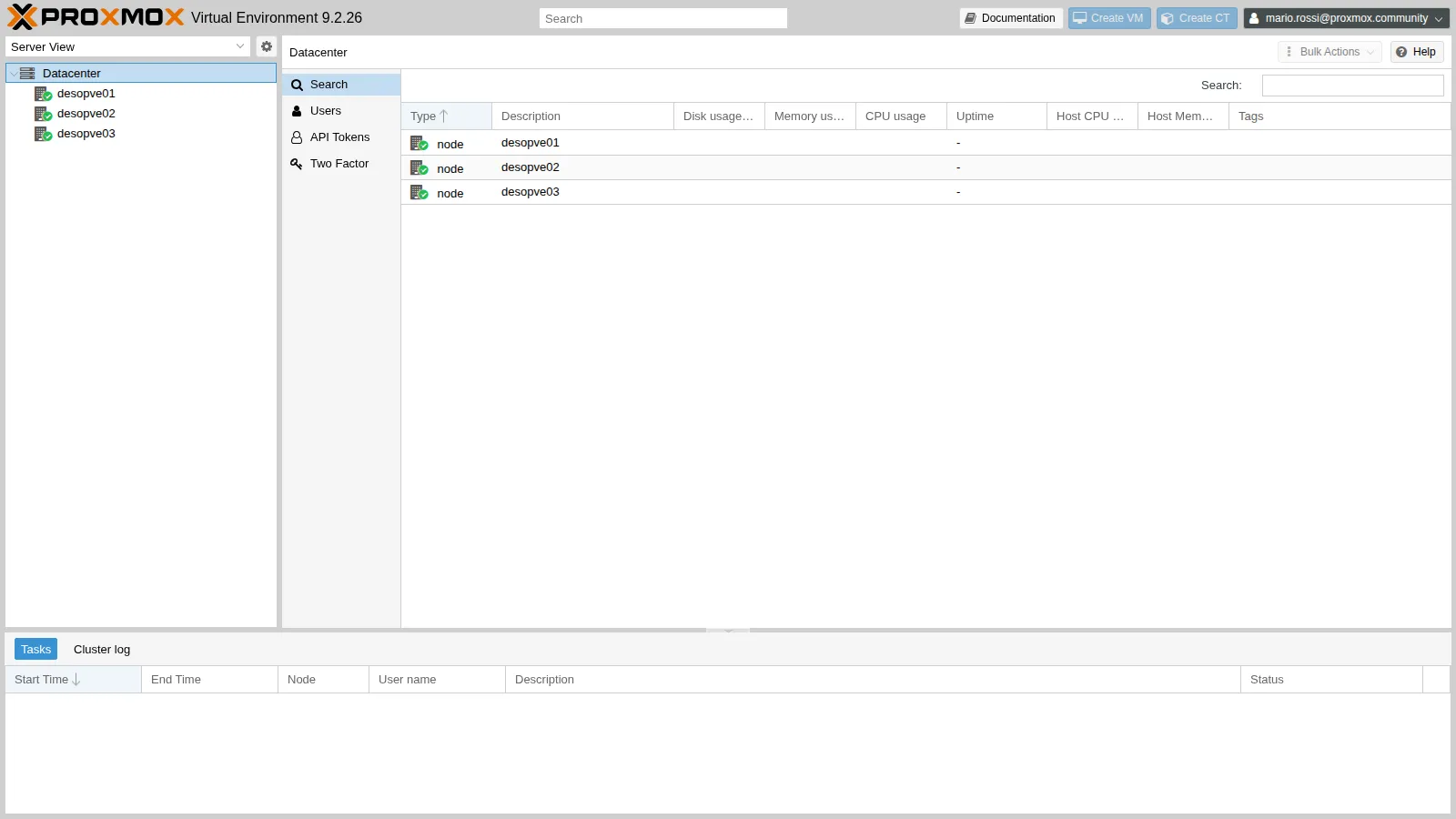
Permissions are assigned to the groups in Lab 44.
Verification and tests
Section titled “Verification and tests”Login through the API, which uses the same mechanism as the GUI:
t(){ curl -sk -o /dev/null -w "$1 -> HTTP %{http_code}\n" --data-urlencode "username=$1" \ --data-urlencode "password=$2" https://desopve01.proxmox.community:8006/api2/json/access/ticket; }[email protected] -> HTTP 200[email protected] -> HTTP 401[email protected] -> HTTP 401[email protected] -> HTTP 401- A synchronized user logs in with the domain password; with a wrong password, the login fails.
utente.esternohas a valid password in AD but cannot log in: it does not exist in Proxmox VE, because it is outside the OU and the filter.- The service account is not a Proxmox VE user and cannot log in to the GUI.
- Without the CA in the node’s store, the LDAPS connection is refused (
certificate verify failed). - A user added in AD appears in Proxmox VE at the next run of the scheduled job.
Final lab state
Section titled “Final lab state”- DC
desopve-dc01:- AD CS with the Enterprise Root CA
PROXMOX-CA(4096 bits, SHA-256, valid until 2036); - Domain Controller certificate for LDAPS on port 636;
- OU
OU=PVE,DC=proxmox,DC=communitywith the sub-OUsUtenti,Gruppi,Servizi; - service account
svc-pve-ldap(OUServizi); - groups
pve-admins(mario.rossi),pve-operators(laura.bianchi, anna.neri),pve-auditors(paolo.verdi); utente.esternoinCN=Users, excluded from synchronization.
- AD CS with the Enterprise Root CA
- Nodes
desopve01-03: CA in/usr/local/share/ca-certificates/proxmox-ca.crt, in the system store. - Realm
proxmox.community(typead, LDAPS with verification), user filter on the members of thepve-*groups, group filter(cn=pve-*). - Synchronized users:
mario.rossi,laura.bianchi,paolo.verdi,anna.neri@proxmox.community, without permissions. - Synchronized groups:
pve-admins-proxmox.community,pve-operators-proxmox.community,pve-auditors-proxmox.community. - Job
sync-ad: hourly synchronization withremove-vanished acl;entry;properties.
What you learned
Section titled “What you learned”- An Enterprise CA in AD lets the domain controllers obtain the LDAPS certificate on their own.
- LDAPS is only useful if the client verifies the certificate: the CA must be installed on every node.
- The bind uses a dedicated service account without privileges, never the Administrator.
- Base DN, user filter and group filter decide who gets into Proxmox VE; a dry run shows the effect before anything is written.
- Domain users log in with their AD password, but they must be synchronized to exist in Proxmox VE.
- A Realm Sync Job keeps users and groups aligned; Remove Vanished decides what happens to those who disappear from AD.