

Lab 20 – Linux bridges, stable network interface names and VLAN-aware bridges
Dependencies
Section titled “Dependencies”- Previous labs: Lab 06 (cluster
deso-cluster), Lab 07 (VM 100 and the first containers), Lab 17 (CephFS for the templates andrbd-vmfor the disks of the test containers), Lab 18 (thenooutflag, to power off a node that hosts OSDs). - Hardware: a dual-port network card for each node
desopve01-03, to install with the server powered off (step 1) and to cable to the switch, on the same network as the other cards. In this lab you pin its names; in Lab 21 the two ports become a bond. - Network: the switch the node cards are connected to must carry VLAN-tagged frames (trunk ports), as described in Lab 01.
- Template:
debian-13-standard(you download it to CephFS during the lab). - Credentials:
root/<lab-password>on the nodes and in the containers → Appendix B.
Objectives
Section titled “Objectives”- Understand how Proxmox VE connects VMs to the network: physical NICs, Linux bridges, virtual ports.
- Give new network cards a stable name, with the pinning introduced in Proxmox VE 9.
- Read and edit
/etc/network/interfaces, from the GUI and from the command line, and apply the changes without rebooting. - Make
vmbr0VLAN-aware and put VMs and containers on different VLANs with a simple number (tag). - Verify with real tests that the same VLAN communicates across different nodes and that different VLANs stay isolated.
How it works
Section titled “How it works”The Linux bridge is a switch inside the node
Section titled “The Linux bridge is a switch inside the node”A Linux bridge (vmbr0, vmbr1, …) is a software Ethernet switch. Its ports are:
- one or more physical NICs (
bridge-ports nic0): the uplink to the datacenter switch; - the virtual ports of the VMs (
tap100i0= VM 100, interfacenet0) and of the containers (veth121i0= CT 121,net0), which Proxmox VE creates and attaches when the guest starts.
The node’s IP address is on the bridge (vmbr0), not on the physical NIC: the node itself is just another “port” of the switch.
A bridge without physical NICs is an isolated switch: the VMs attached to it can only talk to each other, on the same node. Isolated networks that span several nodes are built with SDN (labs 27-31).
Stable network interface names
Section titled “Stable network interface names”Linux gives network cards a name that depends on where they are connected (PCI slot, position on the bus: ens…, enp…s…). If the hardware changes, or a kernel or systemd update changes the naming rules, the name changes. At that point /etc/network/interfaces points to an interface that no longer exists and the node is left without a network.
Proxmox VE 9 solves the problem with pinning: a systemd.link file for each card maps its MAC address to a fixed name, nic0, nic1, …
- The installer does this for the cards present at installation time: it is the Pin network interface names option, enabled by default (see Lab 03).
- For cards added later you use
pve-network-interface-pinning generate. The tool creates the.linkfiles in/usr/local/lib/systemd/network/and also updates the configurations that reference the old name: network, node firewall, SDN.
The old names remain available as alternative names (altname): in the GUI you see them in the Alternative Names column.
/etc/network/interfaces and ifupdown2
Section titled “/etc/network/interfaces and ifupdown2”The node’s network configuration lives in /etc/network/interfaces, in ifupdown2 format:
iface <name> inet manual– interface without an address (a card used as a port of a bridge or a bond);iface <name> inet static+address/gateway– interface with an address;auto <name>– brought up at boot;bridge-ports,bridge-stp,bridge-fd,bridge-vlan-aware,bridge-vids– bridge options.
The GUI does not edit the file directly: it writes /etc/network/interfaces.new and shows the difference as Pending changes. Apply Configuration moves the file into place and runs ifreload -a, which applies only the differences, without rebooting the node and without interrupting the interfaces that do not change.
VLAN-aware bridges
Section titled “VLAN-aware bridges”A VLAN (802.1Q) splits a switch into several logical networks: every frame carries a tag with the VLAN number (1-4094). On a VLAN-aware bridge:
| Element | Behavior |
|---|---|
Physical NIC (nic0) |
trunk port: carries the VLANs in bridge-vids (here 2-4094) tagged, plus VLAN 1 untagged |
| Virtual NIC without a tag | sits in VLAN 1 untagged (PVID), like the management network; but Proxmox VE also adds it, tagged, to all the VLANs in bridge-vids (2-4094). In practice it is a trunk: the guest can receive and send frames on any VLAN. To restrict it you use tag= (a single VLAN) or trunks= (only the listed VLANs) |
Virtual NIC with VLAN Tag 10 |
access port of VLAN 10: the guest sees normal frames, the bridge adds and removes the tag |
A single VLAN-aware bridge can therefore serve all the VLANs: to move a VM from one network to another you just change the tag, even while it is running. The lab switch must have the node ports configured as trunks with the same VLANs.
When the Proxmox VE firewall is enabled on the guest’s network device, it inserts an extra small bridge (fwbr100i0) between the VM and vmbr0: in that case the VLAN tag is applied on the fwpr… port attached to vmbr0, not on tap….
Procedure
Section titled “Procedure”1. A new card: from the system name to nic3 and nic4
Section titled “1. A new card: from the system name to nic3 and nic4”-
Install the dual-port card in
desopve01-03, one node at a time, with the server powered off:- set the Ceph
nooutflag (ceph osd set noout, as in Lab 18), so that the OSDs of the powered-off node are not rebuilt elsewhere; - migrate the node’s guests to another node (or shut them down), then power off the node;
- install the card, cable the two ports to the switch and power the node back on;
- when the node is back in the cluster and Ceph is healthy, clear the flag with
ceph osd unset nooutand move on to the next node.
At boot, Linux sees the two new ports with names derived from their position on the PCI bus, and leaves them down:
root@desopve01 ip -br link | grep -E "ens|nic"Output nic0 UP <MAC> <BROADCAST,MULTICAST,UP,LOWER_UP>nic1 UP <MAC> <BROADCAST,MULTICAST,UP,LOWER_UP>nic2 UP <MAC> <BROADCAST,MULTICAST,UP,LOWER_UP>nic2.50@nic2 UP <MAC> <BROADCAST,MULTICAST,UP,LOWER_UP>nic2.51@nic2 UP <MAC> <BROADCAST,MULTICAST,UP,LOWER_UP>ens<N1> DOWN <MAC> <BROADCAST,MULTICAST>ens<N2> DOWN <MAC> <BROADCAST,MULTICAST> - set the Ceph
-
Pin the names
nic3andnic4(same command on the three nodes, with the names you see on yours):root@desopve01 pve-network-interface-pinning generate --interface ens<N1> --target-name nic3Output Name for link 'ens<N1>' (enp<B>s<S>f<F>, enx<MAC>) will change to 'nic3'Generating link filesSuccessfully generated .link files in '/usr/local/lib/systemd/network/'Updating /etc/pve/nodes/desopve01/host.fw.newUpdating /etc/network/interfaces.newUpdating /etc/pve/sdn/controllers.cfgUpdating /etc/pve/sdn/fabrics.cfgSuccessfully updated Proxmox VE configuration files.Please reboot to apply the changes to your configurationroot@desopve01 pve-network-interface-pinning generate --interface ens<N2> --target-name nic4Output ...root@desopve01 cat /usr/local/lib/systemd/network/50-pmx-nic3.linkOutput [Match]MACAddress=<NIC MAC address>Type=ether[Link]Name=nic3Without
--target-namethe tool picks the first free name on its own (nic3,nic4, …); without--interfaceit pins all the cards that do not have a stable name yet. -
The new name takes effect at the next reboot. The two ports, however, are not in use yet (they are down), so you can apply it right away, without another reboot: udev rereads the
.linkfiles and renames the interfaces.root@desopve01 udevadm trigger -c add /sys/class/net/ens<N1> /sys/class/net/ens<N2>udevadm settleip -br link | grep -E "nic3|nic4"Output nic3 DOWN <MAC> <BROADCAST,MULTICAST>nic4 DOWN <MAC> <BROADCAST,MULTICAST> -
The tool has prepared the lines for the new cards in
/etc/network/interfaces.new. Apply them (this is what the Apply Configuration button does):root@desopve01 diff -u /etc/network/interfaces /etc/network/interfaces.new | grep "^[+-]"Output --- /etc/network/interfaces 2026-11-09 17:02:13.533049346 +0100+++ /etc/network/interfaces.new 2026-11-09 19:09:13.063801813 +0100+iface nic4 inet manual++iface nic3 inet manual+root@desopve01 mv /etc/network/interfaces.new /etc/network/interfaces && ifreload -aRepeat steps 2-4 on
desopve02anddesopve03.
2. VLAN-aware vmbr0 from the GUI (desopve01)
Section titled “2. VLAN-aware vmbr0 from the GUI (desopve01)”-
Node desopve01 → System → Network. The
nic3andnic4cards are inactive Network Device entries;vmbr0has VLAN aware set toNo. The Alternative Names column shows the old names of the cards.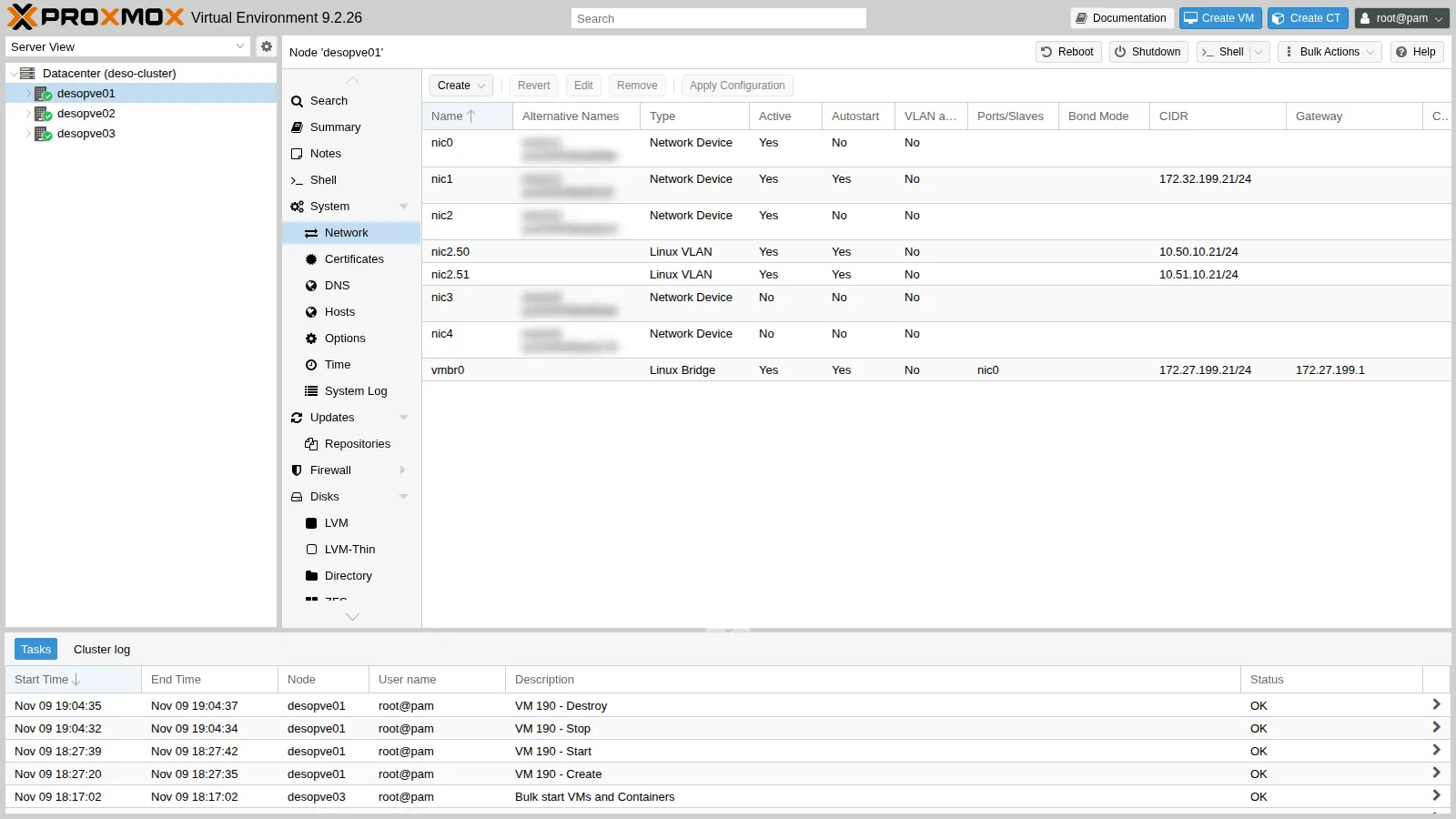
Before the change, the bridge does not filter VLANs:
root@desopve01 cat /sys/class/net/vmbr0/bridge/vlan_filteringOutput 0root@desopve01 bridge vlan show dev nic0Output port vlan-idnic0 1 PVID Egress Untagged -
Select
vmbr0→ Edit and check VLAN aware. The other fields stay unchanged.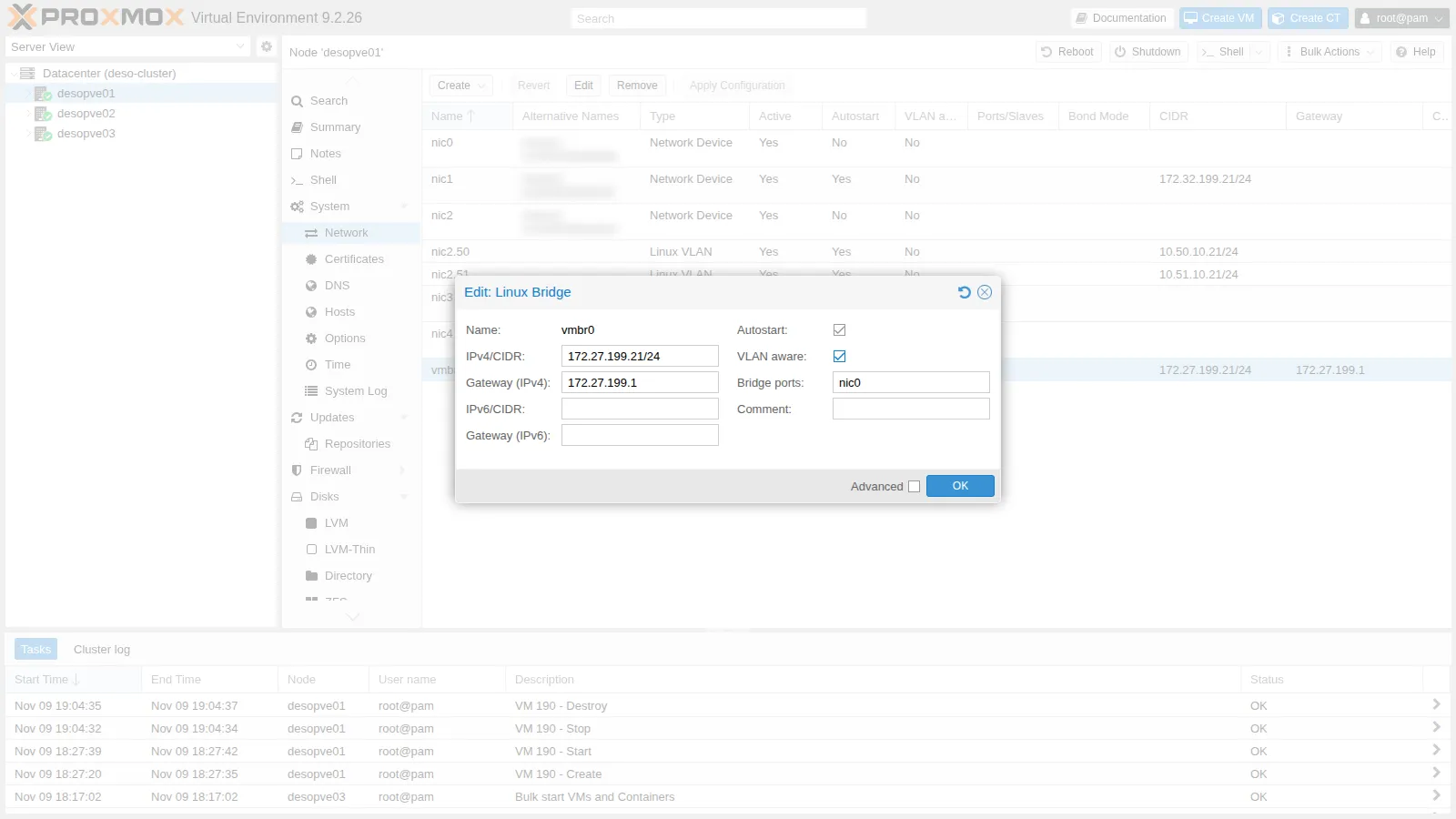
-
OK. The Pending changes appear in the lower part of the page: the two lines that will be added to the file.
bridge-vids 2-4094is the default value, that is, all VLANs.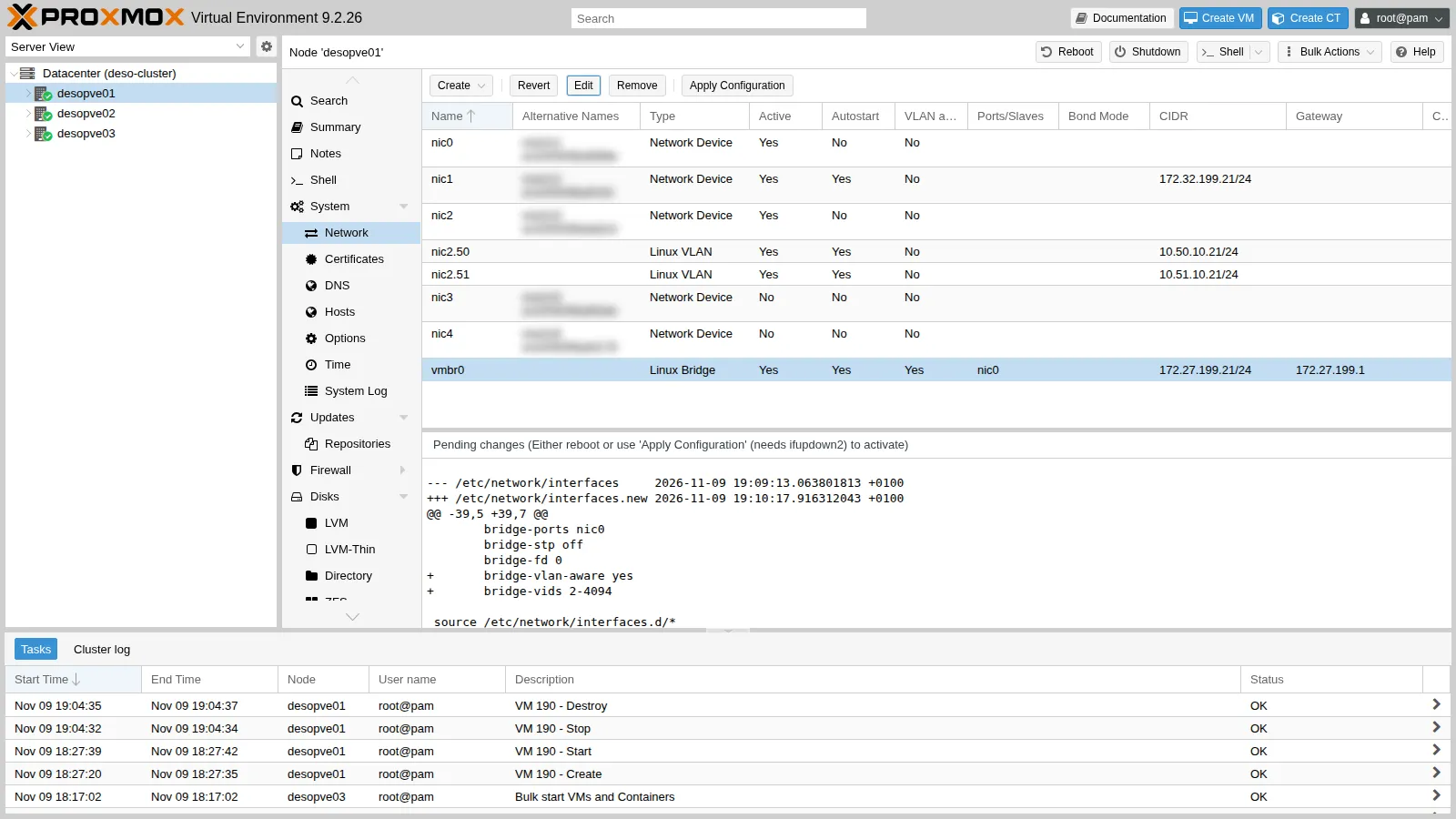
-
Apply Configuration → Yes. After a few seconds
vmbr0is VLAN-aware, with no interruption for the GUI, the cluster or the VMs.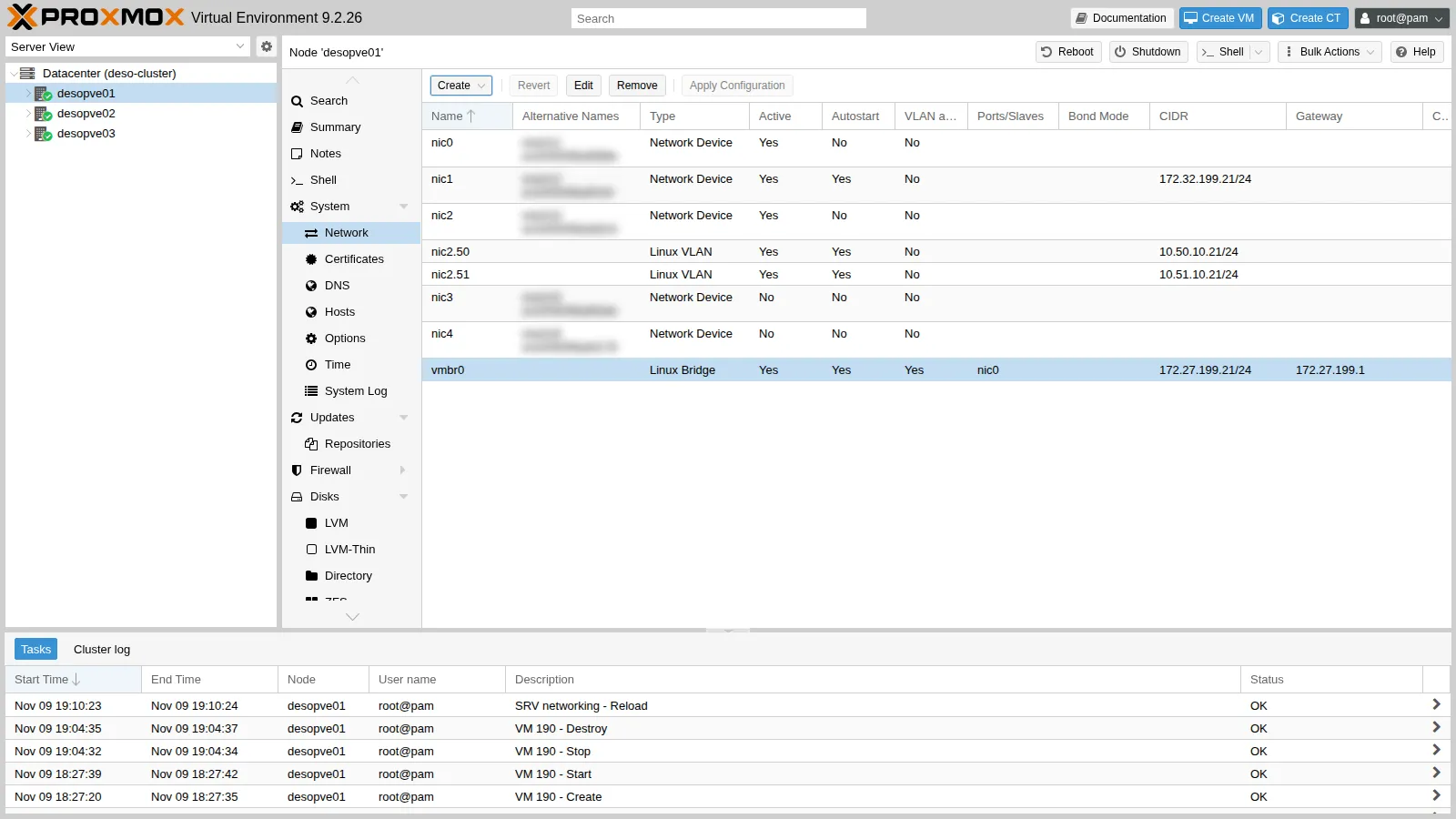
root@desopve01 cat /sys/class/net/vmbr0/bridge/vlan_filteringOutput 1root@desopve01 bridge vlan show dev nic0 | head -4Output port vlan-idnic0 1 PVID Egress Untagged23root@desopve01 ifquery --check vmbr0Output auto vmbr0iface vmbr0 inet static [pass]bridge-ports nic0 (veth121i0) (fwpr100p0) [pass]bridge-fd 0 [pass]bridge-stp no [pass]bridge-vlan-aware yes [pass]bridge-vids 2-4094 []address 172.27.199.21/24 [pass]ifquery --checkcompares the file with the actual state of the interfaces:[pass]means they match. The guests’ virtual ports, which Proxmox VE attaches without them being in the file, appear in parentheses. This output was captured at the end of the lab: it already includes the port of CT 121, which you create in step 4.
3. The same change from the command line (desopve02 and desopve03)
Section titled “3. The same change from the command line (desopve02 and desopve03)”The GUI is convenient; on many nodes, or from a script, you edit the file. Here is the file of desopve01 after the change: the layout is the same on all nodes.
auto loiface lo inet loopback
iface nic0 inet manual
auto nic1iface nic1 inet static  address 172.32.199.21/24
iface nic2 inet manual
auto nic2.50iface nic2.50 inet static  address 10.50.10.21/24
auto nic2.51iface nic2.51 inet static  address 10.51.10.21/24
iface nic4 inet manual
iface nic3 inet manual
auto vmbr0iface vmbr0 inet static  address 172.27.199.21/24  gateway 172.27.199.1  bridge-ports nic0  bridge-stp off  bridge-fd 0  bridge-vlan-aware yes  bridge-vids 2-4094
source /etc/network/interfaces.d/*-
On
desopve02make a copy of the file and add the two lines to thevmbr0block (with an editor, or withsedas shown here):root@desopve02 cp /etc/network/interfaces /root/interfaces.bak-lab20sed -i "/^iface vmbr0 /,/^$/ s/^\tbridge-fd 0$/\tbridge-fd 0\n\tbridge-vlan-aware yes\n\tbridge-vids 2-4094/" /etc/network/interfacessed -n "/auto vmbr0/,/^$/p" /etc/network/interfacesOutput auto vmbr0iface vmbr0 inet staticaddress 172.27.199.22/24gateway 172.27.199.1bridge-ports nic0bridge-stp offbridge-fd 0bridge-vlan-aware yesbridge-vids 2-4094 -
Apply the change and immediately check that the node can still reach the gateway. If something goes wrong, the rollback plan is to put the copy back and run
ifreload -aagain from the node’s console.root@desopve02 ifreload -a && cat /sys/class/net/vmbr0/bridge/vlan_filteringOutput 1root@desopve02 ping -c2 -W1 172.27.199.1 | tail -1Output rtt min/avg/max/mdev = 0.460/1.174/1.889/0.714 ms -
Repeat on
desopve03. At the end, check that the cluster and Ceph did not notice anything:root@desopve01 pvecm status | grep QuorateOutput Quorate: Yesroot@desopve01 ceph -s | grep healthOutput health: HEALTH_OK
4. Three test containers on different VLANs
Section titled “4. Three test containers on different VLANs”-
Download the Debian 13 template to CephFS, so that it is available on all nodes:
root@desopve01 pveam updatepveam download cephfs debian-13-standard_13.6-1_amd64.tar.zstOutput ...download of 'http://download.proxmox.com/images/system/debian-13-standard_13.6-1_amd64.tar.zst' to '/mnt/pve/cephfs/template/cache/debian-13-standard_13.6-1_amd64.tar.zst' finished -
Create one container per node: CT 121 on
desopve01, 122 ondesopve02, 123 ondesopve03. For now they are on the management network, so they can install the test tools (ping,tcpdump,iperf3) through the proxy:root@desopve01 pct create 121 cephfs:vztmpl/debian-13-standard_13.6-1_amd64.tar.zst \--hostname vlan-ct1 --unprivileged 1 --cores 1 --memory 512 --swap 0 \--rootfs rbd-vm:4 --net0 name=eth0,bridge=vmbr0,ip=172.27.199.121/24,gw=172.27.199.1 \--nameserver 172.27.199.20 --searchdomain proxmox.community --features nesting=1 \--password '<lab-password>' --start 1pct exec 121 -- bash -c 'echo "Acquire::http::Proxy \"http://proxy.proxmox.community:3128\";" > /etc/apt/apt.conf.d/90proxyapt-get -qq update && DEBIAN_FRONTEND=noninteractive apt-get -qq install -y iperf3 tcpdump iputils-ping'Same commands for 122 (
vlan-ct2,.122) ondesopve02and 123 (vlan-ct3,.123) ondesopve03. -
Move CT 121 to VLAN 10: 121 → Network →
net0→ Edit. VLAN Tag10, IPv4/CIDR10.10.10.121/24, Gateway empty: the test network has no router.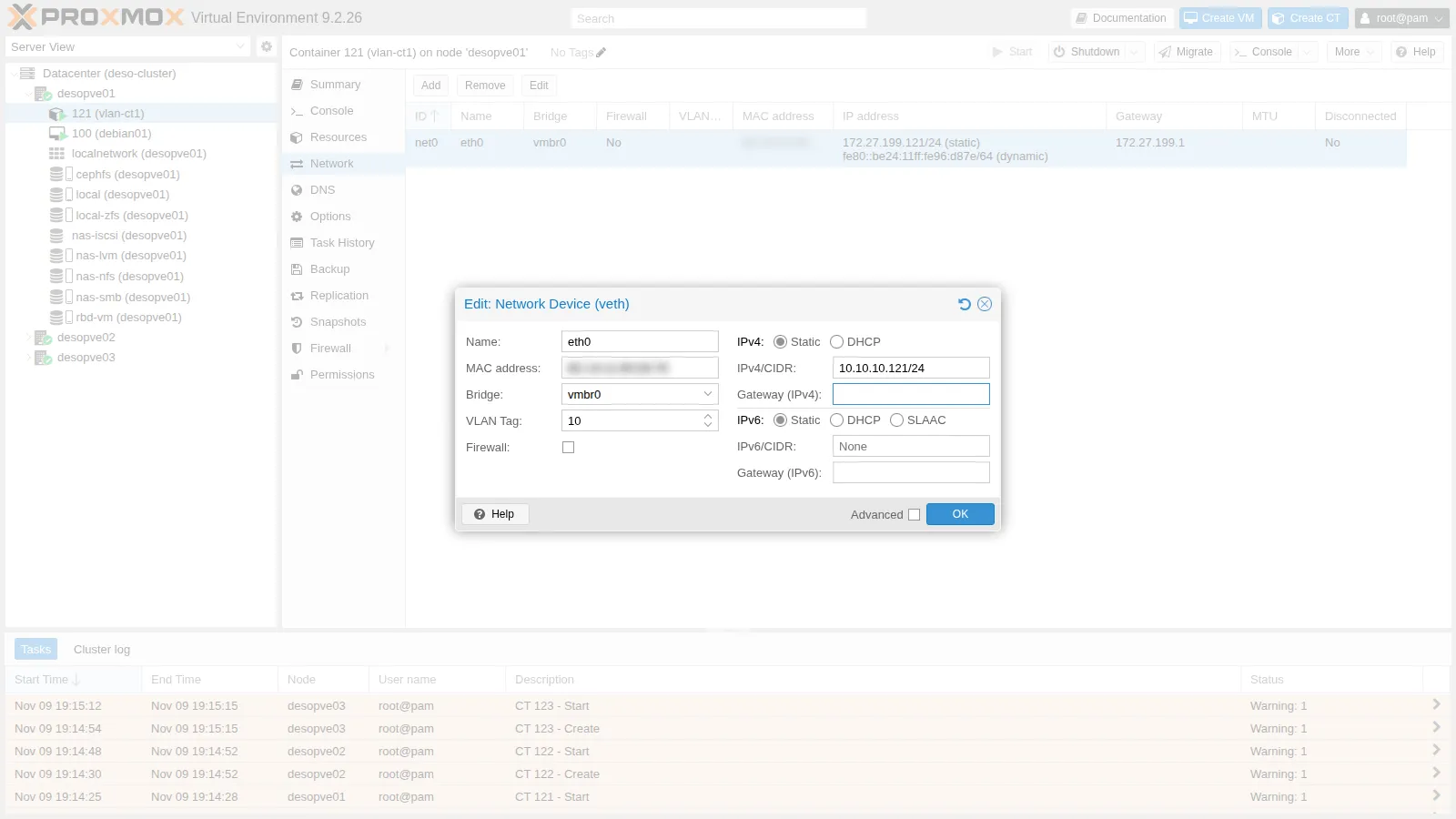
OK: the container keeps running, and Proxmox VE moves its
veth121i0port to VLAN 10.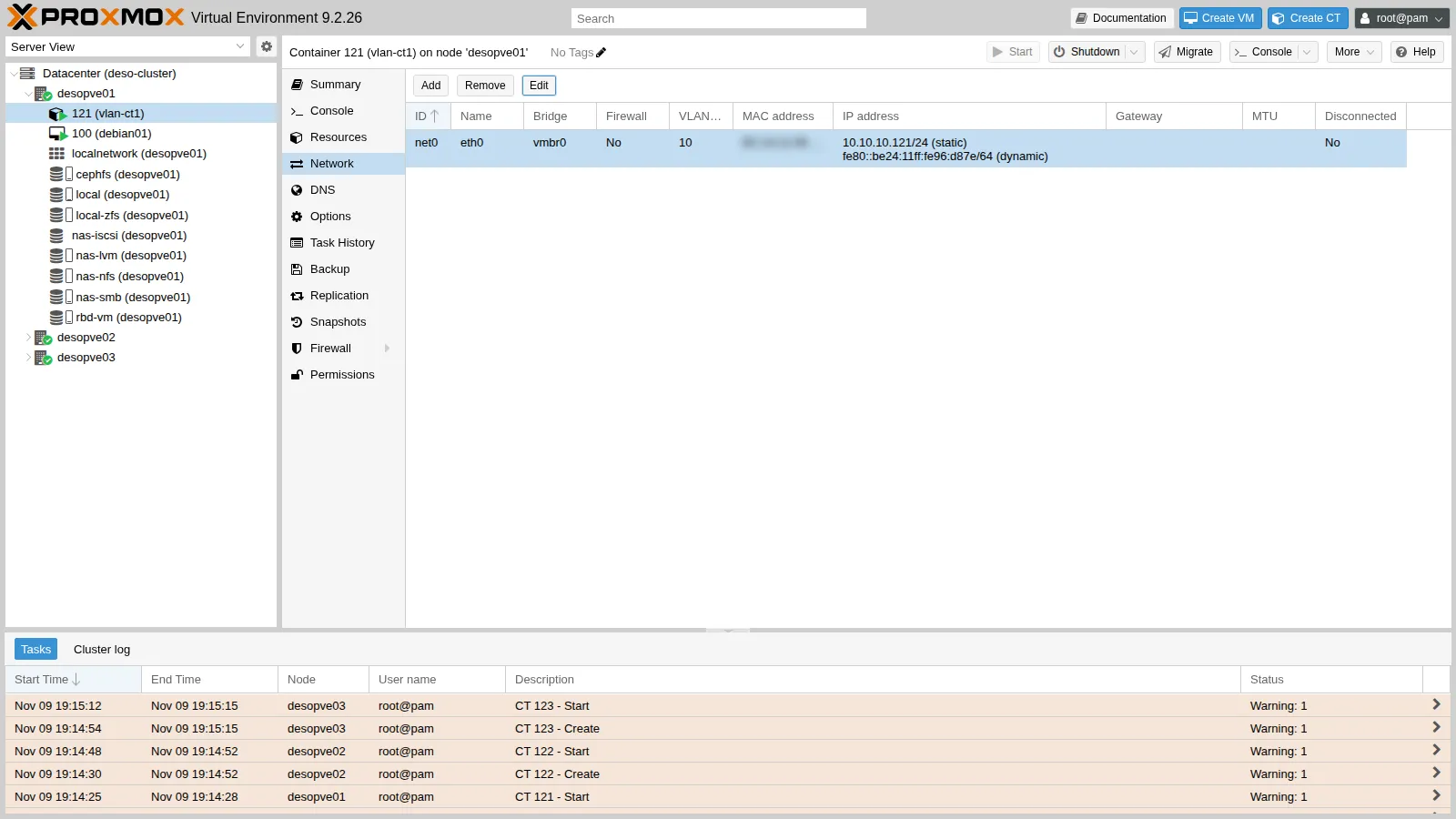
-
Configure the other two from the command line, again while they are running. CT 123 goes on VLAN 20, but with an address in the same subnet as the other two:
root@desopve02 pct set 122 -net0 name=eth0,bridge=vmbr0,tag=10,ip=10.10.10.122/24root@desopve03 pct set 123 -net0 name=eth0,bridge=vmbr0,tag=20,ip=10.10.10.123/24
5. Tests: same VLAN, different VLANs
Section titled “5. Tests: same VLAN, different VLANs”-
Same VLAN, different nodes. CT 121 (on
desopve01) reaches CT 122 (ondesopve02): the frame leavesnic0with tag 10, crosses the network and entersvmbr0on the other node.root@desopve01 pct exec 121 -- ping -c3 -W1 10.10.10.122Output PING 10.10.10.122 (10.10.10.122) 56(84) bytes of data.64 bytes from 10.10.10.122: icmp_seq=1 ttl=64 time=1.53 ms64 bytes from 10.10.10.122: icmp_seq=2 ttl=64 time=0.631 ms64 bytes from 10.10.10.122: icmp_seq=3 ttl=64 time=0.402 ms--- 10.10.10.122 ping statistics ---3 packets transmitted, 3 received, 0% packet loss, time 2018ms -
The tag on the wire. A capture on the node’s
nic0while the ping is running shows the 802.1Q header with VLAN 10:root@desopve01 tcpdump -i nic0 -e -nn -c 4 "vlan 10 and icmp"Output 19:18:43.123268 <MAC> > <MAC>, ethertype 802.1Q (0x8100), length 102: vlan 10, p 0, ethertype IPv4 (0x0800), 10.10.10.121 > 10.10.10.122: ICMP echo request, id 538, seq 1, length 6419:18:43.123781 <MAC> > <MAC>, ethertype 802.1Q (0x8100), length 102: vlan 10, p 0, ethertype IPv4 (0x0800), 10.10.10.122 > 10.10.10.121: ICMP echo reply, id 538, seq 1, length 64...4 packets capturedInside the container, on the other hand, the frames are untagged: it is the bridge that adds and removes the tag. The bridge’s VLAN table confirms it: the port of CT 121 is an access port of VLAN 10 (PVID, egress untagged), while the port of VM 100, which has no tag, is in VLAN 1 untagged and in all VLANs 2-4094 tagged:
root@desopve01 bridge -compressvlans vlan show dev veth121i0Output port vlan-idveth121i0 10 PVID Egress Untaggedroot@desopve01 bridge -compressvlans vlan show dev tap100i0Output port vlan-idtap100i0 1 PVID Egress Untagged2-4094With the firewall enabled on the network device and the default
iptablesengine, the port of VM 100 attached tovmbr0isfwpr100p0instead oftap100i0(see How it works): the table is the same. An untagged virtual NIC therefore also receives the tagged traffic of all the VLANs: if a guest must be on a single network, always give it a tag (or restrict the VLANs withtrunks=). -
Different VLANs, same subnet. CT 123 is in VLAN 20 with an address in the same subnet: it does not answer, because the ARP requests from VLAN 10 never reach VLAN 20.
root@desopve01 pct exec 121 -- ping -c3 -W1 10.10.10.123Output PING 10.10.10.123 (10.10.10.123) 56(84) bytes of data.--- 10.10.10.123 ping statistics ---3 packets transmitted, 0 received, 100% packet loss, time 2065ms -
Changing VLAN on the fly. Move CT 123 to VLAN 10: it communicates immediately, without any restart.
root@desopve03 pct set 123 -net0 name=eth0,bridge=vmbr0,tag=10,ip=10.10.10.123/24pct exec 123 -- ping -c2 -W1 10.10.10.121 | tail -2Output 2 packets transmitted, 2 received, 0% packet loss, time 1002msrtt min/avg/max/mdev = 0.431/1.181/1.931/0.750 ms -
Each VLAN gets its own subnet. Put CT 123 back in VLAN 20 with a subnet of its own,
10.20.20.0/24. Now CT 121 does not even know how to reach it: it has no route to that network.root@desopve03 pct set 123 -net0 name=eth0,bridge=vmbr0,tag=20,ip=10.20.20.123/24root@desopve01 pct exec 121 -- ping -c1 -W1 10.20.20.123Output ping: connect: Network is unreachableroot@desopve01 pct exec 121 -- ip routeOutput 10.10.10.0/24 dev eth0 proto kernel scope link src 10.10.10.121This is the usual design: one VLAN per subnet, and between the VLANs a router that decides what may pass. You will build it in lab 26.
6. An extra network device on a VM
Section titled “6. An extra network device on a VM”VMs work the same way. Add a second network device on VLAN 10 to VM 100:
-
100 (debian01) → Hardware → Add → Network Device. Bridge
vmbr0, VLAN Tag10, ModelVirtIO (paravirtualized), Firewall enabled.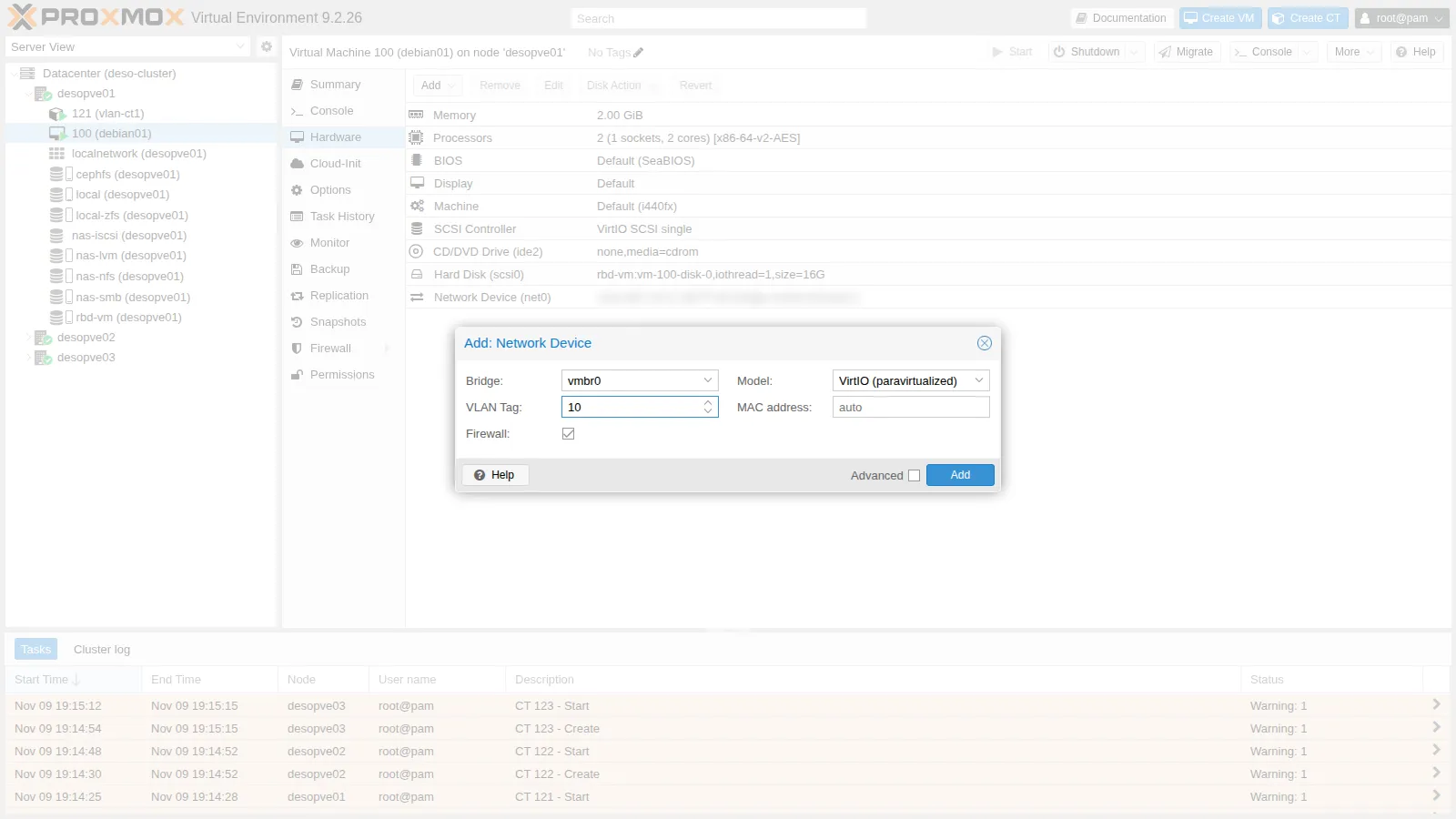
-
Add: the
net1device appears in the hardware list withtag=10and the guest sees it immediately (hotplug).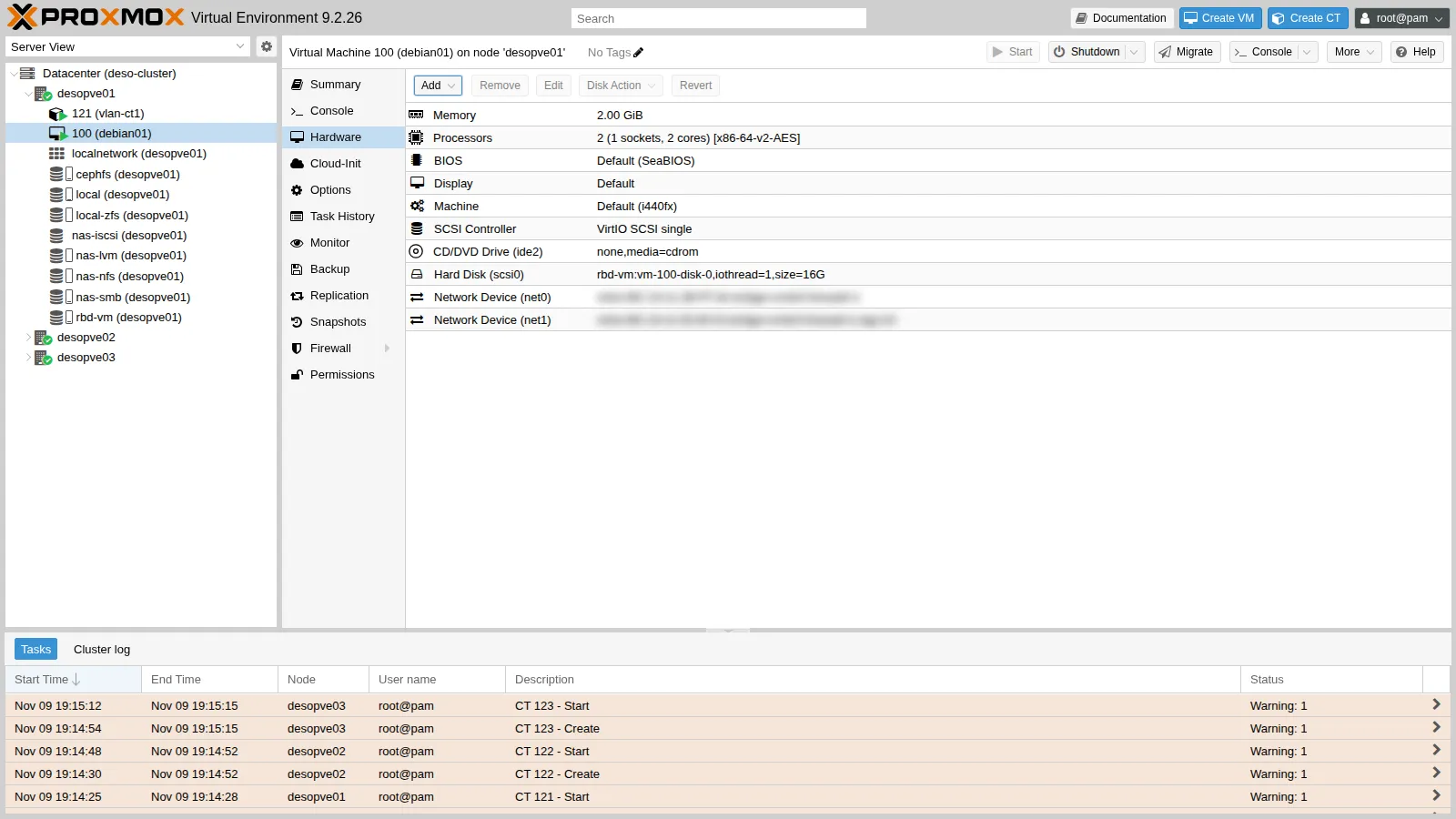
With the firewall enabled, the
tap100i1port is attached to the firewall bridge: that is whytap100i1appears in VLAN 1, while tag 10 is on thefwpr100p1port ofvmbr0.root@desopve01 qm config 100 | grep ^netOutput net0: virtio=<MAC>,bridge=vmbr0,firewall=1net1: virtio=<MAC>,bridge=vmbr0,firewall=1,tag=10root@desopve01 bridge vlan show | grep -E "100i1|100p1"Output tap100i1 1 PVID Egress Untaggedfwbr100i1 1 PVID Egress Untaggedfwpr100p1 10 PVID Egress Untaggedfwln100i1 1 PVID Egress Untagged -
Remove it: from the GUI with Remove on the
net1row, or from the CLI.root@desopve01 qm set 100 --delete net1Output update VM 100: -delete net1
Verification and tests
Section titled “Verification and tests”| Test | Expected result | Actual result |
|---|---|---|
| New cards with a stable name | nic3 and nic4 on desopve01-03, files 50-pmx-nic3/4.link |
✔ |
vmbr0 VLAN-aware on all nodes |
vlan_filtering = 1, management and cluster without interruptions |
✔ (Quorate: Yes, HEALTH_OK) |
| Same VLAN, different nodes (121 → 122) | answers | 0% loss, ~0.5 ms |
| Different VLANs, same subnet (121 → 123) | no answer | 100% loss |
| VLAN change on the fly (123 → VLAN 10) | answers immediately | 0% loss |
| Different VLANs, different subnets | a router is needed | Network is unreachable |
Final lab state
Section titled “Final lab state”-
desopve01-03:vmbr0VLAN-aware (bridge-vids 2-4094), still with the management address172.27.199.2x/24on untagged VLAN 1;- new cards
nic3andnic4with stable names, not configured yet (inet manual), ready for the bond in lab 21; nic1(172.32.199.2x, second Corosync link and second iSCSI path) andnic2.50/nic2.51(Ceph) unchanged.
-
Test containers, running, with
ping,tcpdumpandiperf3:- CT 121
vlan-ct1ondesopve01, VLAN 10,10.10.10.121/24; - CT 122
vlan-ct2ondesopve02, VLAN 10,10.10.10.122/24; - CT 123
vlan-ct3ondesopve03, VLAN 20,10.20.20.123/24.
All with their disk on
rbd-vmand without a gateway: they are also used in labs 21 and 22. - CT 121
-
CephFS: template
debian-13-standard_13.6-1_amd64. -
VM 100 unchanged (only
net0).desopve04was not touched.
What you learned
Section titled “What you learned”- A Linux bridge is a software switch: the physical NICs are its ports to the outside, the VM and container network devices its internal ports.
- Stable names (
nic0,nic1, …) protect the configuration from changes in the hardware or in the naming rules; for cards added after installation you usepve-network-interface-pinning. - The GUI prepares
interfaces.newand shows the differences; Apply Configuration (orifreload -a) applies only what changes, without rebooting. - With a VLAN-aware bridge, a number on the virtual NIC is all it takes to choose the VLAN, even while the guest is running.
- VLANs separate traffic at layer 2: two guests in the same subnet but in different VLANs cannot see each other. Between different VLANs you need a router.