

Lab 38 – Linux VM and QEMU Guest Agent: serial console, options, shutdown, fsfreeze and removal
Dependencies
Section titled “Dependencies”- Previous labs:
- VMs and services: VM 100
debian01ondesopve01, disk onrbd-vm(Ceph, Lab 17); storagenas-nfs(Lab 13) for a test backup job. - Addresses: VM 100 on 172.27.199.100; test VM 380 without network.
- Credentials:
rootandlabuser/<lab-password>→ Appendix B.
Objectives
Section titled “Objectives”- Use the two consoles of a VM: noVNC (graphical screen) and xterm.js (serial port).
- Install and enable the QEMU Guest Agent and understand what Proxmox VE does with it: IP addresses, clean shutdown, commands in the guest, passwords, filesystem freeze.
- See with a real test how fsfreeze blocks the guest’s writes during a backup.
- Configure start at boot, start order and protection of a VM.
- Delete a VM completely with purge, and understand what happens without it.
How it works
Section titled “How it works”The guest agent. qemu-ga is a small service that runs inside the guest. Proxmox VE talks to it through a dedicated channel, without going through the network:
node: /var/run/qemu-server/100.qga (Unix socket)QEMU: virtio-serial device ──► port "org.qemu.guest_agent.0"guest: qemu-ga reads the commands from the port and repliesWith the agent enabled, Proxmox VE:
- shows the guest IPs in the Summary, without you having to look them up;
- shuts down the VM by asking the operating system, instead of simulating the power button (ACPI);
- freezes the filesystems before a snapshot or a backup, so that the data on disk is consistent;
- after a disk move or a migration, can run
fstrimin the guest to return space to thin storage (Lab 37); - runs commands in the guest (
qm guest exec) and changes its passwords (qm guest passwd).
The agent must be enabled on both sides: the package in the guest and the QEMU Guest Agent option in the VM. The option adds the virtio-serial device, so it takes effect only when the QEMU process is started again.
The consoles.
- noVNC shows the graphical screen of the VM (the emulated graphics card). It always works, even during boot and without networking.
- xterm.js is a text terminal connected to the serial port of the VM. It requires a
serial0port and agettylistening onttyS0in the guest. Compared to noVNC, it supports copy and paste and has no keyboard layout issues.
Removal. qm destroy deletes the configuration and the disks. References to the VM in other cluster configurations (backup jobs, replication, HA) remain, unless you request a purge.
Procedure
Section titled “Procedure”1. The starting point: labuser without sudo
Section titled “1. The starting point: labuser without sudo”In VM 100 from Lab 07, the user labuser cannot become an administrator. It is not a mistake: if you set a password for root in the Debian installer, the installer does not install sudo and does not add the first user to the sudo group. For root, on the other hand, SSH login with a password is disabled by default (PermitRootLogin prohibit-password).
Fix it from the noVNC console (VM 100 → Console), logging in as root:
apt-get update -qq; apt-get install -y -qq sudo qemu-guest-agentusermod -aG sudo labuser; id labuser; dpkg -l sudo qemu-guest-agent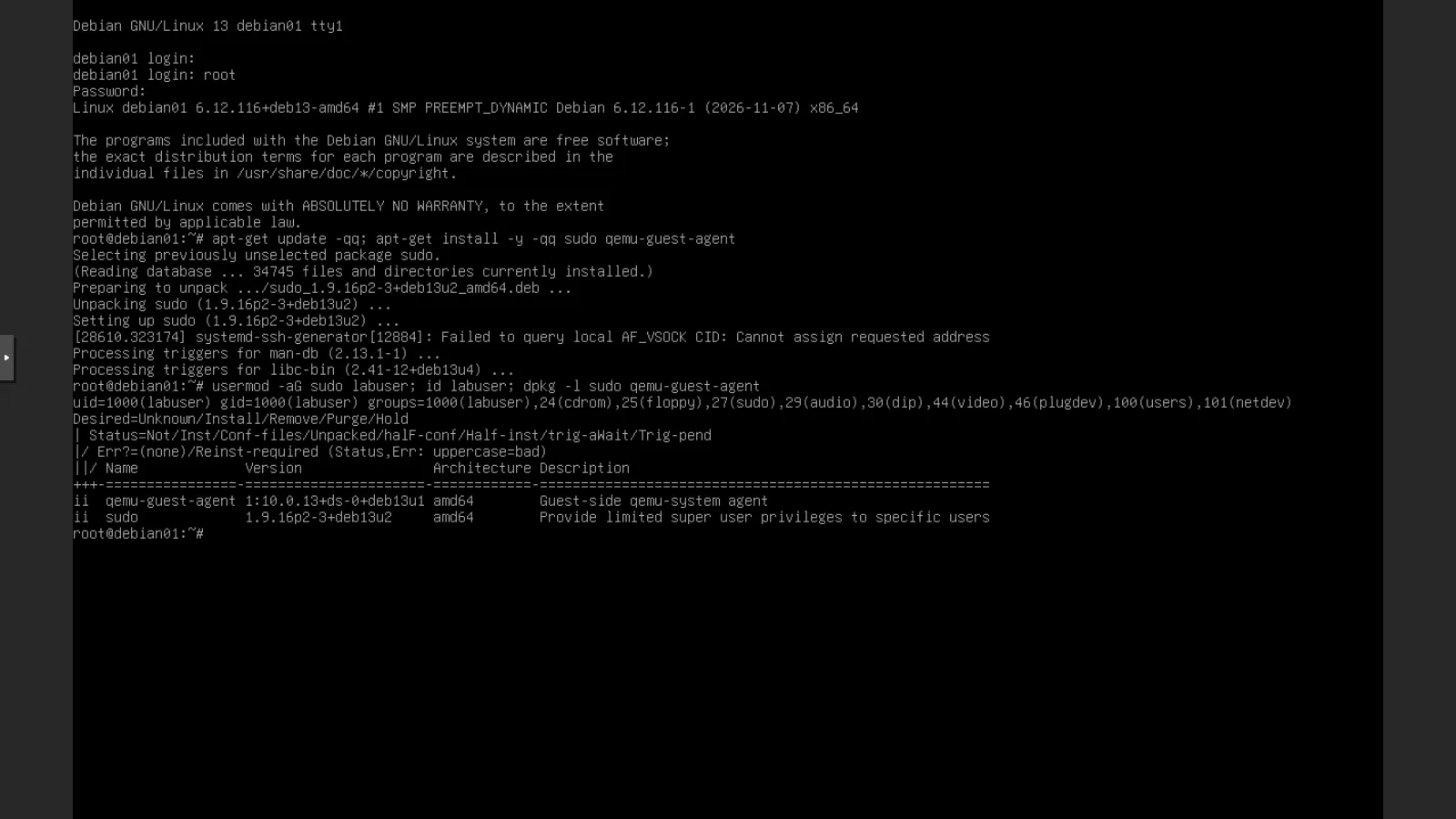
id labusernow shows the group27(sudo).qemu-guest-agentturns out to be already installed (ii): apt installed onlysudo. The only thing still missing in the VM is enabling the agent on the Proxmox side.
2. Enabling the agent in the VM
Section titled “2. Enabling the agent in the VM”Options → QEMU Guest Agent → Edit:
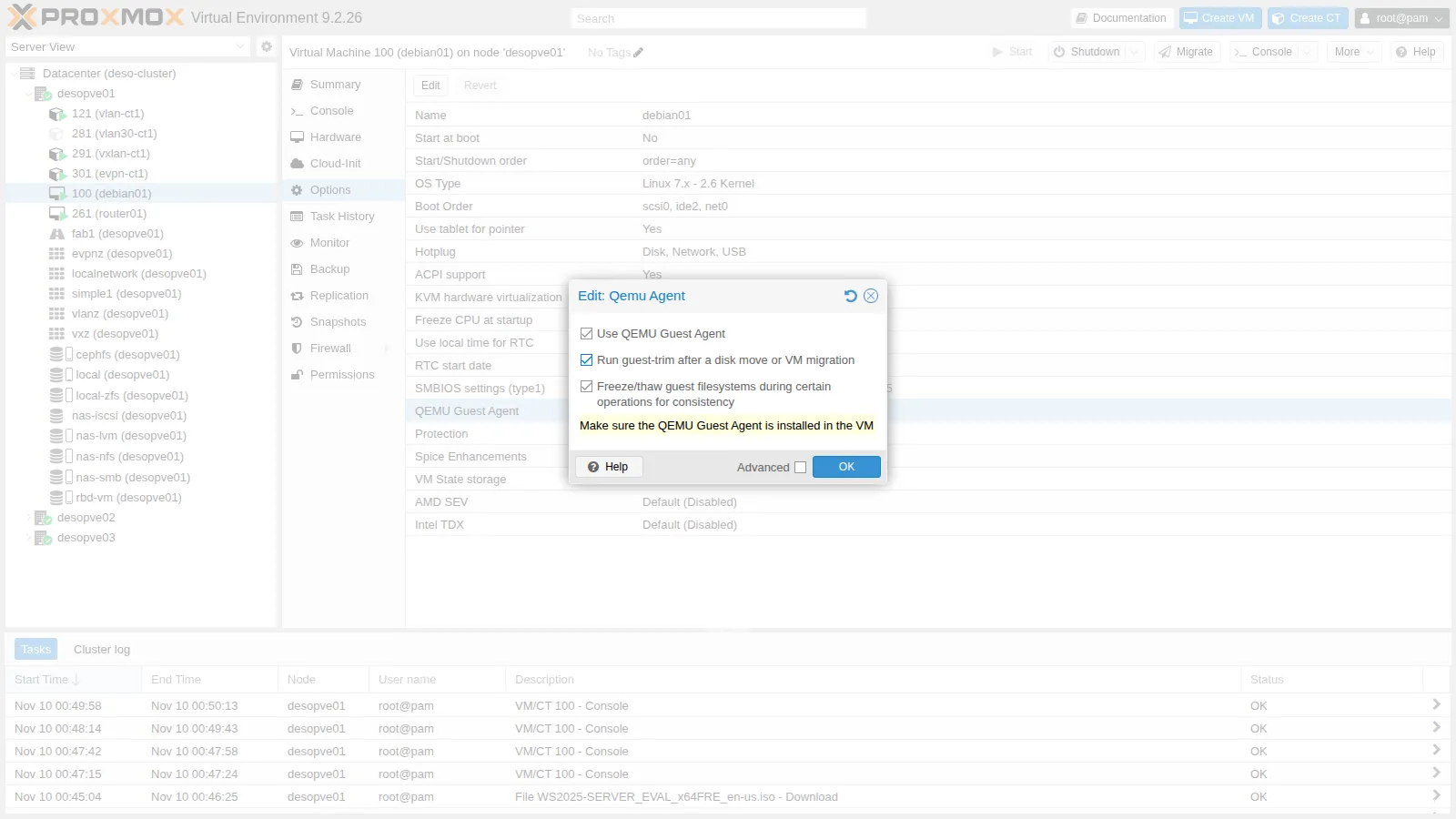
- Use QEMU Guest Agent: adds the virtio-serial channel and makes Proxmox VE use the agent.
- Run guest-trim after a disk move or VM migration: after Move disk or a migration, runs
fstrimin the guest. - Freeze/thaw guest filesystems… for consistency: enabled by default, it is the freeze used by backups and snapshots (section 6).
From the CLI:
qm set 100 --agent enabled=1,fstrim_cloned_disks=13. Adding the serial port
Section titled “3. Adding the serial port”Hardware → Add → Serial Port, port 0:
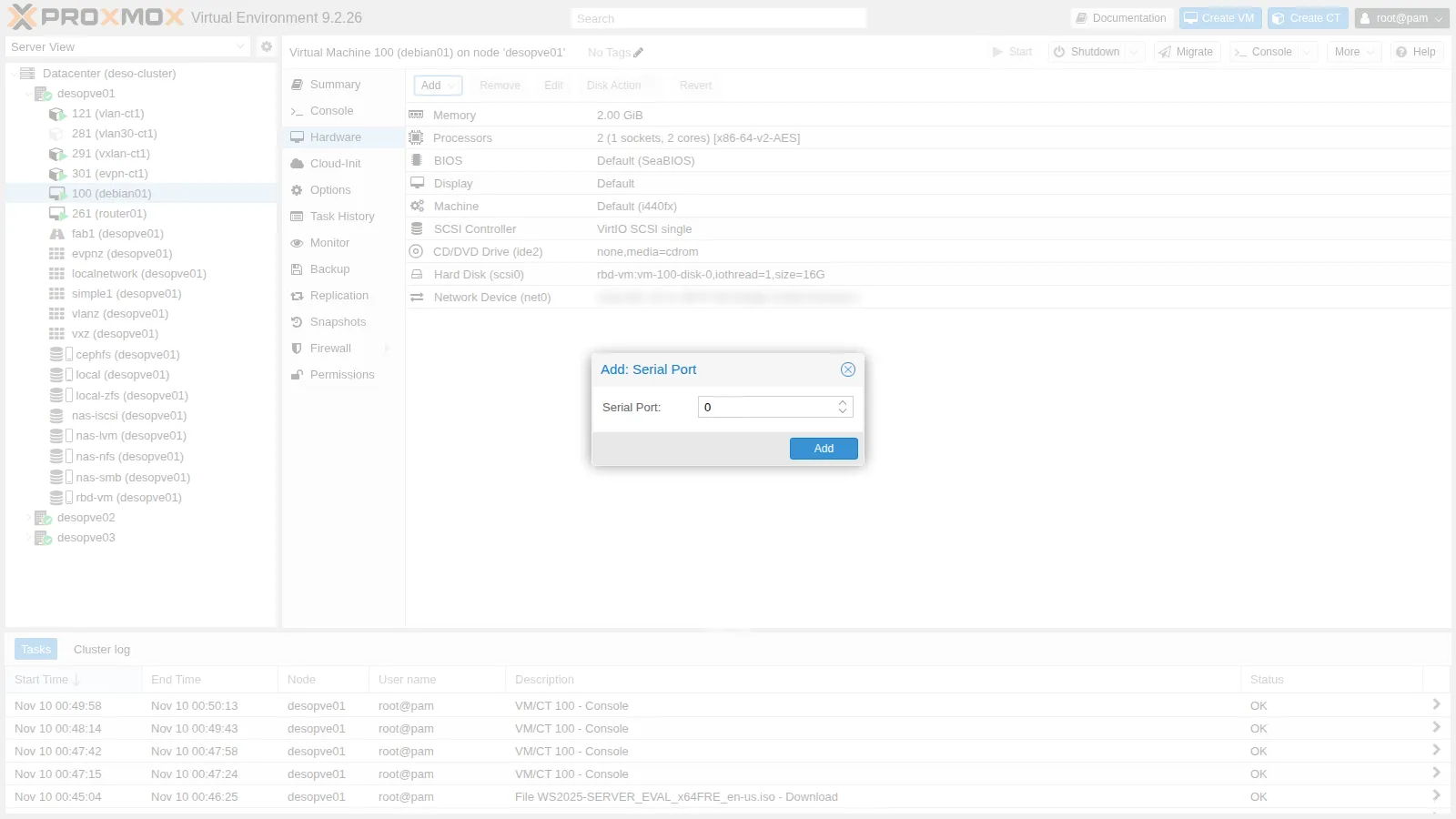
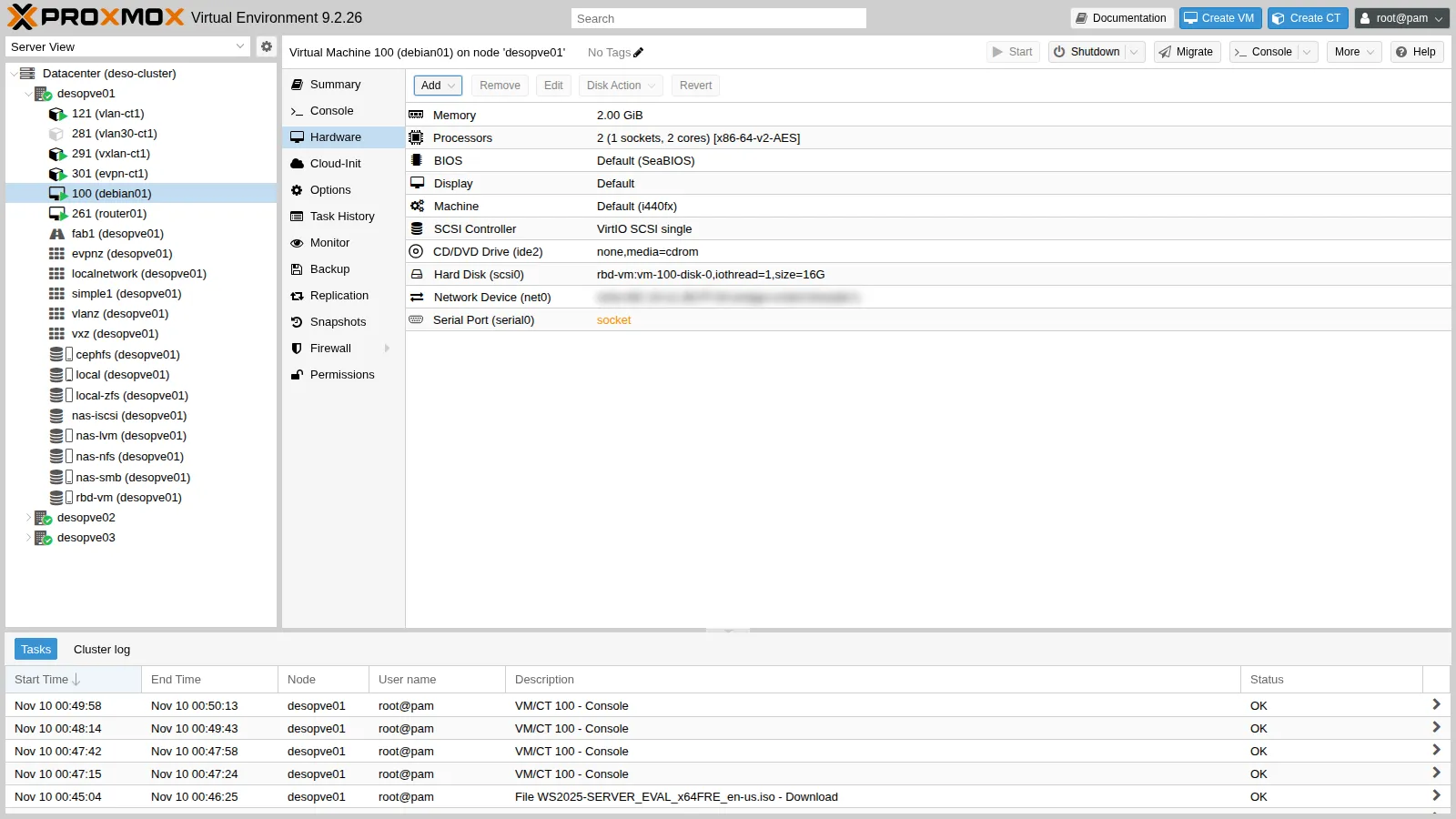
Both changes require new hardware in the VM, so they remain pending: in the Hardware view the serial port appears in orange.
In the guest you need a login terminal on the serial port:
Created symlink '/etc/systemd/system/getty.target.wants/[email protected]' → '/usr/lib/systemd/system/[email protected]'.A reboot from inside the guest is not enough: the QEMU process stays the same and the new hardware does not appear. You need to shut down the VM and start it again:
qm shutdown 100 && qm start 1004. Verifying the agent
Section titled “4. Verifying the agent”On the node, the agent socket and the serial port socket appear, and the QEMU command line contains the new devices:
srwxr-x--- 1 root root 0 Nov 10 00:54 /var/run/qemu-server/100.qgasrwxr-x--- 1 root root 0 Nov 10 00:54 /var/run/qemu-server/100.serial0 -chardev 'socket,id=serial0,path=/var/run/qemu-server/100.serial0,server=on,wait=off' \ -device 'isa-serial,chardev=serial0' \ -chardev 'socket,path=/var/run/qemu-server/100.qga,server=on,wait=off,id=qga0' \ -device 'virtio-serial,id=qga0,bus=pci.0,addr=0x8' \ -device 'virtserialport,chardev=qga0,name=org.qemu.guest_agent.0' \The agent commands (qm agent is an alias of qm guest cmd):
qm agent 100 ping # no output and exit code 0 if the agent respondsqm guest cmd 100 get-osinfo{ "id" : "debian", "kernel-release" : "6.12.116+deb13-amd64", "kernel-version" : "#1 SMP PREEMPT_DYNAMIC Debian 6.12.116-1 (2026-11-07)", "machine" : "x86_64", "name" : "Debian GNU/Linux", "pretty-name" : "Debian GNU/Linux 13 (trixie)", "version" : "13 (trixie)", "version-id" : "13"}network-get-interfaces returns interfaces and addresses; in summary:
lo 00:00:00:00:00:00 ['127.0.0.1/8', '::1/128']ens18 bc:24:11:2b:ff:8a ['172.27.199.100/24', 'fd27:199::be24:11ff:fe2b:ff8a/64', 'fe80::be24:11ff:fe2b:ff8a/64']The global IPv6 address is the SLAAC address received from the lab router (Lab 25). The same addresses appear in the VM’s Summary, under IPs:
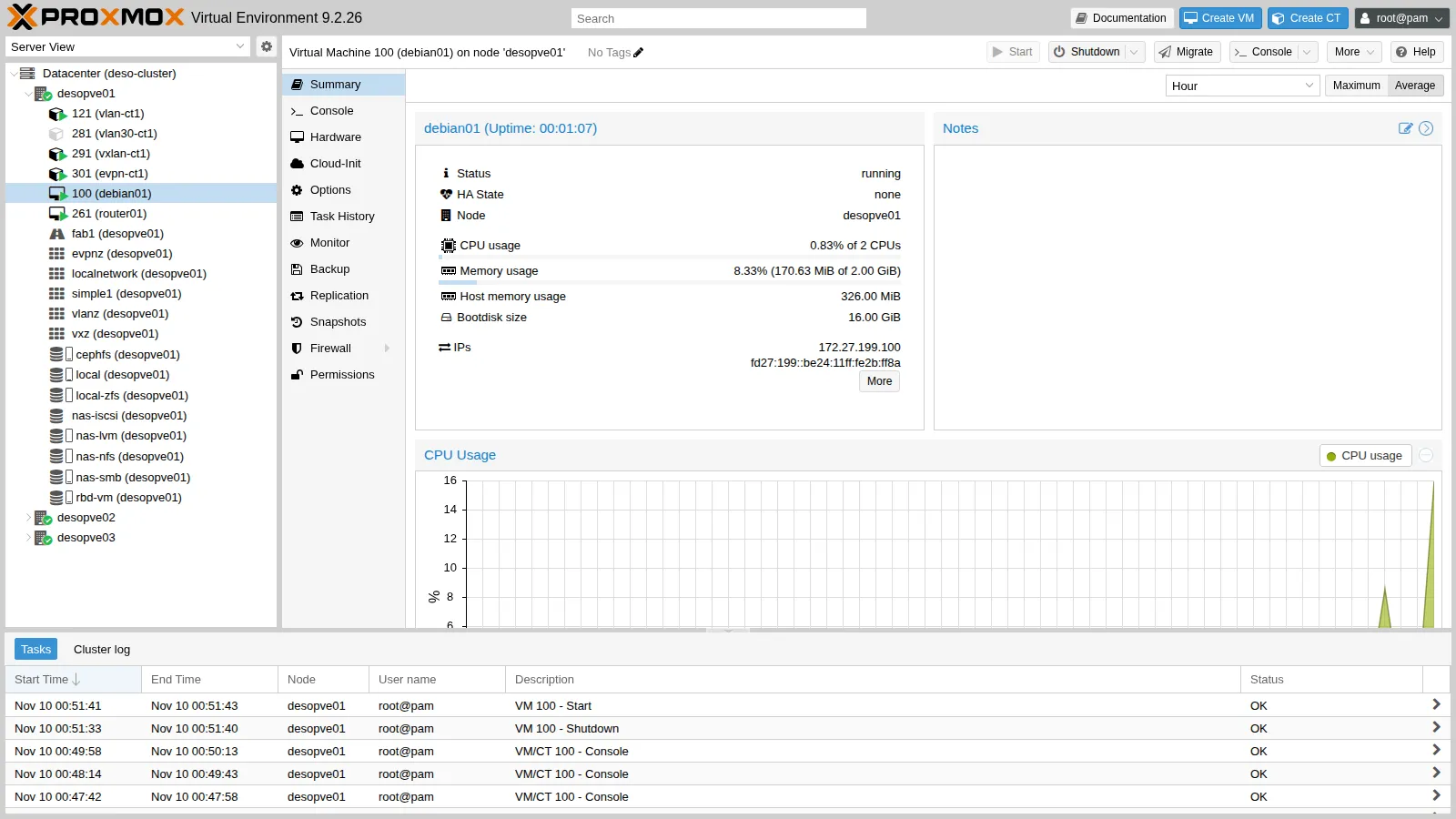
A command run in the guest, with the output returned to the node:
qm guest exec 100 -- uname -r{ "exitcode" : 0, "exited" : 1, "out-data" : "6.12.116+deb13-amd64\n", "out-truncated" : 0}get-fsinfo lists the guest’s filesystems and the disks they live on: the disk is recognized as drive-scsi0, the same name used by Proxmox VE.
/ ext4 sda1 ['0QEMU_QEMU_HARDDISK_drive-scsi0'] 1315024896 150466355205. The serial console with xterm.js
Section titled “5. The serial console with xterm.js”Console → xterm.js (or the drop-down menu of the Console button). The serial port terminal opens directly:
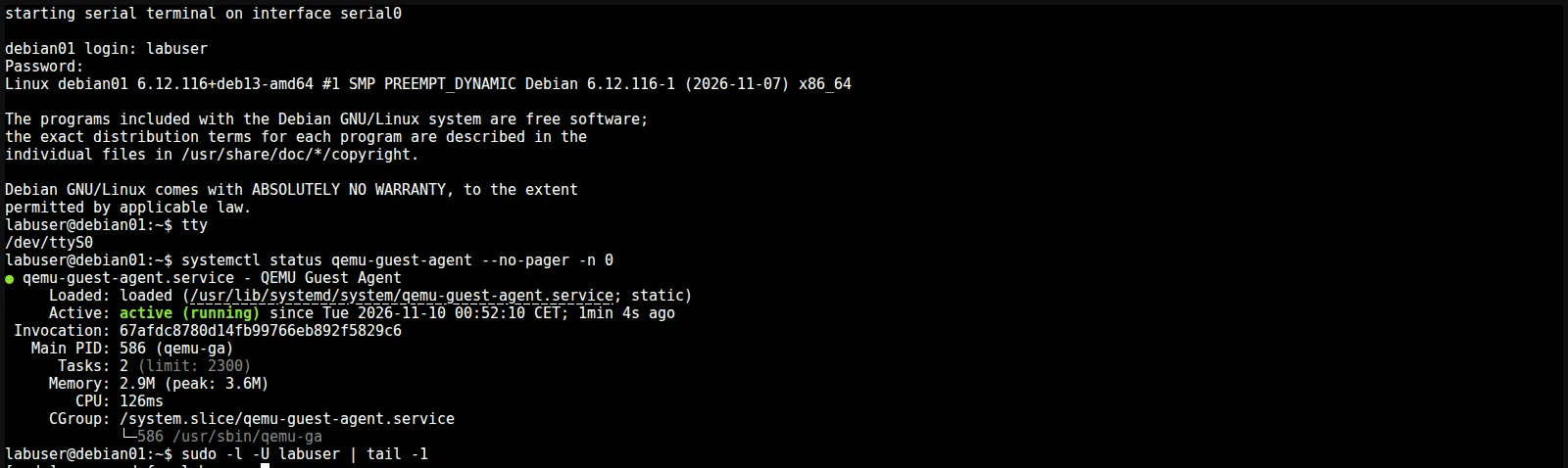
tty returns /dev/ttyS0: it is the serial port, not the screen. You can copy and paste text as in an SSH terminal, but the console works even without networking in the guest.
6. fsfreeze: what the guest sees during a backup
Section titled “6. fsfreeze: what the guest sees during a backup”A backup in snapshot mode (Lab 46) does this: it freezes the filesystems, takes the disk snapshot, thaws them. This way the saved disk is consistent, as after a sync. The test with the agent commands:
- from the node:
fsfreeze-freeze, a 12-second wait,fsfreeze-thaw; - in the guest, in an SSH session that is already open, a write with
syncthat starts during the freeze.
# on the nodeqm guest cmd 100 fsfreeze-freeze # replies with the number of frozen filesystemsqm guest cmd 100 fsfreeze-statussleep 12qm guest cmd 100 fsfreeze-thaw# in the guest, right after the freezedate +%T; dd if=/dev/zero of=~/prova bs=1M count=10 && sync; date +%Tnodo: 00:53:50 freeze1frozenAgent error: Command guest-exec has been disabled: the command is not allowednodo: 00:54:06 thaw1thawedguest: inizio scrittura 00:53:54guest: fine scrittura 00:54:08fsfreeze-freezereplies with the number of frozen filesystems (1) and the status becomesfrozen.- During the freeze the agent rejects other commands, such as
guest-exec: it accepts only status and thaw. - The write in the guest started at 00:53:54 and remained blocked until the thaw at 00:54:06: applications receive no errors, they wait.
This is why a backup with the agent causes only a few seconds of write “pause”. For databases, qemu-ga can run a script before and after the freeze (fsfreeze hook), for example to have the database write a consistent checkpoint.
7. Clean shutdown
Section titled “7. Clean shutdown”With the agent enabled, qm shutdown (and the Shutdown button) asks the guest to shut down through the agent. Measure the time with time qm shutdown 100:
spenta in 7 sIn the guest’s journal, after the restart, you can see who requested the shutdown:
qm guest exec 100 -- journalctl -b -1 --no-pager -g "guest-shutdown|System is powering down"Nov 10 00:54:35 debian01 qemu-ga[586]: info: guest-shutdown called, mode: (null)Nov 10 00:54:35 debian01 systemd-logind[596]: System is powering down (hypervisor initiated shutdown).Without the agent, Proxmox VE sends an ACPI event, like pressing the power button: it works only if the guest handles it (with systemd it does). If the guest does not respond within the timeout, the task fails and you need Stop, which is equivalent to pulling the plug.
8. Changing the password with the agent
Section titled “8. Changing the password with the agent”qm guest passwd sets the password of a guest user without logging in to the guest. It reads the new password twice from standard input:
qm guest passwd 100 labuserThe test with a temporary password and an SSH login:
login con la nuova password: ok (labuser@debian01)The password was then set back to <lab-password> with the same command. This is useful when a password is lost and the VM has no other way in: all you need is an active agent.
9. Start at boot, order and protection
Section titled “9. Start at boot, order and protection”In Options:
- Start at boot (
onboot): the VM starts when the node boots. - Start/Shutdown order (
startup):orderis the position in the sequence (low numbers first; at shutdown the order is reversed),upthe seconds to wait after startup before the next VM,downthe shutdown timeout.
For VM 100: start at boot, position 2, 30-second delay.
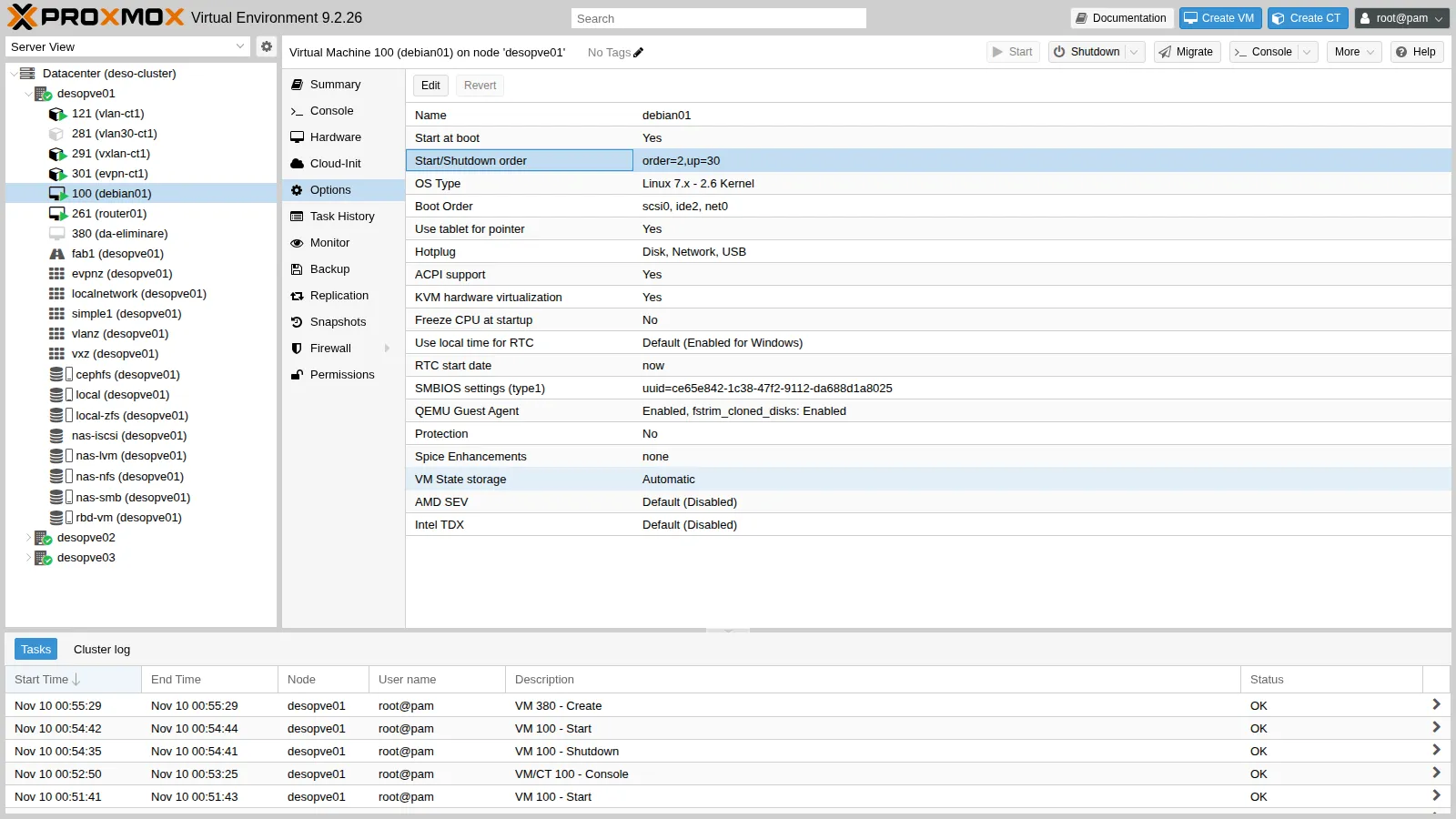
qm set 100 --onboot 1 --startup order=2,up=30Protection prevents the VM and its disks from being deleted. Test it on a throwaway VM, 380, created empty with a 1 GiB disk:
qm create 380 --name prova-380 --memory 512 --scsihw virtio-scsi-single --scsi0 rbd-vm:1 --ostype l26qm set 380 --protection 1qm destroy 380can't remove VM 380 - protection mode enabledRemove it with qm set 380 --delete protection.
10. Removal: without and with purge
Section titled “10. Removal: without and with purge”VM 380 is added to a backup job (disabled, just for the test):
pvesh create /cluster/backup --vmid 380 --storage nas-nfs --schedule "sun 03:00" --enabled 0 --mode snapshot --comment "lab 38 prova purge"First removal, with the default options. In the removal dialog (More → Remove), Purge from job configurations is disabled. The VM disappears, and so does the volume on Ceph, but the job remains:
vzdump: 7da86c4c-424f-44c6-98bf-08d52b3a8af1 comment lab 38 prova purge schedule sun 03:00 enabled 0 mode snapshot storage nas-nfs vmid 380The problem shows up when you create a new VM with the same ID:
qm create 380 --name nuova-vm --memory 512 --scsihw virtio-scsi-single --scsi0 rbd-vm:1 --ostype l26pvesh get /cluster/backup/7da86c4c-424f-44c6-98bf-08d52b3a8af1 --output-format json \ | python3 -c 'import json,sys; print("job vmid:", json.load(sys.stdin)["vmid"])'job vmid: 380The new VM silently inherits the job of the old one: with an enabled job it would be backed up (or, if the storage ran out of space, it would make the job fail).
Second removal, with purge. Enable Purge from job configurations and Destroy unreferenced disks owned by guest (which also finds and deletes disks of the VM that are not referenced in the configuration):
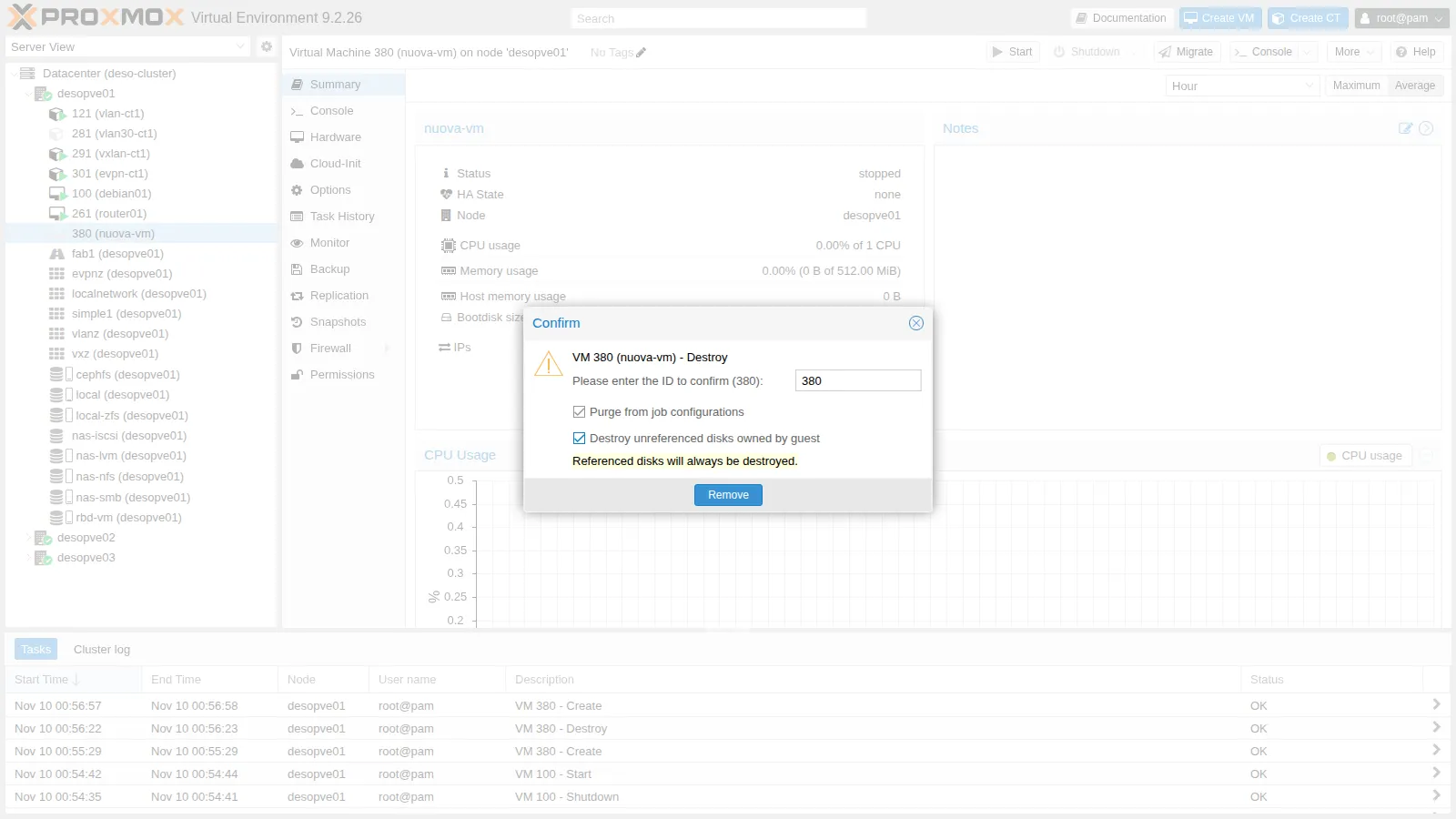
echo "--- dopo la rimozione con purge"; cat /etc/pve/jobs.cfg; echo "(fine jobs.cfg)"--- dopo la rimozione con purge(fine jobs.cfg)/etc/pve/jobs.cfg is empty: the job contained only VM 380, and the purge deleted it entirely. From the CLI:
qm destroy 380 --purge 1 --destroy-unreferenced-disks 1The purge also removes the VM from replication and HA.
Verification and tests
Section titled “Verification and tests”labuseris in thesudogroup;qemu-guest-agentis active in the guest.qm agent 100 pingresponds; the Summary shows the VM’s IPs.- The xterm.js console opens a login on
/dev/ttyS0. qm shutdownshuts down the VM in 7 seconds and the guest logsguest-shutdown called.- During an
fsfreeze, the writes in the guest wait until the thaw and the agent rejectsguest-exec. qm guest passwdchanges the password and login with the new one works.- A protected VM cannot be deleted.
- Without purge, a backup job keeps the ID of the deleted VM and applies it to a new VM with the same ID; with purge the reference disappears.
Final lab state
Section titled “Final lab state”- VM 100
debian01ondesopve01, running:sudoforlabuser, agent enabled (agent: 1,fstrim_cloned_disks=1),serial0port with getty onttyS0,onboot: 1,startup: order=2,up=30. The password oflabuseris the same as before. - VM 380: deleted, together with the test backup job.
- No other changes to the cluster.
What you learned
Section titled “What you learned”- The guest agent communicates with the node over a virtio-serial channel and must be enabled both in the guest and in the VM options; the new hardware requires a shutdown and a fresh start.
- With the agent, Proxmox VE knows the guest’s IPs, shuts it down cleanly, runs commands and changes passwords.
- Freezing the filesystems makes the guest’s writes wait for the duration of the snapshot: this is what makes backups consistent.
- The xterm.js console uses the serial port and behaves like a real terminal; noVNC remains the emergency access.
onboot,startupandprotectioncontrol automatic start, sequence and safety of VMs.- Deleting a VM without purge leaves orphaned references in jobs, which a new VM with the same ID inherits.