

Lab 27 – SDN 1: Simple zone with SNAT, DHCP and IPAM
Dependencies
Section titled “Dependencies”- Previous labs:
- Lab 06: cluster
deso-clusterwithdesopve01-desopve03; - Lab 17:
rbd-vmstorage for the container disks, andcephfs; - Lab 20: the Debian template on
cephfs; - Lab 21 and Lab 22:
vmbr1onbond0and the dedicated Corosync networks, mentioned in the checks; - Lab 24: routing and NAT on the host, to compare with what the SDN generates.
- Lab 06: cluster
- Nodes:
desopve01,desopve02anddesopve03.desopve04is outside the cluster and does not receive the SDN configuration. - Template:
cephfs:vztmpl/debian-13-standard_13.6-1_amd64.tar.zst. - Proxy:
proxy.proxmox.community:3128for packages. - Credentials:
root/<lab-password>on the nodes and in the containers → Appendix B.
Objectives
Section titled “Objectives”- Learn the building blocks of the Proxmox VE SDN: zone, VNet, subnet, IPAM and DHCP.
- Create from the GUI a private network present on all nodes, without editing the network files by hand.
- Give the guests automatic addresses with the SDN DHCP and see them in the IPAM.
- Understand the limit of the Simple zone: the network exists on every node, but the nodes are not connected to each other.
How it works
Section titled “How it works”The SDN building blocks
Section titled “The SDN building blocks”| Object | What it is | Where it is configured |
|---|---|---|
| Zone | the type of separation: Simple, VLAN, QinQ, VXLAN, EVPN. It decides how the VNets reach the nodes | Datacenter → SDN → Zones |
| VNet | a virtual network. On every node it becomes a Linux bridge with the same name, which you choose as the Bridge in the guests’ network interfaces | Datacenter → SDN → VNets |
| Subnet | the VNet addressing: network, gateway, SNAT, DHCP ranges | Datacenter → SDN → VNets → Subnets |
| IPAM | the register of assigned addresses. pve is the built-in one; NetBox or phpIPAM can also be used |
Datacenter → SDN → IPAM |
| DHCP | an automatic DHCP server for the zone, based on dnsmasq |
the zone’s Automatic DHCP option |
The configuration lives in the cluster file system (/etc/pve/sdn/*.cfg) and is not active until you click Apply. With Apply every node generates /etc/network/interfaces.d/sdn and reloads its network; the status of each zone on each node appears on the SDN page.
The Simple zone
Section titled “The Simple zone”The Simple zone creates an isolated bridge on every node, with no physical ports. The node holds the gateway address on the bridge and routes the guests’ traffic; with SNAT it sends that traffic out with its own address, like the masquerading of lab 24, but without writing rules by hand.
Every node has the same gateway (10.60.60.1 in this lab) on its own bridge. Guests on different nodes are in the same subnet but cannot see each other: there is no layer 2 connection between the nodes. For a network that spans the nodes you need the VLAN, QinQ, VXLAN or EVPN zones (labs 28-30).
DHCP and IPAM
Section titled “DHCP and IPAM”With Automatic DHCP, Proxmox VE starts an instance of dnsmasq for the zone on the nodes (dnsmasq@simple1). It is not a “classic” DHCP server with a free pool:
- when you add a network interface on a VNet with DHCP to a guest, Proxmox VE reserves an address in the IPAM and binds it to the interface’s MAC;
- on the node where the guest runs,
dnsmasqreceives the MAC → address pair and answers only known MACs, with a lease that never expires; dnsmasqalso acts as the DNS server for the guests: it forwards queries to the node’s DNS servers.
The dnsmasq package must be installed on all nodes, with its default service disabled: Proxmox VE starts the per-zone instances itself.
Procedure
Section titled “Procedure”1. dnsmasq on the nodes
Section titled “1. dnsmasq on the nodes”On desopve01, desopve02 and desopve03:
apt-get install -y dnsmasq...Setting up dnsmasq-base (2.91-1+deb13u2) ...Setting up dns-root-data (2025080400~deb13u1) ...Setting up dnsmasq (2.91-1+deb13u2) ...systemctl disable --now dnsmasqRemoved '/etc/systemd/system/multi-user.target.wants/dnsmasq.service'.systemctl is-enabled dnsmasq; systemctl is-active dnsmasqdisabledinactive2. The zone
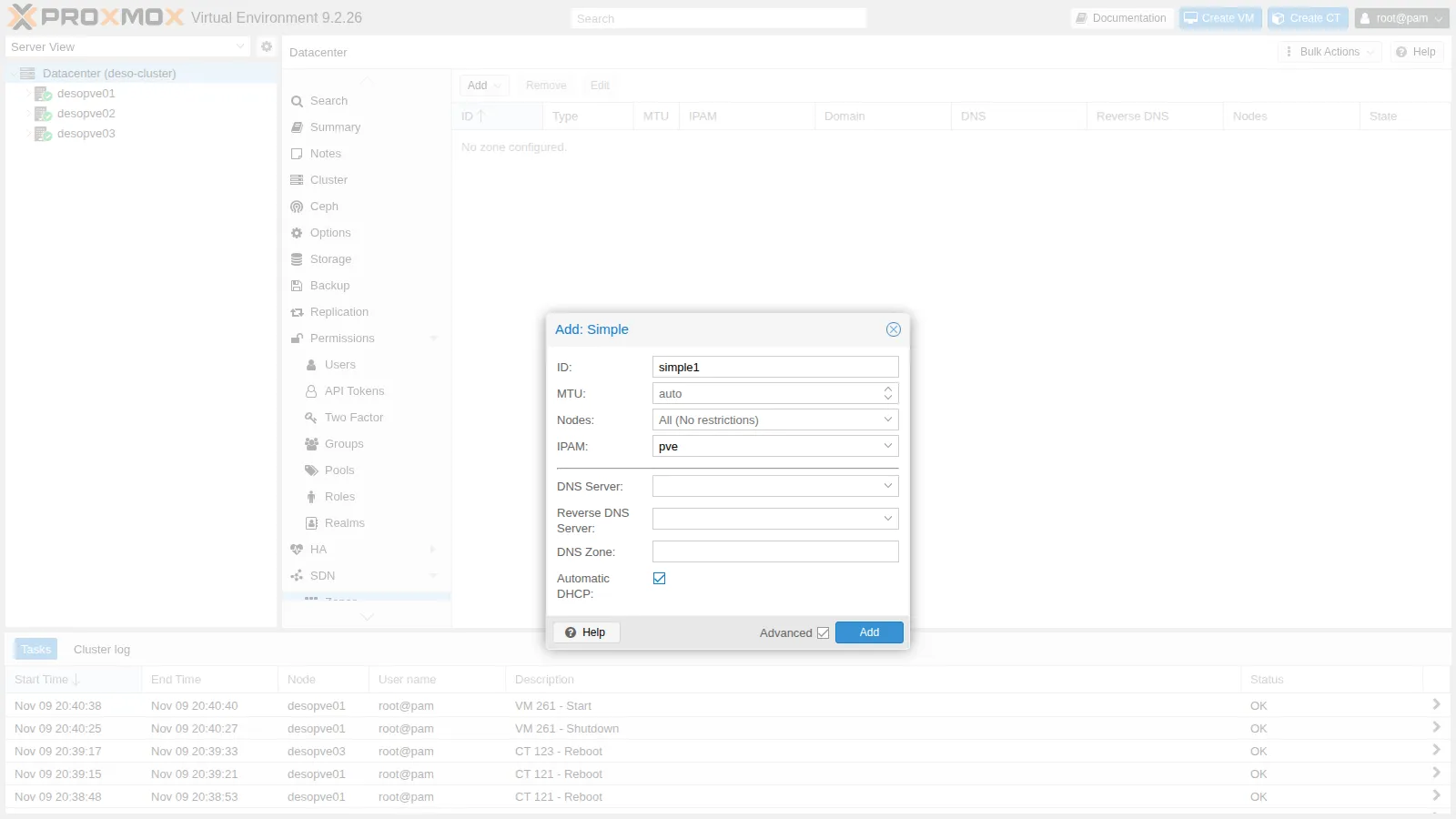
Section titled “2. The zone”Datacenter → SDN → Zones → Add → Simple. ID simple1, IPAM pve. Check Advanced and enable Automatic DHCP:
3. The VNet
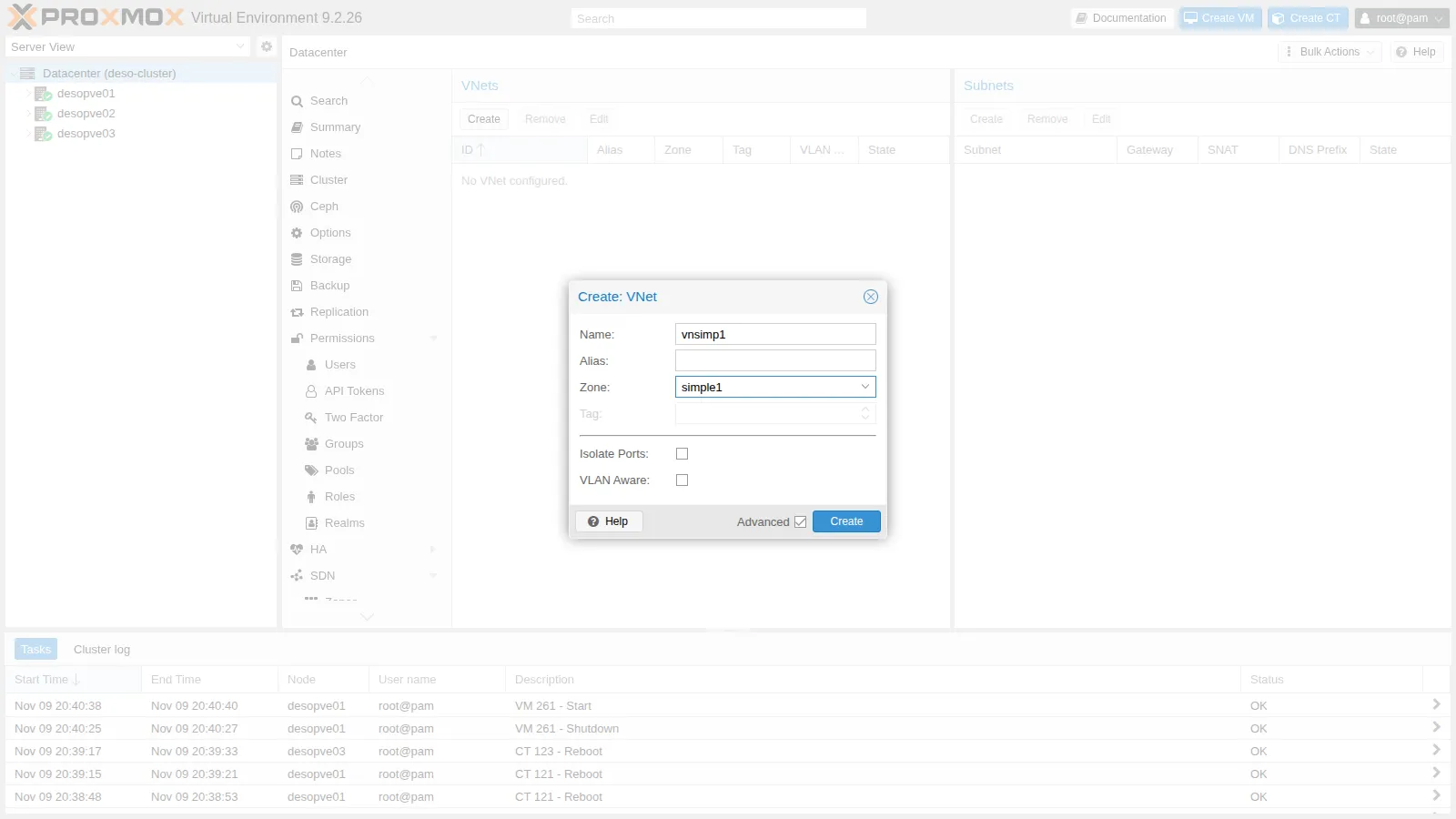
Section titled “3. The VNet”SDN → VNets → Create. Name vnsimp1, Zone simple1. The VNet name becomes the name of the Linux bridge on the nodes, so it must be short.
4. The subnet with SNAT and DHCP
Section titled “4. The subnet with SNAT and DHCP”-
Select
vnsimp1and, in the Subnets panel, click Create. Subnet10.60.60.0/24, Gateway10.60.60.1, SNAT enabled: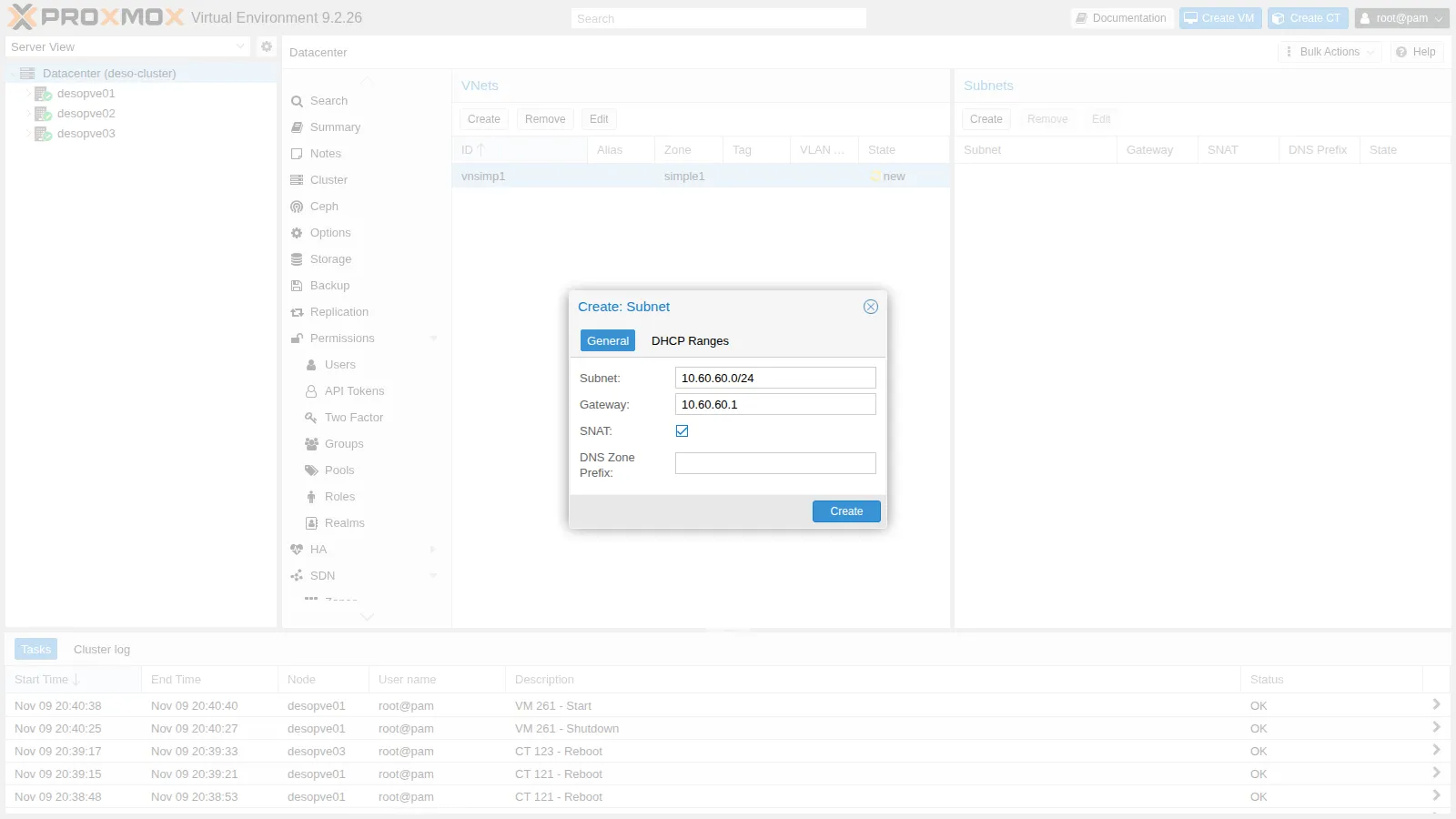
-
DHCP Ranges tab → Add: from
10.60.60.100to10.60.60.200.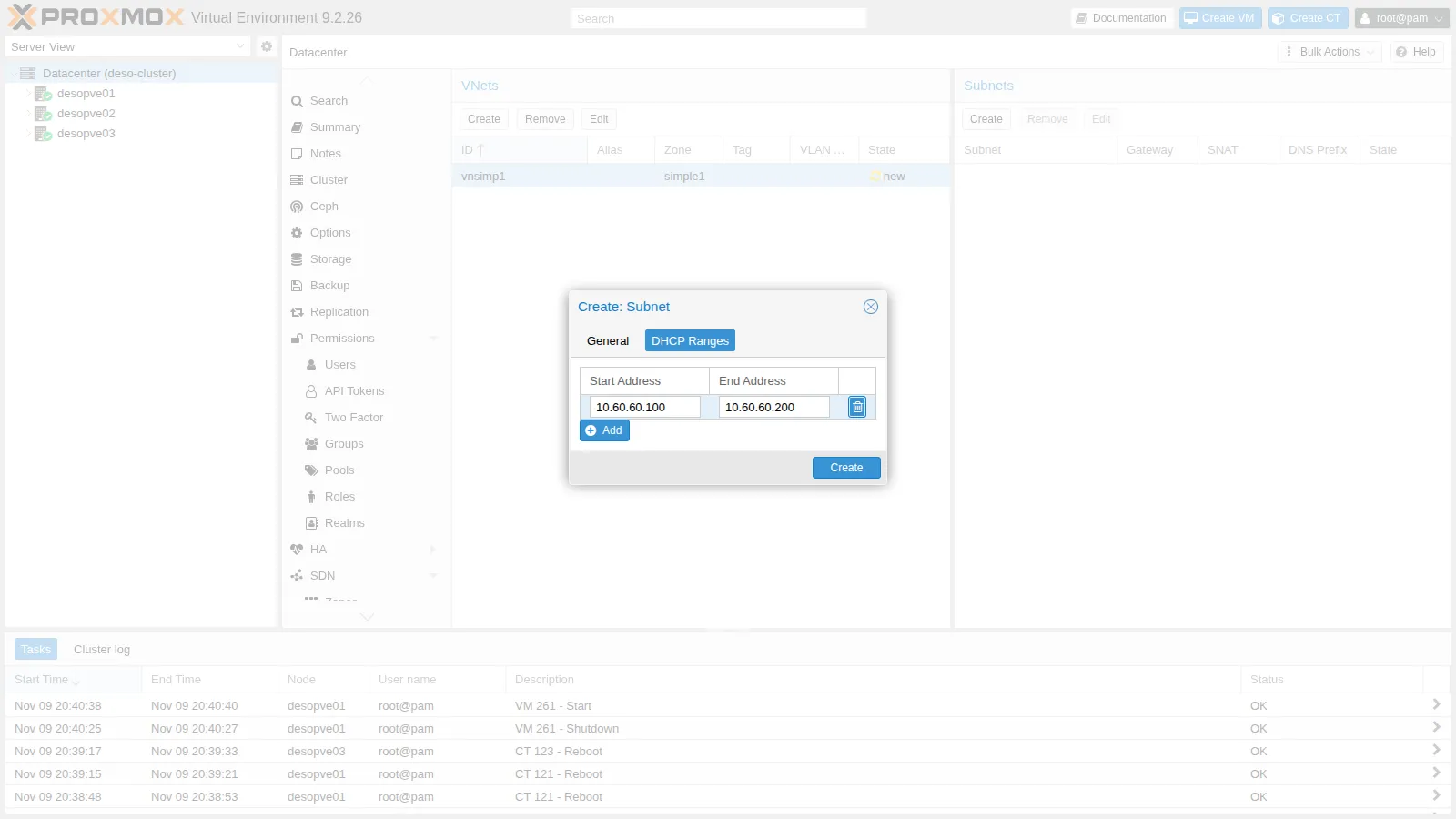
-
The result in the cluster files:
root@desopve01 cat /etc/pve/sdn/zones.cfg /etc/pve/sdn/vnets.cfg /etc/pve/sdn/subnets.cfgOutput simple: simple1dhcp dnsmasqipam pvevnet: vnsimp1zone simple1subnet: simple1-10.60.60.0-24vnet vnsimp1dhcp-range start-address=10.60.60.100,end-address=10.60.60.200gateway 10.60.60.1snat 1
5. Apply
Section titled “5. Apply”SDN → Apply. Every node reloads its network (task SRV networking - Reload) and the zone changes to available:
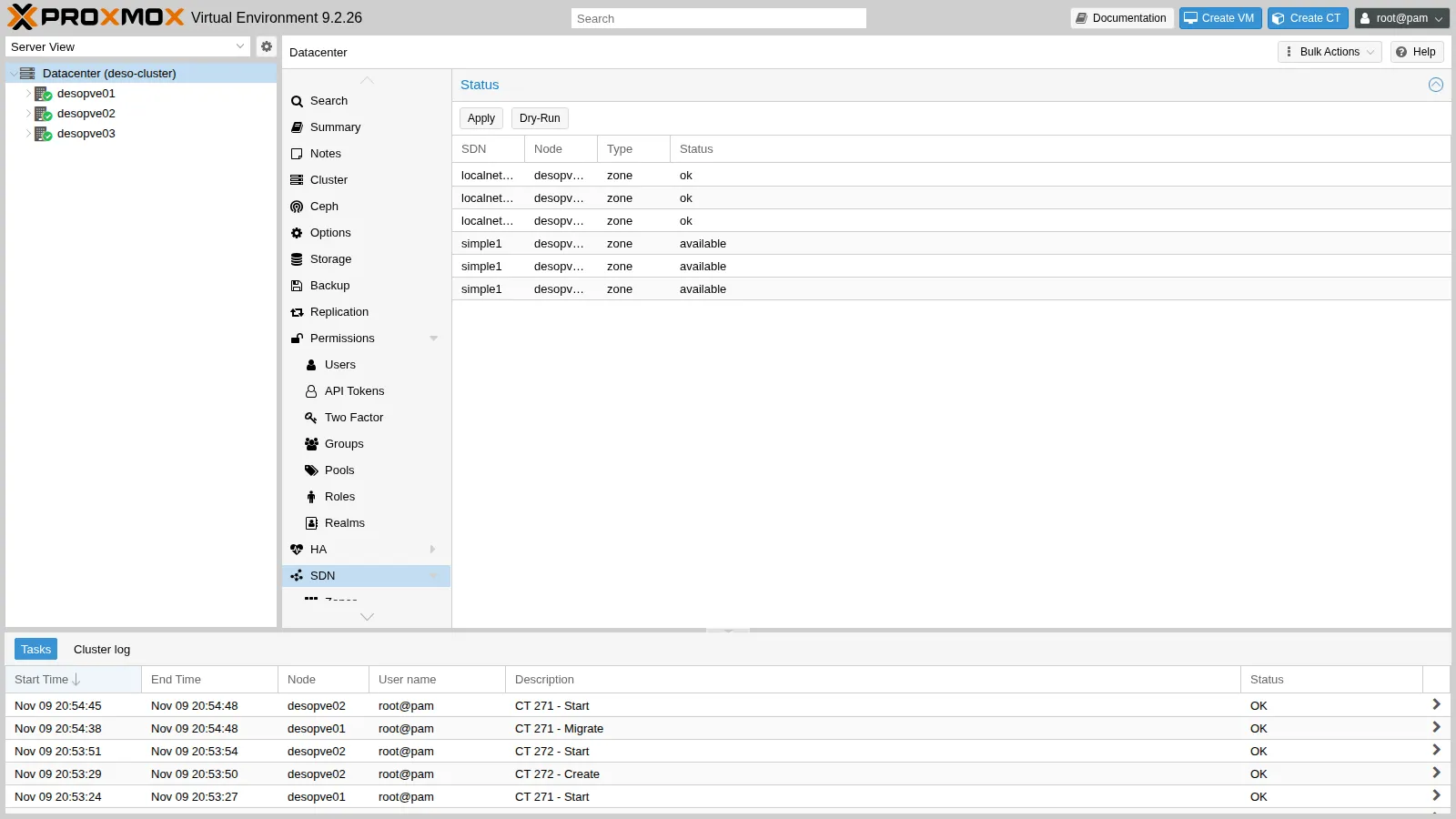
The localnetwork zone, always present, represents the bridges already configured on the nodes (vmbr0, vmbr1).
for n in desopve01 desopve02 desopve03; do echo "$n $(pvesh get /nodes/$n/sdn/zones --output-format json | python3 -c 'import sys,json; print([(z["zone"], z["status"]) for z in json.load(sys.stdin)])')"; donedesopve01 [('simple1', 'available')]desopve02 [('simple1', 'available')]desopve03 [('simple1', 'available')]6. What the SDN generated
Section titled “6. What the SDN generated”-
The bridge, with the gateway, IP forwarding and the SNAT rule to the node’s address. This is what we wrote by hand in lab 24:
root@desopve01 cat /etc/network/interfaces.d/sdnOutput #version:1auto vnsimp1iface vnsimp1address 10.60.60.1/24post-up iptables -t nat -A POSTROUTING -s '10.60.60.0/24' -o vmbr0 -j SNAT --to-source 172.27.199.21post-down iptables -t nat -D POSTROUTING -s '10.60.60.0/24' -o vmbr0 -j SNAT --to-source 172.27.199.21post-up iptables -t raw -I PREROUTING -i fwbr+ -j CT --zone 1post-down iptables -t raw -D PREROUTING -i fwbr+ -j CT --zone 1bridge_ports nonebridge_stp offbridge_fd 0ip-forward onroot@desopve01 iptables -t nat -S | grep 10.60.60Output -A POSTROUTING -s 10.60.60.0/24 -o vmbr0 -j SNAT --to-source 172.27.199.21The rule in the
rawtable separates the connection tracking of guests with a firewall (the conntrack zones mentioned in lab 24). -
The
dnsmasqinstance for the zone. The range isstatic: only the MACs registered in theethersfile get an answer.root@desopve01 systemctl is-active dnsmasq@simple1Output activeroot@desopve01 ls /etc/dnsmasq.d/simple1/Output 00-default.conf 10-vnsimp1.confroot@desopve01 cat /etc/dnsmasq.d/simple1/10-vnsimp1.confOutput dhcp-range=set:simple1-10.60.60.0-24,10.60.60.0,static,255.255.255.0,infinitedhcp-option=tag:simple1-10.60.60.0-24,option:router,10.60.60.1interface=vnsimp1root@desopve01 grep -E "hostsfile|ignore=tag" /etc/dnsmasq.d/simple1/00-default.confOutput dhcp-hostsfile=/etc/dnsmasq.d/simple1/ethersdhcp-ignore=tag:!known
7. Two containers on the VNet
Section titled “7. Two containers on the VNet”-
One container on
desopve01and one ondesopve02, with the network interface onvnsimp1using DHCP:root@desopve01 pct create 271 cephfs:vztmpl/debian-13-standard_13.6-1_amd64.tar.zst --hostname simple-ct1 \--unprivileged 1 --features nesting=1 --cores 1 --memory 512 --rootfs rbd-vm:4 \--net0 name=eth0,bridge=vnsimp1,ip=dhcp --passwordpct start 271root@desopve02 pct create 272 cephfs:vztmpl/debian-13-standard_13.6-1_amd64.tar.zst --hostname simple-ct2 \--unprivileged 1 --features nesting=1 --cores 1 --memory 512 --rootfs rbd-vm:4 \--net0 name=eth0,bridge=vnsimp1,ip=dhcp --passwordpct start 272In the GUI the VNet appears among the selectable bridges:
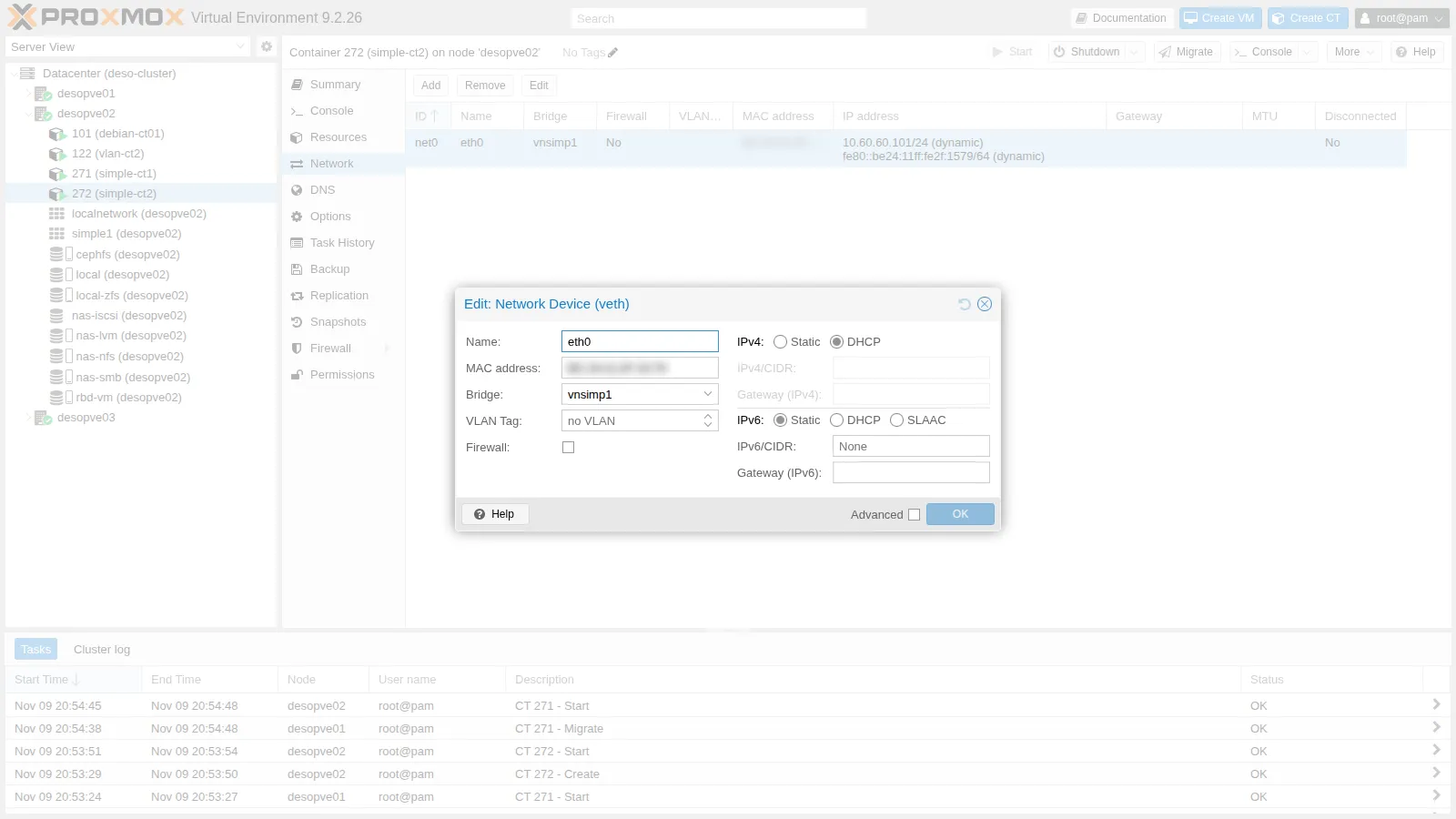
-
The containers receive the first and second addresses of the range, with the node as their gateway:
root@desopve01 pct exec 271 -- ip -4 -brief addr show eth0Output eth0@if72 UP 10.60.60.100/24root@desopve01 pct exec 271 -- ip routeOutput default via 10.60.60.1 dev eth010.60.60.0/24 dev eth0 proto kernel scope link src 10.60.60.100root@desopve02 pct exec 272 -- ip -4 -brief addr show eth0Output eth0@if28 UP 10.60.60.101/24
8. The IPAM
Section titled “8. The IPAM”SDN → IPAM shows, by zone, VNet and subnet, the gateway and the assigned addresses with VMID and MAC:
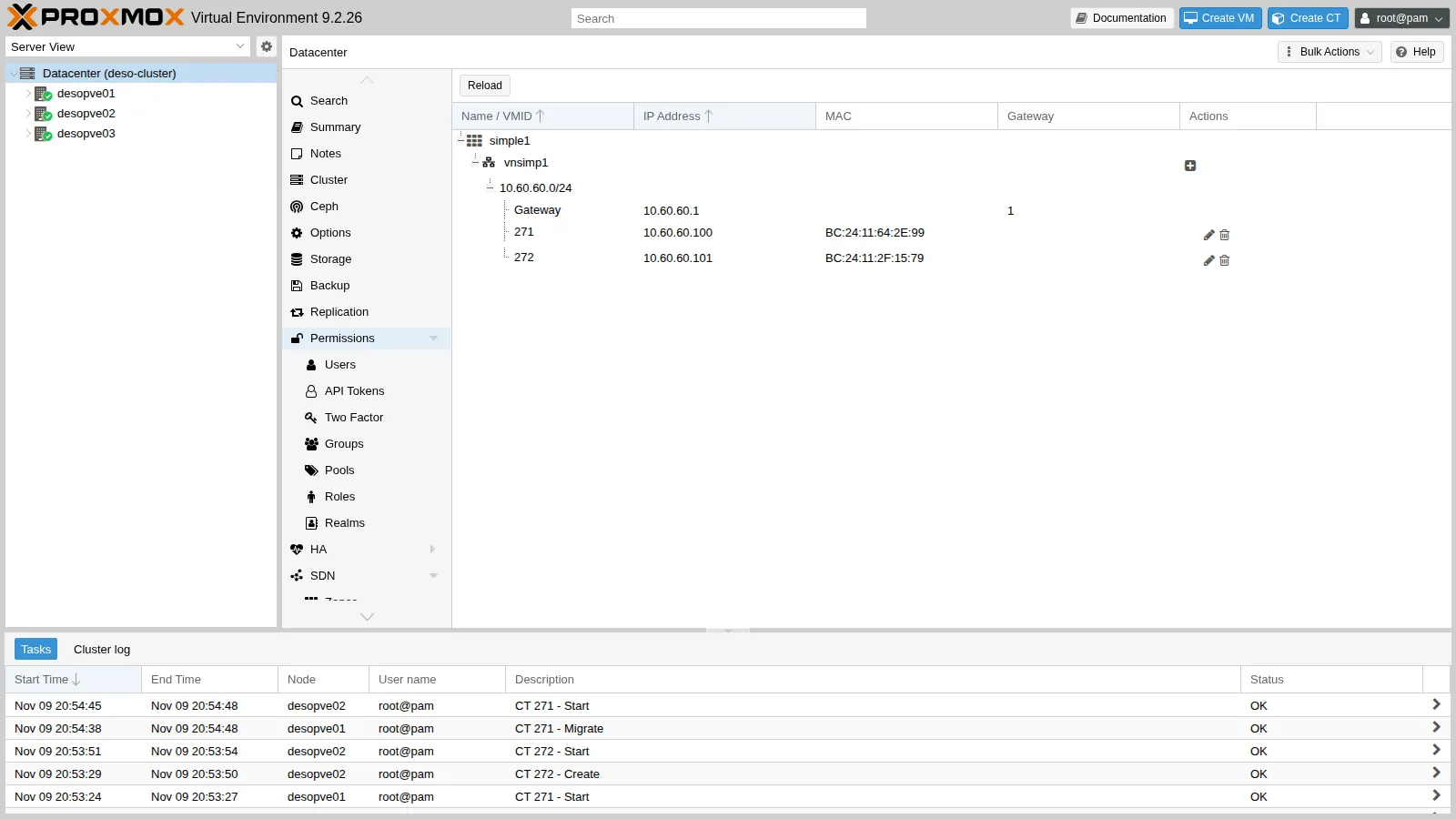
The same from the command line. The ethers file of each node contains only the guests running on that node:
pvesh get /cluster/sdn/ipams/pve/status --output-format json | python3 -c "import sys,json; [print(e.get('ip'), e.get('mac',''), e.get('vmid',''), e.get('hostname',''), 'gateway' if e.get('gateway') else '') for e in json.load(sys.stdin)]"10.60.60.1 gateway10.60.60.100 BC:24:11:64:2E:99 271 simple-ct110.60.60.101 BC:24:11:2F:15:79 272 simple-ct2cat /etc/dnsmasq.d/simple1/ethersBC:24:11:64:2E:99,10.60.60.100Verification and tests
Section titled “Verification and tests”-
Gateway, DNS and SNAT. The container reaches the gateway and the DC; the DNS server is the gateway itself, that is,
dnsmasq:root@desopve01 pct exec 271 -- ping -c2 -W1 10.60.60.1Output 2 packets transmitted, 2 received, 0% packet loss, time 1026msroot@desopve01 pct exec 271 -- grep nameserver /etc/resolv.confOutput nameserver 10.60.60.1root@desopve01 pct exec 271 -- ping -c3 -W1 172.27.199.20Output 3 packets transmitted, 3 received, 0% packet loss, time 2047msOn the management network the traffic goes out with the node’s address:
root@desopve01 tcpdump -lni vmbr0 -c2 icmp and host 172.27.199.20Output 20:54:22.383353 IP 172.27.199.21 > 172.27.199.20: ICMP echo request, id 372, seq 1, length 6420:54:22.384284 IP 172.27.199.20 > 172.27.199.21: ICMP echo reply, id 372, seq 1, length 64 -
Packages through the proxy: the proxy name resolves via
dnsmasqandaptworks:root@desopve01 pct exec 271 -- sh -c 'echo "Acquire::http::Proxy \"http://proxy.proxmox.community:3128\";" > /etc/apt/apt.conf.d/80proxy && apt-get update'Output ...Reading package lists... -
The nodes are not connected. Container 271 on
desopve01does not reach 272 ondesopve02, even though they are in the same subnet:root@desopve01 pct exec 271 -- ping -c3 -W1 10.60.60.101Output 3 packets transmitted, 0 received, 100% packet loss, time 2043ms -
Migration. Moved to
desopve02(restart migration, disk on Ceph), the container keeps its address, because the IPAM belongs to the cluster, and now sees 272:root@desopve01 pct migrate 271 desopve02 --restartOutput ...2026-11-09 20:54:48 migration finished successfully (duration 00:00:09)root@desopve02 cat /etc/dnsmasq.d/simple1/ethersOutput BC:24:11:2F:15:79,10.60.60.101BC:24:11:64:2E:99,10.60.60.100root@desopve02 pct exec 271 -- ip -4 -brief addr show eth0Output eth0@if29 UP 10.60.60.100/24root@desopve02 pct exec 271 -- ping -c3 -W1 10.60.60.101Output 3 packets transmitted, 3 received, 0% packet loss, time 2068msroot@desopve02 pct exec 271 -- getent hosts proxy.proxmox.communityOutput 172.27.199.250 netsvc.proxmox.community proxy.proxmox.communityOn the new node too, the container’s DNS server is the local
dnsmasq, which forwards to the DC.
| Test | Result |
|---|---|
| Zone Apply | available on desopve01-desopve03 |
| DHCP addresses | .100 and .101 from the IPAM, gateway 10.60.60.1 |
| Container → DC | 0% loss, with the node’s address (SNAT) |
DNS and apt via dnsmasq and the proxy |
working |
| Containers on different nodes | 100% loss: no connection between the nodes |
Migration to desopve02 |
9 s, same address; the two containers now see each other |
Final lab state
Section titled “Final lab state”- Packages:
dnsmasqinstalled ondesopve01-desopve03, default service disabled. - SDN:
- zone
simple1(Simple, DHCPdnsmasq, IPAMpve); - VNet
vnsimp1with subnet10.60.60.0/24, gateway10.60.60.1, SNAT, DHCP.100-.200; - applied on
desopve01-desopve03, with thednsmasq@simple1instance active.
- zone
- Containers on
desopve02, both running, not set to start at boot, disk onrbd-vm:- CT 271
simple-ct1, 10.60.60.100 (migrated fromdesopve01), with theaptproxy configured; - CT 272
simple-ct2, 10.60.60.101.
- CT 271
- The node networking (
vmbr0,vmbr1, Corosync, Ceph) has not changed: the SDN only adds theinterfaces.d/sdnfile.
What you learned
Section titled “What you learned”- The SDN separates how the network is transported (zone) from which network it is (VNet) and from how it is addressed (subnet).
- The SDN configuration belongs to the cluster but becomes active only with Apply, which generates the network files on every node.
- The Simple zone gives every node the same isolated network, with gateway, SNAT and DHCP and no hand-written rules.
- The SDN DHCP assigns addresses from the IPAM, bound to the guest’s MAC;
dnsmasqanswers only known MACs. - In a Simple zone, guests on different nodes cannot see each other: for a network that spans the nodes you need the other zone types.