

Lab 15 – iSCSI with shared LVM and multipath: losing a path
Dependencies
Section titled “Dependencies”- Previous labs: Lab 12 for the NAS
desonaswith thedati/iscsidataset, Lab 09 for the LVM concepts, Lab 06 for the nodes with the second NICnic1(172.32.199.21-23), Lab 11 for the migration times to compare against. - Cluster:
deso-clusterwith the three nodes; VM 100debian01running ondesopve01, with its disk onlocal-zfs. - Network: the nodes reach the NAS at
172.27.199.10(interfacevmbr0) and, after the first step, at172.32.199.10(interfacenic1). - Software:
open-iscsiis already installed in Proxmox VE; you will installmultipath-toolsthrough the lab proxy (lab 04). - Credentials:
root/<lab-password>on the nodes,truenas_admin/<lab-password>on the NAS,labuser/<lab-password>in VM 100 → Appendix B.
Objectives
Section titled “Objectives”- A 40 GiB zvol exported by the NAS over iSCSI on two portals,
172.27.199.10and172.32.199.10, and reachable only by the IQNs of the three nodes. - On every node, two iSCSI sessions combined by multipath into a single device,
nas-lun0, with both pathsactive ready running, and the shared LVM storagenas-lvmon top of it. - VM 100 live-migrated between two nodes with its disk on
nas-lvm, without copying the disk. - A path cut while the VM is writing, with three observations kept apart: the state of the paths on the node, the kernel timestamps of the failure and of the recovery, and the pause seen from inside the VM.
- Nodes with two NICs on the same Ethernet segment answering ARP only from the right interface, and the symptoms of the opposite case recognized in the logs.
How it works
Section titled “How it works”iSCSI carries SCSI commands over TCP: the node sees a disk on the NAS as if it were attached locally (/dev/sdX). Unlike NFS and SMB, it does not share files, but blocks.
| Term | In the lab |
|---|---|
| Target: the “server” that exposes the disks, identified by an IQN | iqn.2005-10.org.freenas.ctl:pve on desonas |
| LUN / extent: the exported disk | the 40 GiB zvol dati/iscsi/pve, LUN 0 |
| Portal: IP address and TCP port (3260) on which the target responds | 172.27.199.10:3260 and 172.32.199.10:3260 |
| Initiator: the client, with its own IQN | the three nodes, iqn.1993-08.org.debian:01:… |
| Initiator group: who is allowed to connect to the target | only the IQNs of the three nodes |
Shared LVM
Section titled “Shared LVM”The same iSCSI disk is seen by all nodes. On top of it you create a single LVM volume group (vg_nas), and each VM disk is a logical volume (LV):
desonas: zvol dati/iscsi/pve (40 GiB) │ 172.27.199.10 │ 172.32.199.10 path 1 (vmbr0) path 2 (nic1) │ │ each node: /dev/sde /dev/sdf ← the same LUN, twice └──────── multipath ───────┘ /dev/mapper/nas-lun0 │ VG vg_nas (shared) └── vm-100-disk-0 (LV)- LVM is not a cluster file system: Proxmox VE coordinates the changes (creating, growing, deleting LVs) with a cluster lock, and an LV is active on only one node at a time, the one where the VM runs.
- The storage is thick: every LV takes up all its space right away. Thin provisioning (LVM-thin) cannot be shared across nodes.
- Snapshots on shared LVM exist only with the volume chain feature of Proxmox VE 9, which you will see in lab 16.
Multipath
Section titled “Multipath”With two portals, each node opens two iSCSI sessions and sees the LUN twice (sde, sdf). Using them directly would be dangerous: LVM would find two copies of the same disk. The multipathd daemon recognizes that they have the same identifier (WWID) and combines them into a single device, /dev/mapper/nas-lun0:
- with
path_grouping_policy multibusandround-robin, both paths belong to the same group and I/O is spread over both; - if a path goes down, multipath marks it
failedand sends the I/O over the other one; when the path comes back, multipathd reinstates it by itself. Its path checker runs everypolling_intervalseconds, and the interval grows up tomax_polling_interval(four times as long, by default) while the paths are healthy; - with
no_path_retry queue, if all paths go down, I/O is queued (as with the NFShardmount of lab 13) instead of returning errors to the VM disk. The VM then waits for as long as the outage lasts, and themultipath.conf(5)man page warns that processes waiting on that I/O can hang and cannot be killed. This lab cuts only one path: the case with all paths down is not tested.
Detecting a lost path
Section titled “Detecting a lost path”How long the I/O waits when a path fails depends on two layers:
- Detection, in open-iscsi. Each session is checked with an iSCSI ping (NOP-Out). With the values of the
iscsid.confshipped with open-iscsi, a ping is sent every 5 seconds and its answer is awaited for 5 seconds; this lab does not change them. A ping without an answer marks the connection as failed. - Recovery timeout. From that moment open-iscsi tries to restore the session, and the I/O waits. When the session recovery timeout expires, the pending I/O is handed back to multipath, which retries it on another path. In
iscsid.confthis timeout isnode.session.timeo.replacement_timeout: 120 seconds by default, lowered to 15 in step 3. For the sessions that belong to its paths, however, multipathd writes its own value into the session’srecovery_tmo: itsfast_io_fail_tmo, 5 seconds by default. The failure test shows which value was in effect in the lab.
Test environment and versions
Section titled “Test environment and versions”The times reported in this lab come from a run on 9 November 2026, with the configuration below. With other versions, timers or hardware, the same steps can give different times.
| Component | Configuration used |
|---|---|
| Proxmox VE | 9.2.26, kernel 7.0.14-28-pve (Lab 04); open-iscsi and multipath-tools as installed on the nodes, versions not recorded in this lab (dpkg -l open-iscsi multipath-tools shows them) |
| iSCSI initiator | node.session.timeo.replacement_timeout = 15 (step 3); every other parameter as in the package’s iscsid.conf; no CHAP |
| Multipath | the /etc/multipath.conf of step 5: multibus, round-robin 0, polling_interval 2, failback immediate, no_path_retry queue; fast_io_fail_tmo not set, so the multipath-tools default applies |
| NAS | TrueNAS SCALE 25.10 (Lab 12), one network card with two addresses (172.27.199.10 and the alias 172.32.199.10); thick 40 GiB zvol dati/iscsi/pve, Modern OS platform (4 KiB blocks), on the dati pool, a two-disk mirror |
| Network | vmbr0 (on nic0) and nic1 of each node on the same switch and in the same VLAN, MTU 1500 |
| Test VM | VM 100 debian01 (Lab 07): Debian 13, 2 cores, 2 GiB of RAM, 16 GiB scsi0 disk with iothread=1, moved to nas-lvm as a raw LV |
What the tests measure, and what they do not. The failure test cuts one path, on one node (desopve02), by taking its interface down with ip link set nic1 down: it simulates the failure on the node side. An unplugged cable, a failed switch port or a fault on the NAS side were not tested, and they may be detected after different times. The test runs once, with a light load: one short write followed by sync every second. The kernel log (dmesg -T) has a resolution of one second, and so, roughly, does the heartbeat in the VM, whose clock was not synchronized with the node’s. The migration times are task durations from individual runs, not repeated measurements.
Procedure
Section titled “Procedure”1. A second address on the NAS
Section titled “1. A second address on the NAS”The NAS has a single network card: add the second address as an alias, on the 172.32.199.0/24 network that the nodes reach through nic1.
-
System → Network → interface row → ⋮ → Edit.
-
Under Static IP Addresses click Add and enter
172.32.199.10/24.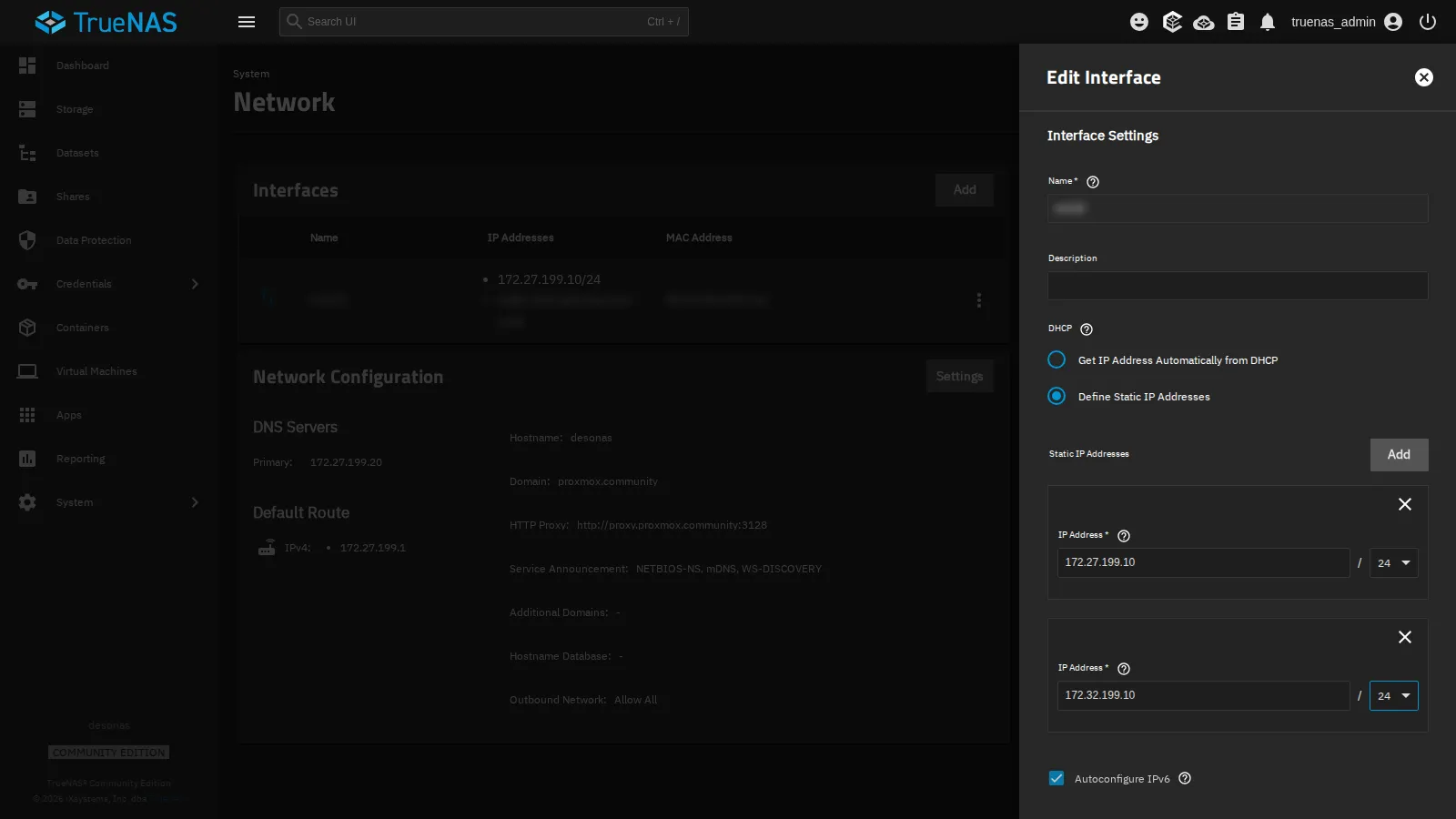
-
Save, then Test Changes and, within the time shown, Save Changes: if the network stopped working, TrueNAS would revert to the previous configuration by itself.
2. The iSCSI target
Section titled “2. The iSCSI target”-
Shares → iSCSI → Wizard.
-
Target:
Create New, Next. -
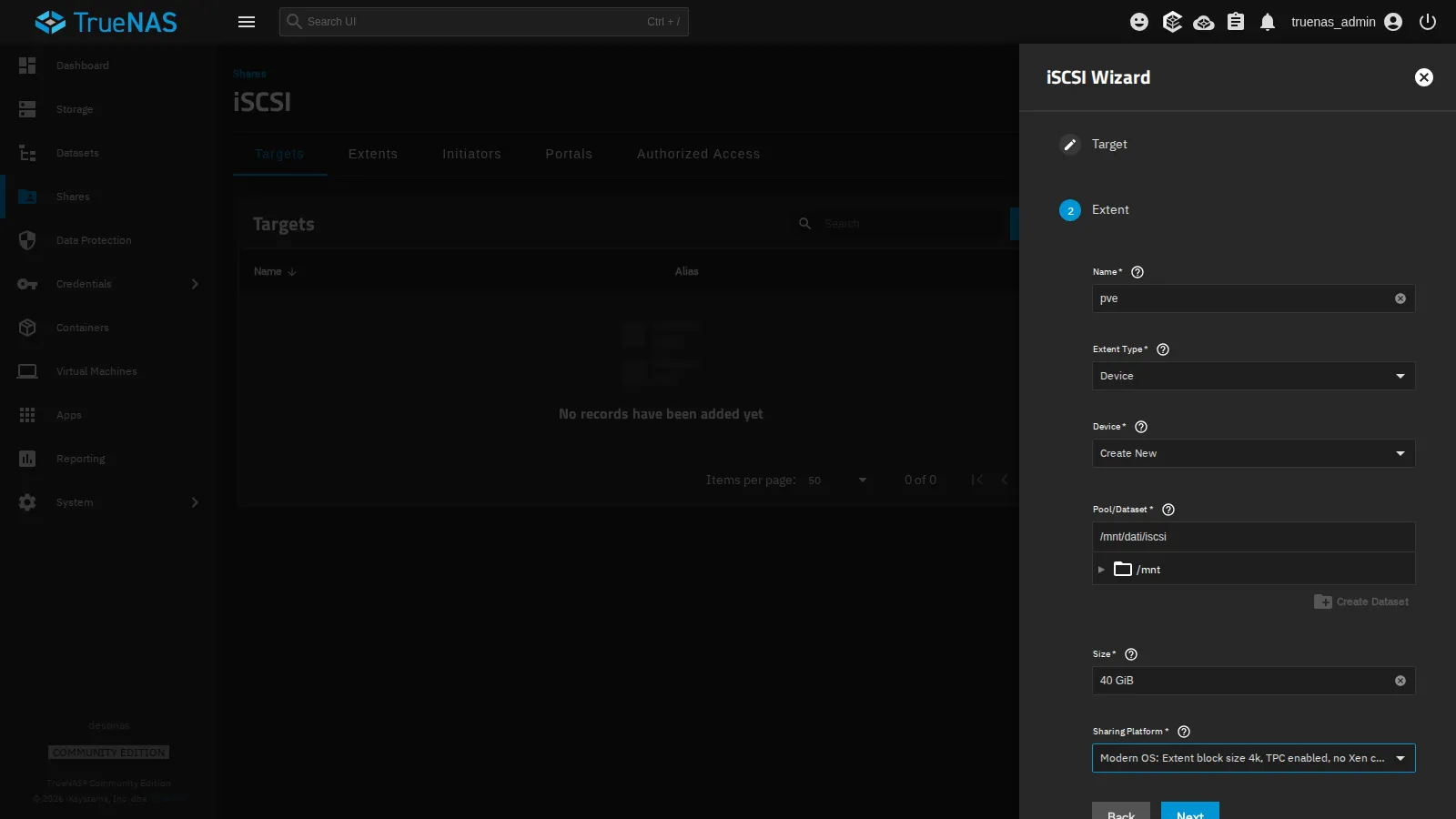
Extent:
- Name
pve(it becomes the name of the target and of the extent); - Extent Type
Device, DeviceCreate New: TrueNAS creates a zvol, a ZFS block volume. A dataset will not do: it is a file system, not a disk; - Pool/Dataset
/mnt/dati/iscsi, Size40 GiB; - Sharing Platform
Modern OS(4 KiB blocks).
- Name
-
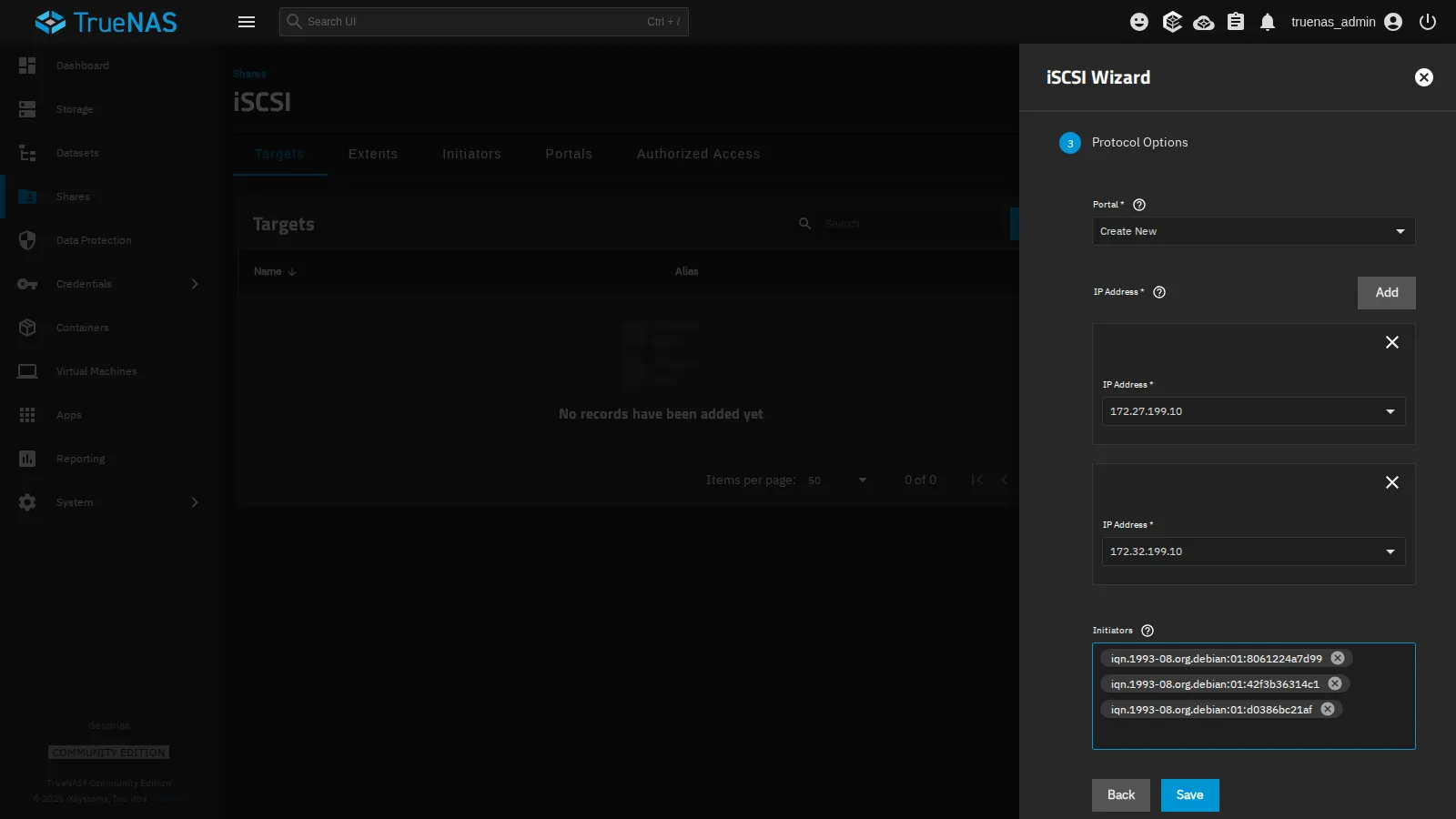
Protocol Options:
- Portal
Create New, with two IP Address entries:172.27.199.10and172.32.199.10; - Initiators: the IQNs of the three nodes, read on each node with
cat /etc/iscsi/initiatorname.iscsi. Only these will be able to connect.
- Portal
-
Save, and accept starting the iSCSI service with automatic start enabled.
The zvol is thick: it reserves its 40 GiB right away, and in the lab the free space seen by the NFS and SMB storages dropped from about 95 to 56 GiB. On the NAS, zfs get volsize,refreservation dati/iscsi/pve shows the reservation.
3. Connect the nodes to the target
Section titled “3. Connect the nodes to the target”On all three nodes, before the first connection, lower the session recovery timeout from the default 120 seconds to the 15 seconds recommended by the Proxmox VE multipath guide. Once multipath manages the paths, multipathd may apply a value of its own: see Detecting a lost path.
sed -i 's/^node.session.timeo.replacement_timeout = 120/node.session.timeo.replacement_timeout = 15/' /etc/iscsi/iscsid.confpvesm scan iscsi 172.27.199.10iqn.2005-10.org.freenas.ctl:pve 172.27.199.10:3260,172.32.199.10:3260The target advertises both portals. Add the iSCSI storage:
-
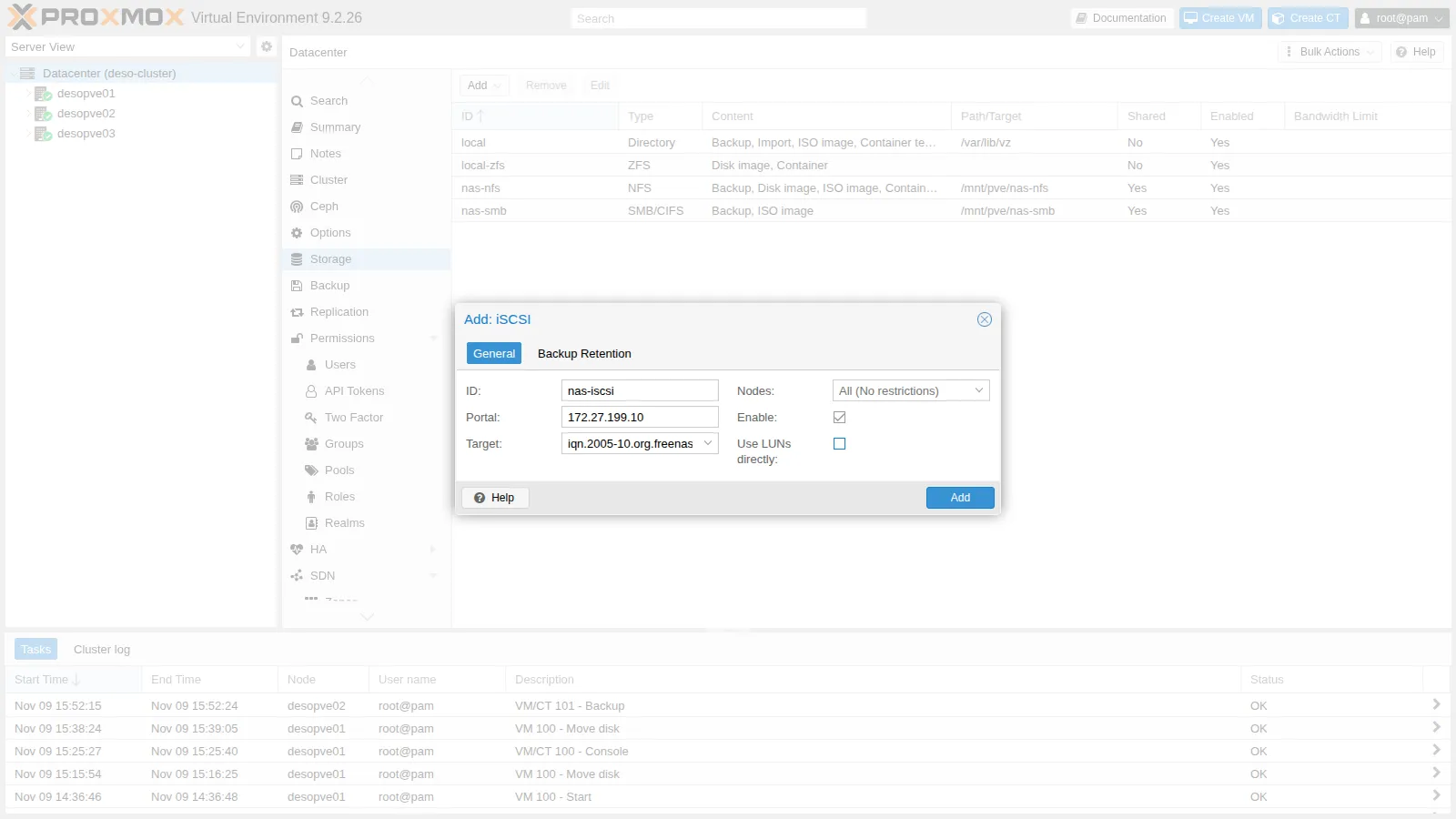
Datacenter → Storage → Add → iSCSI.
-
ID
nas-iscsi, Portal172.27.199.10, Target from the drop-down. -
Uncheck Use LUNs directly: the LUN will not hold the VM disks directly, but the LVM volume group.
-
Add. Proxmox VE connects to the target from every node, on all the advertised portals:
iscsiadm -m sessiontcp: [1] 172.27.199.10:3260,1 iqn.2005-10.org.freenas.ctl:pve (non-flash)tcp: [2] 172.32.199.10:3260,1 iqn.2005-10.org.freenas.ctl:pve (non-flash)lsblk -o NAME,SIZE,TRAN,VENDOR,MODEL | grep iscsisde 40G iscsi TrueNAS iSCSI Disksdf 40G iscsi TrueNAS iSCSI Diskiscsiadm -m session -P3 | grep -E 'Current Portal|Attached scsi disk' Current Portal: 172.27.199.10:3260,1 Attached scsi disk sde State: running Current Portal: 172.32.199.10:3260,1 Attached scsi disk sdf State: runningsde and sdf are the same disk, seen through the two paths.
4. Two NICs on the same network: ARP
Section titled “4. Two NICs on the same network: ARP”In this lab vmbr0 and nic1 are connected to the same switch, in the same VLAN: the 172.27.199.0/24 and 172.32.199.0/24 subnets share one Ethernet segment. By default Linux answers an ARP request for any of its addresses on any interface (arp_ignore=0, a behaviour known as ARP flux). The NAS can therefore associate 172.32.199.22 with the MAC address of vmbr0 and send the traffic of the second path there. This is most likely after one of the two NICs has been down: while nic1 is down only vmbr0 answers, and the NAS can keep that association after nic1 comes back.
Configuration tried. vmbr0 and nic1 of every node on the same switch and VLAN, with the default ARP settings.
Behaviour observed. On desopve02 the session of the second path kept dropping, every 10 seconds, and the VM’s I/O stalled, with pauses of up to 85 seconds (the lab does not reproduce the output of that measurement). The kernel log shows the repeated connection errors (code 1022, an unanswered NOP-Out), and a capture on vmbr0 shows traffic from the 172.32.199.10 portal, which should arrive only on nic1:
dmesg -T | grep "conn error" | tail -2[Mon Nov 9 16:28:15 2026] connection2:0: detected conn error (1022)[Mon Nov 9 16:28:25 2026] connection2:0: detected conn error (1022)tcpdump -ni vmbr0 -c 2 host 172.32.199.1016:28:46.780034 IP 172.32.199.10.3260 > 172.32.199.22.36180: Flags [S.], seq 2256764707, ack 4002835344, win 65160, options [mss 1460,sackOK,TS val 675916009 ecr 343433178,nop,wscale 7], length 016:28:46.781033 IP 172.32.199.10.3260 > 172.32.199.22.36180: Flags [.], ack 49, win 509, options [nop,nop,TS val 675916010 ecr 343433179], length 0Interpretation. The symptoms are consistent with ARP flux, that is, with the NAS sending the second path’s traffic to the MAC address of vmbr0. The capture, however, shows only that those packets reach vmbr0, not which MAC address the NAS used: on its own it does not prove the cause.
How to check. On the NAS (TrueNAS shell), ip neigh show 172.32.199.22 shows the MAC address associated with the node’s second address: compare it with the output of ip link show nic1 and ip link show vmbr0 on the node. tcpdump -eni vmbr0 host 172.32.199.10 adds the MAC addresses to the capture.
Decision. On all the nodes with more than one NIC on the same segment, restrict ARP to the right interface, before configuring multipath: each interface answers only for its own addresses (arp_ignore=1), and ARP requests use a source address from the target’s subnet on the outgoing interface (arp_announce=2):
printf 'net.ipv4.conf.all.arp_ignore = 1\nnet.ipv4.conf.all.arp_announce = 2\n' > /etc/sysctl.d/90-arp-multihomed.confsysctl -p /etc/sysctl.d/90-arp-multihomed.confnet.ipv4.conf.all.arp_ignore = 1net.ipv4.conf.all.arp_announce = 2If the NAS has already learned the wrong association, update it with an unsolicited ARP announcement from the right interface:
apt install iputils-arpingarping -c 3 -U -I nic1 -s 172.32.199.22 172.32.199.22Result. The path-failure test at the end of this lab, run later on the same node, shows a single connection error and the path coming back by itself (see Verification and tests). This is consistent with the fix, but the lab did not record the NAS’s ARP table before and after the change: the check above would confirm it.
A storage network on its own segment (a dedicated switch or VLAN) avoids the situation altogether, because each node then has a single interface on that network.
5. Multipath
Section titled “5. Multipath”On all three nodes:
-
Install the package and read the WWID of the LUN:
root@desopve01 apt install multipath-tools/lib/udev/scsi_id -g -u -d /dev/sdeOutput 36589cfc000000580bcccfa017f51b957 -
Create
/etc/multipath.conf: all disks are excluded (blacklist) except the NAS LUN, which is given a readable name.defaults {polling_interval 2path_selector "round-robin 0"path_grouping_policy multibusuid_attribute ID_SERIALfailback immediateno_path_retry queueuser_friendly_names yes}blacklist {wwid .*}blacklist_exceptions {wwid "36589cfc000000580bcccfa017f51b957"}multipaths {multipath {wwid "36589cfc000000580bcccfa017f51b957"alias nas-lun0}} -
Register the WWID: with the default
find_multipaths strict, multipath-tools builds a device only for WWIDs it already knows. Then reload:root@desopve01 multipath -a 36589cfc000000580bcccfa017f51b957systemctl restart multipathd; multipath -rmultipath -llOutput nas-lun0 (36589cfc000000580bcccfa017f51b957) dm-0 TrueNAS,iSCSI Disksize=40G features='1 queue_if_no_path' hwhandler='0' wp=rw`-+- policy='round-robin 0' prio=1 status=active|- 33:0:0:0 sde 8:64 active ready running`- 34:0:0:0 sdf 8:80 active ready runningOne device, two active paths;
queue_if_no_pathis the effect ofno_path_retry queue.
6. The shared LVM volume group
Section titled “6. The shared LVM volume group”Create the volume group only once, from a single node, on the multipath device (never on sde or sdf):
pvcreate /dev/mapper/nas-lun0 Physical volume "/dev/mapper/nas-lun0" successfully created.vgcreate vg_nas /dev/mapper/nas-lun0 Volume group "vg_nas" successfully createdpvs PV VG Fmt Attr PSize PFree /dev/mapper/nas-lun0 vg_nas lvm2 a-- 39.99g 39.99gThe other nodes see the volume group right away, again through the multipath device: LVM ignores the individual paths by itself (multipath_component_detection=1).
-
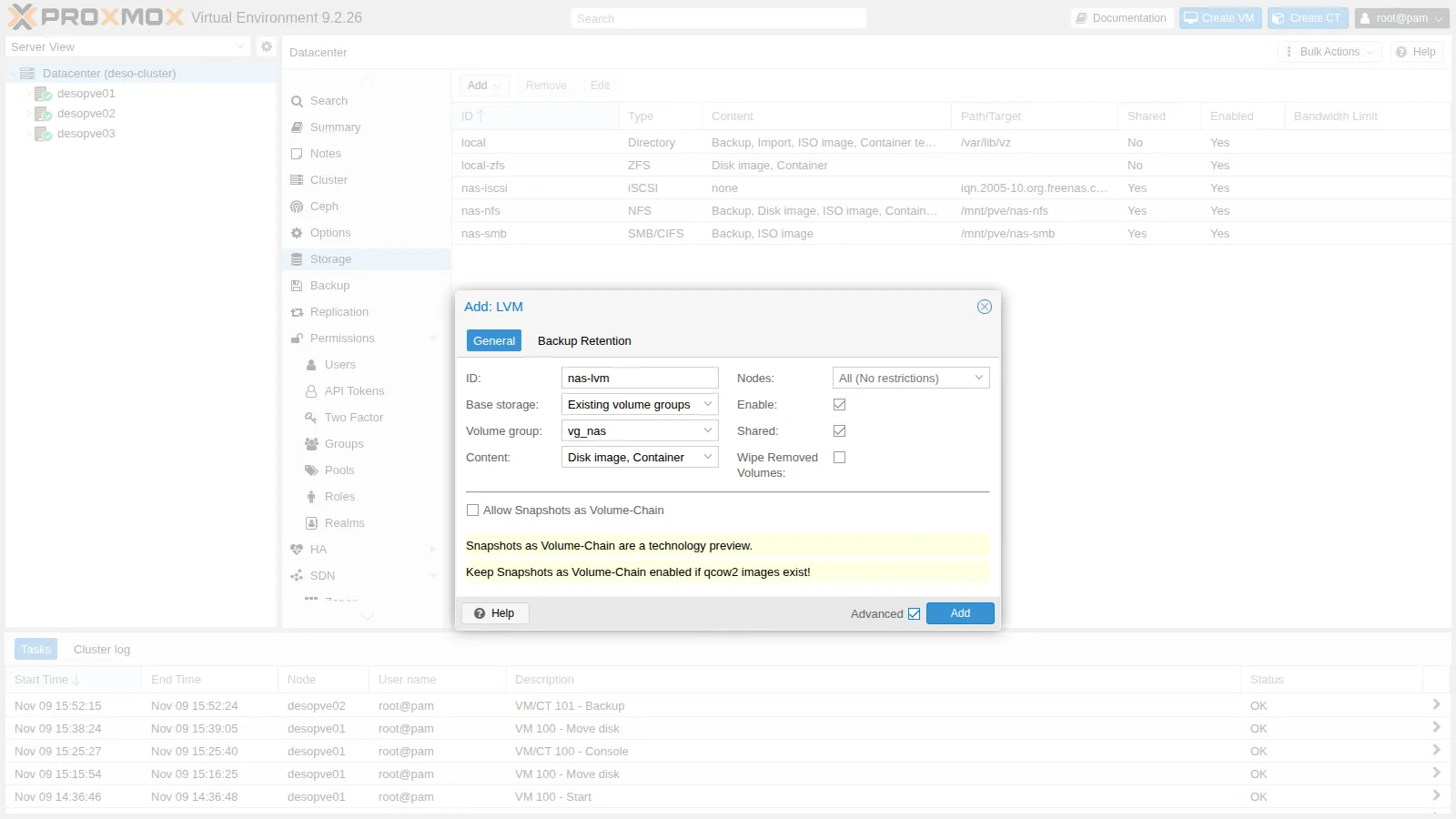
Datacenter → Storage → Add → LVM.
-
ID
nas-lvm, Base storageExisting volume groups, Volume groupvg_nas, ContentDisk image, Container. -
Check Shared: without it, Proxmox VE would treat the volume group as local to each node.
-
Add.
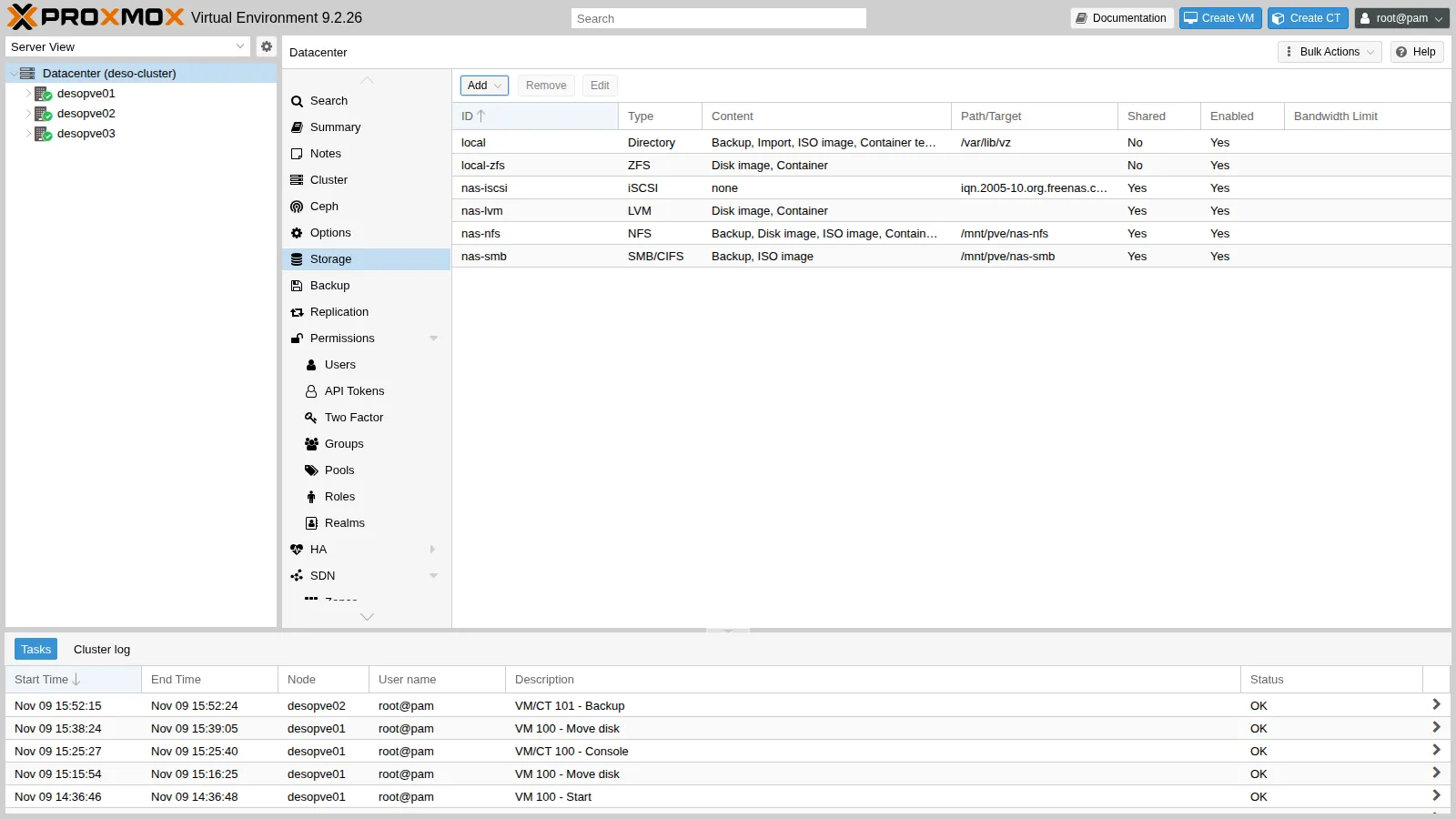
grep -A5 "lvm: nas-lvm" /etc/pve/storage.cfglvm: nas-lvm vgname vg_nas content images,rootdir saferemove 0 shared 17. A VM on shared storage
Section titled “7. A VM on shared storage”Move the disk of VM 100 to nas-lvm while the VM is running (it becomes a raw LV) and migrate the VM:
qm disk move 100 scsi0 nas-lvm --delete 1mirror-scsi0: transferred 16.0 GiB of 16.0 GiB (100.00%) in 1m 20s, readymirror-scsi0: Completed successfully.removing source volume 'local-zfs:vm-100-disk-0' after successful copylvs vg_nas LV VG Attr LSize Pool Origin Data% Meta% Move Log Cpy%Sync Convert vm-100-disk-0 vg_nas -wi-ao---- 16.00gqm migrate 100 desopve02 --online2026-11-09 16:22:48 starting migration of VM 100 to node 'desopve02' (172.27.199.22)2026-11-09 16:22:54 migration completed, transferred 274.2 MiB VM-state2026-11-09 16:22:58 migration finished successfully (duration 00:00:10)The disk is not copied: the target node activates the same LV. The task transferred 274.2 MiB of VM state (the memory pages and the state of the virtual devices) and took 10 seconds in all; the return trip in the cleanup also took 10 seconds.
| Live migration of VM 100 | Task duration (duration in the log) |
|---|---|
| Local disk, no replication (lab 11) | 1 min 13 s |
| Local disk with ZFS replication (lab 11) | 20 s |
| Disk on shared storage (LVM on iSCSI) | 10 s |
The values are those of the individual migrations reported in lab 11 and in this lab, run on the same day with the same VM. The differences are consistent with how much disk data each migration has to copy: the whole disk without replication, only the changes since the last replication with it, nothing with shared storage. The table compares the total duration of the task, not the VM’s downtime, which is a different measurement: lab 11’s logs report 10 and 20 ms, while for the migration to shared storage this lab did not record it (the full task log reports it on the average migration speed … downtime … ms line).
Verification and tests
Section titled “Verification and tests”The lab has succeeded when the checks at the end of this section pass. The core is the path-failure test, which looks at the loss of a path from two sides: the node, with the state of the paths and the kernel log, and the VM, with the pause its writes see. The two sides measure different things and are kept apart.
Test – A path goes down while I/O is in progress
Section titled “Test – A path goes down while I/O is in progress”-
In VM 100, now on
desopve02, start a “heartbeat”: a loop that appends the time, to the millisecond, to a file, flushes it to disk withsyncand waits one second. A write that stalls shows up as a gap between two consecutive entries.labuser@debian01 nohup sh -c 'while true; do date +%T.%N | cut -c1-12 >> $HOME/battito.log; sync; sleep 1; done' >/dev/null 2>&1 & -
On
desopve02, take down the NIC of the second path, noting the time (node clock). This simulates the failure on the node side:root@desopve02 date +%T.%N | cut -c1-12; ip link set nic1 downOutput 16:32:14.282 -
About 15 seconds later, look at the paths and at the kernel log on the node:
root@desopve02 multipath -ll nas-lun0 | tail -2Output |- 33:0:0:0 sde 8:64 active ready running`- 35:0:0:0 sdg 8:96 failed faulty offlineroot@desopve02 dmesg -T | grep -E 'conn error|recovery timed|Failing path'Output [Mon Nov 9 16:32:24 2026] connection3:0: detected conn error (1022)[Mon Nov 9 16:32:29 2026] session3: session recovery timed out after 5 secs[Mon Nov 9 16:32:29 2026] device-mapper: multipath: 252:0: Failing path 8:96.- Measured (node clock, kernel log with a resolution of one second):
nic1goes down at 16:32:14.282. The first connection error on the second path’s session (connection3) comes at 16:32:24, about 10 seconds later, with code 1022, which the kernel uses for an unanswered NOP-Out (ISCSI_ERR_NOP_TIMEDOUT);session recovery timed out after 5 secsandFailing path 8:96come at 16:32:29, about 15 seconds after the disconnection.multipath -llthen showssdgasfailed faulty offlineandsdestillactive ready running. - Interpretation: the two intervals fit the two layers described in Detecting a lost path: about 10 seconds of detection, compatible with the NOP-Out values of the shipped
iscsid.conf(a ping every 5 seconds, 5 seconds to answer), then 5 seconds of recovery timeout. That timeout is not the 15 seconds set in step 3: the value is consistent with multipathd having applied itsfast_io_fail_tmoto the session. The lab did not print the values in effect. - How to check:
iscsiadm -m node -T iqn.2005-10.org.freenas.ctl:pve -p 172.32.199.10 | grep -E 'noop_out|replacement_timeout'shows the values of the node record;cat /sys/class/iscsi_session/session*/recovery_tmoshows the timeout actually in effect for each session;multipathd show config | grep fast_io_fail_tmoshows the multipath value.
- Measured (node clock, kernel log with a resolution of one second):
-
Bring the NIC back up: the path comes back by itself.
root@desopve02 date +%T.%N | cut -c1-12; ip link set nic1 upOutput 16:32:49.332root@desopve02 dmesg -T | grep ReinstatingOutput [Mon Nov 9 16:32:58 2026] device-mapper: multipath: 252:0: Reinstating path 8:96.root@desopve02 multipath -ll nas-lun0 | tail -2Output |- 33:0:0:0 sde 8:64 active ready running`- 35:0:0:0 sdg 8:96 active ready running- Measured:
nic1comes back at 16:32:49.332 and the path is reinstated at 16:32:58, about 9 seconds later, as the same device (sdg, 8:96). Both paths areactive ready runningagain. - Interpretation: the session was restored and multipathd put the path back into the existing map: nothing changes for LVM or for the VM, which only see
nas-lun0. The 9 seconds include the new iSCSI login and the time the path checker takes to notice it; the test does not separate the two. - How to check:
journalctl -u iscsidshows when the session became operational again; compare it with the time ofReinstating path.
In this output the second path is called
sdginstead ofsdfbecause ondesopve02its session had already been recreated once, during the ARP problem described in step 4, and the kernel had given the disk a new name. The kernel log agrees: at 16:28 the second path wasconnection2, in this test it isconnection3. On your nodes it will probably besdf. - Measured:
-
In the VM, look for heartbeat pauses longer than 1.5 seconds:
labuser@debian01 awk -F: '{s=$1*3600+$2*60+$3; if (NR>1 && s-p>1.5) printf "pausa di %.1f s, da %s a %s\n", s-p, q, $0; p=s; q=$0}' $HOME/battito.logOutput pausa di 15.3 s, da 16:32:09.700 a 16:32:25.034pausa di 1.8 s, da 16:32:40.597 a 16:32:42.416pausa di 1.6 s, da 16:32:44.484 a 16:32:46.123pausa di 1.6 s, da 16:32:46.123 a 16:32:47.678- Measured (VM clock; one entry about every second; the
awkcommand prints only the gaps longer than 1.5 seconds): one gap of 15.3 seconds, from 16:32:09.700 to 16:32:25.034, and three gaps of 1.6-1.8 seconds between 16:32:40 and 16:32:48. No gap longer than 1.5 seconds around the return of the path. - Interpretation:
- The 15.3-second gap is the pause seen by the guest, and it is a different observation from the node’s timers (10 + 5 seconds in the kernel log). The two agree in duration, and with an offset of a few seconds between the clocks they would also coincide in time. The VM clock was indeed a few seconds behind the node’s, but by an amount that was not measured, so the alignment of the two logs cannot be verified.
- The writes waited instead of failing: the heartbeat resumed by itself, over the remaining path.
- The three gaps of 1.6-1.8 seconds fall while only one path was active, but they are not explained by this test: they concern only three of the twenty or more iterations in that interval, and the others stayed under the 1.5-second threshold.
- The return of the path caused no gap above 1.5 seconds; a shorter pause would not show up with this method.
- How to check: synchronize the VM with
ntp.proxmox.communitybefore the test, so that its times can be compared with the node’sdmesg; print every interval, without the 1.5-second threshold, to compare before, during and after the failure;journalctl -k -p errin the VM shows whether the guest kernel logged any I/O errors.
- Measured (VM clock; one entry about every second; the
Taking nic1 down also cut Corosync link 1 (lab 06) on desopve02, since it uses the same NIC: the cluster stayed quorate over link 0. corosync-cfgtool -s shows the state of each link.
Stop the heartbeat:
pkill -f "^sh -c while true"; rm -f $HOME/battito.logCleanup
Section titled “Cleanup”Move the VM back to desopve01 and its disk back to local storage. The nas-iscsi and nas-lvm storages stay configured for the following labs.
qm migrate 100 desopve01 --online2026-11-09 16:34:07 migration finished successfully (duration 00:00:10)qm disk move 100 scsi0 local-zfs --delete 1mirror-scsi0: transferred 16.0 GiB of 16.0 GiB (100.00%) in 2m 30s, readyremoving source volume 'nas-lvm:vm-100-disk-0' after successful copy- The NAS answers on
172.27.199.10and172.32.199.10(pvesm scan iscsilists both portals) and exports thedati/iscsi/pvezvol only to the IQNs of the nodes. - Each node has two iSCSI sessions (
iscsiadm -m session) and a single multipath device,nas-lun0, with both pathsactive ready running(multipath -ll). - The
nas-lvmstorage is shared (shared 1instorage.cfg), on thevg_nasvolume group created on/dev/mapper/nas-lun0, and every node sees it (pvs). - A live migration with the disk on
nas-lvmcopies only the VM state: the log reportstransferred … VM-stateand no disk mirror. - With one path down, the VM’s writes pause for about as long as the detection plus the recovery timeout in effect (15.3 seconds in the lab) and then resume on their own; the path goes
failedand, once the NIC is back,active ready runningagain. -
arp_ignore=1andarp_announce=2are active on the nodes (sysctl net.ipv4.conf.all.arp_ignore net.ipv4.conf.all.arp_announce).
Final lab state
Section titled “Final lab state”- NAS: alias
172.32.199.10/24on the network card; zvoldati/iscsi/pve(40 GiB, thick); targetiqn.2005-10.org.freenas.ctl:pvewith LUN 0, portals172.27.199.10:3260and172.32.199.10:3260, initiator group with the three nodes, no CHAP; iSCSI service running and set to start automatically. - Nodes
desopve01-03:node.session.timeo.replacement_timeout = 15in/etc/iscsi/iscsid.conf;multipath-toolswith/etc/multipath.conf(aliasnas-lun0) and the WWID registered;/etc/sysctl.d/90-arp-multihomed.confwitharp_ignore=1andarp_announce=2;- on
desopve02,iputils-arpingas well.
- Cluster: storages
nas-iscsi(iSCSI, no direct content) andnas-lvm(shared LVM on thevg_nasVG, contentimages,rootdir, empty). - Storages
nas-nfsandnas-smbunchanged. VM 100 running ondesopve01, disk onlocal-zfs; CT 101 running ondesopve02.
What you learned
Section titled “What you learned”- How to export block storage from TrueNAS: as a zvol, not a dataset. A thick zvol reserves its whole size at once, so take it out of the pool’s free space when you size the other shares.
- Where to build LVM: on the multipath device, never on the single paths, as a single volume group marked Shared. Each VM disk is then an LV active on one node at a time, and a live migration copies only the VM state.
- How long a VM waits when a path fails: about the detection time (NOP-Out interval plus timeout) plus the session recovery timeout in effect, which with multipath can be multipathd’s
fast_io_fail_tmorather than thereplacement_timeoutofiscsid.conf. Read the values in effect (/sys/class/iscsi_session/*/recovery_tmo) before relying on them, and measure the pause from inside the guest, separately from the node’s logs. - What to choose for the case with all paths down:
no_path_retry queuekeeps the I/O waiting for as long as the outage lasts, so the VM’s I/O hangs without errors, possibly with processes that cannot be killed; a finite number of retries returns errors after a bounded time. This lab tested only the loss of one path. - How to lay out the network for two paths: two interfaces on the same Ethernet segment need
arp_ignore=1andarp_announce=2; a separate segment for each path avoids the problem. If one path keeps dropping every few seconds, check which MAC address the NAS associates with the node’s address before blaming the storage.
References
Section titled “References”- Proxmox VE – Open-iSCSI initiator
- Proxmox VE – LVM Backend
- Proxmox VE wiki – Multipath: iSCSI paths,
multipath -a, LVM on top,replacement_timeout - TrueNAS 25.10 – Adding iSCSI Block Shares (the iSCSI wizard)
multipath.conf(5)for Debian 13 (multipath-tools 0.11):no_path_retry,fast_io_fail_tmo,polling_interval,find_multipaths- multipath-tools 0.11.1 –
sysfs_set_session_tmo():fast_io_fail_tmoapplied as therecovery_tmoof iSCSI sessions - open-iscsi –
iscsid.conf: NOP-Out andreplacement_timeoutvalues - Linux kernel 7.0 – iSCSI error codes in
include/scsi/iscsi_if.h(1022 isISCSI_ERR_NOP_TIMEDOUT) - Linux kernel –
arp_ignoreandarp_announce