

Lab 32 – Firewall 1: levels, rules, security groups, IPSets, aliases and logs
Dependencies
Section titled “Dependencies”- Previous labs:
- Lab 05: the DC’s SSH key loaded in the agent, which the test script uses to log in to the nodes;
- Lab 15, Lab 17, Lab 22, Lab 27 and Lab 29-31: multipath, Ceph, Corosync on two links, migration,
dnsmasqand SDN. Step 2 lists them and step 8 checks them: if you have not done one of these labs, skip the corresponding check; - Lab 20: bridges and VLANs;
- Lab 24: the routed subnet 10.99.99.0/28 of
desopve04, with CT 403; - Lab 25: IPv6 addresses
fd27:199::/64of the nodes and the DC; - Lab 26:
router01, which NATs the traffic of VLANs 10 and 20 toward the management network.
- Guests used:
- CT 101
debian-ct01(172.27.199.101 ondesopve02): becomes the protected server, with nginx; - CT 121
vlan-ct1(VLAN 10): a client that comes in throughrouter01; - CT 403
routed-ct1(10.99.99.2 ondesopve04): a client from a routed network; - the DC
desopve-dc01(172.27.199.20): the administration workstation.
- CT 101
- Nodes: cluster
desopve01-desopve03and the standalone nodedesopve04. - Credentials:
root/<lab-password>→ Appendix B.
Objectives
Section titled “Objectives”- Understand the levels of the Proxmox VE firewall (Datacenter, Node, VM/CT) and what enables what.
- Enable the datacenter firewall without blocking the services between the nodes.
- Use aliases, IPSets and security groups to write readable, reusable rules.
- Protect a container with inbound and outbound rules, and verify them with positive and negative tests.
- Read the firewall log.
- Protect the host and understand the role of the
managementIPSet, including for IPv6.
How it works
Section titled “How it works”Levels and files
Section titled “Levels and files”The Proxmox VE firewall is distributed: each node applies the rules that concern it, but the configuration lives in the cluster file system (/etc/pve), so there is a single configuration for the whole cluster.
| Level | Where it is configured | File | What it protects |
|---|---|---|---|
| Datacenter | Datacenter → Firewall | /etc/pve/firewall/cluster.fw |
Master switch, default policies, shared aliases, IPSets and security groups |
| Node | Node → Firewall | /etc/pve/nodes/<nodo>/host.fw |
Traffic addressed to the node itself (GUI, SSH, cluster services) |
| VM/CT | VM/CT → Firewall | /etc/pve/firewall/<vmid>.fw |
Traffic to and from a single network interface of the guest |
| VNet | SDN → VNet Firewall | /etc/pve/sdn/firewall/<vnet>.fw |
Traffic passing through a VNet (→ Lab 33) |
Three rules to remember:
- The Datacenter switch turns everything on. As long as the Datacenter
Firewalloption isNo, no rule is applied, at any level. When it becomesYes, the firewall of every node is enabled too, except on the nodes where it has been explicitly disabled. - A guest’s firewall only applies if it is enabled in two places: the guest’s
Firewalloption and thefirewall=1flag on the individual network interface (net0). Without the flag, that interface’s traffic does not go through the firewall. - Rules are evaluated from top to bottom and the first match wins. If none matches, the default policy for that direction decides (
Input Policy,Output Policy).
The default policies
Section titled “The default policies”| Level | Inbound | Outbound |
|---|---|---|
| Datacenter/nodes | DROP |
ACCEPT |
| VM/CT | DROP |
ACCEPT |
For the nodes, Proxmox VE adds the essential rules on its own: GUI (8006), SSH (22), console (5900-5999, 3128) and migration (60000-60050) from the management network, plus Corosync traffic between the cluster nodes. The management network is the management set; if you do not define it, the local network detected from the node’s address (local_network) applies.
Tools for writing readable rules
Section titled “Tools for writing readable rules”- Alias: a name for an address or a network (
dc01= 172.27.199.20). If the address changes, you update the alias and all the rules follow it. - IPSet: a named list of addresses and networks (
admin). In rules it is referenced with a leading+:+dc/admin. - Security group: a named bundle of rules (
web-server), to insert into several guests with a singleGROUPline. - Macro: a predefined service (
HTTP,SSH,Ping,Ceph…) that maps to protocols and ports, so you do not have to remember the numbers.
In Proxmox VE 9 references have a scope: dc/ for those of the Datacenter and guest/ for those defined in the individual guest. In the GUI and in the files they appear as dc/dc01 and +dc/admin.
How it is applied to the guest
Section titled “How it is applied to the guest”When a network interface has firewall=1, Proxmox VE does not connect it directly to the bridge: it places a small dedicated bridge (fwbr<vmid>i<n>) and a pair of interfaces (fwln/fwpr) in between. The guest’s rules hook in there. In the log these names appear as IN=fwbr101i0 and PHYSOUT=veth101i0.
The pve-firewall daemon recompiles the rules about every 10 seconds: a rule you have just saved is not active at that very instant.
Procedure
Section titled “Procedure”1. The initial state
Section titled “1. The initial state”Datacenter → Firewall → Options: the firewall is off, with the default policies.
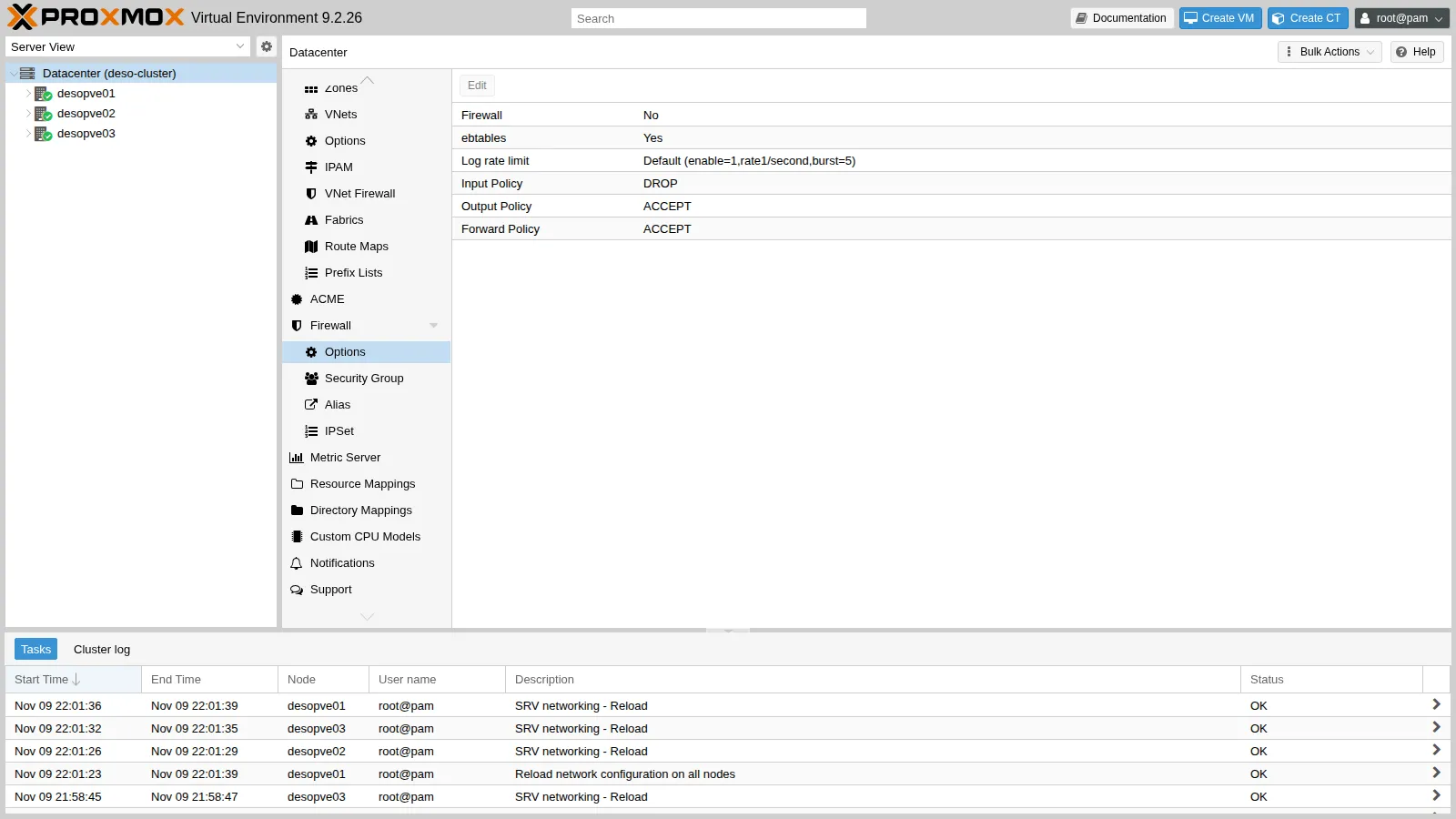
2. Before turning it on: securing the nodes
Section titled “2. Before turning it on: securing the nodes”Turning on the Datacenter firewall also turns on the nodes’ firewall, with the inbound policy DROP. The automatic rules cover the management network and Corosync, but in this cluster there are services on other networks that would be blocked:
- Ceph on VLANs 50 and 51 (10.50.10.0/24 and 10.51.10.0/24);
- the second Corosync link on VLAN 40;
- the SDN’s BGP, BFD and VXLAN on VLAN 61 and on the fabric;
- migration on VLAN 100;
dnsmasqDHCP and DNS for the SDN zonesimple1.
In this lab the firewall is for the guests, so first of all you disable the nodes’ firewall: Node → Firewall → Options → Firewall: No. The firewall of the cluster hosts, with all the rules for the services, is built in Lab 33.
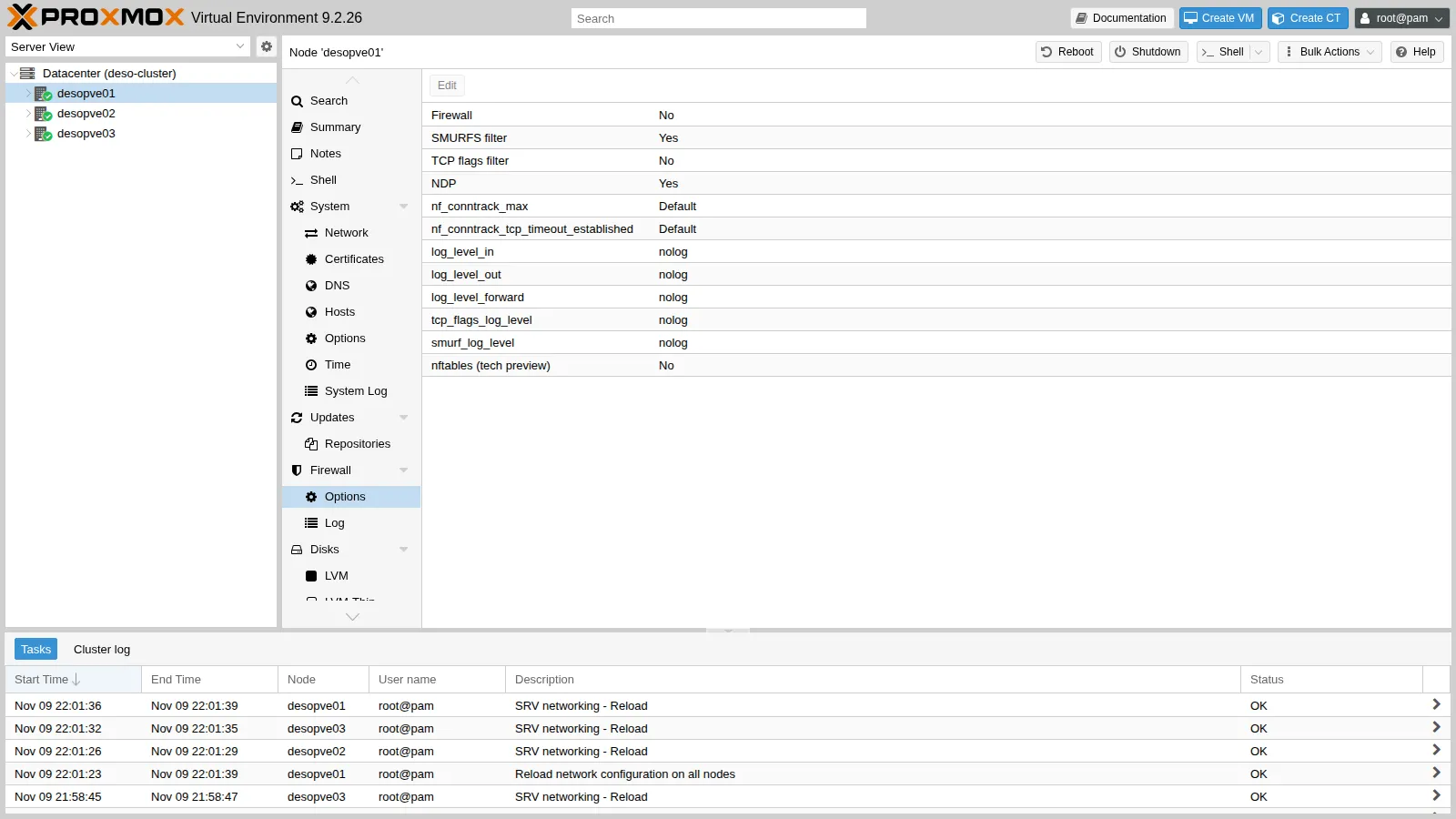
The same, for all three nodes, from the command line:
for n in desopve01 desopve02 desopve03; do pvesh set /nodes/$n/firewall/options --enable 0donecat /etc/pve/nodes/desopve02/host.fw[OPTIONS]
enable: 03. The aliases
Section titled “3. The aliases”Datacenter → Firewall → Alias → Add: a name for each address or network that appears in the rules.
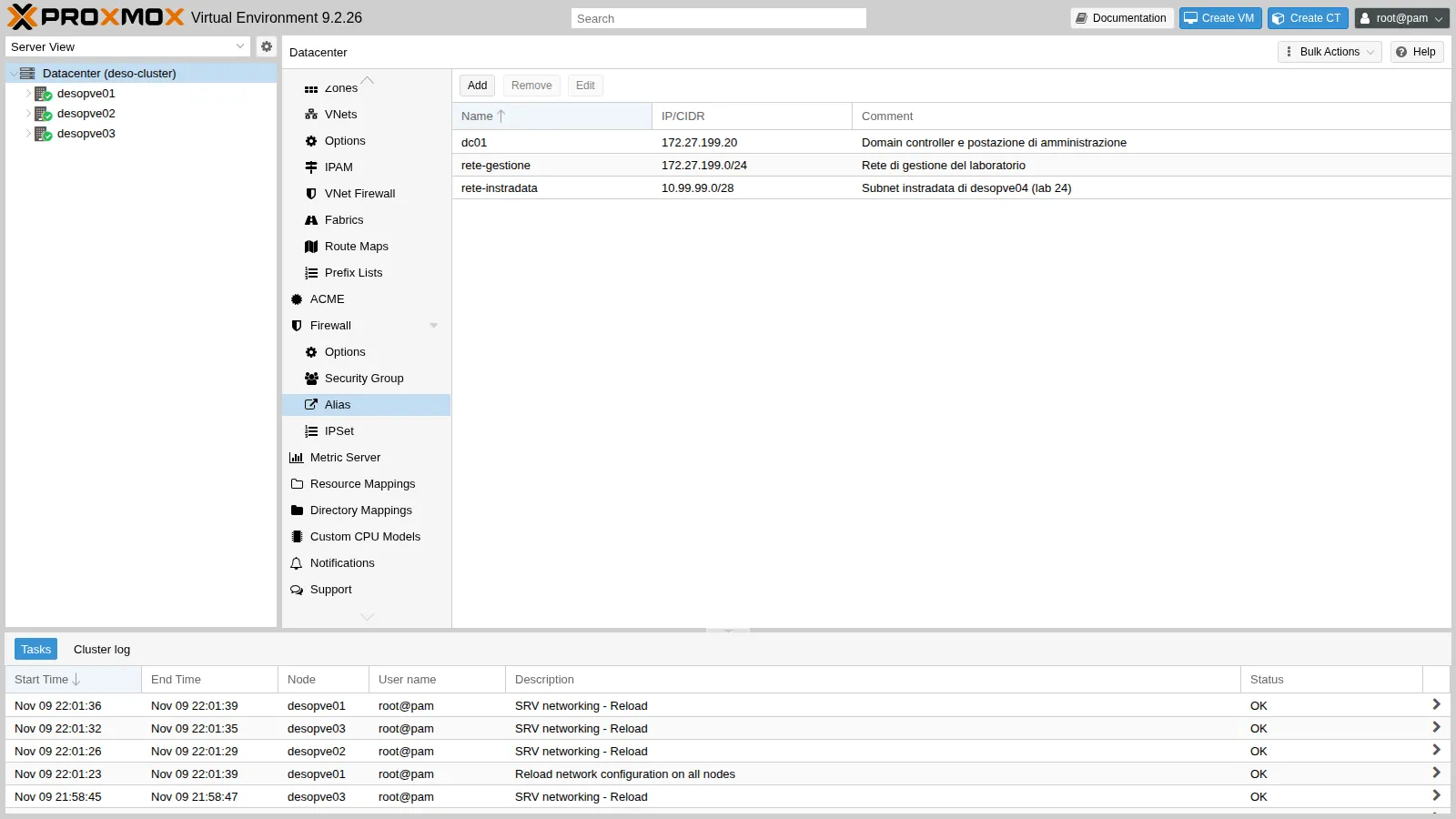
From the command line:
pvesh create /cluster/firewall/aliases --name dc01 --cidr 172.27.199.20 \ --comment "Domain controller e postazione di amministrazione"pvesh create /cluster/firewall/aliases --name rete-gestione --cidr 172.27.199.0/24 \ --comment "Rete di gestione del laboratorio"pvesh create /cluster/firewall/aliases --name rete-instradata --cidr 10.99.99.0/28 \ --comment "Subnet instradata di desopve04 (lab 24)"4. The administrators’ IPSet
Section titled “4. The administrators’ IPSet”Datacenter → Firewall → IPSet → Create admin, then on the right Add with the alias dc/dc01. Later on, adding another workstation only takes one more line in the set.
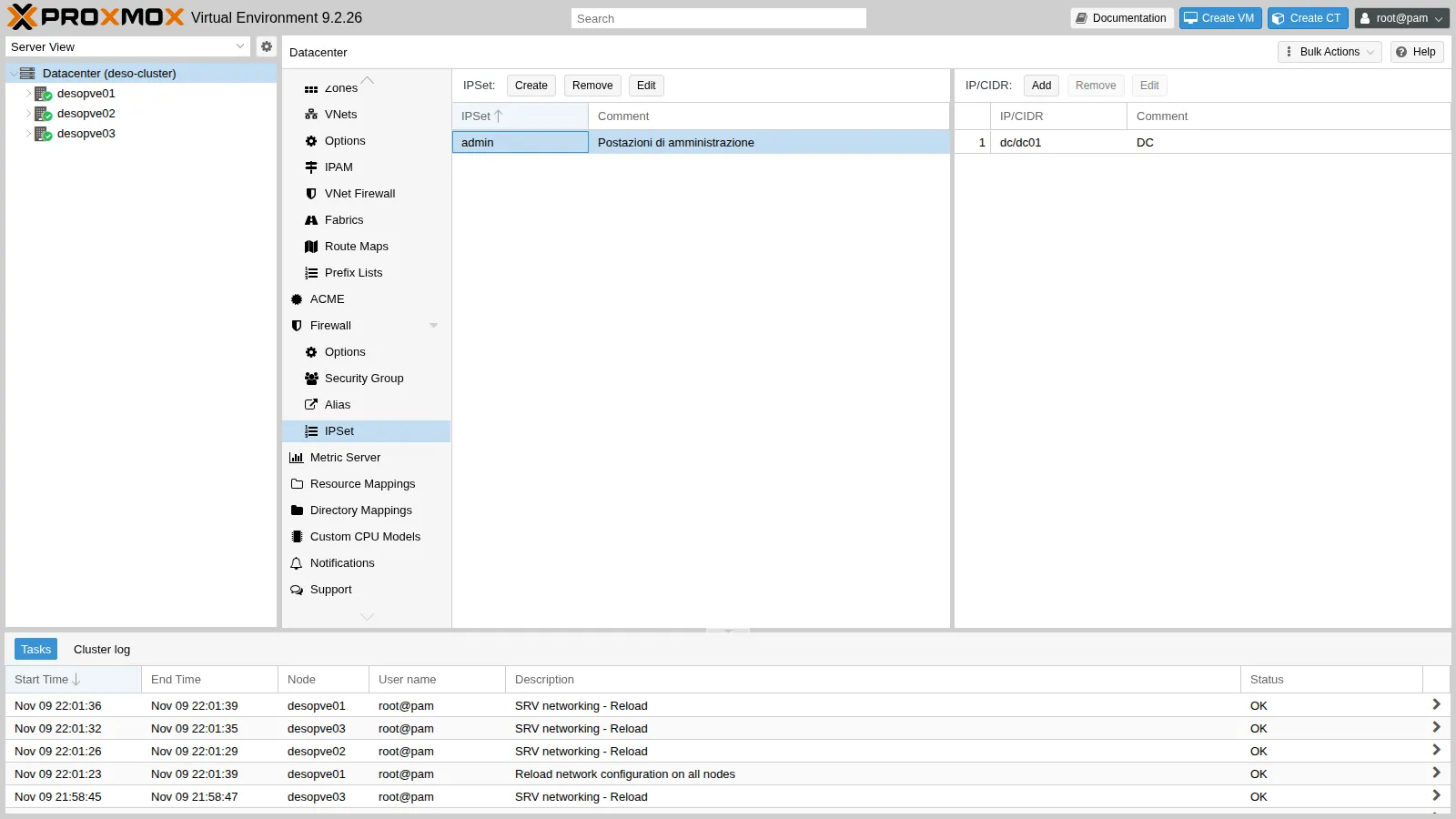
pvesh create /cluster/firewall/ipset --name admin --comment "Postazioni di amministrazione"pvesh create /cluster/firewall/ipset/admin --cidr dc/dc01 --comment "DC"5. The security groups
Section titled “5. The security groups”Datacenter → Firewall → Security Group → Create. Create two groups:
web-server: HTTP from the management network;accesso-admin: SSH and ping only from theadminset.
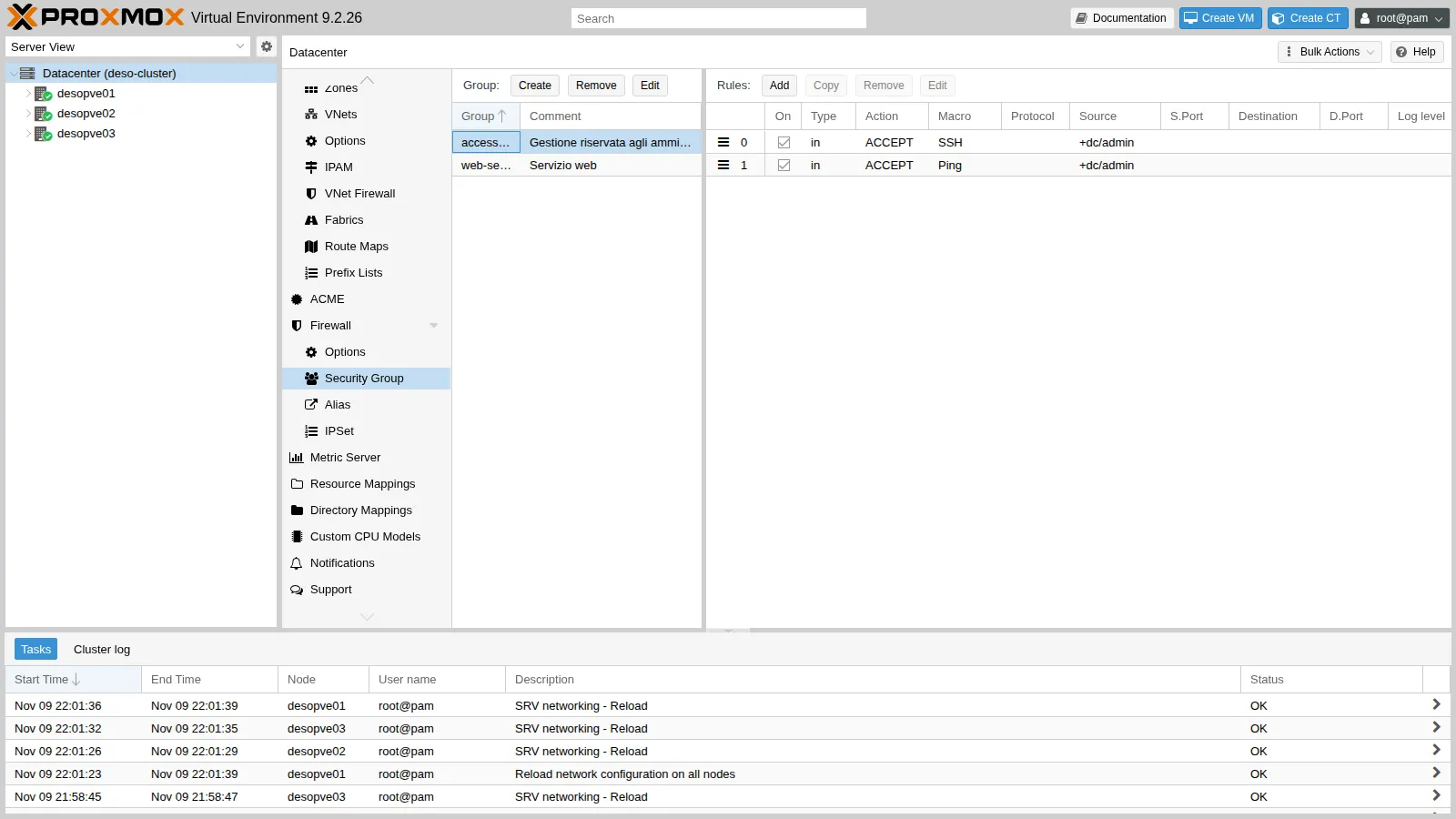
Each rule is created with Add in the right-hand panel. The details of the SSH rule:
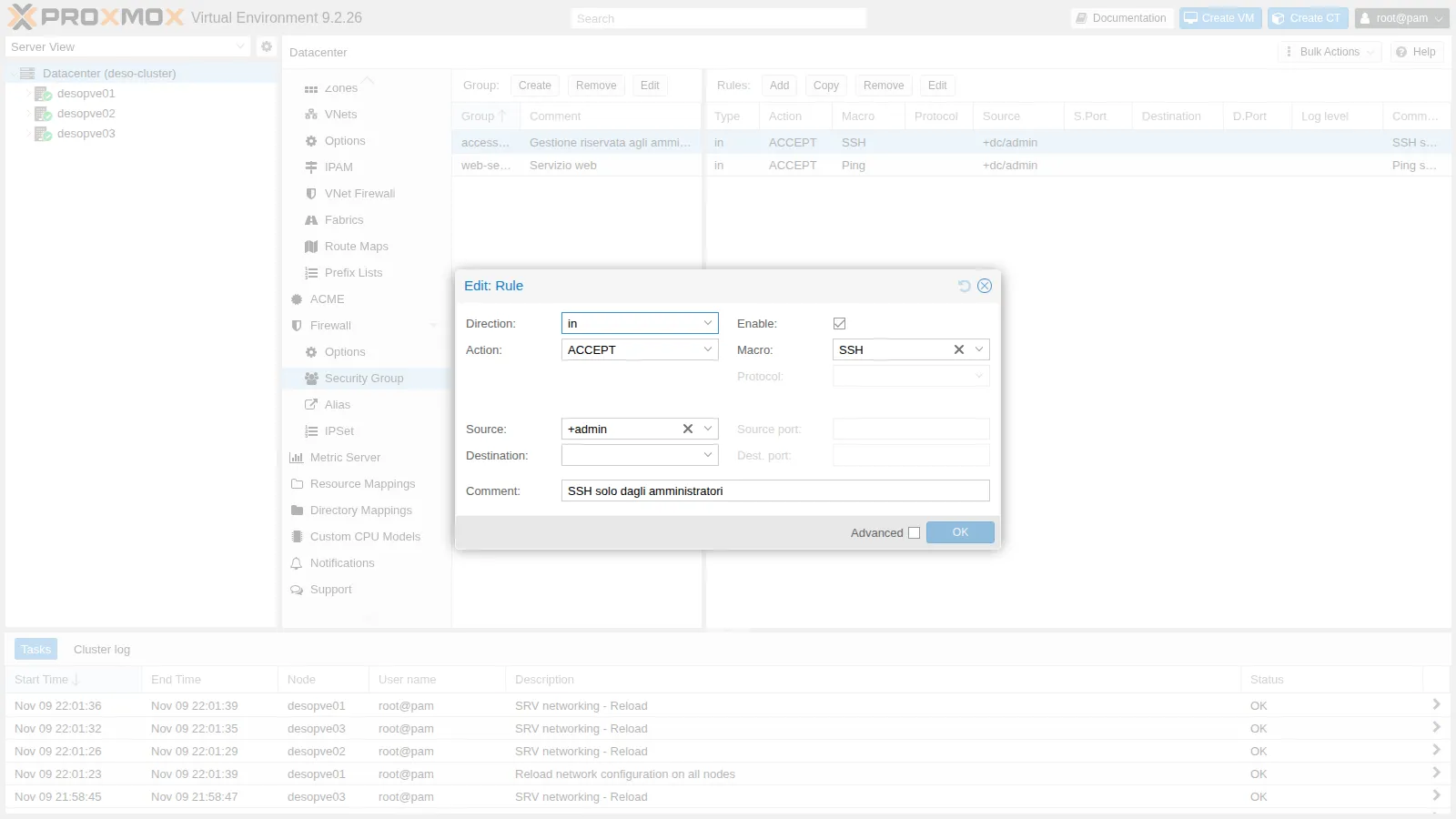
From the command line:
pvesh create /cluster/firewall/groups --group web-server --comment "Servizio web"pvesh create /cluster/firewall/groups/web-server --type in --action ACCEPT \ --macro HTTP --source dc/rete-gestione --enable 1 --comment "HTTP solo dalla rete di gestione"pvesh create /cluster/firewall/groups --group accesso-admin --comment "Gestione riservata agli amministratori"pvesh create /cluster/firewall/groups/accesso-admin --type in --action ACCEPT \ --macro Ping --source +dc/admin --enable 1 --comment "Ping solo dagli amministratori"pvesh create /cluster/firewall/groups/accesso-admin --type in --action ACCEPT \ --macro SSH --source +dc/admin --enable 1 --comment "SSH solo dagli amministratori"The result in cluster.fw:
[ALIASES]
dc01 172.27.199.20 # Domain controller e postazione di amministrazionerete-gestione 172.27.199.0/24 # Rete di gestione del laboratoriorete-instradata 10.99.99.0/28 # Subnet instradata di desopve04 (lab 24)
[IPSET admin] # Postazioni di amministrazione
dc/dc01 # DC
[group accesso-admin] # Gestione riservata agli amministratori
IN SSH(ACCEPT) -source +dc/admin # SSH solo dagli amministratoriIN Ping(ACCEPT) -source +dc/admin # Ping solo dagli amministratori
[group web-server] # Servizio web
IN HTTP(ACCEPT) -source dc/rete-gestione # HTTP solo dalla rete di gestione6. The server to protect
Section titled “6. The server to protect”Install a test web server on CT 101:
pct exec 101 -- bash -c 'apt-get -qq update; apt-get -y -qq install nginx curl echo "debian-ct01 - web di prova (lab 32)" > /var/www/html/index.html'pct exec 101 -- ss -ltnLISTEN 0 511 0.0.0.0:80 0.0.0.0:*LISTEN 0 511 [::]:80 [::]:*LISTEN 0 4096 *:22 *:*The CT’s network interface already has the firewall flag, set at creation time:
net0: name=eth0,bridge=vmbr0,firewall=1,gw=172.27.199.1,hwaddr=BC:24:11:0C:31:84,ip=172.27.199.101/24,type=vethBefore enabling any rule, measure the starting situation with the test script fwtest.ps1. Copy it to the DC, for example to C:\lab, and run it in PowerShell with .\fwtest.ps1. For the tests from the containers, the script logs in to the nodes with the DC’s SSH key (Lab 05) and runs nc and ping inside the CT. It tests HTTP, SSH and ping from three sources:
- the DC;
- CT 121, which comes from VLAN 10 through the NAT of
router01(source 172.27.199.26); - CT 403, which comes from the routed network without NAT (source 10.99.99.2).
DC 172.27.199.20 (admin) HTTP ok SSH ok ping okCT 121 VLAN 10 (via router01, NAT) HTTP ok SSH ok ping okCT 403 10.99.99.2 (rete instradata) HTTP ok SSH ok ping ok7. The rules of CT 101
Section titled “7. The rules of CT 101”CT 101 → Firewall → Insert: Security Group, once for web-server and once for accesso-admin. Then Firewall → Options:
Firewall:Yes;log_level_in:info, to log the packets dropped by the inbound policy.
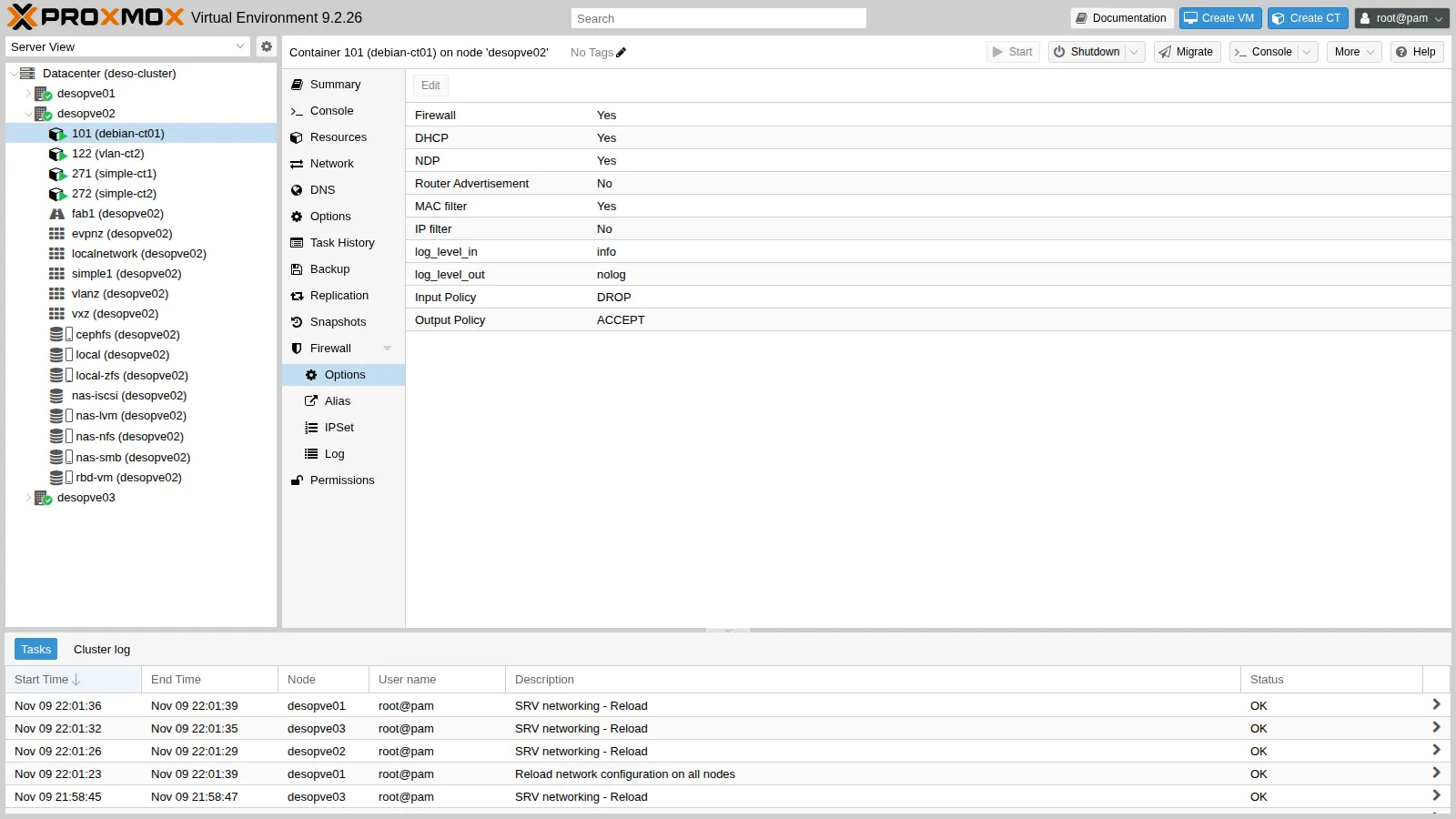
From the command line:
pvesh create /nodes/desopve02/lxc/101/firewall/rules --type group --action accesso-admin --enable 1pvesh create /nodes/desopve02/lxc/101/firewall/rules --type group --action web-server --enable 1pvesh set /nodes/desopve02/lxc/101/firewall/options --enable 1 --log_level_in infocat /etc/pve/firewall/101.fw[OPTIONS]
enable: 1log_level_in: info
[RULES]
GROUP web-serverGROUP accesso-admin8. Turning on the datacenter firewall
Section titled “8. Turning on the datacenter firewall”Datacenter → Firewall → Options, double-click Firewall, check the box and click OK.
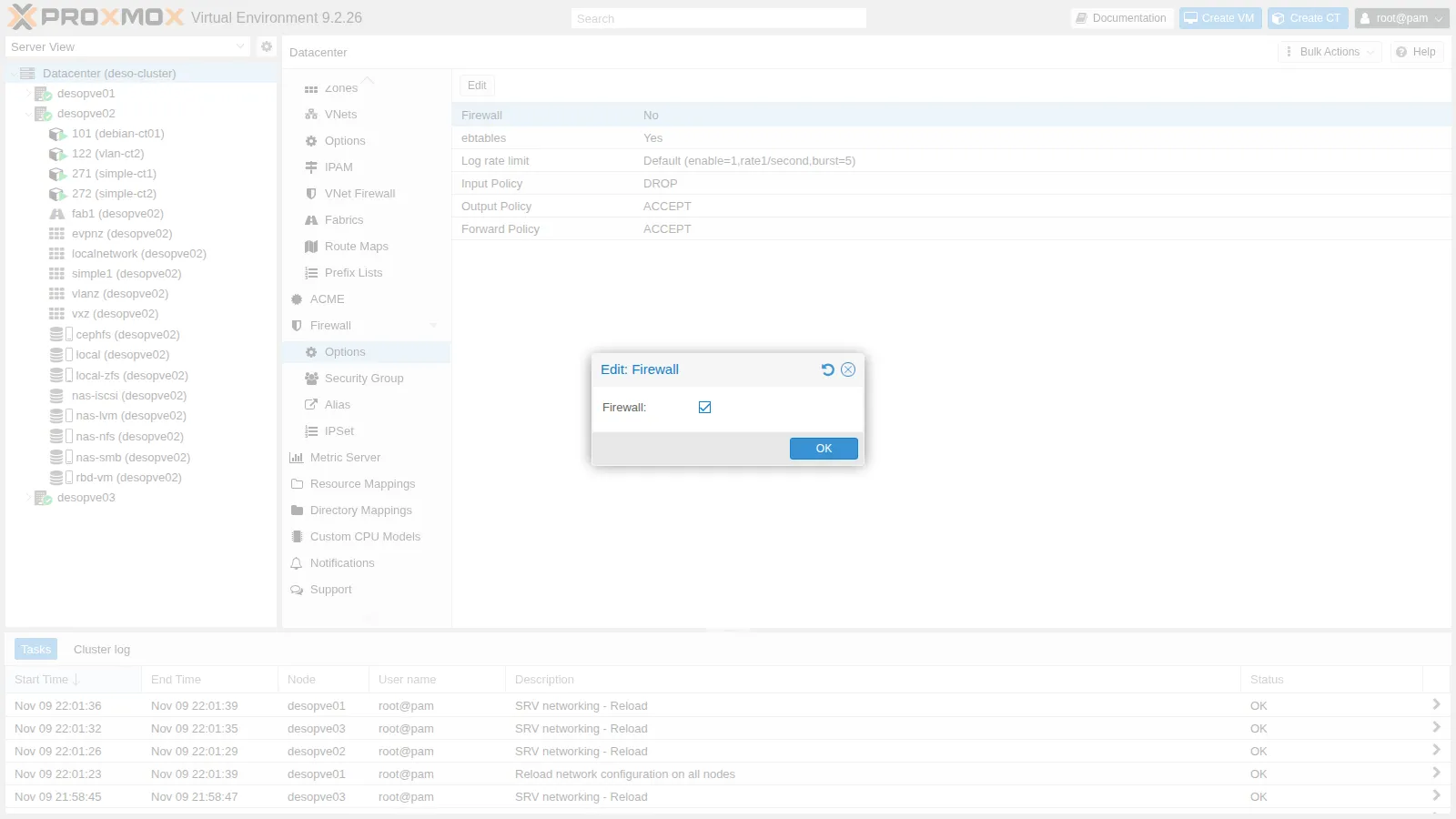
Right afterwards, check that the nodes have no rules of their own and that the cluster services have not been interrupted:
for n in desopve01 desopve02 desopve03; do ssh $n 'echo "== $(hostname)"; pve-firewall status; echo "regole host: $(iptables -S PVEFW-HOST-IN 2>/dev/null | wc -l)"'donepvecm status | grep Quorate; corosync-cfgtool -s | grep -c connectedceph health; multipath -ll | grep -c "active ready"vtysh -c "show bgp summary" | grep ^desopve== desopve01Status: enabled/runningregole host: 0== desopve02Status: enabled/runningregole host: 0== desopve03Status: enabled/runningregole host: 0Quorate: Yes4HEALTH_OK2desopve02(10.61.10.22) 4 65000 519 529 16 0 0 00:25:09 3 5 FRRouting/10.6.1desopve03(10.61.10.23) 4 65000 528 529 16 0 0 00:25:09 6 5 FRRouting/10.6.1The service is enabled/running, but the host rule chain is empty: the nodes filter nothing. Corosync has both links up (4 connected lines), Ceph is healthy, both iSCSI paths are active and the BGP sessions are up.
9. The tests
Section titled “9. The tests”DC 172.27.199.20 (admin) HTTP ok SSH ok ping okCT 121 VLAN 10 (via router01, NAT) HTTP ok SSH BLOCCATO ping BLOCCATOCT 403 10.99.99.2 (rete instradata) HTTP BLOCCATO SSH BLOCCATO ping BLOCCATOEach result is explained by a rule:
- DC: it is in the
adminset, so SSH and ping get through (accesso-admin); it is in the management network, so HTTP gets through (web-server). - CT 121: the NAT of
router01makes it arrive with the address 172.27.199.26. That address is in the management network, so HTTP gets through; it is not in theadminset, so SSH and ping end up on theDROPpolicy. - CT 403: it arrives with its real address 10.99.99.2, which matches no rule. Everything is blocked.
10. The log
Section titled “10. The log”CT 101 → Firewall → Log shows the dropped packets, thanks to log_level_in: info.
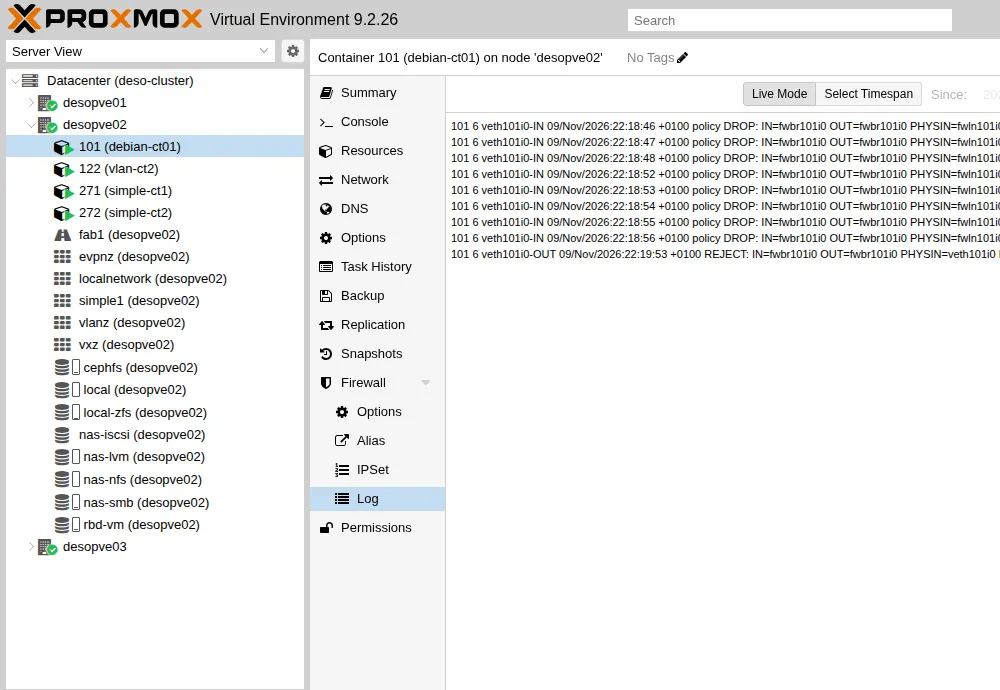
The same log can be read on the node that hosts the guest, in /var/log/pve-firewall.log. In the lines below, the MAC field (destination, source and frame type) is abbreviated:
101 6 veth101i0-IN 09/Nov/2026:22:18:48 +0100 policy DROP: IN=fwbr101i0 OUT=fwbr101i0 PHYSIN=fwln101i0 PHYSOUT=veth101i0 MAC=… SRC=172.27.199.26 DST=172.27.199.101 LEN=84 TOS=0x00 PREC=0x00 TTL=63 ID=61663 DF PROTO=ICMP TYPE=8 CODE=0 ID=404 SEQ=1101 6 veth101i0-IN 09/Nov/2026:22:18:52 +0100 policy DROP: IN=fwbr101i0 OUT=fwbr101i0 PHYSIN=fwln101i0 PHYSOUT=veth101i0 MAC=… SRC=10.99.99.2 DST=172.27.199.101 LEN=60 TOS=0x00 PREC=0x00 TTL=63 ID=64893 DF PROTO=TCP SPT=55866 DPT=80 SEQ=2496087703 ACK=0 WINDOW=64240 SYNHow to read a line:
101is the guest and6the log level (info);veth101i0-INis the chain: inbound on thenet0interface;policy DROPmeans that no rule accepted the packet and the default policy kicked in;SRC,DST,PROTO,DPTtell who, to whom and what.
The log is limited to 1 line per second with bursts of 5 (Log rate limit in the Datacenter options), so as not to fill the disk during an attack.
11. An outbound rule
Section titled “11. An outbound rule”The guests’ outbound policy is ACCEPT, but specific destinations can be forbidden. For example: the web server must not open SMB connections to the DC.
pvesh create /nodes/desopve02/lxc/101/firewall/rules --type out --action REJECT \ --dest dc/dc01 --proto tcp --dport 445 --enable 1 --log info \ --comment "Nessuna connessione SMB verso il DC"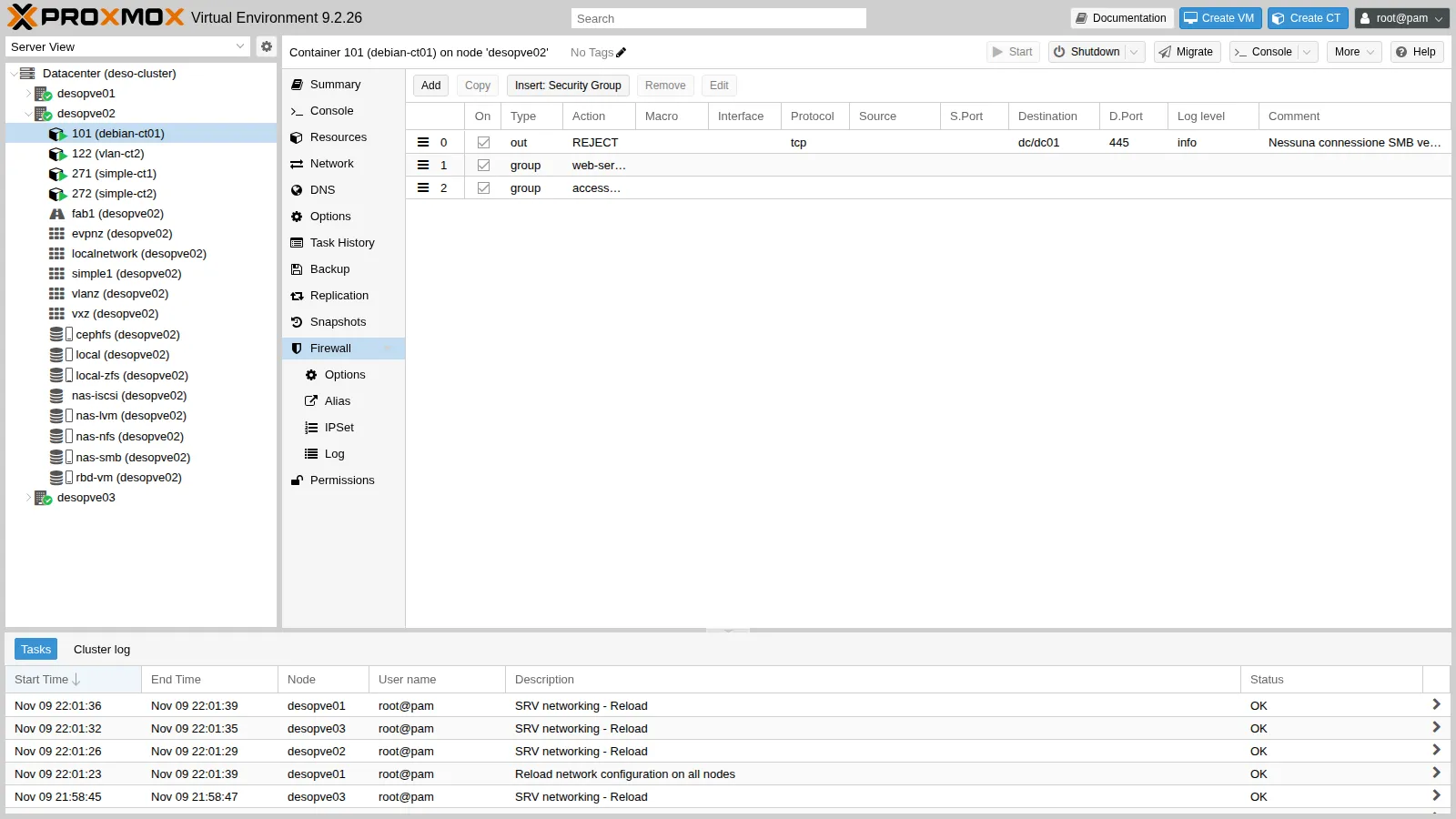
Before and after, from inside CT 101, with pct exec 101 -- nc -zv -w2 desopve-dc01.proxmox.community 445 53. The second check was done about ten seconds after saving, the time of one pve-firewall cycle:
# beforedesopve-dc01.proxmox.community [172.27.199.20] 445 (microsoft-ds) opendesopve-dc01.proxmox.community [172.27.199.20] 53 (domain) open# afterdesopve-dc01.proxmox.community [172.27.199.20] 445 (microsoft-ds) : Connection refuseddesopve-dc01.proxmox.community [172.27.199.20] 53 (domain) openREJECT answers immediately with a refusal (Connection refused), while DROP leaves the client waiting until the timeout. For internal traffic REJECT makes troubleshooting faster; toward the outside DROP is preferred, because it does not confirm that the service exists.
The compiled rules can be seen on the node:
iptables -S veth101i0-OUT-N veth101i0-OUT-A veth101i0-OUT -j CONNMARK --set-xmark 0x65/0xffffffff-A veth101i0-OUT -p udp -m udp --sport 68 --dport 67 -g PVEFW-SET-ACCEPT-MARK-A veth101i0-OUT -m mac ! --mac-source BC:24:11:0C:31:84 -j DROP-A veth101i0-OUT -j MARK --set-xmark 0x0/0x80000000-A veth101i0-OUT -d 172.27.199.20/32 -p tcp -m tcp --dport 445 -m limit --limit 1/sec -j NFLOG --nflog-prefix ":101:6:veth101i0-OUT: REJECT: "-A veth101i0-OUT -d 172.27.199.20/32 -p tcp -m tcp --dport 445 -j PVEFW-reject-A veth101i0-OUT -j GROUP-web-server-OUT-A veth101i0-OUT -m mark --mark 0x80000000/0x80000000 -j RETURN-A veth101i0-OUT -j GROUP-accesso-admin-OUT-A veth101i0-OUT -m mark --mark 0x80000000/0x80000000 -j RETURN-A veth101i0-OUT -g PVEFW-SET-ACCEPT-MARKThe line with --mac-source is the MAC filter, enabled by default: the guest cannot send traffic with a MAC other than its own. It is covered in depth in Lab 33.
12. The host firewall on desopve04
Section titled “12. The host firewall on desopve04”desopve04 is a standalone node, that is, a datacenter of its own, with its own cluster.fw. It is the right place to see the host firewall in action without any risk to the cluster.
Which network it considers the “management” network:
pve-firewall localnetlocal hostname: desopve04local IP address: 172.27.199.24network auto detect: 172.27.199.0/24using detected local_network: 172.27.199.0/24Turn on the datacenter firewall of desopve04. The node has no options of its own, so its firewall follows the master switch:
pvesh set /cluster/firewall/options --enable 1iptables -S PVEFW-HOST-IN-A PVEFW-HOST-IN -i lo -j ACCEPT-A PVEFW-HOST-IN -m conntrack --ctstate INVALID -j DROP-A PVEFW-HOST-IN -m conntrack --ctstate RELATED,ESTABLISHED -j ACCEPT-A PVEFW-HOST-IN -m conntrack --ctstate INVALID,NEW -j PVEFW-smurfs-A PVEFW-HOST-IN -p 2 -j RETURN-A PVEFW-HOST-IN -p tcp -m set --match-set PVEFW-0-management-v4 src -m tcp --dport 8006 -j RETURN-A PVEFW-HOST-IN -p tcp -m set --match-set PVEFW-0-management-v4 src -m tcp --dport 5900:5999 -j RETURN-A PVEFW-HOST-IN -p tcp -m set --match-set PVEFW-0-management-v4 src -m tcp --dport 3128 -j RETURN-A PVEFW-HOST-IN -p tcp -m set --match-set PVEFW-0-management-v4 src -m tcp --dport 22 -j RETURN-A PVEFW-HOST-IN -p tcp -m set --match-set PVEFW-0-management-v4 src -m tcp --dport 60000:60050 -j RETURN-A PVEFW-HOST-IN -j PVEFW-Drop-A PVEFW-HOST-IN -j DROPThese are the automatic rules: GUI, console, SSH and migration only from the management set, and everything else dropped. The tests run from the DC, in PowerShell, and from CT 403:
'== dal DC (172.27.199.20)'foreach ($p in 22, 8006) { $ok = Test-NetConnection 172.27.199.24 -Port $p -InformationLevel Quiet -WarningAction SilentlyContinue 'tcp/{0} {1}' -f $p, $(if ($ok) {'ok'} else {'BLOCCATO'})}'ping ' + $(if (Test-Connection 172.27.199.24 -Count 1 -Quiet) {'ok'} else {'BLOCCATO'})# on desopve04pct exec 403 -- bash -c 'echo "== dal CT 403 (10.99.99.2) verso il nodo 10.99.99.1" nc -zw2 10.99.99.1 22 && echo "tcp/22 ok" || echo "tcp/22 BLOCCATO" ping -c1 -W2 10.99.99.1 >/dev/null && echo "ping ok" || echo "ping BLOCCATO" echo "-- inoltro verso il DC:" nc -zw2 172.27.199.20 53 && echo "dc tcp/53 ok" || echo "dc tcp/53 BLOCCATO"'== dal DC (172.27.199.20)tcp/22 oktcp/8006 okping BLOCCATO== dal CT 403 (10.99.99.2) verso il nodo 10.99.99.1tcp/22 BLOCCATOping BLOCCATO-- inoltro verso il DC:dc tcp/53 ok== dal DC: port forwarding 8080 e GUI in IPv4172.27.199.24:8080 (DNAT verso CT 402) ok172.27.199.24:8006 (GUI, IPv4) okThree observations:
- Ping to the node is blocked even from the management network: the automatic rules do not open it.
- Traffic that the node forwards does not go through the host rules: the routing of CT 403 toward the DC and the port forwarding of Lab 24 still work. The host rules only concern packets addressed to the node (input chain).
- IPv6 is left out: the detected local network is IPv4 only, so the GUI reached via
fd27:199::24is blocked.
For IPv6 the local network is not enough: you need an explicit management set. Datacenter → Firewall → IPSet → Create management, with both the IPv4 and the IPv6 management networks.
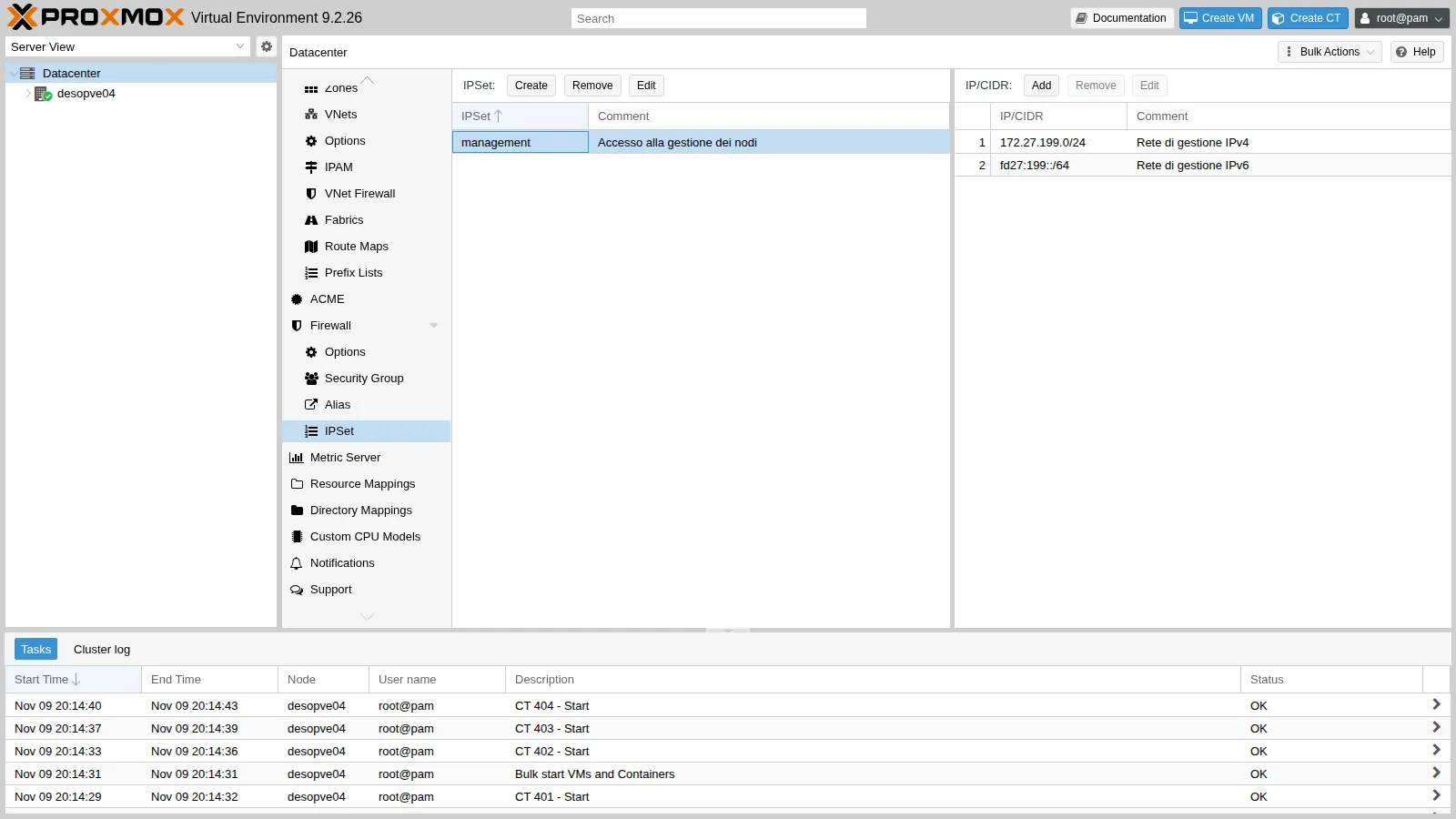
pvesh create /cluster/firewall/ipset --name management --comment "Accesso alla gestione dei nodi"pvesh create /cluster/firewall/ipset/management --cidr 172.27.199.0/24 --comment "Rete di gestione IPv4"pvesh create /cluster/firewall/ipset/management --cidr fd27:199::/64 --comment "Rete di gestione IPv6"The effect was verified from the DC by removing and re-adding the IPv6 line:
== senza la rete IPv6 nel set managementGUI via IPv6 [fd27:199::24]:8006 -> False== con la rete IPv6 nel set managementGUI via IPv6 [fd27:199::24]:8006 -> TrueFinally, two node rules, in Node → Firewall → Add:
- ping from the management network;
- SSH from the routed subnet, to administer the node from CT 403.
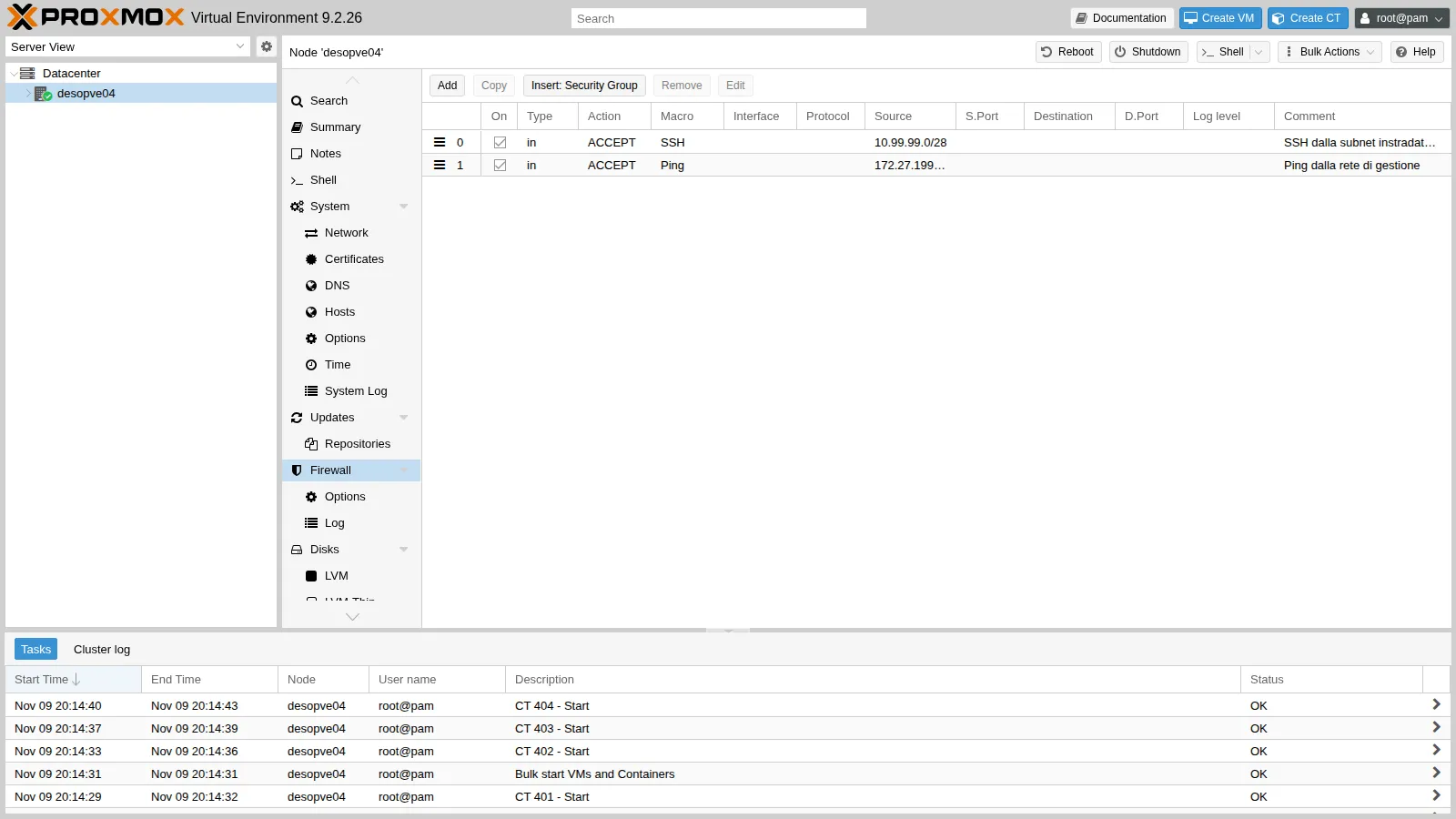
pvesh create /nodes/desopve04/firewall/rules --type in --action ACCEPT --macro Ping \ --source 172.27.199.0/24 --enable 1 --comment "Ping dalla rete di gestione"pvesh create /nodes/desopve04/firewall/rules --type in --action ACCEPT --macro SSH \ --source 10.99.99.0/28 --enable 1 --comment "SSH dalla subnet instradata (amministrazione del CT 403)"ping dal DC okCT403 tcp/22 okVerification and tests
Section titled “Verification and tests”| Test | Expected | Result |
|---|---|---|
| Datacenter firewall enabled, cluster hosts without rules | regole host: 0 on all three nodes |
ok |
| Quorum, Corosync (2 links), Ceph, iSCSI, BGP after enabling | unchanged | ok |
| HTTP, SSH, ping from the DC to CT 101 | all allowed | ok |
| HTTP from CT 121 (NAT 172.27.199.26) | allowed; SSH and ping blocked | ok |
| HTTP, SSH, ping from CT 403 (10.99.99.2) | all blocked and logged | ok |
| SMB from CT 101 to the DC | Connection refused; DNS still allowed |
ok |
GUI and SSH of desopve04 from the management network |
allowed; ping blocked until the node rule is added | ok |
GUI of desopve04 via IPv6 |
blocked without fd27:199::/64 in management, allowed with it |
ok |
Routing and port forwarding through desopve04 |
not affected by the host firewall | ok |
Final lab state
Section titled “Final lab state”- Cluster
deso-cluster:- Datacenter firewall enabled;
- host firewall disabled on
desopve01,desopve02anddesopve03(host.fw:enable: 0), until Lab 33 builds the rules for the cluster services; - aliases
dc01,rete-gestione,rete-instradata; IPSetadmin; security groupsweb-serverandaccesso-admin.
- CT 101
debian-ct01:- nginx installed, with the test page;
- firewall enabled with
log_level_in: info; - rules:
OUT REJECTtowarddc/dc01port 445,GROUP web-server,GROUP accesso-admin.
- Other guests: no rules; their firewall stays off.
desopve04: firewall of its datacenter enabled, IPSetmanagementwith 172.27.199.0/24 andfd27:199::/64, node rules for Ping (management network) and SSH (10.99.99.0/28).- DC: test script
fwtest.ps1inC:\lab.
What you learned
Section titled “What you learned”- The Datacenter switch turns on the firewall of all nodes: prepare the node rules beforehand, or disable the firewall explicitly on the nodes.
- A guest’s firewall requires two switches: the guest option and
firewall=1on the network interface. - Aliases, IPSets and security groups make rules readable and reusable; in Proxmox VE 9 they are referenced with their scope (
dc/,+dc/). - Tests must be run from several sources, and upstream NAT changes what the firewall sees.
log_level_inand the guest log show exactly which packet was dropped and why.- The host’s automatic rules cover GUI, SSH and console from the IPv4 local network only: for IPv6, and for services on other networks, you need explicit rules.