

Lab 06 – Three-node cluster and Corosync
Dependencies
Section titled “Dependencies”- Previous labs: Lab 04, with the nodes updated to the same version and their time synchronized, and Lab 05, for key-based SSH access from the DC.
- Servers:
desopve01,desopve02anddesopve03powered on, with no VMs or containers;desopve04also powered on, only to configure itsnic1(it stays outside the cluster). A node that joins a cluster must not have any guests, because their IDs could conflict with those of the cluster. - Network: the second network card of each node (
nic1) connected to the172.32.199.0/24network. - Credentials:
root/<lab-password>→ Appendix B.
Objectives
Section titled “Objectives”- Understand what Corosync, the quorum and the cluster file system (pmxcfs) do.
- Prepare a second network for Corosync.
- Create the
deso-clustercluster from the web interface, with two links. - Add one node from the web interface and one from the command line.
- Diagnose the cluster status and verify what happens when a link or a node goes down.
How it works
Section titled “How it works”The cluster components
Section titled “The cluster components”A Proxmox VE cluster is a set of nodes managed as one: from any node you see and manage all the others, and you can move VMs and containers between nodes. Three components work together:
| Component | What it does |
|---|---|
| Corosync | carries the messages between nodes and knows at every moment which nodes are present (membership). It uses the kronosnet (knet) protocol over UDP, ports 5405-5412 |
Quorum (votequorum) |
each node has one vote; the cluster is operational (quorate) only if a majority of the votes is present |
| pmxcfs | the cluster file system, mounted on /etc/pve: VM, storage, user and permission configurations, replicated to all nodes through Corosync |
Thanks to pmxcfs, a change made on one node is instantly visible on all the others. A node that loses quorum makes /etc/pve read-only: this way, two groups of nodes isolated from each other cannot modify the same configuration in different ways (split brain).
Why three nodes and not four
Section titled “Why three nodes and not four”With three nodes the quorum is 2: the cluster survives the loss of any one node. With four nodes the quorum is 3: the cluster still survives the loss of only one node, but if the network splits in half (two nodes on one side, two on the other), neither half has the majority and the whole cluster stops. For clusters with an even number of nodes there is the QDevice, an external vote that acts as a tie-breaker.
This is why desopve04 stays standalone: it is a second “datacenter” that you will need for migrations between clusters (Lab 48) and to compare the ext4/LVM installation with the ZFS one.
Two links for Corosync
Section titled “Two links for Corosync”Corosync is sensitive to latency, not to bandwidth: if the network is congested (for example by a backup or a migration), messages arrive late and the nodes may believe they are isolated. This is why best practices call for:
- at least two links on different networks, so that the loss of one network does not stop the cluster;
- a link dedicated to Corosync only, in production clusters: you will set it up with VLANs in lab 22.
With knet, the links work in passive mode: Corosync uses one at a time, the one with the highest priority (by default the lowest number, so link 0), and switches to the other within moments if the first one goes down.
| Link | Network | Addresses |
|---|---|---|
| 0 | management 172.27.199.0/24 |
vmbr0 of the nodes, .21-.23 |
| 1 | cluster/storage 172.32.199.0/24 |
nic1 of the nodes, .21-.23 |
Procedure
Section titled “Procedure”1. Configure the second network card
Section titled “1. Configure the second network card”On each node, nic1 is connected to the 172.32.199.0/24 network but has no address. Configure it from the web interface on desopve01 and from the command line on the other nodes.
-
Log in to
https://desopve01.proxmox.community:8006, selectdesopve01→ System → Network and double-clicknic1. -
Enter IPv4/CIDR
172.32.199.21/24, leave the gateway empty (the network is directly reachable) and check Autostart, so that the interface comes up at boot. Click OK.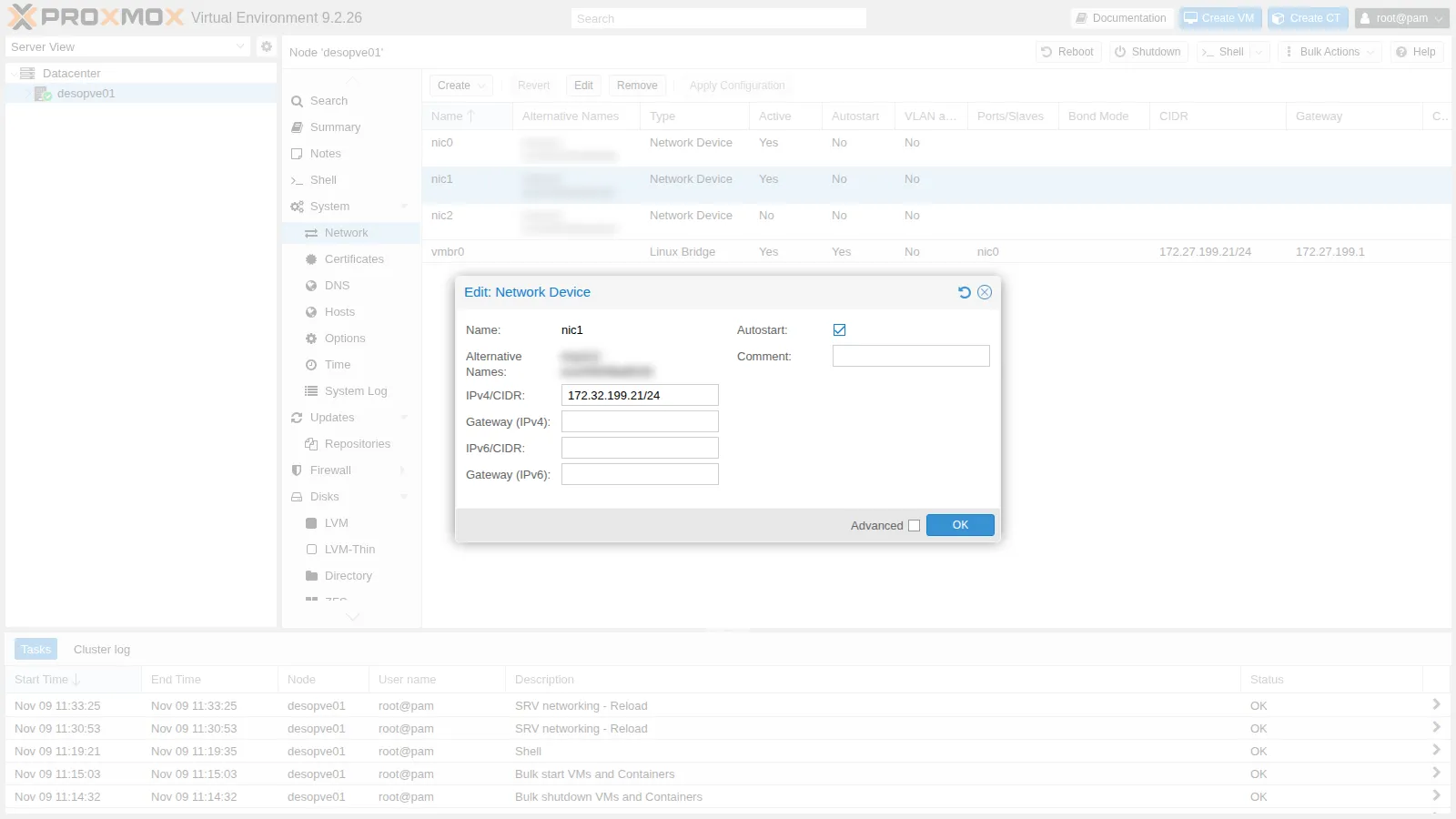
-
The change is not active yet: Proxmox VE has written it to
/etc/network/interfaces.newand shows at the bottom the differences from the file in use. Click Apply Configuration and confirm with Yes: the SRV networking - Reload task applies the configuration withifreloadwithout rebooting the node.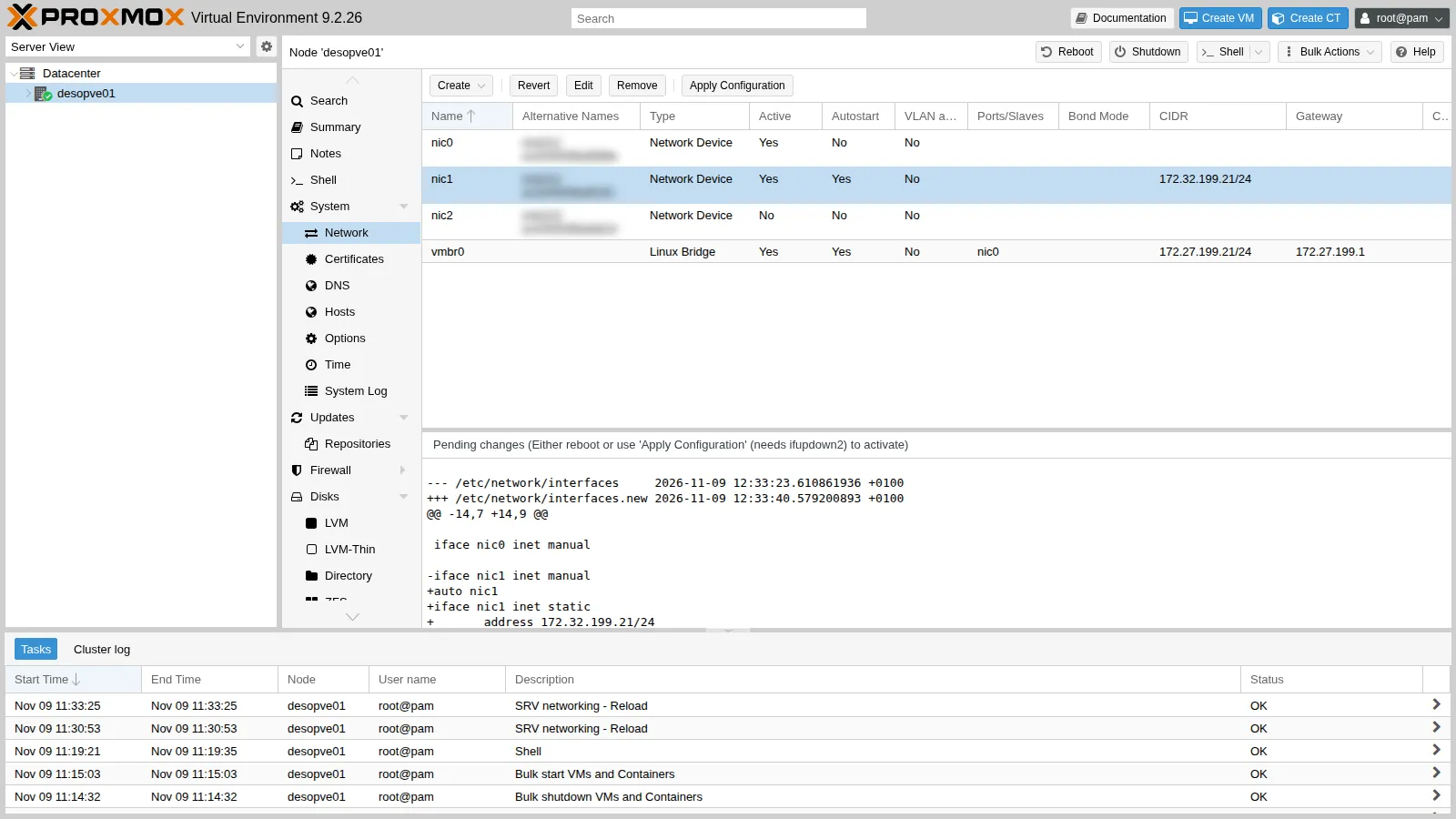
-
On the other three nodes, do the same with
pvesh: the first command stages the change, the second one applies it.root@desopve02 pvesh set /nodes/desopve02/network/nic1 --type eth --cidr 172.32.199.22/24 --autostart 1pvesh set /nodes/desopve02/networkOutput UPID:desopve02:00001497:0001C658:6AF1AFB3:srvreload:networking:root@pam:root@desopve02 ip -br -4 addr show nic1Output nic1 UP 172.32.199.22/24Repeat on
desopve03(172.32.199.23) anddesopve04(172.32.199.24). -
Check that the nodes can reach each other on the second network:
root@desopve01 for n in 22 23 24; do ping -c1 -W1 172.32.199.$n | grep "bytes from"; doneOutput 64 bytes from 172.32.199.22: icmp_seq=1 ttl=64 time=1.94 ms64 bytes from 172.32.199.23: icmp_seq=1 ttl=64 time=0.963 ms64 bytes from 172.32.199.24: icmp_seq=1 ttl=64 time=0.906 ms
2. Create the cluster
Section titled “2. Create the cluster”-
On
desopve01, go to Datacenter → Cluster and click Create Cluster. -
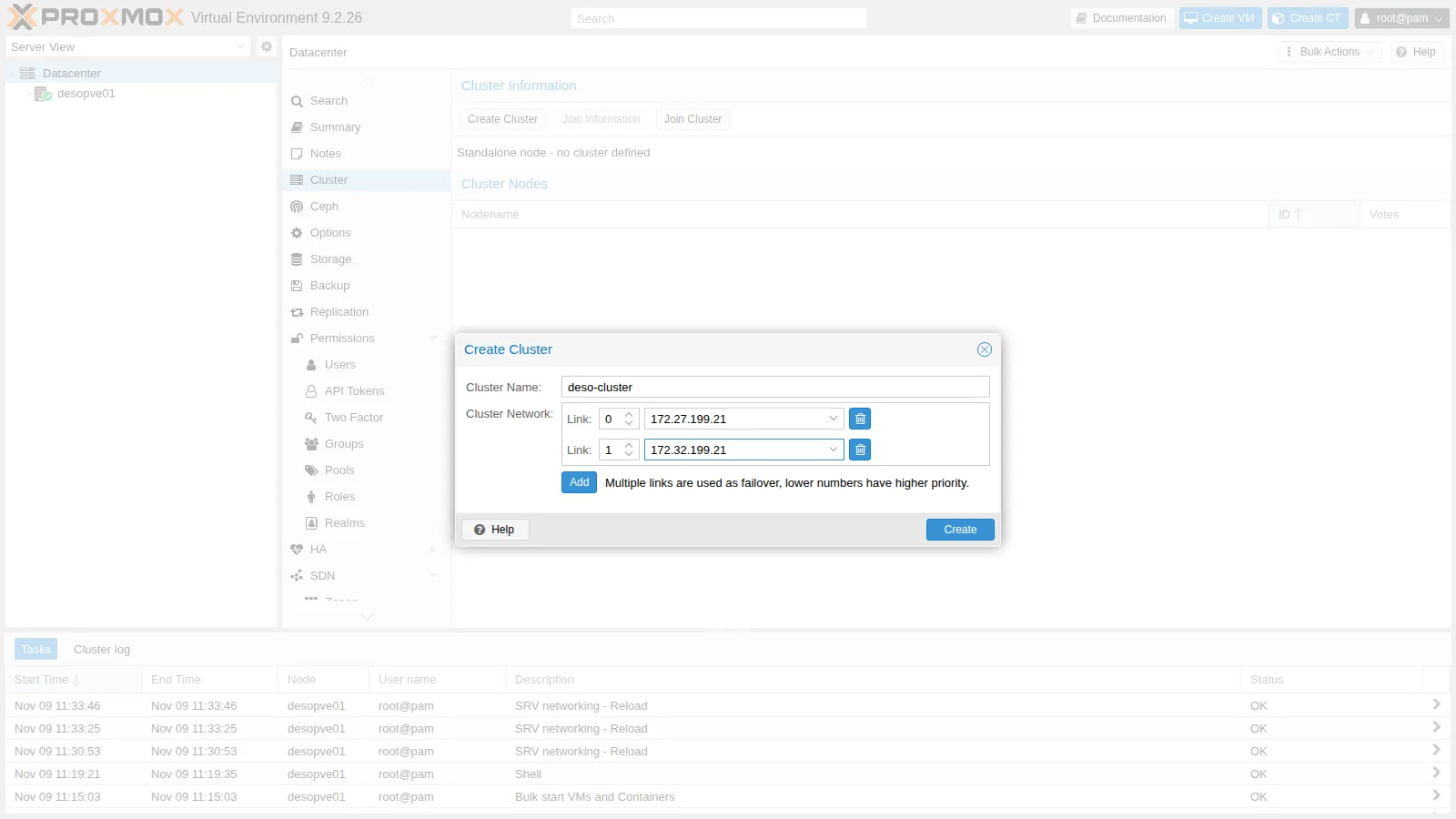
Fill in:
- Cluster Name:
deso-cluster. At most 15 characters, and it cannot be changed later; - Cluster Network – Link 0: choose
172.27.199.21from the list; - click Add and, for Link 1, choose
172.32.199.21.
The dialog reminds you of the link rule: all else being equal, the lowest number wins.
- Cluster Name:
-
Click Create. The task generates the Corosync authentication key (
/etc/corosync/authkey), writes/etc/pve/corosync.confand restarts Corosync and pmxcfs.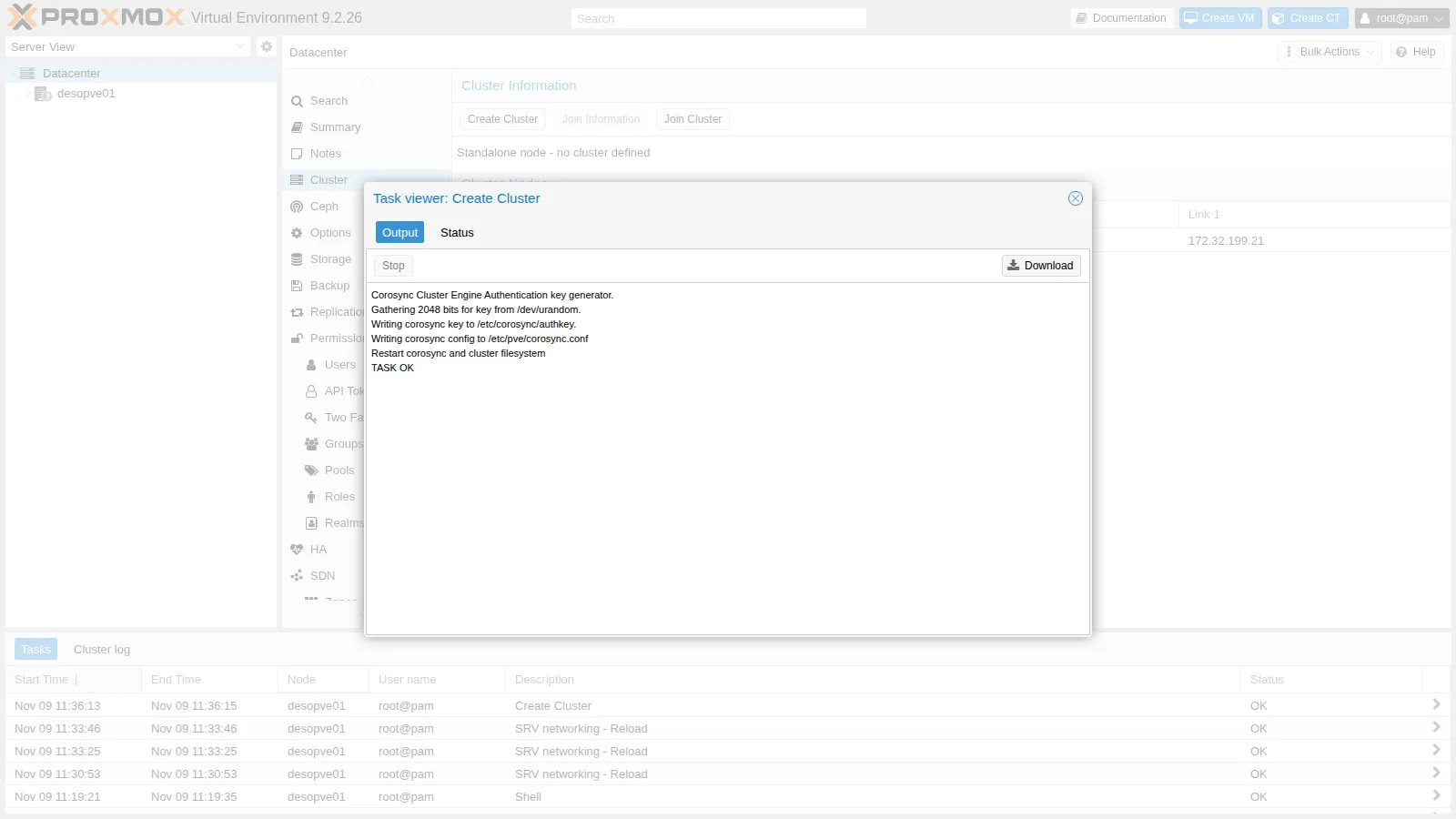
3. Add desopve02 from the web interface
Section titled “3. Add desopve02 from the web interface”-
On
desopve01, in Datacenter → Cluster, click Join Information. The dialog contains, encoded in a single string, the node address, the fingerprint of its certificate and the link configuration. Click Copy Information.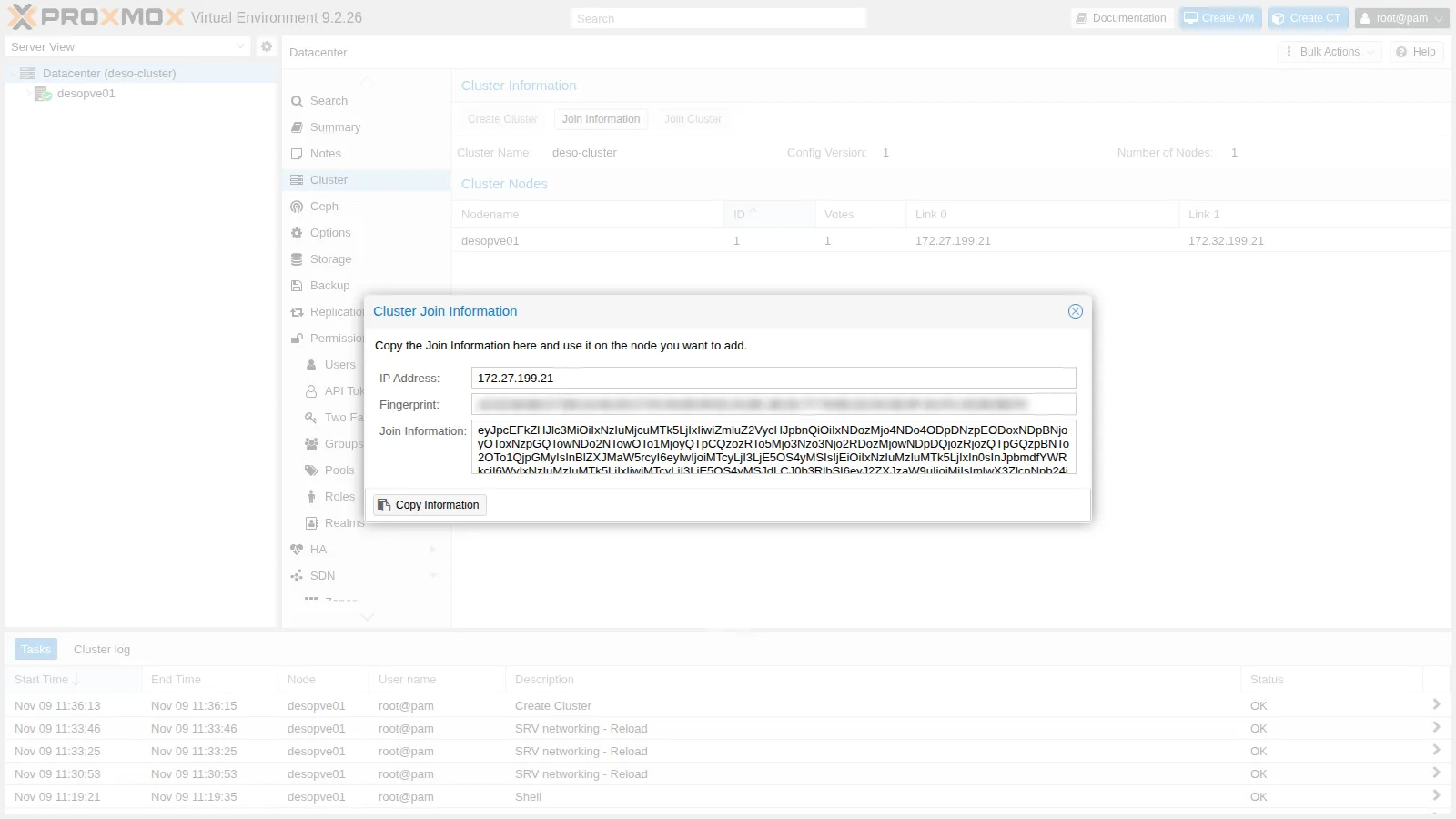
-
Log in to the web interface of
desopve02(https://desopve02.proxmox.community:8006) and go to Datacenter → Cluster → Join Cluster. -
Paste the string into Information: the address and the fingerprint fill in automatically. Enter the
rootpassword ofdesopve01and choose the local addresses ofdesopve02for the two links:172.27.199.22for link 0 and172.32.199.22for link 1.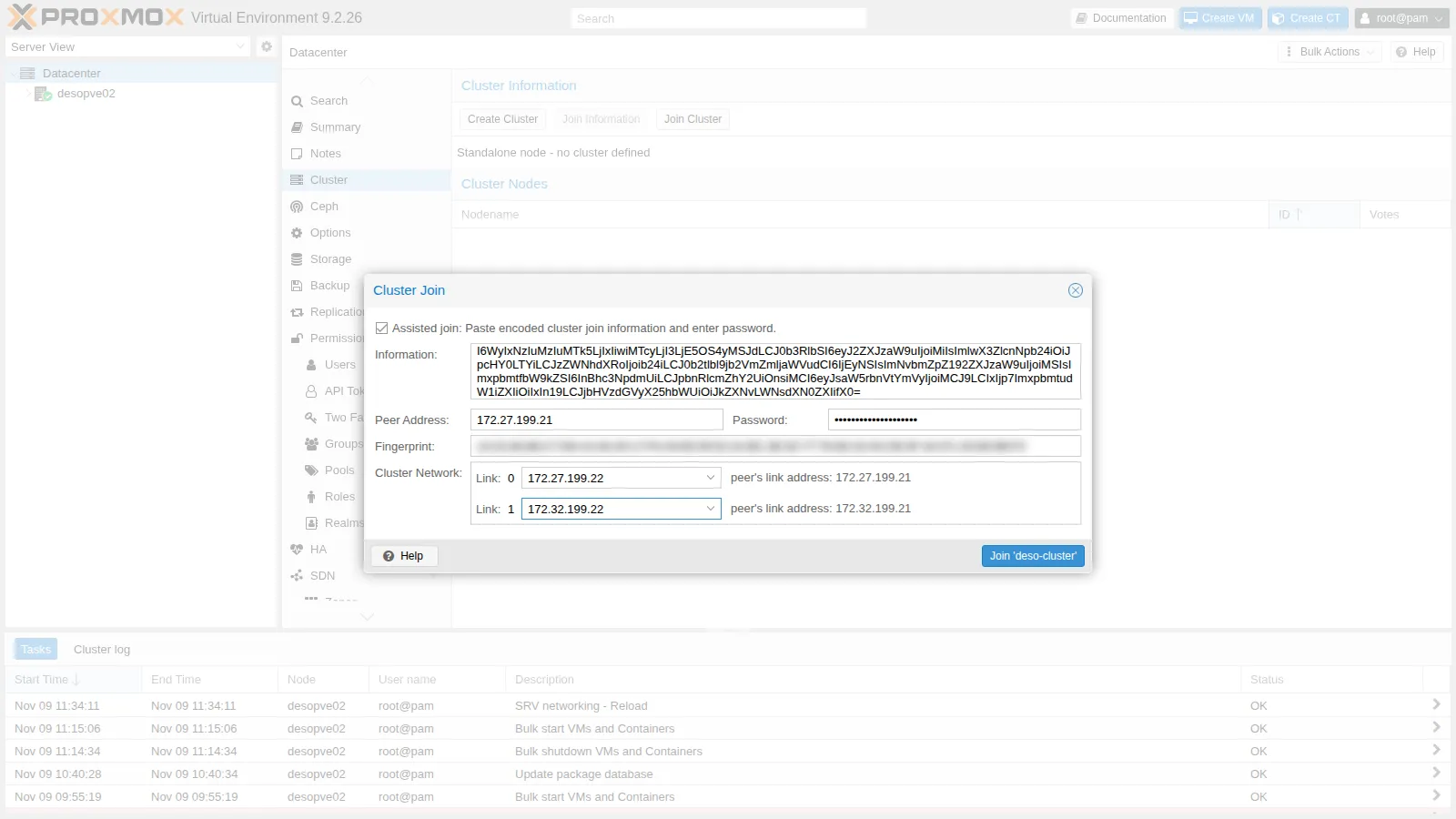
-
Click Join ‘deso-cluster’. During the join, the node receives a new certificate and restarts the web service, so the task window stops updating after Request addition of this node. This is normal: wait a few seconds, reload the page and log in again. The complete task log, in
desopve02→ Task History, is this:Establishing API connection with host '172.27.199.21'Login succeeded.check cluster join API versionRequest addition of this nodeJoin request OK, finishing setup locallystopping pve-cluster servicebackup old database to '/var/lib/pve-cluster/backup/config-1794224271.sql.gz'waiting for quorum...OK(re)generate node filesgenerate new node certificatemerge authorized SSH keysgenerated new node certificate, restart pveproxy and pvedaemon servicessuccessfully added node 'desopve02' to cluster.TASK OKNote two steps. The node backs up its old configuration (
backup old database) and replaces it with the cluster’s: this is why it must be empty. Then it merges the authorized SSH keys: the DC key, which you copied to each node in lab 05, is now in a single shared file.
4. Add desopve03 from the command line
Section titled “4. Add desopve03 from the command line”From the DC, connect over SSH to desopve03 (with the key from lab 05 you do not need the password) and use pvecm add. The first argument is a node that is already part of the cluster; --link0 and --link1 are the local addresses of the joining node. The command asks for the root password of the specified node and, on the first connection, shows its certificate fingerprint: compare it with the one in the Join Information and answer yes.
ssh root@desopve03.proxmox.communitypvecm add desopve01.proxmox.community --link0 172.27.199.23 --link1 172.32.199.23Please enter superuser (root) password for 'desopve01.proxmox.community': ********************Establishing API connection with host 'desopve01.proxmox.community'The authenticity of host 'desopve01.proxmox.community' can't be established.X509 SHA256 key fingerprint is 14:32:84:88:C7:D8:14:A6:29:17:FA:04:65:09:52:2A:BC:3E:92:77:76:6D:32:04:CB:3F:3A:FC:A5:69:5B:F3.Are you sure you want to continue connecting (yes/no)? yesLogin succeeded.check cluster join API versionRequest addition of this nodeJoin request OK, finishing setup locallystopping pve-cluster servicebackup old database to '/var/lib/pve-cluster/backup/config-1794224432.sql.gz'waiting for quorum...OK(re)generate node filesgenerate new node certificatemerge authorized SSH keysgenerated new node certificate, restart pveproxy and pvedaemon servicessuccessfully added node 'desopve03' to cluster.5. The cluster in the web interface
Section titled “5. The cluster in the web interface”-
Reload the
desopve01interface: the tree now shows Datacenter (deso-cluster) with three nodes. In Datacenter → Cluster you see the nodes, their IDs, votes and the addresses of the two links.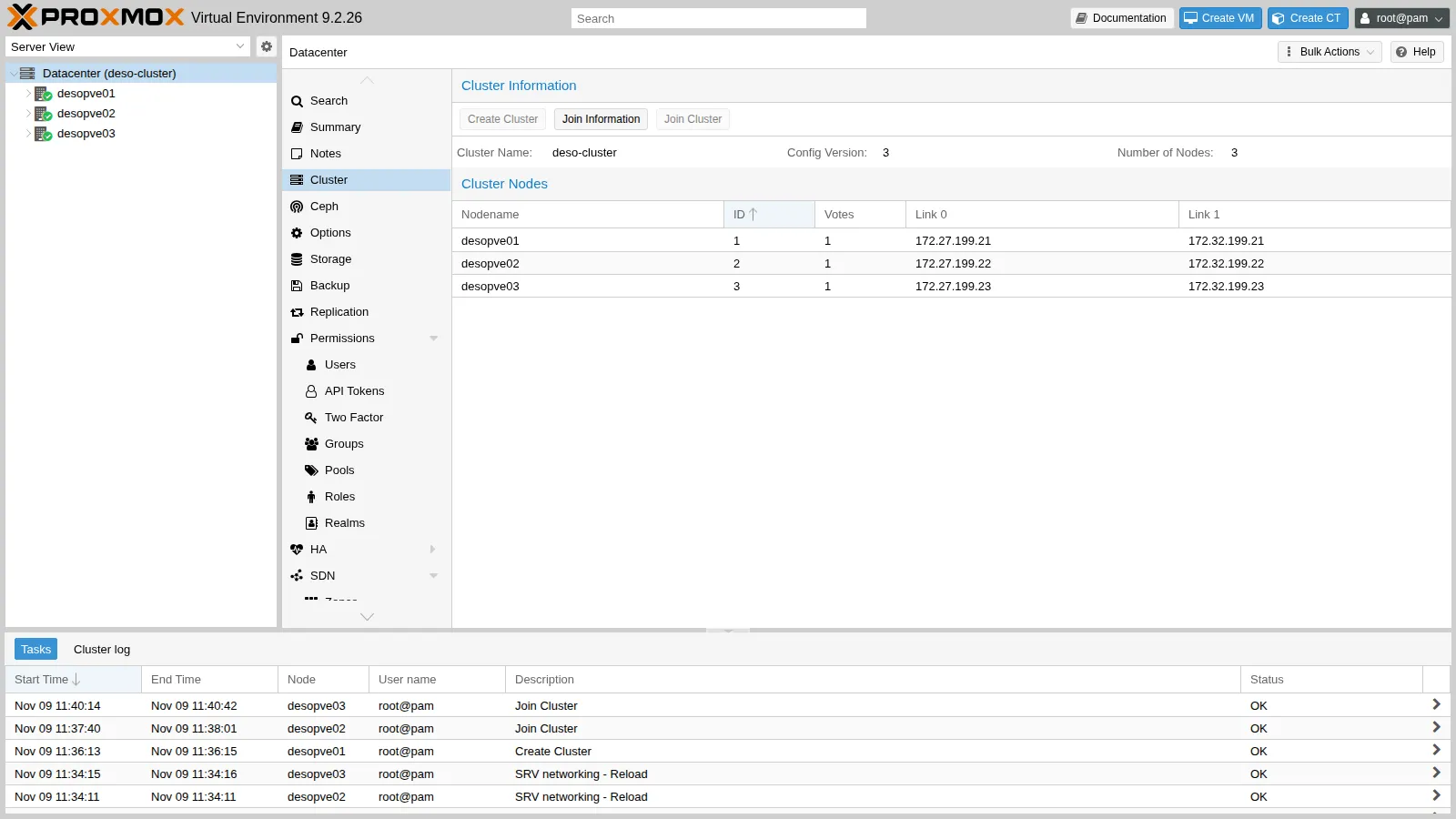
-
Datacenter → Summary summarizes the status: Cluster: deso-cluster, Quorate: Yes, three nodes online.
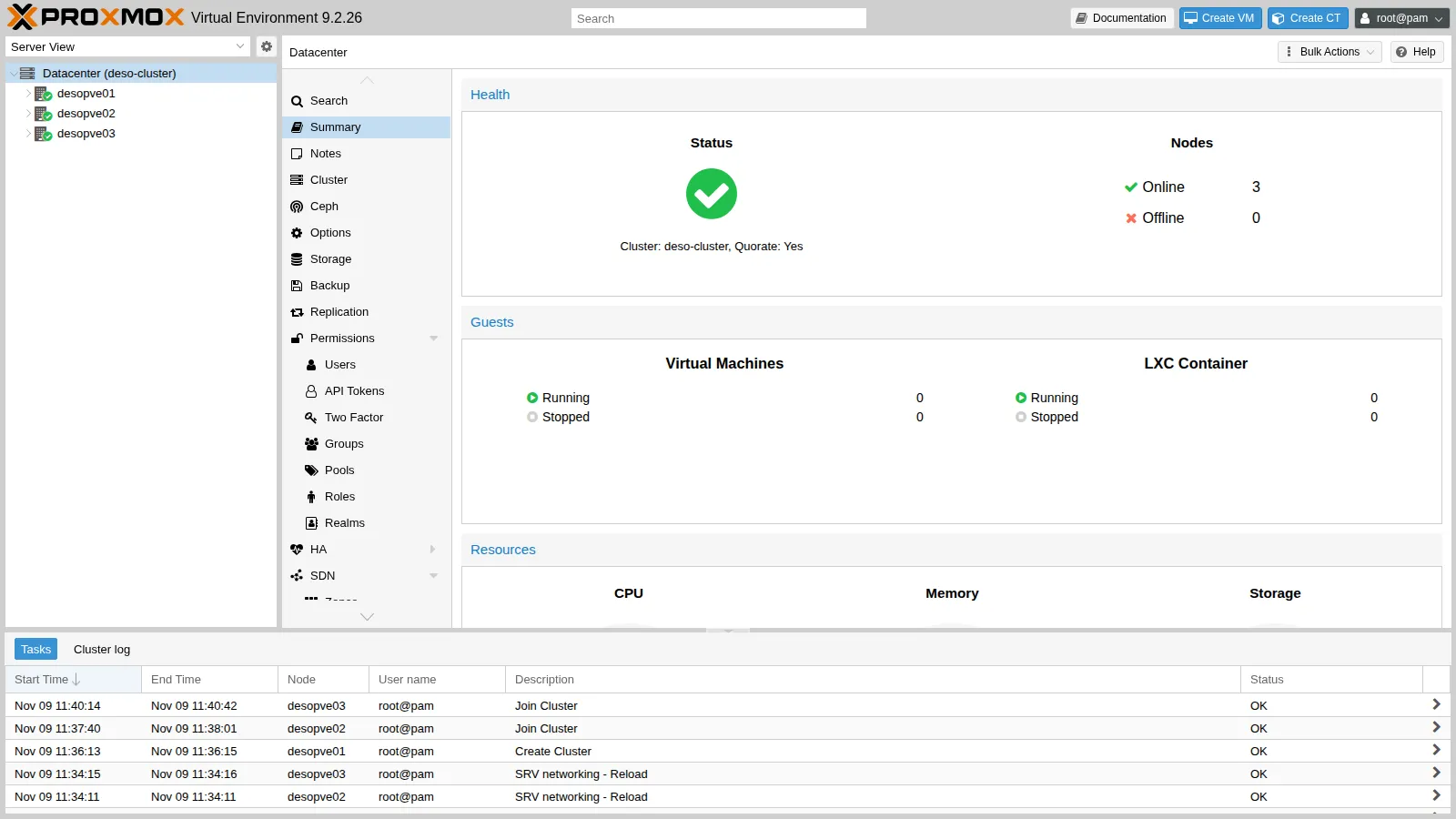
From now on you can manage all three nodes by logging in to the interface of any one of them.
6. Diagnostics from the command line
Section titled “6. Diagnostics from the command line”-
pvecm statusis the first command to run when in doubt. CheckQuorate: Yesand the ratio between Total votes and Quorum:root@desopve01 pvecm statusOutput Cluster information-------------------Name: deso-clusterConfig Version: 3Transport: knetSecure auth: onQuorum information------------------Date: Mon Nov 9 12:41:44 2026Quorum provider: corosync_votequorumNodes: 3Node ID: 0x00000001Ring ID: 1.dQuorate: YesVotequorum information----------------------Expected votes: 3Highest expected: 3Total votes: 3Quorum: 2Flags: QuorateMembership information----------------------Nodeid Votes Name0x00000001 1 172.27.199.21 (local)0x00000002 1 172.27.199.220x00000003 1 172.27.199.23 -
pvecm nodeslists the nodes by name:root@desopve01 pvecm nodesOutput Membership information----------------------Nodeid Votes Name1 1 desopve01 (local)2 1 desopve023 1 desopve03 -
corosync-cfgtool -sshows the status of each link to each node:root@desopve01 corosync-cfgtool -sOutput Local node ID 1, transport knetLINK ID 0 udpaddr = 172.27.199.21status:nodeid: 1: localhostnodeid: 2: connectednodeid: 3: connectedLINK ID 1 udpaddr = 172.32.199.21status:nodeid: 1: localhostnodeid: 2: connectednodeid: 3: connected -
The Corosync configuration is in
/etc/pve/corosync.conf: for each node one address per link (ring0_addr,ring1_addr), and intotemthe cluster name, thepassivelink mode and encrypted authentication (secauth). Edit it only with great care, incrementingconfig_version: a mistake can stop the entire cluster.root@desopve01 cat /etc/pve/corosync.confOutput logging {debug: offto_syslog: yes}nodelist {node {name: desopve01nodeid: 1quorum_votes: 1ring0_addr: 172.27.199.21ring1_addr: 172.32.199.21}node {name: desopve02nodeid: 2quorum_votes: 1ring0_addr: 172.27.199.22ring1_addr: 172.32.199.22}node {name: desopve03nodeid: 3quorum_votes: 1ring0_addr: 172.27.199.23ring1_addr: 172.32.199.23}}quorum {provider: corosync_votequorum}totem {cluster_name: deso-clusterconfig_version: 3interface {linknumber: 0}interface {linknumber: 1}ip_version: ipv4-6link_mode: passivesecauth: ontoken_coefficient: 125version: 2} -
In
/etc/pveeach node has its own directory, and.membersshows the pmxcfs view. The authorized SSH keys are now also a single shared file, with therootkey of each node and the DC key:root@desopve01 ls /etc/pve/nodesOutput desopve01desopve02desopve03root@desopve01 cat /etc/pve/.membersOutput {"nodename": "desopve01","version": 9,"cluster": { "name": "deso-cluster", "version": 3, "nodes": 3, "quorate": 1 },"nodelist": {"desopve01": { "id": 1, "online": 1, "ip": "172.27.199.21"},"desopve02": { "id": 2, "online": 1, "ip": "172.27.199.22"},"desopve03": { "id": 3, "online": 1, "ip": "172.27.199.23"}}}root@desopve01 cut -d" " -f1,3 /etc/pve/priv/authorized_keysOutput ssh-rsa root@desopve01ssh-ed25519 [email protected]ssh-rsa root@desopve02ssh-rsa root@desopve03
Verification and tests
Section titled “Verification and tests”Test 1 – Link 1 goes down
Section titled “Test 1 – Link 1 goes down”Bring down nic1 on desopve03, which loses the 172.32.199.0/24 network:
ip link set nic1 downOn desopve01, link 1 to node 3 shows as disconnected, but the cluster stays Quorate with three votes, because link 0 still works:
corosync-cfgtool -sLocal node ID 1, transport knetLINK ID 0 udp addr = 172.27.199.21 status: nodeid: 1: localhost nodeid: 2: connected nodeid: 3: connectedLINK ID 1 udp addr = 172.32.199.21 status: nodeid: 1: localhost nodeid: 2: connected nodeid: 3: disconnectedpvecm status | grep -E "^Quorate|Total votes"Quorate: YesTotal votes: 3journalctl -u corosync --since "-30 sec" --no-hostname | tail -2Nov 09 12:41:51 corosync[6048]: [KNET ] link: host: 3 link: 1 is downNov 09 12:41:51 corosync[6048]: [KNET ] host: host: 3 (passive) best link: 0 (pri: 1)Bring the card back up (ip link set nic1 up): after a few seconds the link is connected again.
Test 2 – The management network goes down
Section titled “Test 2 – The management network goes down”Now take down link 0, the management network. Bring down nic0 on desopve03, the port of the vmbr0 bridge. An SSH session open on 172.27.199.23 would be cut off, so run the command from desopve01 by connecting to the address on the second network. It is the first SSH connection to that address: accept-new saves its key without asking for confirmation.
Warning: Permanently added '172.32.199.23' (ED25519) to the list of known hosts.desopve03 no longer responds on the management network, but stays in the cluster: Corosync has switched to link 1 by itself.
ping -c1 -W1 172.27.199.23 | grep loss1 packets transmitted, 0 received, 100% packet loss, time 0mspvecm status | grep -E "^Quorate|Total votes"Quorate: YesTotal votes: 3journalctl -u corosync --since "-25 sec" --no-hostname | tail -2Nov 09 12:44:52 corosync[6048]: [KNET ] link: host: 3 link: 0 is downNov 09 12:44:52 corosync[6048]: [KNET ] host: host: 3 (passive) best link: 1 (pri: 1)Bring the card back up: Corosync returns to the preferred link, link 0.
journalctl -u corosync --since "-12 sec" --no-hostname | tail -2Nov 09 12:45:05 corosync[6048]: [KNET ] host: host: 3 (passive) best link: 0 (pri: 1)Nov 09 12:45:05 corosync[6048]: [KNET ] pmtud: Global data MTU changed to: 1397Test 3 – A node loses quorum
Section titled “Test 3 – A node loses quorum”Stop Corosync on desopve03, as if the node were isolated from both networks:
systemctl stop corosyncThe other two nodes have 2 votes out of 3, that is, the quorum: the cluster keeps working.
pvecm status | sed -n "/Votequorum/,\$p"Votequorum information----------------------Expected votes: 3Highest expected: 3Total votes: 2Quorum: 2Flags: Quorate
Membership information---------------------- Nodeid Votes Name0x00000001 1 172.27.199.21 (local)0x00000002 1 172.27.199.22The isolated node, on the other hand, can no longer modify the shared configuration: /etc/pve is read-only.
touch /etc/pve/prova.txttouch: cannot touch '/etc/pve/prova.txt': Permission deniedStart Corosync again (systemctl start corosync): the node rejoins, you are back to three votes and /etc/pve is writable again.
systemctl start corosyncpvecm status | grep -E "^Quorate|Total votes"Quorate: YesTotal votes: 3touch /etc/pve/prova.txt && echo scrittura-ok && rm /etc/pve/prova.txtscrittura-ok-
pvecm statuson any node:Quorate: Yes,Total votes: 3. -
corosync-cfgtool -s: link 0 and link 1connectedto all nodes. - The web interface of a node shows all three nodes with a green status.
Final lab state
Section titled “Final lab state”- Cluster
deso-clusterwithdesopve01(ID 1),desopve02(ID 2) anddesopve03(ID 3), one vote each, quorum 2. - Corosync on two links: link 0
172.27.199.0/24(vmbr0), link 1172.32.199.0/24(nic1). nic1configured on all four nodes (172.32.199.21-.24).desopve04remains a standalone node, outside the cluster.- Authorized SSH keys shared among the cluster nodes in
/etc/pve/priv/authorized_keys.
What you learned
Section titled “What you learned”- The role of Corosync, quorum and pmxcfs, and why a node without quorum makes
/etc/pveread-only. - Why a cluster should have an odd number of votes, and when you need a QDevice.
- How to create a cluster and add nodes from the web interface and with
pvecm add. - How to read the cluster status with
pvecm statusandcorosync-cfgtool -s. - That a second link keeps the cluster running when a network goes down.