

Lab 44 – Users, groups, roles, pools and API tokens
Dependencies
Section titled “Dependencies”- Previous labs:
- Systems: nodes
desopve01-03, DCdesopve-dc01. The API tests run withcurlfrom a machine on the management network. - Credentials:
root@pam; the domain usersmario.rossi,laura.bianchiandpaolo.verdi, all with<lab-password>→ Appendix B.
Objectives
Section titled “Objectives”- Understand the Proxmox VE permission model: privileges, roles, paths and ACLs.
- Create a custom role and a resource pool.
- Grant permissions to the groups synced from AD and check with a real login what each user sees.
- Read a user’s effective permissions, from the GUI and from the CLI.
- Understand propagation and the SDN.Use permission on bridges.
- Tell apart users of the pve and pam realms.
- Create and use an API token with privilege separation, then revoke it the right way.
How it works
Section titled “How it works”Privileges and roles. A privilege is the right to do one specific thing, for example VM.PowerMgmt (start and stop a VM) or Datastore.AllocateSpace (write to a storage). A role is a named set of privileges. Proxmox VE ships about twenty built-in roles; the most commonly used are:
| Role | What it allows |
|---|---|
Administrator |
everything |
PVEAdmin |
almost everything, except system and permission management |
PVEVMAdmin |
full VM management: creation, configuration, migration |
PVEVMUser |
VM usage: console, start and stop, backup, CD-ROM, cloud-init |
PVEDatastoreUser |
space on storages and reading their content |
PVESDNUser |
use of networks (bridges and VNets) |
PVEAuditor |
read-only access to everything |
NoAccess |
no access, useful to shut a user out of a branch |
Paths and ACLs. Every object has a path: / (the whole datacenter), /nodes/<nodo>, /vms/<vmid>, /storage/<storage>, /pool/<pool>, /sdn/zones/<zona>/<vnet>[/<vlan>]. An ACL states: on this path, this user, group or token has this role. With propagate enabled, the ACL also applies to the child paths (/ applies to everything, /vms to all VMs).
Resource pools. A pool groups VMs, containers and storages. An ACL on /pool/<pool> applies to all its members: it is the simplest way to give a group of people “their own” machines.
SDN.Use. To connect a network device to a bridge, whoever configures the VM needs SDN.Use on that bridge. Classic Linux bridges have a path too: /sdn/zones/localnetwork/<bridge>, with a sub-entry for each VLAN.
The pve and pam realms. For users of the pve realm, Proxmox VE stores the password in the cluster file system, so these users work on all nodes. pam users are Linux users: Proxmox VE checks the password against the operating system of the node you log in to, so the Linux user must exist on every node.
API tokens. A token is a credential for scripts and automation, with a secret that does not expire by default (you can set an expiration date with --expire) and is not subject to 2FA. With privilege separation (recommended), the token has its own ACLs and its effective permissions are the intersection of the token’s ACLs and the user’s: a token can never do more than its user.
flowchart LR
  G1[AD group<br/>pve-admins] -->|Administrator on /| R[(Datacenter)]
  G3[AD group<br/>pve-auditors] -->|PVEAuditor on /| R
  G2[AD group<br/>pve-operators] -->|PVEVMUser + PVEDatastoreUser<br/>+ OperatoreRete on /pool/web| P[web pool<br/>VMs 104-106, nas-nfs]
  G2 -->|PVESDNUser| B["/sdn/zones/localnetwork/vmbr1"]
  U["automazione@pve"] -->|PVEVMUser on /pool/web| P
  T["token automazione@pve!ci"] -->|∩ with the user's ACLs| P
Procedure
Section titled “Procedure”1. The built-in roles
Section titled “1. The built-in roles”From the CLI of a node, the list of roles (in the GUI: Datacenter → Permissions → Roles):
pveum role list --noborder 1 | awk '{print $1, $NF}'roleid specialAdministrator 1NoAccess 1PVEAdmin 1PVEAuditor 1PVEDatastoreAdmin 1PVEDatastoreUser 1PVEMappingAdmin 1PVEMappingUser 1PVEPoolAdmin 1PVEPoolUser 1PVESDNAdmin 1PVESDNUser 1PVESysAdmin 1PVETemplateUser 1PVEUserAdmin 1PVEVMAdmin 1PVEVMUser 1special 1 marks the built-in roles, which cannot be modified. The privileges of some of them:
PVEAuditor Datastore.Audit,Mapping.Audit,Pool.Audit,SDN.Audit,Sys.Audit,VM.Audit,VM.GuestAgent.AuditPVEDatastoreUser Datastore.AllocateSpace,Datastore.AuditPVESDNUser SDN.Audit,SDN.UsePVEVMUser VM.Audit,VM.Backup,VM.Config.CDROM,VM.Config.Cloudinit,VM.Console,VM.GuestAgent.Audit,VM.GuestAgent.FileRead,VM.GuestAgent.FileSystemMgmt,VM.GuestAgent.FileWrite,VM.PowerMgmtPVEVMUser can start and stop a VM, but cannot change its hardware configuration: for example, it does not have VM.Config.Network.
2. A custom role
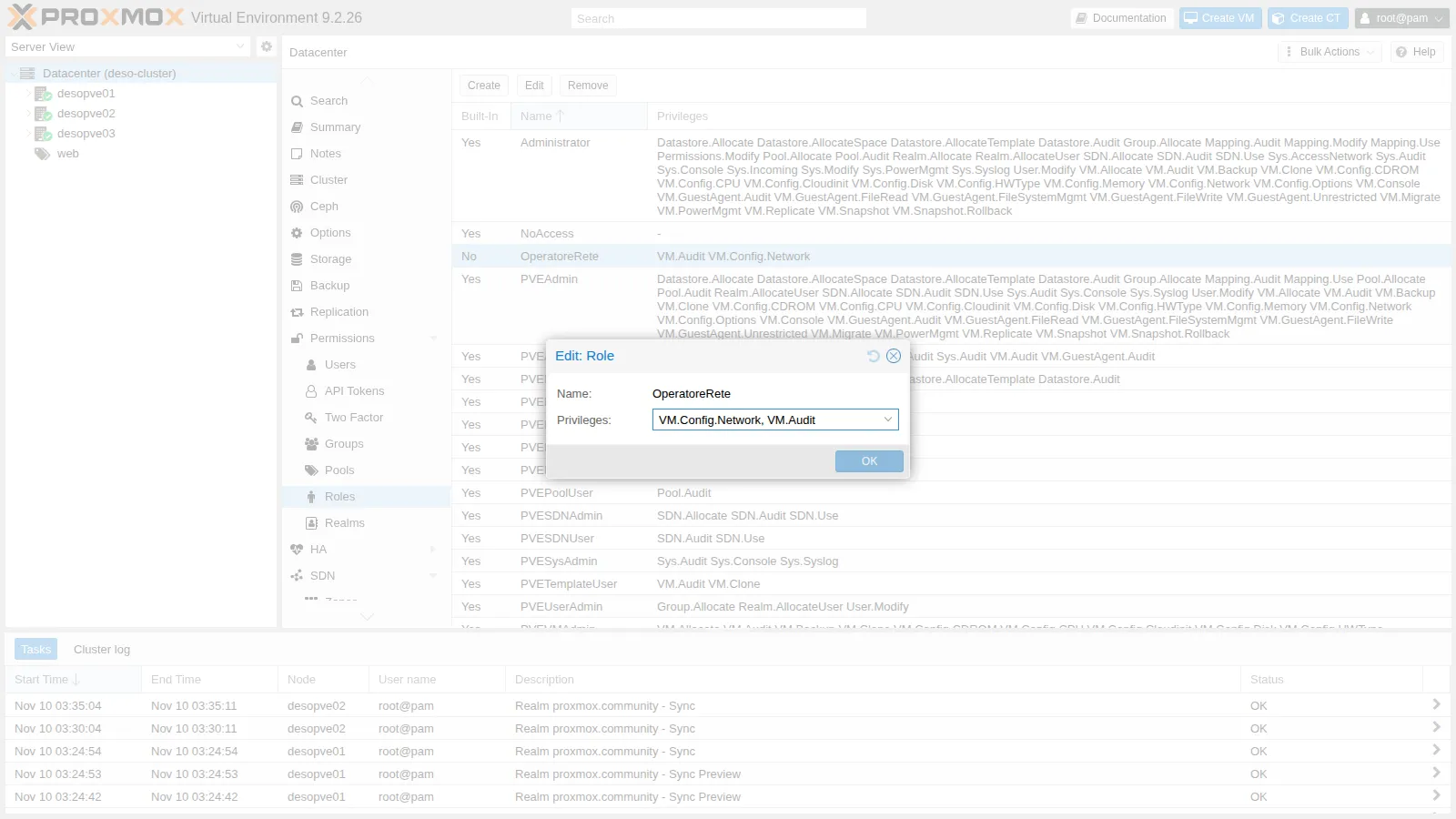
Section titled “2. A custom role”We want the operators to be able to manage the network devices of their VMs as well. Let’s create the OperatoreRete role with only the privileges it needs:
pveum role add OperatoreRete --privs "VM.Audit,VM.Config.Network"In the GUI: Datacenter → Permissions → Roles → Create. The role appears in the list with Built-In = No:
3. The web resource pool
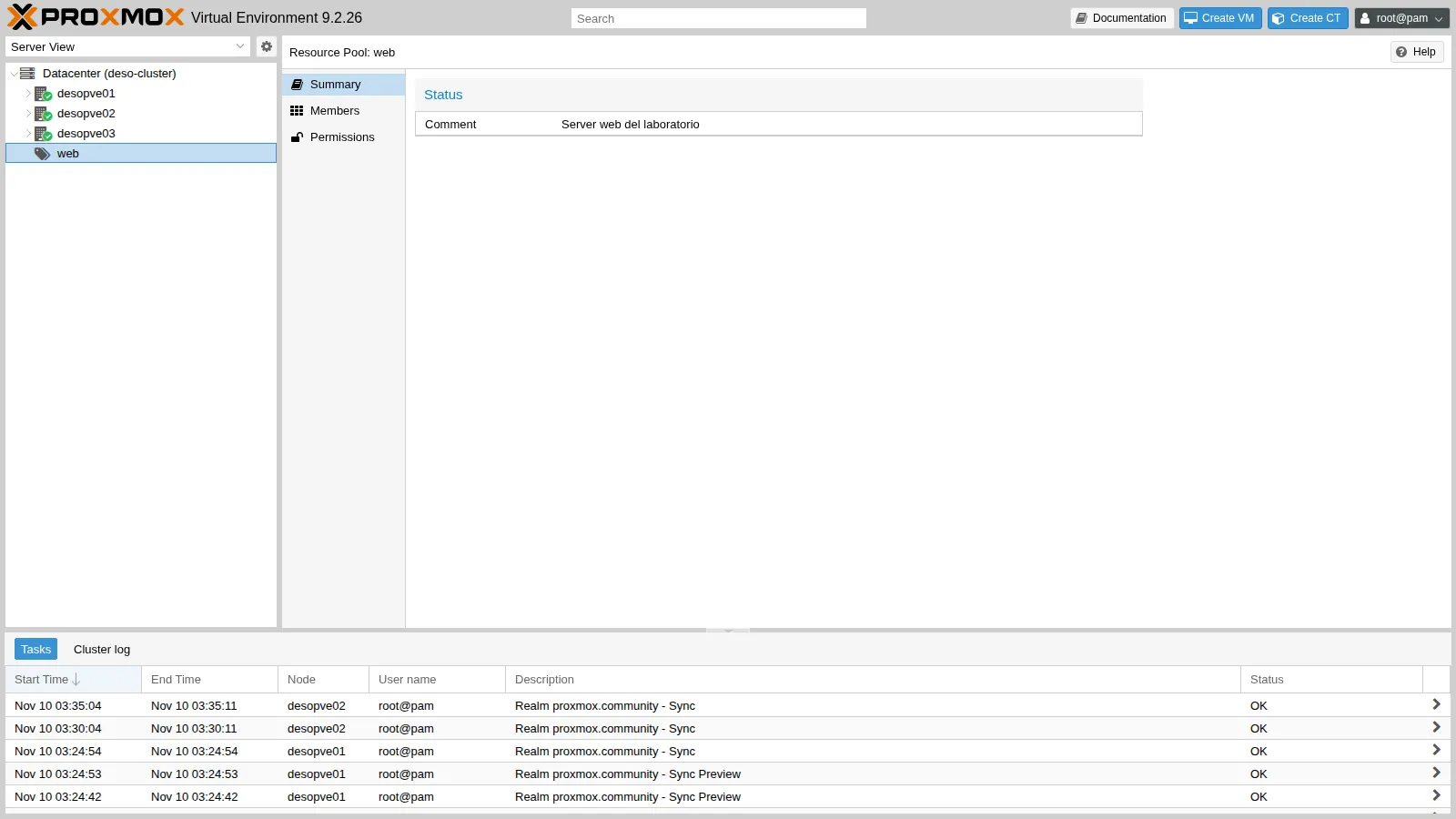
Section titled “3. The web resource pool”Let’s add the three web VMs and the nas-nfs storage to the pool:
pveum pool add web --comment "Server web del laboratorio"pveum pool modify web --vms 104,105,106 --storage nas-nfspvesh get /pools/web --output-format json | python3 -c 'import sys, jsonp = json.load(sys.stdin); print(p["comment"])for m in p["members"]: print(m["type"], m.get("vmid", ""), m.get("name", m.get("storage")), m["node"])'Server web del laboratorioqemu 104 web01 desopve01qemu 105 web02 desopve02qemu 106 web03 desopve03storage nas-nfs desopve01In the GUI, you create the pool from Datacenter → Permissions → Pools → Create, and you add the members by selecting the pool in the tree, Members tab:
4. Permissions for the domain groups
Section titled “4. Permissions for the domain groups”Let’s assign the roles to the three groups synced in Lab 43. The group IDs carry the realm suffix (-proxmox.community).
The first three from the CLI:
pveum acl modify / --groups pve-auditors-proxmox.community --roles PVEAuditorpveum acl modify /pool/web --groups pve-operators-proxmox.community --roles PVEVMUser,PVEDatastoreUserpveum acl modify /pool/web --groups pve-operators-proxmox.community --roles OperatoreRetepveum acl list┌───────────┬──────────────────┬───────┬─────────────────────────────────┬───────────┐│ path │ roleid │ type │ ugid │ propagate │╞═══════════╪══════════════════╪═══════╪═════════════════════════════════╪═══════════╡│ / │ PVEAuditor │ group │ pve-auditors-proxmox.community │ 1 │├───────────┼──────────────────┼───────┼─────────────────────────────────┼───────────┤│ /pool/web │ PVEDatastoreUser │ group │ pve-operators-proxmox.community │ 1 │├───────────┼──────────────────┼───────┼─────────────────────────────────┼───────────┤│ /pool/web │ PVEVMUser │ group │ pve-operators-proxmox.community │ 1 │├───────────┼──────────────────┼───────┼─────────────────────────────────┼───────────┤│ /pool/web │ OperatoreRete │ group │ pve-operators-proxmox.community │ 1 │└───────────┴──────────────────┴───────┴─────────────────────────────────┴───────────┘The fourth from the GUI: Datacenter → Permissions → Add → Group Permission, path /, group pve-admins-proxmox.community, role Administrator, Propagate enabled:
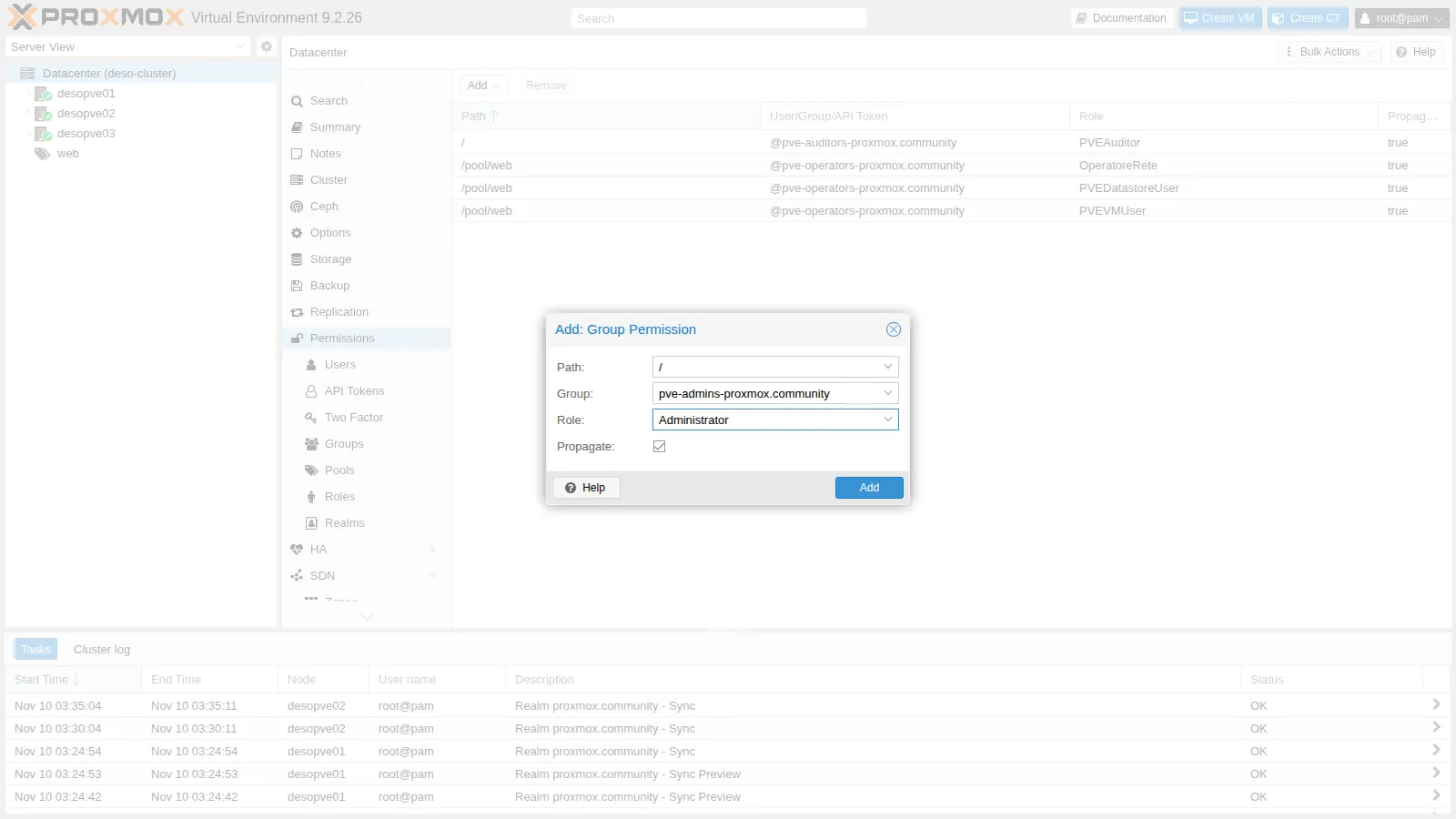
Now pveum acl list shows five rows: the four above plus / │ Administrator │ group │ pve-admins-proxmox.community.
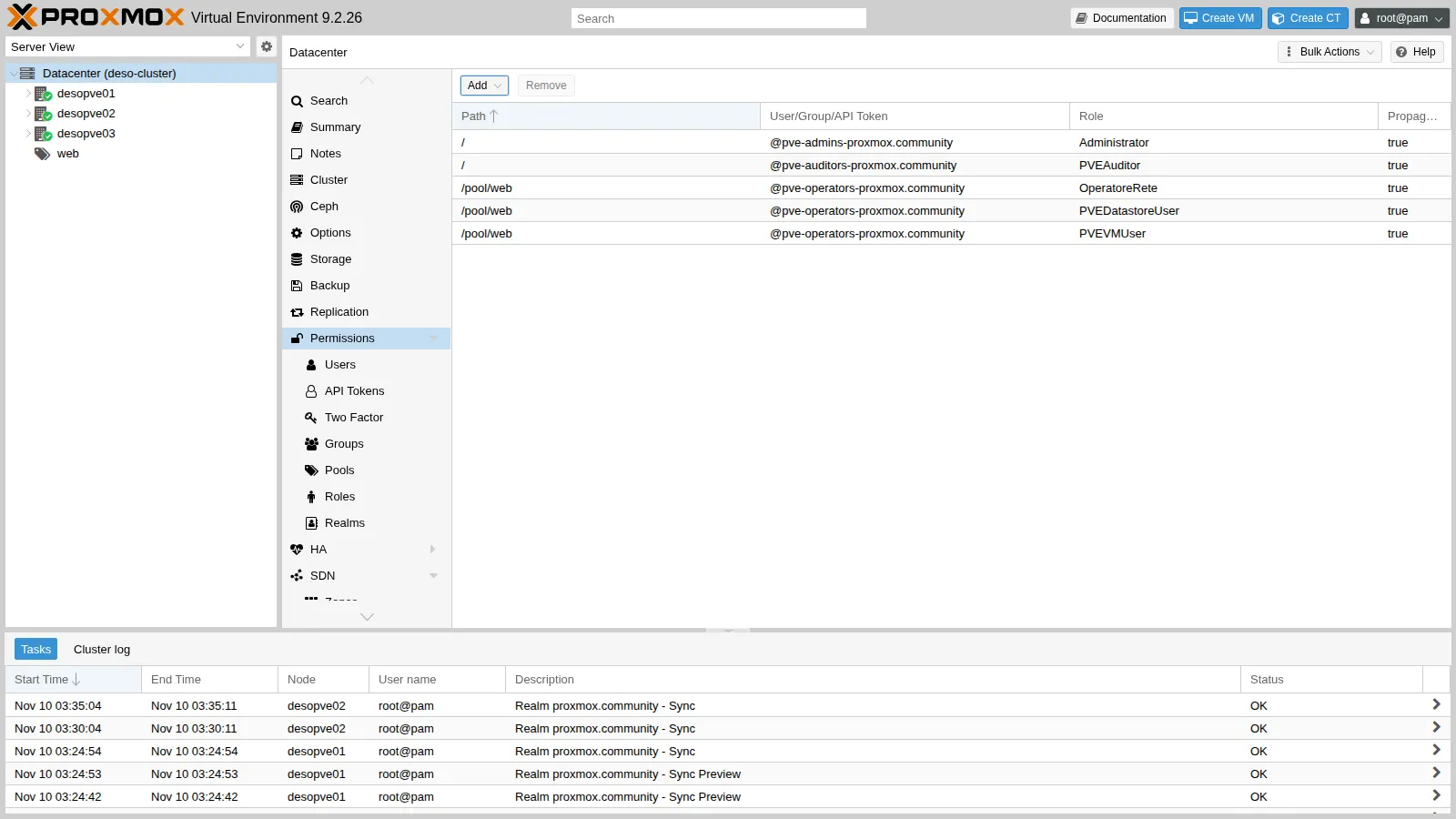
The complete list in Datacenter → Permissions:
5. Effective permissions
Section titled “5. Effective permissions”To find out what a user can actually do on an object, you ask Proxmox VE to compute the effective permissions, which combine all the ACLs, both direct and group ones:
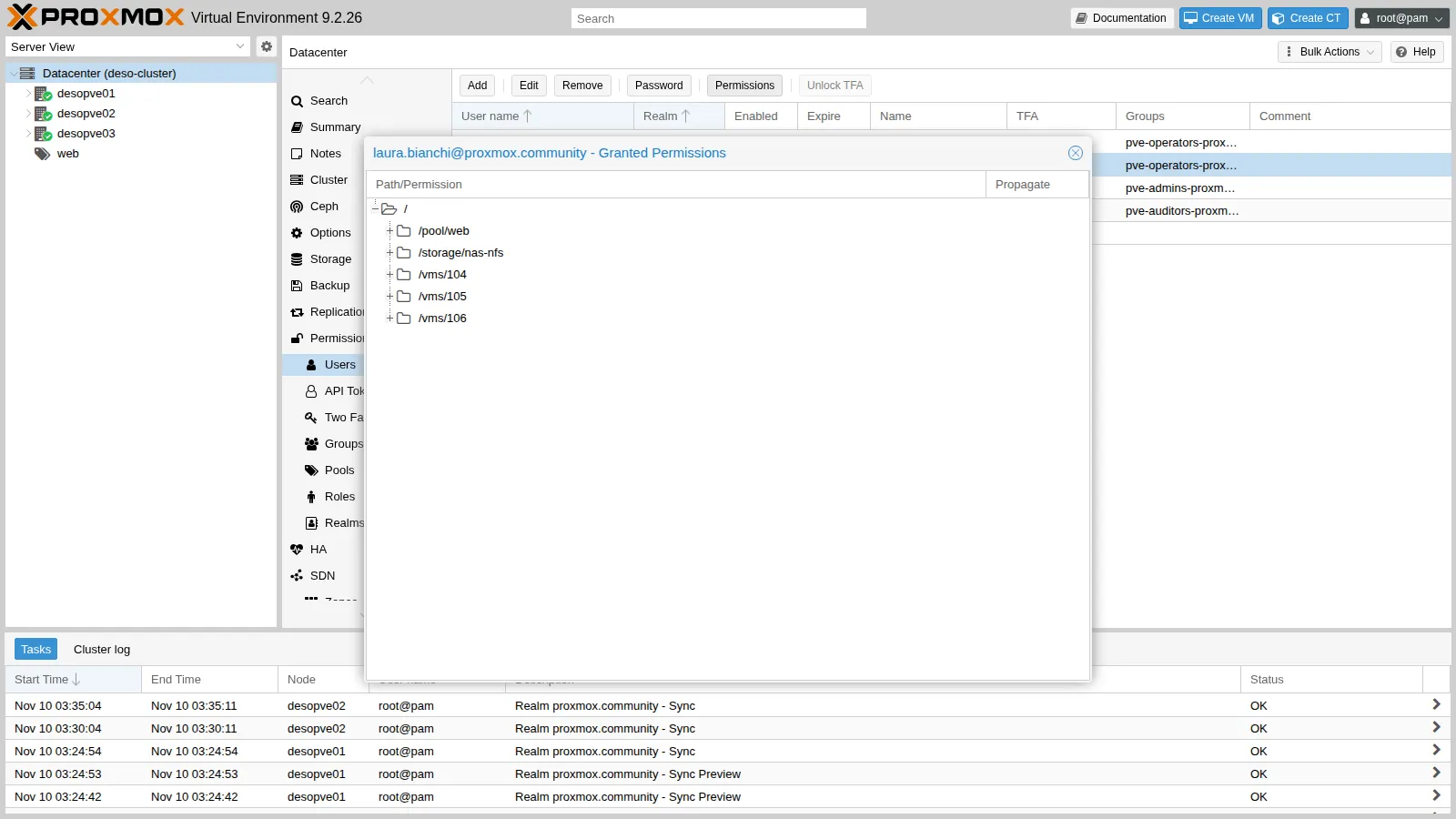
┌──────────┬──────────────────────────────┐│ ACL path │ Permissions │╞══════════╪══════════════════════════════╡│ /vms/104 │ Datastore.AllocateSpace ││ │ Datastore.Audit ││ │ VM.Audit ││ │ VM.Backup ││ │ VM.Config.CDROM ││ │ VM.Config.Cloudinit ││ │ VM.Config.Network ││ │ VM.Console ││ │ VM.GuestAgent.Audit ││ │ VM.GuestAgent.FileRead ││ │ VM.GuestAgent.FileSystemMgmt ││ │ VM.GuestAgent.FileWrite ││ │ VM.PowerMgmt │└──────────┴──────────────────────────────┘┌──────────┬─────────────┐│ ACL path │ Permissions │╞══════════╪═════════════╡│ /vms/100 │ │└──────────┴─────────────┘On VM 104, which is in the pool, Laura has the sum of the three roles; on VM 100, outside the pool, she has nothing. In the GUI: Datacenter → Permissions → Users, select the user and click Permissions:
6. What each user sees: real logins
Section titled “6. What each user sees: real logins”Let’s log in to the GUI as the three domain users, choosing the Active Directory realm in the login window.
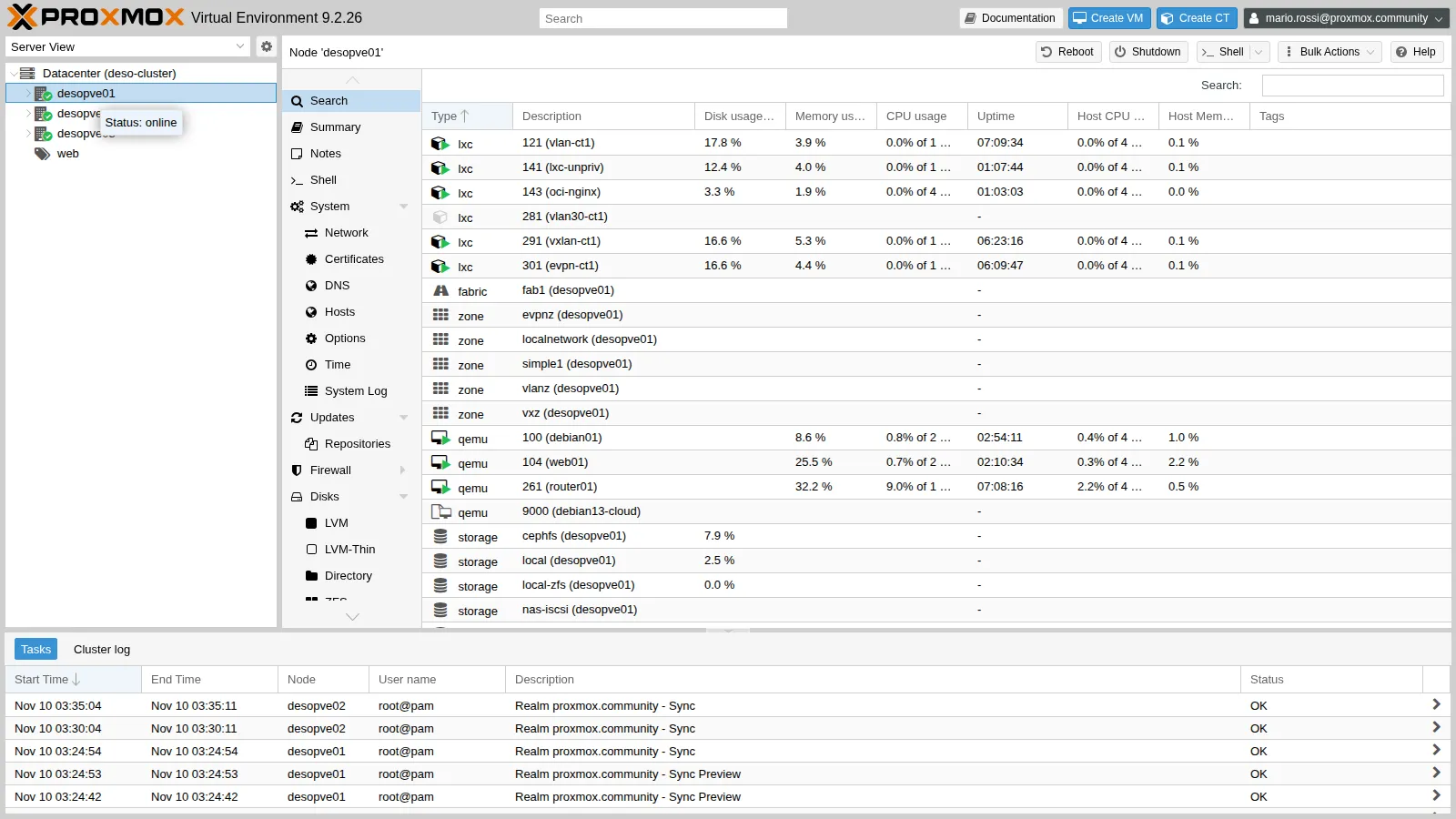
Mario Rossi (pve-admins) sees everything and can do everything:
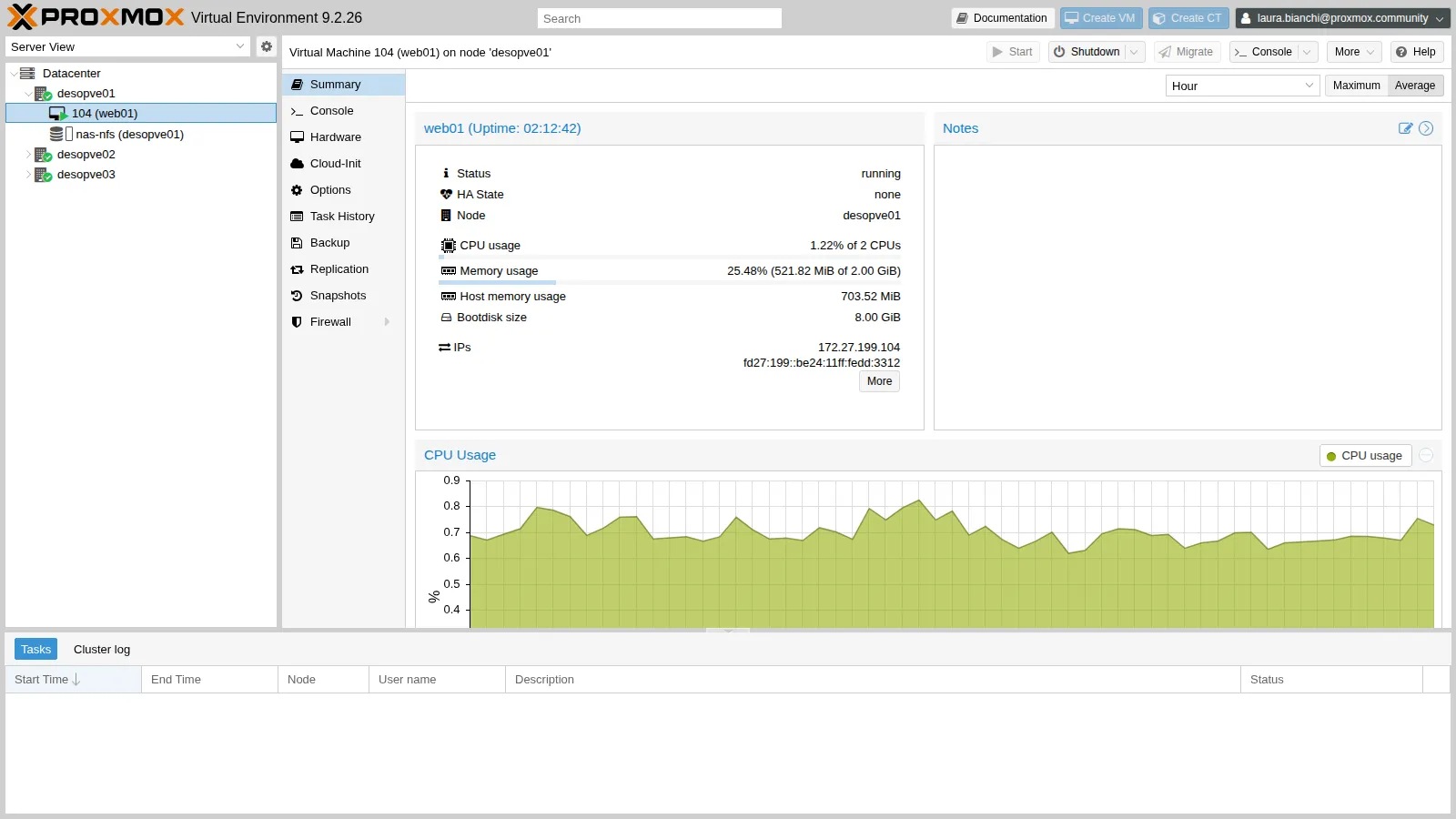
Laura Bianchi (pve-operators) sees only web01 and the nas-nfs storage under desopve01; under the other nodes she finds web02 and web03. The Shutdown and Console buttons are enabled, Create VM and Migrate are not.
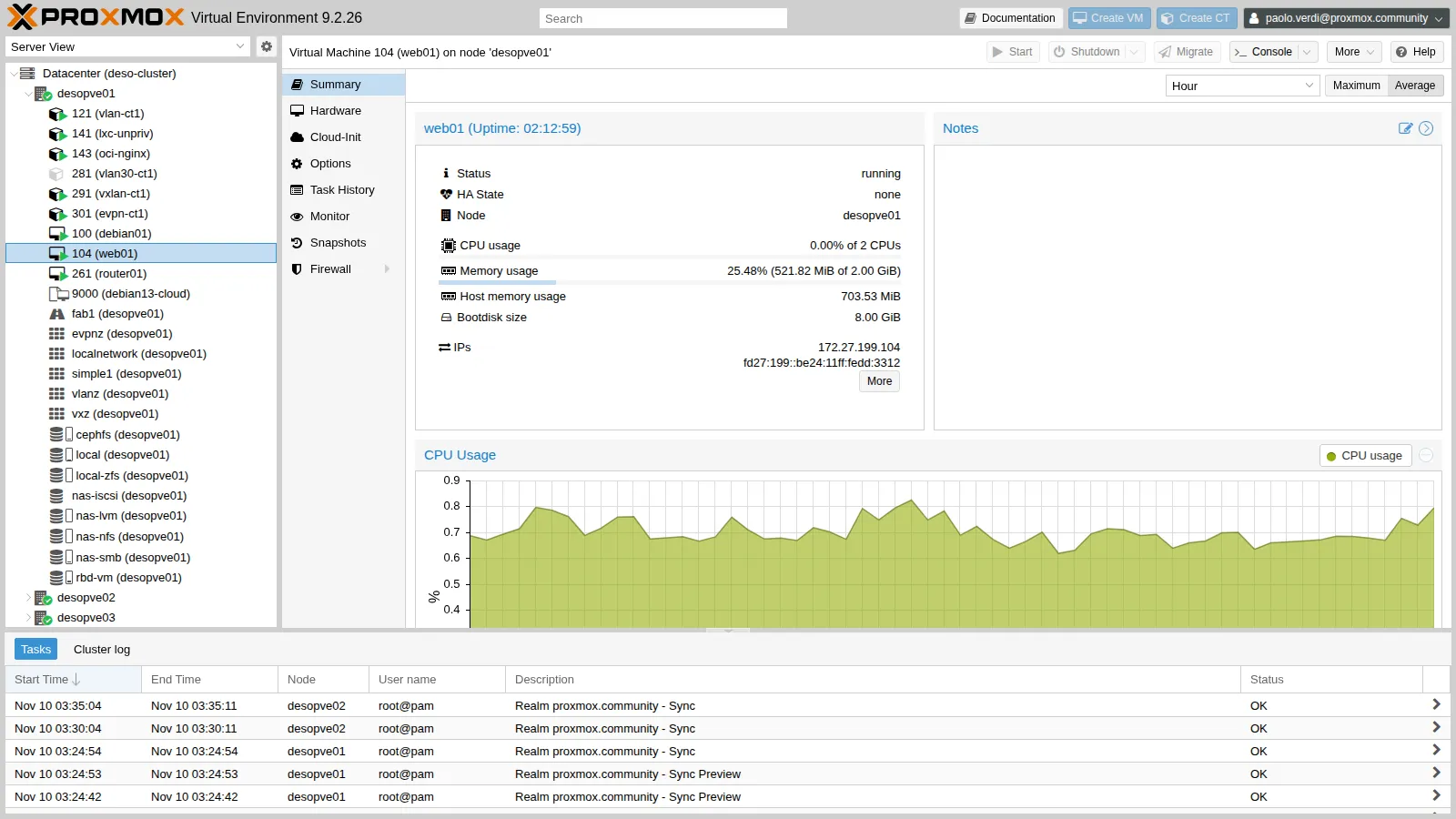
Paolo Verdi (pve-auditors) sees the whole datacenter, but every action is disabled:
7. API tests: the pool boundary
Section titled “7. API tests: the pool boundary”The GUI uses the same REST API that you can call with curl. From a machine on the management network, let’s request a ticket for Laura and try two reboots:
N1=https://172.27.199.21:8006/api2/json --data-urlencode "password=<lab-password>" $N1/access/ticket | python3 -c 'import sys,json; d=json.load(sys.stdin)["data"]; print(d["ticket"], d["CSRFPreventionToken"])')api() { m=$1; p=$2; shift 2; curl -sk -X $m -b "PVEAuthCookie=$TK" -H "CSRFPreventionToken: $CS" "$@" "$N1$p" -w '\nHTTP %{http_code}\n'; }
api POST /nodes/desopve01/qemu/104/status/rebootapi POST /nodes/desopve01/qemu/100/status/reboot{"data":"UPID:desopve01:000727C6:004946EC:6AF286BF:qmreboot:104:[email protected]:"}HTTP 200{"data":null,"message":"Permission check failed (/vms/100, VM.PowerMgmt)\n"}HTTP 403The error message states exactly which privilege is missing and on which path: it is the first thing to read when a user reports “it won’t let me do X”.
8. SDN.Use: the permission on the bridge
Section titled “8. SDN.Use: the permission on the bridge”Laura has VM.Config.Network on the pool VMs (OperatoreRete role). Let’s try to add a second network device to web01, on vmbr1, VLAN 10:
api PUT /nodes/desopve01/qemu/104/config --data-urlencode "net1=virtio,bridge=vmbr1,tag=10"{"message":"Permission check failed (/sdn/zones/localnetwork/vmbr1/10, SDN.Use)\n","data":null}HTTP 403The privilege on the VM is not enough: SDN.Use on the bridge (and on the VLAN) is required too. We grant it to the group on the bridge, with propagation, so it applies to all its VLANs:
pveum acl modify /sdn/zones/localnetwork/vmbr1 --groups pve-operators-proxmox.community --roles PVESDNUserLaura tries again, and this time the network device is hot-plugged:
api PUT /nodes/desopve01/qemu/104/config --data-urlencode "net1=virtio,bridge=vmbr1,tag=10"qm config 104 | grep ^net{"data":null}HTTP 200net0: virtio=BC:24:11:DD:33:12,bridge=vmbr0net1: virtio=BC:24:11:6E:FA:D0,bridge=vmbr1,tag=10Then she removes it:
api PUT /nodes/desopve01/qemu/104/config --data-urlencode "delete=net1"The first time, the guest was still finishing the reboot from step 7 and did not release the device:
{"errors":{"net1":"hotplug problem - error on hot-unplugging device 'net1' - still busy in guest?\n"},"data":null,"message":"Parameter verification failed.\n"}HTTP 400qm pending 104 | grep -i netcur net0: virtio=BC:24:11:DD:33:12,bridge=vmbr0del net1: virtio=BC:24:11:6E:FA:D0,bridge=vmbr1,tag=10The removal was left pending (del): it would be applied at the next shutdown. Repeated once the guest is up, it goes through immediately (HTTP 200) and qm pending shows only net0.
9. Propagation
Section titled “9. Propagation”An ACL on /vms with propagate disabled applies only to the /vms path itself, not to the individual VMs. Let’s verify it with a local user of the pve realm:
pveum user add stagista@pve --password '<lab-password>' --comment 'Utente locale del realm pve'pveum acl modify /vms --users stagista@pve --roles PVEAuditor --propagate 0pveum user permissions stagista@pve --path /vms/104pveum acl modify /vms --users stagista@pve --roles PVEAuditor --propagate 1pveum user permissions stagista@pve --path /vms/104┌──────────┬─────────────┐│ ACL path │ Permissions │╞══════════╪═════════════╡│ /vms/104 │ │└──────────┴─────────────┘┌──────────┬─────────────────────────┐│ ACL path │ Permissions │╞══════════╪═════════════════════════╡│ /vms/104 │ Datastore.Audit (*) ││ │ Mapping.Audit (*) ││ │ Pool.Audit (*) ││ │ SDN.Audit (*) ││ │ Sys.Audit (*) ││ │ VM.Audit (*) ││ │ VM.GuestAgent.Audit (*) │└──────────┴─────────────────────────┘The asterisk marks the privileges inherited through propagation. Finally, we leave stagista@pve with read access to the web pool only (it will be needed in Lab 45):
pveum acl delete /vms --users stagista@pve --roles PVEAuditorpveum acl modify /pool/web --users stagista@pve --roles PVEAuditor10. pve versus pam realm
Section titled “10. pve versus pam realm”Let’s request a ticket from two different nodes, with a small function that prints only the HTTP status code:
t(){ curl -sk -o /dev/null -w "$1 su $3: HTTP %{http_code}\n" --data-urlencode "username=$1" \ --data-urlencode "password=$2" https://$3:8006/api2/json/access/ticket; }t stagista@pve '<lab-password>' 172.27.199.21t stagista@pve '<lab-password>' 172.27.199.22The pve realm user works everywhere:
stagista@pve su 172.27.199.21: HTTP 200stagista@pve su 172.27.199.22: HTTP 200Now let’s create operatore@pam in Proxmox VE and try to log in before and after creating the Linux user only on desopve01:
pveum user add operatore@pam --comment "Utente PAM: serve un utente Linux sul nodo"t operatore@pam '<lab-password>' 172.27.199.21useradd -m -s /bin/bash operatore && echo 'operatore:<lab-password>' | chpasswd # only on desopve01t operatore@pam '<lab-password>' 172.27.199.21t operatore@pam '<lab-password>' 172.27.199.22operatore@pam su 172.27.199.21: HTTP 401operatore@pam su 172.27.199.21: HTTP 200operatore@pam su 172.27.199.22: HTTP 401The pam user can log in only where its Linux account exists. That is why, apart from root@pam, the accounts of people are managed in pve or, better, in a directory realm such as AD. Let’s clean up:
userdel -r operatorepveum user delete operatore@pam11. API token with privilege separation
Section titled “11. API token with privilege separation”Let’s create a user for automation, without a password, with PVEVMUser on the web pool, and a token for it with privilege separation:
pveum user add automazione@pve --comment 'Utente per script e CI'pveum acl modify /pool/web --users automazione@pve --roles PVEVMUserpveum user token add automazione@pve ci --privsep 1 --comment 'Pipeline CI' --output-format json{"full-tokenid":"automazione@pve!ci","info":{"comment":"Pipeline CI","privsep":"1"},"value":"<segreto>"}The secret is shown only once. In the GUI, you create the token from Datacenter → Permissions → API Tokens → Add:
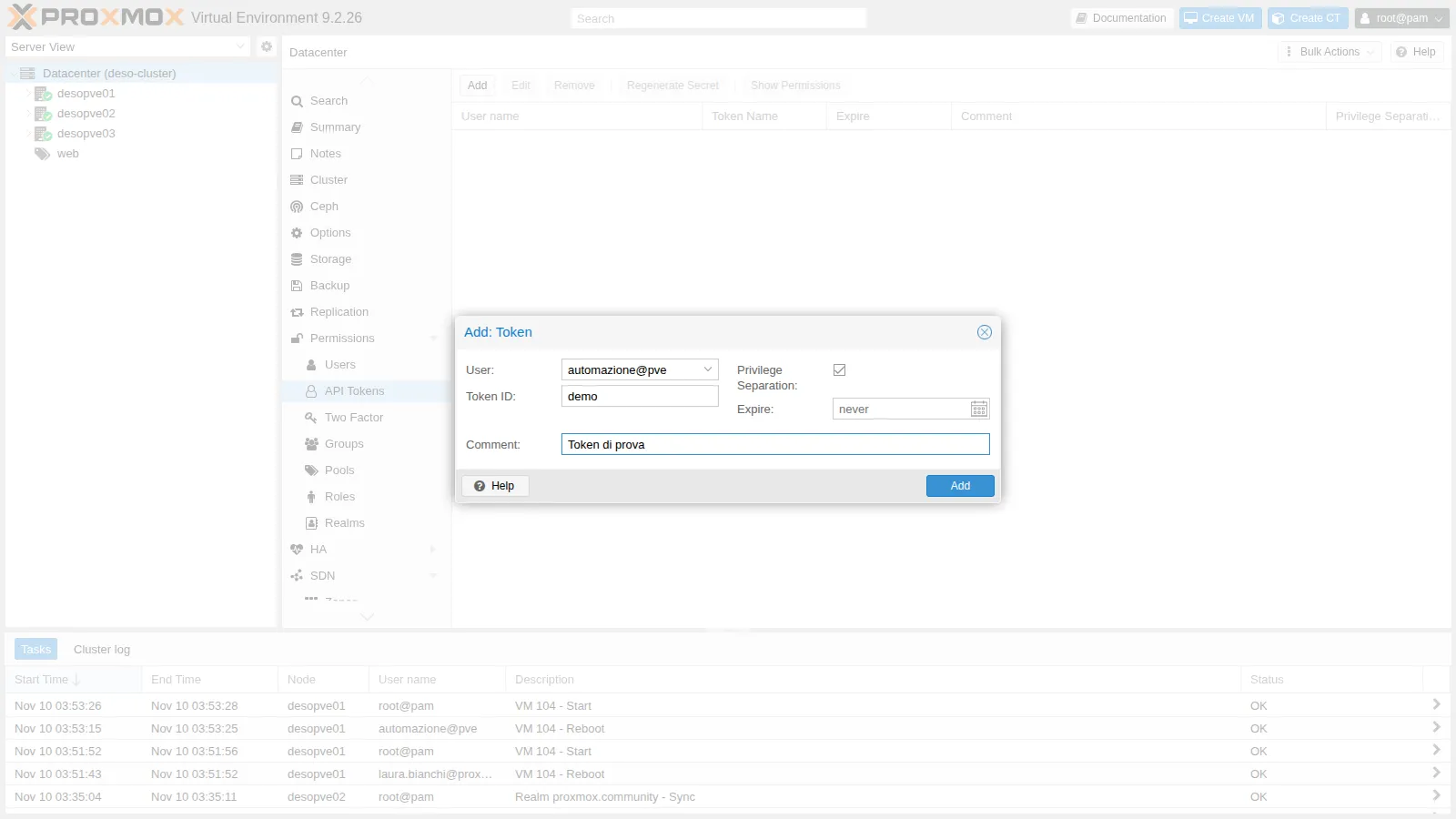
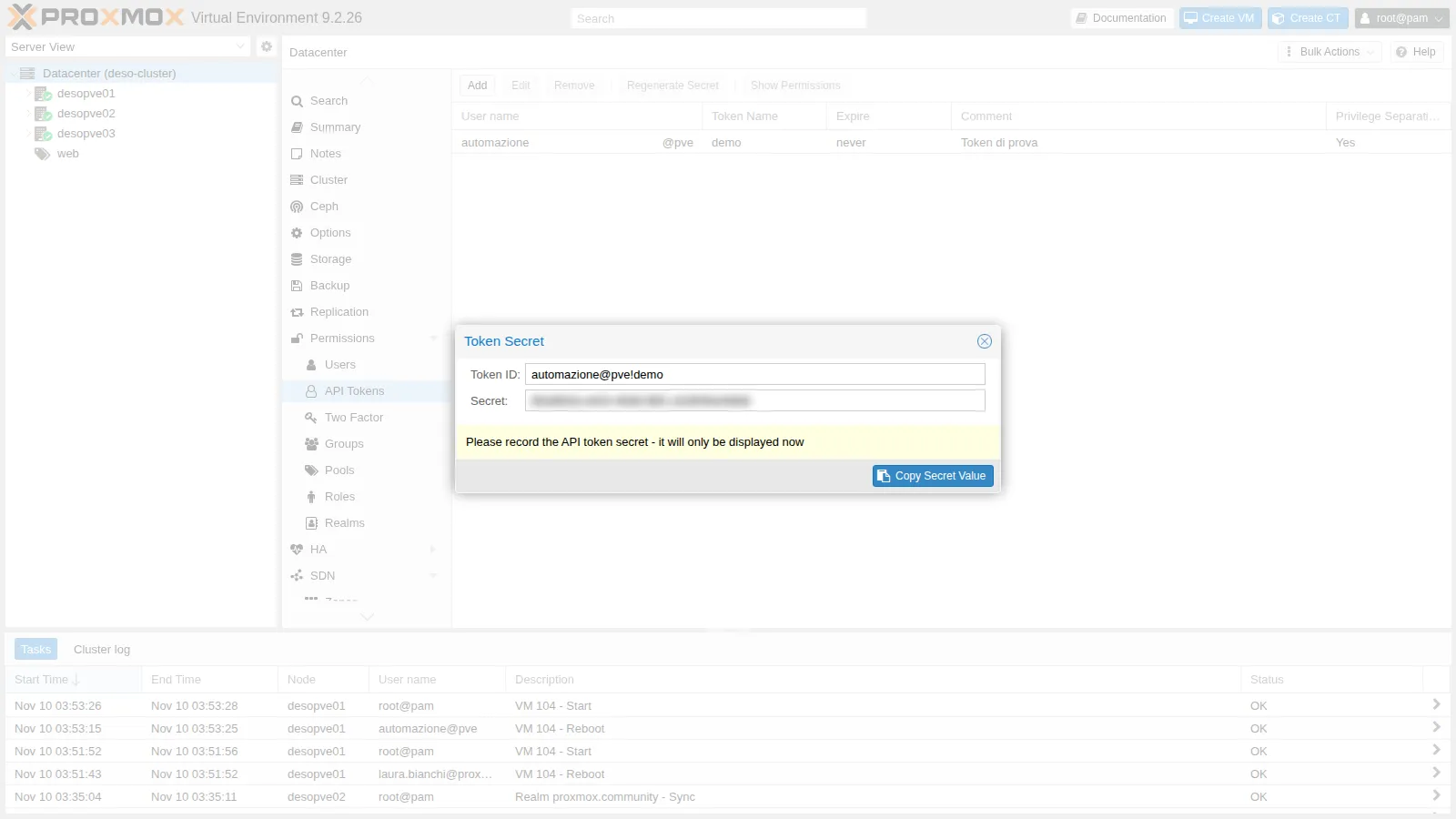
We give the token PVEAuditor on the whole datacenter and PVEVMUser on VM 104 only:
pveum acl modify / --tokens 'automazione@pve!ci' --roles PVEAuditorpveum acl modify /vms/104 --tokens 'automazione@pve!ci' --roles PVEVMUserpveum user token permissions automazione@pve ci --path /vms/104pveum user token permissions automazione@pve ci --path /vms/100┌──────────┬──────────────────────────────┐│ ACL path │ Permissions │╞══════════╪══════════════════════════════╡│ /vms/104 │ VM.Audit ││ │ VM.Backup ││ │ VM.Config.CDROM ││ │ VM.Config.Cloudinit ││ │ VM.Console ││ │ VM.GuestAgent.Audit ││ │ VM.GuestAgent.FileRead ││ │ VM.GuestAgent.FileSystemMgmt ││ │ VM.GuestAgent.FileWrite ││ │ VM.PowerMgmt │└──────────┴──────────────────────────────┘┌──────────┬─────────────┐│ ACL path │ Permissions │╞══════════╪═════════════╡│ /vms/100 │ │└──────────┴─────────────┘On VM 100 the token has PVEAuditor, but the user has nothing: the intersection is empty. Let’s use the token with curl, through the Authorization header:
H='Authorization: PVEAPIToken=automazione@pve!ci=<segreto>'curl -sk -H "$H" "$N1/cluster/resources?type=vm" | python3 -c 'import sys,json; print(sorted(r["vmid"] for r in json.load(sys.stdin)["data"]))'curl -sk -H "$H" -X POST $N1/nodes/desopve01/qemu/104/status/reboot -w '\nHTTP %{http_code}\n'curl -sk -H "$H" -X POST $N1/nodes/desopve02/qemu/105/status/reboot -w '\nHTTP %{http_code}\n'[104, 105, 106]{"data":"UPID:desopve01:00072DA3:00496ABE:6AF2871B:qmreboot:104:automazione@pve!ci:"}HTTP 200{"data":null,"message":"Permission check failed (/vms/105, VM.PowerMgmt)\n"}HTTP 403- The token “sees” only the three VMs in the pool, despite
PVEAuditoron/: the user sees nothing else. - It can reboot 104 (both the token and the user have
VM.PowerMgmt), but not 105 (the token does not have it). In the task log the author isautomazione@pve!ci, so the actions of each automation can be traced. - Requests made with a token do not need the
CSRFPreventionToken.
12. Revoking a token without leaving anything behind
Section titled “12. Revoking a token without leaving anything behind”Let’s remove the token and try again:
pveum user token remove automazione@pve cicurl -sk -H "$H" "$N1/version" -w '\nHTTP %{http_code}\n'user config - ignore invalid acl token 'automazione@pve!ci'user config - ignore invalid acl token 'automazione@pve!ci'
HTTP 401The token no longer works, but its ACLs are still there in /etc/pve/user.cfg and trigger a warning at every command. You cannot even remove them, because the token no longer exists:
ACL update failed: no such token 'ci' for user 'automazione@pve'The correct order is the reverse: first remove the ACLs, then the token. If it has already happened, create a token with the same name again, delete the ACLs and remove the token once more:
pveum user token add automazione@pve ci --privsep 1 >/dev/nullpveum acl delete / --tokens 'automazione@pve!ci' --roles PVEAuditorpveum acl delete /vms/104 --tokens 'automazione@pve!ci' --roles PVEVMUserpveum user token remove automazione@pve cigrep -c 'automazione@pve!ci' /etc/pve/user.cfg0Verification and tests
Section titled “Verification and tests”| Test | Expected result | Outcome |
|---|---|---|
| Laura reboots VM 104, in the pool | HTTP 200 |
ok |
| Laura reboots VM 100, outside the pool | HTTP 403, VM.PowerMgmt missing on /vms/100 |
ok |
Laura adds a network device on vmbr1 without SDN.Use |
HTTP 403 on /sdn/zones/localnetwork/vmbr1/10 |
ok |
The same operation with PVESDNUser on the bridge |
HTTP 200, device added |
ok |
ACL on /vms without and with propagate |
permissions on /vms/104 empty, then present |
ok |
operatore@pam with a Linux user only on desopve01 |
200 on desopve01, 401 on desopve02 |
ok |
| Token with privsep | sees 104-106, reboots 104, 403 on 105 |
ok |
| Revoked token | HTTP 401; no ACLs left after the cleanup |
ok |
Final lab state
Section titled “Final lab state”- Custom role
OperatoreRete(VM.Audit,VM.Config.Network). - Pool
web: VMs 104, 105, 106 and thenas-nfsstorage. - ACLs:
/→pve-admins-proxmox.community:Administrator;pve-auditors-proxmox.community:PVEAuditor;/pool/web→pve-operators-proxmox.community:PVEVMUser,PVEDatastoreUser,OperatoreRete;automazione@pve:PVEVMUser;stagista@pve:PVEAuditor;/sdn/zones/localnetwork/vmbr1→pve-operators-proxmox.community:PVESDNUser.
- Local users:
stagista@pve(with a password, read access to thewebpool),automazione@pve(without a password and, at the end of the lab, without tokens). operatore@pamand its Linux user have been removed; VM 104 again has onlynet0.
What you learned
Section titled “What you learned”- Permissions are ACLs: path + user/group/token + role, with propagation to the child paths.
- The built-in roles cover the common cases; a custom role adds exactly the privileges that are missing.
- A pool is the simplest way to give a group “its own” VMs and storages.
- Permissions are granted to the groups synced from AD, not to individual users.
Permission check failed (percorso, privilegio)messages state exactly what is missing;pveum user permissionsconfirms it.- To connect a network device to a bridge you need
SDN.Use, on classic Linux bridges too. pamusers exist only where the Linux user exists; for people, usepveor a directory realm.- A token with privilege separation can do at most what its user can do; you revoke it by removing first the ACLs and then the token.