

Lab 52 – API and automation: `pvesh`, tickets and CSRF, API tokens, Ansible and OpenTofu
Dependencies
Section titled “Dependencies”- Previous labs:
- Systems: the
deso-clustercluster; the new container154automazione(172.27.199.154) as the automation workstation. - Addresses for the test VMs: 172.27.199.155 (
ans01, Ansible) and 172.27.199.156 (tofu01, OpenTofu). - Credentials:
root@pam→ Appendix B. The token secret is shown only once, when the token is created. - Lab files:
crea-vm.ymlandelimina-vm.yml(Ansible playbooks),main.tf(OpenTofu configuration) andapi-demo.sh(script of the tests withcurl).
Objectives
Section titled “Objectives”- Understand how the Proxmox VE REST API is structured and use it with
pvesh, withcurland from the API viewer. - Authenticate with ticket and CSRF and with an API token, and understand when to use one or the other.
- Build a minimal role and set of ACLs for an automation, starting from the permissions each call requires.
- Create VMs from a cloud-init template with Ansible and with OpenTofu, verify idempotency and clean up.
How it works
Section titled “How it works”A single API. The web interface, pvesh, qm, pct and the external tools all use the same REST API, exposed by pveproxy at https://<nodo>:8006/api2/json/. The resources are organized as a tree (/nodes/{node}/qemu/{vmid}/..., /cluster/..., /access/..., /pools, /storage), and the HTTP methods map to the pvesh commands: GET = pvesh get, POST = pvesh create, PUT = pvesh set, DELETE = pvesh delete. Any node of the cluster answers for the whole cluster and forwards requests to the right node.
Ticket. With a user name and password (POST /access/ticket) you get a ticket, valid for two hours, to send as the PVEAuthCookie cookie, and a CSRFPreventionToken, mandatory in the header of every request that changes something. This is the mechanism the web interface uses. If the user has 2FA, the ticket also requires the second factor (Lab 45).
API token. A token (utente@realm!nome) with its secret is sent in the Authorization: PVEAPIToken=… header: no ticket, no CSRF, no 2FA, and it can be revoked on its own. With privilege separation the token has only the permissions explicitly assigned to it, and never more than those of its user (Lab 44). It is the right method for automation.
Ansible and OpenTofu. Ansible runs a sequence of tasks (“create the clone, set cloud-init, start it”), and the modules of the community.proxmox collection call the API through the proxmoxer library. OpenTofu (the open source fork of Terraform) describes the desired state in a file: it compares the real state with the written one and applies only the differences; the bpg/proxmox provider translates the resources into API calls.
Procedure
Section titled “Procedure”1. Exploring the API with pvesh and the API viewer
Section titled “1. Exploring the API with pvesh and the API viewer”pvesh navigates the tree like a file system. The letters show what you can do on each branch (r = GET, c = POST, w = PUT, D = contains other branches):
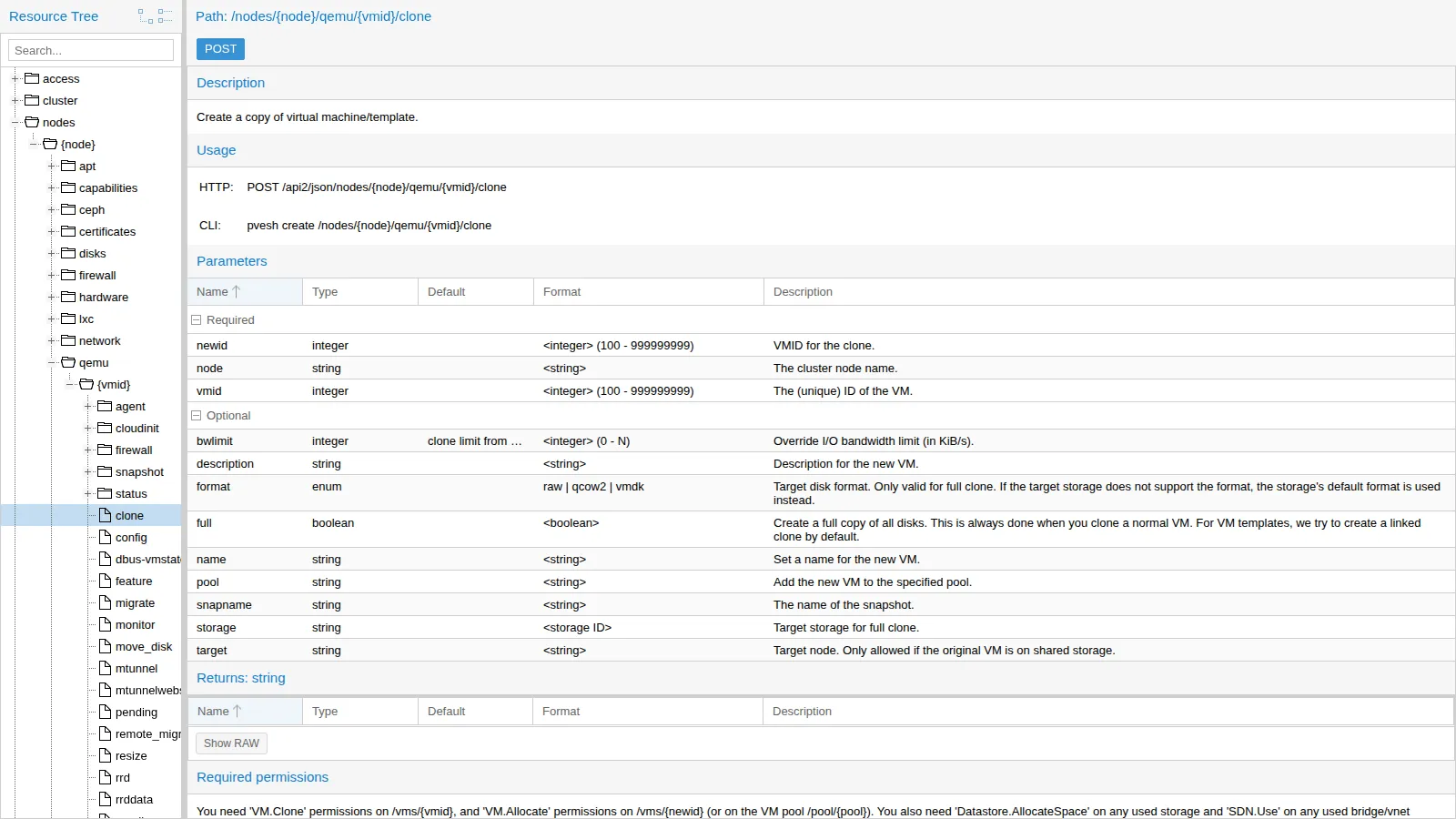
pvesh ls /nodes/desopve01 | head -8pvesh get /cluster/resources --type node --output-format json | python3 -c 'import sys, jsonfor n in json.load(sys.stdin): print(n["node"], n["status"], "%.1f %%" % (n["cpu"] * 100))'pvesh usage /nodes/{node}/qemu/{vmid}/clone-r-c- aplinfoDr--- aptDr--- capabilitiesDr--- cephDr--- certificates-rw-- configDr--- disks-rw-- dnsdesopve01 online 19.0 %desopve02 online 7.8 %desopve03 online 9.3 %USAGE: pvesh create /nodes/{node}/qemu/{vmid}/clone --newid <integer> [OPTIONS]The complete documentation of every call is in the API viewer, published by every node at https://<nodo>:8006/pve-docs/api-viewer/. For each path it shows the parameters, the return values and, at the bottom, the required permissions. Cloning a VM requires VM.Clone on the template, VM.Allocate on the new VM or on its pool, Datastore.AllocateSpace on the storage and SDN.Use on the bridge:
2. The automation workstation
Section titled “2. The automation workstation”A dedicated Debian 13 container, CT 154 automazione, with Ansible from the distribution and OpenTofu from the official package on GitHub:
pct create 154 cephfs:vztmpl/debian-13-standard_13.6-1_amd64.tar.zst --hostname automazione \ --unprivileged 1 --features nesting=1 --cores 2 --memory 1024 --rootfs rbd-vm:8 \ --net0 name=eth0,bridge=vmbr0,ip=172.27.199.154/24,gw=172.27.199.1 \ --nameserver 172.27.199.20 --searchdomain proxmox.community --password '<lab-password>'pct start 154pct enter 154Besides the Debian repositories, the lab proxy must allow the domains github.com, objects.githubusercontent.com and release-assets.githubusercontent.com (downloads of OpenTofu and of the provider) and registry.opentofu.org (for tofu init). Inside the container:
echo 'Acquire::http::Proxy "http://proxy.proxmox.community:3128";' > /etc/apt/apt.conf.d/80proxyapt-get update && apt-get install -y ansible python3-proxmoxer python3-requests curl jqexport https_proxy=http://proxy.proxmox.community:3128V=$(curl -sI https://github.com/opentofu/opentofu/releases/latest | grep -i ^location | sed -E 's#.*/tag/v([0-9.]+).*#\1#' | tr -d '\r')curl -fsSL -o /tmp/tofu.deb https://github.com/opentofu/opentofu/releases/download/v$V/tofu_${V}_amd64.debdpkg -i /tmp/tofu.debansible [core 2.19.11]ansible 12.0.0+dfsg-0+deb13u1python3-proxmoxer 2.2.0-1OpenTofu v1.13.9The community.proxmox collection, which contains proxmox_kvm, is already included in the Debian 13 ansible package.
Certificate verification. Automation must not disable TLS verification. The certificate of the nodes is signed by the cluster CA (/etc/pve/pve-root-ca.pem). Just copy it into the container and add it to the system CAs, which both Python and OpenTofu use. From the node that hosts the container:
pct push 154 /etc/pve/pve-root-ca.pem /usr/local/share/ca-certificates/pve-root-ca.crtpct exec 154 -- update-ca-certificatespct exec 154 -- curl -s -o /dev/null -w "%{http_code} verify=%{ssl_verify_result}\n" \ https://desopve01.proxmox.community:8006/api2/json/version401 verify=0verify=0 means the certificate is valid; 401 because the request is not authenticated.
3. Minimal permissions: role, pool and token
Section titled “3. Minimal permissions: role, pool and token”The VMs created by automation end up in a dedicated pool, and the token can do only what it needs. The Automazione role collects the privileges on the VMs; the rest comes from built-in roles on specific paths:
pveum pool add automazione --comment "VM create dalle automazioni (lab 52)"pveum role add Automazione --privs "VM.Allocate VM.Clone VM.Config.CDROM VM.Config.CPU \  VM.Config.Cloudinit VM.Config.Disk VM.Config.HWType VM.Config.Memory VM.Config.Network \  VM.Config.Options VM.Audit VM.PowerMgmt VM.GuestAgent.Audit Pool.Audit"pveum user token add automazione@pve ansible --privsep 1 --comment "Ansible e OpenTofu (lab 52)"
for chi in '--users automazione@pve' '--tokens automazione@pve!ansible'; do pveum acl modify /pool/automazione --roles Automazione $chi pveum acl modify /vms/9000 --roles PVETemplateUser $chi pveum acl modify /storage/rbd-vm --roles PVEDatastoreUser $chi pveum acl modify /sdn/zones/localnetwork/vmbr0 --roles PVESDNUser $chi pveum acl modify /nodes --roles PVEAuditor $chidone| Path | Role | What it is for |
|---|---|---|
/pool/automazione |
Automazione |
create, configure and start the VMs of the pool |
/vms/9000 |
PVETemplateUser |
clone the template (VM.Clone, VM.Audit) |
/storage/rbd-vm |
PVEDatastoreUser |
allocate the disks (Datastore.AllocateSpace) |
/sdn/zones/localnetwork/vmbr0 |
PVESDNUser |
connect the network device to vmbr0 (SDN.Use) |
/nodes |
PVEAuditor |
read nodes and resources (needed by OpenTofu) |
With privilege separation the ACLs must be given both to the user and to the token: the token gets the intersection of the two. The token secret is shown only once and must be kept in a safe place. In the lab it is stored in /root/.pve-token in CT 154, readable only by root. To put it there without going through intermediate files, instead of the token add above you can run this directly (on the node that hosts CT 154):
pveum user token add automazione@pve ansible --privsep 1 --comment "Ansible e OpenTofu (lab 52)" --output-format json \ | python3 -c 'import sys,json; print(json.load(sys.stdin)["value"])' \ | pct exec 154 -- sh -c 'umask 077; cat > /root/.pve-token'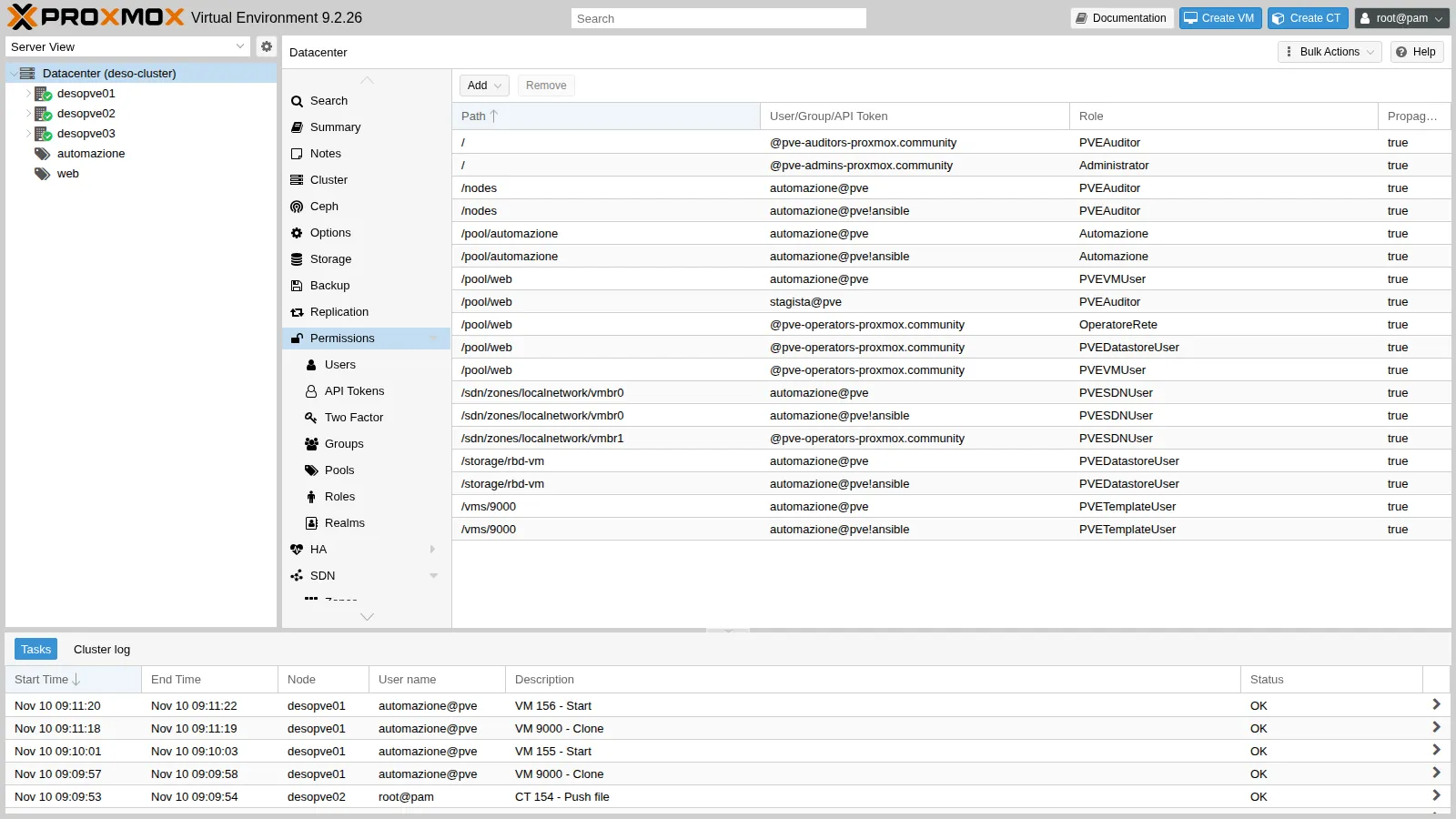
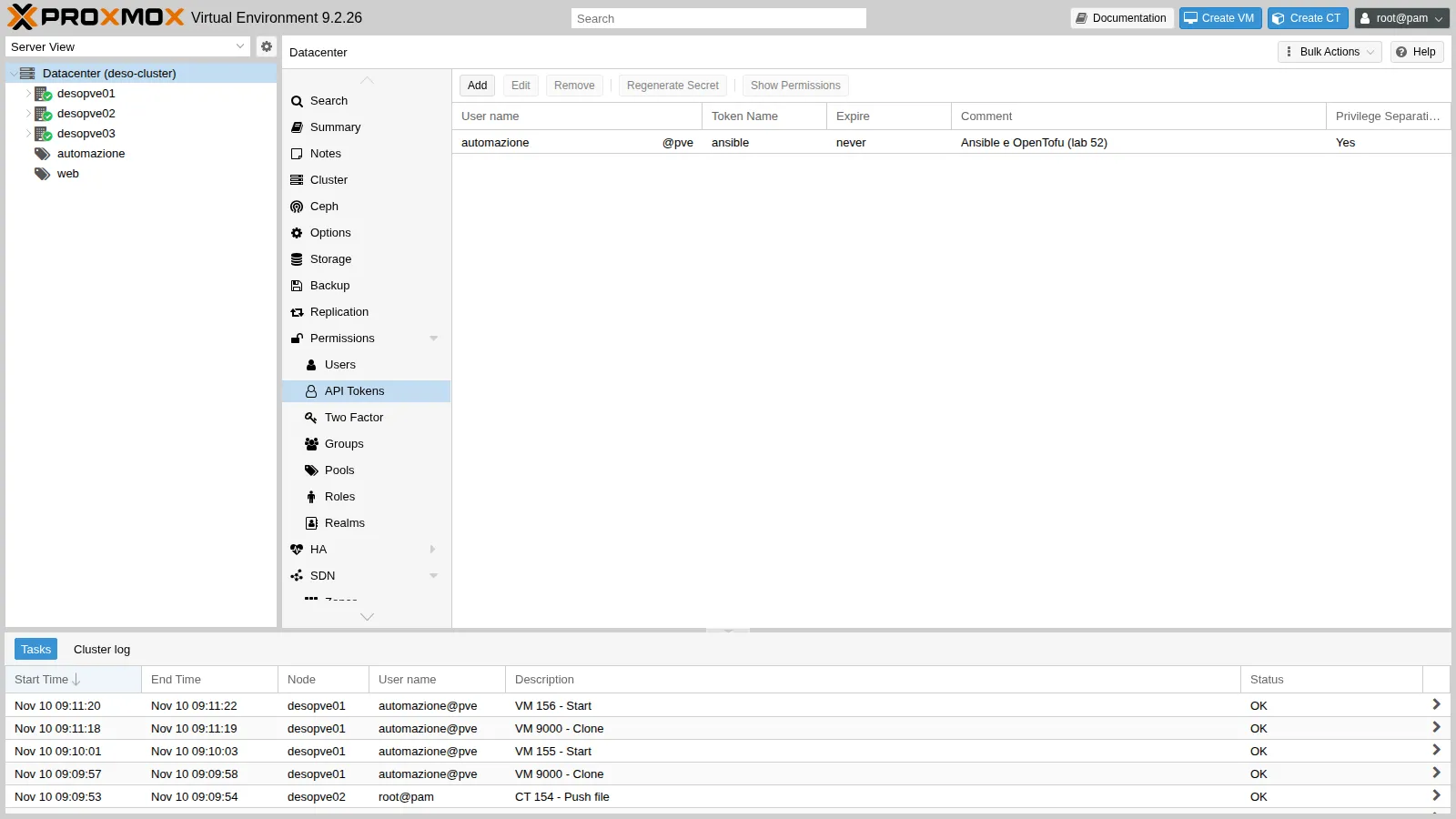
The effective permissions of the token on the pool:
pveum user token permissions automazione@pve ansible --path /pool/automazione│ /pool/automazione │ Pool.Audit (*) ││ │ VM.Allocate (*) ││ │ VM.Audit (*) ││ │ VM.Clone (*) ││ │ VM.Config.CDROM (*) │…│ │ VM.PowerMgmt (*) │4. The API with curl: ticket, CSRF and token
Section titled “4. The API with curl: ticket, CSRF and token”The api-demo.sh script, run in CT 154, shows the two authentication methods. Before running it, in the same shell, enter the root@pam password without leaving it in the history: read -rs PW; export PW.
API=https://desopve01.proxmox.community:8006/api2/jsonR=$(curl -s -d "username=root@pam" --data-urlencode "password=$PW" $API/access/ticket)TICKET=$(echo "$R" | jq -r .data.ticket); CSRF=$(echo "$R" | jq -r .data.CSRFPreventionToken)curl -s -b "PVEAuthCookie=$TICKET" $API/nodescurl -s -b "PVEAuthCookie=$TICKET" -X POST -d "poolid=prova-api" $API/poolscurl -s -b "PVEAuthCookie=$TICKET" -H "CSRFPreventionToken: $CSRF" -X POST -d "poolid=prova-api" $API/pools== 1. ticketticket: PVE:root@pam:6AF2D114::k… (valido 2 ore)CSRFPreventionToken: 6AF2D114:AOl…== 2. GET con il cookiedesopve01 online cpu=14% mem=9/31 GiBdesopve02 online cpu=8% mem=7/31 GiBdesopve03 online cpu=9% mem=6/31 GiB== 3. scrittura senza e con CSRFPOST /pools senza CSRF: HTTP 401POST /pools con CSRF: HTTP 200DELETE /pools/prova-api con CSRF: HTTP 200With the token there is no CSRF, but the ACLs apply:
H='Authorization: PVEAPIToken=automazione@pve!ansible='"$SECRET" # single quotes: "!" in an interactive shellcurl -s -H "$H" "$API/cluster/resources?type=vm"curl -s -H "$H" $API/nodes/desopve01/qemu/100/configcurl -s -H "$H" -X POST -d "poolid=prova-token" $API/pools== 4. API token9000 debian13-cloud desopve01 template=1GET config della VM 100 con il token: HTTP 403{"data":null,"message":"Permission check failed (/pool/prova-token, Pool.Allocate)\n"}The token sees only one VM of the cluster, the template, because it is the only one it has permissions on. Reading VM 100 or creating a pool is denied, and the message states exactly which privilege is missing on which path.
5. Ansible: a VM from the template
Section titled “5. Ansible: a VM from the template”The crea-vm.yml playbook uses module_defaults so that it does not have to repeat the API connection in every task:
- name: VM da template con cloud-init hosts: localhost gather_facts: false module_defaults: group/community.proxmox.proxmox: api_host: desopve01.proxmox.community api_user: automazione@pve api_token_id: ansible api_token_secret: "{{ lookup('file', '/root/.pve-token') }}" validate_certs: true vars: vm_id: 155 vm_nome: ans01 vm_ip: 172.27.199.155 tasks: - name: Linked clone del template debian13-cloud community.proxmox.proxmox_kvm: node: desopve01 clone: debian13-cloud vmid: 9000 newid: "{{ vm_id }}" name: "{{ vm_nome }}" pool: automazione full: false timeout: 300 - name: Cloud-init, CPU e RAM community.proxmox.proxmox_kvm: node: desopve01 vmid: "{{ vm_id }}" update: true update_unsafe: false cores: 1 memory: 1024 ciuser: labuser sshkeys: "{{ lookup('file', '/root/.ssh/id_ed25519.pub') }}" ipconfig: ipconfig0: "ip={{ vm_ip }}/24,gw=172.27.199.1" nameservers: [172.27.199.20] searchdomains: [proxmox.community] - name: Avvio community.proxmox.proxmox_kvm: node: desopve01 vmid: "{{ vm_id }}" state: started - name: Attesa di SSH sulla VM ansible.builtin.wait_for: host: "{{ vm_ip }}" port: 22 timeout: 300The lab files (crea-vm.yml, elimina-vm.yml, main.tf and api-demo.sh, listed in the Dependencies) must be copied into CT 154, from the node that hosts it:
pct exec 154 -- mkdir -p /root/ansible /root/tofupct push 154 crea-vm.yml /root/ansible/crea-vm.ymlpct push 154 elimina-vm.yml /root/ansible/elimina-vm.ymlpct push 154 main.tf /root/tofu/main.tfpct push 154 api-demo.sh /root/api-demo.shThen, in CT 154:
cd /root/ansible && time ansible-playbook crea-vm.ymlTASK [Linked clone del template debian13-cloud] ********************************changed: [localhost]TASK [Cloud-init, CPU e RAM] ***************************************************changed: [localhost]TASK [Avvio] *******************************************************************changed: [localhost]TASK [Attesa di SSH sulla VM] **************************************************ok: [localhost]PLAY RECAP *********************************************************************localhost : ok=4 changed=3 unreachable=0 failed=0 skipped=0 rescued=0 ignored=0real 0m38.381sIn 38 seconds the VM is cloned, configured and reachable. Cloud-init has applied the name, the IP address and the key:
ans01eth0 UP 172.27.199.155/24status: doneIdempotency. A second run without changes:
TASK [Linked clone del template debian13-cloud] ********************************ok: [localhost]TASK [Cloud-init, CPU e RAM] ***************************************************changed: [localhost]TASK [Avvio] *******************************************************************ok: [localhost]localhost : ok=4 changed=1 unreachable=0 failed=0 skipped=0 rescued=0 ignored=0The clone and start tasks recognize that the VM already exists and is running. The task with update: true, on the other hand, rewrites the configuration and always reports changed, even when the values are the same: it does no harm, but in a compliance report it is a false positive you should know about.
6. OpenTofu: the same thing as desired state
Section titled “6. OpenTofu: the same thing as desired state”The main.tf file describes the tofu01 VM:
terraform {  required_providers {    proxmox = {      source = "bpg/proxmox"    }  }}
variable "token_secret" {  type      = string  sensitive = true}
provider "proxmox" {  endpoint  = "https://desopve01.proxmox.community:8006/"  api_token = "automazione@pve!ansible=${var.token_secret}"  insecure  = false}
resource "proxmox_virtual_environment_vm" "tofu01" {  name      = "tofu01"  node_name = "desopve01"  vm_id     = 156  pool_id   = "automazione"  clone {    vm_id = 9000    full  = false  }  agent { enabled = false }  cpu { cores = 1 }  memory { dedicated = 1024 }  network_device { bridge = "vmbr0" }  initialization {    datastore_id = "rbd-vm"    ip_config {      ipv4 {        address = "172.27.199.156/24"        gateway = "172.27.199.1"      }    }    dns {      servers = ["172.27.199.20"]      domain  = "proxmox.community"    }    user_account {      username = "labuser"      keys     = [trimspace(file("/root/.ssh/id_ed25519.pub"))]    }  }}
The secret is not in the file: it comes from an environment variable. The provider download goes through the proxy, while the API of the nodes does not (NO_PROXY):
cd /root/tofuexport HTTPS_PROXY=http://proxy.proxmox.community:3128 NO_PROXY=proxmox.community,172.27.199.0/24export TF_VAR_token_secret=$(cat /root/.pve-token)tofu inittofu plantofu apply -auto-approve- Installing bpg/proxmox v0.121.0...- Installed bpg/proxmox v0.121.0 (signed, key ID 0B3405B36193A495)OpenTofu has been successfully initialized! # proxmox_virtual_environment_vm.tofu01 will be createdPlan: 1 to add, 0 to change, 0 to destroy.proxmox_virtual_environment_vm.tofu01: Creating...proxmox_virtual_environment_vm.tofu01: Creation complete after 5s [id=156]Apply complete! Resources: 1 added, 0 changed, 0 destroyed.agent { enabled = false } is intentional: the template does not have the guest agent installed, and with the agent enabled the provider would wait for an IP address that never comes. The VM answers with the name and the IP address set by cloud-init:
tofu01status: doneA second tofu plan, without changes:
No changes. Your infrastructure matches the configuration.The two VMs in the pool, and the tasks logged under the name of the automation user:
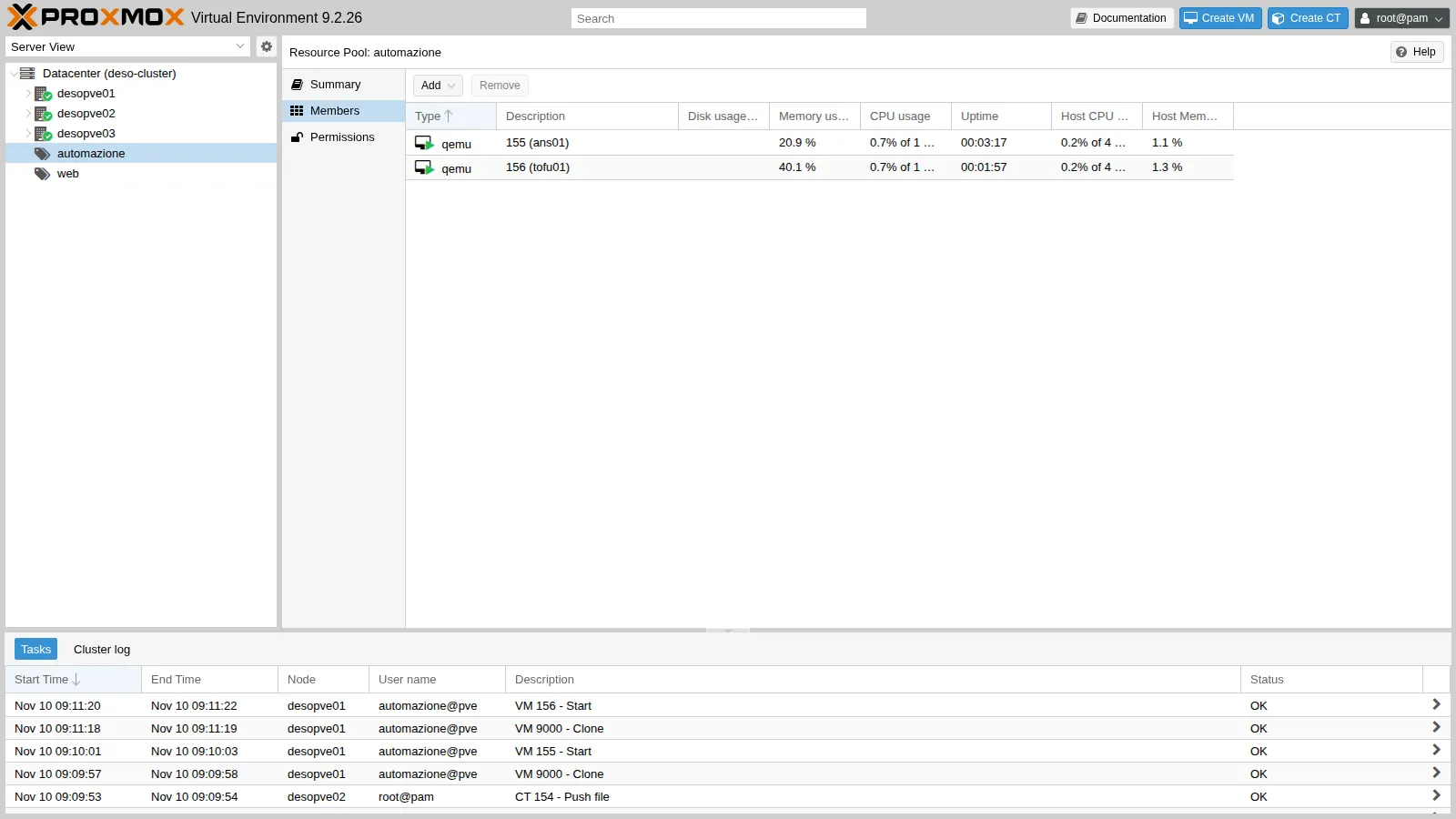
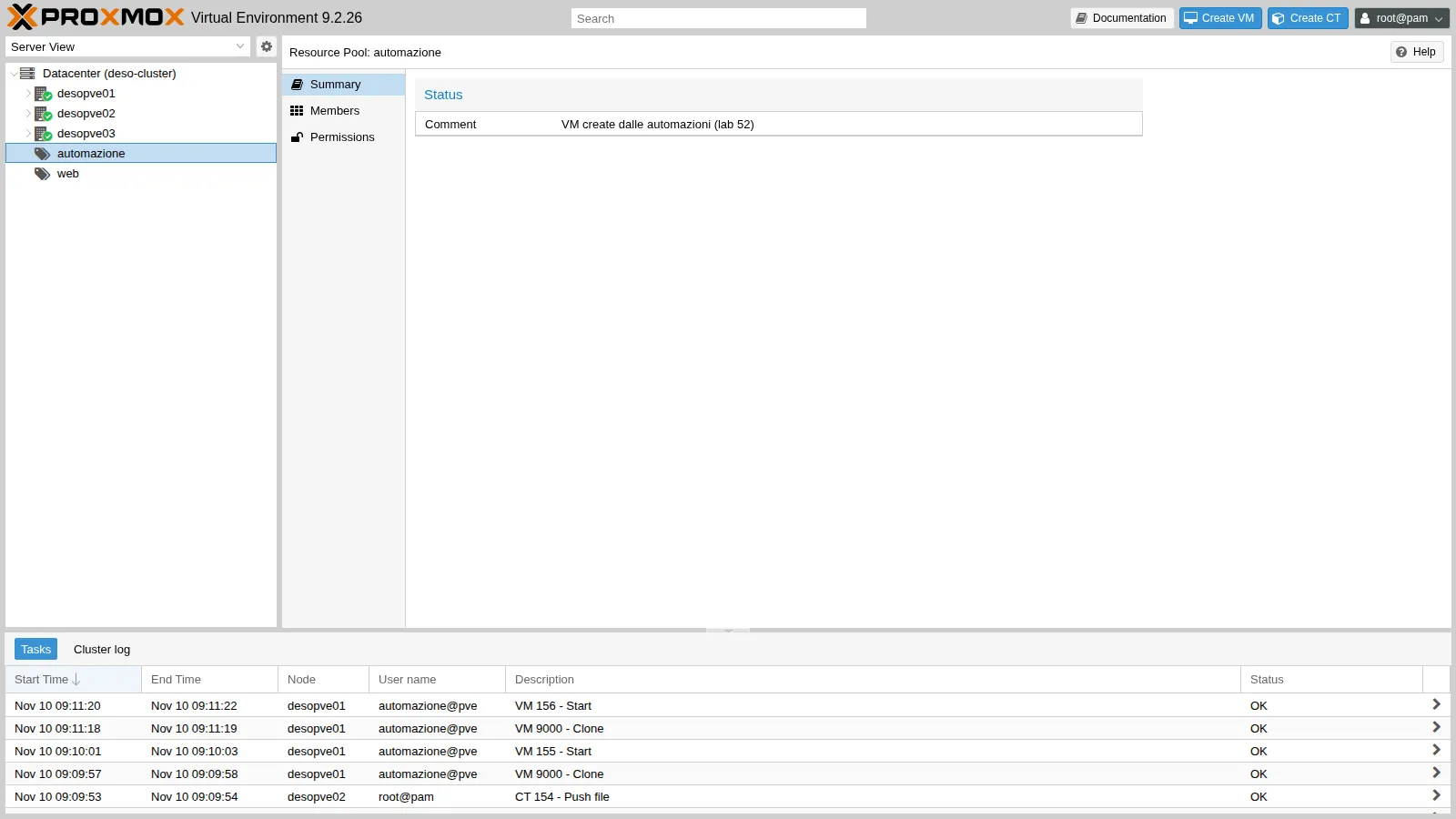
7. Cleanup
Section titled “7. Cleanup”With OpenTofu you destroy what the file describes; with Ansible you need a removal playbook (elimina-vm.yml), with state: stopped and then state: absent:
tofu destroy -auto-approveansible-playbook /root/ansible/elimina-vm.ymlproxmox_virtual_environment_vm.tofu01: Destroying... [id=156]proxmox_virtual_environment_vm.tofu01: Destruction complete after 5sDestroy complete! Resources: 1 destroyed.changed: [localhost]changed: [localhost]localhost : ok=2 changed=2 unreachable=0 failed=0 skipped=0 rescued=0 ignored=0The pool is empty again:
pvesh get /pools/automazione --output-format json{"comment":"VM create dalle automazioni (lab 52)","members":[],"poolid":"automazione"}Verification and tests
Section titled “Verification and tests”| Test | Result |
|---|---|
| Certificate of the nodes verified from CT 154 with the cluster CA | verify=0 |
POST with the ticket, without CSRF |
HTTP 401 |
POST with the ticket and the CSRF token |
HTTP 200 |
| Token: list of the cluster VMs | only template 9000 |
| Token: configuration of VM 100 | HTTP 403 |
| Token: creation of a pool | Permission check failed (/pool/prova-token, Pool.Allocate) |
| Ansible, first run | VM ans01 ready in 38 s, reachable over SSH |
| Ansible, second run | changed=1 (only the update task) |
OpenTofu apply |
VM tofu01 created in 5 s |
OpenTofu, second plan |
No changes |
| Cleanup | pool automazione empty |
Final lab state
Section titled “Final lab state”- CT 154
automazioneondesopve02, running, 172.27.199.154:- Ansible 12 (ansible-core 2.19) with
community.proxmoxandpython3-proxmoxer, OpenTofu 1.13.9; - the cluster CA among the system CAs;
- SSH key
/root/.ssh/id_ed25519and token secret in/root/.pve-token; - playbooks in
/root/ansible, OpenTofu configuration in/root/tofu(empty state after thedestroy).
- Ansible 12 (ansible-core 2.19) with
- Pool
automazione, empty. - Role
Automazioneand tokenautomazione@pve!ansiblewith privilege separation, with the ACLs of the table in step 3 (both for the user and for the token). The ACLs of Lab 44 on/pool/webare unchanged. - Test VMs 155 and 156 deleted.
What you learned
Section titled “What you learned”- The web interface, the CLI and the external tools use the same API:
pveshand the API viewer are the quickest way to understand a call and the permissions it requires. - The ticket is meant for interactive sessions and requires the CSRFPreventionToken for writes; the token has neither CSRF nor 2FA and is the right method for automation.
- The permissions of an automation are built starting from the “Required permissions” of the calls: a dedicated pool, a tailored role, built-in roles on storage, bridge and template.
- With privilege separation the ACLs go both to the user and to the token; a 403 tells you the missing privilege and path.
- Ansible runs tasks, and not all modules are idempotent; OpenTofu compares the desired state with the real one and changes nothing if they match.
- Automation verifies the cluster certificate instead of disabling TLS verification.