

Lab 35 – KVM and QEMU under the hood
Dependencies
Section titled “Dependencies”- Previous labs:
- Resources: the cloud image
debian-13-genericcloud-amd64.qcow2inlocal:importondesopve01, downloaded in Lab 19; the DC’s SSH key (Lab 05), authorized on the nodes. The image is used to create a test VM with cloud-init; cloud-init is covered in depth in Lab 40. - Addresses: test VM
kvm-350on 172.27.199.150. - Credentials:
root/<lab-password>on the nodes → Appendix B.
Objectives
Section titled “Objectives”- Recognize the pieces of a running VM: QEMU process, vCPU threads,
vhostthread, systemd scope,tapinterface. - Query a VM from the QEMU monitor.
- Choose the CPU type knowing what the guest sees and what changes for migration.
- Create a custom CPU model for a cluster with different processors.
- Understand machine type, pinned versions, SeaBIOS and OVMF with Secure Boot.
- Verify nested virtualization inside a VM.
How it works
Section titled “How it works”A Proxmox VE VM is an ordinary QEMU process (/usr/bin/kvm) started by qemu-server. The process uses the kernel’s KVM module to run the guest code directly on the CPU, with the Intel VT-x or AMD-V virtualization extensions.
qm start 350 └─► systemd creates the scope 350.scope (cgroup: CPU, memory, I/O limits) └─► kvm process (QEMU) ───── thread "CPU 0/KVM", "CPU 1/KVM" ← one vCPU = one thread │ ├── thread vhost-<pid> ← VirtIO networking in the kernel │ └── I/O threads (here: librbd for Ceph) ├─► /dev/kvm (kvm module + kvm_intel / kvm_amd) └─► tap350i0 ──► vmbr0 ← network deviceCPU type. QEMU decides which CPU to show the guest: model, instructions (flags) and compatibility level.
host: passes the physical CPU through to the guest as it is. It is the fastest, but it ties the VM to that processor model.- Generic models (
x86-64-v2-AES,x86-64-v3,kvm64): expose a fixed set of instructions, identical on any node that supports it.
During a live migration the guest does not restart: the instructions it saw at boot must also exist on the target node. This is why x86-64-v2-AES is the default for new VMs.
Machine type. It is the virtual motherboard: pc (i440FX, a 1996 chipset) or q35 (ICH9, native PCI Express). Every QEMU release brings a new version of it. Proxmox VE adds the +pveN suffix. The version can be pinned to keep the hardware seen by the guest fixed: Proxmox VE does this automatically for Windows VMs.
Firmware. SeaBIOS is the traditional BIOS; OVMF is the UEFI firmware. OVMF needs a small efidisk0 disk for the UEFI variables, including the certificates for Secure Boot.
Procedure
Section titled “Procedure”1. The test VM
Section titled “1. The test VM”A Debian 13 VM created from the cloud image, with its disk on Ceph and CPU type host. No machine or bios in the configuration: the defaults are used, i440FX and SeaBIOS.
qm create 350 --name kvm-350 --memory 2048 --cores 2 --cpu host --ostype l26 \ --net0 virtio,bridge=vmbr0 --scsihw virtio-scsi-single \ --scsi0 rbd-vm:0,import-from=local:import/debian-13-genericcloud-amd64.qcow2 \ --ide2 rbd-vm:cloudinit --boot order=scsi0 \ --ipconfig0 ip=172.27.199.150/24,gw=172.27.199.1 --nameserver 172.27.199.20 \ --searchdomain proxmox.community --ciuser labuser --sshkeys /root/.ssh/authorized_keys \ --serial0 socket --vga serial0qm resize 350 scsi0 8Gqm start 350--sshkeys copies into the VM the keys already authorized on the node, including the DC’s key: from the DC you log in to the guest with ssh [email protected]. Commands marked “in the guest” are run there.
2. The QEMU command
Section titled “2. The QEMU command”qm showcmd prints the exact command Proxmox VE uses to start the VM. It is the best way to understand what each configuration option produces. The main lines:
qm showcmd 350 --pretty/usr/bin/kvm \ -id 350 \ -name kvm-350 \ -chardev 'socket,id=qmp,path=/var/run/qemu-server/350.qmp,server=on,wait=off' \ -pidfile /var/run/qemu-server/350.pid \ -daemonize \ -smp '2,sockets=1,cores=2,maxcpus=2' \ -cpu host,+kvm_pv_eoi,+kvm_pv_unhalt \ -m 2048 \ -device 'virtio-balloon-pci,id=balloon0,bus=pci.0,addr=0x3,free-page-reporting=on' \ -device 'virtio-scsi-pci,id=virtioscsi0,bus=pci.3,addr=0x1' \ -blockdev '{"detect-zeroes":"on","discard":"ignore","driver":"throttle", ... "driver":"rbd","image":"vm-350-disk-0","pool":"rbd-vm" ...}' \ -device 'scsi-hd,bus=virtioscsi0.0,channel=0,scsi-id=0,lun=0,drive=drive-scsi0,id=scsi0,...,write-cache=on' \ -netdev 'type=tap,id=net0,ifname=tap350i0,script=/usr/libexec/qemu-server/pve-bridge,downscript=/usr/libexec/qemu-server/pve-bridgedown,vhost=on' \ -device 'virtio-net-pci,mac=BC:24:11:BC:39:B2,netdev=net0,bus=pci.0,addr=0x12,id=net0,...' \ -machine 'hpet=off,smm=off,type=pc+pve0'Things to note:
-cpu host,+kvm_pv_eoi,+kvm_pv_unhalt: the host CPU plus two paravirtualized optimizations that Proxmox VE always adds for Linux.-blockdevwith therbddriver: QEMU talks directly to Ceph through librbd, without going through the node’s kernel.vhost=on: VirtIO networking is handled by a kernel thread (vhost), not by the QEMU process in user space.-machine type=pc+pve0: i440FX, latest available version.virtio-balloon-pci: present by default, used in Lab 36.
3. Process, threads and cgroup
Section titled “3. Process, threads and cgroup”PID=$(cat /var/run/qemu-server/350.pid)ps -o pid,ppid,user,nlwp,rss,etime,comm -p $PIDps -T -o spid,comm -p $PID PID PPID USER NLWP RSS ELAPSED COMMAND 263691 1 root 36 1097572 02:17 kvm
SPID COMMAND 263691 kvm 263692 call_rcu 263695 msgr-worker-0 263702 io_context_pool 263704 ceph_timer 263711 taskfin_librbd ... 263757 vhost-263691 263758 CPU 0/KVM 263759 CPU 1/KVM 263761 kvm-nx-lpage-re- Threads
CPU 0/KVMandCPU 1/KVM: each vCPU is a Linux thread. The node’s scheduler treats them like any other thread, and this is wherecpulimit,cpuunitsand CPU affinity (affinity), covered in Lab 42, come from. - Thread
vhost-263691: with recent kernels, thevhostwork appears as a thread of the QEMU process and no longer as a separate kernel process. - Threads
msgr-worker,ceph_timer,taskfin_librbd…: they belong to librbd, because the disk is on Ceph. With file or block storage they are not there. - RSS of about 1 GiB out of 2 configured: the VM’s memory is allocated only when the guest uses it.
Each VM has its own systemd scope, that is, a dedicated cgroup, and its own tap interface connected to the bridge:
● 350.scope     Loaded: loaded (/run/systemd/transient/350.scope; transient)     Active: active (running) since Mon 2026-11-09 23:10:23 CET; 2min 17s ago      Tasks: 36 (limit: 35002)
tap350i0         UNKNOWN        36:42:93:1e:22:31 <BROADCAST,MULTICAST,PROMISC,UP,LOWER_UP>
4. The QEMU monitor
Section titled “4. The QEMU monitor”The monitor is QEMU’s control console. From the GUI: VM → Monitor; from the command line: qm monitor 350.
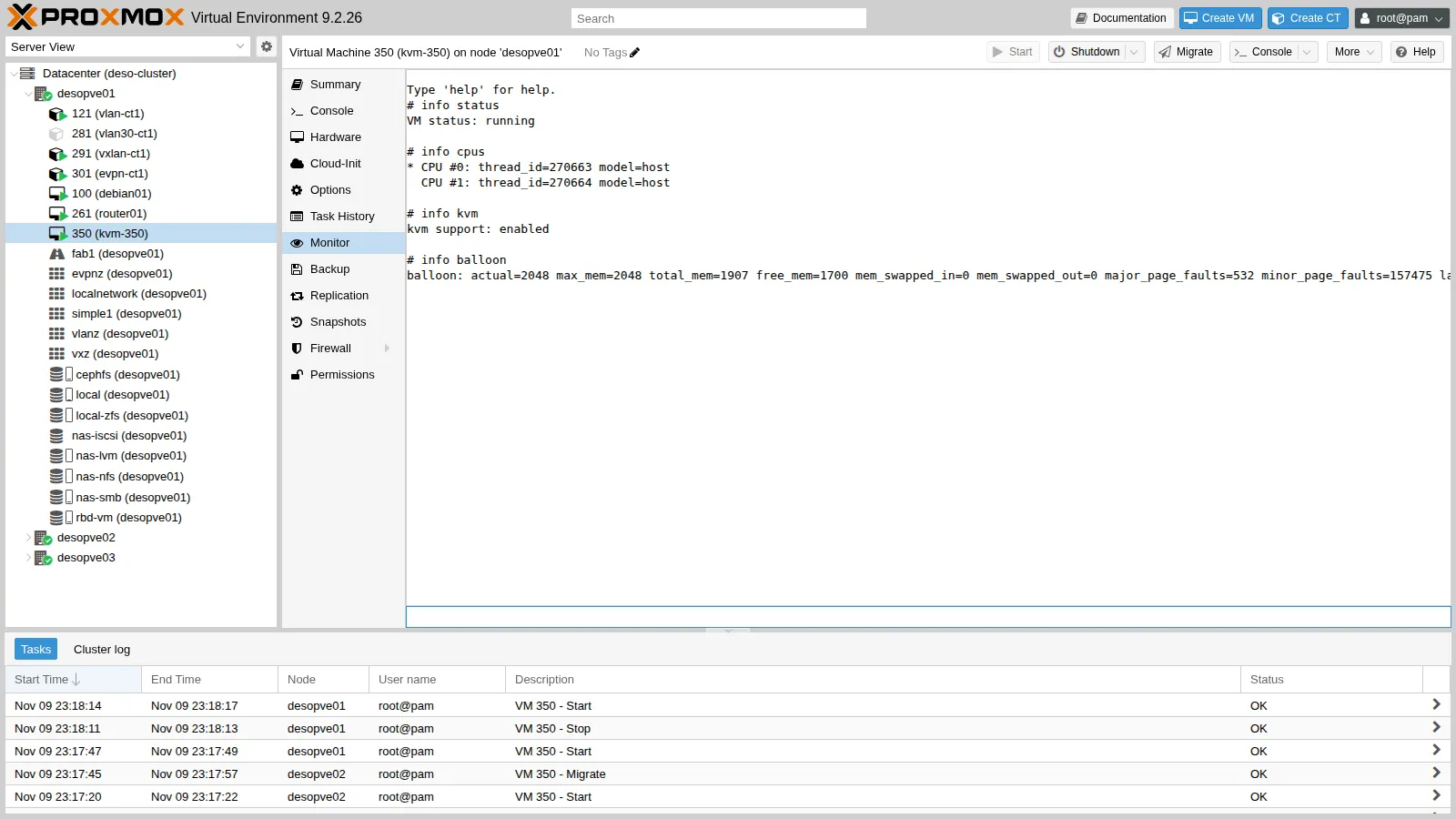
info statusVM status: runninginfo cpus* CPU #0: thread_id=263758 model=host CPU #1: thread_id=263759 model=hostinfo kvmkvm support: enabledinfo balloonballoon: actual=2048 max_mem=2048 total_mem=1974 free_mem=1111 ...info version11.1.3pve-qemu-kvm_11.1.3-1The thread_id values of info cpus are exactly the CPU 0/KVM and CPU 1/KVM threads seen with ps. info block shows the cache mode of each disk:
drive-scsi0: json:{... "driver": "rbd", "image": "vm-350-disk-0" ...} (throttle) Cache mode: writeback Detect zeroes: onecc0604f325c130c767a85510231093: json:{"pool": "rbd-vm", "image": "vm-350-disk-0", ...} (rbd) Cache mode: writeback, directwriteback, direct is the internal translation of cache=none, the default: QEMU opens the disk in direct mode (direct), bypassing the node’s page cache, and leaves the management of the write cache to the guest. The cache modes are compared in Lab 37.
5. Which CPU the guest sees
Section titled “5. Which CPU the guest sees”Hardware → Processors → Edit → Type lists all the available models: generic, Intel, AMD and custom ones.
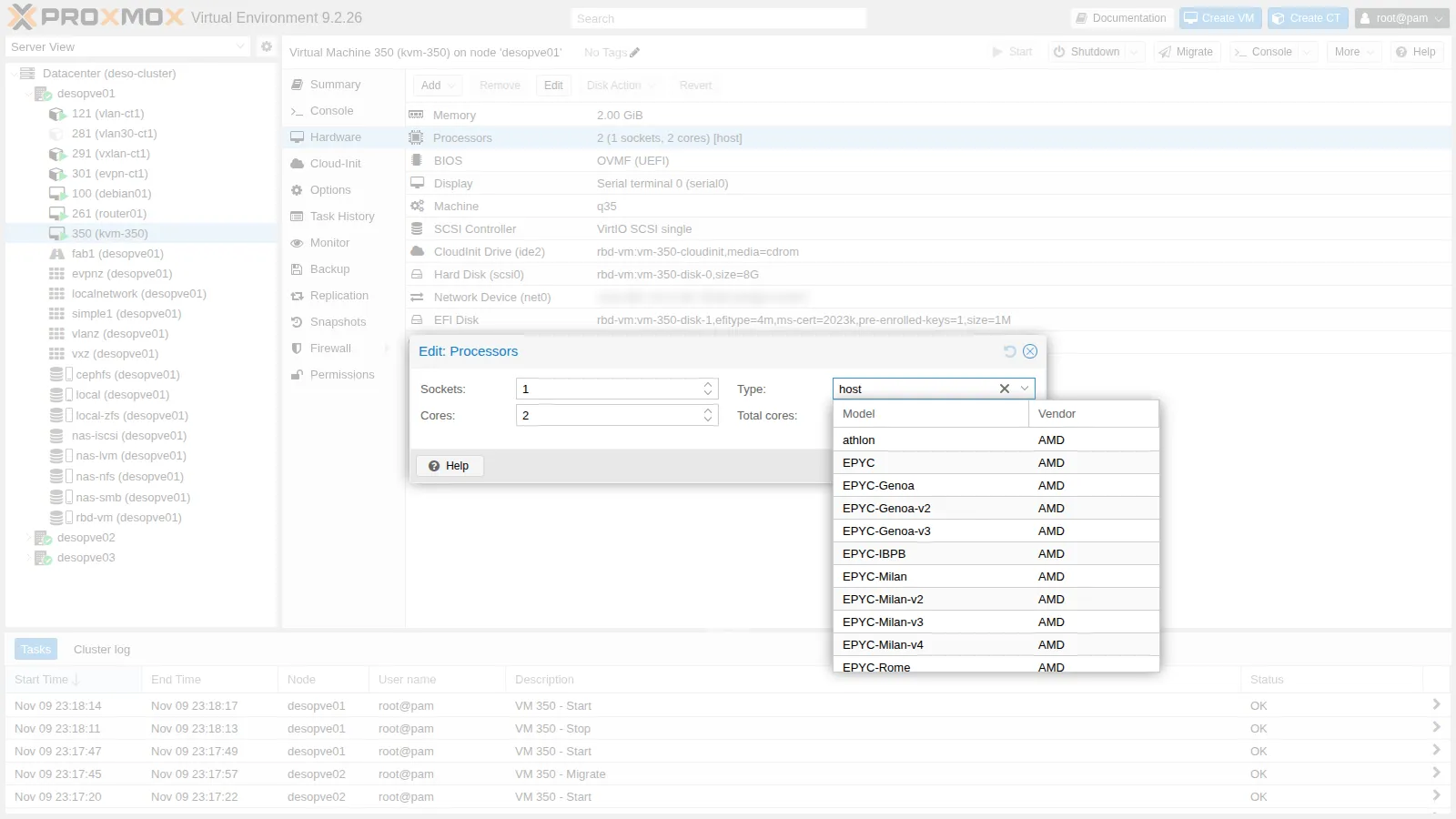
The same guest is tested with four CPU types. Each change requires a full restart of the VM (qm reboot, which stops and restarts the QEMU process). In the guest, read the model, some key instructions and the x86-64 level that the glibc loader recognizes as supported:
qm set 350 --cpu x86-64-v3 && qm reboot 350# in the guestgrep -m1 "model name" /proc/cpuinfogrep -m1 ^flags /proc/cpuinfo | wc -w/lib64/ld-linux-x86-64.so.2 --help | grep x86-64-vThe summary below collects, for each type, the model, the key instructions present (grep -o -w -E 'aes|avx|avx2|avx512f|hypervisor|pcid|popcnt|sse4_2|vmx|x2apic' on the flags line) and the total number of flags:
=== cpu: host model name : <modello-CPU-del-nodo> flag: aes avx avx2 avx512f hypervisor pcid popcnt sse4_2 vmx x2apic totale flag: 101 x86-64-v4 (supported, searched) x86-64-v3 (supported, searched) x86-64-v2 (supported, searched)=== cpu: x86-64-v2-AES model name : QEMU Virtual CPU version 2.5+ flag: aes hypervisor popcnt sse4_2 x2apic totale flag: 44 x86-64-v2 (supported, searched)=== cpu: x86-64-v3 model name : QEMU Virtual CPU version 2.5+ flag: aes avx avx2 hypervisor popcnt sse4_2 x2apic totale flag: 53 x86-64-v3 (supported, searched) x86-64-v2 (supported, searched)=== cpu: kvm64 model name : Common KVM processor flag: hypervisor x2apic totale flag: 40 x86-64-v4 x86-64-v3 x86-64-v2With host the guest sees the real model of the node’s processor, replaced here by a placeholder (see Redacted hardware data in Lab 01); with the other types it sees a generic model.
| Type | Flags | Level | When to use it |
|---|---|---|---|
host |
101 | v4 | Clusters with identical CPUs, maximum performance, nested virtualization |
x86-64-v3 |
53 | v3 | Clusters with recent CPUs (AVX2), even of different generations |
x86-64-v2-AES |
44 | v2 | Default: compatible with almost all x86 CPUs of the last 10-15 years |
kvm64 |
40 | none | Only for very old systems |
With kvm64 even sse4_2 and popcnt are missing, so the guest does not even reach level v2. Modern distributions require at least v2, some already v3: a model that is too “low” slows the guest down or prevents it from booting.
6. Migration with CPU host between identical nodes
Section titled “6. Migration with CPU host between identical nodes”The three cluster nodes have the same processor, so a VM with host can be live-migrated. During the migration, from netsvc, the lab’s network services server, ping the VM every 0.2 seconds (ping -i 0.2 -c 200 172.27.199.150):
qm migrate 350 desopve02 --online2026-11-09 23:16:09 starting migration of VM 350 to node 'desopve02' (10.100.10.22)2026-11-09 23:16:14 starting online/live migration on unix:/run/qemu-server/350.migrate2026-11-09 23:16:14 migration downtime limit: 100 ms2026-11-09 23:16:15 migration active, transferred 248.7 MiB of 2.0 GiB VM-state, 2.9 GiB/s2026-11-09 23:16:16 average migration speed: 1.0 GiB/s - downtime 74 ms2026-11-09 23:16:16 migration status: completed2026-11-09 23:16:20 migration finished successfully (duration 00:00:11)
--- 172.27.199.150 ping statistics ---200 packets transmitted, 196 received, 2% packet loss, time 40101msThe migration runs over the dedicated network (10.100.10.22, Lab 22). The disk is on Ceph, so only the RAM is copied: copying the 2 GiB takes about 2 seconds and the whole task 11, with a guest downtime of 74 ms. The ping misses 4 replies, just under one second: besides the downtime, there is the time the network needs to learn where the VM is now.
With different nodes. If the target node has a CPU with fewer instructions, the VM with host remains “convinced” that it still has them. The first time it uses a missing instruction, the guest crashes or hangs. In clusters with different CPUs there are two solutions:
- a generic model (
x86-64-v2-AESorx86-64-v3) that all nodes support; - a custom model, based on the oldest CPU in the cluster.
7. A custom CPU model
Section titled “7. A custom CPU model”Custom models live in /etc/pve/virtual-guest/cpu-models.conf, shared across the whole cluster. Here we create one based on the QEMU model Cascadelake-Server-noTSX, that is, the generation of the nodes’ CPU, with the AES instruction:
cat > /etc/pve/virtual-guest/cpu-models.conf <<'EOF'cpu-model: lab-cascadelake flags +aes phys-bits host reported-model Cascadelake-Server-noTSXEOFqm set 350 --cpu custom-lab-cascadelakeqm reboot 350In the VM:
model name : Intel Xeon Processor (Cascadelake)flag: 87 x86-64-v4 (supported, searched) x86-64-v3 (supported, searched) x86-64-v2 (supported, searched)The guest sees a generic “Cascadelake” processor, with 87 instructions instead of the 101 of host, but with the same level v4. In the GUI, the model appears in the type list with the custom- prefix. Live migration works as before:
2026-11-09 23:17:51 migration downtime limit: 100 ms2026-11-09 23:17:53 average migration speed: 1.0 GiB/s - downtime 9 ms2026-11-09 23:17:57 migration finished successfully (duration 00:00:11)If a node with an older CPU joined the cluster, it would be enough to change reported-model in the file: all the VMs using the model would align at their next restart.
8. Machine type, versions and firmware
Section titled “8. Machine type, versions and firmware”With the defaults, the guest sees an i440FX motherboard and the traditional BIOS:
-machine 'hpet=off,smm=off,type=pc+pve0'00:00.0 Host bridge: Intel Corporation 440FX - 82441FX PMC [Natoma] (rev 02)00:01.0 ISA bridge: Intel Corporation 82371SB PIIX3 ISA [Natoma/Triton II]firmware: BIOSQEMU lists the available versions: pc and q35 are aliases of the latest one.
kvm -machine help | grep -E "^pc-q35-1[0-9]|^q35 |^pc "pc Standard PC (i440FX + PIIX, 1996) (alias of pc-i440fx-11.1)q35 Standard PC (Q35 + ICH9, 2009) (alias of pc-q35-11.1)pc-q35-11.1 Standard PC (Q35 + ICH9, 2009)pc-q35-11.0 Standard PC (Q35 + ICH9, 2009)pc-q35-10.2 Standard PC (Q35 + ICH9, 2009)pc-q35-10.1 Standard PC (Q35 + ICH9, 2009)pc-q35-10.0 Standard PC (Q35 + ICH9, 2009)Switch to q35 with OVMF firmware and an EFI disk with the Secure Boot keys already enrolled. The firmware change takes effect at the next boot, so a stop and start is needed:
qm set 350 --machine q35 --bios ovmf --efidisk0 rbd-vm:1,efitype=4m,pre-enrolled-keys=1qm stop 350 && qm start 350efidisk0: successfully created disk 'rbd-vm:vm-350-disk-1,efitype=4m,ms-cert=2023k,pre-enrolled-keys=1,size=1M' -blockdev '{"driver":"raw","file":{"driver":"file","filename":"/usr/share/pve-edk2-firmware//OVMF_CODE_4M.secboot.fd"},"node-name":"pflash0","read-only":true}' \ -machine 'pflash0=pflash0,pflash1=drive-efidisk0,hpet=off,type=q35+pve0'OVMF_CODE_4M.secboot.fd: the firmware code, read-only, shared by all VMs.efidisk0: the UEFI variables of this VM.ms-cert=2023k: the EFI disk already contains the 2023 Microsoft certificates, needed to boot systems signed with the new keys.
In the guest:
00:00.0 Host bridge: Intel Corporation 82G33/G31/P35/P31 Express DRAM Controller00:1a.0 USB controller: Intel Corporation 82801I (ICH9 Family) USB UHCI Controller #4 (rev 03)firmware: UEFI[ 0.000000] Kernel is locked down from EFI Secure Boot; see man kernel_lockdown.7[ 0.000000] secureboot: Secure boot enabledSecureBoot efivar: 1The Debian cloud image contains both the BIOS and the UEFI boot loaders, which is why it boots again without changes. A system installed with SeaBIOS usually does not have an EFI partition: the firmware change must be made before installation.
Pinned version. In Hardware → Machine → Edit, with Advanced enabled, the version appears: Latest always follows the latest installed QEMU version.
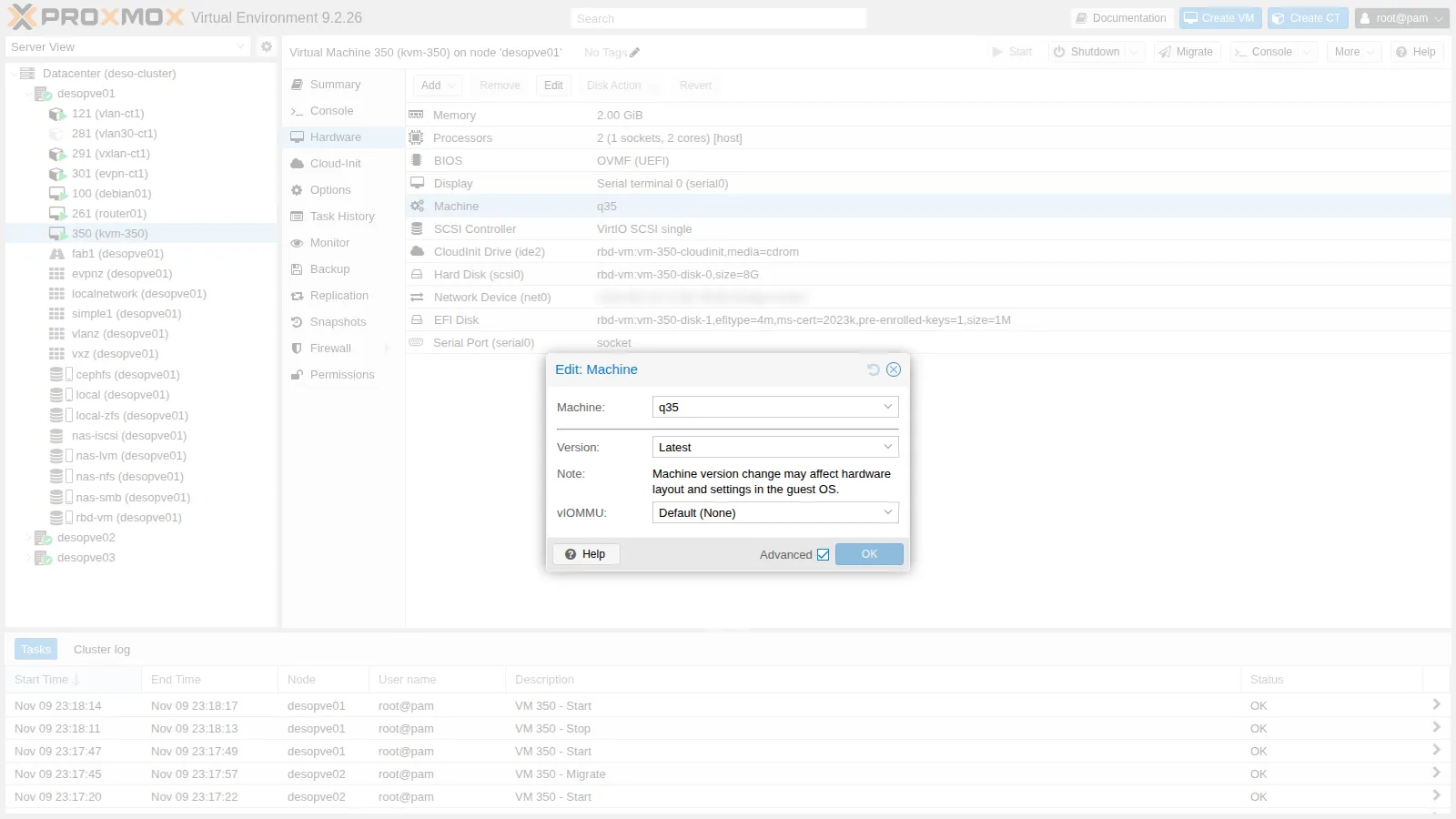
A fixed version (machine: pc-q35-11.0+pve0) keeps the hardware seen by the guest identical even after QEMU updates. It matters above all for Windows, which can detect “new hardware” and reset the network configuration or ask for a new activation: this is why Proxmox VE automatically pins the version of Windows VMs when they are created.
9. Nested virtualization
Section titled “9. Nested virtualization”With CPU type host the guest sees the vmx instruction (Intel VT-x) and can load KVM itself:
cat /sys/module/kvm_intel/parameters/nested # on the nodeYsudo modprobe kvm_intel # in the guestls -l /dev/kvmcat /sys/module/kvm_intel/parameters/nestedcrw-rw---- 1 root kvm 10, 232 Nov 9 22:15 /dev/kvmYWith the generic models vmx is not there (see the table in step 5): nested virtualization requires host, or a custom model with +vmx. It is useful for labs, CI, sandboxes, Proxmox VE inside Proxmox VE. The performance of a nested guest is lower, and live migration of a VM that itself hosts VMs is not supported.
Verification and tests
Section titled “Verification and tests”qm showcmdandinfo cpus: the number ofCPU n/KVMthreads matches the configured vCPUs.- Each CPU type produces the expected model and x86-64 level in the guest, and
kvm64does not even reach v2. - Live migration with
hostand with the custom model succeeded between identical nodes, with downtimes of 74 and 9 ms. - After switching to q35 and OVMF, the guest boots in UEFI mode with Secure Boot enabled.
Final lab state
Section titled “Final lab state”- VM 350
kvm-350: deleted at the end withqm stop 350 && qm destroy 350 --purge. - Custom CPU model
lab-cascadelake: remains in/etc/pve/virtual-guest/cpu-models.conf, available for the following labs; no VM uses it. - No other changes to the nodes.
What you learned
Section titled “What you learned”- A VM is a QEMU process with one thread per vCPU, a
vhostthread for networking and a dedicated cgroup: you can observe it with ordinary Linux tools. qm showcmdand the QEMU monitor show what the configuration actually turns into.hostis the fastest CPU type, but it restricts migration to nodes with the same CPU; generic and custom models make a heterogeneous cluster migratable.- Machine type and version define the hardware seen by the guest; pinning the version avoids surprises for sensitive systems such as Windows.
- OVMF with
efidisk0and pre-enrolled keys provides UEFI and Secure Boot; the firmware is chosen before installing the operating system.