

Lab 46 – Backup with vzdump: modes, compression, fleecing, retention and restore
Dependencies
Section titled “Dependencies”- Previous labs:
- Systems: nodes
desopve01-03, NASdesonas. To measure interruptions, apingevery 0.2 s to the VM from the management network. - Credentials:
root@pam→ Appendix B.
Objectives
Section titled “Objectives”- Three backups of the same VM in the three modes, snapshot, suspend and stop, with the interruption seen from the network measured for each, so that you can choose the mode for each kind of guest.
- The same backup with the four compression options, with sizes and durations compared.
- Backups on NFS, CephFS and SMB, one of them with fleecing, with the temporary image created and removed by vzdump.
- A disk excluded from a VM backup, and the container mount points left out of the backup (bind mounts) recognized in the log.
- A protected backup that survives a retention policy (prune), simulated first and then applied.
- A nightly scheduled job on the
webpool, with retention and automatic notes, run once by hand. - A VM and a container restored to another node and another storage, with new MAC addresses.
How it works
Section titled “How it works”vzdump is the built-in backup tool. It produces one file per guest (vzdump-qemu-<vmid>-<data>.vma.zst for VMs, vzdump-lxc-<vmid>-<data>.tar.zst for containers) on a storage that accepts the backup content type. Each file contains everything: configuration and disks. There are no incremental backups: every run saves the entire content, compressed. For incremental backups with deduplication you need Proxmox Backup Server (Lab 47).
Modes.
| Mode | VM | Container |
|---|---|---|
| snapshot | the VM keeps running; QEMU tracks the blocks while it copies them, so the backup is consistent with the moment it started. With the guest agent, the file systems are “frozen” for an instant (fs-freeze/fs-thaw) |
the container is suspended for an instant to take a storage snapshot (ZFS, Ceph, LVM-thin), then the copy is made from the snapshot |
| suspend | the VM is paused to start the backup, then resumes. It is kept for compatibility: the documentation recommends snapshot instead | rsync while running, pause, second rsync |
| stop | clean shutdown; the VM restarts as soon as the backup has started, and the copy continues in the background | the container stays stopped for the entire duration of the backup and restarts at the end: potentially long downtime |
Fleecing. During a snapshot backup, when the guest wants to write to a block that has not been copied yet, QEMU must first copy that block to the backup. If the target is slow, the guest slows down. With fleecing, the old block goes instead to a temporary image on a fast storage (ideally local, thin-provisioned and with discard) and the guest writes immediately.
Retention (prune). The keep-last, keep-hourly, keep-daily, keep-weekly, keep-monthly, keep-yearly options define how many backups to keep for each interval. After each backup of the job, the backups not covered are deleted. A protected backup is never deleted by prune.
What the log and the ping measure. The duration in Finished Backup of VM … (hh:mm:ss) is that of the whole backup, in whole seconds. In suspend and stop mode the log also shows resuming VM again after N seconds: vzdump counts, in whole seconds, from the moment it suspends the VM or starts shutting it down to the moment it lets it run again. That figure does not include what happens afterwards inside the guest, such as the boot that follows a stop. The ping every 0.2 s from the management network shows what a client sees: replies lost or delayed.
Test environment and versions
Section titled “Test environment and versions”The outputs and times in this lab come from a run carried out on 10 November 2026 (last checked in November 2026), with this configuration:
| Component | Configuration used |
|---|---|
| Proxmox VE | 9.2.26, kernel 7.0.14-28-pve (Lab 04) |
| VM under test | VM 104 web01: Debian 13 from template 9000, 2 GiB of RAM, 8 GiB disk on rbd-vm with about 1.2 GB of data, guest agent enabled (Lab 40) |
| Backup targets | nas-nfs: NFS 4.2 to the TrueNAS SCALE 25.10 NAS (Lab 12, Lab 13); nas-smb: SMB 3.11 to the same NAS (Lab 14); cephfs: Ceph 20.2.5 (Lab 17) |
| vzdump | default options except those shown in each command: zstd with one thread unless --zstd is given |
What the test measures, and what it does not. The modes and the compression were tried once or twice each, on a single, small, almost idle VM. The ping measures reachability over the network, not the disk inside the guest: it does not show how long fs-freeze blocks the guest’s writes, nor how much the backup slows them down. The durations depend on the NAS, the network and the CPU of the node, which this test does not separate.
Procedure
Section titled “Procedure”1. The target storages
Section titled “1. The target storages”pvesm status --content backupName Type Status Total (KiB) Used (KiB) Available (KiB) %cephfs cephfs active 100483072 7921664 92561408 7.88%local dir active 45995008 1143936 44851072 2.49%nas-nfs nfs active 56481792 0 56481792 0.00%nas-smb cifs active 57458048 977024 56481024 1.70%local is on the node’s disk: if you lose the node, you lose the backups too. In production, backups belong off the node.
2. The three modes, measured
Section titled “2. The three modes, measured”We take three backups of VM 104 (web01, 8 GiB disk on Ceph, guest agent enabled) to nas-nfs, while a ping from another machine to the VM every 0.2 seconds measures the interruptions:
vzdump 104 --mode snapshot --storage nas-nfs --compress zstd --notes-template '{{guestname}} - prova modalità snapshot'INFO: backup mode: snapshotINFO: creating vzdump archive '/mnt/pve/nas-nfs/dump/vzdump-qemu-104-2026_11_10-04_28_17.vma.zst'INFO: issuing guest-agent 'fs-freeze' commandINFO: starting backup via QMP commandINFO: issuing guest-agent 'fs-thaw' commandINFO: started backup task '461881ef-c1a7-4b5e-9526-4a451d72f0a8'INFO: resuming VM againINFO: archive file size: 355MBINFO: Finished Backup of VM 104 (00:00:17)The same with --mode suspend and --mode stop:
INFO: backup mode: suspendINFO: suspending guestINFO: resuming VM again after 4 secondsINFO: Finished Backup of VM 104 (00:00:31)INFO: backup mode: stopINFO: stopping virtual guestINFO: starting kvm to execute backup taskINFO: resuming VM again after 13 secondsINFO: Finished Backup of VM 104 (00:00:38)| Mode | Backup duration | Pause in the vzdump log | What the ping saw (one every 0.2 s) |
|---|---|---|---|
| snapshot | 17 s | none: vzdump does not pause the VM (resuming VM again has no seconds) |
144 replies out of 144 |
| suspend | 29-31 s | resuming VM again after 4 seconds |
no replies lost, but some delayed by up to 3.0 s |
| stop | 38 s | resuming VM again after 13 seconds |
106 replies out of 219: about 23 seconds without replies |
For each mode, what was measured, how to read it and how to check it:
- snapshot. No ping reply was lost. The ping, however, shows only that the VM kept answering on the network: it does not measure the guest’s disk during
fs-freeze, nor the slowdown of its writes while the backup runs. A write probe in the guest, like the one in Lab 18, running during the backup would show both. - suspend. According to vzdump the VM was paused for 4 seconds; the ping lost no replies, but received some up to 3.0 s late. This is consistent with the requests waiting while the VM was paused and being answered when it resumed, and the two figures agree within their resolution (1 second for the log, 0.2 for the ping). To check it, compare the timestamps of
ping -Dwith thesuspending guestandresuming VM againlines of the log. - stop. vzdump reports 13 seconds from the start of the shutdown to the restart of the VM; the ping, about 23 seconds without replies (113 missing out of 219). The difference is compatible with the boot of the guest after the restart, which vzdump does not count: the VM had been shut down, so it has to boot again before it answers. To check it, look at the boot timeline of the guest (
systemd-analyze,journalctl -b) and compare the timestamps of the ping with those of the log.
snapshot is the mode to use almost always: in this test the VM never stopped answering and, with the guest agent, fs-freeze improves the consistency of the file systems. suspend is kept for compatibility. stop gives the highest consistency, because the guest is shut down cleanly before the copy starts, but it costs a reboot: here about 23 seconds without network.
3. Compression
Section titled “3. Compression”The same backup of VM 104 with the four algorithms:
for C in 0 lzo gzip zstd; do vzdump 104 --mode snapshot --storage nas-nfs --compress $C; done| Compression | File | Size | Backup duration |
|---|---|---|---|
none (0) |
.vma |
1.15 GB | 33 s |
lzo |
.vma.lzo |
521 MB | 41 s |
gzip |
.vma.gz |
381 MB | 1 min 10 s |
zstd (1 thread, the GUI default) |
.vma.zst |
353 MB | 25 s (17 s in a second run) |
zstd with --zstd 0 (half of the cores) |
.vma.zst |
354 MB | 14 s |
The 8 GiB disk contains about 1.2 GB of data: empty blocks do not end up in the backup. In this test zstd produced the smallest file and, with --zstd 0, the shortest backup; it is also the GUI default. On the CLI the default of --compress is 0 (no compression), so you have to specify --compress zstd or set it in /etc/vzdump.conf. --zstd 0 uses half of the node’s cores for compression.
The durations come from a single run each (two for zstd with one thread, 25 and 17 s), on a network storage shared with the rest of the lab: compare the order of magnitude, not the exact seconds. The test does not separate the time spent compressing from the time spent writing to the NAS. To see it, watch the CPU usage of the compressor on the node during the backup (top) and repeat the same backup on the node’s local storage, which takes the network out of the way.
4. Containers and a CephFS target
Section titled “4. Containers and a CephFS target”Container 101 (rootfs on local-zfs) in snapshot mode to cephfs:
vzdump 101 --mode snapshot --storage cephfs --compress zstdINFO: filesystem type on dumpdir is 'ceph' -using /var/tmp/vzdumptmp430726_101 for temporary filesINFO: including mount point rootfs ('/') in backupINFO: backup mode: snapshotINFO: create storage snapshot 'vzdump'INFO: creating vzdump archive '/mnt/pve/cephfs/dump/vzdump-lxc-101-2026_11_10-04_34_41.tar.zst'INFO: archive file size: 208MBINFO: Finished Backup of VM 101 (00:00:28)For containers, vzdump creates a storage snapshot (vzdump on ZFS) and archives it. On CephFS, the temporary files go to the node’s /var/tmp.
5. Excluding disks; bind mounts
Section titled “5. Excluding disks; bind mounts”We add a second disk to VM 100 with the backup=0 option (in the GUI: Hardware → Edit → Advanced → Backup unchecked) and run the backup:
qm set 100 --scsi1 rbd-vm:1,backup=0vzdump 100 --mode snapshot --storage cephfs --compress zstdINFO: include disk 'scsi0' 'rbd-vm:vm-100-disk-0' 16GINFO: exclude disk 'scsi1' 'rbd-vm:vm-100-disk-1' (backup=no)INFO: archive file size: 5.53GBINFO: Finished Backup of VM 100 (00:02:25)This is how you exclude, for example, cache disks or data disks that are backed up in some other way. Be careful: on restore, that disk is not there. When the test is over, detach and delete the added disk:
qm disk unlink 100 --idlist scsi1 --forceIn containers, bind mounts (node directories mounted into the CT) are always excluded; mount points on a storage are excluded by default and included only with backup=1, like mp0 of CT 141:
vzdump 141 --mode snapshot --storage cephfs --compress zstdINFO: including mount point mp0 ('/data') in backupINFO: excluding bind mount point mp1 ('/condivisa') from backup (not a volume)INFO: excluding bind mount point mp2 ('/progetti') from backup (not a volume)The data of bind mounts must be backed up separately, on the node or on the storage that hosts them.
6. Fleecing to a slow storage
Section titled “6. Fleecing to a slow storage”We back up VM 104 to the SMB share, with fleecing on Ceph:
vzdump 104 --mode snapshot --storage nas-smb --compress zstd --fleecing enabled=1,storage=rbd-vmINFO: starting new backup job: vzdump 104 --storage nas-smb --mode snapshot --fleecing '1,storage=rbd-vm' --compress zstdINFO: drive-scsi0: attaching fleecing image rbd-vm:vm-104-fleece-0 to QEMUINFO: archive file size: 354MBINFO: removing (old) fleecing image 'rbd-vm:vm-104-fleece-0'INFO: Finished Backup of VM 104 (00:00:19)For each disk, vzdump creates a vm-<vmid>-fleece-N image on the specified storage and deletes it at the end. The fleecing storage must have room for the blocks rewritten during the backup. The documentation recommends a fast local storage with thin provisioning and discard, and lists LVM-thin, RBD and ZFS with sparse among the examples; here we use Ceph RBD (rbd-vm). This test shows that the image is created and removed; it does not measure the effect of fleecing on the guest’s writes, which is its purpose. To measure it, run a write probe in the guest (as in Lab 18) during a backup to nas-smb, with and without fleecing.
7. Protected backups and retention
Section titled “7. Protected backups and retention”After the tests, VM 104 has at least eight backups on nas-nfs. We protect the first one (in the GUI: Change Protection):
pvesh set /nodes/desopve01/storage/nas-nfs/content/nas-nfs:backup/vzdump-qemu-104-2026_11_10-04_28_17.vma.zst --protected 1In the storage view, the backup now shows the protection shield.
We simulate a keep-last=2 retention:
pvesm prune-backups nas-nfs --vmid 104 --keep-last 2 --dry-run 1NOTE: this is only a preview and might not be what a subsequentprune call does if backups are removed/added in the meantime.
Backup Backup-ID Prune-Markvzdump-qemu-104-2026_11_10-04_28_17.vma.zst qemu/104 protectedvzdump-qemu-104-2026_11_10-04_28_48.vma.zst qemu/104 removevzdump-qemu-104-2026_11_10-04_29_36.vma.zst qemu/104 removevzdump-qemu-104-2026_11_10-04_30_50.vma.zst qemu/104 removevzdump-qemu-104-2026_11_10-04_31_25.vma qemu/104 removevzdump-qemu-104-2026_11_10-04_31_59.vma.lzo qemu/104 removevzdump-qemu-104-2026_11_10-04_32_42.vma.gz qemu/104 removevzdump-qemu-104-2026_11_10-04_33_54.vma.zst qemu/104 removevzdump-qemu-104-2026_11_10-04_34_21.vma.zst qemu/104 keepvzdump-qemu-104-2026_11_10-04_39_45.vma.zst qemu/104 keepThen a real keep-last=3 retention:
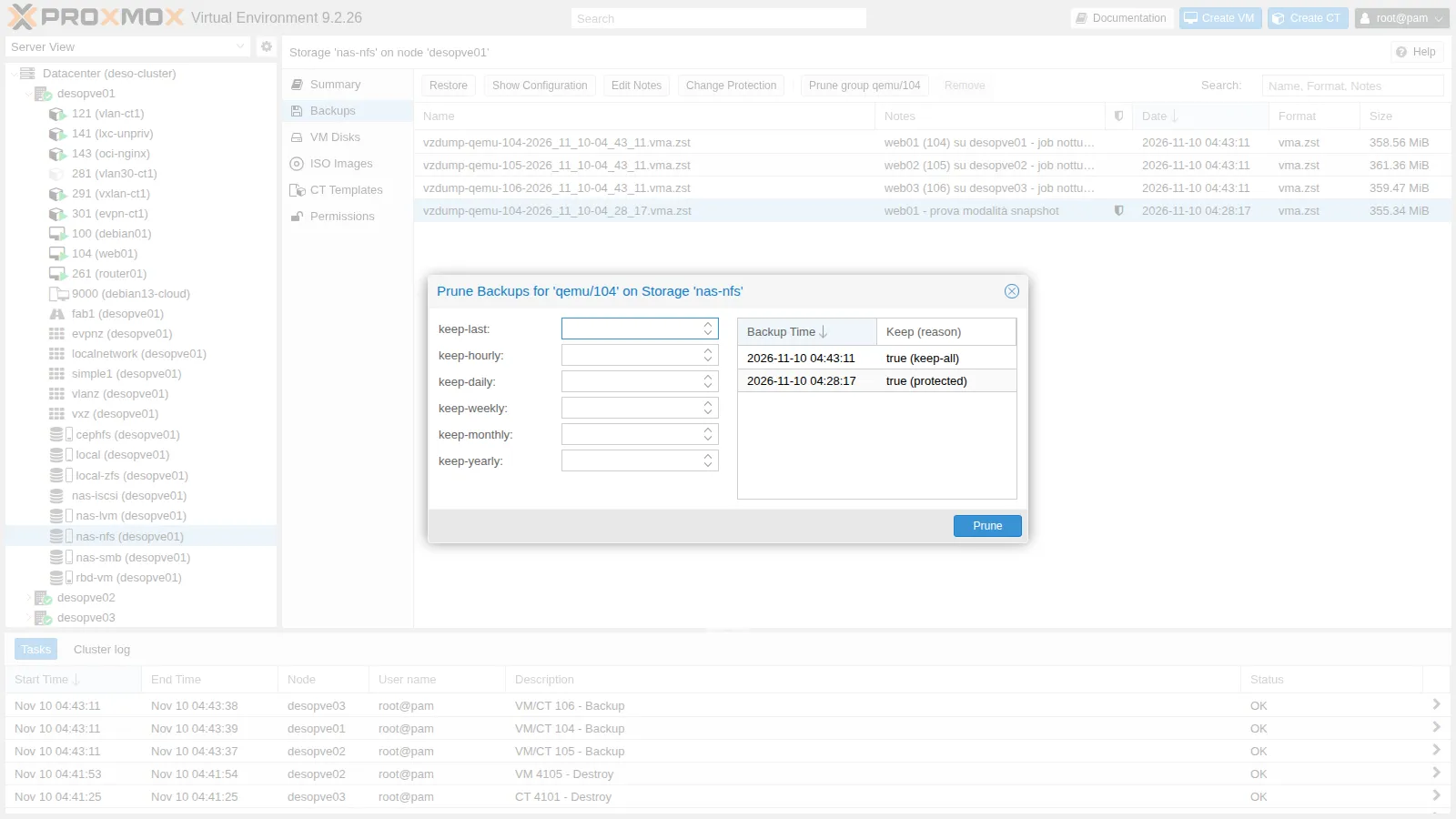
pvesm prune-backups nas-nfs --vmid 104 --keep-last 3pvesm list nas-nfs --vmid 104vzdump-qemu-104-2026_11_10-04_28_17.vma.zstvzdump-qemu-104-2026_11_10-04_33_54.vma.zstvzdump-qemu-104-2026_11_10-04_34_21.vma.zstvzdump-qemu-104-2026_11_10-04_39_45.vma.zstThe last three remain, plus the protected one. In the GUI you do the same with Prune group, which shows for each backup whether it is kept and why:
8. A scheduled job
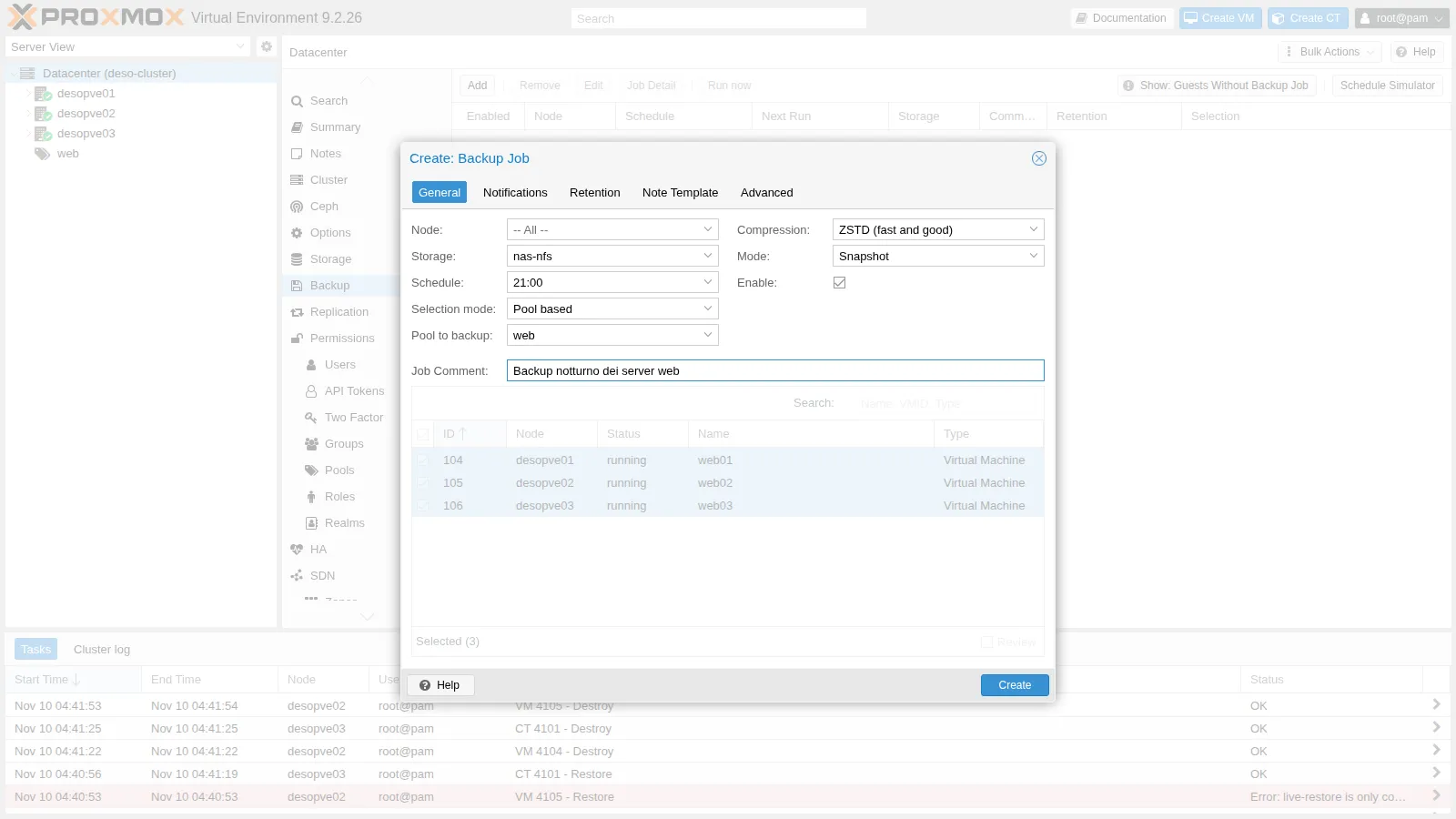
Section titled “8. A scheduled job”In Datacenter → Backup → Add we create the nightly job for the web pool. In the General tab: storage nas-nfs, Schedule 21:00, Selection mode Pool based with the web pool, mode Snapshot, compression ZSTD:
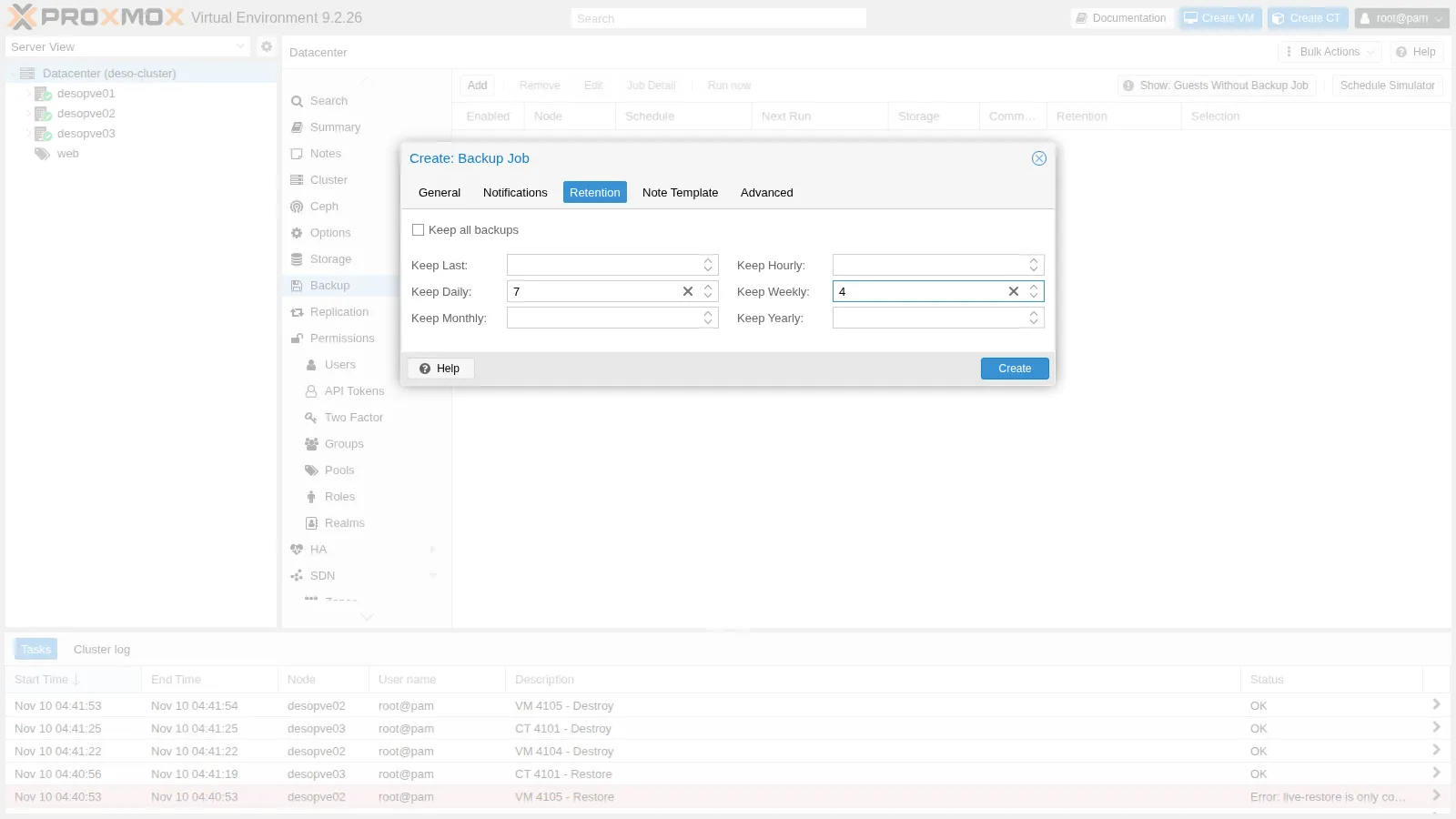
Retention: keep-daily=7, keep-weekly=4, that is, one backup per day for a week and one per week for a month.
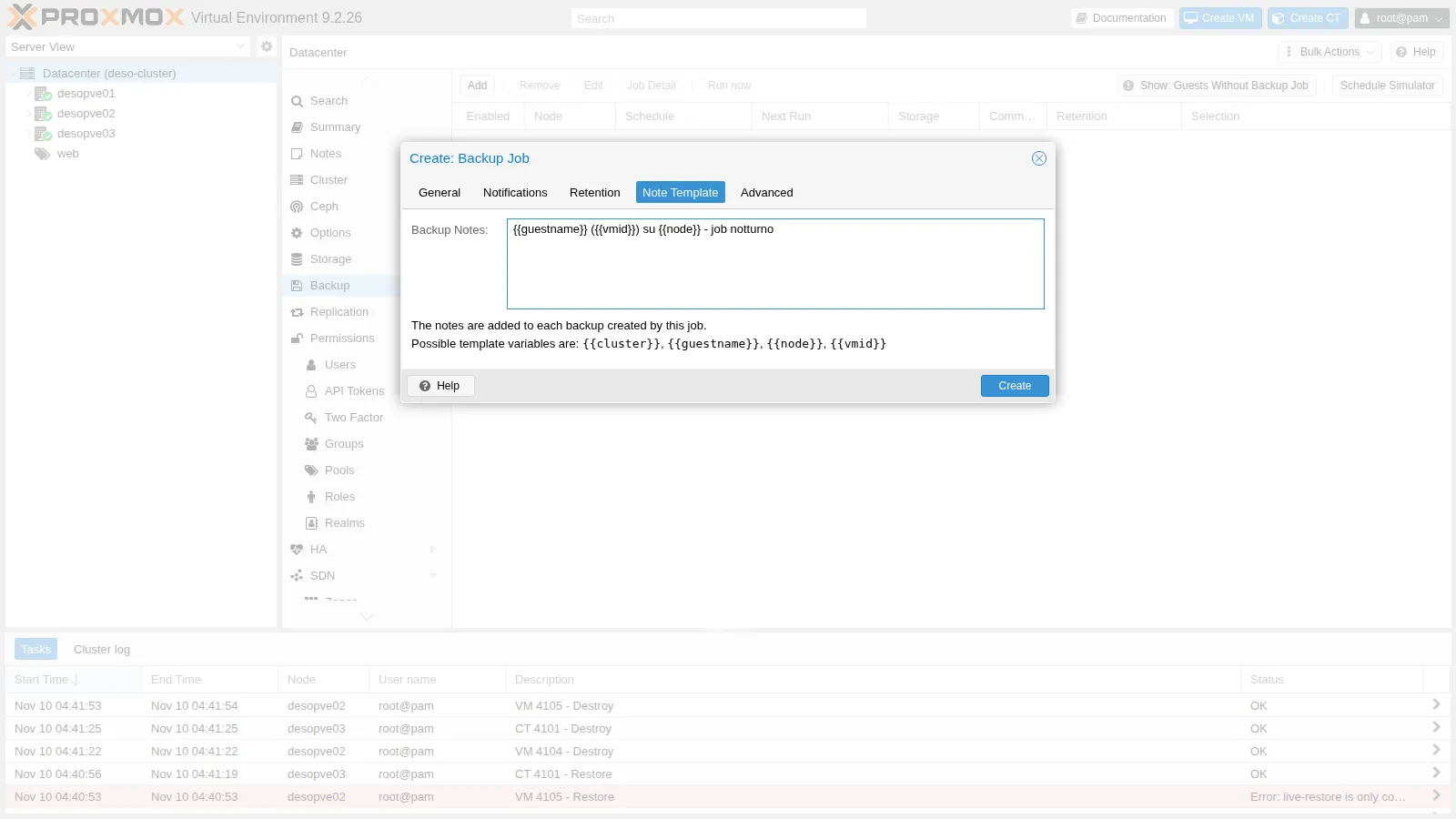
Note Template: the notes of each backup are built from the variables {{guestname}}, {{vmid}}, {{node}}, {{cluster}}:
Advanced: fleecing enabled on rbd-vm. The panel also shows the defaults you can change (zstd threads, bandwidth, I/O workers):
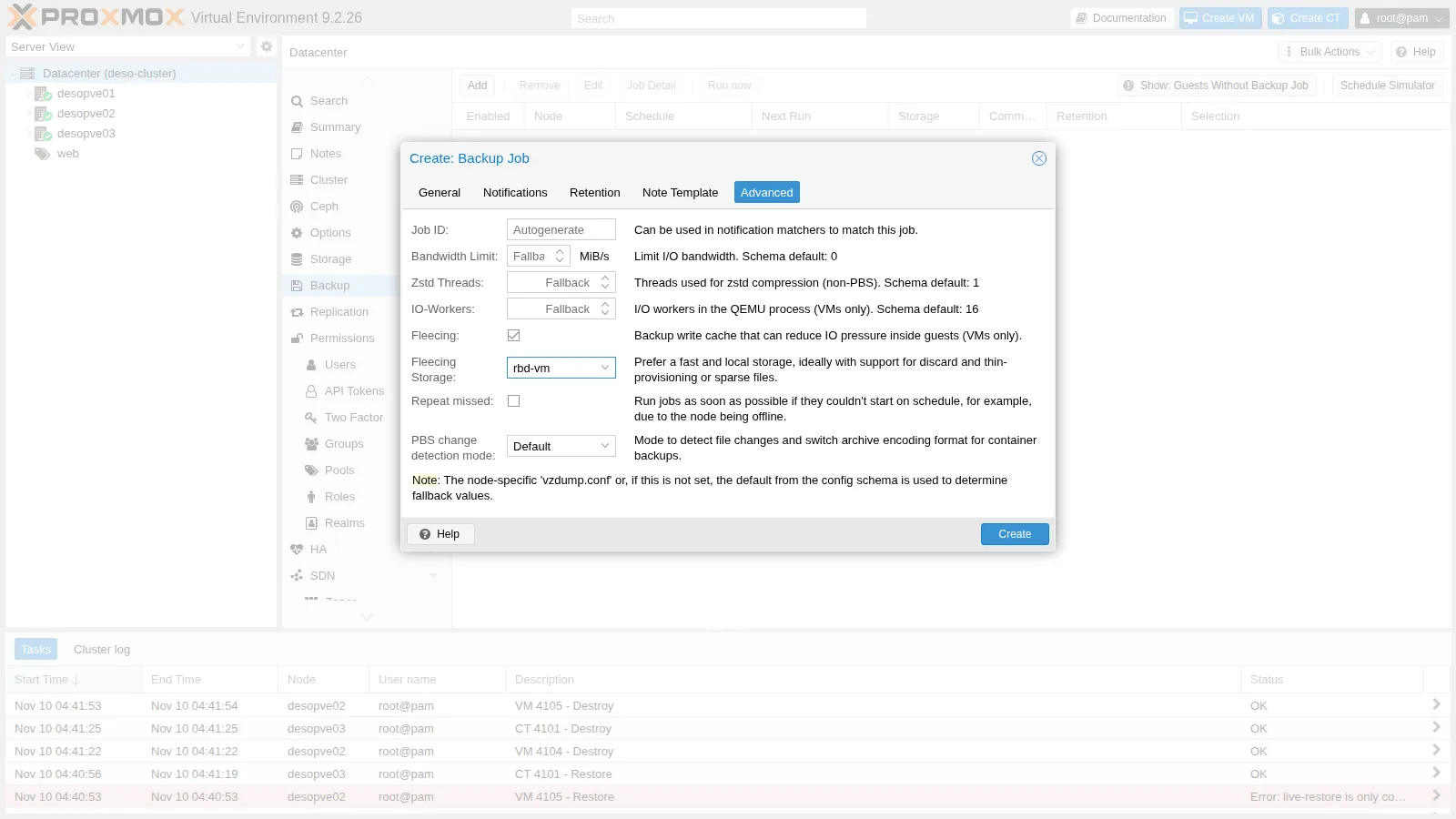
The job is saved in /etc/pve/jobs.cfg:
vzdump: backup-c5fdd165-9aa0 comment Backup notturno dei server web schedule 21:00 compress zstd enabled 1 fleecing 1,storage=rbd-vm mode snapshot notes-template {{guestname}} ({{vmid}}) su {{node}} - job notturno notification-mode notification-system pool web prune-backups keep-daily=7,keep-weekly=4 repeat-missed 0 storage nas-nfs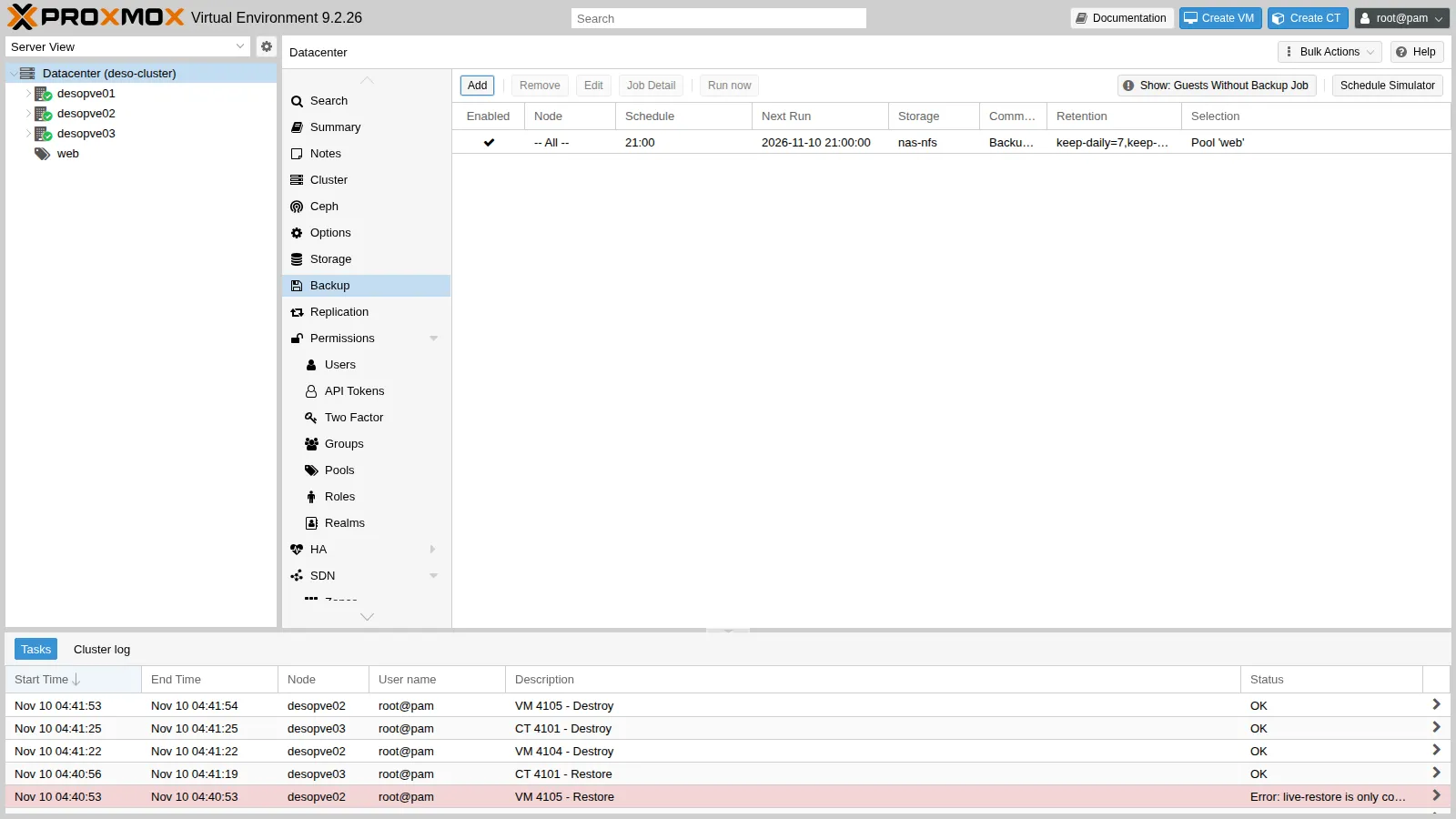
With Run now we run it immediately: a vzdump task starts on every node that hosts a VM of the pool. The log of VM 104 also shows the retention:
INFO: drive-scsi0: attaching fleecing image rbd-vm:vm-104-fleece-0 to QEMUINFO: prune older backups with retention: keep-daily=7, keep-weekly=4INFO: removing backup 'nas-nfs:backup/vzdump-qemu-104-2026_11_10-04_33_54.vma.zst'INFO: removing backup 'nas-nfs:backup/vzdump-qemu-104-2026_11_10-04_34_21.vma.zst'INFO: removing backup 'nas-nfs:backup/vzdump-qemu-104-2026_11_10-04_39_45.vma.zst'INFO: pruned 3 backup(s) not covered by keep-retention policyINFO: removing (old) fleecing image 'rbd-vm:vm-104-fleece-0'INFO: Finished Backup of VM 104 (00:00:28)keep-daily=7 keeps one backup per day, the most recent one: the three backups taken earlier today have been deleted. The protected one is still there. The storage view shows the notes generated from the template and the shield of the protected backups:
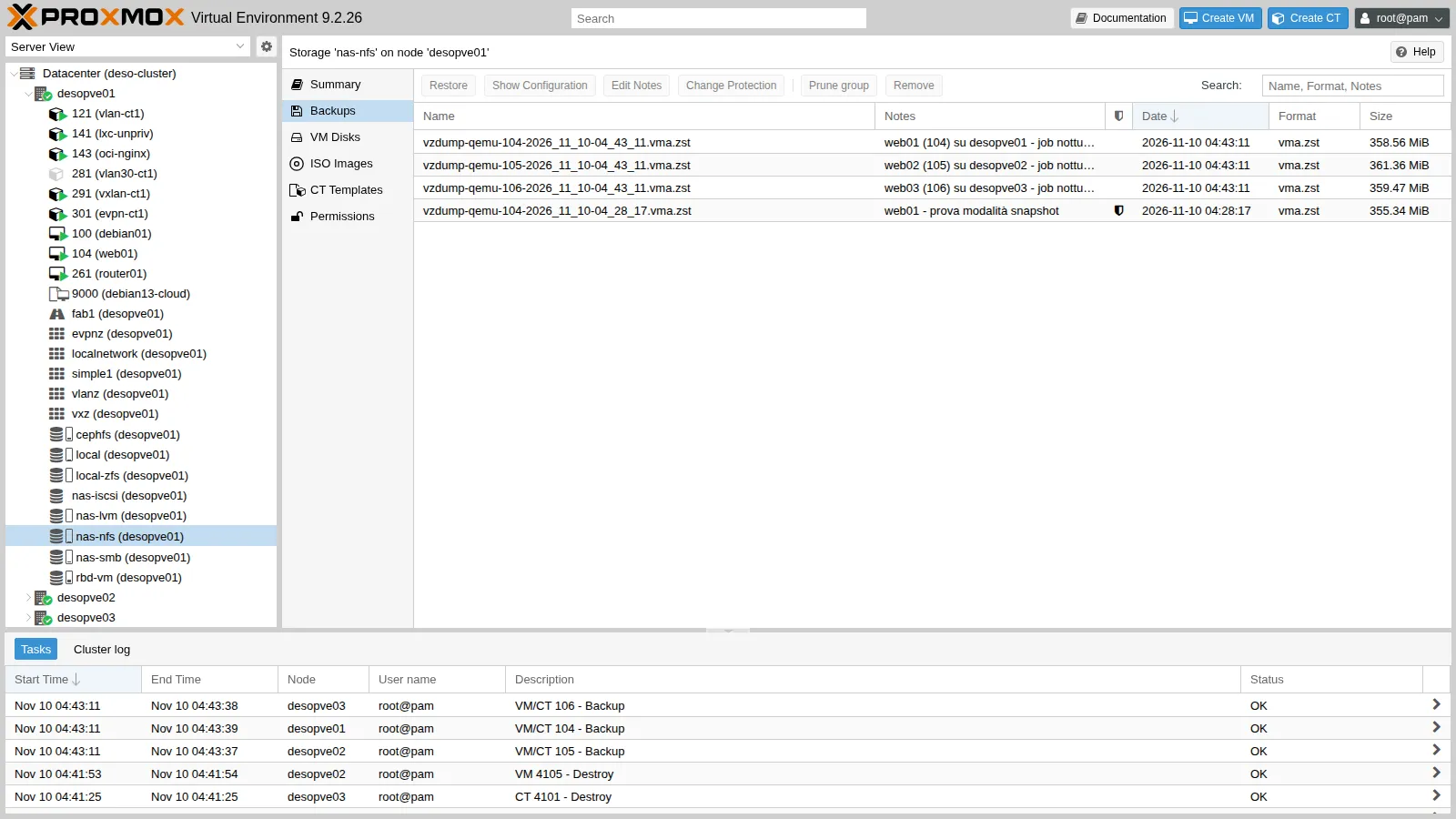
9. Restore to another node and another storage
Section titled “9. Restore to another node and another storage”We restore the latest backup of VM 104 as a new VM 4104 on desopve02, on the local storage local-zfs. With --unique, new MAC addresses are generated, so that no duplicate appears on the network:
V=$(pvesm list nas-nfs --vmid 104 | awk 'NR>1 {v=$1} END {print v}') # the most recent backuptime qmrestore $V 4104 --storage local-zfs --unique 1qm config 4104 | grep -E '^(name|scsi0|net0|agent)'new volume ID is 'local-zfs:vm-4104-cloudinit'new volume ID is 'local-zfs:vm-4104-disk-0'progress 100% (read 8589934592 bytes, duration 8 sec)total bytes read 8589934592, sparse bytes 7360720896 (85.7%)space reduction due to 4K zero blocks 4.29%
real 0m18.836sagent: enabled=1name: web01net0: virtio=BC:24:11:22:EA:5E,bridge=vmbr0scsi0: local-zfs:vm-4104-disk-0,discard=on,iothread=1,size=8G,ssd=1The original had its disk on Ceph; the restore placed it on local ZFS. Do not start the copy while it has the same IP as the original.
Live-restore (the VM starts immediately while the data arrives in the background) is not available with vzdump files:
qmrestore $V 4105 --storage local-zfs --live-restore 1error before or during data restore, some or all disks were not completely restored. VM 4105 state is NOT cleaned up.live-restore is only compatible with backup images from a Proxmox Backup ServerWe will see it in Lab 47 with Proxmox Backup Server.
Restoring container 101 as CT 4101 on desopve03:
time pct restore 4101 cephfs:backup/vzdump-lxc-101-2026_11_10-04_34_41.tar.zst --storage local-zfs --unique 1pct config 4101 | grep -E '^(hostname|rootfs|net0|unprivileged)'extracting archive '/mnt/pve/cephfs/dump/vzdump-lxc-101-2026_11_10-04_34_41.tar.zst'Total bytes read: 715776000 (683MiB, 31MiB/s)merging backed-up and given configuration..
real 0m24.179shostname: debian-ct01net0: name=eth0,bridge=vmbr0,firewall=1,gw=172.27.199.1,hwaddr=BC:24:11:1D:C4:48,ip=172.27.199.101/24,type=vethrootfs: local-zfs:subvol-4101-disk-0,size=8Gunprivileged: 1The restored container stays unprivileged, like the original. In the GUI, you restore by selecting the backup in the storage and clicking Restore, or from the guest’s Backup tab.
We clean up the test copies:
qm destroy 4104 --purge 1qm destroy 4105 --purge 1 # the VM left behind by the failed live-restorepct destroy 4101 --purge 110. Hook scripts
Section titled “10. Hook scripts”To run actions before and after backups (stopping an application, copying the file elsewhere, sending a message), vzdump calls a script at each phase (job-start, backup-start, pre-stop, post-restart, backup-end, job-end…). Proxmox VE ships a commented example:
ls /usr/share/doc/pve-manager/examples/ | grep -i hookvzdump-hook-script.plYou enable the script with the job’s script option or in /etc/vzdump.conf.
Verification and tests
Section titled “Verification and tests”The lab has succeeded when every backup ends with Finished Backup, the scheduled job is in the list and applies its retention, and the restored copies exist on the new node and storage, with new MAC addresses.
| Test | Success criterion | Result in the lab |
|---|---|---|
| snapshot backup with the guest agent | fs-freeze/fs-thaw in the log, no ping replies lost |
17 s; 144 replies out of 144 |
| suspend backup | VM paused and resumed by vzdump | 4 s of pause according to the log; no replies lost, some delayed by up to 3.0 s |
| stop backup | VM shut down and restarted on its own | restarted after 13 s according to the log; about 23 s without ping replies |
| Compression | a valid file with each algorithm | zstd the smallest (353-354 MB); 14 s with --zstd 0 |
Disk with backup=0 |
exclude disk 'scsi1' in the log |
as expected |
| Bind mount of a CT | excluding bind mount point … (not a volume) |
as expected |
| Fleecing | image vm-104-fleece-0 created and removed |
as expected |
| Protected backup | marked protected and never deleted by prune |
kept by both keep-last and the job’s retention |
| Scheduled job | backup of the web pool on three nodes, notes from the template, retention applied |
as expected |
| Restore of a VM and a CT to another node and storage | VM 4104 and CT 4101 created, new MACs | VM restored in 18.8 s and CT in 24.2 s (time) |
| Live-restore from a vzdump file | refused | live-restore is only compatible with backup images from a Proxmox Backup Server |
Final lab state
Section titled “Final lab state”- Scheduled job
backup-c5fdd165-9aa0: poolweb(VMs 104-106) every day at 21:00 tonas-nfs, snapshot, zstd, fleecing onrbd-vm, retentionkeep-daily=7,keep-weekly=4, notes{{guestname}} ({{vmid}}) su {{node}} - job notturno. - Existing backups:
nas-nfs: VMs 104, 105, 106 from the job; VM 104 from the snapshot test, protected;cephfs: CT 101, CT 141, VM 100;nas-smb: VM 104 (fleecing test) and the backup of CT 101 from Lab 14.
- VM 100 again with only the
scsi0disk; VMs 4104 and 4105 and CT 4101 deleted.
What you learned
Section titled “What you learned”- Which mode for which guest. snapshot for almost everything: in this test the ping never lost a reply, and the guest agent freezes the file systems for the snapshot. stop only when you want the guest shut down cleanly before the copy and can accept a reboot, here about 23 seconds without network for a small Debian VM. For a container, stop means being off for the whole backup. suspend only for compatibility.
- Where to keep the backups. Off the node:
localis lost with the node. vzdump saves one complete file per guest; for incremental backups and deduplication you need PBS (Lab 47). - Which compression. zstd, to be named explicitly on the CLI, where the default is no compression; with
--zstd 0it uses half of the cores, if the node has CPU to spare during the backup. - What stays out of the backup. Disks with
backup=0, container mount points withoutbackup=1, and always the bind mounts: back them up in some other way. - When to use fleecing. When the backup target is slow, on a fast storage with room for the rewritten blocks; measure its effect on the guest before relying on it.
- How to set retention.
keep-dailykeeps one backup per day, the most recent; simulate first with--dry-run, and protect the backups that must survive. A job based on a pool also backs up the VMs added to the pool later. - How to restore. A restore can change node and storage;
--uniqueavoids duplicate MACs; live-restore requires PBS.