

Lab 11 – ZFS replication between nodes and manual failover
Dependencies
Section titled “Dependencies”- Previous labs: Lab 06 for the three-node
deso-clustercluster, Lab 07 for VM 100debian01and Lab 10 for the concepts of snapshots andzfs send. - Storage:
local-zfs(poolrpool/data) on all nodes of the cluster, with the same name. It is the storage created by the installation on ZFS (lab 03). - VM: 100
debian01running ondesopve01, with its disk onlocal-zfs, reachable over SSH at172.27.199.100aslabuser. - For the failure test: the ability to cut the power to a node abruptly and to power it back on. Here the node is switched off with a kernel command and powered back on from the remote management card (IPMI, iDRAC, iLO) or with the power button.
- Credentials:
root/<lab-password>→ Appendix B.
Objectives
Section titled “Objectives”- Two replication jobs for VM 100, to two different nodes, one of them every 5 minutes with a 50 MB/s limit, whose state, logs and snapshots you can read in the GUI and with
pvesr. - The same VM live-migrated to a node without a replica and to a node with one, with the task duration, the downtime reported by QEMU and the data copied read separately in the logs.
- VM 100 restarted by hand on another node after its own node was abruptly powered off, with the data lost checked against the time of the last replicated snapshot.
- The cluster and the replication back in order when the failed node returns, knowing which copy is kept and which writes are discarded.
How it works
Section titled “How it works”Replication, not shared storage
Section titled “Replication, not shared storage”With a local storage like local-zfs, the disk of a VM exists on one node only: if the node stops, the VM cannot restart elsewhere. Replication (Storage Replication, the pvesr command) keeps an up-to-date copy of it on other nodes:
desopve01 (source) desopve02 (target) rpool/data/vm-100-disk-0 rpool/data/vm-100-disk-0 @__replicate_100-1_<time>__ ── zfs send ──▶ @__replicate_100-1_<time>__ (every 15 minutes it sends only the blocks changed since the last snapshot)- Replication is asynchronous and based on ZFS snapshots: on every run the job creates a snapshot, sends the difference from the previous run over SSH (incremental
zfs send) and deletes the old snapshot. The first run sends all the data on the disk. - It works only with ZFS storage (
zfspool) and requires the storage to have the same name on the source and on the target. - It is configured per guest and per target node: a job has an ID in the form
<VMID>-<number>and one target; to have copies on two nodes you need two jobs. - The jobs are run by the
pveschedulerservice, according to a schedule in calendar event format (*/15, i.e. every 15 minutes, is the default; forms likemon..fri 22:30can be used too). - The copy is not real-time. What reaches the target is the state of the disk at the moment of the snapshot that opens each run: if the source node fails, everything written after the snapshot of the last successful run is lost. As long as the runs succeed, that window lasts at most the schedule interval plus the duration of a run; every failed run widens it. This is the figure to compare with the Recovery Point Objective (RPO), the largest data loss a service can accept.
What you gain
Section titled “What you gain”- Shorter migrations: if the target already holds a replica, a migration sends only the changes since the last run instead of the whole disk. This also works for live migration: Proxmox VE runs the job one last time, has QEMU track the blocks written from that moment on (a dirty bitmap), and then mirrors only those.
- Restart after a failure: the VM can be restarted on the node that holds the replica, manually (this lab) or automatically with high availability (lab 49), accepting the loss of the most recent data.
Replication does not replace backups (labs 46-47): a deleted file or ransomware gets replicated like any other change.
Who owns the VM
Section titled “Who owns the VM”The configuration of a VM lives in the cluster file system, in /etc/pve/nodes/<node>/qemu-server/<VMID>.conf: the directory that holds the file decides which node the VM belongs to. To restart a VM on another node after a failure you move that file, but only if the failed node is certainly powered off. If it were still running, merely cut off from the others, the VM would end up running twice, on two copies of the disk that drift apart and with the same addresses on the network.
Test environment and versions
Section titled “Test environment and versions”The times and sizes in this lab come from a single run on 9 November 2026, in the configuration below. They describe this configuration: with other versions, disks, networks or VMs they change.
| Component | Configuration used |
|---|---|
| Proxmox VE | 9.2.26, kernel 7.0.14-28-pve on desopve01-03 (Lab 04); QEMU 11.1.3 (the creation-qemu of VM 100, Lab 07) |
local-zfs |
rpool/data on the ZFS mirror (RAID1) of the two system disks of each node (Lab 03), sparse 1; ZFS in the version shipped with Proxmox VE 9.2.26, which the lab does not record (zfs version shows it) |
VM 100 debian01 |
Debian 13.7, 2 vCPUs, 2 GiB of RAM, no guest agent, 16 GiB scsi0 disk holding about 1.9 GiB of data; idle apart from the test writes (Lab 07) |
| Network | replication (over SSH) and migrations use the management network 172.27.199.0/24, because no migration network is set yet (Lab 22); migration type secure, the default; the link speed is not recorded (ethtool shows it) |
| Jobs | 100-0: */5, limit 50 MB/s (50,000,000 bytes/s); 100-1: */15, no limit |
What the logs measure. The lab compares figures that measure different things:
- task duration (
migration finished successfully (duration …)): the whole migration task, from the start to the final steps; - downtime (
downtime … ms): the pause that QEMU measures in the last phase of the memory transfer. Proxmox VE resumes the VM on the target only afterwards, in the final steps of the task, so this figure is not the interruption a client sees; - average migration speed: the VM’s total RAM divided by the duration of the memory transfer, counted in whole seconds, as Lab 48 explains; it is neither the network throughput nor the speed of the disk copy, and with a resolution of one second it cannot compare memory transfers that last only a few seconds;
- run duration (
Durationinpvesr status): a whole run of a replication job, of which the send is only one part; - data to send (
estimated size): the estimate ZFS makes before sending, in binary units (154K,511Mand1.91Gare KiB, MiB and GiB); it is not a network counter.
What the lab does not measure. It does not measure the pause a client sees during the migrations, nor the time from the power-off of the node until the VM is reachable again. Each migration and each test was run once: the figures are single observations, not statistics.
Procedure
Section titled “Procedure”1. Check the storage
Section titled “1. Check the storage”The local-zfs storage is defined only once for the whole cluster, without a nodes line, so it exists on all nodes with the same name:
grep -A4 "zfspool: local-zfs" /etc/pve/storage.cfgzfspool: local-zfs pool rpool/data content rootdir,images sparse 12. A baseline migration, without replication
Section titled “2. A baseline migration, without replication”To have a point of comparison, live-migrate VM 100 to desopve03, which has no copy of its disk yet. With --with-local-disks, Proxmox VE mirrors the 16 GiB disk to the target while the VM keeps running:
qm migrate 100 desopve03 --online --with-local-disks…mirror-scsi0: transferred 16.0 GiB of 16.0 GiB (100.00%) in 57s, ready2026-11-09 14:19:36 average migration speed: 1.0 GiB/s - downtime 10 ms2026-11-09 14:19:36 migration completed, transferred 333.6 MiB VM-state2026-11-09 14:19:43 migration finished successfully (duration 00:01:13)- Measured: the disk mirror (
mirror-scsi0) reports 16.0 GiB of 16.0 GiB in 57 seconds; the whole task takes 1 minute 13 seconds; QEMU reports 10 ms of downtime and 333.6 MiB of VM state (the memory) transferred. - Interpretation: the mirror went through the whole 16 GiB virtual size of the disk, although the volume holds only about 1.9 GiB of data (the estimate of the full send in step 4). The duration is consistent with a copy that depends on the size of the disk more than on its contents, which is what the documentation describes for a target without a replica. The log does not show how many bytes actually crossed the network, nor what limited the speed of the copy: the network, the source pool or the target pool.
- How to check: compare the bytes the source node transmits on the management network before and after the migration (
ip -s link show vmbr0), and watchzpool iostat 1on both nodes during the copy.
The VM now runs on desopve03.
3. Create the replication jobs
Section titled “3. Create the replication jobs”-
Select VM 100 (debian01) → Replication → Add.
-
Fill in the job to
desopve01:- Target
desopve01; - Schedule
*/5, every 5 minutes (in the lab, to see the runs without waiting too long); - Rate limit (MB/s)
50, so as not to saturate the network during the first full send; - Comment
replica verso desopve01.
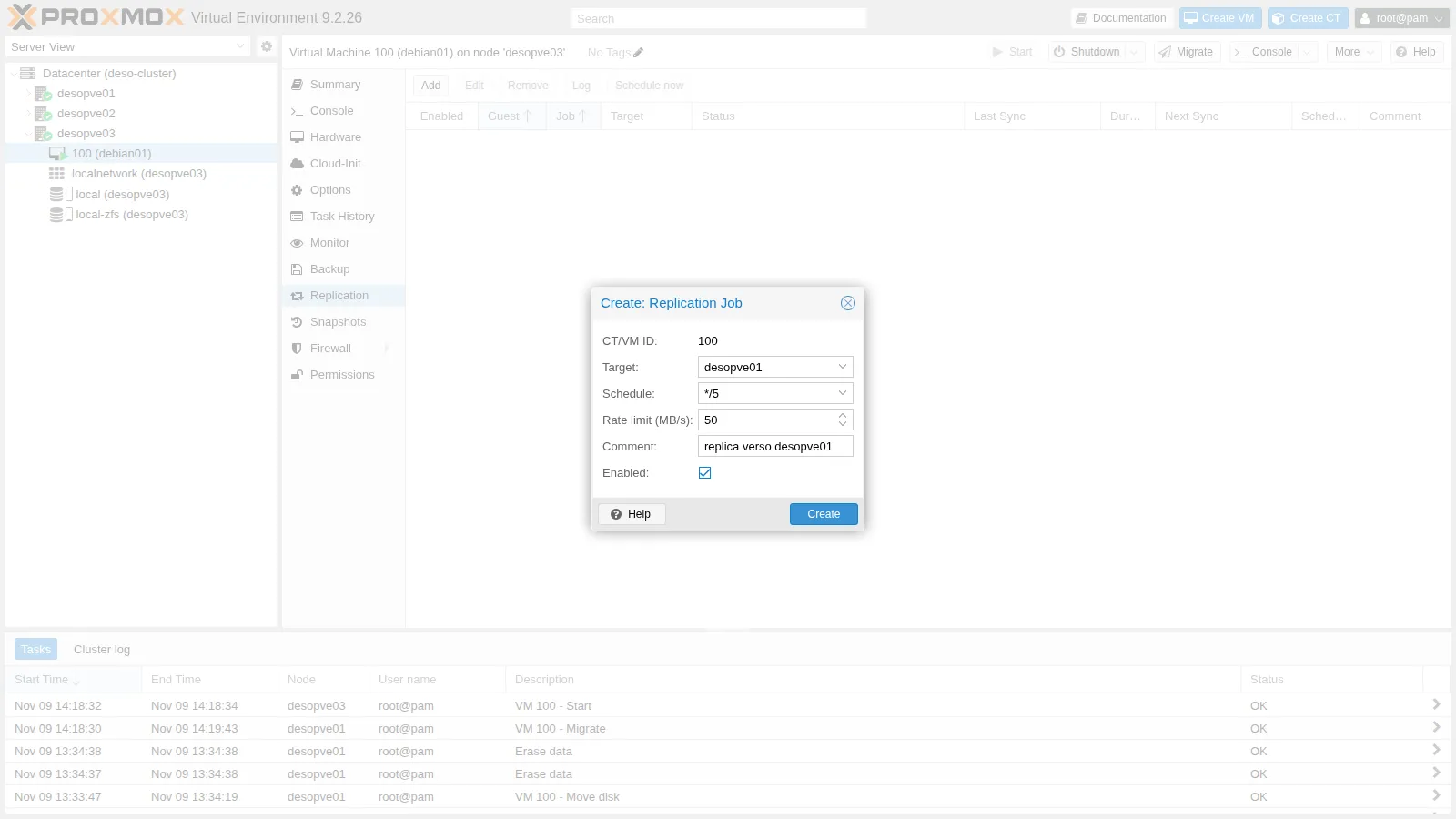
- Target
-
Click Create, then add a second job: Target
desopve02, Schedule*/15(the default), no rate limit.
The configuration is in the cluster file system:
cat /etc/pve/replication.cfglocal: 100-0 comment replica verso desopve01 target desopve01 rate 50 schedule */5 source desopve03
local: 100-1 comment replica verso desopve02 target desopve02 source desopve03The second job has no schedule line because it uses the default value.
4. The first run: a full copy
Section titled “4. The first run: a full copy”The first runs start a few seconds after the jobs are created. Log shows the steps of a run: snapshot, full send (full sync), import on the target. This is the first run of the job to desopve01, with the 50 MB/s limit:
2026-11-09 14:22:02 100-0: create snapshot '__replicate_100-0_1794230521__' on local-zfs:vm-100-disk-02026-11-09 14:22:02 100-0: using secure transmission, rate limit: 50 MByte/s2026-11-09 14:22:02 100-0: full sync 'local-zfs:vm-100-disk-0' (__replicate_100-0_1794230521__)2026-11-09 14:22:03 100-0: full send of rpool/data/vm-100-disk-0@__replicate_100-0_1794230521__ estimated size is 1.91G…2026-11-09 14:22:43 100-0: 14:22:43 1.90G rpool/data/vm-100-disk-0@__replicate_100-0_1794230521__2026-11-09 14:23:00 100-0: successfully imported 'local-zfs:vm-100-disk-0'2026-11-09 14:23:01 100-0: end replication jobZFS estimates 1.91G to send (in binary units, 1.91 GiB). The 16 GiB volume holds only the blocks written so far, and zfs send sends those, not the empty space. The send takes about 40 seconds, in line with the limit (1.91 GiB at 50 MB/s takes about 41 seconds). The job to desopve02, without a limit, sends the same data in 7 seconds. Step 5 compares these times with the duration of the whole runs.
5. Subsequent runs: only the differences
Section titled “5. Subsequent runs: only the differences”-
In the VM, write 500 MiB of new data:
labuser@debian01 dd if=/dev/urandom of=$HOME/dati-1.bin bs=1M count=500 status=none; sync -
Select the job to
desopve01, click Schedule now, then open Log. This time the run is incremental (incremental sync): ZFS estimates511Mto send, close to the 500 MiB just written, instead of the whole volume: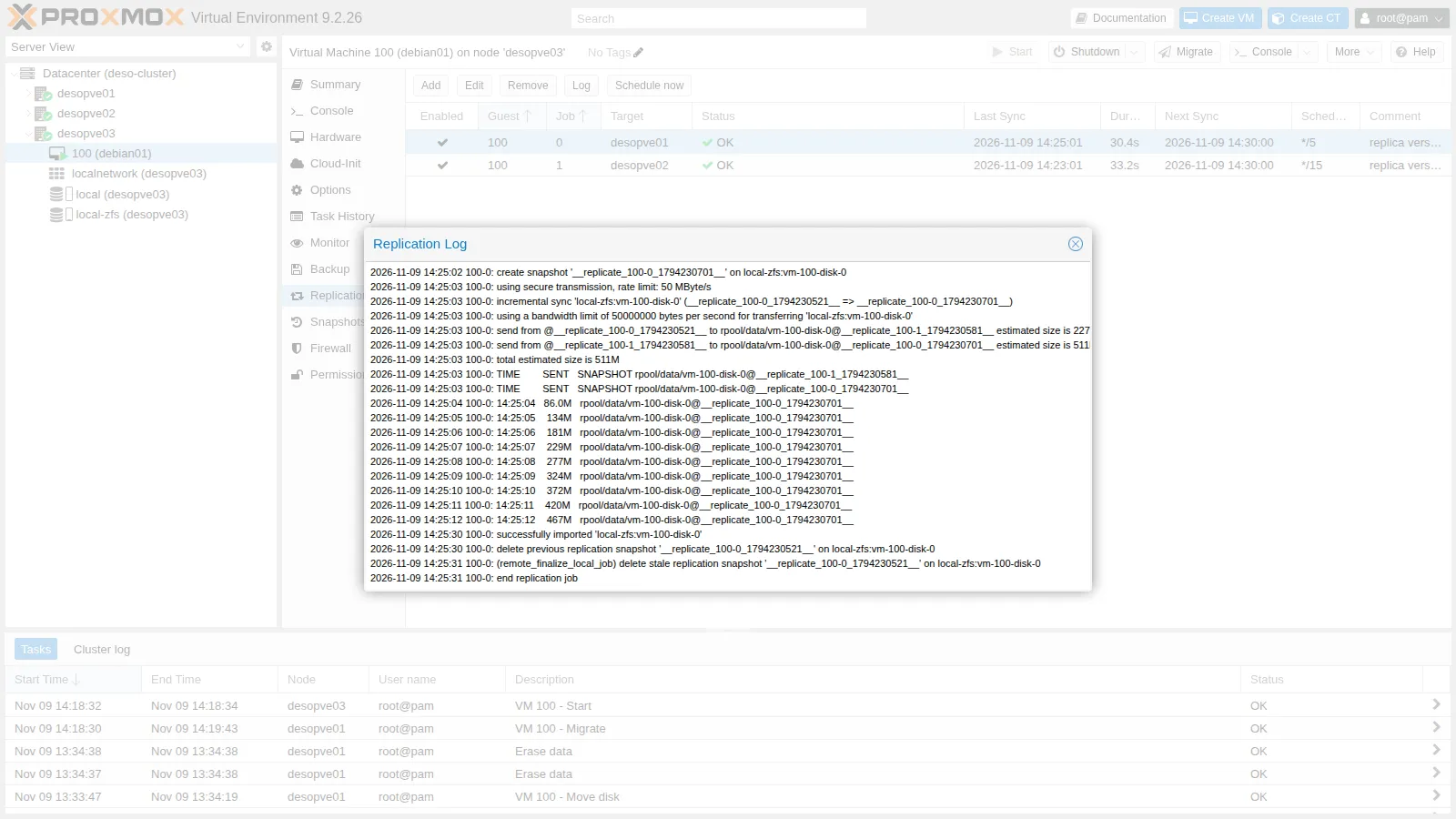
-
The job list shows, for each job, the last sync, the duration of the last run, the next run and the state:
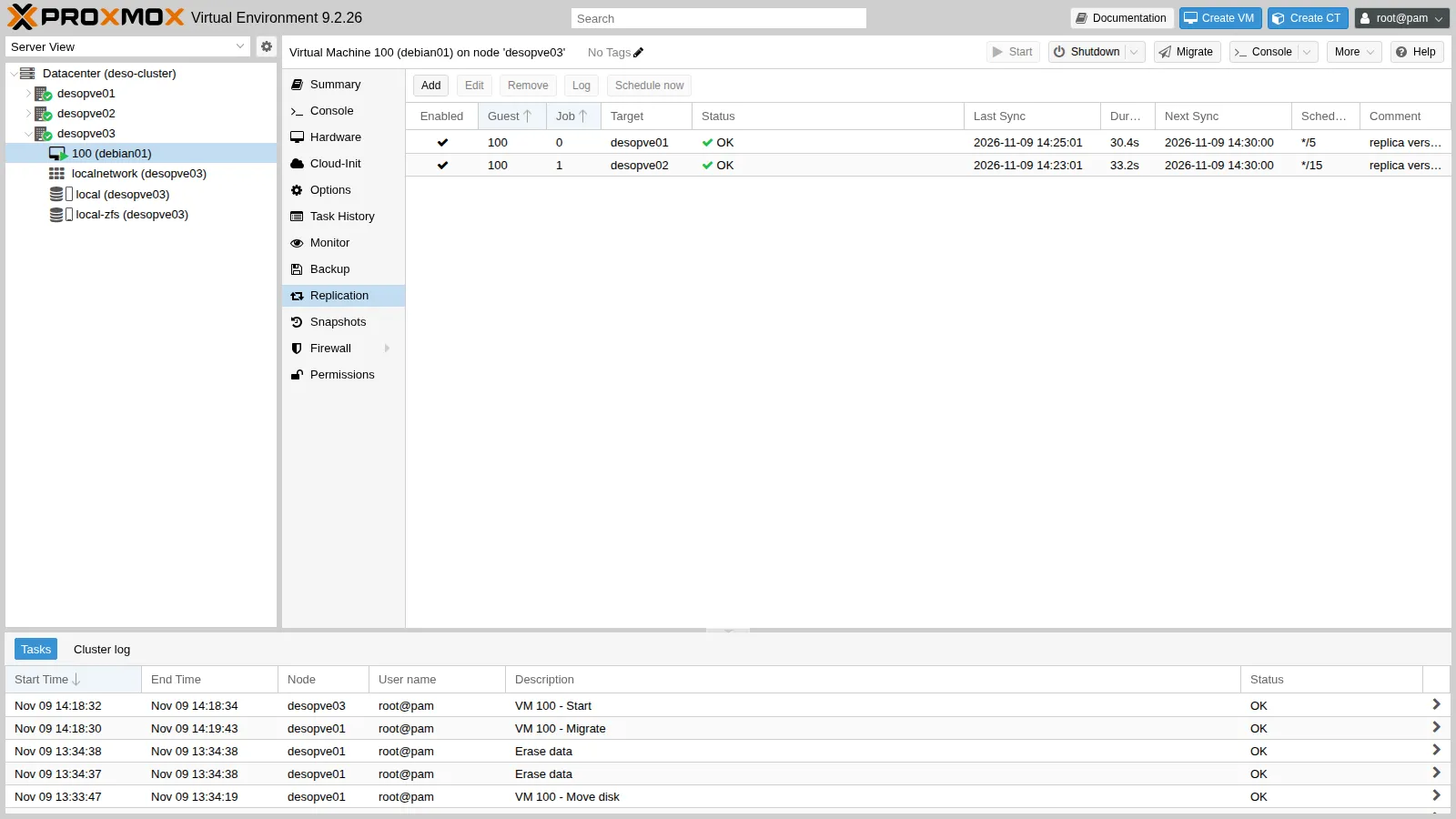
From the command line:
root@desopve03 pvesr statusOutput JobID Enabled Target LastSync NextSync Duration FailCount State100-0 Yes local/desopve01 2026-11-09_14:25:01 2026-11-09_14:30:00 30.423273 0 OK100-1 Yes local/desopve02 2026-11-09_14:23:01 2026-11-09_14:30:00 33.221129 0 OK -
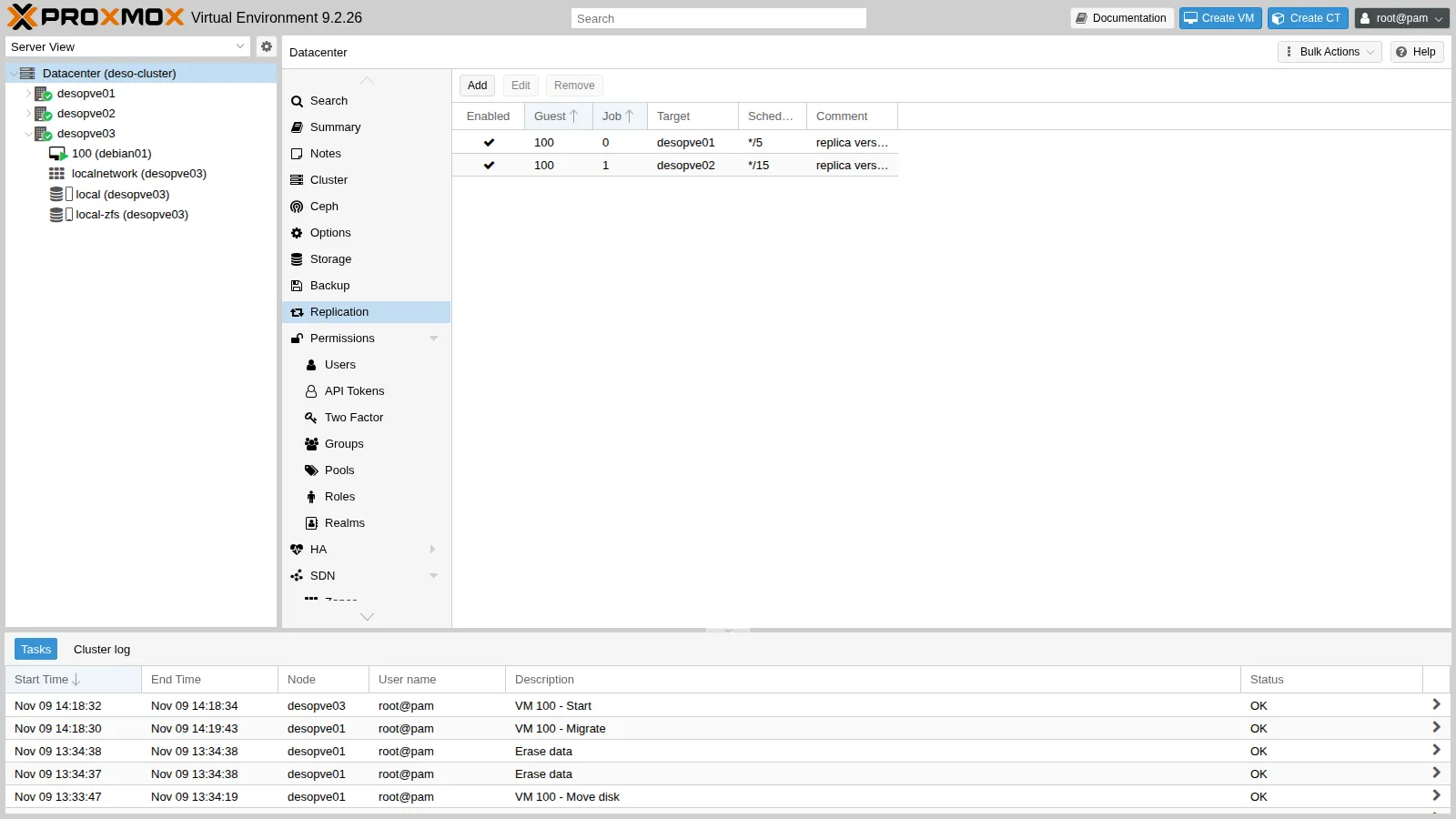
Datacenter → Replication lists the jobs of all the guests in the cluster: it is the place to check them all at once.
-
The replication snapshots can be seen with
zfs list. Each volume keeps the last snapshot of each job, which serves as the base for the next run:root@desopve03 zfs list -t snapshot -o name,used,creation -r rpool/dataOutput NAME USED CREATIONrpool/data/vm-100-disk-0@__replicate_100-1_1794230581__ 1.12M Mon Nov 9 14:23 2026rpool/data/vm-100-disk-0@__replicate_100-0_1794230701__ 188K Mon Nov 9 14:25 2026root@desopve03 ssh desopve01 zfs list -t snapshot -o name,used,creation -r rpool/dataOutput NAME USED CREATIONrpool/data/vm-100-disk-0@__replicate_100-1_1794230581__ 1.12M Mon Nov 9 14:23 2026rpool/data/vm-100-disk-0@__replicate_100-0_1794230701__ 0B Mon Nov 9 14:25 2026Do not delete the
__replicate_…snapshots by hand: without the common base, the next run would have to start over with a full copy.
Send and run: two different durations. The Duration column is the length of a whole run. The send is only one part of it, as the logs show:
| Run | Data to send (ZFS estimate) | Send (progress lines in the log) | Whole run |
|---|---|---|---|
First run to desopve01, 50 MB/s limit (step 4) |
1.91G |
about 40 s (14:22:03 → 14:22:43) | about 1 minute (14:22:02 → 14:23:01) |
First run to desopve02, no limit (step 4) |
the same | 7 s | 33.2 s (Duration) |
Incremental run to desopve01, 50 MB/s limit (this step) |
511M |
about 10 s (14:25:03 → 14:25:12) | 30.4 s (Duration) |
- Measured: with the limit, the send proceeds at about 50 MB/s, the configured value (the log states it as
50000000 bytes per second). In both runs todesopve01, 17-18 seconds pass between the last progress line andsuccessfully imported; the run todesopve02lasts 33.2 seconds for a 7-second send. - Interpretation: the length of the send follows from the data to send and the limit. The log does not break down the rest of the run: it may go into completing the receive on the target or into the other steps of the job, and this test does not tell them apart.
- How to check: during a run,
zpool iostat 1on the target shows whether the pool is still writing after the last progress line, and the full log of the job gives the time of every step.
6. Migrate a replicated VM
Section titled “6. Migrate a replicated VM”Migrate VM 100 from desopve03 to desopve01, which already has a replica:
qm migrate 100 desopve01 --online --with-local-disks…2026-11-09 14:26:55 incremental sync 'local-zfs:vm-100-disk-0' (__replicate_100-0_1794230701__ => __replicate_100-0_1794230814__)2026-11-09 14:26:56 send from @__replicate_100-0_1794230701__ to rpool/data/vm-100-disk-0@__replicate_100-0_1794230814__ estimated size is 154K…drive mirror re-using dirty bitmap 'repl_scsi0'…2026-11-09 14:27:07 average migration speed: 688.3 MiB/s - downtime 20 ms2026-11-09 14:27:14 migration finished successfully (duration 00:00:20)| Live migration of VM 100 | Disk copy, from the task log | Downtime reported by QEMU | Task duration |
|---|---|---|---|
To desopve03, without a replica (step 2) |
mirror of the whole disk: 16.0 GiB of 16.0 GiB in 57 s | 10 ms | 1 minute 13 seconds |
To desopve01, with the replica |
one last replication run (estimate 154K), then a mirror of only the blocks recorded in the repl_scsi0 bitmap |
20 ms | 20 seconds |
- Measured: with the replica, the task lasts 20 seconds instead of 1 minute 13 seconds. The replication run it starts lasts 3.2 seconds: it is the run of job
100-0withLastSync14:26:54 in thepvesr statusat the start of the failure test. - Interpretation: the shorter task is consistent with the smaller disk copy. The excerpts do not show how the rest of the time is split, but two figures narrow it down. From the
average migration speed(see Test environment and versions), with 2 GiB of RAM, the memory transfer took about 3 seconds here and about 2 in step 2: a few seconds in both cases, but at a resolution of one second the figure does not say which of the two was faster. And in both migrations 7 seconds pass between the end of the memory transfer and the end of the task (14:27:07 → 14:27:14 here, 14:19:36 → 14:19:43 in step 2). The downtimes, 10 and 20 ms, are QEMU’s figures from a single run each: they do not say how long a client lost contact with the VM. - How to check: the full task log (double-click the task in Tasks) gives the time of every phase. To measure what a client sees, ping the VM from another host during the migration, with an interval shorter than the pause you want to resolve, for example every 10 ms (
ping -D -i 0.01 172.27.199.100). With a ping every 0.2 seconds, as in Lab 48, a pause shorter than the interval can go unnoticed.
After the migration Proxmox VE reverses the jobs on its own: the one that pointed to desopve01 now replicates to the old node, desopve03. The comment, however, stays as it was written by hand:
cat /etc/pve/replication.cfglocal: 100-0 comment replica verso desopve01 target desopve03 rate 50 schedule */5 source desopve01
local: 100-1 comment replica verso desopve02 target desopve02 source desopve01Verification and tests
Section titled “Verification and tests”The lab has succeeded when every check below gives the expected result. The last column shows what this run observed, on 9 November 2026.
| Check | Expected result | Observed in the lab |
|---|---|---|
Replication jobs (pvesr status, Datacenter → Replication) |
both jobs OK, FailCount 0 |
100-0 every 5 minutes and 100-1 every 15, both OK |
| Run logs | full sync on the first run, incremental sync afterwards |
1.91G on the first run; 511M after writing 500 MiB |
| Migration to a node with the replica (step 6) | incremental sync and drive mirror re-using dirty bitmap in the log; a shorter task than without a replica |
20 s instead of 1 minute 13 s |
| VM restarted from the replica (first test) | the VM starts on desopve02; the files written before the last snapshot are there, the later ones are missing |
A and dati-1.bin present; B and dati-2.bin, written after 14:28:01, lost |
| Return of the failed node (second test) | the node rejoins with quorum, does not start VM 100, and the next run realigns it with an incremental sync |
Quorate, 3 votes; 12.5M sent at 14:36:02 |
| Cleanup | no jobs left, no volumes of VM 100 on desopve02 and desopve03 |
as expected |
Test – The node suddenly powers off
Section titled “Test – The node suddenly powers off”Configuration tried. VM 100 runs on desopve01 and is replicated to desopve03 (job 100-0, every 5 minutes) and to desopve02 (job 100-1). You cut the power to desopve01 and restart the VM from the replica on desopve02.
-
In the VM, write a file, start a replication run to
desopve02and wait for it to finish. Then write more data, after the snapshot of that run (LastSync):labuser@debian01 date "+%F %T" > $HOME/A-prima-della-replica.txt; syncroot@desopve01 pvesr schedule-now 100-1pvesr statusOutput JobID Enabled Target LastSync NextSync Duration FailCount State100-0 Yes local/desopve03 2026-11-09_14:26:54 2026-11-09_14:30:00 3.183833 0 OK100-1 Yes local/desopve02 2026-11-09_14:28:01 2026-11-09_14:30:00 13.542599 0 OKlabuser@debian01 date "+%F %T" > $HOME/B-dopo-la-replica.txtdd if=/dev/urandom of=$HOME/dati-2.bin bs=1M count=200 status=none; syncls -l --time-style=+%T $HOMEOutput -rw-rw-r-- 1 labuser labuser 20 14:27:34 A-prima-della-replica.txt-rw-rw-r-- 1 labuser labuser 20 14:28:11 B-dopo-la-replica.txt-rw-rw-r-- 1 labuser labuser 524288000 14:24:00 dati-1.bin-rw-rw-r-- 1 labuser labuser 209715200 14:28:12 dati-2.bin -
At 14:28:28, before the next run, power
desopve01off abruptly. The SysRqocommand makes the kernel switch the machine off at once, without a clean shutdown: services are not stopped and file systems are not unmounted:root@desopve01 echo o > /proc/sysrq-trigger -
The other two nodes still have quorum (2 votes out of 3), so the cluster stays operational:
root@desopve02 pvecm status | grep -E "Total votes|Quorum:|Flags"Output Total votes: 2Quorum: 2Flags: QuorateBehaviour observed. The web interface marks
desopve01as offline. VM 100 still appears underdesopve01, with its last known state, and nothing restarts it: there is no high availability.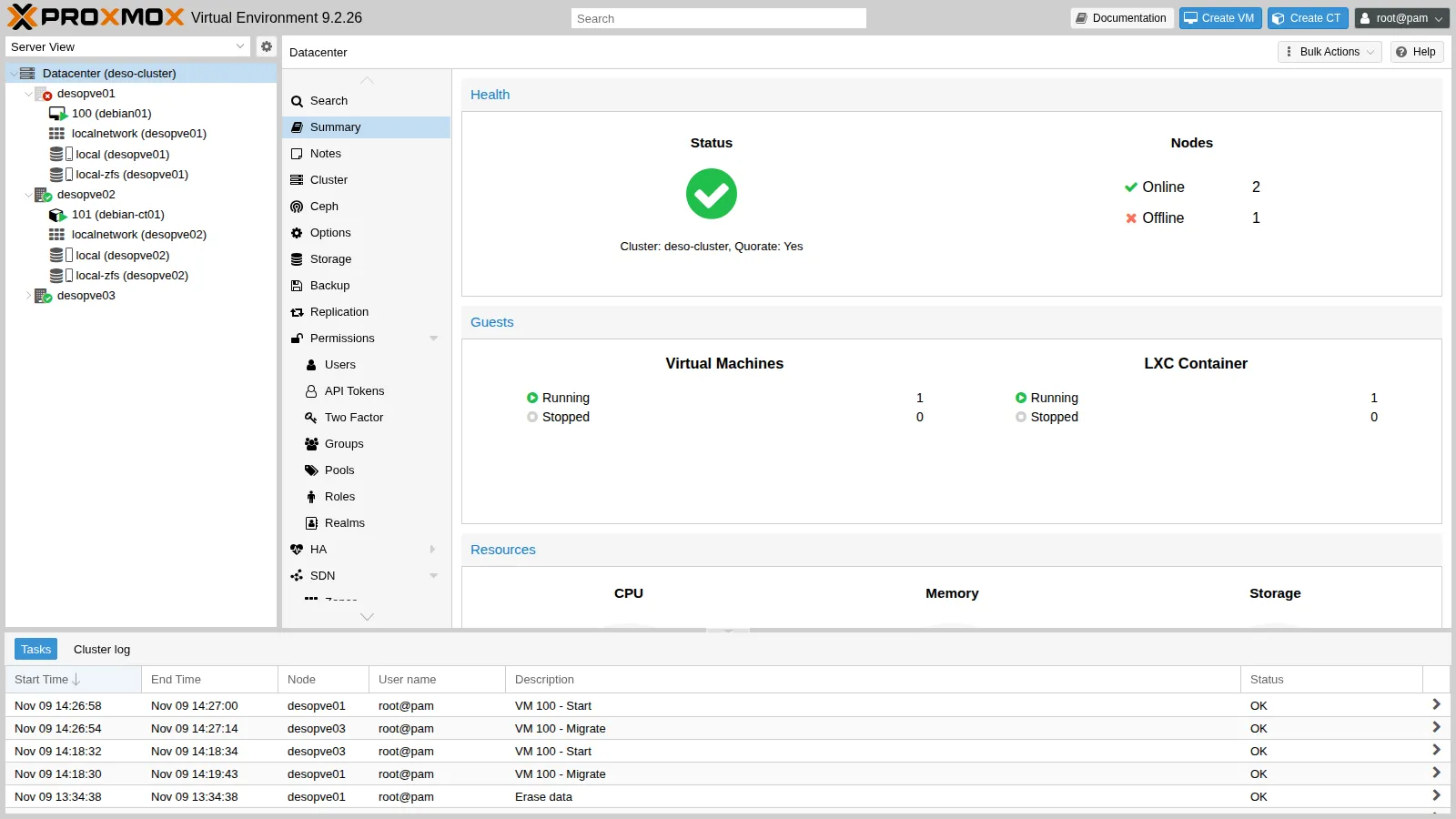
-
On
desopve02, check the last replication snapshot received: it is the one taken at 14:28:01 (__replicate_100-1_1794230881__; the number in the name is the time of the snapshot in seconds since 1970).root@desopve02 zfs list -t snapshot -o name,creation -r rpool/data/vm-100-disk-0Output NAME CREATIONrpool/data/vm-100-disk-0@__replicate_100-0_1794230814__ Mon Nov 9 14:26 2026rpool/data/vm-100-disk-0@__replicate_100-1_1794230881__ Mon Nov 9 14:28 2026 -
Decision. Restart the VM from the replica on
desopve02. This is safe only because you know for certain thatdesopve01is off: you switched it off yourself. Move the VM configuration into the directory ofdesopve02and start the VM, as the documentation describes for a failed node:root@desopve02 mv /etc/pve/nodes/desopve01/qemu-server/100.conf /etc/pve/nodes/desopve02/qemu-server/100.confqm start 100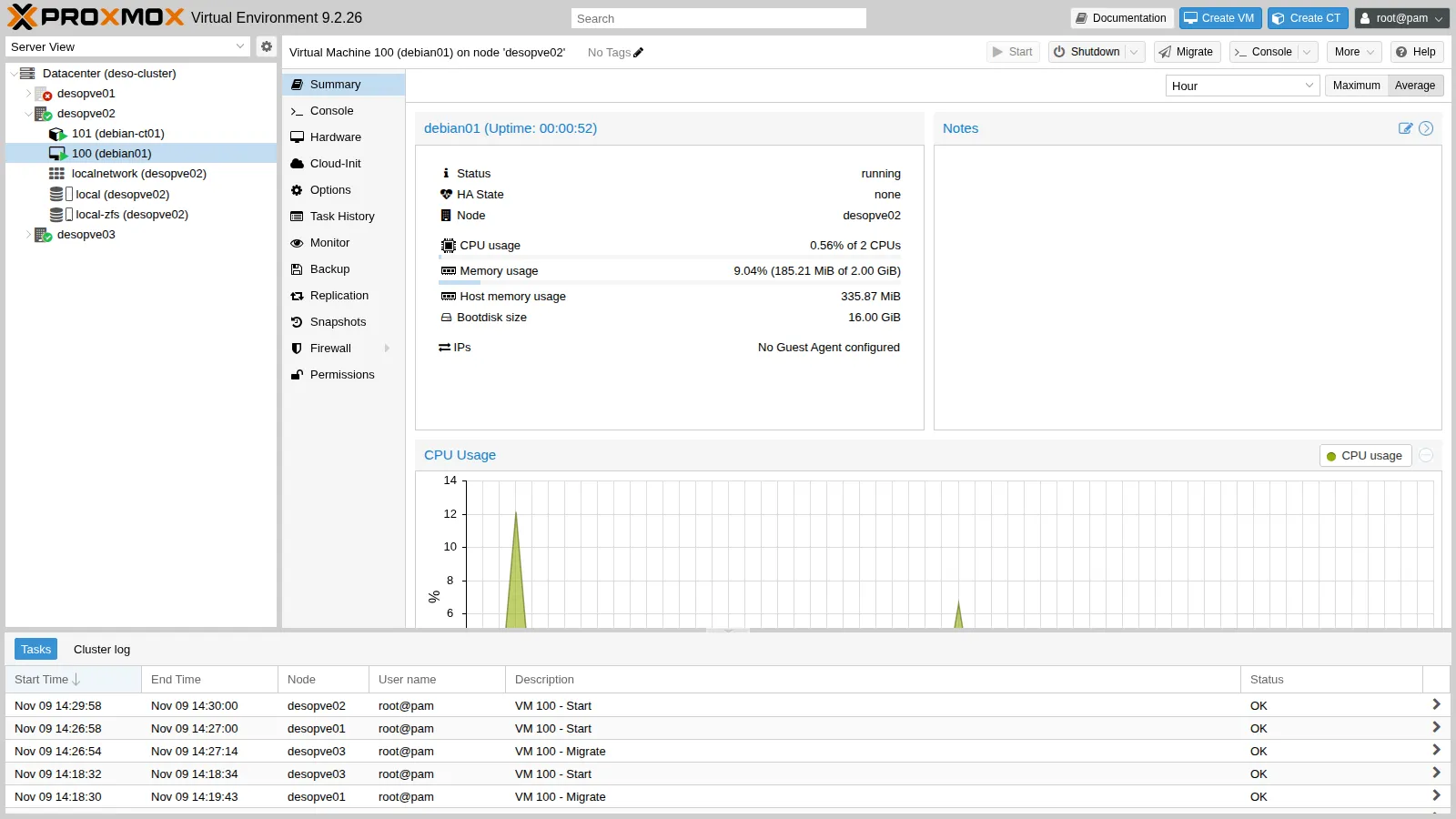
-
In the VM, check the files:
labuser@debian01 ls -l --time-style=+%T $HOMEOutput -rw-rw-r-- 1 labuser labuser 20 14:27:34 A-prima-della-replica.txt-rw-rw-r-- 1 labuser labuser 524288000 14:24:00 dati-1.binlabuser@debian01 cat $HOME/B-dopo-la-replica.txtOutput cat: /home/labuser/B-dopo-la-replica.txt: No such file or directoryResult. The VM restarted with its disk as it was at 14:28:01, the moment of the last replicated snapshot.
- Measured: the file written before the snapshot (
A, 14:27:34) anddati-1.binare there; fileB(14:28:11) and the 200 MiB ofdati-2.bin(14:28:12), written after it, are lost. Between the snapshot and the power-off (14:28:28) 27 seconds passed: that is the data-loss window of this test. The VM boots and its files can be read. - Interpretation: what is lost is whatever was written inside the window, and the window depends on where the failure falls between two runs. With job
100-1on its default*/15schedule and no forced run, it could have reached 15 minutes plus the duration of a run, and more after failed runs. VM 100 has no guest agent, so the snapshot is taken without freezing the guest file systems: the copy is like a disk after a power cut (crash-consistent), and ext4 makes it consistent again by replaying its journal when it mounts. - How to check: in the VM, as root, the kernel log of the boot shows whether ext4 recovered its journal (
journalctl -k -b | grep EXT4-fs); in the job log, the linefreeze guest filesystemappears only when the guest file systems are frozen before the snapshot. Applications need their own checks: a database, for example, has to recover its own log.
The test did not measure how long the service was down, from the power-off until the VM answered again: here that time includes making sure that the node is off and the manual steps. To measure it, keep a ping running from another host for the whole test (
ping -D 172.27.199.100): the timestamps of the last reply before the power-off and of the first one after the restart give the interruption. - Measured: the file written before the snapshot (
-
Meanwhile the jobs have followed the VM. Job
100-1, whose target wasdesopve02, now replicates fromdesopve02to the failed node,desopve01: it fails (FailCount1,sshexit code 255) and has noNextSyncwhile that node is off. Job100-0carries on from the new node todesopve03:root@desopve02 pvesr statusOutput JobID Enabled Target LastSync NextSync Duration FailCount State100-0 Yes local/desopve03 2026-11-09_14:30:01 2026-11-09_14:35:00 6.464296 0 OK100-1 Yes local/desopve01 - - 3.111215 1 command '/usr/bin/ssh -e none … [email protected] -- pvesr prepare-local-job 100-1 --last_sync 0 -- local-zfs:vm-100-disk-0' failed: exit code 255
Test – The failed node returns to service
Section titled “Test – The failed node returns to service”-
Power
desopve01back on from the remote management card. At boot it rejoins the cluster and receives the updated configuration: VM 100 no longer belongs to it, so it does not start.root@desopve01 pvecm status | grep -E "Total votes|Quorate"Output Quorate: YesTotal votes: 3root@desopve01 qm listzfs list -t all -o name,creation -r rpool/data | grep vm-100Output rpool/data/vm-100-disk-0 Mon Nov 9 14:22 2026rpool/data/vm-100-disk-0@__replicate_100-0_1794230814__ Mon Nov 9 14:26 2026rpool/data/vm-100-disk-0@__replicate_100-1_1794230881__ Mon Nov 9 14:28 2026The disk left on
desopve01is stale: the VM now lives ondesopve02, and this copy stopped at the power-off. It may also hold the writes made after 14:28:01 that never reached the replica; the lab does not check this. To see it, before the job runs again, runzfs get written rpool/data/vm-100-disk-0ondesopve01: it shows how much was written after the last snapshot, and a value close to the 200 MiB ofdati-2.binwould confirm it. -
The job resumes by itself, at 14:36:02 in this run. It starts from the snapshot the two nodes have in common, the one taken at 14:28:01 (
__replicate_100-1_1794230881__), and sends only what the VM wrote ondesopve02after it: an estimated12.5M. On import, Proxmox VE useszfs receive -F, which first rolls the volume ondesopve01back to that snapshot:2026-11-09 14:36:02 100-1: incremental sync 'local-zfs:vm-100-disk-0' (__replicate_100-1_1794230881__ => __replicate_100-1_1794231361__)2026-11-09 14:36:03 100-1: total estimated size is 12.5M2026-11-09 14:36:10 100-1: successfully imported 'local-zfs:vm-100-disk-0'2026-11-09 14:36:11 100-1: end replication jobThe writes left only on
desopve01are discarded: the good copy is the one the VM kept working on. The time of the retry is not fixed: the documentation speaks of retries every 30 minutes, while here the job ran again within a few minutes. Decision: if you need the writes left on the failed node, disable the job (pvesr disable 100-1) before powering the node back on, and recover them first. -
Move the VM back to its node. The log shows the same steps as in step 6 of the procedure, an incremental run and the reuse of the
repl_scsi0bitmap, and the task again lasts 20 seconds:root@desopve02 qm migrate 100 desopve01 --online --with-local-disksOutput …2026-11-09 14:36:43 incremental sync 'local-zfs:vm-100-disk-0' (__replicate_100-1_1794231361__ => __replicate_100-1_1794231402__)drive mirror re-using dirty bitmap 'repl_scsi0'2026-11-09 14:37:01 migration finished successfully (duration 00:00:20)
Cleanup
Section titled “Cleanup”Delete the replication jobs and the test files in the VM. Removing a job is a background operation: the job is marked with remove_job full, and on the next run pvescheduler deletes the replicated volumes on the target and the snapshots on the source.
rm -f $HOME/dati-*.bin $HOME/A-*.txt $HOME/B-*.txtpvesr delete 100-0Replication job removal is a background task and will take some time.pvesr delete 100-1Replication job removal is a background task and will take some time.grep -E "^local|remove_job" /etc/pve/replication.cfglocal: 100-0 remove_job fulllocal: 100-1 remove_job fullA minute later the jobs are gone, together with the copies on the other nodes:
cat /etc/pve/replication.cfgzfs list -t all -o name -r rpool/data | grep vm-100rpool/data/vm-100-disk-0ssh desopve02 'zfs list -t all -o name -r rpool/data | grep vm-100 || echo "nessun volume della VM 100"'nessun volume della VM 100ssh desopve03 'zfs list -t all -o name -r rpool/data | grep vm-100 || echo "nessun volume della VM 100"'nessun volume della VM 100Final lab state
Section titled “Final lab state”- Cluster
deso-clusterwith the three nodes online;desopve04unchanged. - VM 100
debian01running ondesopve01, disklocal-zfs:vm-100-disk-0, with no test files. - No replication jobs:
/etc/pve/replication.cfgis empty and there are no copies of VM 100 ondesopve02anddesopve03. - CT 101
debian-ct01running ondesopve02, unchanged.
What you learned
Section titled “What you learned”- Choosing the schedule from the data you can afford to lose. After a failure you lose everything written after the snapshot of the last successful run: up to the schedule interval plus the duration of a run, and more if runs fail. You compare that window with the RPO of the service, and you watch
LastSyncandFailCountinpvesr statusor in Datacenter → Replication. - Planning copies and bandwidth. A job covers one guest and one target, so two copies need two jobs; a rate limit keeps the first full send from saturating the network, at the cost of a longer run.
- Using a replica to shorten migrations. With a replica on the target, the migration of a VM with local disks sends only the changes since the last run. Here it took 20 seconds instead of 1 minute 13 seconds, measured once on one VM: on your own VMs, measure before relying on a figure.
- Reading a migration log. The task duration, the downtime reported by QEMU and the pause a client sees are different measurements, and
average migration speed, the RAM divided by whole seconds, is neither the network throughput nor a figure for comparing two runs. To know what clients see, you measure it from outside, with a ping at an interval suited to the pause you expect. - Restarting a VM by hand after a failure. Only when the failed node is certainly off: you move the configuration file into the directory of a node that holds the replica, then start the VM.
- Handling the return of the failed node. Replication resumes by itself and rolls the stale copy back to the common snapshot, discarding the writes left there: if you need them, you disable the job before powering the node back on.
- Knowing what replication does not do. It is not a backup and it does not restart VMs: automatic restart needs high availability (lab 49), with the same data-loss window.
References
Section titled “References”- Proxmox VE – Storage Replication
- Proxmox VE – Storage Replication: error handling and retries
- Proxmox VE – Migrating a guest in case of error (moving the configuration file)
- Proxmox VE – Schedule Format (calendar events)
- Proxmox VE –
pvesrman page - Proxmox VE – Migration
- Proxmox VE – qemu-server source,
QemuMigrate.pm(average migration speed, resuming the VM on the target) - OpenZFS 2.4 –
zfs receive -F(rollback before receiving) - OpenZFS 2.4 – the
writtenproperty - Linux kernel – Magic SysRq key (
o: power off)