

Lab 18 – Ceph 2: growth, maintenance, pool configuration and failures
Dependencies
Section titled “Dependencies”- Previous labs: Lab 17 (Ceph on
desopve01-03, poolrbd-vm, CephFS), Lab 06 (cluster and Corosync with two links), Lab 09 (local-lvmand templates ondesopve04), Lab 10 (pooltankondesopve04), Lab 13 and Lab 14 (storagesnas-nfsandnas-smb), Lab 15 (storagesnas-iscsi/nas-lvmand the LUNssde/sdfon the nodes). - Hardware to add during the lab:
- a new 60 GB disk for
desopve03, to hot-plug into a free hot-swap bay; - for
desopve04, two new 40 GB disks (free hot-swap bays) and a single-port network card for the Ceph VLANs, to install with the server powered off (step 4.2).
- a new 60 GB disk for
- VM: VM 100
debian01onrbd-vm, running ondesopve01. During the tests it writes continuously, to measure I/O pauses. desopve04: standalone node, with no VMs or containers, with the storageslocal-lvmandtank.- Credentials:
root/<lab-password>on the nodes,labuser/<lab-password>in VM 100 → Appendix B.
Objectives
Section titled “Objectives”- Ceph grown by one disk and then by a whole node, with the new distribution of the data read in
ceph osd df treeand the usable space inceph df. - A node rebooted for maintenance with the
nooutflag, without Ceph rebuilding copies elsewhere, knowing in which order to update the daemons. - The protection of a pool changed and restored (replication 3 → 2 → 3), and a pool on a single device class and an erasure-coded pool created, compared and removed.
- The I/O pauses seen by a VM during an OSD failure, a planned reboot and a sudden power-off measured, and compared with the moments Ceph marked the OSDs down or out in its log.
- A node removed from Ceph and from the Proxmox cluster without reinstalling it, with its own storages working again.
How it works
Section titled “How it works”OSD states: up/down and in/out
Section titled “OSD states: up/down and in/out”Each OSD has two independent states:
| State | Meaning | Who decides it |
|---|---|---|
| up / down | the OSD process is alive and responding | the other OSDs and the monitors, through heartbeats |
| in / out | the OSD takes part in data placement | the administrator, or the monitors after 600 s down |
- An OSD that is down but in receives no I/O. The PGs it held become degraded: they have one copy fewer, but the pool stays writable as long as at least
min_sizecopies remain. Ceph waits: it might just be a reboot. - An OSD that is out no longer counts: CRUSH recomputes where to place its PGs and Ceph recreates the missing copies elsewhere (recovery and backfill).
- After
mon_osd_down_out_interval(600 seconds) the monitors automatically mark a down OSD out. Thenooutflag prevents this: you use it during maintenance, when you know the node will come back.
The PG states you will see
Section titled “The PG states you will see”| State | Meaning |
|---|---|
active+clean |
all good: all the copies, in the right places |
peering |
the PG’s OSDs are agreeing on its state. For a few seconds, I/O on that PG stops. |
undersized / degraded |
copies are missing: the data is there, but less protected |
remapped + backfill_wait / backfilling |
the PG has to move to other OSDs; the copy is queued or in progress |
Replication and erasure coding
Section titled “Replication and erasure coding”| Scheme | Copies | Usable space | Failures tolerated | Notes |
|---|---|---|---|---|
Replication size 3, min_size 2 |
3 | 1/3 | 1 without interruption, 2 without data loss | the default, the most common choice for VM disks |
Replication size 2, min_size 2 |
2 | 1/2 | 0 without interruption: one failure blocks writes | to be avoided |
Replication size 2, min_size 1 |
2 | 1/2 | 1, but with a real risk of losing data | never in production |
Erasure coding k=2, m=2 |
2 data chunks + 2 parity chunks | 1/2 | 1 without interruption (min_size 3), 2 without data loss |
needs at least k+m = 4 hosts; more CPU and higher write latency |
Erasure coding is Ceph’s “distributed RAID 6”: it splits each object into k data chunks and computes m parity chunks, each stored on a different host.
Test environment and versions
Section titled “Test environment and versions”The outputs and pauses in this lab come from a run carried out on 9 November 2026 (last checked in November 2026), with this configuration:
| Component | Configuration used |
|---|---|
| Proxmox VE | 9.2.26, kernel 7.0.14-28-pve (Lab 04) |
| Ceph | 20.2.5 (tentacle), three monitors on desopve01-03, public and cluster networks on VLANs 50 and 51, MTU 1500 (Lab 17) |
| OSDs | the six from Lab 17 plus osd.6 from step 1, on the 60 GB disks of desopve01-03; two more on the 40 GB disks of desopve04 between steps 4 and 7; all of class hdd |
Pool rbd-vm |
replicated, size 3 / min_size 2, 32 PGs, one copy per host |
| Ceph timers | default values: osd_heartbeat_grace 20 s, mon_osd_down_out_interval 600 s (read in step 2) |
| VM under test | VM 100 debian01: Debian 13, 2 GiB of RAM, 16 GiB disk on rbd-vm, running on desopve01 |
What the probe measures, and what it does not. The script in the note below measures how long one write of the VM waits, fsync included. Each write touches only a small part of the disk, and therefore only a few of the 32 PGs of rbd-vm: a pause shows up only if those PGs are affected, so a run without pauses does not prove that the whole disk kept working. A pause that begins during the one-second sleep between two writes is measured shorter, by up to about a second. The script discards the messages of dd: I/O errors would appear in the kernel log of the VM (journalctl -k), not in io.log. Each event was observed once, on a lab scaled down compared with a production cluster (Lab 17): the figures describe this configuration, not Ceph in general.
Procedure
Section titled “Procedure”1. Growth: a new disk in a node
Section titled “1. Growth: a new disk in a node”-
Insert the 60 GB disk into a free hot-swap bay of
desopve03. If Linux does not see it right away, force a rescan of the bus:root@desopve03 for h in /sys/class/scsi_host/host*/scan; do echo "- - -" > $h; donelsblk -dno NAME,SIZE,TYPE,TRANOutput sda 50G disksdb 50G disksdc 60G disksdd 60G disksde 40G disk iscsisdf 40G disk iscsisdg 60G diskWatch the names:
sdeandsdfare the iSCSI LUNs from lab 15, so the new disk issdg. Always check the size and the type before creating an OSD. -
Node desopve03 → Ceph → OSD → Create: OSD, Disk
/dev/sdg. The list offers only free disks.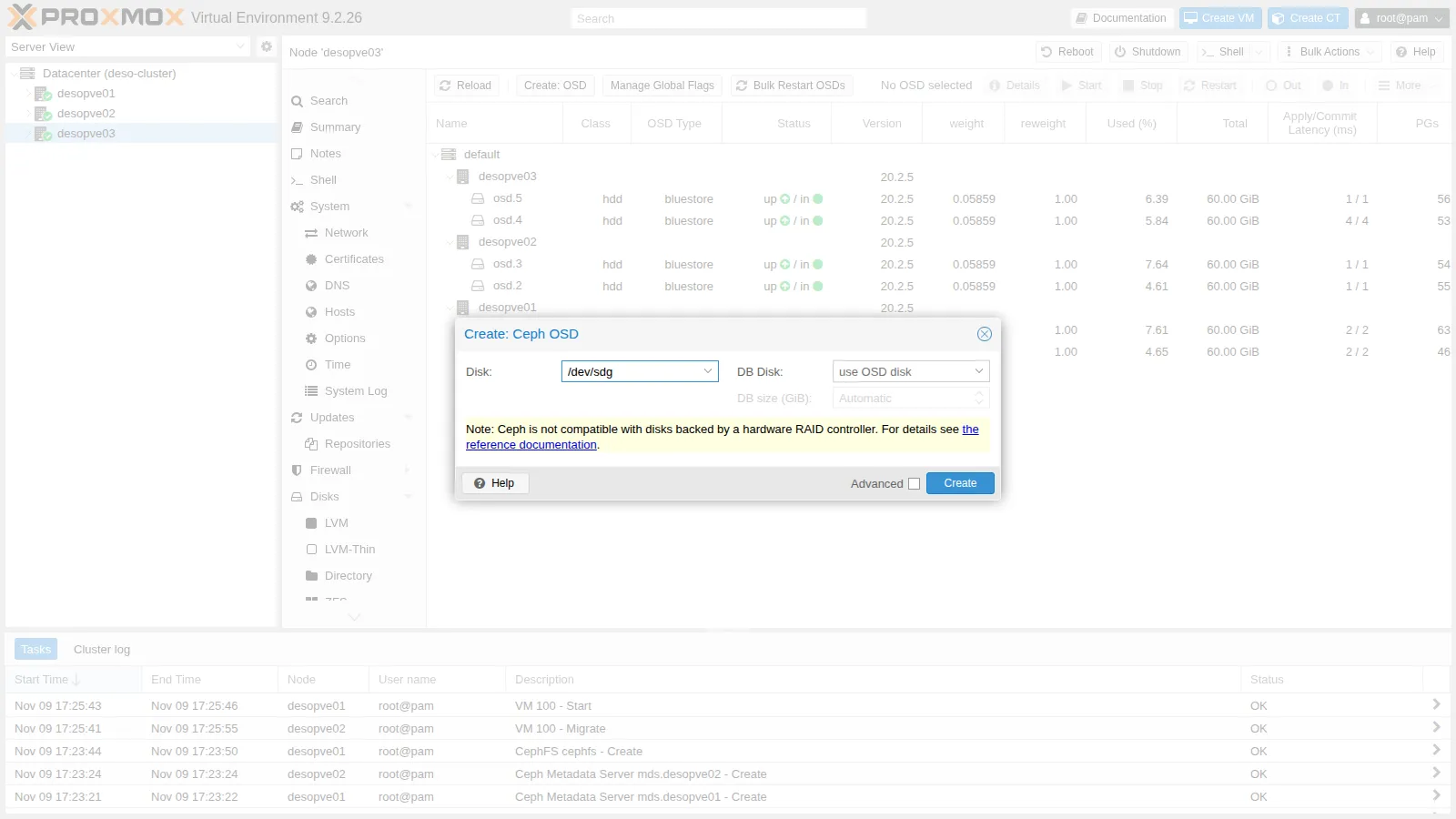
-
Watch the rebalancing:
root@desopve01 ceph -sOutput ...osd: 7 osds: 7 up (since 104s), 7 in (since 109s)...io:client: 3.4 MiB/s wr, 0 op/s rd, 0 op/s wrrecovery: 8.2 MiB/s, 2 objects/sThis status was taken 109 seconds after the new OSD joined (
7 in (since 109s)), while Ceph was still copying data to it; the total duration of the rebalancing was not recorded (to time it, repeatceph -suntil no PG is being moved). At the end, part of the PGs ofdesopve03are on the newosd.6:root@desopve01 ceph osd df treeOutput ID CLASS WEIGHT REWEIGHT SIZE RAW USE DATA ... %USE VAR PGS STATUS TYPE NAME-1 0.41016 - 420 GiB 22 GiB 22 GiB ... 5.27 1.00 - root default-3 0.11719 - 120 GiB 7.4 GiB 7.2 GiB ... 6.13 1.16 - host desopve01...-7 0.17578 - 180 GiB 7.4 GiB 7.2 GiB ... 4.13 0.78 - host desopve034 hdd 0.05859 1.00000 60 GiB 2.4 GiB 2.3 GiB ... 4.00 0.76 33 up osd.45 hdd 0.05859 1.00000 60 GiB 2.3 GiB 2.3 GiB ... 3.90 0.74 32 up osd.56 hdd 0.05859 1.00000 60 GiB 2.7 GiB 2.6 GiB ... 4.48 0.85 32 up osd.6Each host still holds 7.4 GiB, that is, a complete copy: with three hosts and 3-way replication, the CRUSH rule always puts one copy on each host. The new disk only spread the data better within
desopve03. To really increase the usable space you need disks on all the hosts, or a fourth host (step 4).
2. OSD failure
Section titled “2. OSD failure”-
Stop an OSD as if its disk had failed:
root@desopve02 systemctl stop ceph-osd@2root@desopve01 ceph health detail | head -5Output HEALTH_WARN 1 osds down; Degraded data redundancy: 866/5694 objects degraded (15.209%), 38 pgs degraded[WRN] OSD_DOWN: 1 osds downosd.2 (root=default,host=desopve02) is down[WRN] PG_DEGRADED: Degraded data redundancy: 866/5694 objects degraded (15.209%), 38 pgs degradedpg 2.4 is active+undersized+degraded, acting [1,4]acting [1,4]: PG 2.4 now lives on only two OSDs instead of three. It is still active: withmin_size 2, writes continue.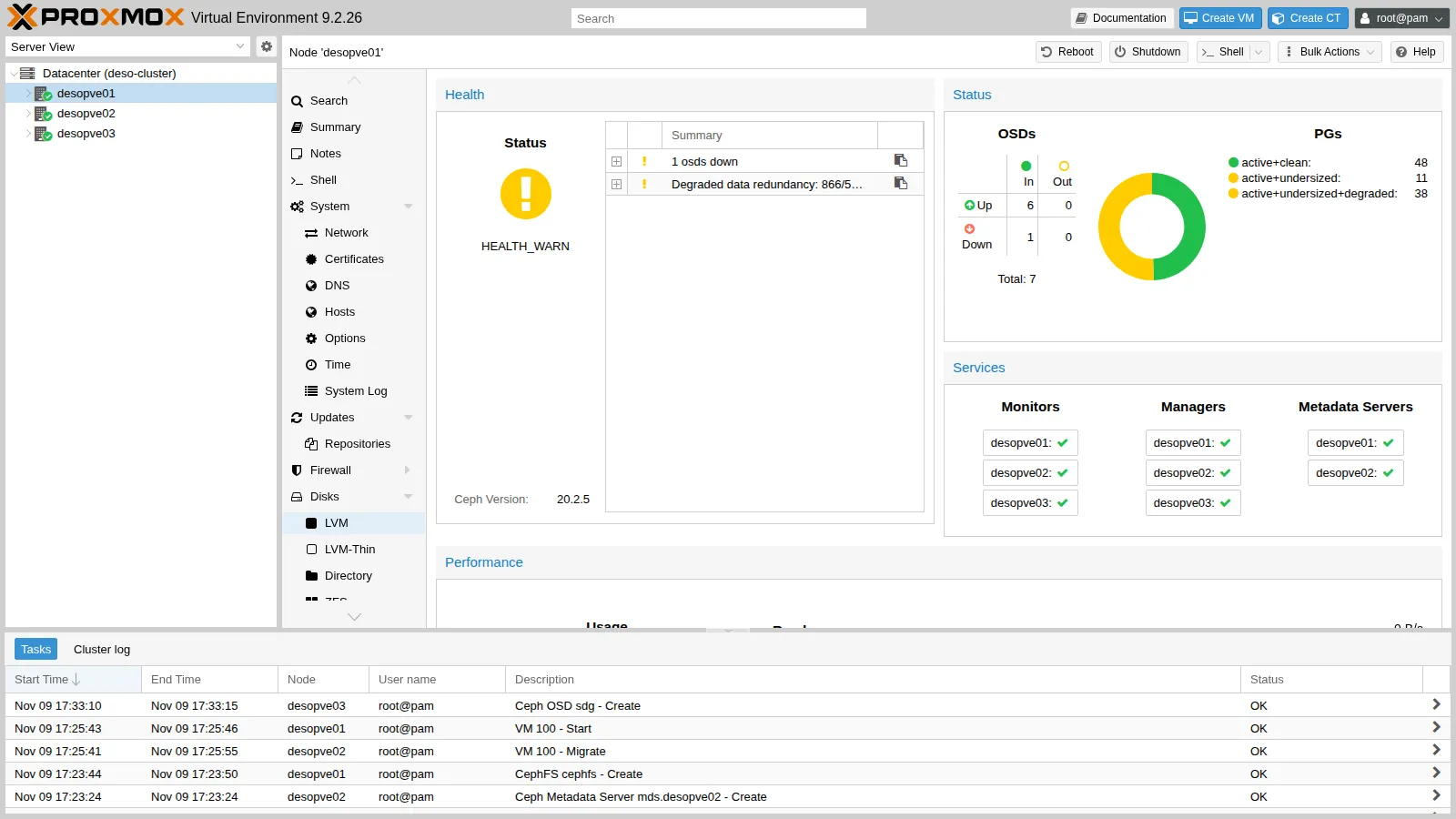
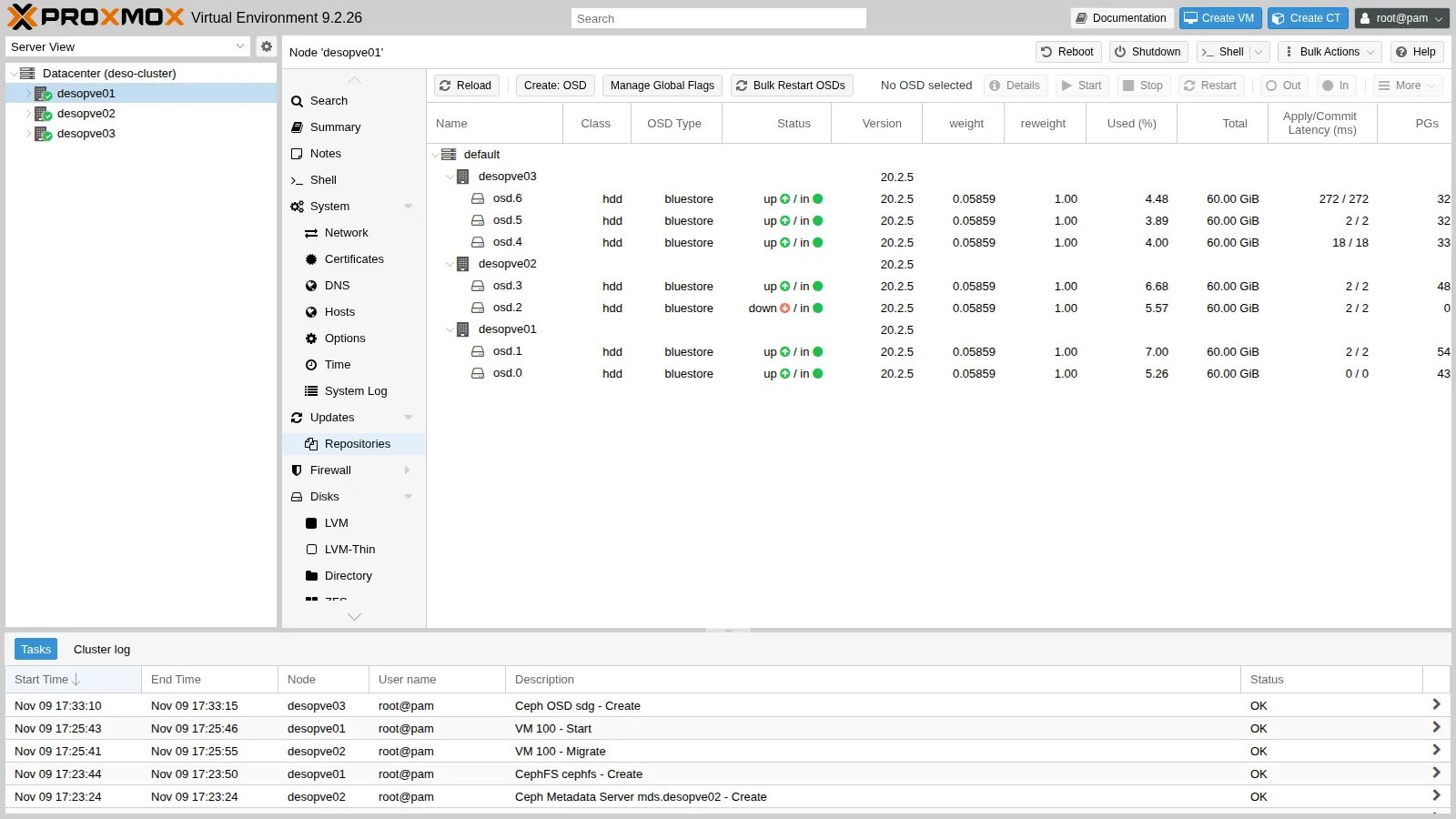
-
Ceph waits 600 seconds before rebuilding the copies:
root@desopve01 ceph config get mon mon_osd_down_out_intervalOutput 600To avoid waiting, mark the OSD out yourself. Ceph recreates the missing copies: since the rule keeps one copy per host, those of
desopve02can only go toosd.3, the other OSD of that node. 41 seconds after theout(6 in (since 41s)) the status is alreadyHEALTH_OK, with all 97 PGsactive+clean, so the recovery took at most that long:root@desopve01 ceph osd out 2Output marked out osd.2.root@desopve01 ceph -sOutput ...health: HEALTH_OKosd: 7 osds: 6 up (since 89s), 6 in (since 41s)pgs: 97 active+clean -
The disk has been “replaced”: restart the OSD and mark it in again. Ceph moves the data back to
osd.2:root@desopve02 systemctl start ceph-osd@2root@desopve01 ceph osd in 2Output marked in osd.2.root@desopve01 ceph -sOutput ...pgs: 12.371% pgs not active330/5694 objects misplaced (5.796%)59 active+clean26 active+clean+remapped8 peering4 remapped+peeringBringing the OSD back changes the map again: at this moment 12 of the 97 PGs (8 + 4, the 12.371%
not active) are peering, and a PG accepts no writes until it is active again. -
What the VM saw:
labuser@debian01 awk '$1>="17:36:30" && $1<="17:39:30"' io.log | sort -k2 -n | tail -4Output 17:38:26 1715 ms17:38:18 1943 ms17:38:22 2051 ms17:37:56 4261 ms- Measured: no errors observed; in the three minutes of the test (17:36:30-17:39:30) the longest write took 4,261 ms and three more took 1.7-2.1 s, against the usual 25-45 ms.
- Interpretation: every step of the test (stop,
out, start,in) changes the OSD map and makes some PGs peer, and while a PG peers it accepts no writes: the pauses are compatible with peering. The test, however, did not record the time of each command, so it cannot say which step caused which pause, nor whether the recovery traffic also slowed the writes down. How long peering lasts depends on the hardware, the network and the load: this lab did not measure it on faster hardware. - How to check: note the time of each command (
date; ceph osd out 2), follow the cluster log withceph -w(or read/var/log/ceph/ceph.logon a monitor node) and compare both withio.log, whose timestamps mark the end of each write.
3. Maintenance: the noout flag, orderly reboot and updates
Section titled “3. Maintenance: the noout flag, orderly reboot and updates”Before rebooting a node, for example for a kernel update, set noout: Ceph will not rebuild the missing copies, because the node is about to come back.
-
Ceph → OSD → Manage Global Flags → check noout → Apply.
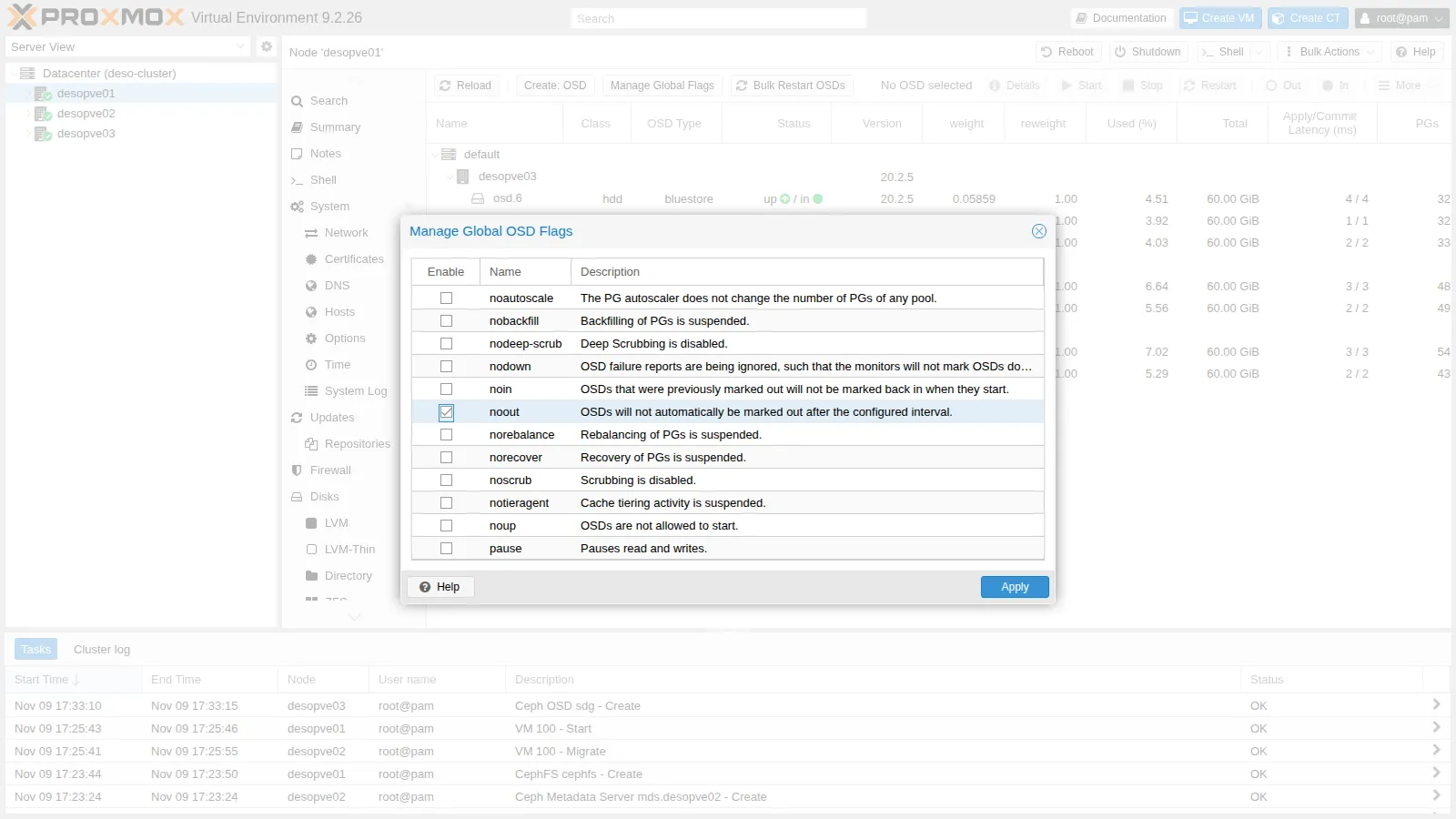
root@desopve01 ceph osd dump | grep ^flagsOutput flags noout,sortbitwise,recovery_deletes,purged_snapdirs,pglog_hardlimit -
Check whether there are Ceph updates to install along with the reboot:
root@desopve02 apt update && apt list --upgradable 2>/dev/null | grep -ciE "ceph|rados|rbd"Output 0Today there are none. When there are, the rule is to update one node at a time:
apt full-upgrade, then restart the services in this order:- monitors;
- managers;
- OSDs;
- MDSs.
Move on to the next node only when the status is
HEALTH_OK, apart from thenooutflag.ceph versionsshows which version each daemon is running. -
Reboot
desopve02. CT 101 lives on that node’slocal-zfs: shut it down first and start it again afterwards (in Lab 48 you will see how to move it). During the reboot:root@desopve02 pct shutdown 101; rebootroot@desopve01 ceph -sOutput cluster:health: HEALTH_WARN1 filesystem is degradedinsufficient standby MDS daemons available1/3 mons down, quorum desopve01,desopve03noout flag(s) set2 osds down1 host (2 osds) downReduced data availability: 7 pgs inactive, 11 pgs peeringDegraded data redundancy: 961/5694 objects degraded (16.877%), 45 pgs degraded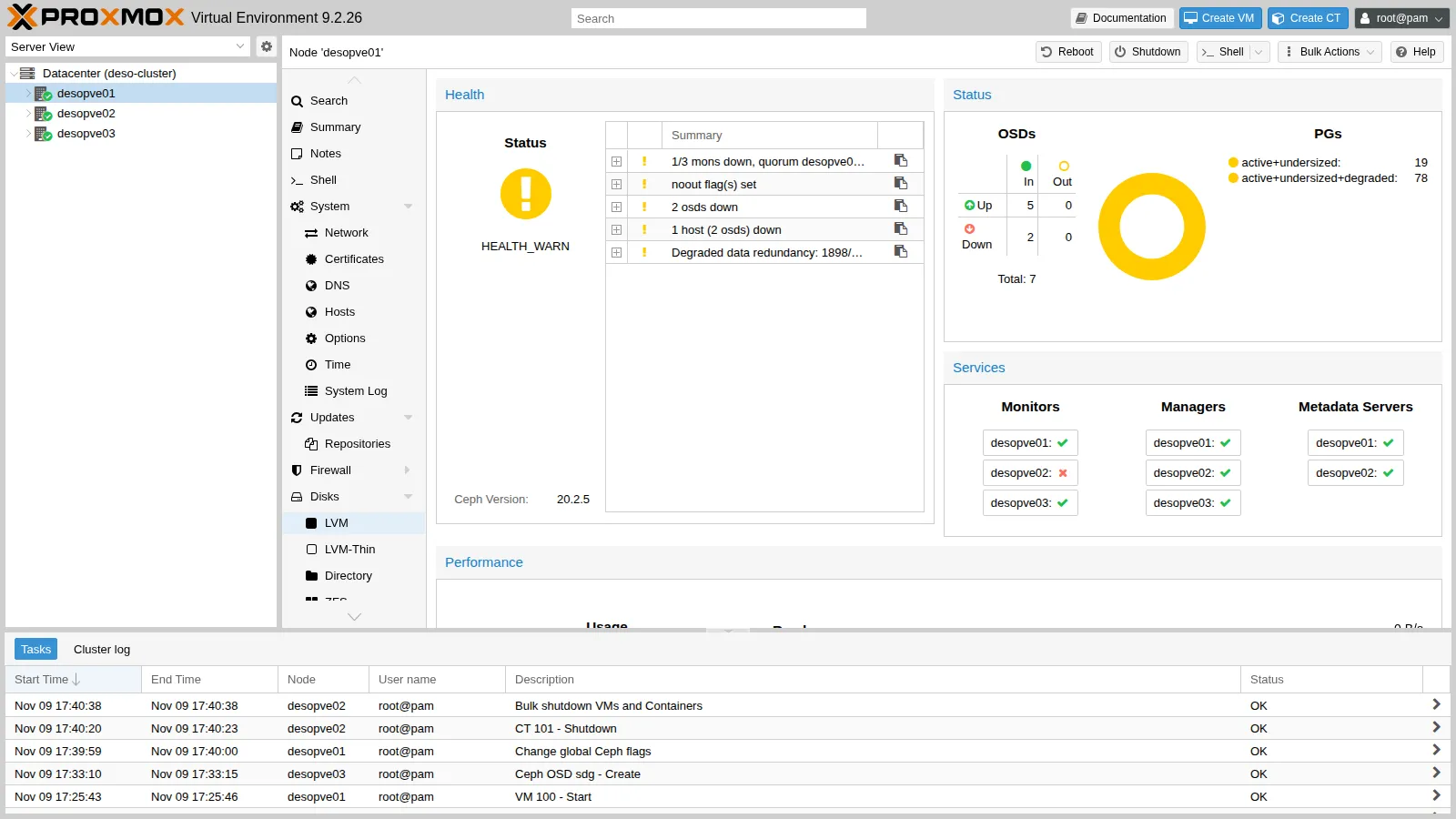
- The monitor on
desopve02is out of quorum: the other two are enough. - The active MDS was on
desopve02: CephFS fails over to the standby MDS ondesopve01. - The OSDs are down but stay in: no copy is moved.
- The monitor on
-
The node comes back online. In this lab it took roughly 70 seconds, an approximate observation that the outputs do not record; a server with a long POST can take a few minutes. Ceph recovers only the writes made in the meantime; then remove the flag:
root@desopve01 ceph -s | grep -E "health|noout|pgs:"Output health: HEALTH_WARNnoout flag(s) setpgs: 97 active+cleanroot@desopve01 ceph osd unset nooutOutput noout is unsetroot@desopve01 ceph fs status | grep -E "active|STANDBY" -A1 | head -4Output 0 active desopve01 Reqs: 0 /s 15 18 16 15--STANDBY MDSdesopve02root@desopve02 pct start 101- Measured: in the VM the longest pause was 13.5 seconds.
- Interpretation: during a reboot several things happen in sequence, and each of them can hold writes back for a while: the OSDs of
desopve02go down and later come back, their PGs peer both times, and the monitor ofdesopve02leaves the quorum and later rejoins it. The test does not say which of these produced the 13.5 seconds. - How to check: compare
io.logwith the cluster log of the same minutes (/var/log/ceph/ceph.logondesopve01), which records when the OSDs went down and came back up (boot), the monitor elections and, every few seconds, the state of the PGs.
4. Growth: a new node in the cluster and in Ceph
Section titled “4. Growth: a new node in the cluster and in Ceph”desopve04 is a standalone node with the ZFS pool tank (lab 10). It joins the Proxmox cluster first, then Ceph.
-
Before joining it, check that it has no VMs or containers and save its storage configuration: the join replaces it with the cluster’s.
root@desopve04 qm list; pct listcp /etc/pve/storage.cfg /root/storage.cfg.standalone -
Hardware. Power off
desopve04(it has no guests), install the single-port network card, connect the port to the switch (a trunk port carrying the Ceph VLANs) and insert the two 40 GB disks into the free bays; then power the node back on. The new port gets a “system” name (ens<N>, where the number depends on the PCI slot). Pin it asnic2, as on the other nodes (name pinning is the subject of lab 20):root@desopve04 pve-network-interface-pinning generate --interface ens<N> --target-name nic2Output ...Successfully updated Proxmox VE configuration files.Please reboot to apply the changes to your configurationroot@desopve04 reboot -
On
desopve01: Datacenter → Cluster → Join Information → Copy Information.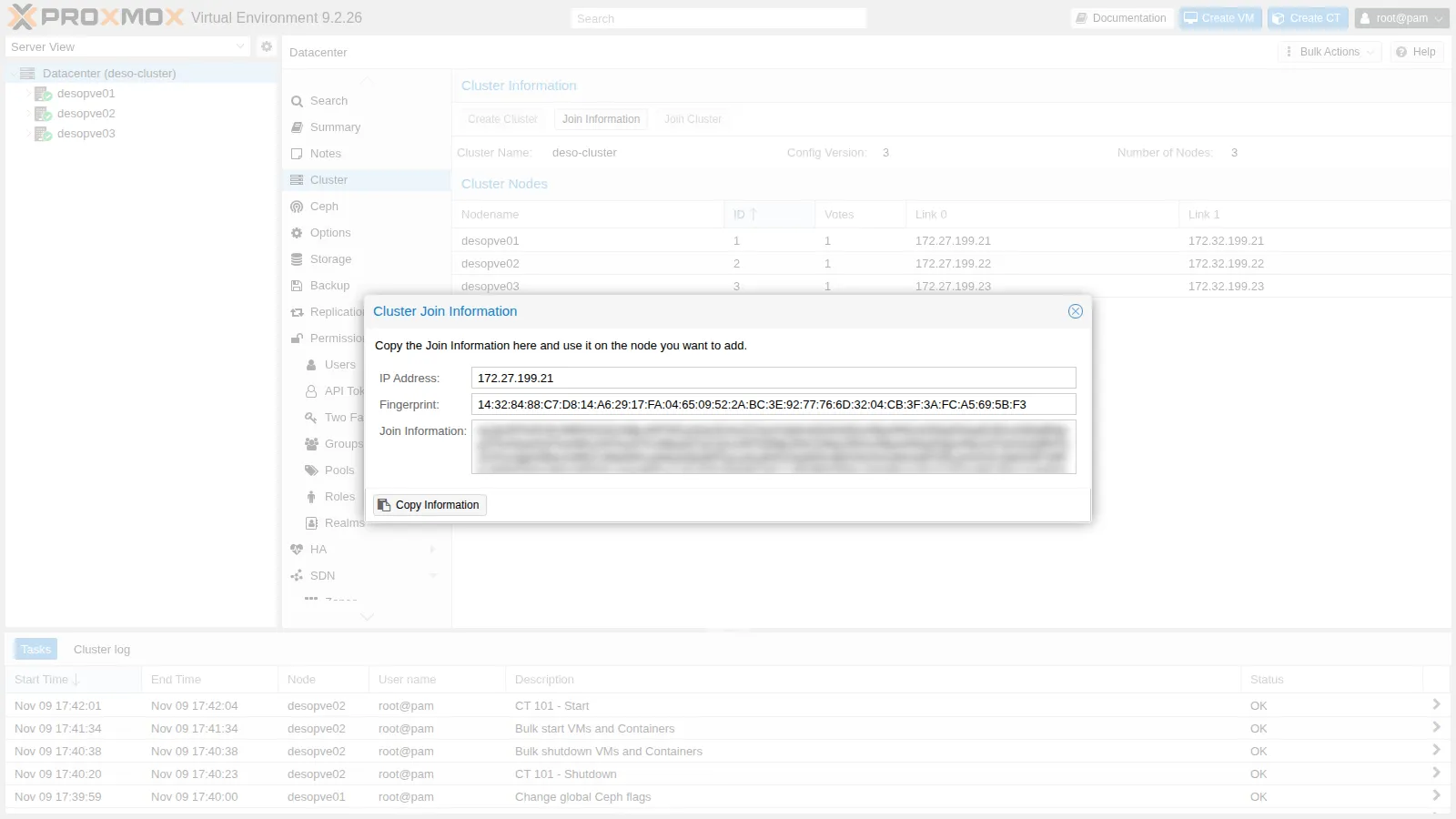
-
On
desopve04: Datacenter → Cluster → Join Cluster.- Paste the information and enter the
rootpassword ofdesopve01. - Choose the two Corosync links: Link 0
172.27.199.24, Link 1172.32.199.24.
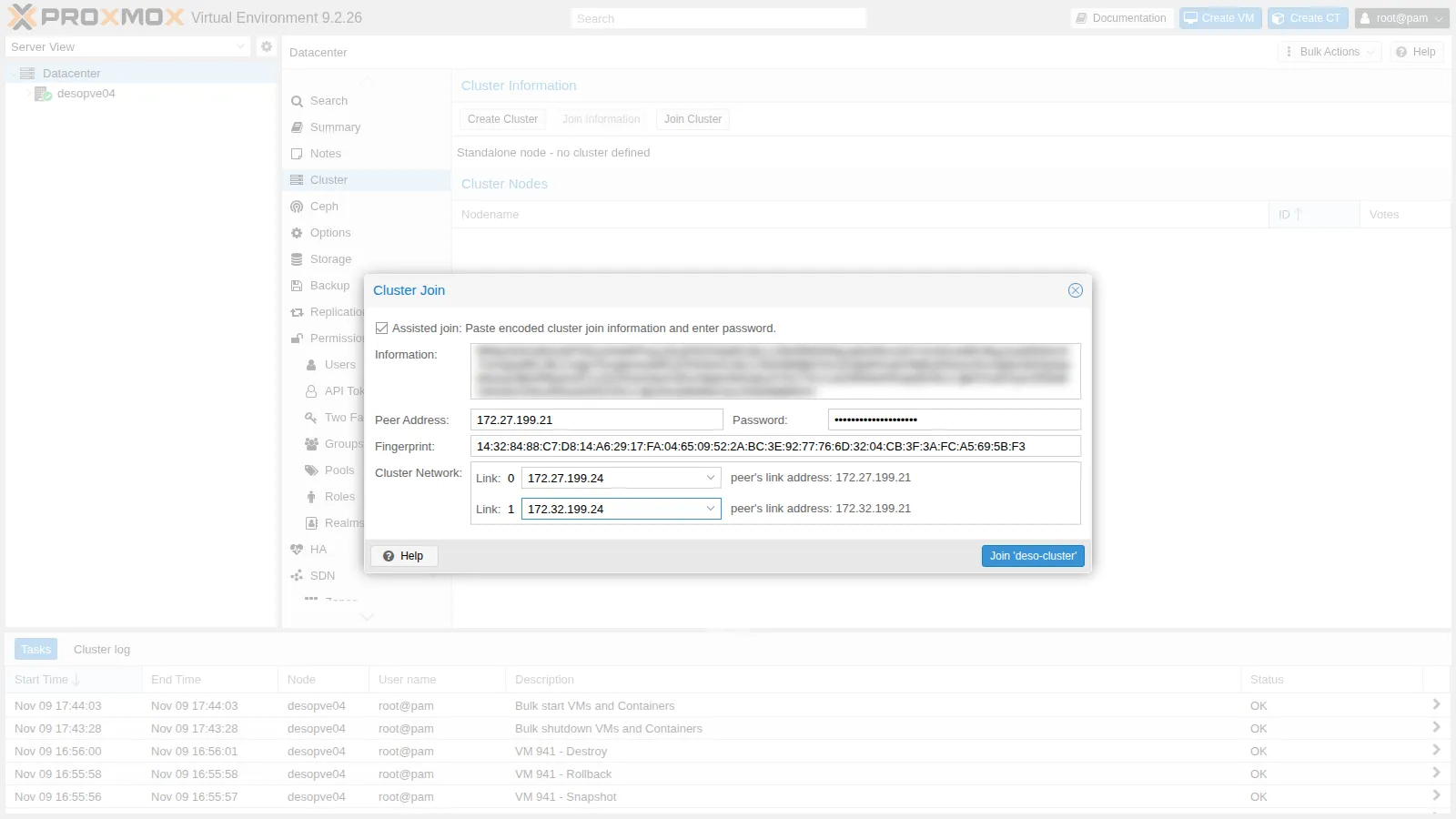
root@desopve01 pvecm nodesOutput Nodeid Votes Name1 1 desopve01 (local)2 1 desopve023 1 desopve034 1 desopve04With four votes the quorum is 3: the cluster still tolerates only one node down, just as with three. With an even number of nodes you usually add a QDevice (Lab 06).
- Paste the information and enter the
-
Fix the storages. After the join,
desopve04uses the cluster’sstorage.cfg: it sees storages it does not have and has lost its own.root@desopve04 pvesm statusOutput could not activate storage 'local-zfs', zfs error: cannot import 'rpool': no such pool availablecommand '/usr/bin/iscsiadm --mode node --targetname iqn.2005-10.org.freenas.ctl:pve --login' failed: exit code 21...Name Type Status Total (KiB) Used (KiB) Available (KiB) %cephfs cephfs inactive 0 0 0 0.00%local dir active 22203544 5789716 15260600 26.08%local-zfs zfspool inactive 0 0 0 0.00%nas-iscsi iscsi inactive 0 0 0 0.00%nas-lvm lvm inactive 0 0 0 0.00%nas-nfs nfs active 56489984 0 56489984 0.00%nas-smb cifs active 57466112 977024 56489088 1.70%rbd-vm rbd inactive 0 0 0 0.00%Restrict the local storages and the iSCSI ones to the right nodes (the initiator of
desopve04is not authorized on the NAS), then addlocal-lvmandtankback fordesopve04only. The data intankis intact: only the configuration has changed.root@desopve01 pvesm set local-zfs --nodes desopve01,desopve02,desopve03pvesm set nas-iscsi --nodes desopve01,desopve02,desopve03pvesm set nas-lvm --nodes desopve01,desopve02,desopve03pvesm add lvmthin local-lvm --vgname pve --thinpool data --content images,rootdir --nodes desopve04pvesm add zfspool tank --pool tank --mountpoint /tank --content images,rootdir --sparse 1 --nodes desopve04 -
Ceph on the new node: packages, VLANs 50/51 on
nic2(as in lab 17) and the two OSDs.root@desopve04 pveceph install --repository no-subscription --version tentaclepvesh create /nodes/desopve04/network --iface nic2.50 --type vlan --cidr 10.50.10.24/24 --autostart 1pvesh create /nodes/desopve04/network --iface nic2.51 --type vlan --cidr 10.51.10.24/24 --autostart 1pvesh set /nodes/desopve04/networkceph -sOutput Error initializing cluster client: ObjectNotFound('RADOS object not found (error calling conf_read_file)')The
cephclient looks for/etc/ceph/ceph.conf. In this lab, after the packages had been installed from the command line, the new node did not have the link to the shared configuration yet; creating it by hand solved the problem:root@desopve04 ln -s /etc/pve/ceph.conf /etc/ceph/ceph.confpveceph osd create /dev/sdfOutput --> ceph-volume lvm create successful for: /dev/sdfroot@desopve04 pveceph osd create /dev/sdgOutput --> ceph-volume lvm create successful for: /dev/sdg -
A monitor here too? No. The monitors decide by majority:
- with 3 monitors you need 2, so you can lose 1;
- with 4 you need 3, so you can still lose only 1, with more traffic;
- you move to 5 monitors only in larger clusters.
The new node contributes only disks.
-
Ceph rebalances the data onto the fourth host. The outputs do not record when the rebalancing ended: in this lab it was roughly a minute and a half after the OSDs joined, an approximate observation. To time it, follow
ceph -wor repeatceph pg statuntil every PG isactive+clean. Two snapshots of the status, 3 and 64 seconds after the new OSDs joined, show it in progress, with 32 remapped PGs at first and 7 after 64 seconds:root@desopve04 ceph -sOutput osd: 9 osds: 8 up (since 2s), 9 in (since 3s); 32 remapped pgspgs: ...10 active+remapped+backfill_wait9 remapped+peering...root@desopve01 ceph -sOutput osd: 9 osds: 9 up (since 57s), 9 in (since 64s); 7 remapped pgsrecovery: 87 MiB/s, 22 objects/s...root@desopve01 ceph osd df tree | grep hostOutput -3 0.11719 - 120 GiB 5.7 GiB 5.4 GiB ... 4.75 1.06 - host desopve01-5 0.11719 - 120 GiB 5.3 GiB 5.2 GiB ... 4.45 0.99 - host desopve02-7 0.17578 - 180 GiB 6.8 GiB 6.5 GiB ... 3.77 0.84 - host desopve03-9 0.07819 - 80 GiB 4.5 GiB 4.4 GiB ... 5.68 1.27 - host desopve04Now the three copies are spread across four hosts, and no host has to hold everything anymore. The pool’s estimated usable space goes up:
root@desopve01 ceph df | grep -E "POOL|rbd-vm"Output POOL ID PGS STORED OBJECTS USED %USED MAX AVAILrbd-vm 2 32 6.4 GiB 1.69k 19 GiB 4.15 148 GiBIn lab 17, with six OSDs on three nodes, it was 106 GiB. MAX AVAIL is an estimate based on the OSD that would fill up first: read it as a trend, not as a guarantee.
5. Pool configuration
Section titled “5. Pool configuration”Replication 3 → 2 and back
Section titled “Replication 3 → 2 and back”-
Ceph → Pools → double-click
rbd-vm: Size 2, Min. Size 2.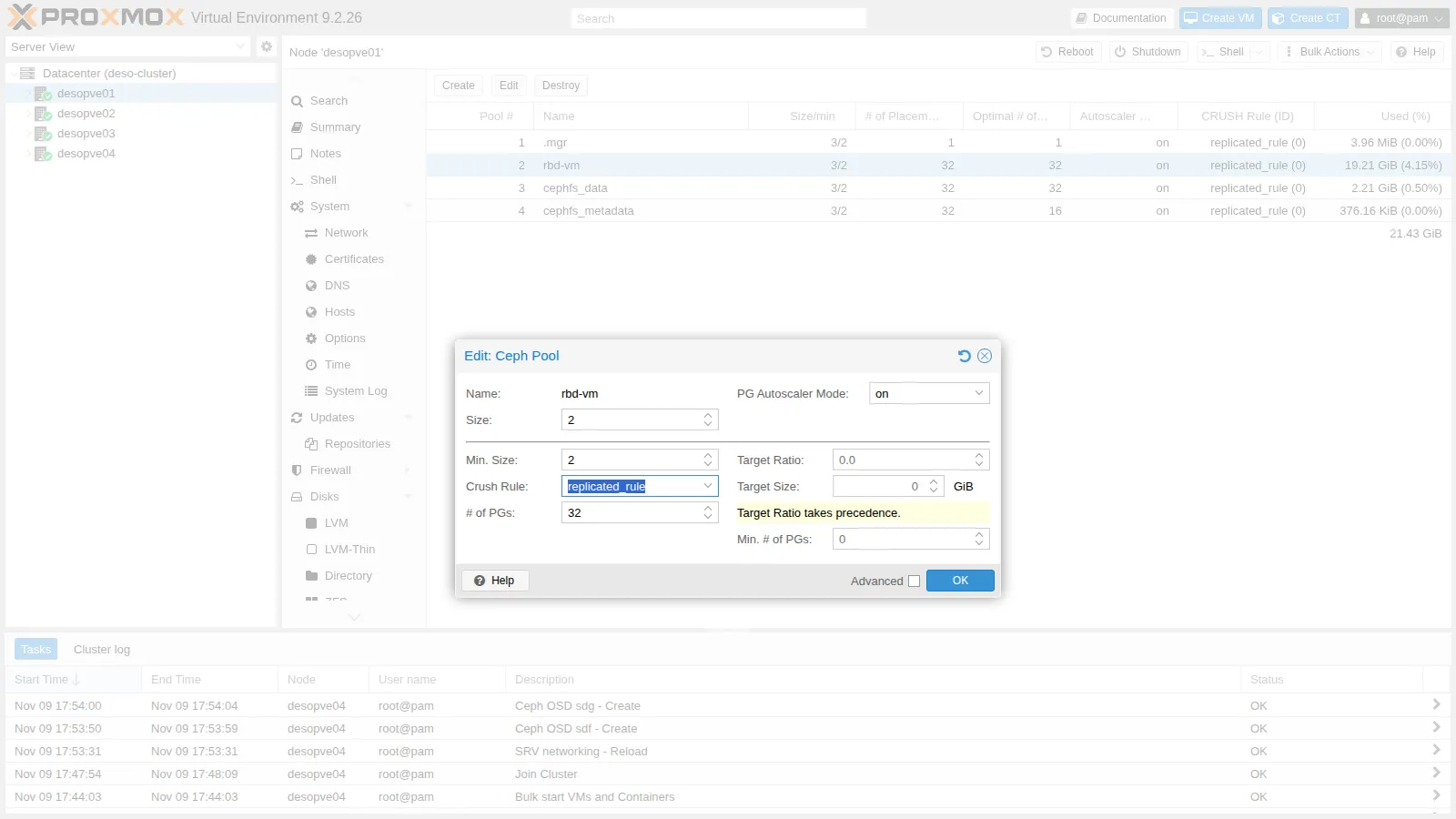
Ceph deletes the third copy right away: the used space goes down and the available space goes up.
root@desopve01 ceph df | grep -E "POOL|rbd-vm"Output POOL ID PGS STORED OBJECTS USED %USED MAX AVAILrbd-vm 2 32 6.4 GiB 1.69k 13 GiB 2.75 226 GiBThe price is high. With
size 2andmin_size 2, a single failed OSD blocks writes to its PGs. Withmin_size 1writes continue on a single copy, and if that copy is lost too, the data is gone. That is why in Proxmox VE you stay at 3/2. -
Go back to 3-way replication:
root@desopve01 pveceph pool set rbd-vm --size 3Output pool rbd-vm: applying size = 3
Device classes and CRUSH rules
Section titled “Device classes and CRUSH rules”Every OSD has a class (hdd, ssd, nvme), detected automatically. A CRUSH rule can be restricted to a single class: this is how, in a cluster with mixed disks, you create a “fast” pool on the SSDs only.
-
In the lab all the disks are the same: simulate one SSD per host by changing the class of one OSD per node, then create a rule that uses only the
ssdclass, still with one copy per host:root@desopve01 for o in 1 3 5 7; do ceph osd crush rm-device-class osd.$o; ceph osd crush set-device-class ssd osd.$o; doneceph osd crush rule create-replicated fast default host ssdceph osd crush rule lsOutput replicated_rulefast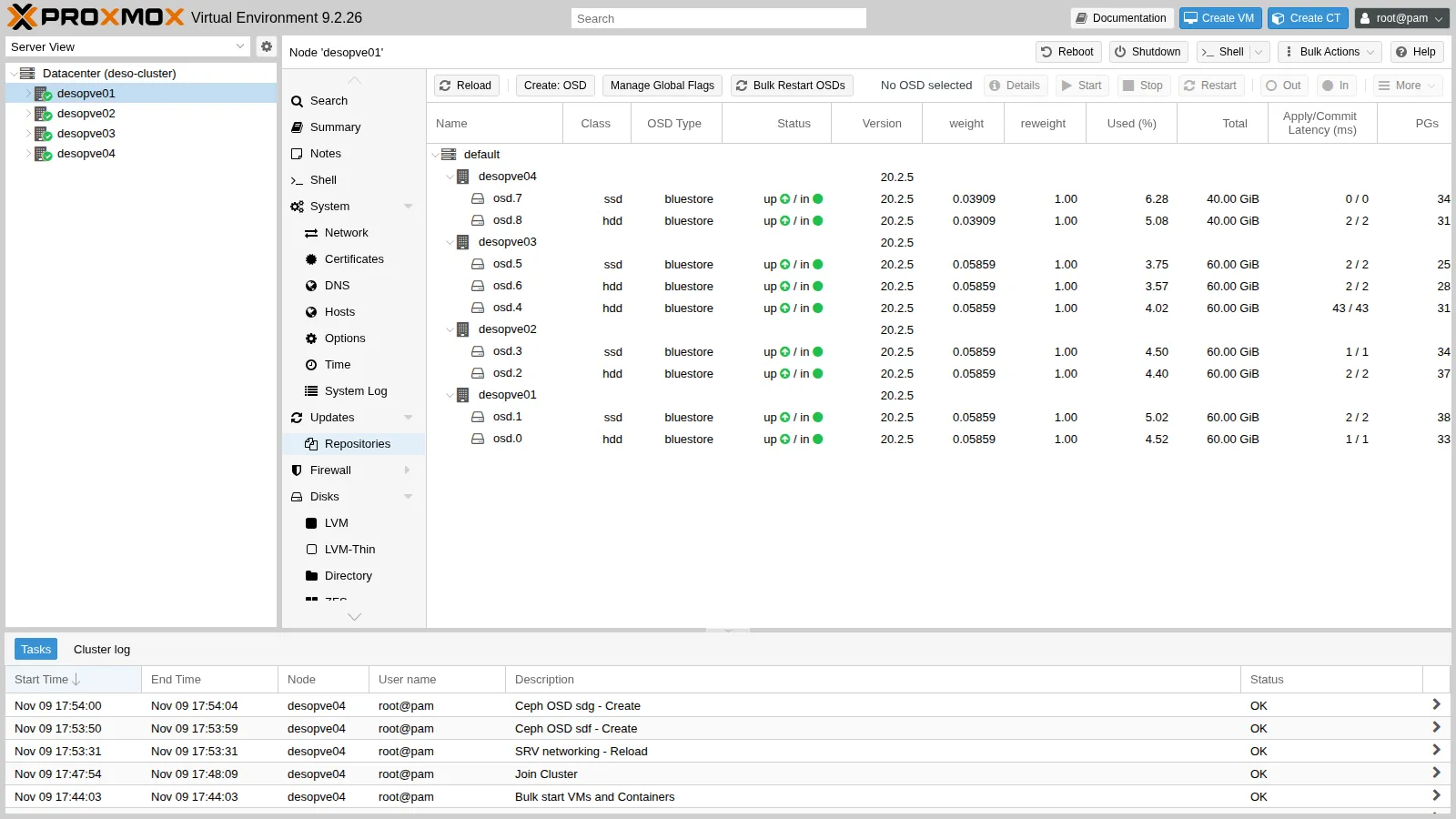
-
Create a pool that uses the
fastrule: you select it in Create → Crush Rule, or from the command line.root@desopve01 pveceph pool create rbd-fast --crush_rule fast --pg_autoscale_mode onceph pg ls-by-pool rbd-fast -f json | python3 -c 'import sys,json; d=json.load(sys.stdin); d=d.get("pg_stats", d) if isinstance(d, dict) else d; s=set(); [s.update(p["acting"]) for p in d]; print("OSD usati da rbd-fast:", sorted(s))'Output OSD usati da rbd-fast: [1, 3, 5, 7]root@desopve01 ceph osd crush rule dump fast | grep -E 'item_name|type"'Output "type": 1,"item_name": "default~ssd""type": "host"default~ssdis the “shadow” tree that CRUSH builds for each class. Therbd-vmpool still usesreplicated_rule, which has no class: changing the class of the OSDs did not move its data.
Erasure coding
Section titled “Erasure coding”-
With four hosts you can create an EC pool with
k=2,m=2. Proxmox creates two pools:ec22-data, erasure coded, for the data;ec22-metadata, replicated, for the RBD metadata, which cannot be stored in an EC pool.
It also creates the
ec22storage:root@desopve01 pveceph pool create ec22 --erasure-coding k=2,m=2 --add_storages 1ceph osd erasure-code-profile get pve_ec_ec22Output crush-device-class=crush-failure-domain=host...k=2m=2plugin=isatechnique=reed_sol_vanroot@desopve01 grep -A5 "rbd: ec22" /etc/pve/storage.cfgOutput rbd: ec22content images,rootdirdata-pool ec22-datakrbd 0pool ec22-metadata -
Write 1 GiB to the EC pool and 1 GiB to the replicated pool
rbd-fast, and compare the space used:root@desopve01 rbd create ec22-metadata/bench --size 2G --data-pool ec22-datarbd create rbd-fast/bench --size 2Grbd bench --io-type write --io-size 4M --io-total 1G --io-pattern seq ec22-metadata/benchOutput elapsed: 3 ops: 256 ops/sec: 76.5535 bytes/sec: 306 MiB/sroot@desopve01 rbd bench --io-type write --io-size 4M --io-total 1G --io-pattern seq rbd-fast/benchOutput elapsed: 4 ops: 256 ops/sec: 63.8073 bytes/sec: 255 MiB/sroot@desopve01 ceph df | sed -n "/POOLS/,\$p"Output --- POOLS ---POOL ID PGS STORED OBJECTS USED %USED MAX AVAIL.mgr 1 1 1.3 MiB 2 4.0 MiB 0 144 GiBrbd-vm 2 32 6.4 GiB 1.69k 19 GiB 4.25 144 GiBcephfs_data 3 32 756 MiB 189 2.2 GiB 0.51 144 GiBcephfs_metadata 4 32 98 KiB 22 379 KiB 0 144 GiBrbd-fast 5 127 1007 MiB 259 2.9 GiB 1.53 63 GiBec22-data 6 128 1.0 GiB 257 2.0 GiB 0.46 216 GiBec22-metadata 7 32 969 B 4 26 KiB 0 144 GiB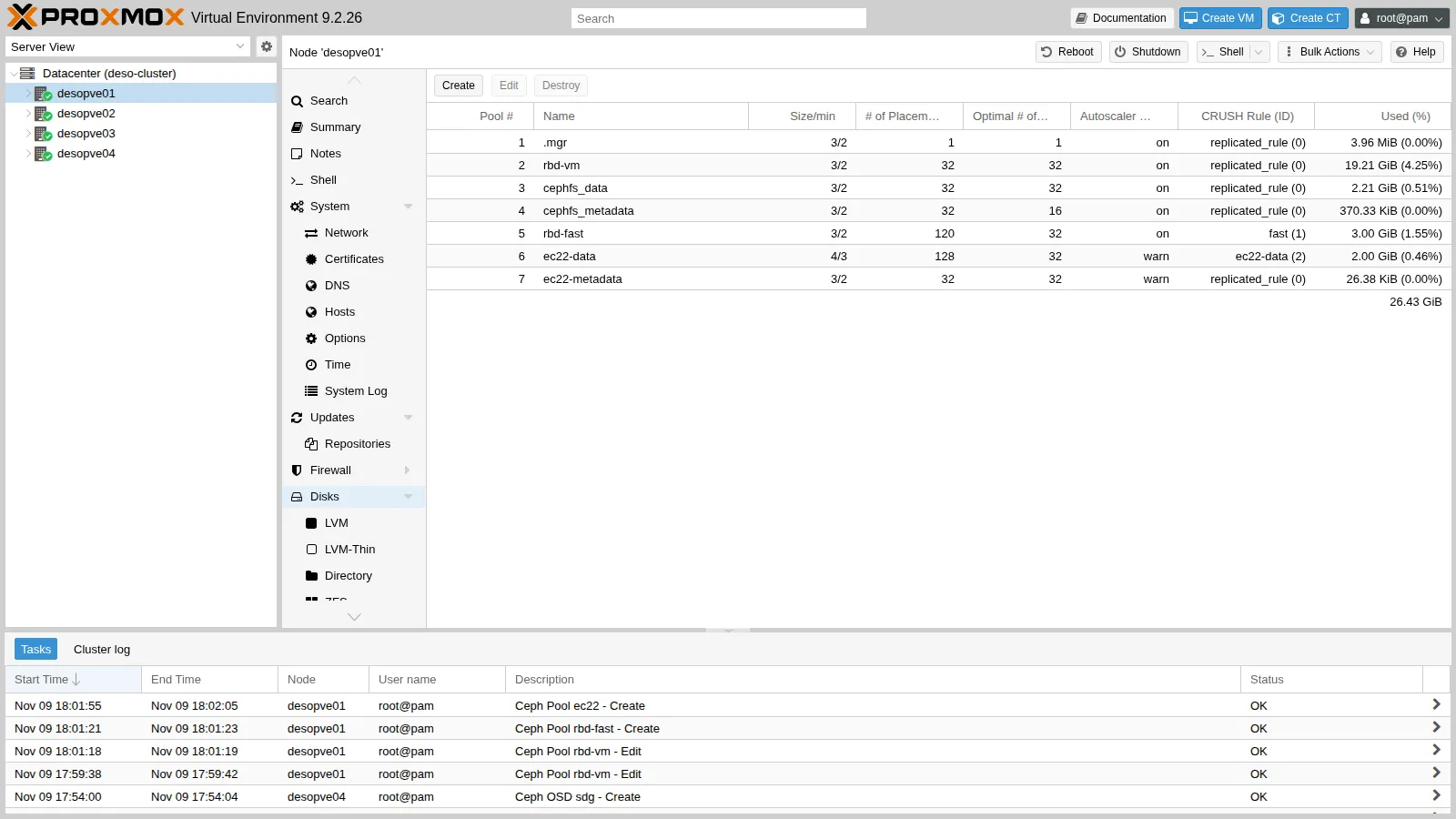
- EC 2+2: 1 GiB written takes up 2: the efficiency is 50%, and it tolerates two failures.
- 3-way replication: 1 GiB takes up 3 (2.9 in the output): the efficiency is 33%.
rbd-fasthas only 63 GiB available: it uses only the four OSDs of classssd.
The two
rbd benchruns are there to fill the pools: a single 1 GiB run per pool is not a performance comparison between replication and erasure coding. Lab 19 describes the method for that.
The PG autoscaler
Section titled “The PG autoscaler”ceph osd pool autoscale-statusPOOL SIZE TARGET SIZE RATE RAW CAPACITY RATIO FINAL RATIO TARGET RATIO EFFECTIVE RATIO BIAS PG_NUM NEW PG_NUM AUTOSCALE BULK...ec22-data 1024M 2.0 499.9G 0.0040 0.1829 1.0 128 32 warn Falserbd-fast 1026M 3.0 219.9G 0.0137 0.4800 1.0 32 on False- RATE is the space multiplier: 3.0 for 3-way replication, 2.0 for EC 2+2.
- Proxmox creates EC pools with the autoscaler in
warnmode: it suggests 32 PGs (NEW PG_NUM) but does not change them, and it reports this with thePOOL_TOO_MANY_PGSwarning. Withonthe autoscaler acts on its own, as it does forrbd-vm. - If you already know that a pool will grow, set its expected size (
target_size_ratioortarget_size, in the pool’s advanced options): the autoscaler sets the right number of PGs from the start and you avoid rebalancing later on.
When you are done, remove the test pools and rule and set the OSDs back to class hdd:
rbd rm rbd-fast/bench; rbd rm ec22-metadata/benchpveceph pool destroy rbd-fastpveceph pool destroy ec22-data --remove_storages 1pveceph pool destroy ec22-metadataceph osd crush rule rm fastfor o in 1 3 5 7; do ceph osd crush rm-device-class osd.$o; ceph osd crush set-device-class hdd osd.$o; done6. Failure: a node suddenly powers off
Section titled “6. Failure: a node suddenly powers off”-
Simulate a power outage on
desopve03(monitor, standby manager, three OSDs) while VM 100 is writing ondesopve01:root@desopve03 echo 1 > /proc/sys/kernel/sysrq; echo o > /proc/sysrq-trigger -
At first Ceph does not notice anything. According to the documentation, the other OSDs report an OSD as failed after 20 seconds without replies to their heartbeats (
osd_heartbeat_grace), and the monitors mark it down once OSDs on two different hosts have reported it.root@desopve01 ceph -s # 13 seconds laterOutput health: HEALTH_WARN1/3 mons down, quorum desopve01,desopve02osd: 9 osds: 9 up (since 10m), 9 in (since 10m)root@desopve01 ceph -s # 38 seconds laterOutput health: HEALTH_WARN1/3 mons down, quorum desopve01,desopve023 osds down1 host (3 osds) downDegraded data redundancy: 1710/5694 objects degraded (30.032%), 70 pgs degradedosd: 9 osds: 6 up (since 12s), 9 in (since 10m)root@desopve01 pvecm status | grep -E "Quorate|Total votes"Output Quorate: YesTotal votes: 3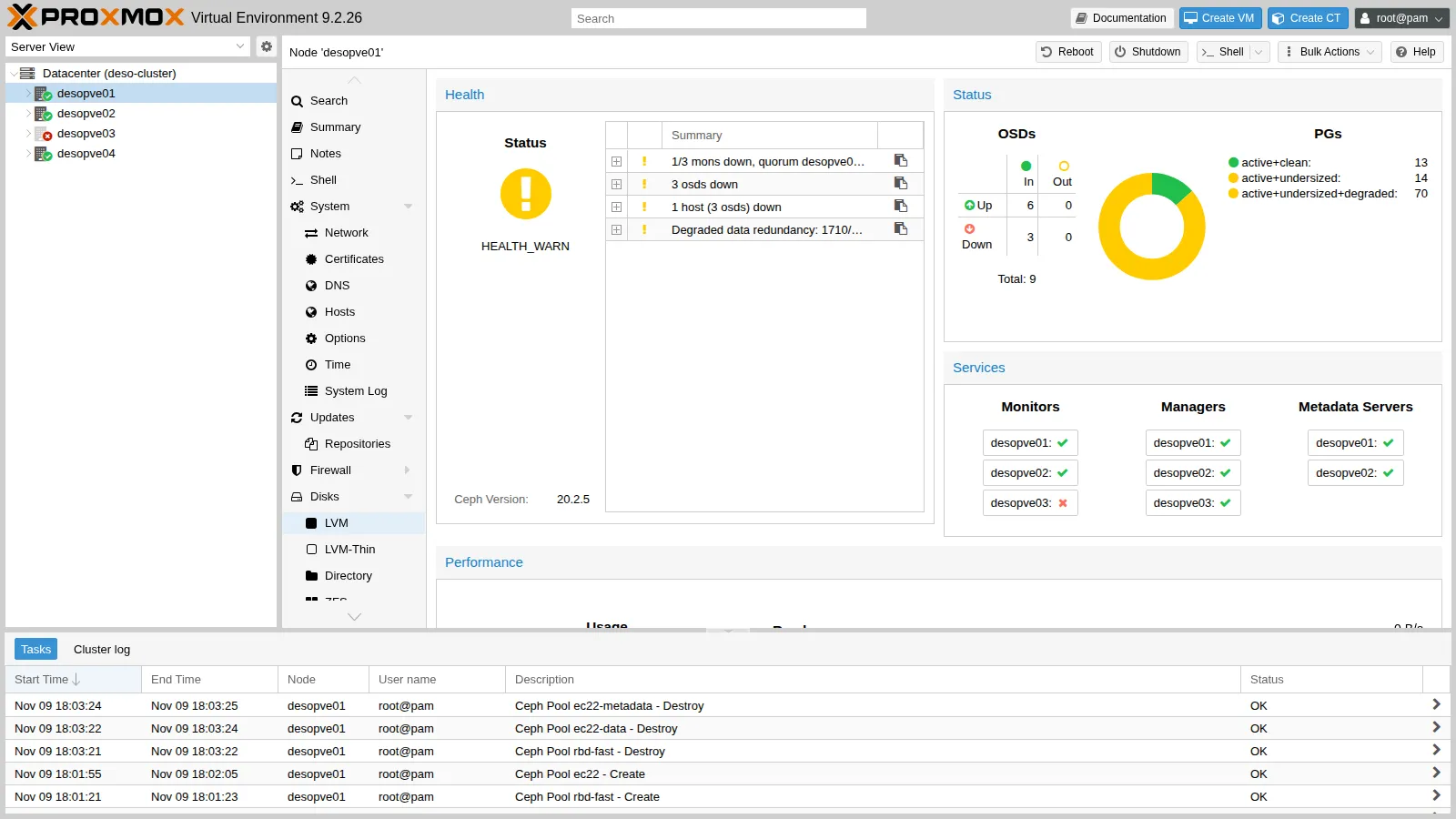
In the VM, the longest write:
labuser@debian01 sort -k2 -n io.log | tail -1Output 18:04:48 26833 ms- Measured: 13 seconds after the power-off all nine OSDs were still
up; 38 seconds after it, three had beendownfor 12 seconds, so the monitors had marked them down about 26 seconds after the power-off. In the VM, one write waited 26.8 seconds, and ended at 18:04:48. - Interpretation: a write to a PG whose primary OSD is on the lost node waits until that OSD is marked down and the PG peers with a new primary; then I/O resumes on the remaining copies. Two records line up with this explanation: the long write ended at 18:04:48, and the monitor log shown in the next step says that at 18:14:52 the OSDs had been down for 604 seconds, that is, since about 18:04:48. The match assumes that the clocks of the VM and of the nodes agree, which NTP should ensure. The seconds beyond the 20-second grace period are compatible with the heartbeat interval (under 6 seconds according to the documentation) and with the collection of the failure reports; the test does not break them down.
- How to check: the cluster log records when each OSD was reported failed, after how many seconds and with which grace (
grep -E "osd\.[4-6] failed" /var/log/ceph/ceph.logon a monitor node);ceph config get osd osd_heartbeat_graceshows the value in force.
- Measured: 13 seconds after the power-off all nine OSDs were still
-
After 600 seconds the monitors mark the OSDs out and Ceph rebuilds the copies on the other three hosts: with four hosts there is room for them.
root@desopve01 grep "Marking osd" /var/log/ceph/ceph.logOutput 2026-11-09T18:14:52.615748+0100 mon.desopve01 (mon.0) 4032 : cluster [INF] Marking osd.4 out (has been down for 604 seconds)2026-11-09T18:14:52.615827+0100 mon.desopve01 (mon.0) 4033 : cluster [INF] Marking osd.5 out (has been down for 604 seconds)2026-11-09T18:14:52.615849+0100 mon.desopve01 (mon.0) 4034 : cluster [INF] Marking osd.6 out (has been down for 604 seconds)root@desopve01 ceph -s # 11 seconds laterOutput ...recovery: 181 MiB/s, 0 keys/s, 48 objects/s...root@desopve01 ceph -s # 52 seconds laterOutput osd: 9 osds: 6 up (since 10m), 6 in (since 52s); 2 remapped pgspgs: 1.031% pgs not active82/5694 objects degraded (1.440%)94 active+clean52 seconds after the
outthe recovery was not over yet: 1.44% of the objects were still degraded and one PG out of 97 (1.031%) was not active. The lab did not record how long the whole recovery took, nor how the VM’s writes behaved meanwhile. To see it, readio.logfor the minutes after 18:14:52 and followceph -suntilHEALTH_OK. -
Power the node back on. The OSDs come back up and the monitors mark them in again on their own, because they had been marked out automatically:
root@desopve01 ceph -sOutput health: HEALTH_WARNclock skew detected on mon.desopve03osd: 9 osds: 9 up (since 13s), 9 in (since 13s)...root@desopve01 ceph -s # 20 seconds laterOutput health: HEALTH_OK-
The
clock skewwarning lasts a few seconds: after power-on, the node’s clock syncs with NTP. Ceph is very sensitive to time, which is why NTP is among the prerequisites (lab 04). -
The log also shows
OSD bench result ... is not within the thresholdwarnings. At startup every OSD benchmarks its own disk. If the result falls outside the thresholds expected for the disk’s class (for example a disk classified ashddthat performs like an SSD because it sits behind a controller cache), Ceph discards it and uses the default value. The warning itself reports the measured value and the threshold; this lab did not investigate which case applied to its disks. In production you measure the capacity with fio and set it withosd_mclock_max_capacity_iops_hdd/_ssd. -
With slow disks under load, the
BLUESTORE_SLOW_OP_ALERTwarning can also appear; by default it stays visible for 24 hours after the last occurrence. If you want it to clear sooner, reduce the time to 10 minutes:root@desopve01 ceph config set osd bluestore_slow_ops_warn_lifetime 600
-
7. Decommissioning a node without reinstalling it
Section titled “7. Decommissioning a node without reinstalling it”Now desopve04 leaves Ceph and the cluster and becomes a standalone node again, with its own storages. It will be needed in this state in Lab 48, for the migration between clusters.
-
Drain the OSDs. Mark them out and wait until Ceph has moved everything:
root@desopve01 ceph osd out 7 8Output marked out osd.7. marked out osd.8.root@desopve01 ceph osd safe-to-destroy 7 8Output OSD(s) 7,8 are safe to destroy without reducing data durability.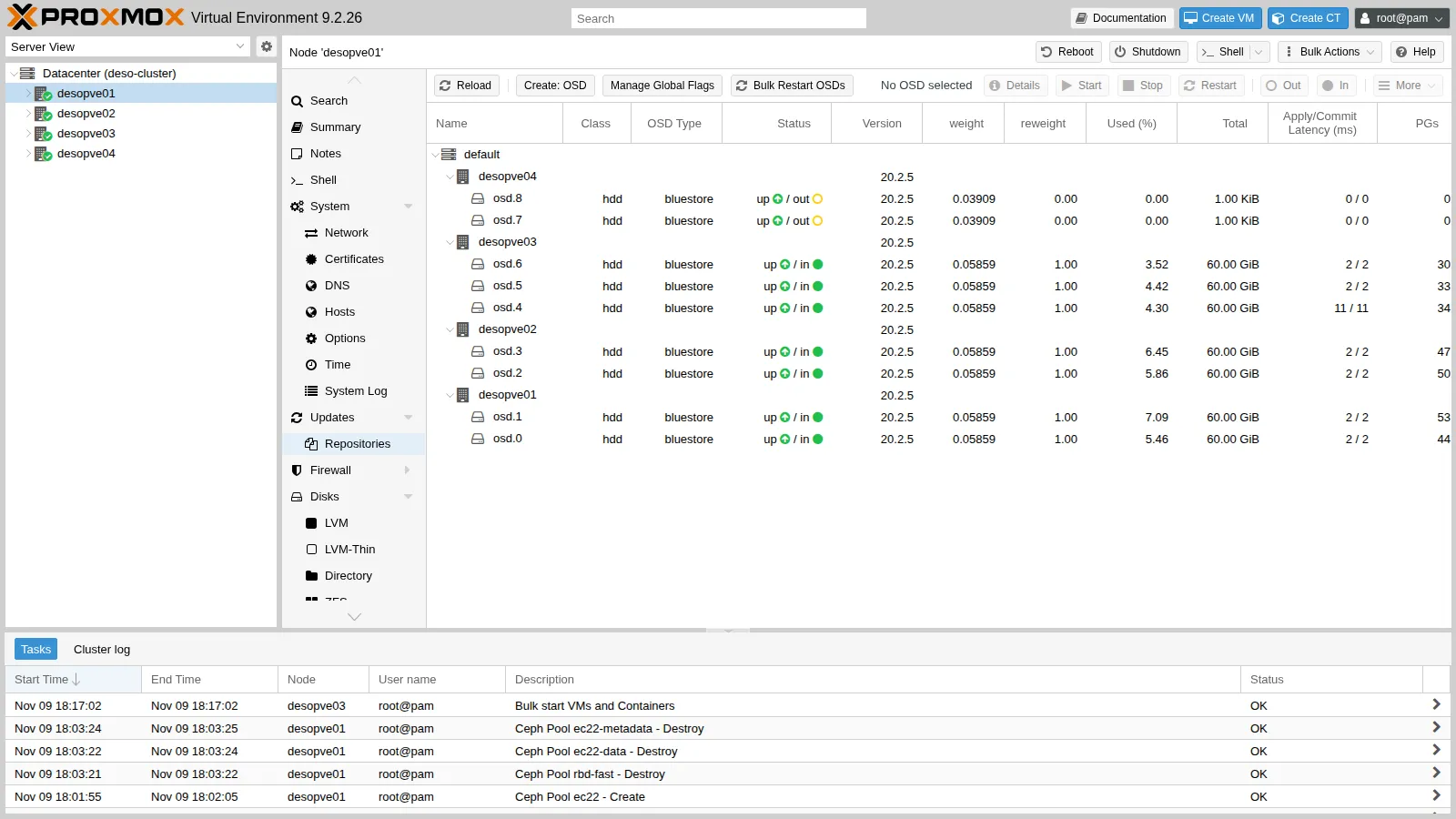
Never use
destroyon an OSD that still holds data:safe-to-destroychecks this for you. -
Destroy the OSDs and remove the host from the CRUSH map:
root@desopve04 systemctl stop ceph-osd@7 ceph-osd@8pveceph osd destroy 7 --cleanup 1Output stdout: Labels on physical volume "/dev/sdf" successfully wiped.root@desopve04 pveceph osd destroy 8 --cleanup 1Output stdout: Labels on physical volume "/dev/sdg" successfully wiped.root@desopve01 ceph osd crush remove desopve04Output removed item id -9 name 'desopve04' from crush mapThe node had no monitors, managers or MDSs. If it had any, you would remove them first (Ceph → Monitor → Destroy), always leaving an odd number of monitors.
-
Remove the Ceph VLANs from
desopve04:root@desopve04 pvesh delete /nodes/desopve04/network/nic2.50pvesh delete /nodes/desopve04/network/nic2.51pvesh set /nodes/desopve04/network -
Separate the node from the cluster, following the official Separate a Node Without Reinstalling procedure. On
desopve04:root@desopve04 systemctl stop pve-cluster corosyncpmxcfs -lOutput [main] notice: forcing local mode (although corosync.conf exists)root@desopve04 rm /etc/pve/corosync.confrm -r /etc/corosync/*killall pmxcfssystemctl start pve-clusterpvecm statusOutput Error: Corosync config '/etc/pve/corosync.conf' does not exist - is this node part of a cluster?pmxcfs -lstarts the Proxmox cluster file system in local mode, without quorum: this way you can modify/etc/pveeven outside the cluster.- Without
corosync.confthe node starts up again as a standalone node.
-
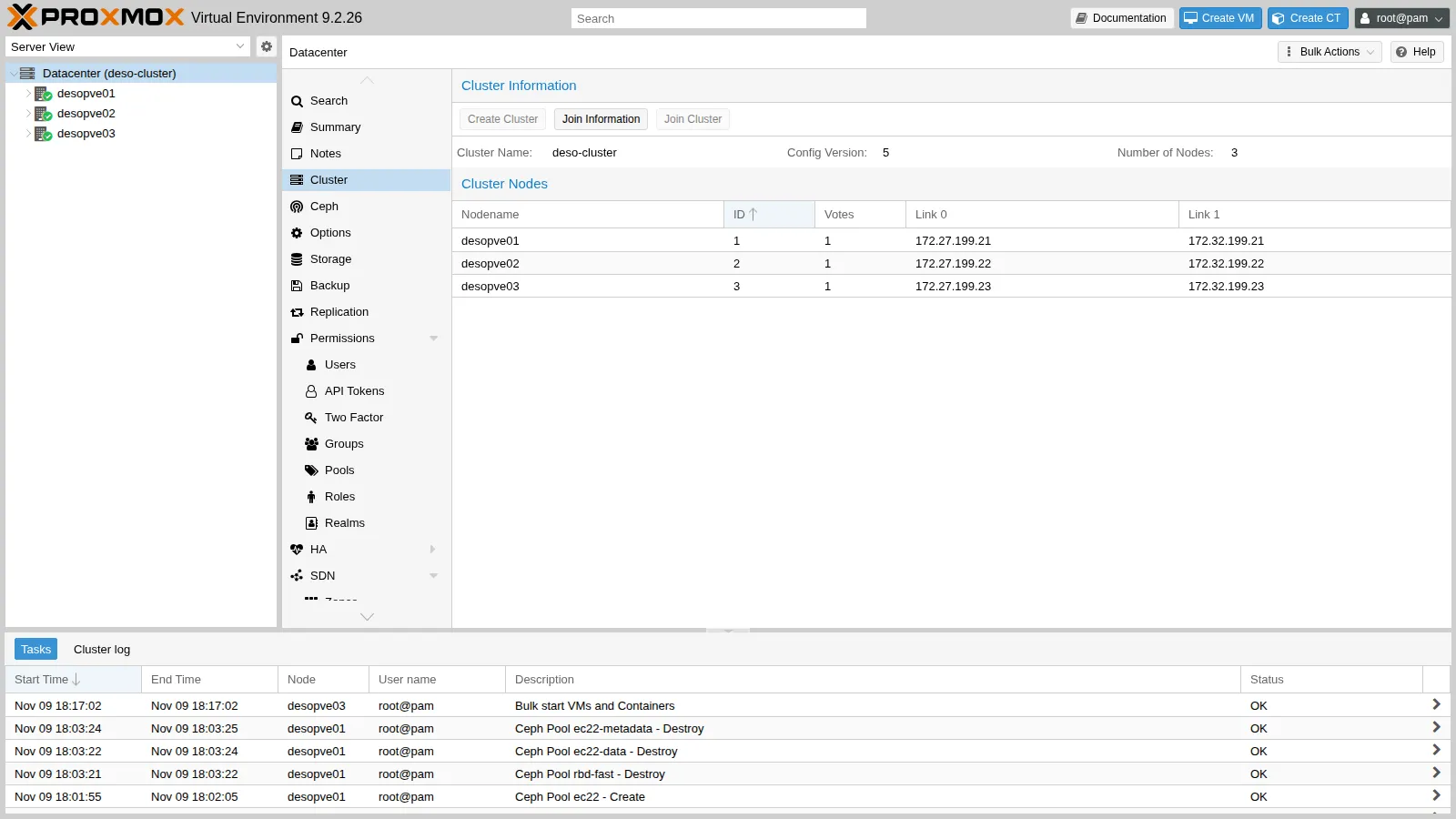
On the cluster, remove the node and its leftovers:
root@desopve01 pvecm delnode desopve04Output Killing node 4Could not kill node (error = CS_ERR_NOT_EXIST)root@desopve01 pvecm status | grep -E "Quorate|Expected|Total"Output Quorate: YesExpected votes: 3Total votes: 3root@desopve01 rm -r /etc/pve/nodes/desopve04sed -i "/root@desopve04$/d" /etc/pve/priv/authorized_keysssh-keygen -f /etc/pve/priv/known_hosts -R desopve04pvesm remove local-lvm; pvesm remove tankCS_ERR_NOT_EXISTis normal: the node had already left Corosync, so there was nothing to “kill”. It was removed from the configuration anyway.- Before deleting
/etc/pve/nodes/desopve04, check that it contains no VM or container configurations. pvesm removeonly removes the definitions from the cluster: the data intankstays ondesopve04.
-
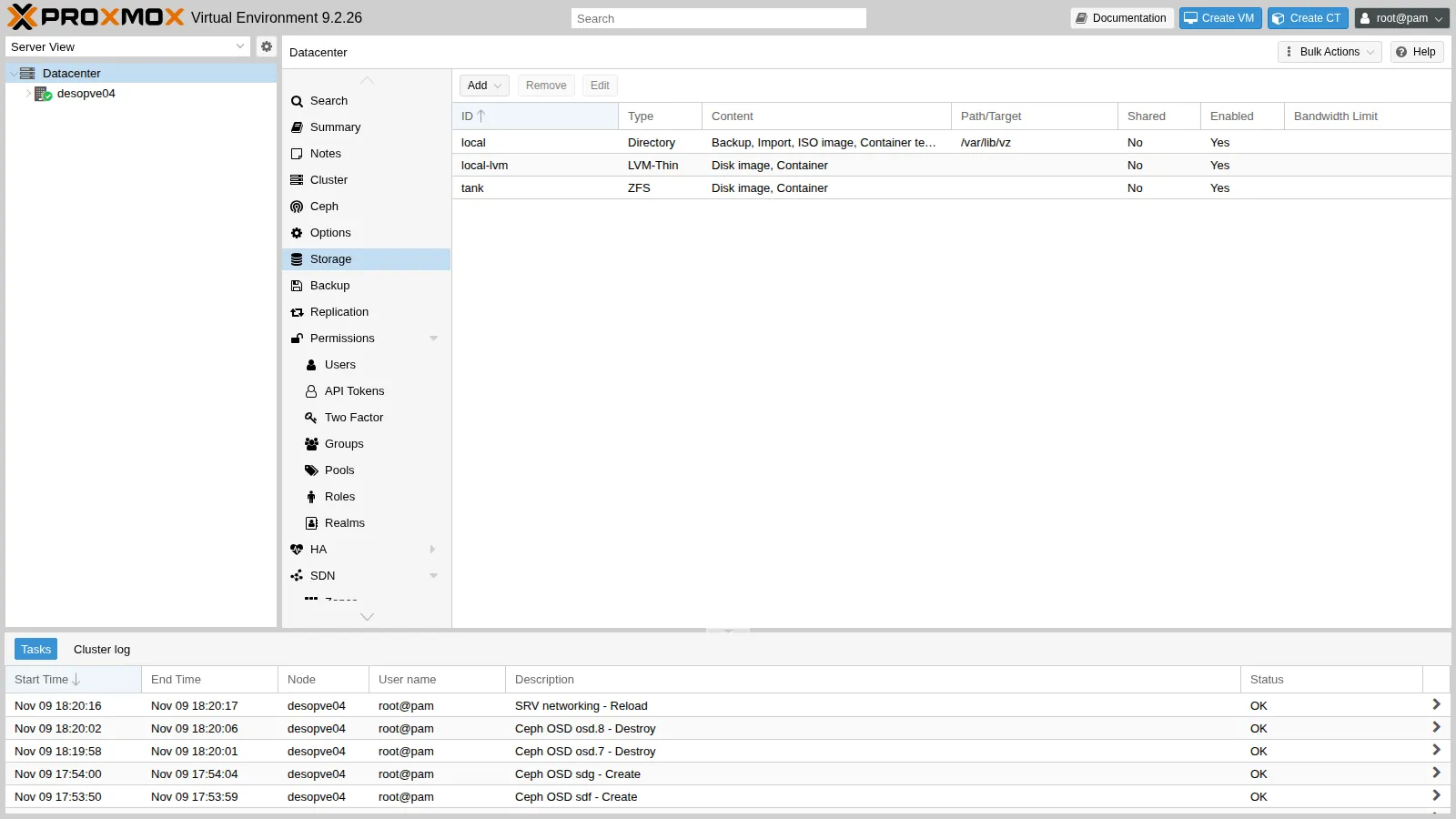
On
desopve04, restore the storage configuration saved in step 4 and delete the copies of the cluster configuration that are no longer needed: other nodes and Ceph.root@desopve04 cp /root/storage.cfg.standalone /etc/pve/storage.cfgrm -rf /etc/pve/nodes/desopve01 /etc/pve/nodes/desopve02 /etc/pve/nodes/desopve03pveceph purgeOutput Foreign MON address in ceph.conf. Keeping config & keyringsroot@desopve04 rm -f /etc/pve/ceph.conf /etc/ceph/ceph.conf /etc/pve/priv/ceph.client.admin.keyring /etc/pve/priv/ceph.mon.keyringrm -rf /etc/pve/priv/cephsystemctl disable --now ceph-crash.servicepvesm statusOutput Name Type Status Total (KiB) Used (KiB) Available (KiB) %local dir active 22203544 6107924 14942392 27.51%local-lvm lvmthin active 14217216 0 14217216 0.00%tank zfspool active 40265280 751 40264528 0.00%root@desopve04 zpool status -x tankOutput pool 'tank' is healthypveceph purgerefuses to delete a configuration that points to monitors on other nodes: it is a safeguard. Here the node is already separated, so you delete those files by hand: they are local copies and do not affect the cluster.- The Ceph packages stay installed: they do no harm, and they would be needed if the node rejoined.
Verification and tests
Section titled “Verification and tests”The lab has succeeded when Ceph is back to HEALTH_OK with 7 OSDs and all PGs active+clean, the cluster has three nodes again, and desopve04 works on its own with its storages:
ceph -s | sed -n "/health:/p;/mon:/p;/mgr:/p;/mds:/p;/osd:/p;/pgs:/p" health: HEALTH_OK mon: 3 daemons, quorum desopve01,desopve03,desopve02 (age 4m) [leader: desopve01] mgr: desopve01(active, since 74m), standbys: desopve02, desopve03 mds: 1/1 daemons up, 1 standby osd: 7 osds: 7 up (since 100s), 7 in (since 3m) pgs: 97 active+cleanpvecm nodes Nodeid Votes Name 1 1 desopve01 (local) 2 1 desopve02 3 1 desopve03The pauses measured by the probe in the VM (normally 25-45 ms per write):
| Event | Longest write in the VM | Reading | Data lost |
|---|---|---|---|
| OSD stopped, then out and in | 4.3 s | compatible with peering; which step caused it was not recorded | none: HEALTH_OK at the end |
Node reboot with noout |
13.5 s | cause not established: OSDs down and then up again, peering, monitor election | none |
| Node suddenly powered off | 26.8 s | ended when the monitors marked the OSDs down (18:04:48) | none |
Cleanup
Section titled “Cleanup”In VM 100, stop the measurement script and delete its files:
pkill -f io.bin; rm -f $HOME/io.bin $HOME/io.logFinal lab state
Section titled “Final lab state”- Proxmox cluster
deso-cluster: back todesopve01-03, 3 votes out of 3. - Ceph Tentacle 20.2.5,
HEALTH_OK:- 3 MONs, 3 MGRs (active on
desopve01), 2 MDSs (active ondesopve01, standby ondesopve02); - 7 OSDs of class
hdd:osd.0-osd.5as in lab 17, plusosd.6on the new disk/dev/sdgofdesopve03; - pools
rbd-vm(3/2),cephfs_data,cephfs_metadataand.mgr; no test pools or rules.
- 3 MONs, 3 MGRs (active on
- Cluster storage:
local,local-zfs,nas-iscsiandnas-lvm(these three restricted todesopve01-03),nas-nfs,nas-smb,rbd-vm,cephfs. - VM 100 running on
desopve01, disk onrbd-vm, home directory oflabusercleaned up. CT 101 running ondesopve02. desopve04: standalone again, with neither Ceph nor Corosync.- Storages
local,local-lvm(empty) andtank(RAIDZ1 with a spare, empty). - It has the third network card
nic2(with no addresses) and two free 40 GB disks (sdf,sdg). - It keeps the copy of its storage configuration in
/root/storage.cfg.standalone.
- Storages
What you learned
Section titled “What you learned”- Choosing between waiting,
outandnoout. A down OSD triggers no data movement for 10 minutes, an out one does. For a planned reboot setnoout; for a failed disk, mark the OSD out (or let the monitors do it after 600 seconds) and replace it. - Growing the cluster in a way that adds space. With only as many hosts as copies, an extra disk on a single node does not increase the usable space: grow all the hosts evenly, or add a host. A new node enters the cluster through the join and Ceph through its OSDs, and the local storages must be restricted to the nodes that really have them.
- Choosing the protection of a pool. 3/2 replication is the safe compromise; 2/2 stops writes at the first failure and 2/1 puts data at risk; erasure coding saves space but needs at least
k+mhosts. Device classes and CRUSH rules separate fast and slow disks into different pools. - Knowing what a failure costs the VMs. In this lab Ceph lost no data, but after a sudden power-off the VM’s writes waited 26.8 seconds, until the monitors marked the OSDs down, and up to 13.5 seconds during a planned reboot. Compare these figures, measured on your own hardware, with the timeouts of your guests and applications (for a Linux guest on a SCSI disk,
/sys/block/sda/device/timeout) before deciding whether to change anything. - Decommissioning a node without reinstalling it. Drain it, destroy its OSDs, separate it with
pmxcfs -land clean up the configuration on both sides.
References
Section titled “References”- Proxmox VE – Ceph maintenance: replacing OSDs
- Proxmox VE – Ceph pools and the PG autoscaler
- Proxmox VE – Erasure coded pools
- Proxmox VE – Shutting down a Proxmox VE + Ceph cluster: the
nooutflag - Proxmox VE – Adding a node to the cluster
- Proxmox VE – Separate a Node Without Reinstalling
- Ceph Tentacle – Monitoring OSDs and PGs: peering and PG states
- Ceph Tentacle – Monitor/OSD interaction: heartbeats, grace period, down and out
- Ceph Tentacle – Erasure code
- Ceph Tentacle – CRUSH device classes
- Ceph Tentacle – mClock: OSD capacity and the bench threshold