

Lab 10 – ZFS: pools, redundancy, compression, snapshots and failures
Dependencies
Section titled “Dependencies”- Previous labs: Lab 09. On
desopve04the four 20 GB disks (sdb,sdc,sdd,sde) are empty. - Nodes:
desopve04as the test bed anddesopve01(installed on ZFS, lab 03) for sending snapshots to a remote node. - Template:
debian-13-standard_13.6-1_amd64.tar.zstin thelocalstorage ofdesopve04(lab 09). - Addresses:
172.27.199.141for the test container. - Hardware for the failure tests: the disks of
desopve04sit in hot-swap bays and can be pulled while the node is running. Have a fifth, new 20 GB disk ready to insert in Test 2 as a spare disk (see the lab hardware). - Credentials:
root/<lab-password>→ Appendix B.
Objectives
Section titled “Objectives”- A
tankpool ondesopve04, created first as a mirror from the web interface and then rebuilt from the command line as a three-disk RAIDZ1 on stableby-pathnames, and registered as thetankstorage:zpool statusshows it ONLINE andpvesm statusshows the storage active. - A deliberately corrupted mirror disk repaired by a scrub, with the test file’s checksum unchanged and the pool reported healthy.
- The raw space, usable space and compression ratio of the RAIDZ1 read with
zpool listandzfs list, for three datasets with different compression settings. - A dataset restored with a rollback and copied with
zfs send/receive, in full and incrementally, within the pool and todesopve01, with the received data checked. - The ARC of
desopve04capped at 2 GiB, both on the fly and in/etc/modprobe.d/zfs.conf. - A disk pulled from the running RAIDZ1: the DEGRADED pool keeps serving the container and returns ONLINE after
zpool replace; a spare disk is then added to the pool.
How it works
Section titled “How it works”Pools, vdevs and datasets
Section titled “Pools, vdevs and datasets”ZFS does the job of a RAID, a volume manager and a file system all at once:
 pool (zpool)           tank                         │ vdev               raidz1-0  (or mirror-0, or a single disk)                    ┌────┼────┐ disks            sdb   sdc   sdd
dataset and zvol tank/dati file system, mounted at /tank/dati tank/vm-990-disk-0 zvol: a block device, /dev/zvol/tank/vm-990-disk-0- A pool is made of one or more vdevs. Redundancy lives inside each vdev: if you lose an entire vdev, you lose the pool.
- A vdev can be a single disk, a mirror (2 or more identical copies), a RAIDZ1/2/3 (distributed parity, survives the loss of 1, 2 or 3 disks) or a dRAID. There are also special vdevs (
log,cache,special) and spare disks (spare). - In the pool you create datasets (file systems) and zvols (block devices). Properties, such as compression, are inherited from the parent and can be changed for each one.
In Proxmox VE a zfspool storage puts VM disks in zvols and container disks in datasets (subvol), with a quota equal to the disk size.
Why ZFS does not lose data silently
Section titled “Why ZFS does not lose data silently”- Copy-on-write: ZFS never overwrites a block; it writes a new one and then updates the pointers. An interrupted write does not leave the file system half-updated, and snapshots are instant and take up no space when they are created.
- A checksum for every block, stored in the parent block: ZFS notices when a disk returns wrong data, even without I/O errors.
- Self-healing: if the vdev is redundant, ZFS reads the good copy and rewrites the damaged one. A scrub rereads the entire pool to find and fix latent errors.
Mirror or RAIDZ?
Section titled “Mirror or RAIDZ?”| Mirror (2 disks) | RAIDZ1 (3 disks) | RAIDZ2 (4+ disks) | |
|---|---|---|---|
| Usable space | 50% | about 66% | about 50% with 4 disks, more with many disks |
| Disks that can fail without data loss | 1 per mirror | 1 | 2 |
| Random performance (IOPS) | writes: about one disk per mirror; reads: more, growing with the disks in the mirror. Both grow with the number of mirrors | roughly that of one disk per vdev | roughly that of one disk per vdev |
| Rebuild (resilver) | copy from a single disk | recomputed from parity across all disks | recomputed from parity |
The Proxmox VE documentation points out that for running VMs IOPS are usually the metric that matters most, and that a RAIDZ vdev delivers roughly the IOPS of a single disk. For VM disks this points to mirrors or striped mirrors (RAID10); RAIDZ is a better fit for backups and archives, where capacity matters more. On RAIDZ, small blocks also take more space than the nominal parity ratio suggests, because each one needs at least one parity sector: step 5 shows the effect.
The ARC is the ZFS read cache in RAM. The larger it is, the more reads it can serve without touching the disks, but the RAM it holds is not available to the VMs until ZFS gives it back. Since version 8.1 the Proxmox VE installer caps the ARC at 10% of the RAM, with a maximum of 16 GiB, and writes the limit to /etc/modprobe.d/zfs.conf.
Test environment and versions
Section titled “Test environment and versions”The outputs in this lab come from a run on 9 November 2026, the date shown in the logs, with the configuration below. The space, compression and timing figures depend on it: with other versions, disks or data they change.
| Component | Configuration used |
|---|---|
| Proxmox VE | 9.2.26, kernel 7.0.14-28-pve (Lab 04) |
| ZFS | the version shipped for that kernel. It was not recorded on desopve04 during the test: zfs version shows it. For reference, Appendix A shows zfsutils-linux 2.4.4-pve1 on a test node running the same kernel |
| Test node | desopve04: 4 cores, 16 GB of RAM (15.6 GiB according to arc_summary), system on ext4/LVM on a 50 GB disk, four 20 GB disks in hot-swap bays on the same controller (pci-0000:02:00.0), plus a fifth 20 GB disk for Test 2 (Lab 01) |
tank |
first a two-disk mirror (compression=on, i.e. LZ4, ashift=12), then a three-disk RAIDZ1 with ashift=12, compression=lz4 and atime=off; zfspool storage with sparse 1 |
ARC on desopve04 |
1.6 GiB maximum set by the installer, raised to 2 GiB in step 9 |
| Remote node | desopve01, system pool rpool: a ZFS mirror on two 50 GB disks (Lab 03) |
| Test data | 1,500 MiB of random data for the scrub; a copy of the node’s /usr/share/doc and /usr/lib/python3 (112 MiB of logical data) for compression, snapshots and send/receive |
Disk and controller models are redacted, as explained in the manual’s conventions.
What the tests show, and what they do not. They show how ZFS behaves on a small, nearly empty pool on a single node: detecting and repairing damage, accounting for space, recovering from a failed disk. The times (a 5-second scrub, a 12-second resilver) and the space figures hold for these amounts of data, from about a hundred megabytes to 1.5 GB, and for this disk layout. They are not performance measurements: they do not tell you how long a scrub or a resilver takes on large, full disks or under load, nor what compression costs in CPU.
Procedure
Section titled “Procedure”1. The system pool of desopve01
Section titled “1. The system pool of desopve01”The installation in lab 03 created rpool, a mirror on partition 3 of the two 50 GB disks:
zpool status rpool pool: rpool state: ONLINEconfig:
NAME STATE READ WRITE CKSUM rpool ONLINE 0 0 0 mirror-0 ONLINE 0 0 0 scsi-<seriale-disco-sda>-part3 ONLINE 0 0 0 scsi-<seriale-disco-sdb>-part3 ONLINE 0 0 0
errors: No known data errorszpool listNAME SIZE ALLOC FREE CKPOINT EXPANDSZ FRAG CAP DEDUP HEALTH ALTROOTrpool 49G 5.44G 43.6G - - 3% 11% 1.00x ONLINE -The installer uses the names in /dev/disk/by-id, which contain the model and serial number of the disk and do not change if the sda, sdb… order changes. In the manual the serial numbers are replaced by placeholders, because they depend on the hardware.
2. Create a mirror from the web interface
Section titled “2. Create a mirror from the web interface”-
On
desopve04open Disks → ZFS → Create: ZFS. -
Name
tank, RAID LevelMirror, Compressionon(i.e. LZ4), ashift12(4 KiB sectors), Add Storage enabled. Select/dev/sdband/dev/sdc.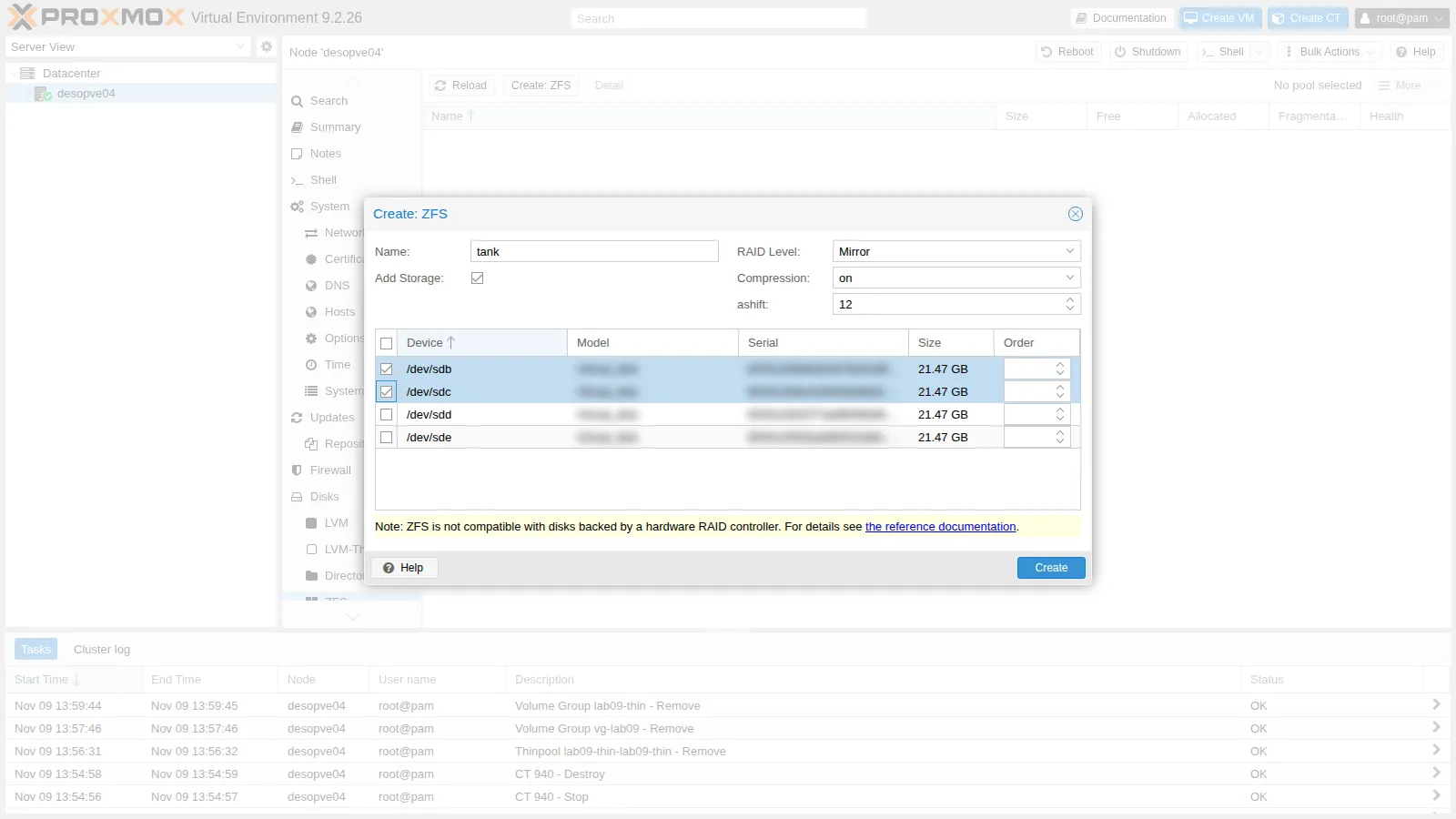
-
Click Create. The pool appears in the list; Detail shows the state of the disks, like
zpool status.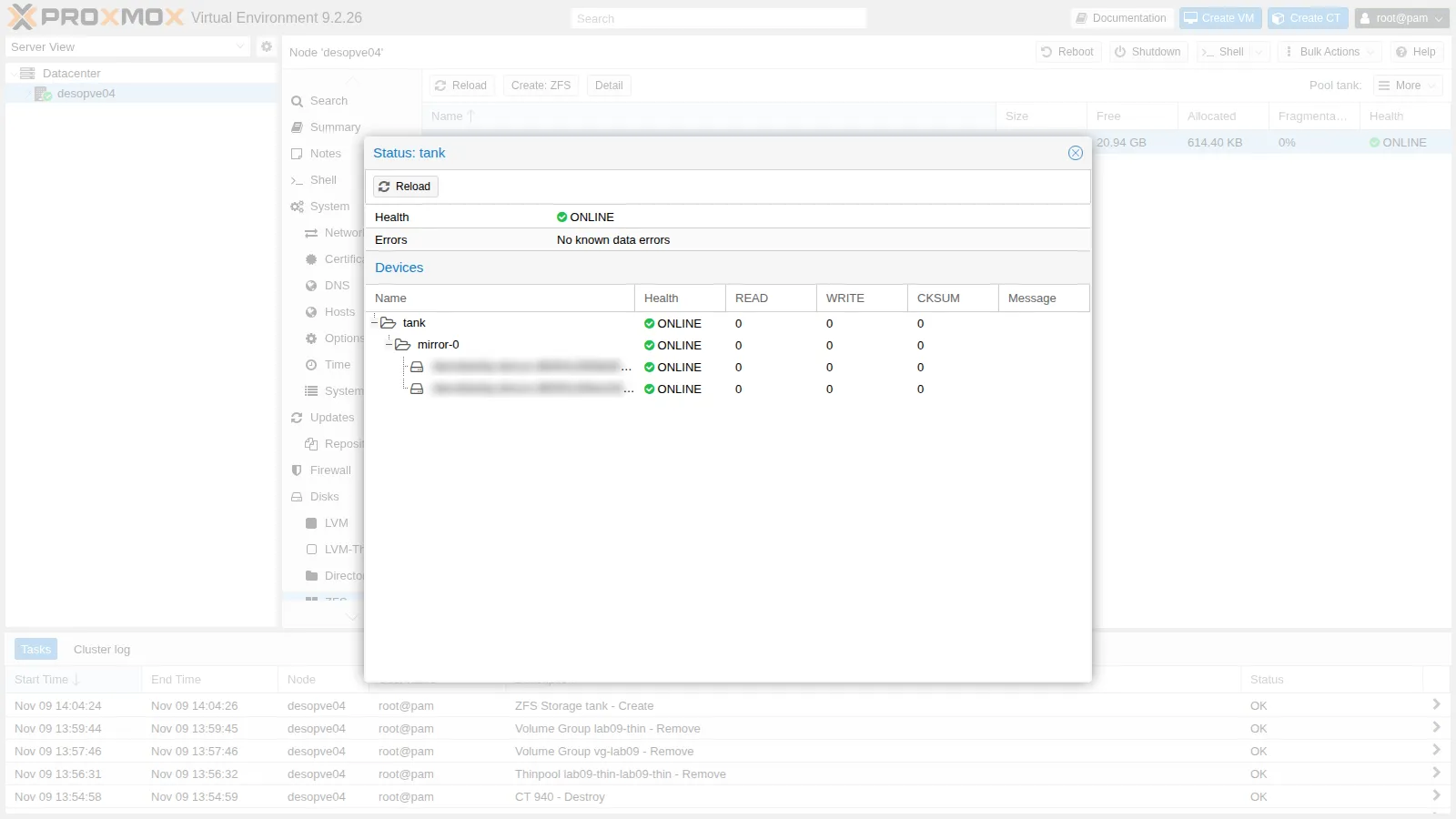
-
From the command line:
root@desopve04 zpool status tankOutput pool: tankstate: ONLINEconfig:NAME STATE READ WRITE CKSUMtank ONLINE 0 0 0mirror-0 ONLINE 0 0 0scsi-<seriale-disco-sdb> ONLINE 0 0 0scsi-<seriale-disco-sdc> ONLINE 0 0 0errors: No known data errorsroot@desopve04 grep -A4 "zfspool: tank" /etc/pve/storage.cfgOutput zfspool: tankpool tankcontent rootdir,imagesmountpoint /tanknodes desopve04
3. Self-healing: corrupt a mirror disk
Section titled “3. Self-healing: corrupt a mirror disk”This step deliberately destroys part of the data on a disk. Only do it on a test pool.
-
Create a dataset, write 1.5 GB of random data and note the file’s checksum:
root@desopve04 zfs create tank/datidd if=/dev/urandom of=/tank/dati/archivio.bin bs=1M count=1500 status=nonemd5sum /tank/dati/archivio.binOutput 15bd171a50378dae9c3153c9c48bdb00 /tank/dati/archivio.bin -
Overwrite 3 GB of the data partition of
sdcwith zeros, starting at 64 MiB so as not to touch the ZFS labels at the beginning of the disk:root@desopve04 dd if=/dev/zero of=/dev/sdc1 bs=1M seek=64 count=3000 oflag=direct status=none -
Start a scrub and wait for it to finish (
-w):root@desopve04 zpool scrub -w tankzpool status tankOutput pool: tankstate: ONLINEstatus: One or more devices has experienced an unrecoverable error. Anattempt was made to correct the error. Applications are unaffected.action: Determine if the device needs to be replaced, and clear the errorsusing 'zpool clear' or replace the device with 'zpool replace'.see: https://openzfs.github.io/openzfs-docs/msg/ZFS-8000-9Pscan: scrub repaired 962M in 00:00:05 with 0 errors on Mon Nov 9 14:06:41 2026config:NAME STATE READ WRITE CKSUMtank ONLINE 0 0 0mirror-0 ONLINE 0 0 0scsi-<seriale-disco-sdb> ONLINE 0 0 0scsi-<seriale-disco-sdc> ONLINE 0 0 7.57Kerrors: No known data errors- Measured: the scrub ends with
repaired 962M in 00:00:05 with 0 errors. On the second disk theCKSUMcounter reads 7.57K, whileREADandWRITEstay at 0. - Interpretation: the disk returned zeros in place of the data without reporting any I/O error, and only the block checksums gave it away; ZFS rewrote the damaged blocks from the good copy on the first disk. The 962 MiB repaired are less than the 3,000 MiB overwritten: this is consistent with a scrub that reads only allocated blocks, so the zeros written over free space go unnoticed and do no harm.
- How to check:
zpool list tankbefore the test shows how much space is allocated;zpool events -vlists the checksum error events, with the device and the offsets involved.
- Measured: the scrub ends with
-
The file is intact. Reset the counters:
root@desopve04 md5sum /tank/dati/archivio.binOutput 15bd171a50378dae9c3153c9c48bdb00 /tank/dati/archivio.binroot@desopve04 zpool clear tankzpool status -x tankOutput pool 'tank' is healthyIn production, keep an eye on a disk with checksum errors, and replace it if the errors come back. The
zfsutils-linuxpackage schedules a monthly scrub of all pools (/etc/cron.d/zfsutils-linux), andzfs-zedcan report problems by email toroot: whether that mail actually arrives depends on the node’s mail setup, which Lab 51 covers.
4. Create a RAIDZ1 from the command line
Section titled “4. Create a RAIDZ1 from the command line”Now rebuild tank as a RAIDZ1 on three disks. First remove the storage and the mirror pool:
pvesm remove tankzpool destroy tankTo specify the disks, instead of sdb… (which can change at every boot) use /dev/disk/by-path, which identifies the controller port. It is a stable alternative to by-id, handy when you want to know which slot a disk is in:
ls -l /dev/disk/by-path/ | grep -v part | awk '{print $9, $11}' | grep scsipci-0000:02:00.0-scsi-0:0:0:0 ../../sdapci-0000:02:00.0-scsi-0:0:1:0 ../../sdbpci-0000:02:00.0-scsi-0:0:2:0 ../../sdcpci-0000:02:00.0-scsi-0:0:3:0 ../../sddpci-0000:02:00.0-scsi-0:0:4:0 ../../sdecd /dev/disk/by-pathzpool create -o ashift=12 -O compression=lz4 -O atime=off tank raidz1 pci-0000:02:00.0-scsi-0:0:1:0 pci-0000:02:00.0-scsi-0:0:2:0 pci-0000:02:00.0-scsi-0:0:3:0zpool status tank pool: tank state: ONLINEconfig:
NAME STATE READ WRITE CKSUM tank ONLINE 0 0 0 raidz1-0 ONLINE 0 0 0 pci-0000:02:00.0-scsi-0:0:1:0 ONLINE 0 0 0 pci-0000:02:00.0-scsi-0:0:2:0 ONLINE 0 0 0 pci-0000:02:00.0-scsi-0:0:3:0 ONLINE 0 0 0
errors: No known data errorszpool list tankNAME SIZE ALLOC FREE CKPOINT EXPANDSZ FRAG CAP DEDUP HEALTH ALTROOTtank 59.5G 856K 59.5G - - 0% 0% 1.00x ONLINE -zfs list tankNAME USED AVAIL REFER MOUNTPOINTtank 512K 38.4G 128K /tank-o ashift=12is a pool property, fixed for good at creation time;-Osets properties of the root dataset, which its children inherit.atime=offavoids a write on every file read.zpool listshows the raw space of the three disks, parity included: 59.5 GiB.zfs listshows the usable space, what the datasets can actually fill: 38.4 GiB. Two thirds of 59.5 GiB would be 39.7 GiB: one disk’s worth goes to parity, and the remaining gap is consistent with the small share of the pool (1/32 by default, the slop space) that ZFS keeps in reserve and never reports as available. The module parameter that sets it isspa_slop_shift(cat /sys/module/zfs/parameters/spa_slop_shift).
Add the storage, with the sparse option like local-zfs:
pvesm add zfspool tank --pool tank --content images,rootdir --sparse 1 --nodes desopve04pvesm statusName Type Status Total (KiB) Used (KiB) Available (KiB) %local dir active 22203544 5768732 15281584 25.98%local-lvm lvmthin active 14217216 0 14217216 0.00%tank zfspool active 40265280 543 40264736 0.00%5. Compression compared
Section titled “5. Compression compared”Create three datasets with different compression and copy the same files into each one (documentation and Python libraries, i.e. text and code):
for c in off lz4 zstd; do zfs create -o compression=$c tank/comp-$c; cp -a /usr/share/doc /usr/lib/python3 /tank/comp-$c/; donezfs list -o name,compression,used,logicalused,compressratio -r tank | grep -E "NAME|comp-"NAME COMPRESS USED LUSED RATIOtank/comp-lz4 lz4 111M 112M 1.63xtank/comp-off off 157M 112M 1.00xtank/comp-zstd zstd 103M 112M 1.83x- Measured: on the same 112 MiB of logical data (
LUSED), the compression ratio (compressratio, theRATIOcolumn) is 1.83x with zstd and 1.63x with LZ4. Without compression it is 1.00x, and the space used in the pool (USED) is 157 MiB: more than the logical data. - Interpretation:
- on these files, text and code, zstd compresses more than LZ4. The test does not measure what either algorithm costs in CPU or time.
compression=on, which on this pool means LZ4, is the default that the OpenZFS documentation describes as balancing speed and compression ratio; - the extra space without compression is consistent with the allocation overhead of small blocks: every block takes a whole number of 4 KiB sectors (
ashift=12), and on RAIDZ1 it also needs at least one parity sector. With many small files, as here, this overhead shows inUSED, and compression absorbs part of it. This is also consistent withUSED(111 MiB) being close toLUSED(112 MiB) for LZ4 despite a 1.63x ratio: the ratio describes the compression alone, whileUSEDalso includes the allocation overhead. The test does not separate the share due to sector rounding from the share due to RAIDZ.
- on these files, text and code, zstd compresses more than LZ4. The test does not measure what either algorithm costs in CPU or time.
- How to check: to compare what the algorithms cost, time the same copy into each dataset (
time cp -a …) on an otherwise idle node. To separate the two shares, copy the same files into an uncompressed dataset on a mirror with the sameashiftand compareusedwithlogicalused: what remains is the share due to sector rounding.
6. Zvols and subvols: the guests’ disks
Section titled “6. Zvols and subvols: the guests’ disks”Allocate a disk for a VM (test VMID 990) and create a container on the tank storage:
pvesm alloc tank 990 vm-990-disk-0 4Gsuccessfully created 'tank:vm-990-disk-0'pct create 941 local:vztmpl/debian-13-standard_13.6-1_amd64.tar.zst --hostname lab10-ct --rootfs tank:4 --memory 512 --unprivileged 1 --features nesting=1 --ostype debian --net0 name=eth0,bridge=vmbr0,ip=172.27.199.141/24,gw=172.27.199.1pvesm list tankVolid Format Type Size VMIDtank:subvol-941-disk-0 subvol rootdir 4294967296 941tank:vm-990-disk-0 raw images 4294967296 990zfs list -t all -o name,type,volsize,refquota,used,mountpoint -r tank | grep -E "NAME|990|941"NAME TYPE VOLSIZE REFQUOTA USED MOUNTPOINTtank/subvol-941-disk-0 filesystem - 4G 346M /tank/subvol-941-disk-0tank/vm-990-disk-0 volume 4G - 74.6K -pct start 941pct exec 941 -- df -h /Filesystem Size Used Avail Use% Mounted ontank/subvol-941-disk-0 4.0G 351M 3.7G 9% /- The VM disk is a 4 GiB zvol (
volume), thin: it takes up 75 KiB. - The container disk is a dataset (
filesystem) with a 4 GiBrefquota: the container sees a 4 GiB file system, and the node sees its files directly in/tank/subvol-941-disk-0.
7. Snapshots and rollback
Section titled “7. Snapshots and rollback”-
Create a test dataset, take a snapshot and delete the files:
root@desopve04 zfs create tank/snapdemo; cp -a /usr/share/doc /tank/snapdemo/zfs snapshot tank/snapdemo@arm -rf /tank/snapdemo/doc; synczfs list -t snapshot -o name,used,refer tank/snapdemoOutput NAME USED REFERtank/snapdemo@a 64.6M 64.7Mroot@desopve04 zfs list -o space tank/snapdemoOutput NAME AVAIL USED USEDSNAP USEDDS USEDREFRESERV USEDCHILDtank/snapdemo 37.5G 64.7M 64.6M 128K 0B 0BA new snapshot shares all its blocks with the dataset, so at first it takes up no space of its own. When the files are deleted, their blocks stay with the snapshot: now the dataset uses 128 KiB (
USEDDS) and the snapshot 64.6 MiB (USEDSNAP). TheUSEDcolumn of a snapshot counts only the blocks that belong to that snapshot alone: if several snapshots share the same blocks, each one shows0Band the space appears only inUSEDSNAP. -
The files of the snapshot can be read, read-only, in the hidden
.zfs/snapshotdirectory. Withzfs rollbackthe dataset goes back exactly to how it was. Try it ontank/comp-zstd:root@desopve04 zfs snapshot tank/comp-zstd@primarm -rf /tank/comp-zstd/docls /tank/comp-zstdOutput python3root@desopve04 ls /tank/comp-zstd/.zfs/snapshot/prima/Output docpython3root@desopve04 zfs rollback tank/comp-zstd@primals /tank/comp-zstdOutput docpython3root@desopve04 zfs destroy -r tank/snapdemozfs rollbackonly goes back to the most recent snapshot: to go back to an earlier one you have to destroy the later ones (-r). Snapshots of VM and container disks are managed from the web interface, which relies on ZFS snapshots (lab 16).
8. zfs send and zfs receive
Section titled “8. zfs send and zfs receive”zfs send turns a snapshot into a data stream, zfs receive recreates it elsewhere. This is the foundation of Proxmox VE replication (lab 11).
-
Full and incremental copy within the same pool:
root@desopve04 zfs snapshot tank/comp-zstd@s1zfs send tank/comp-zstd@s1 | zfs receive tank/copiadate > /tank/comp-zstd/nuovo.txtzfs snapshot tank/comp-zstd@s2zfs send -v -i @s1 tank/comp-zstd@s2 | zfs receive tank/copiaOutput send from tank/comp-zstd@s1 to tank/comp-zstd@s2 estimated size is 49.1Ktotal estimated size is 49.1KTIME SENT SNAPSHOT tank/comp-zstd@s2root@desopve04 zfs list -t snapshot -o name,used,refer -r tank/comp-zstd tank/copiaOutput NAME USED REFERtank/comp-zstd@prima 0B 103Mtank/comp-zstd@s1 0B 103Mtank/comp-zstd@s2 0B 103Mtank/copia@s1 95.9K 111Mtank/copia@s2 0B 111Mroot@desopve04 cat /tank/copia/nuovo.txtOutput Mon Nov 9 02:07:58 PM CET 2026The incremental send (
-i @s1) carries only the blocks that changed between the two snapshots:zfs send -vestimates the stream at 49.1 KiB, while the dataset references 103 MiB. That figure is an estimate printed before the transfer, and the size of the full stream sent first was not measured:zfs send -nvP tank/comp-zstd@s1(a dry run) prints it without sending anything.tank/copiareferences 111 MiB, more than the 103 MiB of the source. This is consistent with a stream sent without-c: its data travel uncompressed and are compressed again on arrival, with the propertytank/copiainherits fromtank(LZ4, the same 111 MiB astank/comp-lz4). To check:zfs get compression,compressratio tank/copia. -
To another node, over SSH.
desopve04is not part of the cluster, so it first needs an authorized key ondesopve01.ssh-copy-idasks once for therootpassword ofdesopve01:root@desopve04 Output /usr/bin/ssh-copy-id: INFO: Source of key(s) to be installed: "/root/.ssh/id_rsa.pub"/usr/bin/ssh-copy-id: INFO: attempting to log in with the new key(s), to filter out any that are already installed/usr/bin/ssh-copy-id: INFO: 1 key(s) remain to be installed -- if you are prompted now it is to install the new keysNumber of key(s) added: 1...root@desopve04 Output NAME USED REFERrpool/lab10-copia 93.5M 93.5Mrpool/lab10-copia@s2 0B 93.5MThe dataset arrives on
desopve01along with its snapshot, and there it uses 93.5 MiB, against 111 MiB for the copy received ontank. The difference is consistent with the absence of RAIDZ overhead onrpool, which is a mirror, but the test does not rule out other differences between the two pools, such as the compression property inherited fromrpoolor itsashift. To check:zfs get compression,compressratio,logicalreferenced rpool/lab10-copiaondesopve01, andzpool get ashifton both pools.
9. Size the ARC
Section titled “9. Size the ARC”-
The current limit is in the file created by the installer and in the module parameter:
root@desopve04 cat /etc/modprobe.d/zfs.confOutput options zfs zfs_arc_max=1676673024root@desopve04 arc_summary -s arc | sed -n 7,12pOutput ARC status:Total memory size: 15.6 GiBMin target size: 3.1 % 499.7 MiBMax target size: 10.0 % 1.6 GiBTarget size (adaptive): 44.1 % 1.6 GiBCurrent size: 44.1 % 705.3 MiB1,676,673,024 bytes is 1.6 GiB, 10% of the 15.6 GiB of RAM that ZFS sees on the node. On
desopve01, with 32 GB of RAM, the same rule gives about 3.1 GiB: the exact value is in/etc/modprobe.d/zfs.confon that node. -
Raise the limit to 2 GiB on the fly by writing to the module parameter, and make it permanent in
zfs.conf:root@desopve04 echo $((2*1024*1024*1024)) > /sys/module/zfs/parameters/zfs_arc_maxsed -i "s/^options zfs zfs_arc_max=.*/options zfs zfs_arc_max=2147483648/" /etc/modprobe.d/zfs.confarc_summary -s arc | sed -n 8,12pOutput Total memory size: 15.6 GiBMin target size: 3.1 % 499.7 MiBMax target size: 12.8 % 2.0 GiBTarget size (adaptive): 33.2 % 1.6 GiBCurrent size: 33.2 % 679.9 MiBroot@desopve04 arcstat 1 3Output time read ddread ddh% dmread dmh% pread ph% size c avail14:08:38 0 0 0 0 0 0 0 680M 1.6G 12.2G14:08:39 0 0 0 0 0 0 0 680M 1.6G 12.2G14:08:40 0 0 0 0 0 0 0 680M 1.6G 12.2GThe maximum is now 2.0 GiB, but the target (
cinarcstat, Target size inarc_summary) stays at 1.6 GiB and the ARC holds 680 MiB. With no reads during the sample (thereadcolumn is 0), this is consistent with an ARC that only grows when there is data to cache: the new limit matters under load. To see it, watcharcstat 1while reading more data than the ARC can hold.On nodes with the system on ZFS (like
desopve01-03) the module is loaded from the initramfs: after changingzfs.confyou must runupdate-initramfs -u -k all, otherwise the old limit applies again after a reboot.desopve04has its system on ext4, so this is not needed. This lab does not rebootdesopve04: after its next reboot,cat /sys/module/zfs/parameters/zfs_arc_maxshould print2147483648.
Verification and tests
Section titled “Verification and tests”The lab has succeeded when every check in the table gives the expected result. The last column shows what this run observed.
| Check | Counts as success | Observed in this run |
|---|---|---|
tank pool and storage |
zpool status tank ONLINE with the three by-path disks; tank active in pvesm status |
ONLINE; storage active |
| Scrub after corrupting a mirror disk | scrub repaired … with 0 errors, the file’s md5sum unchanged, pool 'tank' is healthy after zpool clear |
962 MiB repaired in 5 seconds, CKSUM 7.57K on the corrupted disk, same md5sum |
| Space of the RAIDZ1 | the usable space in zfs list is about two thirds of the raw space in zpool list, or a little less |
38.4 GiB usable out of 59.5 GiB raw |
| Compression | compressratio above 1.00x on the compressed datasets |
LZ4 1.63x, zstd 1.83x, off 1.00x |
| Rollback | the deleted directory is back after zfs rollback |
doc back in tank/comp-zstd |
zfs send/receive |
the received datasets carry their snapshots, and the file written after @s1 is in tank/copia |
tank/copia@s1, @s2 and nuovo.txt; rpool/lab10-copia@s2 on desopve01 |
| ARC | arc_summary shows a Max target size of 2.0 GiB, and zfs.conf holds 2147483648 |
2.0 GiB on the fly; persistence after a reboot not checked in this lab |
| Disk failure (Test 1) | the pool DEGRADED but writable, ONLINE after zpool replace, resilver with 0 errors |
write succeeded during the failure; resilvered 435M in 00:00:12 with 0 errors |
| Spare disk (Test 2) | the disk listed under spares as AVAIL, autoreplace=on |
AVAIL; automatic activation not tested |
Test 1 – A RAIDZ disk fails
Section titled “Test 1 – A RAIDZ disk fails”Configuration tried. tank is a RAIDZ1 on three disks, named by bay (by-path), so it can survive the loss of one of them. Container 941 is running with its disk on tank. The disk in bay scsi-0:0:3:0 is pulled while the node is running.
-
Hot-remove the disk in bay
scsi-0:0:3:0(sdd). Behaviour observed: the disk disappears from the system and the pool marks itREMOVED:root@desopve04 lsblk -d -o NAME,SIZE | grep sdOutput sda 50Gsdb 20Gsdc 20Gsde 20Groot@desopve04 zpool status tankOutput pool: tankstate: DEGRADEDstatus: One or more devices have been removed.Sufficient replicas exist for the pool to continue functioning in adegraded state.action: Online the device using zpool online' or replace the device with'zpool replace'.config:NAME STATE READ WRITE CKSUMtank DEGRADED 0 0 0raidz1-0 DEGRADED 0 0 0pci-0000:02:00.0-scsi-0:0:1:0 ONLINE 0 0 0pci-0000:02:00.0-scsi-0:0:2:0 ONLINE 0 0 0pci-0000:02:00.0-scsi-0:0:3:0 REMOVED 0 0 0errors: No known data errorsroot@desopve04 journalctl -u zfs-zed --since "-15 min" --no-hostname | tail -2Output Nov 09 14:09:18 zed[24608]: eid=246 class=statechange pool='tank' vdev=pci-0000:02:00.0-scsi-0:0:3:0-part1 vdev_state=REMOVEDNov 09 14:09:19 zed[24927]: eid=247 class=removed pool='tank' vdev=pci-0000:02:00.0-scsi-0:0:3:0-part1 vdev_state=REMOVEDzfs-zed, the ZFS event daemon, logged the removal at 14:09:18 and 14:09:19. The test does not record the exact moment the disk was pulled, so it does not measure how long ZFS took to notice: the kernel log (journalctl -k) shows when the disk left the SCSI bus. ZED can also emailroot(ZED_EMAIL_ADDRin/etc/zfs/zed.d/zed.rc), but this lab does not check the delivery: in Lab 51 the notifications of the earlier labs turn out to be stuck in the Postfix queue of the cluster nodes, andpostqueue -pondesopve04shows whether this one is stuck too. -
The pool is DEGRADED but still in service: inside the container a write, a
syncand a read all succeed.root@desopve04 pct exec 941 -- sh -c "date > /root/durante-il-guasto.txt; sync; cat /root/durante-il-guasto.txt"Output Mon Nov 9 13:10:55 UTC 2026The container’s clock is in UTC: 13:10:55 UTC is 14:10:55 on the node, about a minute and a half after ZED logged the removal. A single write is a functional check, not a performance test: it does not tell you how much slower the pool is while degraded.
In Disks → ZFS → Detail the pool and the vdev are shown in yellow, with the disk
REMOVED: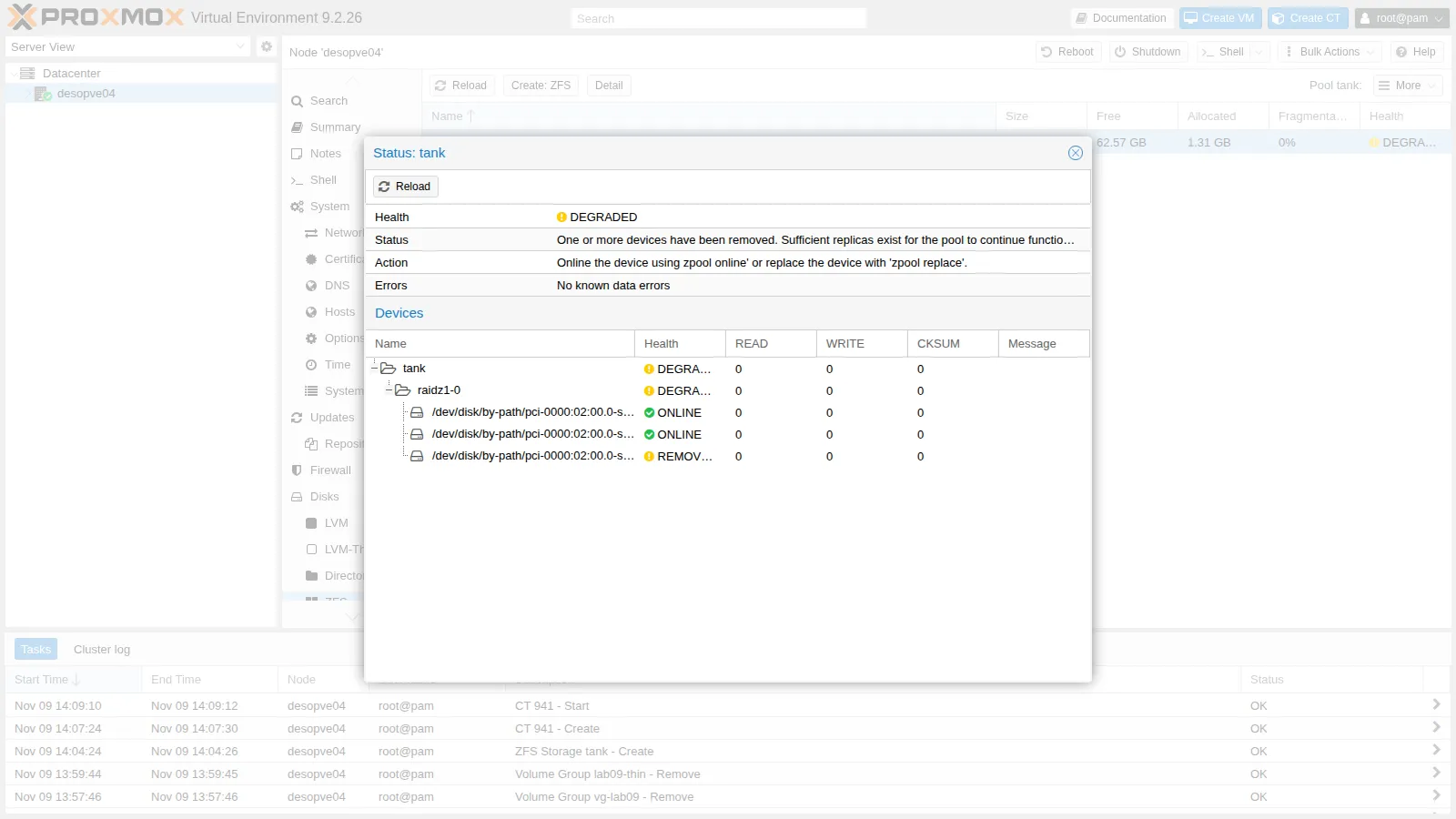
-
Decision: the pulled disk does not go back into the node, so the missing disk is replaced with the free disk
sde(bayscsi-0:0:4:0). ZFS rebuilds the missing data from parity (resilver), working only on the blocks in use:root@desopve04 zpool replace tank pci-0000:02:00.0-scsi-0:0:3:0 /dev/disk/by-path/pci-0000:02:00.0-scsi-0:0:4:0zpool status tankOutput pool: tankstate: DEGRADEDstatus: One or more devices is currently being resilvered. The pool willcontinue to function, possibly in a degraded state.action: Wait for the resilver to complete.scan: resilver in progress since Mon Nov 9 14:11:25 20261.22G / 1.22G scanned, 345M / 1.12G issued at 173M/s100M resilvered, 30.18% done, 00:00:04 to goconfig:NAME STATE READ WRITE CKSUMtank DEGRADED 0 0 0raidz1-0 DEGRADED 0 0 0pci-0000:02:00.0-scsi-0:0:1:0 ONLINE 0 0 0pci-0000:02:00.0-scsi-0:0:2:0 ONLINE 0 0 0replacing-2 DEGRADED 0 0 0pci-0000:02:00.0-scsi-0:0:3:0 REMOVED 0 0 0pci-0000:02:00.0-scsi-0:0:4:0 ONLINE 0 0 0 (resilvering)errors: No known data errorsroot@desopve04 zpool wait -t resilver tank -
Result: when the resilver completes, ZFS detaches the old disk by itself and the pool goes back ONLINE:
root@desopve04 zpool status tankOutput pool: tankstate: ONLINEscan: resilvered 435M in 00:00:12 with 0 errors on Mon Nov 9 14:11:37 2026config:NAME STATE READ WRITE CKSUMtank ONLINE 0 0 0raidz1-0 ONLINE 0 0 0pci-0000:02:00.0-scsi-0:0:1:0 ONLINE 0 0 0pci-0000:02:00.0-scsi-0:0:2:0 ONLINE 0 0 0pci-0000:02:00.0-scsi-0:0:4:0 ONLINE 0 0 0errors: No known data errorsroot@desopve04 md5sum /tank/copia/nuovo.txt /tank/comp-zstd/nuovo.txtOutput 2b697b63aba1f00e8edd33f831903cf2 /tank/copia/nuovo.txt2b697b63aba1f00e8edd33f831903cf2 /tank/comp-zstd/nuovo.txtroot@desopve04 pct exec 941 -- cat /root/durante-il-guasto.txtOutput Mon Nov 9 13:10:55 UTC 2026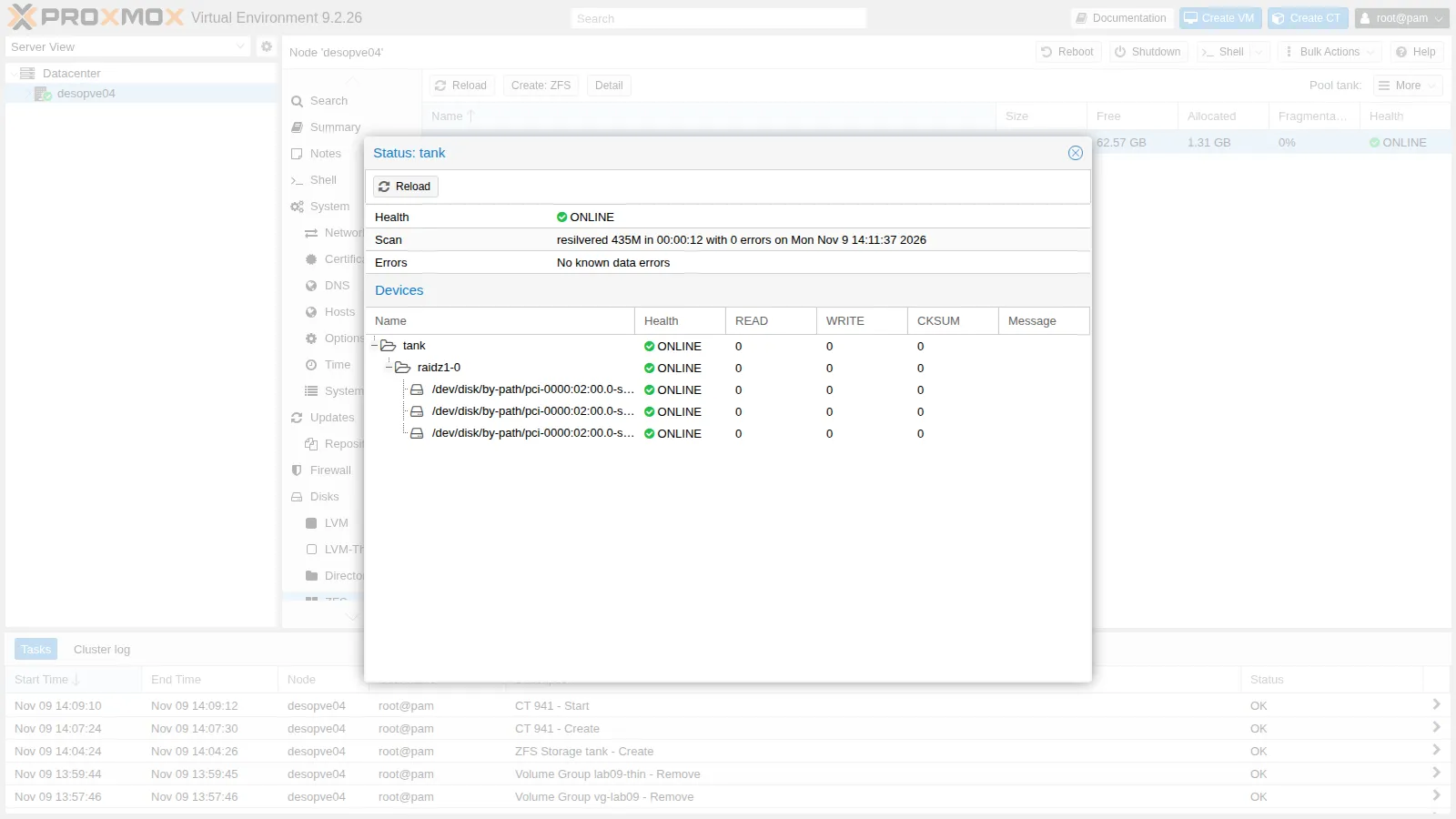
- Measured:
resilvered 435M in 00:00:12 with 0 errors. During the resilver the progress line showed 1.22G to scan and, at that moment, an issue rate of 173M/s. Afterwards the two copies ofnuovo.txthave the samemd5sum, the file written during the failure reads back unchanged, andzpool statusreportsNo known data errors. - Interpretation: the checks show no data loss, not even for the data written while the pool was degraded; they cover the files that were checked, though, not every block in the pool. The resilver scanned 1.22 GiB, a small fraction of a 20 GB disk, consistent with a resilver that works only on allocated blocks. The 12 seconds hold for this amount of data: on a fuller pool, or under load, a resilver takes longer, and this test does not say how much longer.
- How to check: a scrub after the resilver (
zpool scrub -w tank) rereads every block and verifies its checksum. To see how the time grows, noteALLOCinzpool list tankbefore pulling the disk and repeat the test with more data.
- Measured:
Test 2 – A spare disk
Section titled “Test 2 – A spare disk”Insert the new 20 GB disk into the free bay scsi-0:0:5:0 (if the kernel doesn’t see it, repeat the bus rescan from Lab 09). The kernel gives it the first free name, sdd: the same name as the removed disk, but it is a different disk. That is why pools are built with stable names (by-path or by-id) and not with sdX.
ls -l /dev/disk/by-path/ | grep -v part | awk '{print $9, $11}' | grep scsipci-0000:02:00.0-scsi-0:0:0:0 ../../sdapci-0000:02:00.0-scsi-0:0:1:0 ../../sdbpci-0000:02:00.0-scsi-0:0:2:0 ../../sdcpci-0000:02:00.0-scsi-0:0:4:0 ../../sdepci-0000:02:00.0-scsi-0:0:5:0 ../../sddzpool add tank spare /dev/disk/by-path/pci-0000:02:00.0-scsi-0:0:5:0zpool set autoreplace=on tankzpool status tank pool: tank state: ONLINE scan: resilvered 435M in 00:00:12 with 0 errors on Mon Nov 9 14:11:37 2026config:
NAME STATE READ WRITE CKSUM tank ONLINE 0 0 0 raidz1-0 ONLINE 0 0 0 pci-0000:02:00.0-scsi-0:0:1:0 ONLINE 0 0 0 pci-0000:02:00.0-scsi-0:0:2:0 ONLINE 0 0 0 pci-0000:02:00.0-scsi-0:0:4:0 ONLINE 0 0 0 spares pci-0000:02:00.0-scsi-0:0:5:0 AVAIL
errors: No known data errors- The spare (
AVAIL) stays idle. According to the OpenZFS documentation, when a pool disk fails the spare replaces it automatically, without waiting for an operator; on Linux it iszfs-zedthat starts the replacement and the resilver. The failed disk must then be replaced, and the spare becomes available again. autoreplace=ondoes something else: a new disk inserted in the same bay, the same physical location as a disk that belonged to the pool, is formatted and used as its replacement automatically. This too needszfs-zedrunning.- This lab does not test either behaviour. To see them, pull a pool disk again and watch
zpool status: the spare should goINUSEand a resilver start without anyzpool replace; then insert a new disk in the bay of the pulled one.
Cleanup
Section titled “Cleanup”Remove the container, the test disk and the lab datasets, the dataset received on desopve01 and the key of desopve04 from the cluster. The tank pool stays: it will be used in lab 19.
pct stop 941 && pct destroy 941 --purge 1purging CT 941 from related configurations..pvesm free tank:vm-990-disk-0Removed volume 'tank:vm-990-disk-0'for d in comp-off comp-lz4 comp-zstd copia; do zfs destroy -r tank/$d; donezfs list -r tankNAME USED AVAIL REFER MOUNTPOINTtank 794K 38.4G 139K /tankssh [email protected] 'zfs destroy -r rpool/lab10-copia; sed -i "/ root@desopve04$/d" /etc/pve/priv/authorized_keys'[email protected]: Permission denied (publickey,password).The connection is now refused: the key of desopve04 no longer opens desopve01.
Final lab state
Section titled “Final lab state”- Nothing changed on the cluster: the received dataset was removed from
desopve01and the key ofdesopve04was removed from the cluster’sauthorized_keys. desopve04:- pool
tank: RAIDZ1 on the diskspci-0000:02:00.0-scsi-0:0:1:0,0:2:0and0:4:0, with the spare0:5:0. Propertiescompression=lz4,atime=off,autoreplace=on; it is empty, with 38.4 GiB usable; - storage
tank(zfspool, contentimages,rootdir,sparse,desopve04only); - bay
scsi-0:0:3:0is empty: the disk pulled in Test 1 does not go back into the node; - ARC limited to 2 GiB in
/etc/modprobe.d/zfs.conf; - template
debian-13-standard_13.6-1_amd64.tar.zstin thelocalstorage.
- pool
What you learned
Section titled “What you learned”- Choosing the vdev layout. Redundancy lives inside each vdev, and losing a vdev means losing the pool. For VM disks, where IOPS count, choose mirrors or striped mirrors; choose RAIDZ where capacity counts, as for backups and archives.
- Naming the disks. Build pools on stable names (
by-idorby-path), never onsdX: in Test 2 the new disk got the namesdd, the same as the disk pulled in Test 1. - Planning capacity. Plan on the usable space shown by
zfs list, not on the raw space ofzpool list. On RAIDZ, small files cost more than the parity ratio suggests: without compression, 112 MiB of data took up 157 MiB. - Enabling compression. Keep it on by default (LZ4 or zstd) and compare the algorithms on your own data with
compressratio; if CPU matters, measure its cost separately, because the ratio does not show it. - Reacting to checksum errors.
CKSUMerrors withoutREADorWRITEerrors mean that a disk returned wrong data without reporting it: run a scrub, keep an eye on the disk and replace it if the errors come back. Keep the monthly scrub, and make sure the ZED notifications actually arrive (Lab 51). - Using snapshots and send/receive. Read the space held by snapshots in
USEDSNAP; remember that a rollback only goes back to the latest snapshot; use incremental sends to move only the changes, as replication does (Lab 11). - Sizing the ARC. Set
zfs_arc_maxaccording to the RAM the guests need and to the size of the pools (the Proxmox VE documentation suggests at least 2 GiB plus 1 GiB per TiB of storage), both on the fly and in/etc/modprobe.d/zfs.conf, addingupdate-initramfs -u -k allon nodes that boot from ZFS, and check the value after the next reboot. - Handling a failed disk. A degraded RAIDZ1 keeps working but has no redundancy left: replace the disk promptly with
zpool replace, confirm with a scrub, and consider a spare so that the rebuild starts without waiting for an operator. Judge resilver times on your own data: the 12 seconds seen here hold for 1.22 GiB.
References
Section titled “References”- Proxmox VE – ZFS on Linux
- Proxmox VE – ZFS RAID level considerations: performance, space and parity of small blocks
- Proxmox VE – Email notification from ZED
- Proxmox VE – Limit ZFS Memory Usage
- Proxmox VE – Local ZFS Pool Backend
- OpenZFS 2.4 –
zpool scrub: what scrub and resilver examine - OpenZFS 2.4 –
zpool replace - OpenZFS 2.4 – Hot spares and the
autoreplaceproperty - OpenZFS 2.4 – The
compressionproperty and rounding to whole sectors - OpenZFS 2.4 – Space accounting:
used,usedbysnapshots,logicalused - OpenZFS 2.4 –
zfs send: incremental, compressed and dry-run streams - OpenZFS 2.4 – Module parameters:
spa_slop_shift - OpenZFS 2.4 –
zpoolandzfsmanual pages