

Lab 16 – Snapshots: with and without RAM, rollback, trees and volume chain
Dependencies
Section titled “Dependencies”- Previous labs: Lab 10 (ZFS snapshots), Lab 09 (LVM-thin on
desopve04), Lab 13 (nas-nfsstorage), Lab 15 (nas-lvmstorage on iSCSI). - Cluster: VM 100
debian01running ondesopve01with its disk onlocal-zfs;desopve04standalone with thelocal-lvmstorage (LVM-thin). - Space: the
vg_nasvolume group has 40 GiB free; the disk of VM 100 is 16 GiB. - Credentials:
root/<lab-password>on the nodes,labuser/<lab-password>in VM 100 → Appendix B.
Objectives
Section titled “Objectives”- Take snapshots of a VM with and without RAM, and understand what happens on rollback.
- Recognize how each storage type implements snapshots and what its limits are.
- Build a snapshot tree with branches.
- Enable snapshots as a volume chain on shared LVM, inspect the chain of volumes and measure its cost in space.
How it works
Section titled “How it works”What a snapshot is in Proxmox VE
Section titled “What a snapshot is in Proxmox VE”A snapshot freezes the state of the VM at a given instant:
- the state of the disks, implemented by the storage (ZFS, qcow2, LVM-thin, Ceph…);
- the VM configuration, saved in the
/etc/pve/qemu-server/<VMID>.conffile in a[snapshot-name]section; - optionally the RAM (vmstate), i.e. the state of the running VM: processes, connections, memory contents. It is saved in a separate volume on the same storage.
Rollback takes the VM back exactly to that point. With RAM, the VM comes back running, as if nothing had happened; without RAM it comes back powered off, as after a power failure.
A snapshot is not a backup: it lives on the same storage as the VM, and if the storage fails, the VM and its snapshots are lost together. Backups are the topic of labs 46 and 47.
Snapshots by storage type
Section titled “Snapshots by storage type”| Storage | How it works | Rollback to a snapshot other than the latest |
|---|---|---|
| ZFS | native snapshot of the ZFS volume, instant | no: the more recent ones must be deleted first |
| qcow2 on NFS, SMB or directory | snapshots internal to the qcow2 file | yes, with branches (tree) |
| LVM-thin | thin volume that shares its blocks with the original | yes, with branches |
| LVM (thick, shared too) | none | – |
| LVM with volume chain (PVE 9) | chain of qcow2 volumes, each on its own LV | no: only to the latest |
| Ceph RBD | native RBD snapshot (lab 17) | yes, even to an older snapshot: the later ones are kept |
Snapshots as a volume chain
Section titled “Snapshots as a volume chain”Thick LVM has no usable snapshots: classic LVM snapshots (copy-on-write) slow down writes to the origin volume and cannot be used on a volume group shared between nodes. Proxmox VE 9 introduces an alternative, still a technology preview, that works with any block storage (iSCSI, Fibre Channel):
before the snapshot after snapshot "v1" ┌──────────────────────┐ ┌──────────────────────────────┐ ┌──────────────────────┐ │ vm-100-disk-0.qcow2 │ ──▶ │ snap_vm-100-disk-0_v1.qcow2 │ ◀─│ vm-100-disk-0.qcow2 │ │ (16 GiB LV) │ │ frozen state (16 GiB) │ │ new, only the │ └──────────────────────┘ └──────────────────────────────┘ │ differences (16 GiB) │ backing file └──────────────────────┘- The VM disk is in qcow2 format, written directly inside an LV.
- The snapshot renames the current volume (which becomes the frozen state) and creates a new volume that contains only the differences, with the previous one as its backing file.
- Each volume is a thick LV the size of the entire disk: a snapshot of a 16 GiB disk takes up another 16 GiB in the volume group.
Procedure
Section titled “Procedure”1. Snapshot with RAM on ZFS
Section titled “1. Snapshot with RAM on ZFS”-
In VM 100, create a file to use as a reference:
labuser@debian01 echo "creato prima dello snapshot" > $HOME/prima.txt; sync; uptime -sOutput 2026-11-09 14:30:12uptime -sshows when the VM was started. -
VM 100 → Snapshots → Take Snapshot: Name
con-ram, a description, and Include RAM checked (the default when the VM is running).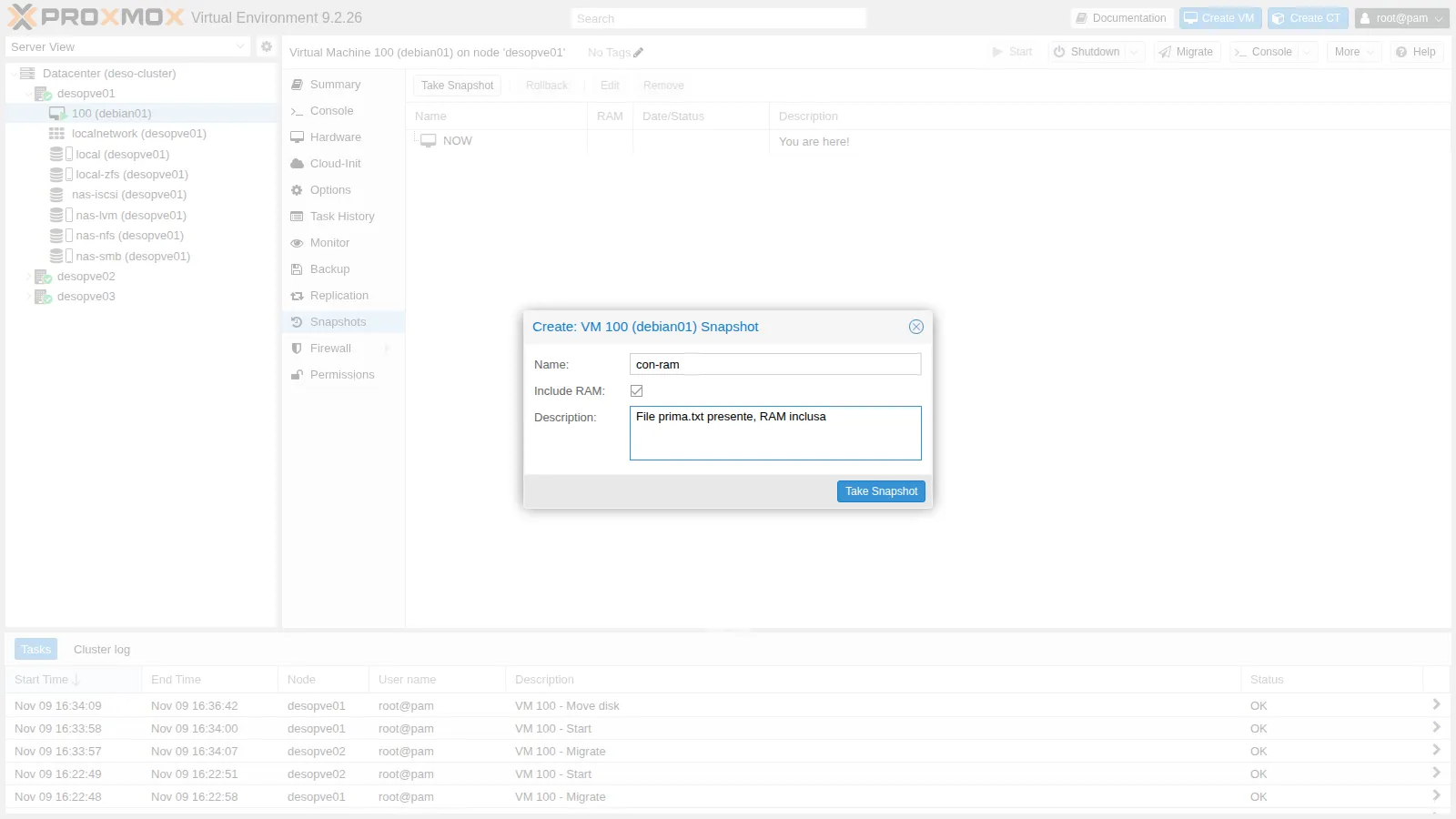
-
On the node, look at what ZFS created:
root@desopve01 qm listsnapshot 100Output `-> con-ram 2026-11-09 16:41:06 File prima.txt presente, RAM inclusa`-> current You are here!root@desopve01 zfs list -t all -o name,used,refer -r rpool/data | grep -E 'NAME|vm-100'Output NAME USED REFERrpool/data/vm-100-disk-0 5.86G 5.86Grpool/data/vm-100-disk-0@con-ram 804K 5.86Grpool/data/vm-100-state-con-ram 154M 154Mvm-100-disk-0@con-ramis the disk snapshot: right after it is created it takes up almost nothing (804K), because it shares all its blocks with the disk.vm-100-state-con-ramis a separate volume with the contents of the RAM (154 MiB in use out of 2 GiB).
-
In the VM, delete the file and create another one, then roll back:
labuser@debian01 rm $HOME/prima.txt; echo "creato dopo lo snapshot" > $HOME/dopo.txt; syncroot@desopve01 time qm rollback 100 con-ramOutput real 0m4.404sroot@desopve01 qm status 100Output status: runninglabuser@debian01 ls $HOME; uptime -sOutput prima.txt2026-11-09 14:30:12In 4 seconds the VM went back to the moment of the snapshot, running:
prima.txtis there,dopo.txtnever existed, and the boot time has not changed because the VM did not reboot. Even an SSH session opened before the snapshot picks up again, unless it timed out in the meantime.
2. Snapshot without RAM and the ZFS limitation
Section titled “2. Snapshot without RAM and the ZFS limitation”-
Take a snapshot without RAM:
root@desopve01 qm snapshot 100 senza-ram --vmstate 0qm listsnapshot 100Output `-> con-ram 2026-11-09 16:41:06 File prima.txt presente, RAM inclusa`-> senza-ram 2026-11-09 16:45:34 no-description`-> current You are here! -
Try to go back to the first snapshot, which is not the most recent one:
root@desopve01 qm rollback 100 con-ramOutput can't rollback, 'con-ram' is not most recent snapshot on 'local-zfs:vm-100-disk-0'ZFS can only go back to the latest snapshot: to go back to an earlier one, you first have to delete the more recent ones.
-
Roll back to
senza-ram: without RAM the VM ends up stopped and must be started again.root@desopve01 qm rollback 100 senza-ram; qm status 100Output status: stoppedroot@desopve01 qm start 100 -
Delete
senza-ram: nowcon-ramis the most recent one and the rollback is allowed. Then deletecon-ramas well.root@desopve01 qm delsnapshot 100 senza-ramqm rollback 100 con-ram; qm status 100Output status: runningroot@desopve01 qm delsnapshot 100 con-ramIf
qm delsnapshotrepliescan't lock file '/var/lock/qemu-server/lock-100.conf' - got timeout, the previous rollback is still finishing: try again after a few seconds.
3. A snapshot tree with qcow2 on NFS
Section titled “3. A snapshot tree with qcow2 on NFS”On a file-based storage with qcow2 disks, snapshots are internal to the file and you can go back to any of them. Use a test VM without an operating system:
qm create 110 --name snap-qcow2 --memory 512 --scsihw virtio-scsi-single --scsi0 nas-nfs:4,format=qcow2qm snapshot 110 s1 --description "stato s1"qm snapshot 110 s2 --description "stato s2"qm rollback 110 s1qm snapshot 110 s3 --description "dopo il rollback a s1"qm listsnapshot 110`-> s1 2026-11-09 16:46:35 stato s1 `-> s2 2026-11-09 16:46:36 stato s2 `-> s3 2026-11-09 16:46:39 dopo il rollback a s1 `-> current You are here!qemu-img snapshot -l /mnt/pve/nas-nfs/images/110/vm-110-disk-0.qcow2Snapshot list:ID TAG VM_SIZE DATE VM_CLOCK ICOUNT1 s1 0 B 2026-11-09 16:46:35 0000:00:00.000 02 s2 0 B 2026-11-09 16:46:36 0000:00:00.000 03 s3 0 B 2026-11-09 16:46:39 0000:00:00.000 0The rollback to s1 succeeded even though s2 existed. Snapshot s3, created afterwards, stems from s1: the tree has two branches, s2 and s3. In the web interface it looks like this:
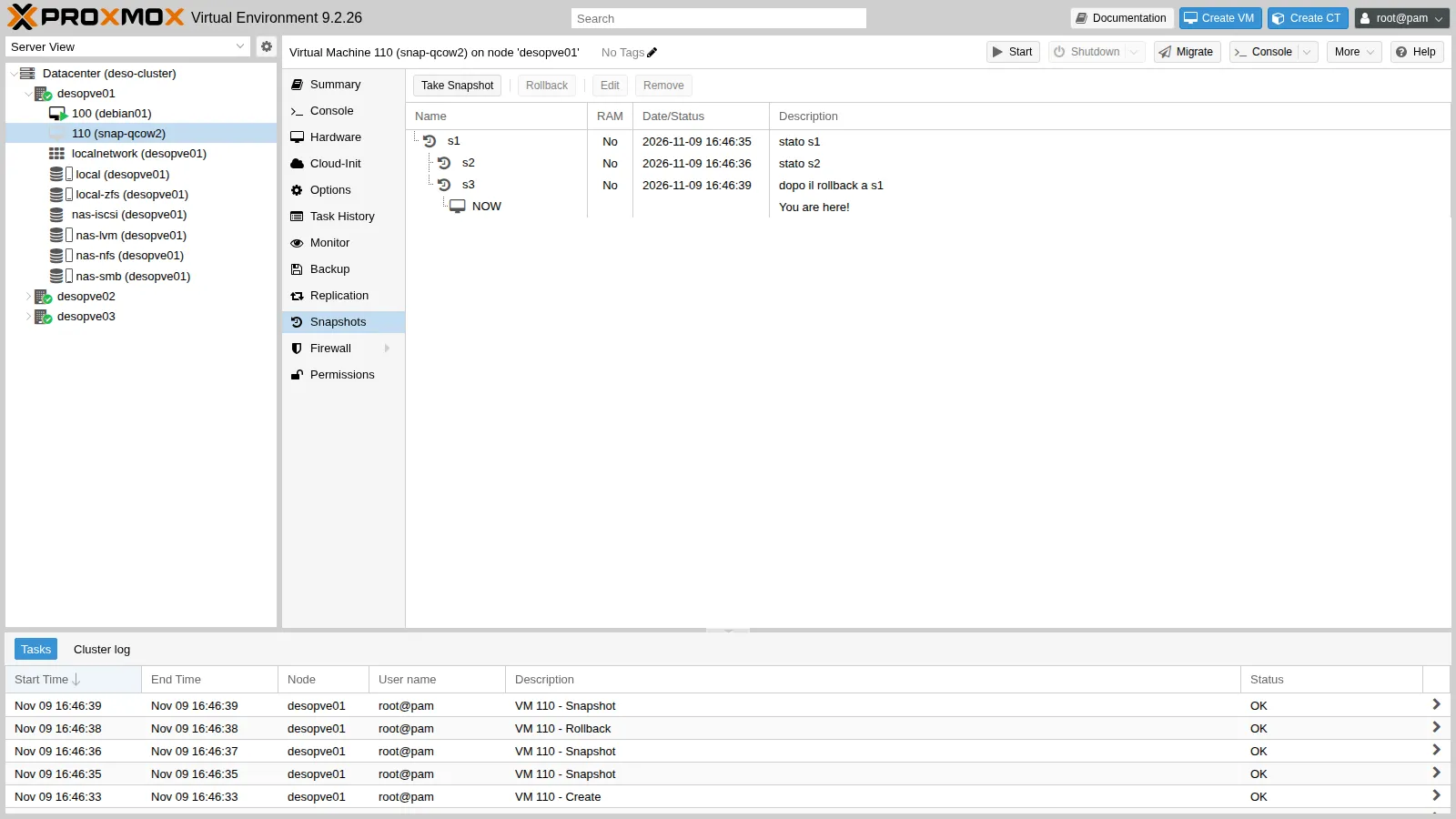
Creating or deleting an internal qcow2 snapshot blocks the VM for the duration of the operation, and on network storage with large disks it can take minutes. With large disks on NFS it is better to perform these operations with the VM powered off, or to use the volume chain.
4. LVM-thin
Section titled “4. LVM-thin”On desopve04 the local-lvm storage is LVM-thin (lab 09):
qm create 940 --name snap-thin --memory 512 --scsihw virtio-scsi-single --scsi0 local-lvm:4qm snapshot 940 primalvs -o lv_name,lv_attr,lv_size,pool_lv,origin,data_percent pve | grep -E 'LV|940' LV Attr LSize Pool Origin Data% snap_vm-940-disk-0_prima Vri---tz-k 4.00g data vm-940-disk-0 vm-940-disk-0 Vwi-a-tz-- 4.00g data 0.00The snapshot is a thin volume (snap_vm-940-disk-0_prima) whose origin is the disk: it shares the blocks and takes up space only for the blocks that change afterwards. As with qcow2, you can go back to any snapshot: with two snapshots uno and due, qm rollback to uno succeeds.
5. Thick LVM: no snapshots
Section titled “5. Thick LVM: no snapshots”On the nas-lvm storage from lab 15, as it was created, the disks are raw LVs:
qm create 112 --name snap-lvm --memory 512 --scsihw virtio-scsi-single --scsi0 nas-lvm:4qm snapshot 112 provasnapshot feature is not available6. Enable snapshots as a volume chain
Section titled “6. Enable snapshots as a volume chain”-
Datacenter → Storage →
nas-lvm→ Edit, check Advanced and then Allow Snapshots as Volume-Chain. The interface reminds you that it is a technology preview.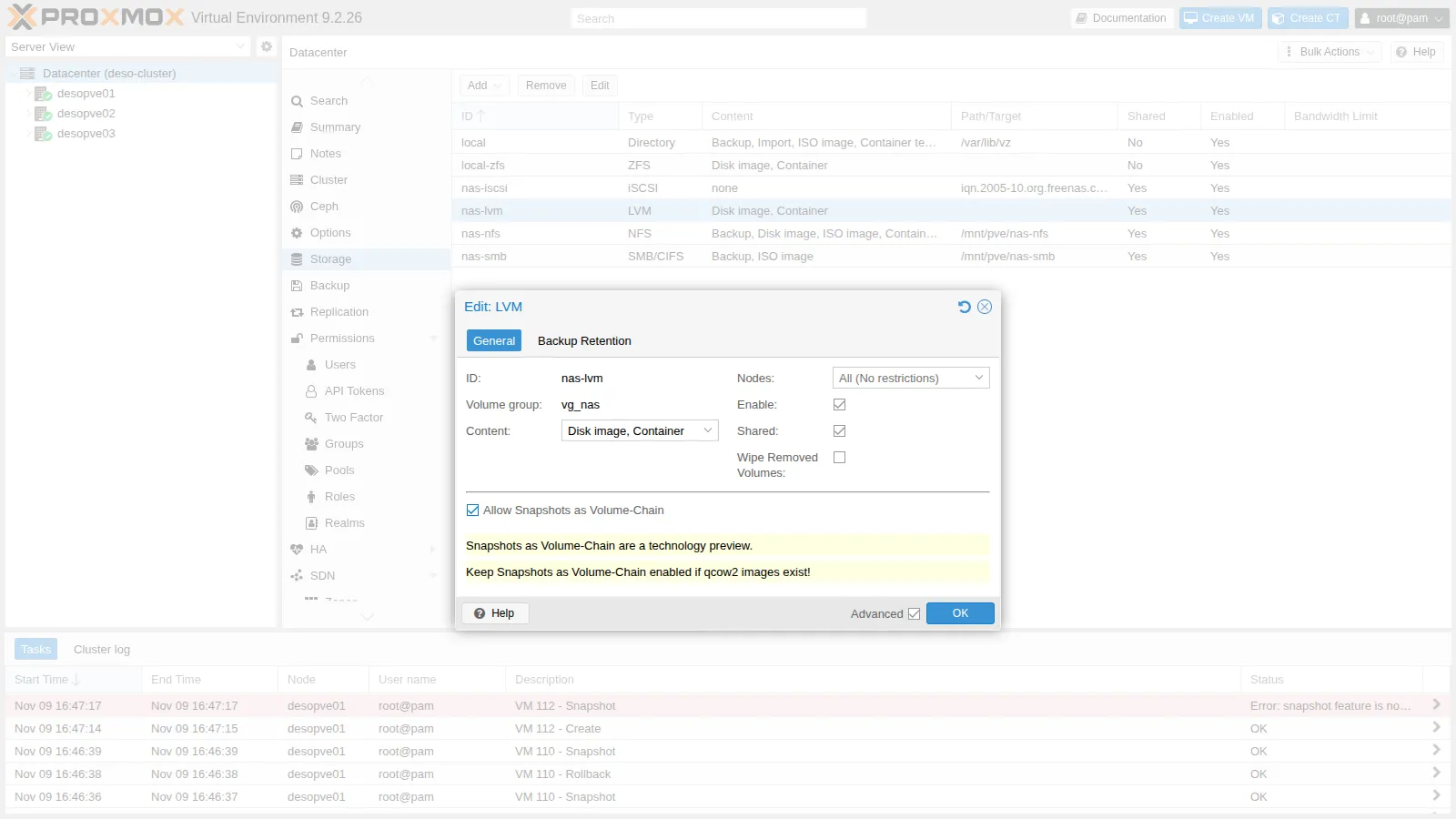
-
The option applies only to disks created from that moment on:
root@desopve01 grep -A6 "lvm: nas-lvm" /etc/pve/storage.cfgOutput lvm: nas-lvmvgname vg_nascontent rootdir,imagessaferemove 0shared 1snapshot-as-volume-chain 1root@desopve01 qm snapshot 112 provaOutput snapshot feature is not availableThe
rawdisk of VM 112 still cannot have snapshots. -
Move the disk of VM 100 to
nas-lvmin qcow2 format, while the VM is running:root@desopve01 qm disk move 100 scsi0 nas-lvm --format qcow2 --delete 1Output mirror-scsi0: transferred 16.0 GiB of 16.0 GiB (100.00%) in 1m 57s, readyremoving source volume 'local-zfs:vm-100-disk-0' after successful copyroot@desopve01 qm config 100 | grep scsi0Output scsi0: nas-lvm:vm-100-disk-0.qcow2,iothread=1,size=16G -
In the VM, create
a.txt, take the snapshotv1, then write 300 MiB of data and try a second snapshot,v2:labuser@debian01 echo uno > $HOME/a.txt; syncroot@desopve01 qm snapshot 100 v1 --vmstate 0 --description 'solo a.txt'Output blockdev replace current by v1blockdev-snapshot: reopen current with v1 backing imagelabuser@debian01 head -c 300M /dev/urandom > $HOME/b.bin; syncroot@desopve01 qm snapshot 100 v2 --vmstate 0 --description 'a.txt e b.bin (300 MiB)'Output snapshot create failed: starting cleanuplvcreate 'vg_nas/vm-100-disk-0.qcow2' error: Volume group "vg_nas" has insufficient free space (1020 extents): 4097 required.labuser@debian01 echo tre > $HOME/c.txt; syncThe second snapshot does not fit: the 40 GiB volume group already holds the disk (16 GiB), the snapshot
v1(another 16 GiB) and the disk of VM 112 (4 GiB). Each snapshot requires a new LV of the full size of the disk, even if the differences amount to only 300 MiB. -
Look at the chain:
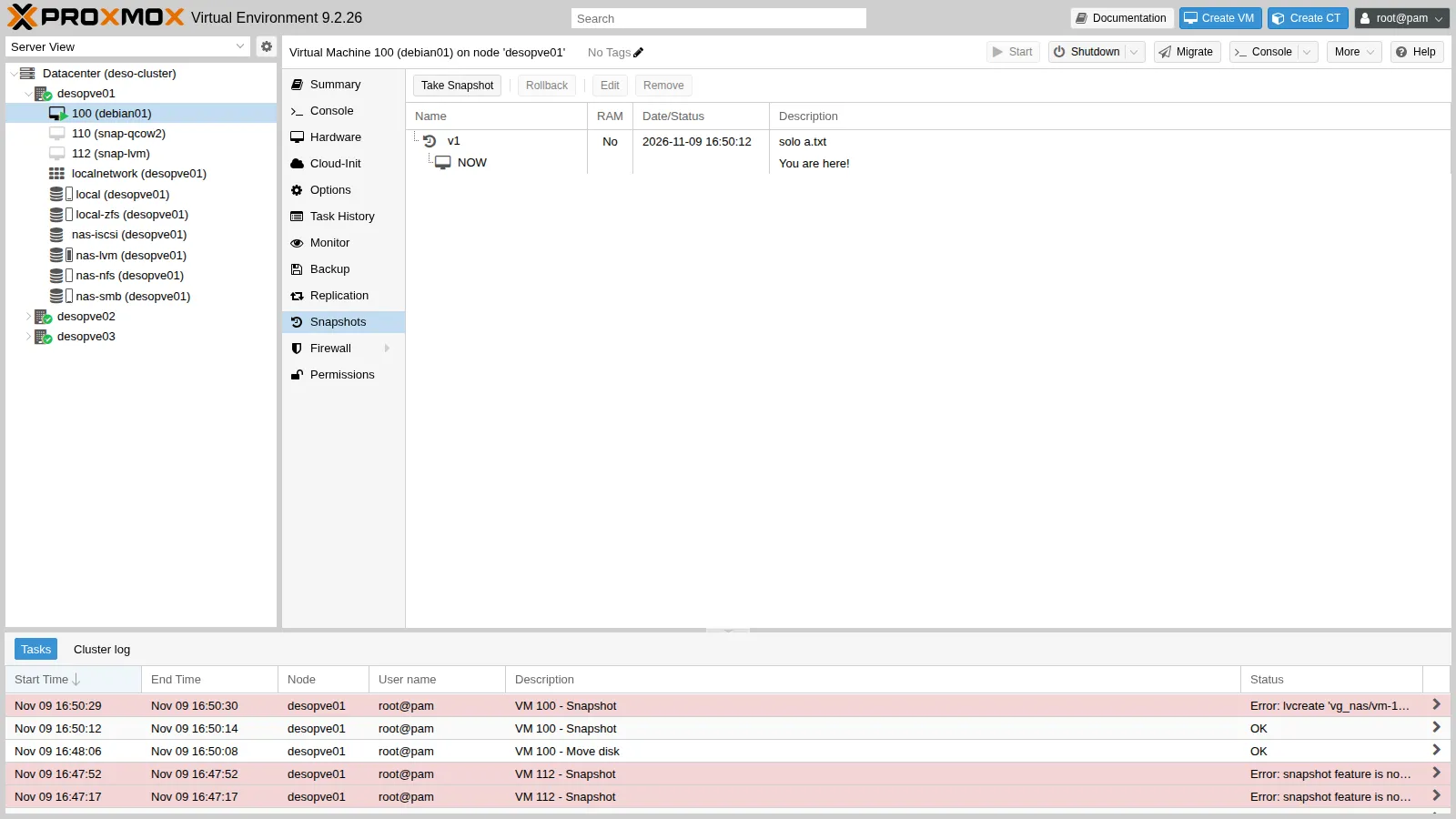
root@desopve01 lvs -o lv_name,lv_size,lv_attr vg_nasOutput LV LSize Attrsnap_vm-100-disk-0_v1.qcow2 16.00g -wi-ao----vm-100-disk-0.qcow2 16.00g -wi-ao----vm-112-disk-0 4.00g -wi-a-----root@desopve01 qemu-img info --backing-chain /dev/vg_nas/vm-100-disk-0.qcow2 | grep -E '^image|backing file:'Output image: /dev/vg_nas/vm-100-disk-0.qcow2backing file: snap_vm-100-disk-0_v1.qcow2 (actual path: /dev/vg_nas/snap_vm-100-disk-0_v1.qcow2)image: /dev/vg_nas/snap_vm-100-disk-0_v1.qcow2In the web interface the storage shows only the VM disk: the snapshot volumes can be seen with
lvs. The task list at the bottom shows the two errors from steps 2 and 4.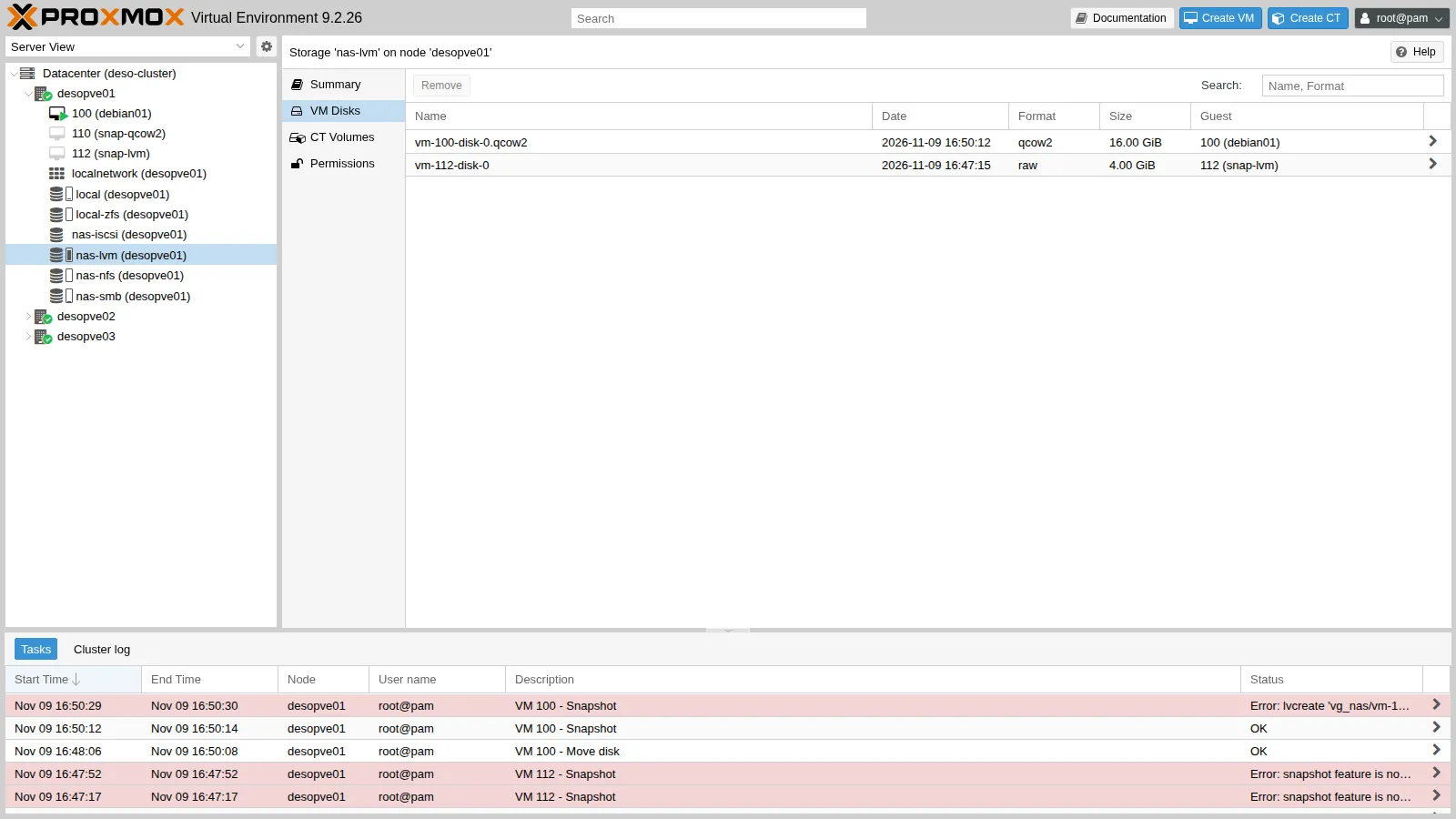
-
Roll back to
v1(without RAM, so the VM stops):root@desopve01 time qm rollback 100 v1Output Logical volume "vm-100-disk-0.qcow2" successfully removed.Rounding up size to full physical extent 16.00 GiBLogical volume "vm-100-disk-0.qcow2" created.Formatting '/dev/vg_nas/vm-100-disk-0.qcow2', fmt=qcow2 cluster_size=131072 extended_l2=on preallocation=metadata compression_type=zlib size=17179869184 backing_file=snap_vm-100-disk-0_v1.qcow2 backing_fmt=qcow2 lazy_refcounts=off refcount_bits=16real 0m3.610sroot@desopve01 qm start 100labuser@debian01 ls -s $HOMEOutput total 44 a.txtThe rollback deletes the current volume and creates a new, empty one on top of
v1:b.binandc.txt, written after the snapshot, are gone. -
Deleting a snapshot means merging the differences into the underlying volume:
root@desopve01 time qm delsnapshot 100 v1Output commit-drive-scsi0: Completed successfully.commit-drive-scsi0: commit-job finisheddelete old /dev/vg_nas/vm-100-disk-0.qcow2Logical volume "vm-100-disk-0.qcow2" successfully removed.Renamed "snap_vm-100-disk-0_v1.qcow2" to "vm-100-disk-0.qcow2" in volume group "vg_nas"blockdev replace v1 by currentreal 0m3.570sQEMU copies (commits) the differences into
v1, then the old volume is deleted andv1takes over the name of the disk.
7. Several snapshots in a chain
Section titled “7. Several snapshots in a chain”With a small disk there is enough space for several snapshots. Delete VM 112 and create a 4 GiB test VM:
qm destroy 112 --purgeqm create 113 --name snap-chain --memory 512 --scsihw virtio-scsi-single --scsi0 nas-lvm:4qm config 113 | grep scsi0scsi0: nas-lvm:vm-113-disk-0.qcow2,size=4Gqm snapshot 113 s1; qm snapshot 113 s2lvs -o lv_name,lv_size vg_nas | grep 113 snap_vm-113-disk-0_s1.qcow2 4.00g snap_vm-113-disk-0_s2.qcow2 4.00g vm-113-disk-0.qcow2 4.00gqm rollback 113 s1can't rollback, 's1' is not most recent snapshot on 'vm-113-disk-0.qcow2'qm delsnapshot 113 s1vm-113-disk-0.qcow2: deleting snapshot 's1' by commiting snapshot 's2'running 'qemu-img commit /dev/vg_nas/snap_vm-113-disk-0_s2.qcow2'Image committed.delete snap_vm-113-disk-0_s2.qcow2 Logical volume "snap_vm-113-disk-0_s2.qcow2" successfully removed.rename snap_vm-113-disk-0_s1.qcow2 to snap_vm-113-disk-0_s2.qcow2 Renamed "snap_vm-113-disk-0_s1.qcow2" to "snap_vm-113-disk-0_s2.qcow2" in volume group "vg_nas"- Two snapshots of a 4 GiB disk, together with the current volume, take up 12 GiB in the volume group.
- As with ZFS, rollback is only possible to the most recent snapshot.
- Deleting an intermediate snapshot merges the next one into it.
Verification and tests
Section titled “Verification and tests”- You rolled back to a snapshot with RAM and the VM came back running, without a reboot.
- You know why, on ZFS and with the volume chain, you cannot go back to an old snapshot without deleting the more recent ones.
- You created a tree with two branches on qcow2.
- You saw that an LVM-thin snapshot is a thin volume with the disk as its origin.
- You saw that thick LVM has no snapshots, and that the volume chain applies only to new disks.
- You measured the space cost of the volume chain: one LV the full size of the disk for each snapshot.
Cleanup
Section titled “Cleanup”Delete the test VMs, move the disk of VM 100 back to local-zfs (with the volume chain, a disk that has snapshots cannot be moved: delete them first) and disable the volume chain, still a technology preview, on the shared storage used by the following labs:
qm destroy 113 --purge; qm destroy 110 --purgeqm destroy 940 --purgeqm disk move 100 scsi0 local-zfs --delete 1mirror-scsi0: transferred 16.0 GiB of 16.0 GiB (100.00%) in 2m 2s, readyremoving source volume 'nas-lvm:vm-100-disk-0.qcow2' after successful copypvesm set nas-lvm --delete snapshot-as-volume-chainrm -f $HOME/a.txtFinal lab state
Section titled “Final lab state”- Cluster: VM 100
debian01running ondesopve01, disklocal-zfs:vm-100-disk-0(raw), with no snapshots; CT 101 running ondesopve02. - Storage:
nas-lvmback without volume chain and empty;nas-nfsempty;nas-smbwith the ISO and the backup from lab 14;nas-iscsiunchanged. desopve04: no VMs;local-lvmempty.- No test VMs left over (110, 112, 113 and 940 deleted).
What you learned
Section titled “What you learned”- A snapshot saves the disks, the configuration and, if requested, the RAM; with RAM, a rollback brings the VM back running at that same instant.
- Each storage implements snapshots in its own way: ZFS and the volume chain allow rollback only to the latest snapshot; qcow2 and LVM-thin allow trees with branches.
- Thick LVM has no snapshots; Proxmox VE 9 adds them with the volume chain, which is enabled per storage and applies to new disks in qcow2 format.
- With the volume chain, each snapshot takes up an LV the full size of the disk: plan the space in the volume group accordingly.
- Internal qcow2 snapshots on network storage block the VM while they are created and deleted.
- A snapshot does not replace a backup.