

Lab 22 – Dedicated networks: Corosync, migration and storage
Dependencies
Section titled “Dependencies”- Previous labs:
- VM: VM 100
debian01with its disk onrbd-vm, running ondesopve01: you need it to measure the migration. - Network: the lab switch carries the VLANs on the node ports (trunk). The new VLANs 40 and 100 have no router.
- Credentials:
root/<lab-password>on the nodes → Appendix B.
Objectives
Section titled “Objectives”- Corosync link 1 moved to VLAN 40 (10.40.10.0/24, no router) on all three nodes, with the cluster quorate after every step:
corosync-cfgtool -nshows link 1 on the new addresses. - Live migrations carried over VLAN 100 (10.100.10.0/24), proved by the byte counters of the interfaces.
- Knowing which Corosync link carries the cluster traffic, and what still works when the link on VLAN 40 fails.
- A table of the lab networks (VLAN, subnet, interface, gateway, use) to plan the following labs.
How it works
Section titled “How it works”Different types of traffic, different needs
Section titled “Different types of traffic, different needs”| Traffic | What matters | What happens when it suffers |
|---|---|---|
| Corosync (cluster) | low, steady latency, little bandwidth | if packets arrive late the node loses quorum; with high availability enabled it is isolated and rebooted (fencing) |
| Storage (NFS, iSCSI) | bandwidth and latency | slow VMs, I/O waiting |
| Ceph public and cluster | bandwidth and latency; the cluster network carries replication between the OSDs | slow writes, slow ops |
| Migration | lots of bandwidth, in bursts | slow migrations; if it shares the link with Corosync, it can disrupt it |
| VMs | depends on the services | |
| Management | little bandwidth | GUI and SSH unreachable |
The typical risk is a migration or a backup that saturates the link shared with Corosync: the cluster packets arrive late and a healthy node gets excluded. The Proxmox VE documentation therefore asks for a cluster network with latencies under 5 ms that other traffic does not use heavily, ideally physically separate, and advises in particular against sharing it with storage, except as a low-priority fallback link.
Corosync with two links
Section titled “Corosync with two links”Corosync (knet transport) monitors all the links, but in passive mode it sends the cluster traffic over only one of them: the working link with the highest priority. No priority is set in this cluster (in Lab 06 the log shows pri: 1 for both links), so the link with the lowest number wins, link 0. In the lab:
- link 0: management network (
vmbr0), the link that carries the Corosync traffic; - link 1: so far on
172.32.199.0/24onnic1, the same network as the second iSCSI path, routed byrtr-core. In this lab it moves to a dedicated VLAN, VLAN 40, without a gateway. It stays the fallback link, used only if link 0 fails.
To make VLAN 40 the preferred link you would give it a higher knet_link_priority than link 0; this lab keeps the default priorities. VLAN 40 is also dedicated only at the addressing level: it shares the physical port nic1 with the second iSCSI path.
VLAN interfaces on a NIC and on a bridge
Section titled “VLAN interfaces on a NIC and on a bridge”| Interface | What it is | Use in the lab |
|---|---|---|
nic1.40 |
VLAN 40 on top of the nic1 card: frames tagged 40 on the same cable as the untagged traffic |
Corosync link 1 |
vmbr1.100 |
the node’s address in VLAN 100 of the VLAN-aware bridge vmbr1 (on top of the bond) |
migration network |
The two networks have no router: traffic cannot go through rtr-core and keep “working” over some indirect route when the dedicated link fails. And the ARP problem from lab 15 cannot happen again, because each VLAN is a separate broadcast domain.
The migration network
Section titled “The migration network”Unless told otherwise, Proxmox VE sends migrations over the network used for cluster communication: here, the management network, which also carries Corosync link 0. In Datacenter → Options → Migration Settings you choose:
- Network: the network (CIDR) over which the nodes exchange memory and disks during migrations;
- Type:
secure(the default: traffic goes through an encrypted SSH tunnel) orinsecure(plain TCP, faster, acceptable only on a dedicated, isolated network).
Test environment and versions
Section titled “Test environment and versions”The outputs and measurements in this lab come from tests run in November 2026 with this configuration:
| Component | Configuration used |
|---|---|
| Proxmox VE | 9.2.26, kernel 7.0.14-28-pve (Lab 04); Corosync and knet as shipped with that release (versions not recorded: pveversion -v lists them) |
| Corosync | knet transport, passive link mode, no link priorities (Lab 06) |
| Network | 10 GbE ports (Lab 01); vmbr0 on nic0; nic1 shared by the storage network and VLAN 40; vmbr1 and VLAN 100 on bond0 (nic3 + nic4, active-backup, Lab 21); MTU 1500 everywhere |
| Migration | type=secure (SSH tunnel); VM 100 with 2 GiB of RAM and its disk on rbd-vm (Ceph 20.2, Lab 17), so only the memory is copied |
What the tests measure, and what they do not. There is one migration in each direction, with no other load on the networks: the runs show which way the traffic goes, not which network is faster. The failure of link 1 is simulated with ip link set nic1.40 down on one node: the nic1 port stays up, so this is neither a pulled cable nor a switch failure, and it takes away the standby link, not the one in use.
Procedure
Section titled “Procedure”1. The VLAN interfaces from the GUI (desopve01)
Section titled “1. The VLAN interfaces from the GUI (desopve01)”-
Node desopve01 → System → Network → Create → Linux VLAN. Name
nic1.40(the GUI derives the card and the VLAN from the name on its own), IPv4/CIDR10.40.10.21/24, no gateway, Autostart checked, commentCorosync link 1.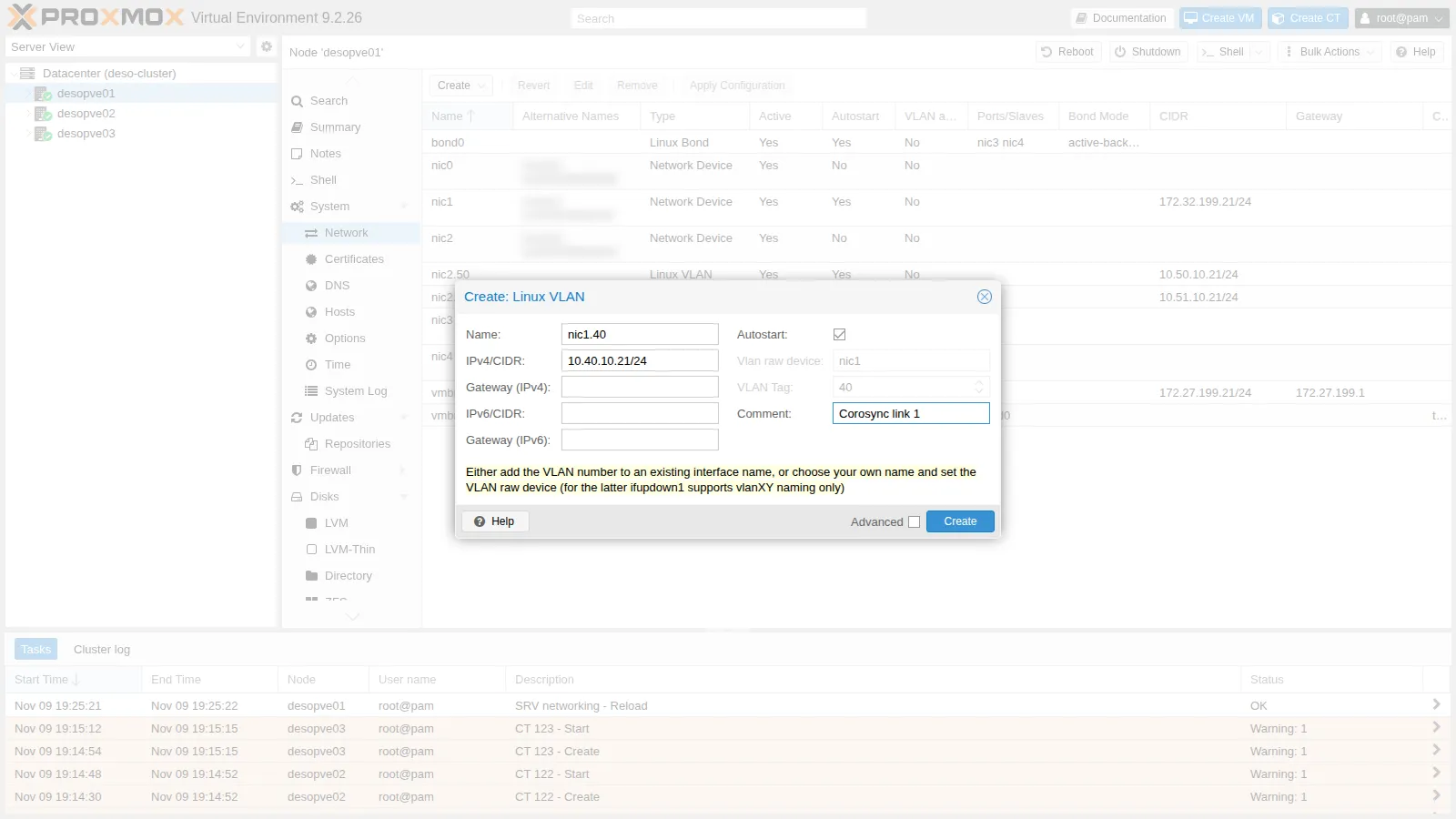
-
Create → Linux VLAN. Name
vmbr1.100, IPv4/CIDR10.100.10.21/24, commentmigrazione.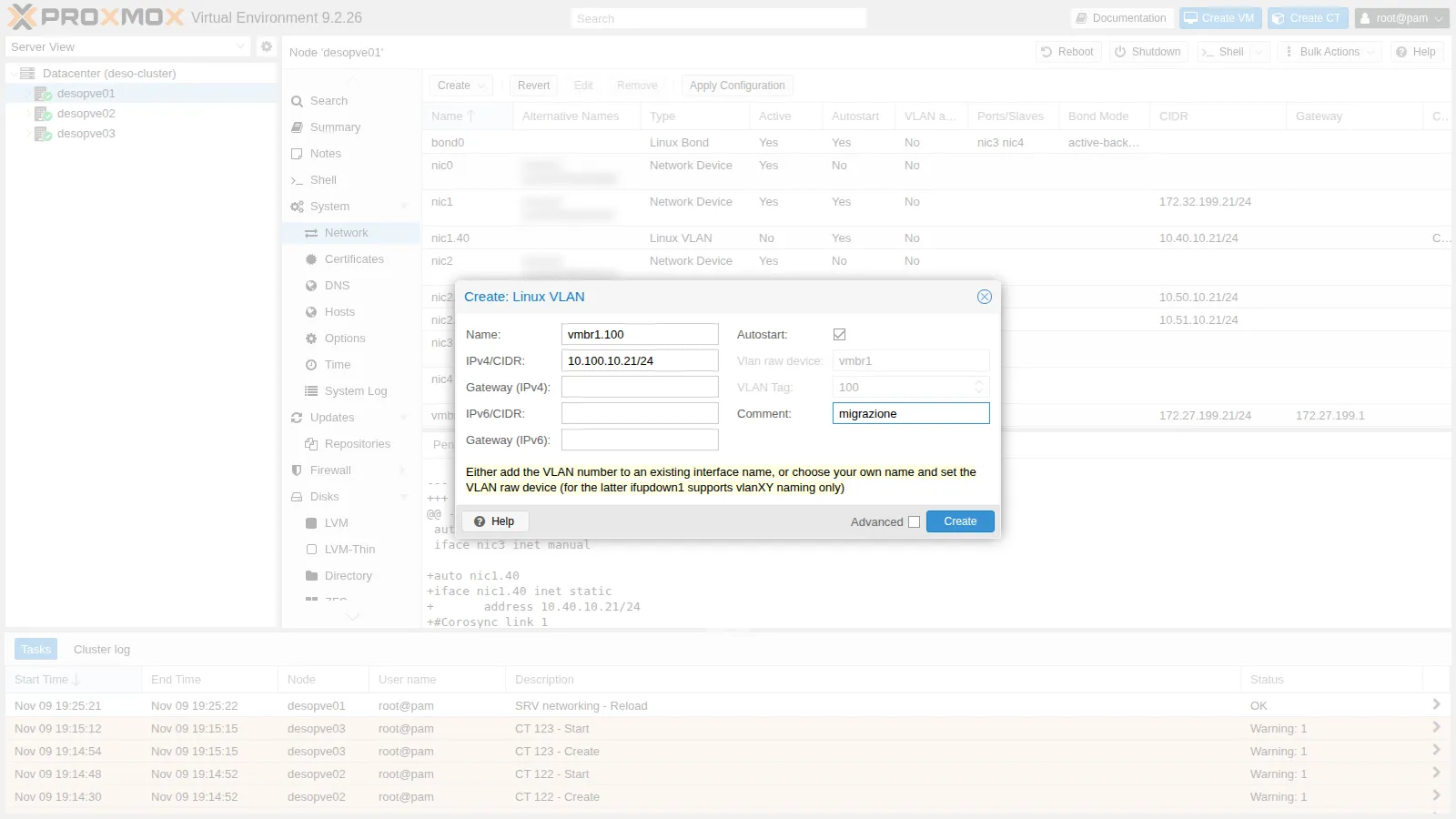
-
Check the pending changes and apply them with Apply Configuration.
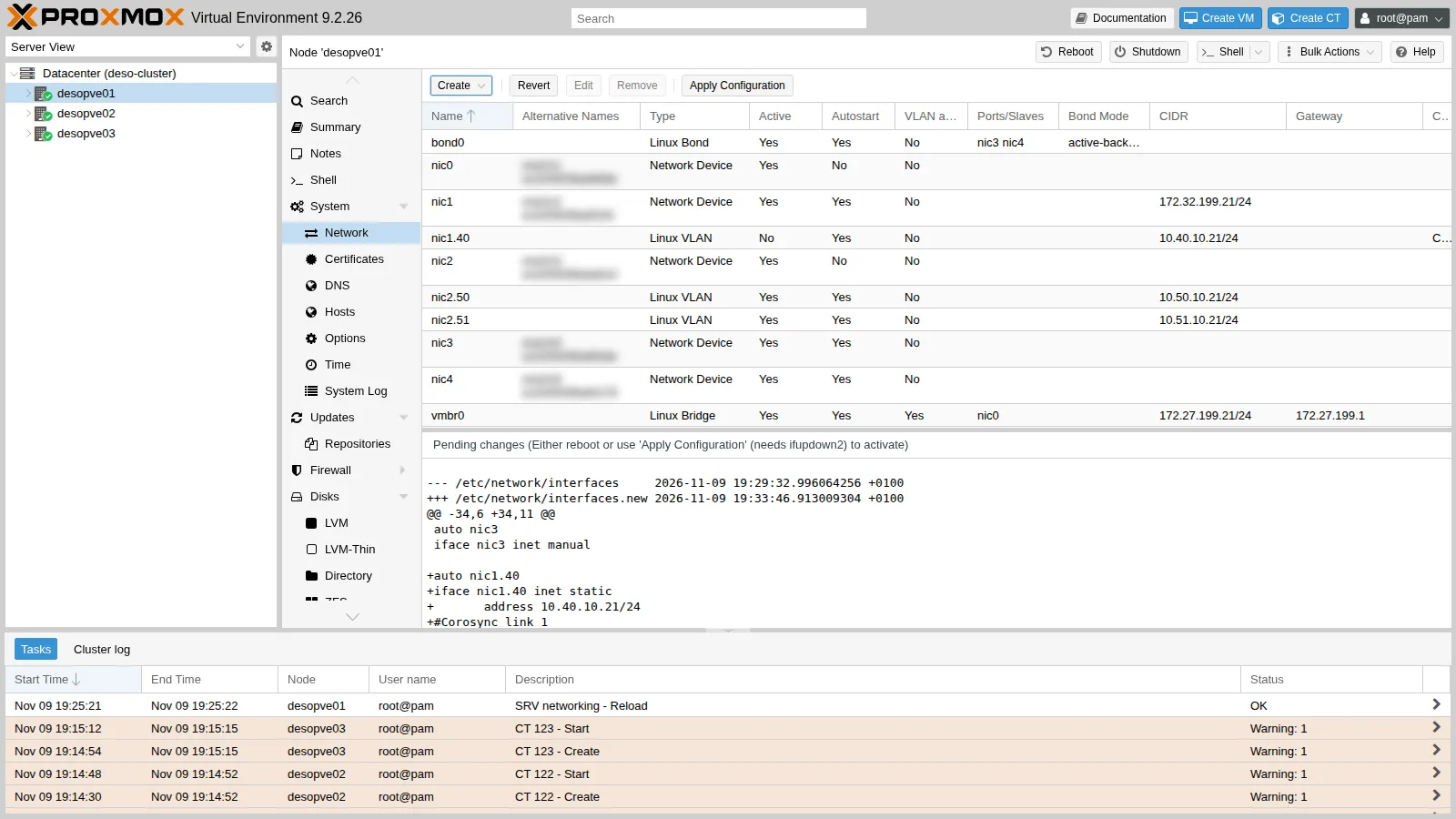
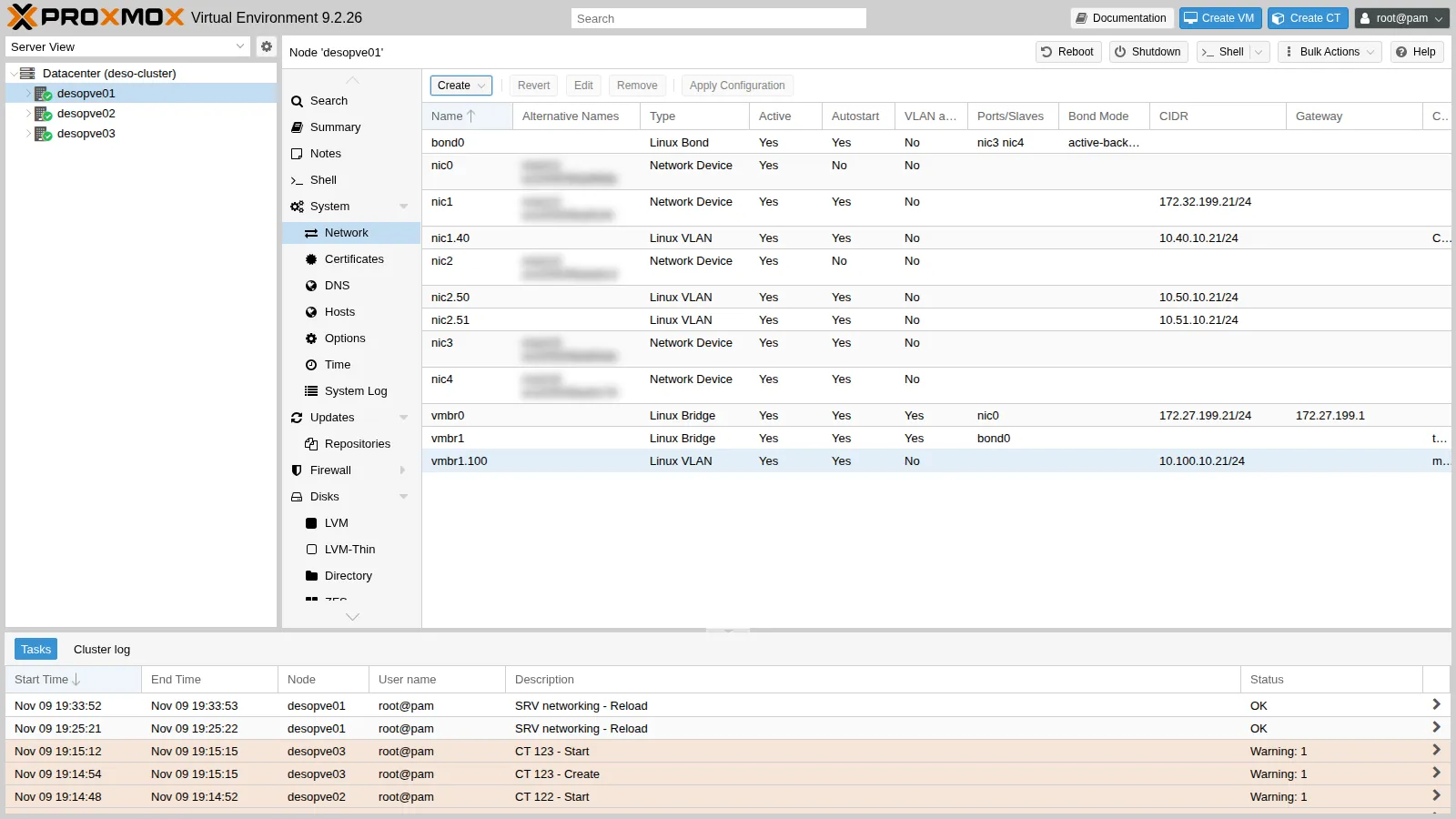 auto nic1.40iface nic1.40 inet staticaddress 10.40.10.21/24#Corosync link 1auto vmbr1.100iface vmbr1.100 inet staticaddress 10.100.10.21/24#migrazione
2. The same interfaces on the other nodes (CLI)
Section titled “2. The same interfaces on the other nodes (CLI)”On desopve02 and desopve03 add the same two blocks (with .22 and .23) before the source line, after making a copy of the file (/root/interfaces.bak-lab22), then run ifreload -a. Check from desopve01:
for ip in 10.40.10.22 10.40.10.23 10.100.10.22 10.100.10.23; do printf "%s " $ip; ping -c2 -W1 $ip >/dev/null && echo ok || echo NO; done10.40.10.22 ok10.40.10.23 ok10.100.10.22 ok10.100.10.23 okip route get 10.40.10.2210.40.10.22 dev nic1.40 src 10.40.10.21 uid 0 cacheping -c1 -W1 10.40.10.1 >/dev/null 2>&1 || echo "nessun router su 10.40.10.0/24"nessun router su 10.40.10.0/243. Moving Corosync link 1 to VLAN 40
Section titled “3. Moving Corosync link 1 to VLAN 40”-
The starting point:
root@desopve01 corosync-cfgtool -nOutput Local node ID 1, transport knetnodeid: 2 reachableLINK: 0 udp (172.27.199.21->172.27.199.22) enabled connected mtu: 1397LINK: 1 udp (172.32.199.21->172.32.199.22) enabled connected mtu: 1397nodeid: 3 reachableLINK: 0 udp (172.27.199.21->172.27.199.23) enabled connected mtu: 1397LINK: 1 udp (172.32.199.21->172.32.199.23) enabled connected mtu: 1397 -
Always edit a copy of
/etc/pve/corosync.conf, check it, and then move it into place with a singlemv. A half-written or wrong file would be distributed to all nodes immediately. Besides the addresses you must incrementconfig_version, otherwise the nodes ignore the change. The value depends on the cluster’s history (here it is 5, afterdesopve04joined and left in lab 18): theperlcommand reads it and increases it by one, whatever it is.root@desopve01 cp /etc/pve/corosync.conf /root/corosync.conf.bak-lab22cp /etc/pve/corosync.conf /etc/pve/corosync.conf.newgrep config_version /etc/pve/corosync.conf.newOutput config_version: 5root@desopve01 sed -i "s/ring1_addr: 172.32.199.2/ring1_addr: 10.40.10.2/" /etc/pve/corosync.conf.newperl -pi -e 's/(config_version: )(\d+)/$1.($2+1)/e' /etc/pve/corosync.conf.newdiff -u /etc/pve/corosync.conf /etc/pve/corosync.conf.newOutput @@ -9,21 +9,21 @@nodeid: 1quorum_votes: 1ring0_addr: 172.27.199.21- ring1_addr: 172.32.199.21+ ring1_addr: 10.40.10.21}...- ring1_addr: 172.32.199.23+ ring1_addr: 10.40.10.23}}@@ -33,7 +33,7 @@totem {cluster_name: deso-cluster- config_version: 5+ config_version: 6interface {linknumber: 0}root@desopve01 mv /etc/pve/corosync.conf.new /etc/pve/corosync.conf -
Corosync rereads the file but, in this version, does not change the address of a link that is already active, and the log says so:
root@desopve01 journalctl -u corosync --since "-1min" --no-pagerOutput ... [CFG ] Config reload requested by node 1... [TOTEM ] new config has different address for link 1 (addr changed from 172.32.199.21 to 10.40.10.21). Internal value was NOT changed....... [CFG ] Cannot configure new interface definitions: To reconfigure an interface it must be deleted and recreated. A working interface needs to be available to corosync at all timesDecision. The Proxmox VE documentation covers this case: a change that cannot be applied while Corosync is running needs a restart of the service. Restart Corosync one node at a time: while one node restarts, the other two stay connected over link 0 and keep 2 votes out of 3. Each command reads the quorum 6 seconds after the restart:
root@desopve03 systemctl restart corosync; sleep 6; pvecm status | grep ^QuorateOutput Quorate: Yesroot@desopve02 systemctl restart corosync; sleep 6; pvecm status | grep ^QuorateOutput Quorate: Yesroot@desopve01 systemctl restart corosync; sleep 6; pvecm status | grep ^QuorateOutput Quorate: Yes -
Result: link 1 now uses VLAN 40:
root@desopve01 corosync-cfgtool -nOutput Local node ID 1, transport knetnodeid: 2 reachableLINK: 0 udp (172.27.199.21->172.27.199.22) enabled connected mtu: 1397LINK: 1 udp (10.40.10.21->10.40.10.22) enabled connected mtu: 1397nodeid: 3 reachableLINK: 0 udp (172.27.199.21->172.27.199.23) enabled connected mtu: 1397LINK: 1 udp (10.40.10.21->10.40.10.23) enabled connected mtu: 1397The GUI shows it too, in Datacenter → Cluster, with Config Version
6: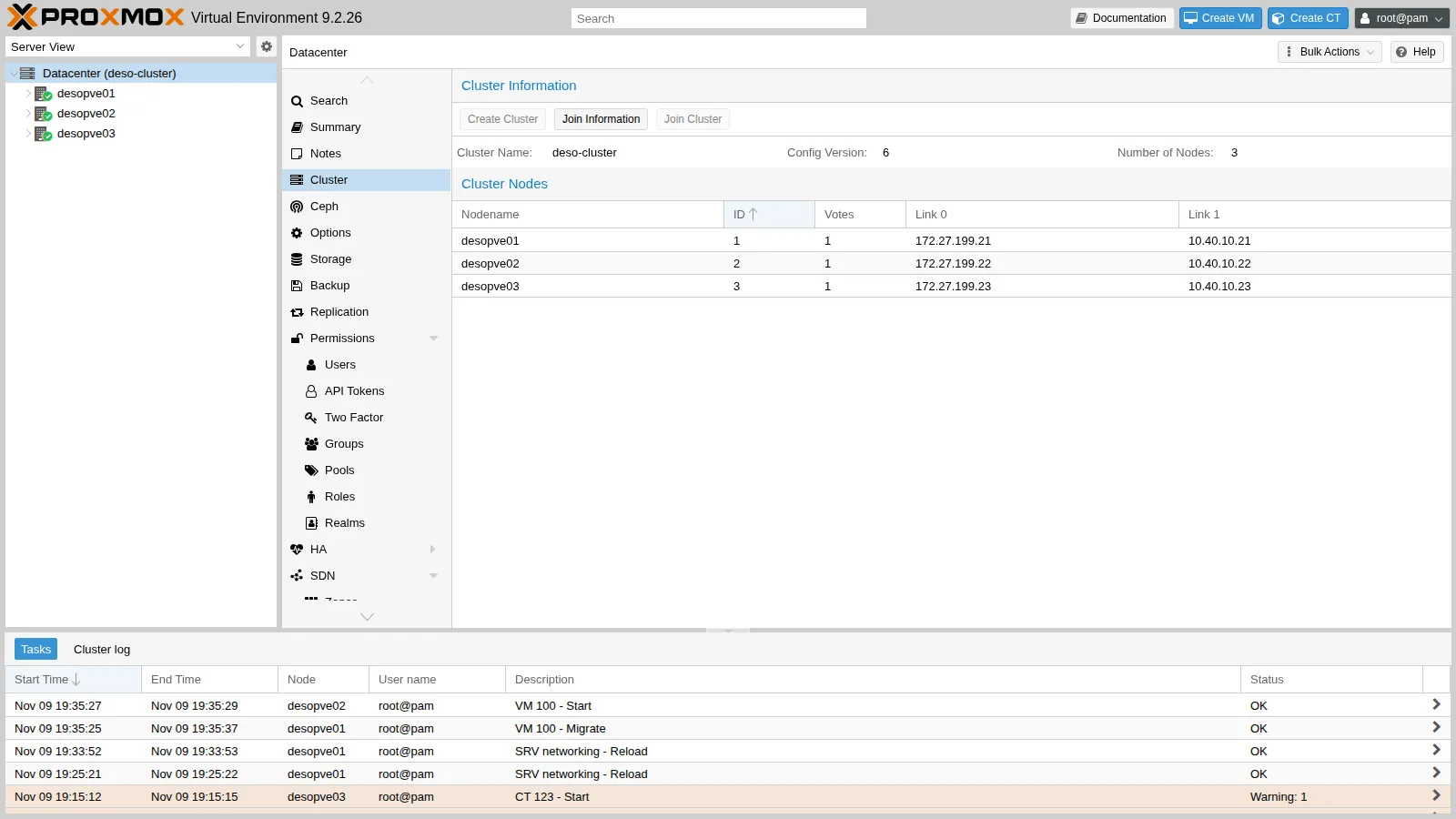
4. The migration network
Section titled “4. The migration network”-
Before: VM 100 (disk on Ceph, 2 GiB of RAM) migrates from
desopve01todesopve02with the default settings, that is, over the management network:root@desopve01 qm migrate 100 desopve02 --onlineOutput ...2026-11-09 19:35:29 start remote tunnel2026-11-09 19:35:30 ssh tunnel ver 12026-11-09 19:35:30 migration downtime limit: 100 ms2026-11-09 19:35:30 start migrate command to unix:/run/qemu-server/100.migrate2026-11-09 19:35:31 migration active, transferred 221.0 MiB of 2.0 GiB VM-state, 9.8 GiB/s2026-11-09 19:35:32 average migration speed: 1.0 GiB/s - downtime 53 ms2026-11-09 19:35:32 migration completed, transferred 289.1 MiB VM-state2026-11-09 19:35:37 migration finished successfully (duration 00:00:12) -
Datacenter → Options → Migration Settings → Edit. The Network field offers the node’s addresses: choose the one on
vmbr1.100. Type stayssecure.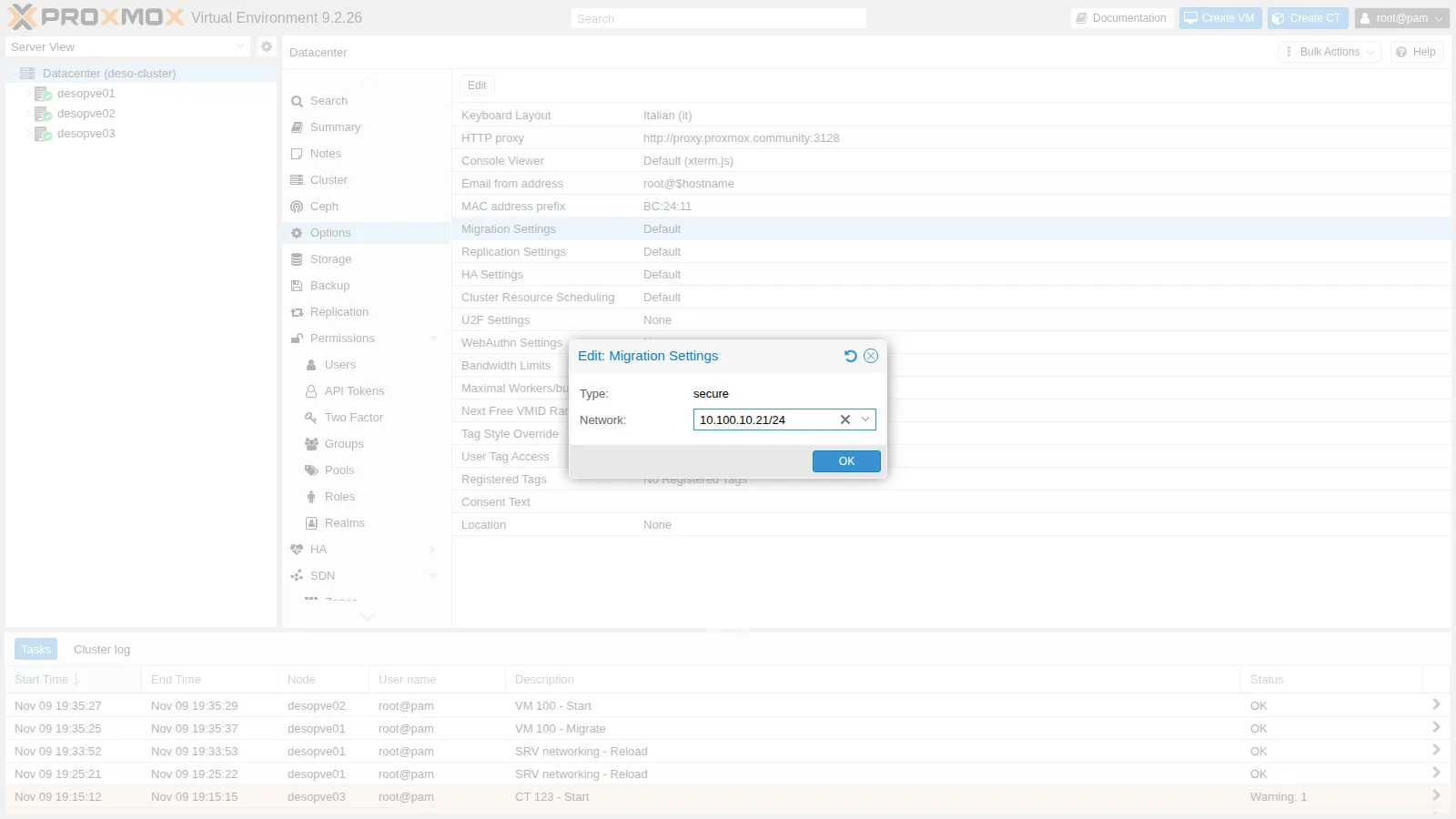
The GUI saves the node’s address (
10.100.10.21/24): this works, because it applies to the whole network that contains it. For clarity it is better to write the network address:root@desopve01 pvesh set /cluster/options --migration network=10.100.10.0/24,type=securegrep migration /etc/pve/datacenter.cfgOutput migration: network=10.100.10.0/24,type=secure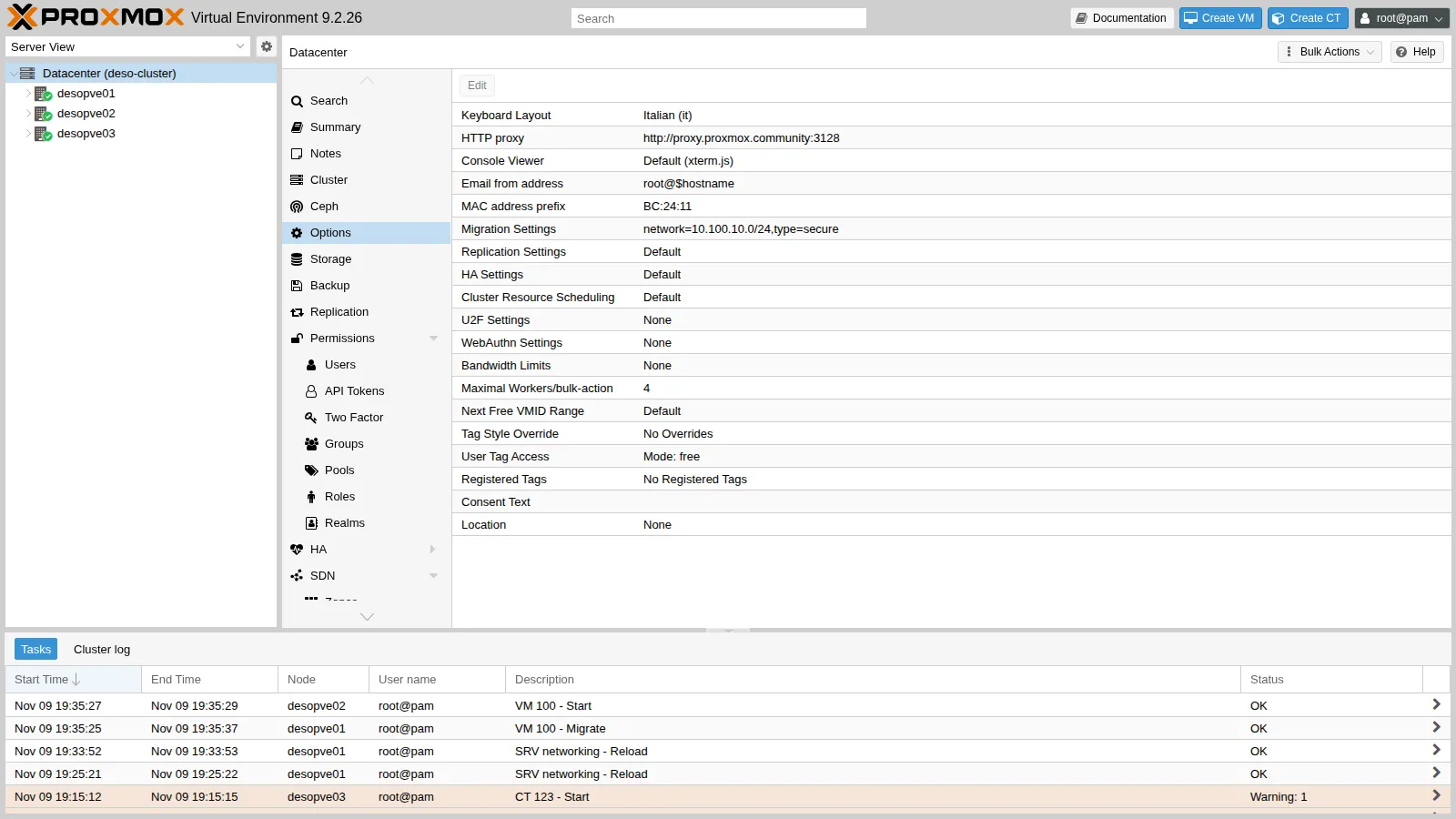
-
After: the VM goes back to
desopve01. By counting the bytes received by the interfaces ofdesopve01before and after the migration, you can see which way it went:root@desopve01 cat /sys/class/net/vmbr1.100/statistics/rx_bytes /sys/class/net/vmbr0/statistics/rx_bytesroot@desopve02 qm migrate 100 desopve01 --onlineOutput ...2026-11-09 19:38:19 average migration speed: 1.0 GiB/s - downtime 9 ms2026-11-09 19:38:19 migration completed, transferred 290.4 MiB VM-state2026-11-09 19:38:24 migration finished successfully (duration 00:00:11)root@desopve01 cat /sys/class/net/vmbr1.100/statistics/rx_bytes /sys/class/net/vmbr0/statistics/rx_bytesThe difference between the two readings:
Interface of desopve01Bytes received during the migration vmbr1.100(migration)291 MiB vmbr0(management)0 MiB The migration went through VLAN 100: 291 MiB received on
vmbr1.100, in line with the 290.4 MiB of VM state in the task log, against 0 MiB (rounded to the MiB) onvmbr0.How to read the two migrations:
- Measured: over the management network the task took 12 s and reported 53 ms of downtime; over VLAN 100, 11 s and 9 ms. Both times about 290 MiB of state were transferred out of 2 GiB of RAM.
- Interpretation: the two runs do not compare the networks. There is one run per direction, in opposite directions, both paths have 10 GbE ports, and a transfer of a few hundred MiB is too short to show a difference; the gap in downtime cannot be put down to the network either. The rates in the log do not measure the network either. The 9.8 GiB/s printed during the copy is more than a 10 Gbit/s port can carry. The
average migration speed, 1.0 GiB/s in both runs, is not a throughput: as Lab 48 explains, Proxmox VE computes it as the guest’s total RAM divided by the duration of the memory phase, counted in whole seconds. With 2 GiB of RAM, 1.0 GiB/s only says that the memory phase lasted about 2 seconds, at a resolution of one second; the figure counts the whole RAM, not the 290 MiB actually sent, and at that resolution it cannot tell the two runs apart. What crossed the network is measured by the counters. - What the dedicated network gives here: migrations no longer cross the management network, the one that carries Corosync link 0. Whether it also makes them faster is a separate question: repeat several runs per direction with a VM that uses much more memory, with and without load on
vmbr0. A gain is to be expected only if the dedicated network is faster than the shared one, or the shared one is busy.
5. Failure of the dedicated Corosync link
Section titled “5. Failure of the dedicated Corosync link”With the default priorities link 1 is the standby link: bringing it down removes the redundancy without moving the Corosync traffic (the loss of link 0 is tested in Lab 06). On desopve03 bring down only VLAN 40 (the nic1 card stays up, with the iSCSI path):
ip link set nic1.40 downcorosync-cfgtool -n | sed -n "/nodeid: 3/,\$p"nodeid: 3 reachable LINK: 0 udp (172.27.199.21->172.27.199.23) enabled connected mtu: 1397 LINK: 1 udp (10.40.10.21->10.40.10.23) enabled mtu: 1397pvecm status | grep -E "^Quorate|Total votes"Quorate: YesTotal votes: 3multipath -ll | grep -c "active ready"2Link 1 toward desopve03 is no longer connected; the node is still reachable over link 0 and the cluster keeps all three votes. multipath -ll still shows both iSCSI paths active: bringing down the VLAN interface did not touch nic1. Until link 1 comes back, however, the cluster has a single link toward desopve03. Bring the VLAN back up and Corosync picks it up again on its own:
ip link set nic1.40 upjournalctl -u corosync --since "-2min" --no-pager | grep "host: 3 link: 1"Nov 09 19:38:34 desopve01 corosync[120106]: [KNET ] link: host: 3 link: 1 is downNov 09 19:38:44 desopve01 corosync[120106]: [KNET ] rx: host: 3 link: 1 is upThe two messages are 10 seconds apart, but that interval includes the time the interface stayed down, which was not recorded: it is neither a detection time nor a recovery time. To measure those, note the time of each command (date +%T.%N; ip link set nic1.40 down) and compare it with the timestamps of the link: 1 is down and is up messages. To confirm which link carries the traffic, read the knet counters on desopve01 twice, a few seconds apart: corosync-cmapctl -m stats | grep -E 'node3\.link[01]\.tx_data_bytes'. The counter that grows belongs to the link in use.
6. The overall picture of the lab networks
Section titled “6. The overall picture of the lab networks”flowchart LR
subgraph N["desopve01-03 (last octet .21, .22, .23)"]
V0["vmbr0 on nic0<br/>management 172.27.199.x<br/>Corosync link 0"]
N1["nic1<br/>storage 172.32.199.x<br/>second iSCSI path"]
N140["nic1.40<br/>Corosync link 1<br/>10.40.10.x"]
N250["nic2.50<br/>Ceph public 10.50.10.x"]
N251["nic2.51<br/>Ceph cluster 10.51.10.x"]
V1["vmbr1 on bond0 (nic3 + nic4)<br/>VMs: VLAN 10, 20, ..."]
V1100["vmbr1.100<br/>migration 10.100.10.x"]
end
V0 --- RTR["rtr-core<br/>172.27.199.1 / 172.32.199.1"]
N1 --- NAS["desonas<br/>172.27.199.10 / 172.32.199.10"]
V0 --- SRV["DC .20, netsvc .250<br/>PBS .40, PDM .41"]
N1 --- RTR
| Network | VLAN | Subnet | Interface on the nodes | Gateway | Use |
|---|---|---|---|---|---|
| Management | untagged | 172.27.199.0/24 | vmbr0 (nic0) |
rtr-core .1 |
GUI, SSH, DNS, NTP, proxy, Corosync link 0 |
| Storage | untagged | 172.32.199.0/24 | nic1 |
rtr-core .1 |
second iSCSI path to the NAS |
| Corosync link 1 | 40 | 10.40.10.0/24 | nic1.40 |
none | cluster |
| Ceph public | 50 | 10.50.10.0/24 | nic2.50 |
none | clients, MONs |
| Ceph cluster | 51 | 10.51.10.0/24 | nic2.51 |
none | replication between the OSDs |
| Migration | 100 | 10.100.10.0/24 | vmbr1.100 (bond0) |
none | migrations |
| VMs (test) | 10, 20 | 10.10.10.0/24, 10.20.20.0/24 | vmbr1 (bond0) |
none (until lab 26) | containers 121-123 |
In production the most critical networks would have their own physical cards: Corosync at least on a dedicated port, Ceph and storage on fast cards separate from VM traffic. In the lab they are separated with VLANs. A VLAN separates addresses and broadcast domains, and without a gateway its traffic cannot leave it; it does not separate the bandwidth of the port. VLAN 40 shares nic1 with the second iSCSI path, VLAN 100 shares bond0 with the VMs. Whether this matters for Corosync was not measured here: you would watch the latency of the link (corosync-cmapctl -m stats | grep -E 'link1\.latency_(ave|max)') while saturating nic1.
Verification and tests
Section titled “Verification and tests”The lab has succeeded when link 1 runs on 10.40.10.0/24 on every node with the cluster quorate, the migration traffic shows up on the counters of vmbr1.100, and the loss of nic1.40 on one node leaves the cluster quorate over link 0.
| Check | Expected result | Observed in the test |
|---|---|---|
VLAN 40 and 100 interfaces on desopve01-03 |
reachable between the nodes, no router | all reachable; nothing answers on 10.40.10.1 |
Reload of corosync.conf with new addresses |
the address of the active link does not change: restart needed | log: Internal value was NOT changed |
| Corosync restart, one node at a time | cluster quorate | Quorate: Yes 6 s after each restart; link 1 on 10.40.10.0/24 |
| Migration over management, then over VLAN 100 | completed | 12 s and 11 s (task duration); downtime reported by the task 53 ms and 9 ms; one run per direction |
| Path taken by the migration | bytes on vmbr1.100, not on vmbr0 |
291 MiB on vmbr1.100, 0 MiB on vmbr0 |
nic1.40 down on desopve03 |
link 1 not connected, cluster quorate over link 0, storage unaffected | 3 votes, quorate; 2 active iSCSI paths; link 1 back on its own once the VLAN is up |
Final lab state
Section titled “Final lab state”- Corosync: link 0 on 172.27.199.21-23, link 1 on 10.40.10.21-23 (VLAN 40,
nic1.40),config_version6. A copy of the previous file is in/root/corosync.conf.bak-lab22ondesopve01. - Migration:
migration: network=10.100.10.0/24,type=secureindatacenter.cfg, with thevmbr1.100interfaces 10.100.10.21-23. nic1: with 172.32.199.0/24 it remains the storage network (second iSCSI path).- Ceph: unchanged on
nic2.50/nic2.51,HEALTH_OK. - VM 100 running on
desopve01. CT 121-123 unchanged onvmbr1(VLANs 10 and 20). - Copies of the previous network configuration in
/root/interfaces.bak-lab22ondesopve02anddesopve03.
What you learned
Section titled “What you learned”- Which link should carry Corosync: with no priorities, knet uses link 0. Decide which network has the lowest, steadiest latency and make it the preferred link, by its number or with
knet_link_priority; check it with the knet counters, not by assuming it. - How to change a Corosync address safely: edit a copy, increment
config_version, move it into place, then read the log. If it says the address of an active link was not changed, restart Corosync one node at a time, checking the quorum before moving on. - What a VLAN separates and what it does not: addresses and broadcast domains, and, without a gateway, routes to other networks; not the bandwidth of the port. For Corosync in production that calls for a dedicated port, not only a dedicated VLAN.
- How to prove where the traffic goes: compare the byte counters of the interfaces before and after; the rates printed by the migration task are not network throughput.
- When a dedicated migration network pays off: always, to keep migration bursts away from the network that carries Corosync; for speed, only if it is faster than the shared one, which you measure with repeated runs.
References
Section titled “References”- Proxmox VE – Cluster network: requirements and separation
- Proxmox VE – Corosync redundancy and link priorities
- Proxmox VE – Edit corosync.conf
- Proxmox VE – Migration type: secure and insecure
- Proxmox VE – Migration network
- corosync.conf(5) –
link_modeandknet_link_priority - cmap_keys(7) – the
stats.knetcounters